aimi-replica
Below is an enhanced prompt based on your specification. I incorporated the architecture from your uploaded Financial Intelligence Platform specification , expanded it using modern frontend architecture patterns, enterprise UI/UX best practices, AI-assisted development strategies, commercial SaaS design principles, animation systems, and multi-agent execution strategies. --- # Ultimate AI Prompt --- You are an elite team consisting of: * Principal Frontend Architect (20+ years FAANG experience) * Senior UI/UX Designer * Product Designer * Creative Director * Motion Designer * Three.js Graphics Engineer * GSAP Animation Expert * React & Next.js Architect * TypeScript Expert * TailwindCSS Expert * shadcn/ui Expert * TradingView Integration Specialist * Performance Optimization Engineer * Accessibility Expert (WCAG AA+) * AI Product Designer * SaaS Product Architect * Financial Dashboard Designer * Design System Architect * Senior QA Engineer * Code Reviewer * Security Reviewer Work together as independent sub-agents. Every agent must critique every other agent's work. Iterate multiple times internally until no significant improvements remain. Do NOT stop after the first solution. Run several internal refinement passes before producing the final answer. The objective is to create a frontend that could realistically compete with Bloomberg Terminal, Perplexity Finance, TradingView, Robinhood, Arc Browser, Linear, Vercel Dashboard, Raycast, and Apple-level UI polish. --- # Context I already have a production-ready Financial Intelligence Backend. The backend already contains: * FastAPI * RAG * Weaviate * Redis * APScheduler * Streaming SSE * OpenAI * LangChain * Financial Search * Upload APIs * Chat APIs * Session APIs * Video Recommendation * Document Upload * Tier System * Guardrails The backend API contracts, architecture and functionality are already implemented. Do NOT redesign the backend. Only build the frontend. --- # Objective Create a premium commercial-grade Financial Intelligence Web Application. The frontend should feel like a polished SaaS product that people would happily pay for. The experience should feel: * premium * futuristic * lightning fast * intelligent * fluid * elegant * luxurious * modern * trustworthy The application should never feel like a template. It should feel custom-built. --- # Research Phase Before generating anything: Perform deep research internally on: * Bloomberg Terminal UX * TradingView UX * Perplexity AI * OpenAI ChatGPT * Claude * Linear * Arc Browser * Apple Human Interface Guidelines * Material 3 Motion * Stripe Dashboard * Vercel Dashboard * Raycast * Notion * Framer * Figma * Cursor IDE * VSCode * Financial SaaS dashboards * Modern FinTech products * Premium SaaS landing pages Extract only the best interaction patterns. Merge them into one coherent design language. Do NOT copy any product. Only use them as inspiration. --- # Design Language Create a completely original design system. Include: Typography Spacing Grid Cards Glassmorphism (only where appropriate) Soft shadows Depth Motion language Interaction language Loading states Hover states Focus states Empty states Skeleton loaders Error states Success states Transitions Animations Micro-interactions Dark mode Light mode Theme switching Responsive scaling Design tokens CSS variables --- # Technology Stack Use: Next.js 15 React 19 TypeScript TailwindCSS shadcn/ui Framer Motion GSAP Three.js React Three Fiber Drei Motion One (if beneficial) Lenis smooth scrolling TanStack Query React Hook Form Zod Lucide Icons TradingView Widgets React Markdown Chart.js or Recharts where appropriate Embla Carousel Sonner Radix UI Floating UI --- # Performance The application must score: 95+ on Google Lighthouse Optimize for: First Paint Largest Contentful Paint Interaction to Next Paint CLS Lazy Loading Route Splitting Code Splitting Dynamic Imports Image Optimization GPU Accelerated Animations Minimal Layout Shift Minimal Re-renders Memoization Suspense Streaming Virtualization --- # Accessibility WCAG AA+ Keyboard navigation Screen readers Reduced motion support Color contrast Focus management ARIA Semantic HTML --- # Landing Page Create a premium landing page. Include: Hero Animated background Three.js visualization Floating financial particles Animated gradient GSAP entrance animations Statistics Features Live dashboard preview Testimonials Pricing FAQ Footer Call-to-action Everything should feel premium. --- # Authentication Beautiful authentication pages. Login Signup Forgot Password OTP Email Verification Animated illustrations Smooth transitions --- # Dashboard Create an enterprise-grade dashboard. Sections: Overview Markets Portfolio Watchlist News Research Chat Documents Videos Settings Profile Analytics Alerts Bookmarks History Sessions Admin (optional) --- # Dashboard Widgets Integrate TradingView widgets. Examples: Market Overview Ticker Tape Heatmap Economic Calendar Forex Crypto Top Gainers Top Losers Market News Technical Analysis Company Profile Stock Screener Mini Charts Advanced Chart Watchlist Symbol Info Timeline Market Summary Fear & Greed Index --- # Chat Experience The chat should rival ChatGPT. Features: Streaming Markdown Code highlighting (frontend only) Sources Financial citations Charts Images Tables Uploads Drag & Drop Voice Input Typing indicator Thinking animation Regenerate Stop generation Conversation history Search conversations Rename chats Folders Pinned chats Suggested prompts Suggested follow-ups Session persistence Auto scroll Auto save Keyboard shortcuts Slash commands Quick actions Context chips Attachments Video recommendations Token usage Latency indicator Confidence badges --- # File Upload Beautiful upload flow. Support: PDF CSV Excel Images Drag & Drop Progress bars Animated uploads Preview Delete Retry Validation --- # Motion Design Use GSAP extensively. Examples: Page transitions Hero animations Cards Hover Cursor effects Parallax Text reveal Scroll reveal Animated counters Charts Dashboard widgets Sidebar Buttons Menus Modals Notifications Everything should feel alive. --- # Three.js Use Three.js tastefully. Ideas: Financial globe Particle systems Neural network Animated stock graph Floating data nodes Market constellation Abstract AI visualization Never reduce usability. --- # Responsiveness Desktop Laptop Tablet Mobile Ultrawide Everything should adapt perfectly. --- # Animations Every interaction should have motion. Button Card Sidebar Charts Inputs Dialogs Dropdowns Tabs Navigation Loading Transitions Chat Uploads Hover Focus Success Errors --- # Architecture Create scalable folder structure. Component architecture Hooks Utilities Types Providers Contexts Services API layer Theme Animations Design tokens Reusable primitives Feature modules --- # Deliverables Generate: 1. Complete project architecture 2. Folder structure 3. UI architecture 4. Design System 5. Component hierarchy 6. Routing 7. State management 8. Animation architecture 9. Theme architecture 10. API integration layer 11. TradingView integration 12. Chat architecture 13. Dashboard architecture 14. Responsive strategy 15. Performance strategy 16. Accessibility strategy 17. Security considerations 18. Deployment strategy 19. Testing strategy 20. Future scalability roadmap 21. Complete implementation plan 22. Development milestones 23. UI mockups (textual) 24. Every page layout 25. Every reusable component 26. Every animation 27. Every interaction 28. Every loading state 29. Every empty state 30. Every error state 31. Complete design rationale --- # Multi-Agent Workflow Create and coordinate the following internal AI agents: * Product Manager * UX Researcher * UX Designer * UI Designer * Frontend Architect * Design System Engineer * Animation Engineer * Three.js Specialist * React Specialist * Next.js Specialist * Tailwind Specialist * TradingView Integration Specialist * Accessibility Engineer * Performance Engineer * Security Engineer * QA Engineer * Technical Writer Each agent must: * Produce its own recommendations. * Review every other agent's recommendations. * Identify weaknesses. * Suggest improvements. * Iterate until the solution reaches production-grade quality. --- # Quality Gate Before producing the final answer, verify that: * The UI feels commercially sellable. * The UX is frictionless. * The design is memorable. * Animations enhance rather than distract. * Performance remains excellent despite animations. * Accessibility is maintained. * Components are reusable. * The architecture is scalable. * The codebase follows enterprise standards. * The product is investor-demo ready. * The frontend could realistically be shipped as a premium SaaS application. If any criterion is not fully satisfied, continue iterating internally until it is. Do not stop after the first draft. Produce only the refined, production-ready solution.


Comments (0)
Sign in to leave a comment
Project Tasks
150Database Schema & Migrations
Design and implement database schema, migrations, and indexes for user, admin, and session entities.
Implement CTASection for Landing
As a frontend developer, implement the CTASection for the Landing page. This section includes a call-to-action with a title, description, and a button linking to the Login page. Ensure the button is styled as per the design and is accessible to all personas: Administrator, Financial Analyst, and General User. Page access: shared by all personas (Administrator, Financial Analyst, General User).
Implement FeaturesSection for Landing
As a frontend developer, implement the FeaturesSection for the Landing page. This section showcases various features using custom stroke-based icons with a gradient shared with the Navbar. Each feature includes an icon, title, and description. Ensure the icons are rendered correctly and the section is accessible to all personas. Page access: shared by all personas (Administrator, Financial Analyst, General User).
Implement Footer for Landing
As a frontend developer, implement the Footer for the Landing page. This section includes links categorized under Platform, Resources, and Company. Ensure links to restricted pages like Admin and Settings are conditionally shown based on persona access. The footer should be consistent with the overall design and accessible to all personas. Page access: shared by all personas (Administrator, Financial Analyst, General User).
Implement HeroSection for Landing
As a frontend developer, implement the HeroSection for the Landing page. This section features a complex animated background using motion and Three.js elements, including live market ticker feeds and data streams. Ensure animations are smooth and responsive, and the section is accessible to all personas. Page access: shared by all personas (Administrator, Financial Analyst, General User).
Implement HowItWorksSection for Landing
As a frontend developer, implement the HowItWorksSection for the Landing page. This section outlines the process in four steps, each with a number, title, and description. Ensure the steps are clearly presented and the section is accessible to all personas. Page access: shared by all personas (Administrator, Financial Analyst, General User).
Implement Navbar for Landing
As a frontend developer, implement the Navbar for the Landing page. This component includes a logo, navigation links, and a toggle button for mobile view. Ensure links to restricted pages are conditionally shown based on persona access. The Navbar should be consistent with the overall design and accessible to all personas. Page access: shared by all personas (Administrator, Financial Analyst, General User).
Implement StatsSection for Landing
As a frontend developer, implement the StatsSection for the Landing page. This section displays key statistics such as assets tracked, active users, uptime, and response time. Ensure the statistics are visually appealing and the section is accessible to all personas. Page access: shared by all personas (Administrator, Financial Analyst, General User).
Implement SessionsStatusFilter for Sessions
As a frontend developer, implement the SessionsStatusFilter section which allows filtering sessions by status ('Active', 'Idle', 'Offline'). This section uses a collapsible UI with checkboxes and displays the count of each status. It is accessible by the Administrator persona only. Page access: Administrator only.
Implement SessionsDateFilter for Sessions
As a frontend developer, implement the SessionsDateFilter section which provides date range filtering options including presets and a custom date range. This section is collapsible and allows the Administrator persona to select and display the chosen date range. Page access: Administrator only.
Implement SessionsLocationDeviceFilter for Sessions
As a frontend developer, implement the SessionsLocationDeviceFilter section which allows filtering by location and device type. It includes a search input for locations and checkboxes for device types. This section is accessible by the Administrator persona only. Page access: Administrator only.
Implement SessionsIPFilter for Sessions
As a frontend developer, implement the SessionsIPFilter section which allows filtering sessions by IP address. It includes an input field for entering IP addresses and a clear button. This section is accessible by the Administrator persona only. Page access: Administrator only.
Implement SessionsFilterActions for Sessions
As a frontend developer, implement the SessionsFilterActions section which provides buttons to apply or clear all active filters. It displays the count of active filters. This section is accessible by the Administrator persona only. Page access: Administrator only.
Implement SessionsMetrics for Sessions
As a frontend developer, implement the SessionsMetrics section which displays key session metrics such as total active sessions, average session duration, peak concurrent users, and logout rate. This section is accessible by the Administrator persona only. Page access: Administrator only.
Implement SessionsTableHeader for Sessions
As a frontend developer, implement the SessionsTableHeader section which includes sortable columns for user session data such as User, Email, Status, Login Time, Duration, Device, IP Address, Last Activity, and Actions. This section is accessible by the Administrator persona only. Page access: Administrator only.
Implement SessionsTableRows for Sessions
As a frontend developer, implement the SessionsTableRows section which displays user session data in rows with features like relative time display, status badges, and IP address copy functionality. This section is accessible by the Administrator persona only. Page access: Administrator only.
Implement SettingsHeader for Settings
As a frontend developer, implement the SettingsHeader section for the Settings page. This section displays the title 'Settings' and a subtitle describing the purpose of the page. It is a static component with no interactive elements, designed for the Administrator persona. Page access: Administrator only.
Implement ProfileBasicInfo for Profile
As a frontend developer, implement the ProfileBasicInfo section for the Profile page. This section includes a form for editing basic user information such as full name, email, phone, and location. It features client-side validation and displays error messages for invalid inputs. The form simulates an API call to save changes. This section is accessible by Administrator and General User personas. Page access: Administrator, General User only.
Implement ProfilePreferences for Profile
As a frontend developer, implement the ProfilePreferences section for the Profile page. This section allows users to update their bio, preferred language, and timezone. It includes a form with a textarea for the bio and dropdowns for language and timezone selection. The form simulates an API call to save preferences. This section is accessible by Administrator and General User personas. Page access: Administrator, General User only.
Implement ProfileNotifications for Profile
As a frontend developer, implement the ProfileNotifications section for the Profile page. This section allows users to manage their notification preferences, including email and SMS notifications, and set the frequency of digest emails. It uses state hooks to manage settings and includes a debounced auto-save feature that simulates an API call. This section is accessible by Administrator and General User personas. Page access: Administrator, General User only.
Implement ProfilePassword for Profile
As a frontend developer, implement the ProfilePassword section for the Profile page. This section allows users to change their password with fields for current, new, and confirm password. It includes password strength validation and displays error messages for mismatched passwords. The form simulates an API call to update the password. This section is accessible by Administrator and General User personas. Page access: Administrator, General User only.
Implement ProfileTwoFactor for Profile
As a frontend developer, implement the ProfileTwoFactor section for the Profile page. This section allows users to enable or disable two-factor authentication with options for different methods like authenticator apps, SMS, or email. It includes a setup process with verification code input. The form simulates an API call for verification. This section is accessible by Administrator and General User personas. Page access: Administrator, General User only.
Implement ProfileSessions for Profile
As a frontend developer, implement the ProfileSessions section for the Profile page. This section displays a list of active sessions with details like device, OS, IP address, and location. Users can log out of individual sessions. The logout action simulates an API call. This section is accessible by Administrator persona only. Page access: Administrator, General User only.
Implement ProfileExportData for Profile
As a frontend developer, implement the ProfileExportData section for the Profile page. This section allows users to export their data in CSV or JSON format. It includes a dropdown for format selection and a button to initiate the export, simulating an API call. This section is accessible by Administrator and General User personas. Page access: Administrator, General User only.
Implement ProfileDeleteAccount for Profile
As a frontend developer, implement the ProfileDeleteAccount section for the Profile page. This section provides a modal for account deletion, requiring a confirmation phrase and a verification code. It includes a button to send the verification code and simulates an API call for account deletion. This section is accessible by Administrator and General User personas. Page access: Administrator, General User only.
Implement MarketOverviewWidgets for Markets
As a frontend developer, implement the MarketOverviewWidgets section which displays a grid of market indices with their symbols, names, prices, and changes. This section uses static data and is styled to show positive and negative changes with different colors. It is accessible by Financial Analyst and General User personas. Page access: Financial Analyst, General User only.
Implement TickerAndHeatmap for Markets
As a frontend developer, implement the TickerAndHeatmap section which includes a live ticker of stock symbols and a heatmap of sector changes. The ticker allows users to select symbols, triggering the onSelectSymbol callback. The heatmap uses a color interpolation function to visually represent sector performance. This section is accessible by Financial Analyst and General User personas. Page access: Financial Analyst, General User only.
Implement PriceChart for Markets
As a frontend developer, implement the PriceChart section which displays a line chart with selectable timeframes. The chart uses SVG paths and a linear gradient for visual effects. Users can switch between timeframes, updating the chart display. This section is accessible by Financial Analyst and General User personas. Page access: Financial Analyst, General User only.
Implement ChartControls for Markets
As a frontend developer, implement the ChartControls section which provides interactive controls for chart timeframes, indicators, drawing tools, and export options. Users can toggle indicators and drawing tools, and export chart data. This section is accessible by Financial Analyst and General User personas. Page access: Financial Analyst, General User only.
Implement SectorBreakdown for Markets
As a frontend developer, implement the SectorBreakdown section which displays a sortable list of sectors with mini line charts representing sector performance. Users can sort by percentage change, value change, or name. This section is accessible by Financial Analyst and General User personas. Page access: Financial Analyst, General User only.
Implement EconomicCalendar for Markets
As a frontend developer, implement the EconomicCalendar section which displays a table of upcoming economic events with filters for impact levels. The table includes event details such as date, time, country, and forecast vs actual values. This section is accessible by Financial Analyst and General User personas. Page access: Financial Analyst, General User only.
Implement WatchlistSymbolSearch for Watchlist
As a frontend developer, implement the WatchlistSymbolSearch section for the Watchlist page. This section includes a search input for entering ticker symbols, an add button to add symbols to the watchlist, and displays validation messages. The input is auto-focused on mount. This page is accessible by Financial Analysts only. Page access: Financial Analyst only.
Implement WatchlistSuggestedSymbols for Watchlist
As a frontend developer, implement the WatchlistSuggestedSymbols section for the Watchlist page. This section displays suggested symbols that can be added to the watchlist. It filters out symbols already in the watchlist and provides buttons to add each suggested symbol. This page is accessible by Financial Analysts only. Page access: Financial Analyst only.
Implement WatchlistStats for Watchlist
As a frontend developer, implement the WatchlistStats section for the Watchlist page. This section displays statistical cards for total symbols, portfolio value, average percentage change, and top gainer. Each card includes an icon, value, and trend indicator. This page is accessible by Financial Analysts only. Page access: Financial Analyst only.
Implement WatchlistSymbolGrid for Watchlist
As a frontend developer, implement the WatchlistSymbolGrid section for the Watchlist page. This section displays a grid or list of symbols with details such as price, 24h change, YTD change, and volume. It includes actions for each symbol, such as remove and alert. This page is accessible by Financial Analysts only. Page access: Financial Analyst only.
Implement WatchlistSymbolActions for Watchlist
As a frontend developer, implement the WatchlistSymbolActions component for the Watchlist page. This component provides actions for each symbol, including remove, alert, and view details. It includes a confirmation step for removal. This page is accessible by Financial Analysts only. Page access: Financial Analyst only.
Implement WatchlistEmpty for Watchlist
As a frontend developer, implement the WatchlistEmpty section for the Watchlist page. This section displays a message and a call-to-action button when the watchlist is empty, encouraging users to add symbols. This page is accessible by Financial Analysts only. Page access: Financial Analyst only.
Theme Alignment
Ensure design-system/theme alignment across all components.
Create Landing API
As a Backend Developer, implement API endpoints to support the landing page features such as animated background data, Three.js visualization data, and statistics. Ensure endpoints are optimized for performance and accessible by all personas.
Create Dashboard API
As a Backend Developer, implement API endpoints for the dashboard sections such as Overview, Markets, Portfolio, and Watchlist. Ensure endpoints are secure and optimized for performance.
Create Profile API
As a Backend Developer, implement API endpoints for managing user profiles, including editing basic information, preferences, and notification settings. Ensure endpoints are secure and accessible by Administrator and General User personas.
Create Settings API
As a Backend Developer, implement API endpoints for managing application settings, including profile settings, notification preferences, and two-factor authentication. Ensure endpoints are secure and accessible by Administrator persona.
API Authentication Service
Implement authentication service with JWT and password hashing for all personas.
Implement Navbar for Login
As a frontend developer, implement the Navbar section for the Login page. This section includes a header with a brand logo and a navigation link back to the home page. Ensure the Navbar is styled according to the provided CSS and is accessible to all personas: Administrator, Financial Analyst, and General User. Note that the Navbar component may already exist from the Landing page and should be reused if possible. Page access: shared by all personas (Administrator, Financial Analyst, General User).
Data Retention Policies
Define and implement data retention policies for user and session data.
Integrate Landing Backend and Frontend
As a Tech Lead, verify the end-to-end integration between the Landing frontend implementation and the Landing backend API. Ensure data flows correctly, API responses are handled properly in the UI, and all interactions work as expected.
Integrate Settings Backend and Frontend
As a Tech Lead, verify the end-to-end integration between the Settings frontend implementation and the Settings backend API. Ensure data flows correctly, API responses are handled properly in the UI, and all interactions work as expected.
RBAC Implementation
Implement role-based access control for different personas: Administrator, Financial Analyst, and General User.
Implement LoginFormPanel for Login
As a frontend developer, implement the LoginFormPanel section for the Login page. This section includes a form with email and password fields, validation logic, and a toggle for showing/hiding the password. It uses state hooks for managing form inputs and errors. Ensure the form is styled according to the provided CSS and is accessible to all personas: Administrator, Financial Analyst, and General User. Page access: shared by all personas (Administrator, Financial Analyst, General User).
Implement LoginSocialPanel for Login
As a frontend developer, implement the LoginSocialPanel section for the Login page. This section includes buttons for social login options like Google and Apple, with corresponding SVG icons. Ensure the buttons are styled according to the provided CSS and are accessible to all personas: Administrator, Financial Analyst, and General User. Page access: shared by all personas (Administrator, Financial Analyst, General User).
Implement Footer for Login
As a frontend developer, implement the Footer section for the Login page. This section includes links to Privacy Policy, Terms of Service, and Contact pages, along with a copyright notice. Ensure the Footer is styled according to the provided CSS and is accessible to all personas: Administrator, Financial Analyst, and General User. Note that the Footer component may already exist from the Landing page and should be reused if possible. Page access: shared by all personas (Administrator, Financial Analyst, General User).
Implement DashboardSidebar for Dashboard
As a frontend developer, implement the DashboardSidebar section for the Dashboard page. This section includes a sidebar with navigation buttons for various sections such as Overview, Markets, Portfolio, and more. Each button displays an icon and label, and is wrapped in a <button> element with a data-section attribute. Ensure that the sidebar is styled according to the provided CSS and that it conditionally shows links based on persona access (e.g., 'Documents' for Financial Analyst only). Page access: shared by all personas (Administrator, Financial Analyst, General User).
API Service Layer
Develop API service layer for chat, upload, and dashboard functionalities.
Frontend Routing Shell
Set up routing shell with protected routes for persona-specific pages.
Implement DashboardHeader for Dashboard
As a frontend developer, implement the DashboardHeader section for the Dashboard page. This section includes a header with a page title, current date and time, a search box, and several icon buttons for filters, view toggles, and notifications. The header also displays a user avatar and a tier badge. Ensure the header is styled according to the provided CSS and supports interactions like search input. Page access: shared by all personas (Administrator, Financial Analyst, General User).
Implement OverviewCards for Dashboard
As a frontend developer, implement the OverviewCards section for the Dashboard page. This section displays key financial metrics such as Total Portfolio Value, Daily Change, Market Status, and Risk Score. Each card shows a label, value, and trend indicator. Ensure the cards are styled according to the provided CSS and that the trend indicators reflect the correct trend direction. Page access: shared by all personas (Administrator, Financial Analyst, General User).
Implement MarketWidgets for Dashboard
As a frontend developer, implement the MarketWidgets section for the Dashboard page. This section includes widgets for Market Overview, Ticker Tape, Economic Calendar, and Heatmap. Each widget displays a title and description, with a placeholder for chart previews. Ensure the widgets are styled according to the provided CSS and that the chart previews are correctly rendered. Page access: shared by all personas (Administrator, Financial Analyst, General User).
Implement PortfolioSection for Dashboard
As a frontend developer, implement the PortfolioSection for the Dashboard page. This section displays a sortable table of portfolio holdings, including symbols, shares, average cost, current price, gain/loss, and allocation. Implement sorting functionality for the table columns and ensure the section is styled according to the provided CSS. Note that this section is accessible by General User ONLY. Page access: shared by all personas (Administrator, Financial Analyst, General User).
Implement AlertsAndWatchlist for Dashboard
As a frontend developer, implement the AlertsAndWatchlist section for the Dashboard page. This section includes panels for Active Alerts and Watchlist. Alerts display symbols, trigger prices, and current status, while the watchlist shows symbols, prices, and changes. Ensure the section is styled according to the provided CSS and supports interactions like adding to the watchlist. Note that Alerts are accessible by Financial Analyst and General User, while Watchlist is accessible by Financial Analyst ONLY. Page access: shared by all personas (Administrator, Financial Analyst, General User).
Implement PriceChart for Dashboard
As a frontend developer, implement the PriceChart section for the Dashboard page. This section includes a chart with selectable timeframes (1D, 1W, 1M, 1Y) and a compare button. The chart displays a line graph with a gradient fill. Ensure the section is styled according to the provided CSS and supports timeframe selection. Page access: shared by all personas (Administrator, Financial Analyst, General User).
Implement AnalyticsPanels for Dashboard
As a frontend developer, implement the AnalyticsPanels section for the Dashboard page. This section displays panels for various technical analytics such as Volatility, Beta, and Moving Averages. Each panel includes a label, value, trend indicator, and a sparkline chart. Ensure the section is styled according to the provided CSS and that the sparkline charts are correctly rendered. Note that this section is accessible by Administrator and Financial Analyst. Page access: shared by all personas (Administrator, Financial Analyst, General User).
Implement AdminSidebar for Admin
As a frontend developer, implement the AdminSidebar section for the Admin page. This section includes a responsive sidebar with navigation items such as 'Users', 'Roles & Access', 'System Settings', and more. It uses a mobile toggle button to open/close the sidebar and manages the active section state. Ensure that the sidebar is accessible only to the Administrator persona and that navigation links to restricted pages are conditionally shown. Page access: Administrator only.
Implement SessionsPageHeader for Sessions
As a frontend developer, implement the SessionsPageHeader section which includes a sidebar toggle button, a title 'Active Sessions', a subtitle, and action buttons for exporting and refreshing session data. This section is accessible by the Administrator persona only and should integrate with the DashboardSidebar from the Dashboard page. Page access: Administrator only.
Implement SettingsNav for Settings
As a frontend developer, implement the SettingsNav section for the Settings page. This section includes a navigation menu with icons for different settings categories such as Profile, Security, Notifications, etc. It uses SVG icons and manages state for mobile navigation toggle. Ensure that the navigation links are conditionally shown based on the Administrator persona access. Page access: Administrator only.
Implement AnalyticsHeader for Analytics
As a frontend developer, implement the AnalyticsHeader section for the Analytics page. This section includes a title, breadcrumb navigation, and interactive period tabs that allow users to switch between different time periods ('All Time', '1Y', '6M', '1M', '1W'). It also features action buttons for exporting and refreshing analytics data. This section is accessible by Administrator and Financial Analyst personas only. Ensure that the breadcrumb navigation conditionally displays links based on user access rights. This section depends on the DashboardSidebar from the Dashboard page. Page access: Administrator, Financial Analyst only.
Implement ProfileHeader for Profile
As a frontend developer, implement the ProfileHeader section for the Profile page. This section includes an editable user profile header with avatar upload functionality. It uses state hooks to manage editing mode, user name, email, and avatar image. The avatar can be uploaded and previewed before saving. This section is accessible by Administrator and General User personas. Ensure it integrates with the Dashboard page as it depends on task ID 48e03cc4-1a6b-4722-a9e2-37dd03f9a457. Page access: Administrator, General User only.
Implement MarketsHeader for Markets
As a frontend developer, implement the MarketsHeader section which includes a search bar with recent searches, market status indicators, and a list of major indices with their current values and changes. This section uses state hooks for managing search queries and view modes. It is accessible by Financial Analyst and General User personas. Ensure the search functionality triggers the onSearch callback with the correct symbol. This section depends on the DashboardSidebar from the Dashboard page. Page access: Financial Analyst, General User only.
Implement WatchlistPageHeader for Watchlist
As a frontend developer, implement the WatchlistPageHeader section for the Watchlist page. This section includes a header with the title 'My Watchlist', a subtitle, and metadata showing the item count and last updated time. It features a sort dropdown and a view toggle button to switch between grid and list views. The section also includes an export button. This page is accessible by Financial Analysts only. Page access: Financial Analyst only.
Implement ChatHeader for Chat
As a frontend developer, implement the ChatHeader section for the Chat page. This section includes a header with a title and buttons for starting a new conversation, viewing conversation history, and accessing chat settings. The buttons use SVG icons and are interactive, triggering functions like onNewConversation, onHistoryClick, and onSettingsClick. This section is accessible by Financial Analysts and General Users. Ensure the component integrates with the existing DashboardHeader from the Dashboard page. Page access: Financial Analyst, General User only.
Implement AlertsHeader for Alerts
As a frontend developer, implement the AlertsHeader section which includes a title, subtitle, breadcrumb navigation, and a 'Create Alert' button. The button uses the 'Plus' icon from 'lucide-react' and triggers the 'onCreate' callback when clicked. This section is accessible by Financial Analyst and General User personas. Ensure breadcrumb navigation is accessible and the 'Create Alert' button is functional. Page access: Financial Analyst, General User only.
Implement HistoryHeader for History
As a frontend developer, implement the HistoryHeader section for the History page. This section includes a title and subtitle describing the page's purpose. It features a view toggle with buttons to switch between 'timeline' and 'list' views, using SVG icons for visual representation. The buttons update the viewMode state and provide accessible labels. This page is accessible by Financial Analysts only. Ensure the component integrates with the Dashboard page as per the dependency. Page access: Financial Analyst only.
Implement PortfolioHeader for Portfolio
As a frontend developer, implement the PortfolioHeader section which displays the total portfolio value, total gain/loss, and percentage gain/loss with trend indicators. This section uses the formatCurrency function to format values and conditionally applies CSS classes for positive or negative trends. It also shows the last updated timestamp. This section is accessible by General User ONLY and depends on the DashboardSidebar from the Dashboard page. Page access: General User only.
Auth Middleware Setup
Implement middleware for authentication and persona-based route protection.
API Authorization Rules
Implement authorization rules for API endpoints based on persona roles.
API Client Service
Develop API client service for frontend to interact with backend services.
Integration Tests
Create integration tests for critical workflows including authentication and chat.
Implement AdminHeader for Admin
As a frontend developer, implement the AdminHeader section for the Admin page. This section includes a breadcrumb navigation, a dynamic title based on the current section, and action buttons such as 'Add User', 'Export', and 'Refresh'. The 'Add User' button should trigger a modal for adding new users. Ensure the header is styled according to the Admin page design and is accessible only to the Administrator persona. Page access: Administrator only.
Implement UserTable for Admin
As a frontend developer, implement the UserTable section for the Admin page. This section displays a table of users with sortable columns, inline editing capabilities, and bulk actions. It includes pagination controls and manages user selection state. Ensure the table is styled according to the Admin page design and is accessible only to the Administrator persona. Page access: Administrator only.
Implement RoleCards for Admin
As a frontend developer, implement the RoleCards section for the Admin page. This section displays cards for each role with options to edit, delete, or create new roles. It includes a prompt for creating new roles and confirmation dialogs for deletions. Ensure the cards are styled according to the Admin page design and are accessible only to the Administrator persona. Page access: Administrator only.
Implement ConfigTabs for Admin
As a frontend developer, implement the ConfigTabs section for the Admin page. This section includes tabbed navigation for different configuration panels such as 'API Keys' and 'Notification Settings'. It manages the active tab state and renders the corresponding panel content. Ensure the tabs are styled according to the Admin page design and are accessible only to the Administrator persona. Page access: Administrator only.
Implement ProfileSettings for Settings
As a frontend developer, implement the ProfileSettings section for the Settings page. This section allows the Administrator to update their profile information, including name, organization, and avatar. It includes interactive elements such as file input for avatar upload and state management for form fields. Page access: Administrator only.
Implement PasswordSettings for Settings
As a frontend developer, implement the PasswordSettings section for the Settings page. This section allows the Administrator to change their password with fields for current, new, and confirm password. It includes password strength calculation and validation logic. Page access: Administrator only.
Implement TwoFactorAuth for Settings
As a frontend developer, implement the TwoFactorAuth section for the Settings page. This section allows the Administrator to enable or disable two-factor authentication. It includes modals for enabling/disabling 2FA and displays backup codes. Page access: Administrator only.
Implement NotificationPrefs for Settings
As a frontend developer, implement the NotificationPrefs section for the Settings page. This section allows the Administrator to configure email and in-app notification preferences. It includes toggle switches for different notification types. Page access: Administrator only.
Implement AppearanceSettings for Settings
As a frontend developer, implement the AppearanceSettings section for the Settings page. This section allows the Administrator to customize the application's appearance, including theme, language, and font size. It includes interactive elements for selecting options. Page access: Administrator only.
Implement IntegrationSettings for Settings
As a frontend developer, implement the IntegrationSettings section for the Settings page. This section allows the Administrator to manage third-party integrations. It includes toggles for connecting/disconnecting integrations and displays integration details. Page access: Administrator only.
Implement DangerZone for Settings
As a frontend developer, implement the DangerZone section for the Settings page. This section includes critical actions such as exporting data, resetting data, and deleting the account. It features modals for confirmation and requires specific text input for destructive actions. Page access: Administrator only.
Implement AnalyticsMetrics for Analytics
As a frontend developer, implement the AnalyticsMetrics section for the Analytics page. This section displays various financial metrics such as 'Total Portfolio Value', 'YTD Return', and 'Daily P&L', each with animated value updates and sparklines. The section uses state hooks to manage the animation of metric values and includes visual indicators for positive and negative changes. This section is accessible by Administrator and Financial Analyst personas only. Page access: Administrator, Financial Analyst only.
Implement AnalyticsCharts for Analytics
As a frontend developer, implement the AnalyticsCharts section for the Analytics page. This section includes multiple chart types such as AreaChart, PieChart, and ScatterChart using the Recharts library. It displays data on portfolio performance, asset allocation, and risk-return analysis. The section uses state hooks to manage chart legends and custom tooltips for enhanced data interaction. This section is accessible by Administrator and Financial Analyst personas only. Page access: Administrator, Financial Analyst only.
Implement AnalyticsPerformance for Analytics
As a frontend developer, implement the AnalyticsPerformance section for the Analytics page. This section provides a tabbed interface to view performance data by asset class, sector, and region. It includes sorting and filtering capabilities, allowing users to interactively manage the displayed data. The section uses useMemo for efficient data processing and state hooks for managing active tabs and sort configurations. This section is accessible by Administrator and Financial Analyst personas only. Page access: Administrator, Financial Analyst only.
Implement AnalyticsActivity for Analytics
As a frontend developer, implement the AnalyticsActivity section for the Analytics page. This section displays a timeline of recent financial activities with filtering options for different event types such as 'Buy', 'Sell', and 'Dividend'. It uses state hooks to manage the filter and the number of visible events. The section is styled with color-coded event types and includes a load more functionality. This section is accessible by Administrator and Financial Analyst personas only. Page access: Administrator, Financial Analyst only.
Implement MessageList for Chat
As a frontend developer, implement the MessageList section for the Chat page. This section displays a list of messages with timestamps formatted using the formatTimestamp function. It handles empty states with a prompt to start a conversation and supports message actions like copy and retry. The component dynamically styles messages based on the sender's role and message status. This section is accessible by Financial Analysts and General Users. Page access: Financial Analyst, General User only.
Implement TypingIndicator for Chat
As a frontend developer, implement the TypingIndicator section for the Chat page. This section shows an animated typing indicator with three dots to indicate when a user is typing. It is a simple visual component that enhances the chat experience. This section is accessible by Financial Analysts and General Users. Page access: Financial Analyst, General User only.
Implement FileUploadList for Chat
As a frontend developer, implement the FileUploadList section for the Chat page. This section displays a list of uploaded files with icons representing file types, using the getFileIcon function. It allows users to remove files with an interactive button. This section is accessible by Financial Analysts and General Users. Page access: Financial Analyst, General User only.
Implement FileUploadZone for Chat
As a frontend developer, implement the FileUploadZone section for the Chat page. This section allows users to drag and drop files or click to browse for file uploads. It supports multiple file types and provides visual feedback when files are dragged over the zone. This section is accessible by Financial Analysts and General Users. Page access: Financial Analyst, General User only.
Implement ChatInputArea for Chat
As a frontend developer, implement the ChatInputArea section for the Chat page. This section includes a resizable textarea for message input, with auto-resizing functionality based on content. It supports sending messages with Ctrl+Enter. This section is accessible by Financial Analysts and General Users. Page access: Financial Analyst, General User only.
Implement AlertsFilter for Alerts
As a frontend developer, implement the AlertsFilter section which includes status and type filters, a search input, and a sort dropdown. The section uses 'lucide-react' icons for search and clear actions. It manages filter state using the 'setFilters' callback and supports clearing all filters. This section is accessible by Financial Analyst and General User personas. Page access: Financial Analyst, General User only.
Implement AlertsCards for Alerts
As a frontend developer, implement the AlertsCards section which displays a grid of alert cards. Each card shows alert details like symbol, type, condition, status, and creation date. It includes actions for editing, deleting, and dismissing alerts using 'lucide-react' icons. The section handles empty states and is accessible by Financial Analyst and General User personas. Page access: Financial Analyst, General User only.
Implement AlertsActions for Alerts
As a frontend developer, implement the AlertsActions section which includes an alert form for creating or editing alerts and a confirmation dialog for deleting alerts. The form manages state for symbol, type, and condition fields and uses 'lucide-react' icons for UI elements. This section is accessible by Financial Analyst and General User personas. Page access: Financial Analyst, General User only.
Implement AlertsPagination for Alerts
As a frontend developer, implement the AlertsPagination section which provides pagination controls for navigating through alert pages. It includes input for direct page navigation and buttons for previous and next page actions using 'lucide-react' icons. This section is accessible by Financial Analyst and General User personas. Page access: Financial Analyst, General User only.
Implement HistoryFilters for History
As a frontend developer, implement the HistoryFilters section for the History page. This section includes search input, date range, session type, and sort by filters, each with corresponding SVG icons and accessible labels. The filters update their respective states and include a clear filters button. This page is accessible by Financial Analysts only. Page access: Financial Analyst only.
Implement SessionsList for History
As a frontend developer, implement the SessionsList section for the History page. This section displays a list of sessions in either 'timeline' or 'list' view based on the viewMode state. Each session item includes a type badge, duration, title, summary, and metadata such as date, questions, insights, and documents. The list is interactive, allowing selection of a session. This page is accessible by Financial Analysts only. Page access: Financial Analyst only.
Implement PortfolioControls for Portfolio
As a frontend developer, implement the PortfolioControls section which includes time period selection buttons and an export menu for CSV and PDF formats. This section handles state for the export menu and time period selection, and provides buttons for adding new holdings. This section is accessible by General User ONLY. Page access: General User only.
Implement PortfolioAllocationChart for Portfolio
As a frontend developer, implement the PortfolioAllocationChart section which displays a donut chart of asset allocation. This section uses SVG for rendering and includes interactive features such as hover effects and segment click handling. It manages state for hovered segments and tooltip positioning. This section is accessible by General User ONLY. Page access: General User only.
Implement PortfolioMetrics for Portfolio
As a frontend developer, implement the PortfolioMetrics section which displays various portfolio metrics such as total holdings, average return, YTD performance, and volatility. This section uses sparklines for visualizing trends and calculates metrics based on holdings data. This section is accessible by General User ONLY. Page access: General User only.
Implement PortfolioHoldingsList for Portfolio
As a frontend developer, implement the PortfolioHoldingsList section which displays a sortable table of holdings. This section includes sorting functionality, filter badges, and integrates with PortfolioHoldingActions for editing and removing holdings. This section is accessible by General User ONLY. Page access: General User only.
Implement PortfolioEmpty for Portfolio
As a frontend developer, implement the PortfolioEmpty section which displays a message and a call-to-action button when there are no holdings. This section includes an SVG illustration and a button to add the first holding. This section is accessible by General User ONLY. Page access: General User only.
Implement ResearchHeader for Research
As a frontend developer, implement the ResearchHeader section which includes a page title and subtitle, and a view toggle button group to switch between 'list' and 'grid' view modes. Ensure the toggle buttons update the viewMode state and reflect the active state visually. This section is accessible by Financial Analysts only and depends on the Markets page implementation. Page access: Financial Analyst only.
Implement DocumentsTitle for Documents
As a frontend developer, implement the DocumentsTitle section which includes a heading displaying 'Documents' and a badge showing the number of documents. It also features an 'Upload' button that scrolls to the UploadZone section when clicked. This section is accessible only by Financial Analysts. Page access: Financial Analyst only.
Create Documents API
As a Backend Developer, implement API endpoints for managing documents, including upload, list, preview, and delete functionalities. Ensure endpoints are secure and accessible only by Financial Analysts.
Create Chat API
As a Backend Developer, implement API endpoints for chat functionalities, including message streaming, history retrieval, and file uploads. Ensure endpoints support markdown, financial citations, and are accessible by Financial Analysts and General Users.
Create Portfolio API
As a Backend Developer, implement API endpoints for managing user portfolios, including retrieval, update, and analytics functionalities. Ensure endpoints are secure and accessible only by General Users.
Create Alerts API
As a Backend Developer, implement API endpoints for managing alerts, including creation, update, and deletion functionalities. Ensure endpoints are secure and accessible by Financial Analysts and General Users.
Create Research API
As a Backend Developer, implement API endpoints for accessing research reports, including retrieval and filtering functionalities. Ensure endpoints are secure and accessible only by Financial Analysts.
Create History API
As a Backend Developer, implement API endpoints for accessing user session history, including retrieval and filtering functionalities. Ensure endpoints are secure and accessible only by Financial Analysts.
Create Watchlist API
As a Backend Developer, implement API endpoints for managing watchlists, including add, remove, and list functionalities. Ensure endpoints are secure and accessible only by Financial Analysts.
Create Analytics API
As a Backend Developer, implement API endpoints for accessing analytics data, including retrieval and filtering functionalities. Ensure endpoints are secure and accessible by Administrator and Financial Analysts.
Create Sessions API
As a Backend Developer, implement API endpoints for managing user sessions, including retrieval, filtering, and termination functionalities. Ensure endpoints are secure and accessible only by Administrators.
Create Admin API
As a Backend Developer, implement API endpoints for admin functionalities, including user management, role configuration, and system settings. Ensure endpoints are secure and accessible only by Administrators.
Integrate Dashboard Backend and Frontend
As a Tech Lead, verify the end-to-end integration between the Dashboard frontend implementation and the Dashboard backend API. Ensure data flows correctly, API responses are handled properly in the UI, and all interactions work as expected.
Integrate Profile Backend and Frontend
As a Tech Lead, verify the end-to-end integration between the Profile frontend implementation and the Profile backend API. Ensure data flows correctly, API responses are handled properly in the UI, and all interactions work as expected.
Deployment Pipeline Setup
Set up CI/CD pipeline for automated deployment and health checks.
Implement AddUserModal for Admin
As a frontend developer, implement the AddUserModal section for the Admin page. This modal allows administrators to add new users by filling out a form with fields for email, name, role, and password. It includes client-side validation and error handling. Ensure the modal is styled according to the Admin page design and is accessible only to the Administrator persona. Page access: Administrator only.
Implement EditRoleModal for Admin
As a frontend developer, implement the EditRoleModal section for the Admin page. This modal allows administrators to edit role permissions and status. It includes a toggle for enabling/disabling roles and checkboxes for managing permissions. Ensure the modal is styled according to the Admin page design and is accessible only to the Administrator persona. Page access: Administrator only.
Implement ApiKeysPanel for Admin
As a frontend developer, implement the ApiKeysPanel section for the Admin page. This panel displays the current API key with options to copy or regenerate it. It includes a confirmation dialog for regeneration and manages the copied state. Ensure the panel is styled according to the Admin page design and is accessible only to the Administrator persona. Page access: Administrator only.
Implement NotificationSettings for Admin
As a frontend developer, implement the NotificationSettings section for the Admin page. This section allows administrators to configure notification preferences such as email, SMS, and in-app alerts. It includes toggles for each notification type and a dropdown for alert frequency. Ensure the settings are styled according to the Admin page design and are accessible only to the Administrator persona. Page access: Administrator only.
Implement ChatInputActions for Chat
As a frontend developer, implement the ChatInputActions section for the Chat page. This section includes buttons for sending messages, opening an emoji picker, and starting voice input. The send button is conditionally enabled based on the canSend prop. This section is accessible by Financial Analysts and General Users. Page access: Financial Analyst, General User only.
Implement SessionDetail for History
As a frontend developer, implement the SessionDetail section for the History page. This section provides detailed information about a selected session, including type badge, timestamp, title, summary, key findings, metrics, transcript, and related files. It features a close button to exit the detail view. This page is accessible by Financial Analysts only. Page access: Financial Analyst only.
Implement PortfolioHoldingActions for Portfolio
As a frontend developer, implement the PortfolioHoldingActions component which provides edit and remove actions for each holding. This component includes a confirmation dialog for removal and manages its own state for dialog visibility. This section is accessible by General User ONLY. Page access: General User only.
Implement ResearchFilters for Research
As a frontend developer, implement the ResearchFilters section which includes a search bar, category, date range, and sort dropdowns, and a clear filters button. Ensure the filters update the respective states and display active filters as chips. This section is accessible by Financial Analysts only. Page access: Financial Analyst only.
Implement ReportsCards for Research
As a frontend developer, implement the ReportsCards section which displays a list or grid of report cards based on the viewMode. Each card should be clickable, showing report details like title, description, author, and date. Ensure accessibility features like keyboard navigation are supported. This section is accessible by Financial Analysts only. Page access: Financial Analyst only.
Implement DocumentsControls for Documents
As a frontend developer, implement the DocumentsControls section which includes search functionality, filter and sort options, and view toggles between list and grid. This section uses state hooks to manage view, filter, and sort states. It is accessible only by Financial Analysts. Page access: Financial Analyst only.
Implement UploadZone for Documents
As a frontend developer, implement the UploadZone section which allows users to drag and drop files or click to browse files for upload. It supports PDF, CSV, Excel, and image files. This section uses state hooks to manage drag-over state and is accessible only by Financial Analysts. Page access: Financial Analyst only.
Implement DocumentsList for Documents
As a frontend developer, implement the DocumentsList section which displays a list of documents with details such as name, type, size, date, and status. It uses a sample list of documents and is accessible only by Financial Analysts. Page access: Financial Analyst only.
Integrate Chat Backend and Frontend
As a Tech Lead, verify the end-to-end integration between the Chat frontend implementation and the Chat backend API. Ensure data flows correctly, API responses are handled properly in the UI, and all interactions work as expected.
Integrate Portfolio Backend and Frontend
As a Tech Lead, verify the end-to-end integration between the Portfolio frontend implementation and the Portfolio backend API. Ensure data flows correctly, API responses are handled properly in the UI, and all interactions work as expected.
Integrate Research Backend and Frontend
As a Tech Lead, verify the end-to-end integration between the Research frontend implementation and the Research backend API. Ensure data flows correctly, API responses are handled properly in the UI, and all interactions work as expected.
Integrate History Backend and Frontend
As a Tech Lead, verify the end-to-end integration between the History frontend implementation and the History backend API. Ensure data flows correctly, API responses are handled properly in the UI, and all interactions work as expected.
Integrate Watchlist Backend and Frontend
As a Tech Lead, verify the end-to-end integration between the Watchlist frontend implementation and the Watchlist backend API. Ensure data flows correctly, API responses are handled properly in the UI, and all interactions work as expected.
Integrate Analytics Backend and Frontend
As a Tech Lead, verify the end-to-end integration between the Analytics frontend implementation and the Analytics backend API. Ensure data flows correctly, API responses are handled properly in the UI, and all interactions work as expected.
Integrate Sessions Backend and Frontend
As a Tech Lead, verify the end-to-end integration between the Sessions frontend implementation and the Sessions backend API. Ensure data flows correctly, API responses are handled properly in the UI, and all interactions work as expected.
Integrate Admin Backend and Frontend
As a Tech Lead, verify the end-to-end integration between the Admin frontend implementation and the Admin backend API. Ensure data flows correctly, API responses are handled properly in the UI, and all interactions work as expected.
Global State Management
Set up global state management for shared data across the application.
Form Utilities Setup
Develop reusable form utilities for validation and state management.
Implement ReportViewer for Research
As a frontend developer, implement the ReportViewer section which displays detailed information about a selected report, including title, author, date, category, and key findings. Include a close button to exit the viewer. This section is accessible by Financial Analysts only. Page access: Financial Analyst only.
Implement UploadProgress for Documents
As a frontend developer, implement the UploadProgress section which displays the progress of file uploads, including file name, percentage completed, speed, and remaining size. It uses static state for demonstration and is accessible only by Financial Analysts. Page access: Financial Analyst only.
Implement DocumentPreview for Documents
As a frontend developer, implement the DocumentPreview section which shows a preview of a selected document with metadata and AI-generated insights. It includes actions like 'Analyze' and 'Add to Chat'. This section is accessible only by Financial Analysts. Page access: Financial Analyst only.
Integrate Documents Backend and Frontend
As a Tech Lead, verify the end-to-end integration between the Documents frontend implementation and the Documents backend API. Ensure data flows correctly, API responses are handled properly in the UI, and all interactions work as expected.
Integrate Alerts Backend and Frontend
As a Tech Lead, verify the end-to-end integration between the Alerts frontend implementation and the Alerts backend API. Ensure data flows correctly, API responses are handled properly in the UI, and all interactions work as expected.
Implement ReportActions for Research
As a frontend developer, implement the ReportActions section which provides action buttons for saving, sharing, downloading, and printing a report. Ensure each button triggers the appropriate function passed as props. This section is accessible by Financial Analysts only. Page access: Financial Analyst only.
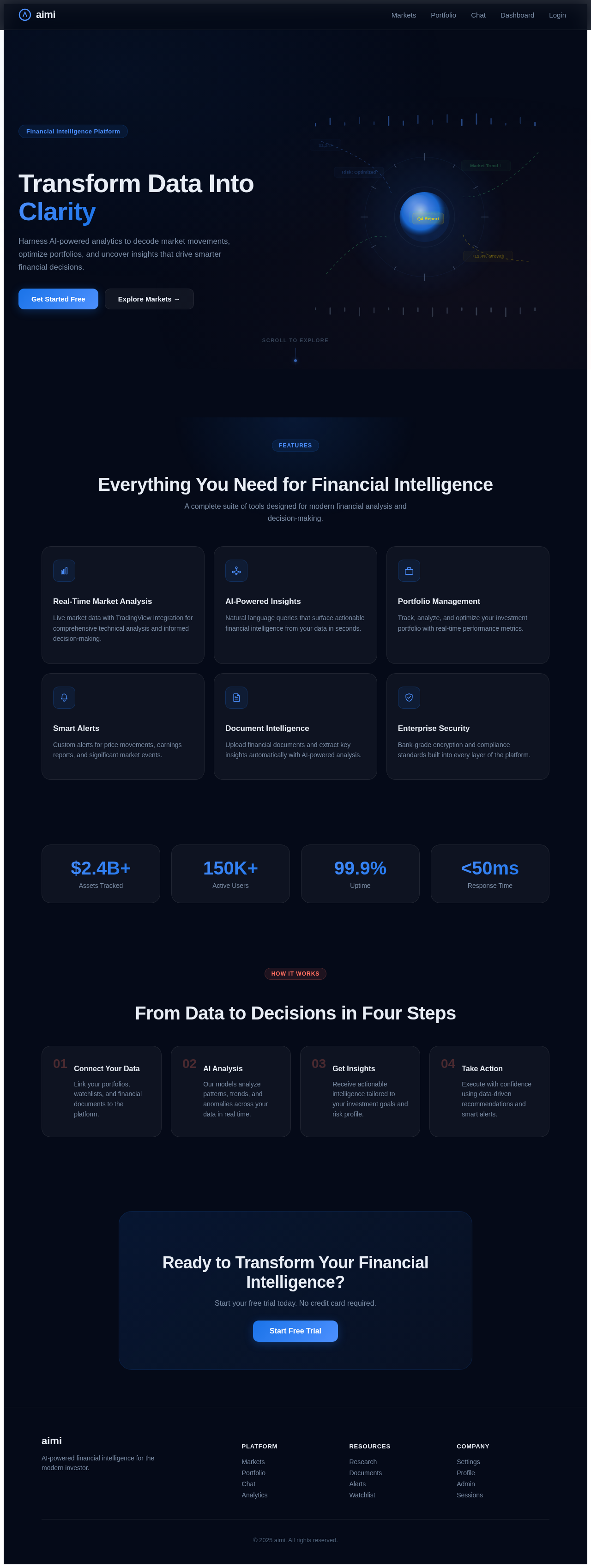
Transform Data Into Clarity
Harness AI-powered analytics to decode market movements, optimize portfolios, and uncover insights that drive smarter financial decisions.
Everything You Need for Financial Intelligence
A complete suite of tools designed for modern financial analysis and decision-making.
Real-Time Market Analysis
Live market data with TradingView integration for comprehensive technical analysis and informed decision-making.
AI-Powered Insights
Natural language queries that surface actionable financial intelligence from your data in seconds.
Portfolio Management
Track, analyze, and optimize your investment portfolio with real-time performance metrics.
Smart Alerts
Custom alerts for price movements, earnings reports, and significant market events.
Document Intelligence
Upload financial documents and extract key insights automatically with AI-powered analysis.
Enterprise Security
Bank-grade encryption and compliance standards built into every layer of the platform.
From Data to Decisions in Four Steps
Connect Your Data
Link your portfolios, watchlists, and financial documents to the platform.
AI Analysis
Our models analyze patterns, trends, and anomalies across your data in real time.
Get Insights
Receive actionable intelligence tailored to your investment goals and risk profile.
Take Action
Execute with confidence using data-driven recommendations and smart alerts.
Ready to Transform Your Financial Intelligence?
Start your free trial today. No credit card required.
Start Free TrialTransform Data Into Clarity
Harness AI-powered analytics to decode market movements, optimize portfolios, and uncover insights that drive smarter financial decisions.
Everything You Need for Financial Intelligence
A complete suite of tools designed for modern financial analysis and decision-making.
Real-Time Market Analysis
Live market data with TradingView integration for comprehensive technical analysis and informed decision-making.
AI-Powered Insights
Natural language queries that surface actionable financial intelligence from your data in seconds.
Portfolio Management
Track, analyze, and optimize your investment portfolio with real-time performance metrics.
Smart Alerts
Custom alerts for price movements, earnings reports, and significant market events.
Document Intelligence
Upload financial documents and extract key insights automatically with AI-powered analysis.
Enterprise Security
Bank-grade encryption and compliance standards built into every layer of the platform.
From Data to Decisions in Four Steps
Connect Your Data
Link your portfolios, watchlists, and financial documents to the platform.
AI Analysis
Our models analyze patterns, trends, and anomalies across your data in real time.
Get Insights
Receive actionable intelligence tailored to your investment goals and risk profile.
Take Action
Execute with confidence using data-driven recommendations and smart alerts.
Ready to Transform Your Financial Intelligence?
Start your free trial today. No credit card required.
Start Free Trial
No comments yet. Be the first!