aimbot-free-fire

byDaniela nicassia Nicassia

Cria painel legítimo esp linha aimbot fov pra free fire e capricha estou no celular

LandingLogin
Landing

Comments (0)

No comments yet. Be the first!

System Requirements

System Requirements Document for Aimbot Free Fire

1. Introduction

Aimbot Free Fire is a mobile-first companion panel for the game Free Fire. Despite the project name, the product is explicitly a legitimate panel: it contains no aimbot, no FOV overlay, and no cheating tool of any kind. The name is retained as the project identifier only; the product itself is an honest statistics and guide companion.

The panel serves two audiences. Players of Free Fire record and review the statistics of their own matches and read community guides about maps, characters, and weapon builds. Free Fire content creators publish and organize those guides for the community. Both audiences use the panel primarily on a phone, so every screen must work well on a mobile viewport.

The product's intent is to give players a fast, honest, competitive-feeling view of their own performance and a curated body of guide content, presented with the strict geometric clarity of Swiss design rather than the visual language of a cheat tool.

2. System Overview

Page 1 of 21

2a. Product Interpretation and Delivery Boundary

The panel is a first-party web application delivered by the application itself. It runs as a React front end against a shared FastAPI backend with a MariaDB database for application-owned persistent data. All five destinations — Landing, Login, Estatísticas, Guias, and Gerenciar Guias — are custom application pages owned by the application.

Access is layered. Landing is the anonymous public entry: it explains what the legitimate panel is and what it does, and it is reachable without an account. Login is the anonymous identity surface where a player or a content creator creates their own account and where a returning user's identity is verified. The three working destinations are protected: Estatísticas and Guias are available to the signed-in player, and Gerenciar Guias is available to the signed-in content creator, who holds permission to manage the guides. A protected destination never establishes access to itself; identity is always established at Login first.

The product is current and complete as described. There is no future roadmap in this document. The single hard exclusion is absolute and applies everywhere: no aimbot, no FOV overlay, and no cheating tool for Free Fire, in any page, asset, copy, or feature.

Removed from scope

  • Aimbot (also: aim bot, auto-aim)
  • FOV overlay (also: field-of-view overlay, FOV tool)
  • Any cheating tool for Free Fire (also: hack, cheat, trapaca)

2b. Source Content Inventory

Not applicable — no reference directive supplies a content_source.

Page 2 of 21

2c. Page Content and Component Coverage

Landing

  • Information and state: Anonymous public entry. Explains that this is a legitimate Free Fire panel with no aimbot, no FOV, and no cheating tools; states that players record their own match statistics and read guides on maps, characters, and weapon builds, on the phone. No account required to view.
  • Primary action: "Entrar no painel" — leads to Login.
  • Supporting actions: Navigate to Login to create an account or sign in.
  • Domain entities: None persisted; presentational only.
  • Component responsibilities:
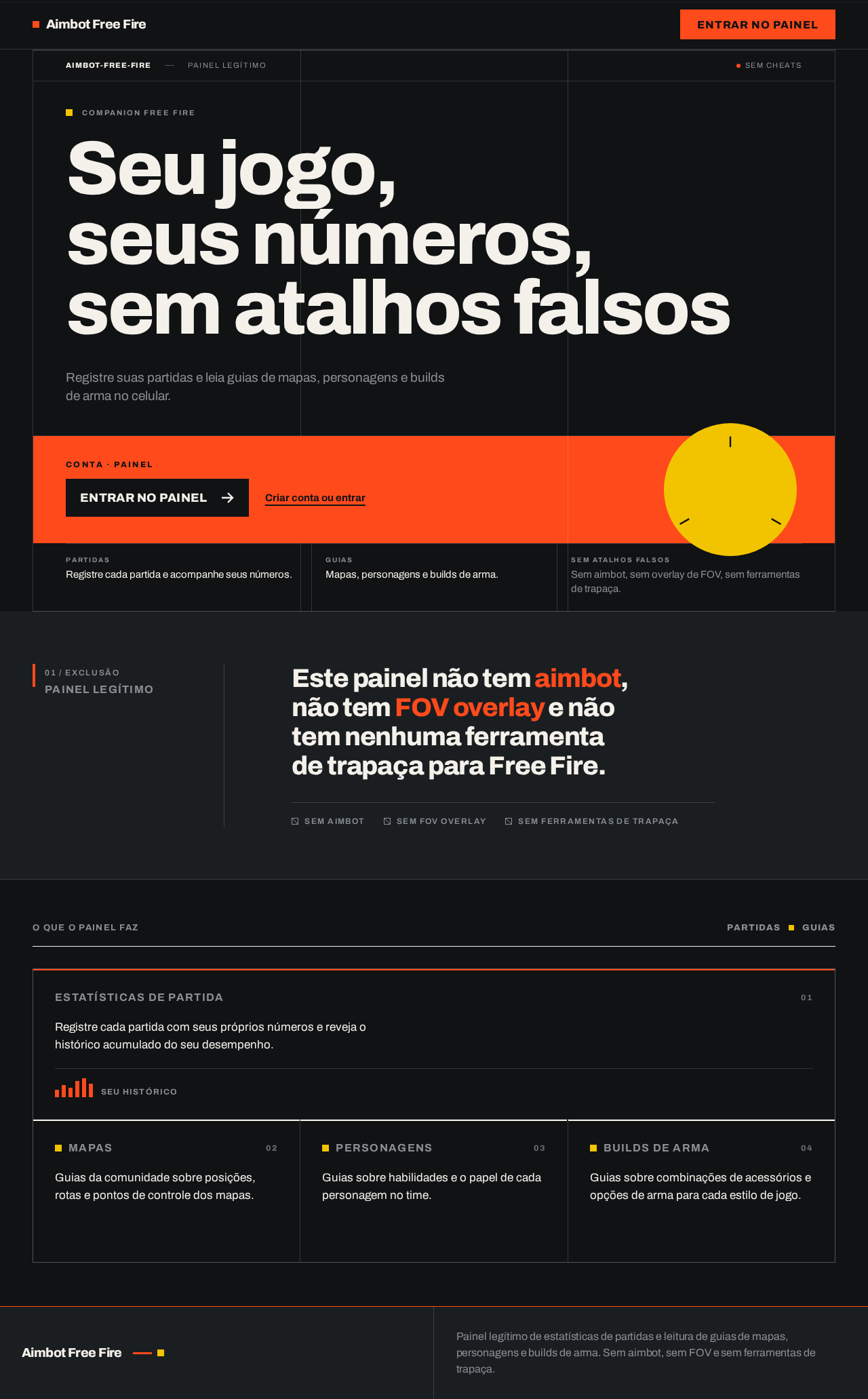
    • Hero: oversized flush-left headline "Seu jogo, seus números, sem atalhos falsos" in three lines; subline "Registre suas partidas e leia guias de mapas, personagens e builds de arma no celular."; solid orange band beneath carrying the CTA; one large yellow match-statistic circle at the right edge as a data mark; thin 1px hairline rule grid framing the hero.
    • Legitimacy statement block: a labelled column stating plainly that the panel contains no aimbot, FOV, or cheating tools.
    • Capability columns: labelled hairline-divided columns describing match statistics and the three guide categories (maps, characters, weapon builds).
    • Mobile-first single-column arrangement with full-width bands.
  • States: Loading (static content, no data fetch); empty and error not applicable; success is the rendered hero with a working CTA; recovery is a plain retry of navigation if the CTA target fails to load.
Page 3 of 21

Login

  • Information and state: Anonymous identity surface. Two modes: account creation for a first-time player or content creator, and verification of a returning user's identity. Shows validation feedback inline.
  • Primary actions: Create account (first use); sign in (returning user).
  • Supporting actions: Switch between creation and sign-in modes; return to Landing.
  • Domain entities: User account (identity, credential, role: player or content creator).
  • Component responsibilities:
    • Mode switch between "criar conta" and "entrar".
    • Credential fields with inline validation messages.
    • Role selection at creation so a content creator receives permission to manage guides.
    • Submit control with a pending state.
  • States: Loading (submitting, control disabled with pending indicator); empty (blank form); success (identity established, redirect to the appropriate protected destination); error (invalid credentials, duplicate account, or validation failure shown inline with the form preserved for correction); recovery (retry submission without losing entered values).
Page 4 of 21

Estatísticas

  • Information and state: Protected, player-only. Shows the signed-in player's own match statistics. Each recorded match contributes its statistics to the player's history.
  • Primary actions: Record a match's statistics; review the accumulated statistics of own matches.
  • Supporting actions: Open an individual recorded match to review its figures; return to the list.
  • Domain entities: Match record (owned by the signed-in player), match statistics (kills, placement, and the figures the player records), aggregate summary.
  • Component responsibilities:
    • Match entry form with the statistic fields.
    • Statistic rows using tabular figures in Archivo 800, aligned right against small-caps labels.
    • Aggregate summary with a large tabular number and a circular data mark.
    • Hairline-divided sections.
  • States: Loading (fetching the player's matches); empty (no matches recorded yet, with a prompt to record the first); success (list and summary rendered, numbers count up once on load); error (fetch or save failure shown with a retry control and entered values preserved); recovery (retry save or reload).
Page 5 of 21

Guias

  • Information and state: Protected, player-only. Lists community guides across the three categories: maps, characters, and weapon builds. Yellow marks guide categories only.
  • Primary actions: Browse guides by category; open a guide to read it.
  • Supporting actions: Filter by category; return to the list.
  • Domain entities: Guide (title, category, body), category (map, character, weapon build).
  • Component responsibilities:
    • Category filter with yellow category marks.
    • Guide list in hairline-divided rows.
    • Guide reading view.
  • States: Loading (fetching guides); empty (no guides in a category, with a clear message); success (list and reading view rendered); error (fetch failure with retry); recovery (retry or switch category).
Page 6 of 21

Gerenciar Guias

  • Information and state: Protected, content-creator-only. The creator's workspace for publishing and organizing the community's guides.
  • Primary actions: Create a guide; edit a guide; organize guides by category.
  • Supporting actions: Review the creator's published guides; return to the list.
  • Domain entities: Guide (title, category, body, publication state), category.
  • Component responsibilities:
    • Guide editor with title, category selection, and body.
    • Category organization control.
    • Creator's guide list with edit entry points.
  • States: Loading (fetching the creator's guides); empty (no guides yet, with a prompt to create the first); success (saved guide reflected in the list and visible to players in Guias); error (save or fetch failure with retry and entered values preserved); recovery (retry save or reload).
Page 7 of 21

3. Functional Requirements

FR-1 — Legitimate panel, no cheating tools (explicit) As a visitor or signed-in user, I should see and use a panel that contains no aimbot, no FOV overlay, and no cheating tool of any kind, so that I know the product is an honest companion.

  • Trigger: any page load.
  • Observable result: no aimbot, FOV, or cheat feature, copy, or imagery appears anywhere; Landing states the exclusion plainly.
  • Access: all access states.
  • Failure/recovery: not applicable — the exclusion is structural.
  • Continuation: the user proceeds to the legitimate features.

FR-2 — Works well on the phone (explicit) As a player or content creator, I should use the panel comfortably on my phone, so that I can work with it wherever I am.

  • Trigger: opening any page on a mobile viewport.
  • Observable result: single-column, full-width bands; headlines, labels, numbers, and controls stay whole and inside the viewport and their container at 375px, 768px, and 1280px, wrapping or scaling to fit.
  • Access: all access states.
  • Failure/recovery: content that would overflow wraps or scales rather than being clipped.
  • Continuation: the user completes the same task on mobile as on desktop.
Page 8 of 21

FR-3 — Record and review own match statistics (explicit) As a player, I should record the statistics of my own matches and review them, so that I can see my progress.

  • Trigger: the signed-in player opens Estatísticas and records a match.
  • Input: the match's statistic figures.
  • Observable result: the match is saved to the player's own history and the aggregate summary updates; numbers count up once on load.
  • Access: protected, player-only; identity established at Login.
  • Failure/recovery: a save or fetch failure shows an error with retry and preserves entered values.
  • Continuation: the player records another match or reviews the updated history.

FR-4 — Read guides on maps, characters, and weapon builds (explicit) As a player, I should read guides about maps, characters, and weapon builds, so that I can improve my play.

  • Trigger: the signed-in player opens Guias and selects a category or a guide.
  • Observable result: guides in the chosen category are listed and a guide opens for reading; yellow marks the category only.
  • Access: protected, player-only.
  • Failure/recovery: a fetch failure shows an error with retry; an empty category shows a clear message.
  • Continuation: the player opens another guide or switches category.
Page 9 of 21

FR-5 — Create own account at Login (required_inference) As a player or content creator, I should create my own account at Login, so that I can enter the panel.

  • Trigger: a first-time user opens Login and chooses to create an account.
  • Input: credentials and role (player or content creator).
  • Observable result: the account is created and the user's identity is established.
  • Access: anonymous.
  • Failure/recovery: validation or duplicate-account errors appear inline with the form preserved.
  • Continuation: the user is taken to the destination appropriate to their role.

FR-6 — Returning identity verification at Login (required_inference) As a returning player or content creator, I should sign in at Login and have my identity verified, so that I reach my own state.

  • Trigger: a returning user submits credentials at Login.
  • Observable result: identity is verified and the user reaches their protected destination with their own data.
  • Access: anonymous entry, protected result.
  • Failure/recovery: invalid credentials show an inline error and the form is preserved for retry.
  • Continuation: the user proceeds to Estatísticas, Guias, or Gerenciar Guias according to role.
Page 10 of 21

FR-7 — Content creator permission to manage guides (required_inference) As a content creator, I should hold permission to manage the guides, so that I can publish and organize the community's content.

  • Trigger: a signed-in content creator opens Gerenciar Guias.
  • Observable result: the creator can create, edit, and organize guides; a player without this permission does not reach this destination.
  • Access: protected, content-creator-only.
  • Failure/recovery: a save or fetch failure shows an error with retry and preserves entered values.
  • Continuation: the creator's saved guide appears in the players' Guias list.

4. User Personas

Page 11 of 21

Jogador de Free Fire

  • Product context: A Free Fire player who wants an honest view of their own performance and reliable guide content, used mainly on a phone.
  • Primary goal: Track the statistics of their own matches and read guides on maps, characters, and weapon builds.
  • Distinct accepted responsibilities: Creates their own account at Login; records each match's statistics in Estatísticas; reviews the accumulated history of their own matches; browses and reads guides by category in Guias.
  • Relevant inputs and decisions: The statistic figures of each match; which guide category to read; which guide to open.
  • Interactions with other participants: Consumes the guides that the content creator publishes and organizes in Gerenciar Guias; sees them in Guias.
  • Observable success: Their match history and aggregate summary reflect what they recorded, and the guides they open are readable and correctly categorized.
  • What makes this role different: The player is a consumer of guide content and the sole owner of their own match statistics; they never manage the community's guides.
Page 12 of 21

Criador de conteúdo de Free Fire

  • Product context: A Free Fire content creator who publishes guides and tips for the community and needs to organize that content so players can find it.
  • Primary goal: Publish and organize guides across maps, characters, and weapon builds.
  • Distinct accepted responsibilities: Creates their own account at Login with the content-creator role; holds permission to manage guides; creates, edits, and organizes guides in Gerenciar Guias.
  • Relevant inputs and decisions: Guide title, category, and body; how to organize guides by category.
  • Interactions with other participants: Their published guides are what players read in Guias.
  • Observable success: A saved guide appears in the creator's list and is available to players in the correct category.
  • What makes this role different: The creator authors and organizes the shared guide content; they hold the permission to manage guides that players do not.

5. Core User Flows

Page 13 of 21

Flow A — A player creates an account and records a match

  1. The visitor opens Landing anonymously and reads that this is a legitimate Free Fire panel with no aimbot, FOV, or cheating tools, and that players record match statistics and read guides on the phone.
  2. The visitor selects "Entrar no painel" and arrives at Login.
  3. At Login, the visitor chooses to create an account, enters credentials, and selects the player role.
  4. Login creates the account and establishes the player's identity; on a validation or duplicate-account error, the form is preserved inline for correction and the player retries.
  5. The player arrives at Estatísticas, which loads their (empty) match history and prompts them to record the first match.
  6. The player enters the statistic figures of a match and saves.
  7. Estatísticas saves the match to the player's own history and updates the aggregate summary; the numbers count up once on load. On a save failure, an error appears with a retry control and the entered values are preserved.
  8. The player reviews the updated history, opens an individual match to check its figures, and continues by recording another match or moving to Guias.
Page 14 of 21

Flow B — A returning player signs in and reads guides

  1. The returning player opens Login and submits their credentials.
  2. Login verifies the identity; on invalid credentials an inline error appears and the form is preserved for retry.
  3. The player arrives at Guias, which loads the guide list across maps, characters, and weapon builds, with yellow marking the categories.
  4. The player selects a category and opens a guide to read it. If the category is empty, a clear message is shown; if the fetch fails, an error with retry is shown.
  5. The player returns to the list and opens another guide, or moves to Estatísticas to review their own match history.

Flow C — A content creator publishes and organizes a guide

  1. A first-time creator opens Landing, selects "Entrar no painel", and at Login creates an account with the content-creator role; Login establishes the identity and grants permission to manage guides. On a validation error, the form is preserved for correction.
  2. The creator arrives at Gerenciar Guias, which loads their guide list; if empty, it prompts them to create the first guide.
  3. The creator creates a guide, entering its title, choosing its category (map, character, or weapon build), and writing its body, then saves.
  4. Gerenciar Guias saves the guide and reflects it in the creator's list. On a save failure, an error appears with retry and the entered values are preserved.
  5. The creator organizes the guide by category so players can find it.
  6. The creator continues by editing an existing guide or creating another.
  7. A player signing in and opening Guias now finds the creator's guide in its category and reads it.
Page 15 of 21

6. Visuals Colors and Theme

The visual system follows the Swiss geometric rigour of Josef Müller-Brockmann: a strict grid, coded colours, and hard geometry that make an honest, competitive game panel — never a cheat tool.

Mode: Dark.

Colour tokens (exact hex by role):

  • Background: #101214 (charcoal ground, holds ~80% of the page)
  • Surface: #1B1E21
  • Text: #F4F1EA (off-white, readable on both dark tones)
  • Primary: #FF4A1C (signal orange — actions and key numbers only)
  • Accent: #F2C400 (yellow — guide categories only)
  • Muted: #8A8F94

Typography:

  • Headings: Archivo, Heavy 800, tracking -0.03em, flush-left, sentence case.
  • Body: Archivo.
  • Numbers: tabular figures at large size, Archivo 800, aligned right against small-caps labels.
  • Modular scale 1.333 — mobile: 44 / 33 / 25 / 19 / 16 px; desktop: 96 / 64 / 40 / 24 / 17 px.
  • Display headline: clamp(44px, 11vw, 112px).

Shape language: Hard edges, zero radius. Circles and vertical bars act as data marks. Thin 1px rules divide every block.

Layout: A 12-column grid with visible hairline rules. The hero stacks a huge left-aligned headline over a solid orange band. Mobile uses one column with full-width bands.

Page 16 of 21

Imagery: Flat geometric diagrams of maps and weapon statistics. One cropped match-statistic circle sits as a graphic mark. No character art, no photos of cheats.

Accessibility: Readable text and controls stay whole and inside the viewport and their container at 375px, 768px, and 1280px, wrapping or scaling to fit; no element covers any part of them. Decoration may be cropped or bled off an edge, but never over readable text or controls.

7. Signature Design Concept

The public entry — Landing — is a dark charcoal first screen framed by a thin 1px hairline rule grid. An oversized headline spans the full width in three flush-left lines at clamp(44px, 11vw, 112px): "Seu jogo, seus números, sem atalhos falsos". Beneath it runs a solid orange band carrying the CTA "Entrar no painel", and at the band's right edge sits one large yellow circle holding a match percentage as a data mark. The subline — "Registre suas partidas e leia guias de mapas, personagens e builds de arma no celular." — sits flush-left above the band. Below the hero, hairline-divided labelled columns state the legitimacy of the panel and describe the match statistics and the three guide categories. The composition recomposes only accepted content and the single CTA to Login; it introduces no new behaviour.

Page 17 of 21

8. Interaction Model & Motion Direction

Interaction Model: Animated Motion Tempo: restrained Hero Dimensionality: flat

Landing Hero Motion Brief

  • Focal subject: The oversized flush-left headline over the solid orange band, with the single yellow match-statistic circle at the right edge as the data mark.
  • Input → transformation → outcome thesis: On load, the hairline section rules draw in from the left and the match percentage inside the yellow circle counts up once to its value, settling into a still, fully readable hero with a working CTA — no bounce, no glow.
  • Motion vocabulary: Restrained; rules draw in from the left; numbers count up once on load; no bounce, no glow.
  • Composed first frame: Charcoal ground, the three-line headline fully rendered flush-left, the orange band and CTA in place, the yellow circle at the right edge, and the rule grid framing the hero.
  • Reduced-motion state: With prefers-reduced-motion, the rules and the circle appear at their final state immediately, the number shown at its value without counting, and all text and controls remain whole and readable.
Page 18 of 21

9. Non-Functional Requirements

  • No cheating tools (explicit): The product must not contain an aimbot, FOV overlay, or any cheating tool for Free Fire, in any page, asset, copy, or feature. This is an absolute, project-wide exclusion.
  • Mobile usability (explicit): The product must work well on the phone. At 375px, 768px, and 1280px, headlines, wordmarks, labels, numbers, and controls stay entirely inside the viewport and their container, wrapping or scaling to fit, with no element covering any part of them.
  • Identity continuity (required_inference): Application-owned identity is required so that a player's match statistics remain bound to the correct player and a content creator's permission to manage guides remains bound to the correct creator. Identity is established at Login; protected destinations require it.
  • Role-scoped access (required_inference): Estatísticas and Guias are restricted to the signed-in player; Gerenciar Guias is restricted to the signed-in content creator holding permission to manage guides.
  • Persistent application data (required_inference): Match statistics and guides persist in the application-owned database so that history and published guides survive across sessions.
  • Readable, honest presentation (explicit, from the creative direction): No rounded cards, soft shadows, glass panels, blue or indigo accents on white, stock photos of players or weapons, gradient blobs, or hover-lift card grids.
Page 19 of 21

10. Tech Stack

  • Frontend: React application UI, mobile-first, implementing the Swiss geometric design system.
  • Backend: A shared FastAPI process hosting the application APIs and domain modules for identity, match statistics, and guides.
  • Database: MariaDB for application-owned persistent data (accounts, match statistics, guides).
  • Deployment: Docker and docker-compose provisioning the backend, database, and frontend services.

11. Assumptions and Constraints

  • Constraint (explicit): No aimbot, FOV, or any cheating tool for Free Fire may be created or represented anywhere in the product.
  • Constraint (explicit): The product must work well on the phone.
  • Assumption (required_inference): Players and content creators create their own accounts at Login; there is no invitation or provisioning flow.
  • Assumption (required_inference): A content creator selects the content-creator role when creating their account, which grants permission to manage guides; players do not hold that permission.
  • Assumption (required_inference): A player records the statistics of their own matches manually in Estatísticas; no external game-data integration is assumed.
  • Assumption (required_inference): Guides are organized into the three categories named in the requirements: maps, characters, and weapon builds.
  • Assumption (required_inference): The project name "Aimbot Free Fire" is an identifier only and does not describe product behavior.
Page 20 of 21

12. Glossary

  • Painel: The legitimate Free Fire companion web application described in this document.
  • Aimbot: An automated aiming cheat; explicitly excluded from this product.
  • FOV (field of view): A widened field-of-view overlay used as a cheat; explicitly excluded from this product.
  • Estatísticas: The protected destination where a player records and reviews the statistics of their own matches.
  • Guias: The protected destination where a player reads community guides.
  • Gerenciar Guias: The protected destination where a content creator publishes and organizes guides.
  • Guia: A piece of community content about a map, a character, or a weapon build.
  • Categoria: One of the three guide categories — mapas, personagens, builds de arma.
  • Jogador: A Free Fire player who records their own match statistics and reads guides.
  • Criador de conteúdo: A Free Fire content creator who holds permission to manage guides.
  • Login: The anonymous identity surface where accounts are created and returning identities are verified.
Page 21 of 21
Live
Landing design preview
Landing: Read legitimacy statement
Login: Enter panel
Login: 1. Create creator account
Login: 2. Correct validation error
Gerenciar Guias: 1. Create first guide
Gerenciar Guias: 2. Save guide
Gerenciar Guias: 3. Retry failed save
Gerenciar Guias: 4. Organize guide by category
Gerenciar Guias: 5. Edit existing guide
Login: 1. Sign in as returning creator
Login: 2. Correct invalid credentials
Live
Landing design preview
Landing: Read legitimacy statement
Login: Enter panel
Login: 1. Create creator account
Login: 2. Correct validation error
Gerenciar Guias: 1. Create first guide
Gerenciar Guias: 2. Save guide
Gerenciar Guias: 3. Retry failed save
Gerenciar Guias: 4. Organize guide by category
Gerenciar Guias: 5. Edit existing guide
Login: 1. Sign in as returning creator
Login: 2. Correct invalid credentials