ai-website
 Jovens Saint Louis
# Build My Personal AI Website & App Builder ## Project Name **MyBuild AI Studio** ## Main Goal Build a professional, private AI website and app builder that I can use personally to create unlimited websites, web apps, landing pages, business tools, dashboards, and other digital projects. I want my own version of an AI app builder similar to Webild.io, but designed exclusively for me. I am the only user. I do not want to pay monthly subscriptions to use my own platform. Build this as a professional, modern, easy-to-use application. --- # 1. PRIVATE PERSONAL WORKSPACE Create a private dashboard that only I can access. Features: - Private personal workspace. - No public registration. - No public user accounts. - No subscription plans. - No payment system. - No public marketplace. - No advertisements. - No unnecessary enterprise features. Create a simple owner login system. Allow me to configure my own password. Do not create a hardcoded publicly accessible admin account. If authentication requires a backend, clearly explain the free options and implement the safest practical solution. --- # 2. AI WEBSITE AND APP GENERATOR Create a large AI prompt input box on the main dashboard. Placeholder: "What do you want to build today? Describe your website or app..." Example: "Build me a professional Christian video streaming website with a homepage, video categories, search, user dashboard, and a dark gold design." Add a prominent button: **Generate My Website** When I submit a prompt, the application should: 1. Understand my project description. 2. Create a website structure. 3. Generate the website's HTML. 4. Generate CSS styling. 5. Generate JavaScript functionality. 6. Create responsive layouts. 7. Display the generated website in a live preview. 8. Allow me to edit the generated code. 9. Allow me to download the project. 10. Save the project to my personal workspace. Support generating: - Websites. - Web applications. - Landing pages. - Business websites. - Christian content websites. - AI tools. - Dashboards. - Portfolio websites. - Online stores. - Booking websites. - Educational platforms. - Mobile-friendly web applications. --- # 3. LIVE WEBSITE PREVIEW Create a professional preview area. Include: - Desktop preview. - Tablet preview. - Mobile preview. - Refresh preview. - Full-screen preview. - Preview loading indicator. When I generate a website, show the actual rendered website. Do not display only a description or a screenshot. I want to see and interact with the website I am building. Use a safe preview environment that isolates generated code from the main application. --- # 4. AI WEBSITE EDITOR After generating a website, allow me to modify it using natural language. Create an input box: "What would you like to change?" Example prompts: - Make the website look more professional. - Change the colors to black and gold. - Add a login page. - Add a video gallery. - Make the website mobile-friendly. - Add a navigation menu. - Add a pricing section. - Add a contact form. - Make the buttons functional. - Add a dashboard. - Fix the broken layout. Add a button: **Apply Changes** The AI should modify the existing project instead of starting over. Preserve existing features unless I specifically request their removal. Show the updated website in the live preview. --- # 5. CODE EDITOR Create a built-in code editor. Include separate tabs for: - HTML. - CSS. - JavaScript. - Project files. Features: - Syntax highlighting. - Editable code. - Save changes. - Preview changes. - Download code. - Copy code. - Restore previous version. Use a professional code editor library if available without requiring a paid subscription. --- # 6. PROJECT FILE MANAGER Create a file explorer for each generated project. Example: My Website/ index.html style.css script.js assets/ README.md Allow me to: - View project files. - Edit files. - Create files. - Rename files. - Delete files. - Download individual files. - Export the entire project as a ZIP file. Save projects in my personal workspace. --- # 7. MY PROJECTS DASHBOARD Create a section called: **My Projects** Every generated project should have: - Project name. - Project description. - Creation date. - Last modified date. - Preview. - Edit. - Rename. - Duplicate. - Download. - Delete. Add project search. Add project categories: - Websites. - Apps. - Business. - AI Tools. - Personal Projects. Allow me to reopen a project and continue working on it. --- # 8. FREE AI SYSTEM My goal is to use this application without paying monthly fees. Design the AI system to support: 1. Local AI models. 2. Free AI services when available. 3. Optional AI provider configuration. Prefer local AI models that can run on my own computer. Allow me to connect an AI provider using my own API key if I choose. Do not require a paid API key to open the dashboard, edit code, preview websites, or download projects. If an AI provider requires payment, clearly explain that before using it. Do not pretend that AI generation is free if it depends on a paid service. Build a provider settings page where I can configure: - AI provider. - Model. - API key. - Local AI endpoint. - Generation settings. Never expose API keys in public frontend code. --- # 9. FREE STORAGE SYSTEM Use local storage or IndexedDB for personal project storage where appropriate. Save: - Projects. - Project descriptions. - Generated code. - Project settings. - Editor preferences. - Recent projects. Automatically save changes. Allow me to export and import my projects. Do not require a paid database for the basic personal version. Explain any limitations of browser storage. --- # 10. PROFESSIONAL DESIGN Create a beautiful dark-themed AI development studio. Design style: - Black background. - Dark gray panels. - Gold accent colors. - Modern typography. - Smooth animations. - Professional dashboard layout. - Clean navigation. - Rounded cards. - Minimal clutter. Make it look like a premium AI software development platform. Main sidebar: - Dashboard. - Create Website. - My Projects. - AI Editor. - Code Editor. - Templates. - Settings. Main dashboard: - Welcome section. - AI generation prompt. - Generate button. - Recent projects. - Quick-start templates. Make the application responsive and easy to use on desktop, tablet, and mobile. --- # 11. WEBSITE TEMPLATES Create starter templates for: - Business website. - Christian website. - Video streaming website. - AI SaaS dashboard. - Landing page. - Portfolio. - Online store. - Booking website. - Educational website. Allow me to select a template and customize it using AI. --- # 12. DOWNLOAD AND EXPORT Add a professional export system. Allow me to: - Download the complete project as ZIP. - Download HTML. - Download CSS. - Download JavaScript. - Copy source code. - Export project files. The downloaded project should contain the actual generated source code. Make projects easy to open in Visual Studio Code. Include a README explaining how to run the project. --- # 13. IMPORTANT TECHNICAL REQUIREMENTS Build the actual working application. Do not create just a static dashboard design. Do not use fake generation buttons. Do not show fake AI results. Do not create buttons that do nothing. Use a simple, maintainable architecture. Prefer: - React. - TypeScript. - Vite. - Tailwind CSS. - IndexedDB. - A safe preview sandbox. - A free code editor library. Use free open-source tools where possible. Avoid unnecessary paid integrations. If the AI model cannot be accessed, display a clear error message and provide the ability to edit projects manually. --- # 14. SECURITY This is a personal development tool. Implement: - Private workspace. - Safe code preview. - Protection against executing generated code inside the main dashboard. - Secure API key handling. - Input validation. - Safe project file handling. Do not expose sensitive API keys. Do not allow generated projects to access my personal files without permission. --- # 15. BUILD AND DEPLOYMENT Build the complete application. Make it possible to run locally on my computer. Provide: - Complete source code. - Installation instructions. - Setup instructions. - Development instructions. - Build instructions. - Deployment instructions. Prefer a free local development workflow. Explain which features work without an internet connection and which require an AI model or internet connection. Do not claim that free hosting, AI inference, or unlimited cloud storage is guaranteed. --- # FINAL REQUIREMENT Build MyBuild AI Studio as a real, working, private AI development platform. I want to open my dashboard, describe an application, generate its source code, preview it, edit it, save it, and download it. Make the platform powerful enough for me to create many different websites and applications for my own projects. Focus on functionality, privacy, simplicity, and keeping ongoing costs as close to zero as realistically possible. Start by building the complete working MVP, then improve it with the additional features. Do not stop at a design mockup. Deliver the actual application and explain how I can start using it.


Comments (0)
Sign in to leave a comment
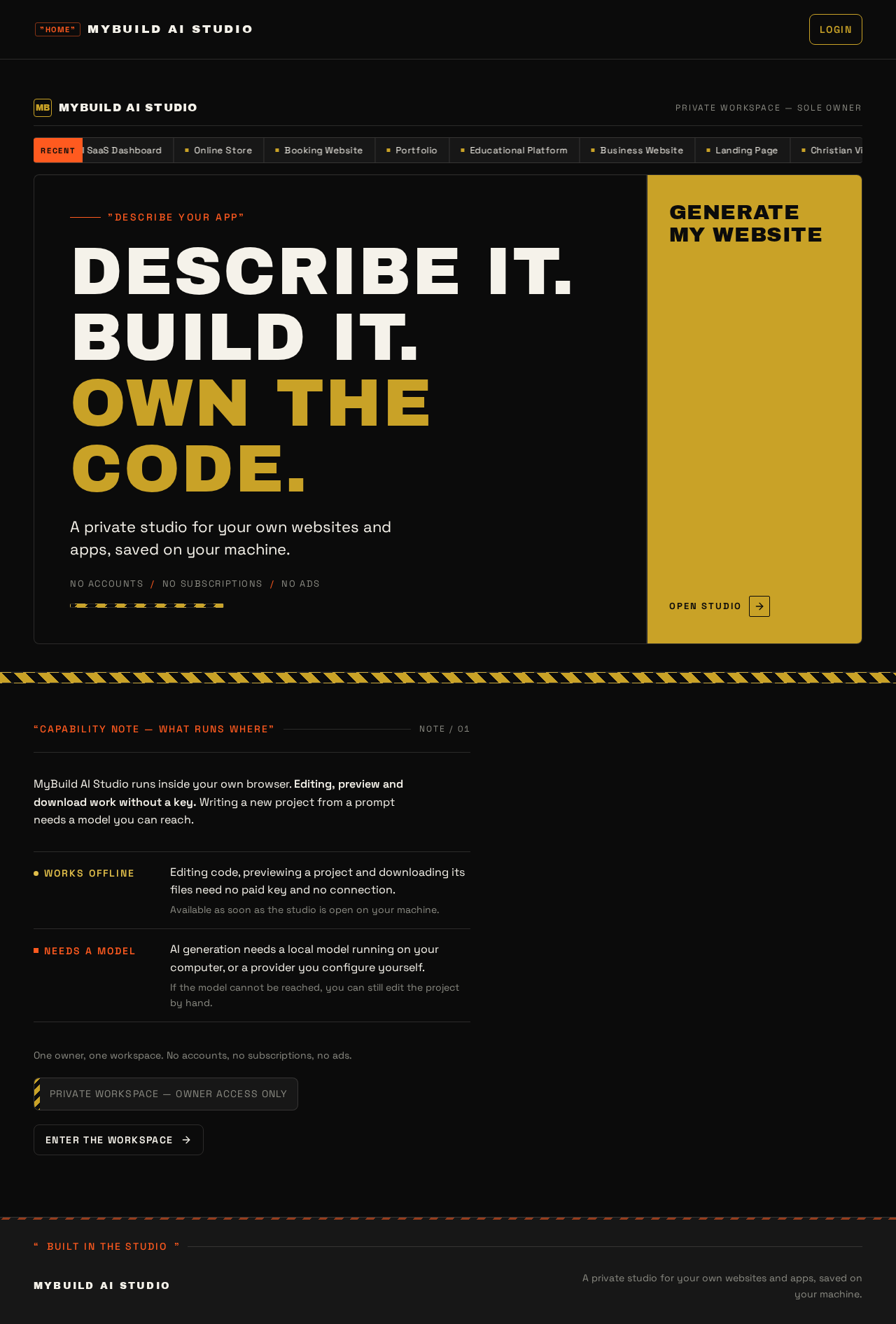
"Describe your app"
Describe it.Build it.Own the code.
A private studio for your own websites and apps, saved on your machine.
“Capability Note — What Runs Where”
Note / 01MyBuild AI Studio runs inside your own browser. Editing, preview and download work without a key. Writing a new project from a prompt needs a model you can reach.
- Works offline
Editing code, previewing a project and downloading its files need no paid key and no connection.
Available as soon as the studio is open on your machine.
- Needs a model
AI generation needs a local model running on your computer, or a provider you configure yourself.
If the model cannot be reached, you can still edit the project by hand.
No comments yet. Be the first!