
ai-powered-accessibility-compliance

byManikandan Rajendran

Idea:

LandingDashboardAuthentication
Landing

Comments (0)

No comments yet. Be the first!

System Requirements

System Requirement Document
Page 1 of 7

AI-Powered Accessibility Compliance

1. Introduction

The AI-Powered Accessibility Compliance project aims to provide small businesses with the tools necessary to meet ADA/WCAG requirements. This project addresses the lack of in-house compliance expertise by offering automated solutions for accessibility compliance.

2. System Overview

Page 2 of 7

2a. Product Interpretation and Delivery Boundary

  • Domain Descriptor: Accessibility Compliance Automation

    • Source Evidence: Automate compliance checks and reporting for small businesses lacking in-house expertise.
    • Confidence: 0.9
  • Product Intent: AI-powered accessibility compliance for small websites.

  • Included Features:

    • Site scan
    • Issue detection
    • Automated fixes
    • Audit reports
    • Ongoing monitoring
    • Compliance alerts
  • Excluded Assumptions:

    • Generic e-commerce features
    • User account management
  • Custom Pages:

    • Dashboard: Indispensable owner surface for initiating site scans and reviewing compliance reports.
    • Landing: Public entry surface to orient and acquire small business owners.
    • Authentication: Combined surface for sign-up, login, and session entry.
  • Access: Application-owned identity is required for durable scan reports and controlled access by the initiating Small Business Owner.

  • Behavior Contracts:

    • Perform Site Scan:

      • Actor: Small Business Owner
      • Trigger: Initiate site scan
      • Inputs: Website URL
      • Outcomes: Accessibility issues detected
      • State Changes: Scan report generated
      • State Lifetime: Durable
      • Identity Continuity: Persistent
      • Audience Entry: Public
      • Human Touchpoints: Dashboard
      • Failure Outcome: Scan failed
    • Review Compliance Report:

      • Actor: Compliance Specialist
      • Trigger: Receive notification of completed scan
      • Inputs: Scan report
      • Outcomes: Compliance status reviewed
      • State Changes: None
      • State Lifetime: None
      • Identity Continuity: Interaction
      • Audience Entry: Private invitation
      • Human Touchpoints: Email, Dashboard
      • Failure Outcome: Report review failed
Page 3 of 7

2b. Page Content and Component Coverage

Dashboard

  • Purpose: Initiate site scans and review compliance reports.
  • Components:
    • Site Scan Initiation
    • Compliance Report Review
    • Alerts and Notifications
    • User Guidance and Support
    • Error Handling and Feedback

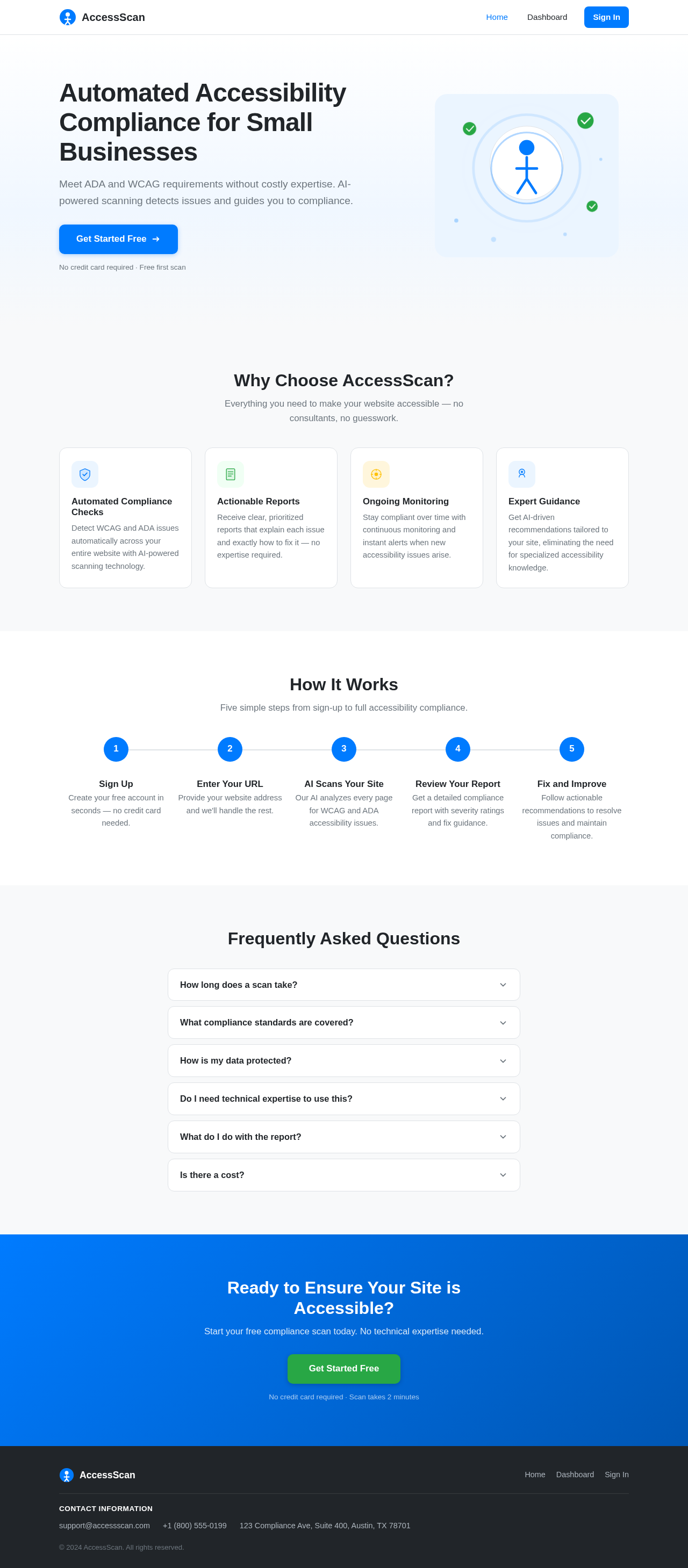
Landing

  • Purpose: Orient and acquire small business owners.
  • Components:
    • Introduction to Services
    • Benefits of Compliance
    • Call to Action for Sign-up/Login
    • Contact Information
    • FAQs

Authentication

  • Purpose: Provide sign-up, login, and session entry.
  • Components:
    • User Registration
    • Login Form
    • Password Recovery
    • Session Management
    • Security and Privacy Information
Page 4 of 7

3. Functional Requirements as Story Points

  • As a Small Business Owner, I should be able to initiate a site scan by providing a website URL to detect accessibility issues. explicit
  • As a Small Business Owner, I should be able to view generated scan reports on the Dashboard to understand compliance status. explicit
  • As a Compliance Specialist, I should be able to review compliance reports to ensure accessibility standards are met. explicit
  • As a Small Business Owner, I should be able to sign up, log in, and manage my session to access personalized compliance tools. required_inference
  • As a Compliance Specialist, I should receive notifications of completed scans to review reports promptly. required_inference

4. User Personas

  • Small Business Owner: Primary user responsible for ensuring website compliance.
  • Compliance Specialist: User responsible for reviewing compliance reports and alerts.

5. Core User Flows

Small Business Owner Flow

  1. Access the Landing page.
  2. Sign up or log in via the Authentication page.
  3. Navigate to the Dashboard.
  4. Initiate a site scan by entering the website URL.
  5. Review the scan report for detected accessibility issues.
Page 5 of 7

Compliance Specialist Flow

  1. Receive notification of a completed scan.
  2. Log in via the Authentication page.
  3. Access the Dashboard.
  4. Review the compliance report.

6. Visuals Colors and Theme

  • Primary: #007BFF (Blue)
  • Primary Light: #66B2FF
  • Secondary: #6C757D (Gray)
  • Accent: #28A745 (Green)
  • Highlight: #FFC107 (Yellow)
  • Background: #FFFFFF (White)
  • Surface: #F8F9FA (Light Gray)
  • Text: #212529 (Dark Gray)
  • Text Muted: #6C757D (Gray)
  • Border: #DEE2E6 (Light Gray)

7. Signature Design Concept

The Dashboard page will feature a clean, modern design with a focus on usability and accessibility. The layout will be structured to guide users through the compliance process, with clear calls to action and feedback mechanisms. The color scheme will use the primary blue for key interactive elements, with green accents for success indicators and yellow for alerts.

Page 6 of 7

8. Interaction Model & Motion Direction

  • Dashboard: Animated with moderate scroll-triggered reveals and hover transitions to enhance user engagement.
  • Landing: Animated with a restrained 2D Hero motion to introduce the service benefits.
  • Authentication: Static to prioritize clarity and ease of use.

9. Non-Functional Requirements

  • Security: Secure access control is required to protect user data and compliance reports. required_inference

10. Tech Stack

  • Frontend: React for Web
  • Backend: Python with FastAPI
  • Database: MySQL or MariaDB, using Alembic for migrations
  • AI Models: GPT 5.4 for user-friendly responses
  • AI Tools: Litellm for LLM Routing, Langchain
  • Local Orchestration: Docker, docker-compose
  • Server-side Orchestration: Kubernetes

11. Assumptions and Constraints

  • The system assumes that small business owners have basic technical knowledge to initiate site scans.
  • The system will not include generic e-commerce features or user account management beyond authentication and session control.
Page 7 of 7

12. Glossary

  • ADA: Americans with Disabilities Act
  • WCAG: Web Content Accessibility Guidelines
  • AI: Artificial Intelligence
  • LLM: Large Language Model
  • UI: User Interface
  • UX: User Experience
Landing design preview
Authentication: External handoff: Receive notification of completed scan
Authentication: Log in
Dashboard: Access compliance report
Dashboard: Compliance status reviewed
Dashboard: Report review fails
Landing design preview
Authentication: External handoff: Receive notification of completed scan
Authentication: Log in
Dashboard: Access compliance report
Dashboard: Compliance status reviewed
Dashboard: Report review fails