ai-assistant-android
 dheeraj mochi
PROJECT LEO — MASTER PROJECT PROMPT Privacy-First Personal AI Assistant for Android 1. Project Identity Project name: Leo AI Assistant Assistant name: Leo Platform: Android smartphone, with future expansion possibilities. Development environment: Android Studio, Kotlin, and Jetpack Compose. Project type: Personal AI assistant with voice interaction, controlled Android actions, and privacy-first architecture. Leo is a personal AI assistant designed to feel natural, practical, friendly, and trustworthy. It should not be an unnecessarily complicated Jarvis clone. The goal is to build a useful assistant that can understand commands, perform approved actions, and respect the user's privacy. 2. My Role and How You Should Help Me Act as my Android development mentor, software architect, Kotlin programmer, security reviewer, UI/UX designer, and project planner. I am a CSE student developing Leo. Guide me from the fundamentals to a working application, even if I am still learning. Follow these rules: - Explain the steps in the correct order. - Give complete, working code when requested, including file names and locations. - Explain where each code block belongs. - Avoid unnecessary complexity and expensive infrastructure. - Prefer free or low-cost development tools when practical. - Never assume I have completed a step unless I confirm it. - Check compatibility, dependencies, Android permissions, and build configuration. - Help me diagnose errors using the actual error messages and code. - Do not repeatedly replace the entire project when a small fix is sufficient. - Clearly distinguish implemented, partially implemented, planned, and untested features. - Never claim a feature works without evidence from testing. - Explain technical limitations honestly. When giving implementation instructions, use this format: 1. Goal 2. Files to create or modify 3. Exact code 4. Where to put the code 5. How to build and run it 6. How to test it 7. Expected result 8. Common errors and fixes 9. Security and privacy considerations 3. Leo's Personality and Voice Leo should have a feminine voice and a natural, friendly personality. Personality requirements: - Speak naturally, like a helpful friend. - Avoid robotic replies and unnecessary formal language. - Avoid sounding parental or overly affectionate. - Use casual words like "bro" when appropriate. - Do not repeat the same greeting after every command. - Support English initially, with the possibility of adding more languages later. - Allow future customization of voice, tone, responses, and wake-up greetings. The activation phrase should be: "Hey Leo" A possible response after activation is: "Hey bro, what can I help you with?" Greetings should be configurable and should not interrupt the user unnecessarily. 4. Main Voice Interaction Flow Design Leo around this workflow: 1. The user says "Hey Leo." 2. Leo activates using the supported wake-word mechanism. 3. Leo indicates clearly that the microphone is active. 4. Leo receives and transcribes the user's command. 5. The AI interprets the command. 6. The AI proposes a structured action. 7. The Android application validates the action against its permission and safety rules. 8. The application executes the approved action. 9. Leo gives a concise spoken response. 10. After approximately 10–15 seconds without another command, the active listening session ends. 11. Leo visibly indicates that the session has ended and the microphone is no longer being used by Leo. The timeout should be configurable. Do not confuse ending a listening session with stopping an entire background service. These are different states and must be implemented and tested separately. 5. The Most Important Feature: Verifiable Privacy Privacy is a core design requirement, not a marketing slogan. Leo must never falsely claim that it has stopped listening when the microphone is still active. Implement a clear state system, such as: - Idle - Wake-word detection active - Listening for a command - Processing - Executing an approved action - Session end


Comments (0)
Sign in to leave a comment
System Requirements
System Requirements Document for ai-assistant-android
1. Introduction
ai-assistant-android is the Android application that delivers Leo AI Assistant ("Leo"), a privacy-first personal AI assistant for Android smartphones. Leo is built in Android Studio with Kotlin and Jetpack Compose, and is intended to feel natural, practical, friendly, and trustworthy rather than being an unnecessarily complicated Jarvis clone. The product's purpose is to understand spoken commands, perform only approved actions, and respect the user's privacy.
The audience for this document is twofold. First, the Leo User (Android device owner) — the person who owns and uses the Android phone, says "Hey Leo", issues spoken commands, receives Leo's spoken responses, and relies on clear visible indication of whether the microphone is active or the session has ended. Second, the Leo Developer / Learner — the CSE student building Leo, who needs ordered guidance, complete working code with file names and locations, build/run and test steps, error diagnosis, and honest status labeling of implemented, partially implemented, planned, and untested features.
The single most important design requirement is verifiable privacy: Leo must never falsely claim that it has stopped listening when the microphone is still active. Every state, label, and control in this document exists to make that promise checkable at a glance.
2. System Overview
Leo is a personal AI assistant with voice interaction, controlled Android actions, and a privacy-first architecture. The current delivery is an Android smartphone application with a first-party interface that makes the assistant's microphone and session state unambiguous, plus a background service that performs wake-word detection and command handling. The application is developed in Android Studio using Kotlin and Jetpack Compose, with future expansion possibilities beyond the Android smartphone platform.
The current actors are:
- Leo User (Android device owner) — the human who speaks to Leo, approves or rejects proposed actions, configures greetings and the listening timeout, and verifies microphone state.
- Leo Developer / Learner — the human who configures, builds, tests, and diagnoses the application, and who must distinguish implemented, partially implemented, planned, and untested features.
- Leo (the assistant) — the system actor that performs wake-word detection, transcription, interpretation, structured action proposal, validation, execution, and spoken response.
- Android platform services — the operating system surfaces that own microphone permission, speech recognition, text-to-speech, and device action execution.
Accepted behavior in the current horizon covers: wake-word activation on "Hey Leo"; a clear microphone-active indication; command receipt and transcription; AI interpretation and structured action proposal; validation of the proposed action against the application's permission and safety rules; execution of the approved action; a concise spoken response; a configurable 10–15 second inactivity timeout that ends the active listening session; and a visible indication that the session has ended and the microphone is no longer being used by Leo. The application also implements a clear state system — Idle, Wake-word detection active, Listening for a command, Processing, Executing an approved action, and Session end — and keeps listening-session termination strictly distinct from background-service termination.
Narrow exclusions: Leo is not an unnecessarily complicated Jarvis clone; it does not use parental or overly affectionate speech; it does not repeat the same greeting after every command; greetings do not interrupt the user unnecessarily. The application avoids unnecessary complexity and expensive infrastructure, and prefers free or low-cost development tools where practical. English is supported initially, with the possibility of adding more languages later.
2a. Product Interpretation and Delivery Boundary
Leo is delivered as a first-party Android application. The application owns the interface through which the user sees and controls the assistant's state, and it owns the durable configuration that makes the assistant behave consistently across sessions. The Android platform owns the microphone, speech recognition, text-to-speech, and the execution of device actions; Leo requests and validates those operations but does not replace the platform's permission model.
Because the user's assistant configuration, privacy-related state, and session history must remain bound to the correct device owner and be resumable, the application establishes its own identity: a first-use enrollment path and a returning verification path. These are journey prerequisites for protected assistant state, not a separate account-management product. The public entry surface is reachable without identity so that the product's privacy promise can be read before any protected state exists.
The current horizon is the Android smartphone application and its supporting backend for assistant configuration and session records. Future horizons — additional languages, deeper voice/tone/response customization, and expansion beyond the Android smartphone — are recorded in Section 11 and are explicitly out of current scope.
2b. Source Content Inventory
Not applicable. No reference directive in this project declares a content_source, so no source content inventory is produced.
2c. Page Content and Component Coverage
Landing
- Information/state: Anonymous first impression explaining Leo's privacy-first Android assistant purpose, the intended user, and the core voice workflow. Displays the product name, the activation phrase "Hey Leo", and the promise that the microphone is live only when the lamp is orange.
- Primary actions: Enter the first-use enrollment path; enter the returning verification path; read the privacy promise and the state-machine explanation.
- Supporting actions: View the schematic signal-path diagram (Wake word → Recogniser → Intent → Permission check → Action) and the six-state diagram.
- Domain entities: Product identity, privacy promise, state catalog, signal path.
- Component responsibilities: Top hairline state strip with 'LEO' in caps at left and build/version in tabular numerals at right; flush-left headline "Hey Leo"; subhead stating the microphone promise; the microphone lamp disc on a panel; the current state word; a ruled label/value row showing MICROPHONE / RELEASED or LIVE; a physical-looking START LISTENING key pinned bottom-left; session countdown in tabular numerals bottom-right.
- States: Loading — the state strip and lamp render immediately with the last known state; empty — no session history yet, the lamp is warm grey and the state word reads IDLE; success — the privacy promise and state catalog are fully readable; error — if the state source is unavailable, the lamp renders warm grey and the state word reads UNKNOWN with a ruled note that no microphone state can be confirmed; recovery — retry the state read and re-render the lamp and state word.
Login
- Information/state: Returning verification surface for the device owner. Shows the identity fields required to resume the owner's durable assistant configuration and privacy-related state.
- Primary actions: Submit returning verification; navigate to first-use enrollment.
- Supporting actions: Recover from a failed verification attempt.
- Domain entities: Owner identity, durable assistant configuration, privacy-related state.
- Component responsibilities: Label/value deck with ALL-CAPS labels and flush-left values; verification submit key; inline error rule; link to enrollment.
- States: Loading — verification submit key shows a pending treatment; empty — fields blank with labels visible; success — verification accepted and the owner is routed to protected assistant state; error — a ruled error row states the verification failed without revealing which field was wrong; recovery — the owner may retry or switch to enrollment.
Sign Up
- Information/state: First-use enrollment surface for the self-starting device owner. Establishes the application-owned identity that binds durable assistant configuration and privacy-related state to the correct person.
- Primary actions: Submit first-use enrollment; navigate to returning verification.
- Supporting actions: Review what durable state will be created.
- Domain entities: Owner identity, durable assistant configuration, privacy-related state.
- Component responsibilities: Label/value deck; enrollment submit key; inline validation rules; link to returning verification.
- States: Loading — submit key shows a pending treatment; empty — fields blank with labels visible; success — enrollment accepted and the owner is routed to protected assistant state; error — a ruled error row states the specific validation failure; recovery — the owner may correct the field and resubmit.
Wake Word
- Information/state: Owns activation through the supported "Hey Leo" wake-word mechanism. Shows whether wake-word detection is armed, and the exact phrase that arms it.
- Primary actions: Arm wake-word detection; disarm wake-word detection.
- Supporting actions: Read the current wake-word state and the last activation time.
- Domain entities: Wake-word phrase, wake-word detection state, activation event.
- Component responsibilities: State strip with the six-state machine and the active state boxed in a 1px rule; arm/disarm key; label/value row for the phrase and the last activation; ruled note when microphone permission is missing.
- States: Loading — the arm key is disabled until the wake-word engine reports readiness; empty — no activation has occurred yet, the last activation row reads NONE; success — the state word reads WAKE-WORD ARMED and the lamp is orange; error — if microphone permission is missing or the wake-word engine fails, the state word reads IDLE and a ruled error row names the missing permission or engine failure; recovery — grant the permission or restart the wake-word engine, then re-arm.
Mic Status
- Information/state: Owns the visible indication that Leo's microphone is active while listening. Shows MICROPHONE / LIVE or MICROPHONE / RELEASED as a ruled label/value row, with the lamp disc as the only circular form in the application.
- Primary actions: Read the microphone state; open the session control that ends the active listening session.
- Supporting actions: Read the elapsed time since the microphone became live.
- Domain entities: Microphone state, listening session, lamp state.
- Component responsibilities: Lamp disc (warm grey when idle, Braun orange and blinking at 1Hz when live, signal green for two seconds after session end); ruled label/value row; elapsed-time readout in tabular numerals.
- States: Loading — the lamp renders warm grey and the row reads MICROPHONE / UNKNOWN until the state source responds; empty — no active session, the lamp is warm grey and the row reads MICROPHONE / RELEASED; success — the lamp is orange and blinking and the row reads MICROPHONE / LIVE; error — if the state source cannot be read, the lamp renders warm grey and the row reads MICROPHONE / UNKNOWN with a ruled note that no microphone state can be confirmed; recovery — retry the state read and re-render the lamp and row.
Transcript
- Information/state: Owns receipt and display of the user's transcribed spoken command. Shows the recognized text for the current listening session.
- Primary actions: Read the transcript; correct the transcript before interpretation.
- Supporting actions: Re-request transcription when recognition confidence is low.
- Domain entities: Spoken command, transcript text, recognition confidence.
- Component responsibilities: Flush-left transcript block; confidence indicator as a ruled label/value row; correction key; re-request key.
- States: Loading — the transcript block shows a ruled pending row while recognition runs; empty — no speech has been recognized yet, the block reads NO COMMAND HEARD; success — the transcript text is displayed and interpretation proceeds; error — if recognition fails, a ruled error row names the failure and offers re-request; recovery — re-request transcription or end the session.
Proposals
- Information/state: Owns the AI interpretation and the structured proposed action. Shows the interpreted intent and the structured action that Leo proposes to perform.
- Primary actions: Read the structured proposal; approve the proposal for validation; reject the proposal.
- Supporting actions: Read the parameters of the proposed action.
- Domain entities: Interpreted intent, structured action, action parameters, proposal status.
- Component responsibilities: Label/value deck for intent and parameters; approve key; reject key; ruled note when the proposal cannot be structured.
- States: Loading — the proposal deck shows a ruled pending row while interpretation runs; empty — no proposal exists yet; success — the structured action and its parameters are displayed with approve and reject keys; error — if interpretation fails or the command cannot be structured into an action, a ruled error row states that no action was proposed; recovery — the user may restate the command or end the session.
Safety Review
- Information/state: Owns validation of proposed actions against the application's permission and safety rules. Shows the proposed action, the rule that applies, and the resulting decision.
- Primary actions: Read the validation decision; confirm an ask-first action; cancel a blocked action.
- Supporting actions: Read which permission or safety rule produced the decision.
- Domain entities: Proposed action, permission rule, safety rule, validation decision (allowed / ask / blocked).
- Component responsibilities: Permission rows as a three-treatment deck — allowed rows carry a solid green left edge, ask-first rows a hatched orange edge, blocked rows a black 2px edge with the action name struck through; decision label/value row; confirm key; cancel key.
- States: Loading — the decision row shows a ruled pending row while validation runs; empty — no proposed action is under review; success — the decision is displayed with the matching row treatment; error — if validation cannot complete, the decision reads BLOCKED with a ruled note that no action may execute without a completed validation; recovery — the user may restate the command or end the session.
Execution
- Information/state: Owns execution of an approved action on the Android device. Shows the action being executed and its outcome.
- Primary actions: Read the execution outcome; retry a failed execution when the action remains approved.
- Supporting actions: Read the platform error returned by the device action.
- Domain entities: Approved action, execution attempt, execution outcome, platform error.
- Component responsibilities: Label/value deck for the action and outcome; retry key; ruled error row for platform failures.
- States: Loading — the outcome row shows a ruled pending row while the action executes; empty — no approved action is pending execution; success — the outcome row states the action completed; error — a ruled error row states the platform failure and whether the action was partially applied; recovery — retry the approved action or report the failure to the user without claiming success.
Responses
- Information/state: Owns the concise spoken response after an approved action executes. Shows the spoken text and the voice used.
- Primary actions: Read the spoken response text; replay the spoken response.
- Supporting actions: Read the voice and language used for the response.
- Domain entities: Spoken response text, voice, language.
- Component responsibilities: Flush-left response block; replay key; label/value row for voice and language.
- States: Loading — the response block shows a ruled pending row while speech synthesis prepares; empty — no response has been spoken yet; success — the response text is displayed and spoken in the feminine voice; error — if speech synthesis fails, a ruled error row states that the response could not be spoken and the text remains readable; recovery — replay the response or continue the session.
Sessions
- Information/state: Owns active listening sessions and their configurable inactivity timeout. Shows the active session, the countdown to the timeout, and the configured timeout value.
- Primary actions: End the active listening session; change the configured timeout inline.
- Supporting actions: Read the session start time and the remaining time.
- Domain entities: Listening session, inactivity timeout, session start, session end.
- Component responsibilities: Large tabular countdown numerals bottom-right with a thin ruled track beneath; inline stepper that writes the new timeout value immediately; end-session key; label/value row for the configured timeout.
- States: Loading — the countdown renders the last known remaining time; empty — no active session, the countdown reads 00:00 and the state word reads IDLE; success — the countdown ticks once per second with no interpolation and the configured timeout is displayed; error — if the session state cannot be read, the countdown is replaced by a ruled note that the session state is unknown; recovery — end the session explicitly and re-arm wake-word detection.
Privacy Status
- Information/state: Owns visible confirmation that a session ended and Leo is no longer using the microphone. Shows SESSION ENDED and MICROPHONE / RELEASED, with the lamp in signal green for two seconds before returning to warm grey.
- Primary actions: Read the session-end confirmation; re-arm wake-word detection.
- Supporting actions: Read the time the session ended.
- Domain entities: Session end event, microphone release state, lamp state.
- Component responsibilities: Lamp disc in signal green for two seconds; ruled label/value rows for session end time and microphone state; re-arm key.
- States: Loading — the lamp renders warm grey and the rows read UNKNOWN until the state source responds; empty — no session has ended yet; success — the lamp is green for two seconds, then warm grey, and the rows read SESSION ENDED and MICROPHONE / RELEASED; error — if the state source cannot confirm release, the rows read MICROPHONE / UNKNOWN with a ruled note that release cannot be confirmed; recovery — retry the state read and re-render the lamp and rows.
Assistant State
- Information/state: Owns the truthful display of Idle, Wake-word detection active, Listening for a command, Processing, Executing an approved action, and Session end. Shows the six-state machine as a single horizontal row of ALL-CAPS labels with the active one boxed in a 1px rule.
- Primary actions: Read the current state; navigate to the surface that owns the current state's work.
- Supporting actions: Read the transition history for the current session.
- Domain entities: Assistant state, state transition, session.
- Component responsibilities: Persistent hairline state strip; state word in Archivo Medium; transition history as a ruled label/value deck.
- States: Loading — the state strip renders the last known state with a ruled pending marker; empty — no session has run yet, the active state is IDLE; success — the active state is boxed and the state word matches the lamp; error — if the state source cannot be read, the active state reads UNKNOWN with a ruled note that no state can be confirmed; recovery — retry the state read and re-render the strip.
Service Control
- Information/state: Separately represents and supports testing of listening-session termination and background-service lifecycle. Shows the listening-session state and the background-service state as two distinct rows so they are never confused.
- Primary actions: End the listening session; stop the background service; start the background service.
- Supporting actions: Read the background-service state and the listening-session state independently.
- Domain entities: Listening session, background service, service lifecycle state.
- Component responsibilities: Two ruled label/value rows — LISTENING SESSION and BACKGROUND SERVICE — with independent controls; ruled note stating that ending a listening session does not stop the background service; test log of the last transition for each.
- States: Loading — both rows show a ruled pending marker until the service state is read; empty — no service has been started, both rows read STOPPED; success — the two rows show independent states and the controls act on the correct one; error — if the service state cannot be read, the affected row reads UNKNOWN with a ruled note; recovery — start or stop the service explicitly and re-read both rows.
Settings
- Information/state: Owns configuration of greetings, voice, tone, responses, and the listening timeout. Presents the same label/value deck with numbers and toggles instead of prose.
- Primary actions: Change the listening timeout; change the greeting; change the voice and tone; change response preferences.
- Supporting actions: Read the current values for every configurable item.
- Domain entities: Listening timeout, greeting, voice, tone, response preference.
- Component responsibilities: Label/value deck; inline stepper for the timeout; greeting editor; voice and tone selectors; ruled note that English is supported initially and more languages may be added later.
- States: Loading — the deck renders the last known values with a ruled pending marker; empty — no configuration has been changed, all rows show their defaults; success — the changed value is written immediately and the row shows the new value; error — if a value cannot be written, a ruled error row states which setting failed and the row reverts to the last saved value; recovery — retry the write or leave the setting unchanged.
3. Functional Requirements
Each requirement below is a distinct story point with provenance, lifecycle facts, and observable acceptance. Provenance is marked explicit for source-stated behavior, basic_default for accepted defaults, and required_inference for indispensable inferred mechanics.
FR-1 — Build Leo as a privacy-first Android assistant. As the Leo Developer / Learner, I should build Leo as a privacy-first personal AI assistant for Android smartphones in Android Studio with Kotlin and Jetpack Compose, with future expansion possibilities, so that the product exists as a working application. Provenance: explicit. Lifecycle: initiator is the Leo Developer / Learner; input is the project source and build configuration; observable result is a buildable Android application; failure is a build or configuration error surfaced with the actual error message; continuation is the next ordered implementation step. Acceptance: the project builds in Android Studio with Kotlin and Jetpack Compose and runs on an Android smartphone.
FR-2 — Feminine voice and friendly personality. As the Leo User, I should hear Leo speak with a feminine voice and a natural, friendly personality that sounds like a helpful friend, avoids robotic or overly formal replies, avoids sounding parental or overly affectionate, may use casual words like "bro" when appropriate, and does not repeat the same greeting after every command, so that interacting with Leo feels natural rather than mechanical. Provenance: explicit. Lifecycle: initiator is the Leo User; input is a spoken command; observable result is a spoken response in the feminine voice that varies its greeting; failure is a robotic, formal, parental, overly affectionate, or repeated greeting, which is a defect; continuation is the next command. Acceptance: the spoken response uses the feminine voice, does not repeat the previous greeting, and does not use parental or overly affectionate phrasing.
FR-3 — English initially, more languages later. As the Leo User, I should use Leo in English initially, with the possibility of adding more languages later, so that the assistant is usable now and extensible later. Provenance: explicit. Lifecycle: initiator is the Leo User; input is an English spoken command; observable result is a correct English response; failure is a language the assistant cannot handle, which must be reported honestly; continuation is the next command. Acceptance: English commands are recognized and answered; additional languages are not claimed as implemented.
FR-4 — Future customization of voice, tone, responses, and wake-up greetings. As the Leo User, I should be able to customize voice, tone, responses, and wake-up greetings in the future, so that Leo can be tuned to my preference over time. Provenance: explicit, future horizon. Lifecycle: initiator is the Leo User; input is a customization choice; observable result is a changed assistant behavior; failure is a customization that cannot be applied, which must be reported; continuation is the next command. Acceptance: this is recorded as a future requirement and is not claimed as implemented in the current horizon.
FR-5 — Activation phrase and configurable greeting. As the Leo User, I should activate Leo by saying "Hey Leo", receive a possible response such as "Hey bro, what can I help you with?", and have greetings that are configurable and do not interrupt me unnecessarily, so that activation is predictable and unobtrusive. Provenance: explicit. Lifecycle: initiator is the Leo User; input is the spoken phrase "Hey Leo"; observable result is activation and a greeting that does not interrupt; failure is a missed activation or an interrupting greeting, which must be reported honestly; continuation is the listening session. Acceptance: the phrase "Hey Leo" activates Leo; the greeting is configurable; the greeting does not interrupt the user unnecessarily.
FR-6 — Main voice interaction flow. As the Leo User, I should complete the full voice interaction flow — say "Hey Leo"; have Leo activate via the supported wake-word mechanism; see that the microphone is active; have Leo receive and transcribe my command; have the AI interpret the command; have the AI propose a structured action; have the Android application validate the action against its permission and safety rules; have the application execute the approved action; hear a concise spoken response; have the active listening session end after approximately 10–15 seconds without another command; and see that the session has ended and the microphone is no longer being used by Leo — so that I can get useful tasks done with confidence. Provenance: explicit. Lifecycle: initiator is the Leo User; input is the spoken command; observable result is the executed approved action, the spoken response, and the visible session end; failure is any step that cannot complete, which must be surfaced with the actual error and must not be reported as success; continuation is the next command or the end of the session. Acceptance: each of the eleven steps is observable and testable in order.
FR-7 — Configurable listening-session timeout. As the Leo User, I should configure the listening-session timeout, so that the session ends on my terms. Provenance: explicit. Lifecycle: initiator is the Leo User; input is a new timeout value; observable result is the countdown using the new value; failure is a value that cannot be written, which must be reported and reverted; continuation is the next session. Acceptance: the timeout is configurable and the countdown reflects the configured value.
FR-8 — Listening session and background service are separate states. As the Leo Developer / Learner, I should implement and test listening-session termination and background-service termination as different states, so that ending a session never silently stops or leaves running the wrong thing. Provenance: explicit. Lifecycle: initiator is the Leo Developer / Learner; input is a session-end or service-stop action; observable result is that only the intended state changes; failure is a conflation of the two states, which is a defect; continuation is the next test. Acceptance: ending a listening session leaves the background service in its prior state, and stopping the background service is a distinct, separately testable action.
FR-9 — Verifiable privacy. As the Leo User, I should never be told that Leo has stopped listening while the microphone is still active, so that I can trust Leo's privacy claims. Provenance: explicit. Lifecycle: initiator is the Leo User; input is the session-end event; observable result is a visible indication that matches the actual microphone state; failure is any mismatch between the displayed state and the actual microphone state, which is a critical defect; continuation is the next session. Acceptance: the displayed microphone state always matches the actual microphone state, and no claim of release is made while the microphone is live.
FR-10 — Clear state system. As the Leo User, I should see a clear state system — Idle, Wake-word detection active, Listening for a command, Processing, Executing an approved action, and Session end — so that I always know where in the flow I am. Provenance: explicit. Lifecycle: initiator is the Leo User; input is a state transition; observable result is the active state shown in the state strip and the state word; failure is a state that is not shown or is shown incorrectly, which is a defect; continuation is the next transition. Acceptance: all six states are represented and the active state is always visible.
FR-11 — First-use enrollment. As the Leo User, I should complete first-use enrollment before protected assistant state is created, so that my durable assistant configuration and privacy-related state are bound to me. Provenance: required_inference. Lifecycle: initiator is the Leo User; input is the enrollment information; observable result is an established application-owned identity and the creation of protected assistant state; failure is a validation error, which must be reported specifically; continuation is the protected assistant surfaces. Acceptance: protected assistant state is not created before enrollment completes.
FR-12 — Returning verification. As the Leo User, I should complete returning verification before accessing protected assistant state, so that my configuration and privacy-related state remain private to me. Provenance: required_inference. Lifecycle: initiator is the Leo User; input is the verification information; observable result is access to protected assistant state; failure is a failed verification, which must be reported without revealing which field was wrong; continuation is the protected assistant surfaces. Acceptance: protected assistant state is not accessible before verification completes.
FR-13 — Microphone and Android permissions. As the Leo User, I should grant microphone and relevant Android permissions before wake-word detection, listening, or device actions can operate, so that Leo can function and I remain in control of what it may do. Provenance: required_inference. Lifecycle: initiator is the Leo User; input is a permission grant or denial; observable result is that wake-word detection, listening, and device actions operate only when the required permission is granted; failure is a missing permission, which must be named in a ruled error row; continuation is the next command. Acceptance: without the required permission, the affected capability does not operate and the missing permission is named.
FR-14 — Distinguish listening-session termination from background-service termination. As the Leo Developer / Learner, I should be able to observe and test listening-session termination and background-service termination independently, so that the two states are never confused in implementation or testing. Provenance: required_inference. Lifecycle: initiator is the Leo Developer / Learner; input is a session-end or service-stop action; observable result is two independently readable states; failure is a state that cannot be read independently, which is a defect; continuation is the next test. Acceptance: the two states are readable and controllable independently.
FR-15 — Configure, build, and test the state and service lifecycle before claiming behavior works. As the Leo Developer / Learner, I should configure, build, and test the state and service lifecycle before claiming behavior works, so that no feature is reported as working without evidence from testing. Provenance: required_inference. Lifecycle: initiator is the Leo Developer / Learner; input is a build and test run; observable result is a labeled status of implemented, partially implemented, planned, or untested; failure is a claim without evidence, which is a defect; continuation is the next ordered step. Acceptance: every claimed feature carries a status label backed by a test result.
FR-16 — Ordered guidance with complete working code. As the Leo Developer / Learner, I should receive guidance in the correct order, with complete working code when requested including file names and locations, and an explanation of where each code block belongs, so that I can build Leo from the fundamentals even while learning. Provenance: explicit. Lifecycle: initiator is the Leo Developer / Learner; input is a request for implementation guidance; observable result is ordered steps with file names, locations, and code; failure is guidance that omits a file or location, which is a defect; continuation is the next step. Acceptance: each implementation instruction names the files to create or modify, the exact code, and where the code belongs.
FR-17 — Avoid unnecessary complexity and expensive infrastructure. As the Leo Developer / Learner, I should avoid unnecessary complexity and expensive infrastructure and prefer free or low-cost development tools when practical, so that the project stays achievable. Provenance: explicit. Lifecycle: initiator is the Leo Developer / Learner; input is a technology or infrastructure choice; observable result is a low-cost, low-complexity choice; failure is an unnecessarily complex or expensive choice, which is a defect; continuation is the next step. Acceptance: chosen tools and infrastructure are free or low-cost where practical.
FR-18 — Never assume a step is completed. As the Leo Developer / Learner, I should never have a step assumed complete unless I confirm it, and I should have compatibility, dependencies, Android permissions, and build configuration checked, so that progress is real. Provenance: explicit. Lifecycle: initiator is the Leo Developer / Learner; input is a confirmation; observable result is that the next step proceeds only after confirmation; failure is an assumed step, which is a defect; continuation is the next step. Acceptance: no step is treated as complete without the developer's confirmation.
FR-19 — Diagnose errors from actual error messages and code. As the Leo Developer / Learner, I should be helped to diagnose errors using the actual error messages and code, and the entire project should not be repeatedly replaced when a small fix is sufficient, so that fixes are targeted and the project stays stable. Provenance: explicit. Lifecycle: initiator is the Leo Developer / Learner; input is an actual error message and the relevant code; observable result is a targeted fix; failure is a wholesale replacement for a small defect, which is a defect; continuation is the next test. Acceptance: diagnosis uses the actual error message and code, and small fixes are applied in place.
FR-20 — Honest status labeling. As the Leo Developer / Learner, I should have implemented, partially implemented, planned, and untested features clearly distinguished, never have a feature claimed to work without evidence from testing, and have technical limitations explained honestly, so that I always know the true state of the project. Provenance: explicit. Lifecycle: initiator is the Leo Developer / Learner; input is a feature status; observable result is a clear label from the four categories; failure is an unlabeled or unsupported claim, which is a defect; continuation is the next step. Acceptance: every feature carries one of the four labels and no claim is made without test evidence.
FR-21 — Implementation instruction format. As the Leo Developer / Learner, I should receive implementation instructions in the format: 1. Goal, 2. Files to create or modify, 3. Exact code, 4. Where to put the code, 5. How to build and run it, 6. How to test it, 7. Expected result, 8. Common errors and fixes, 9. Security and privacy considerations, so that every instruction is complete and actionable. Provenance: explicit. Lifecycle: initiator is the Leo Developer / Learner; input is a request for implementation instructions; observable result is a response containing all nine sections; failure is a response missing a section, which is a defect; continuation is the next step. Acceptance: every implementation instruction contains all nine sections in order.
4. User Personas
Leo User (Android device owner)
Product context. The Leo User owns and uses the Android phone on which Leo runs. They interact with Leo primarily by voice, one-handed, in daily life, and they read the state labels literally because the product's headline promise is verifiable privacy. They are privacy-conscious and will notice immediately if the interface claims the microphone is released while it is still live.
Primary goal. Get useful tasks done by speaking to Leo, without ever losing trust in Leo's privacy claims.
Distinct accepted responsibilities. The Leo User says "Hey Leo" to activate the assistant; issues spoken commands; reads the transcript of what was heard; reviews the structured action Leo proposes; approves or rejects that proposal; confirms ask-first actions and cancels blocked ones; hears Leo's concise spoken response; configures greetings, voice, tone, responses, and the listening timeout; and verifies at a glance whether the microphone is live or released. They also complete first-use enrollment and returning verification so that their durable assistant configuration and privacy-related state remain bound to them.
Relevant inputs or decisions. The activation phrase "Hey Leo"; the spoken command; the approval or rejection of a proposed action; the confirmation of an ask-first action; the cancellation of a blocked action; the configured timeout value; the configured greeting; the permission grants required for wake-word detection, listening, and device actions.
Interactions with other accepted participants. The Leo User is the sole human counterparty to Leo (the assistant) and to the Android platform services that own the microphone, speech recognition, text-to-speech, and device action execution. They do not interact with the Leo Developer / Learner directly, but the developer's honest status labeling determines what the user can trust.
Observable success. The microphone lamp is orange and blinking only while the microphone is live; the state word matches the actual state; the session ends visibly after the configured inactivity timeout; the lamp turns signal green for two seconds and then warm grey; the row reads MICROPHONE / RELEASED; and no action executes that the user did not approve.
Leo Developer / Learner
Product context. The Leo Developer / Learner is a CSE student building Leo in Android Studio with Kotlin and Jetpack Compose. They are still learning, so they need ordered guidance from the fundamentals, complete working code with file names and locations, and honest reporting of what is implemented, partially implemented, planned, or untested.
Primary goal. Produce a working, privacy-respecting assistant by configuring, building, and testing each step before moving on.
Distinct accepted responsibilities. The Leo Developer / Learner configures the Android project, dependencies, permissions, and build settings; implements the six-state machine and the background service; keeps listening-session termination and background-service termination separate and tests them separately; diagnoses errors from actual error messages and code; applies small fixes in place rather than replacing the whole project; and labels every feature honestly. They also use the Service Control surface to observe and test the two lifecycles independently.
Relevant inputs or decisions. The actual error messages and code; the Android permissions and build configuration; the choice of free or low-cost tools; the decision to apply a targeted fix rather than a wholesale replacement; the confirmation that a step is complete before the next step begins.
Interactions with other accepted participants. The Leo Developer / Learner builds the surfaces the Leo User relies on, and their honesty about feature status directly determines whether the Leo User's trust is warranted. They interact with the Android platform's build and permission systems rather than with the Leo User directly.
Observable success. The project builds and runs; the six states are observable; the two lifecycles are separately testable; every feature carries a status label backed by a test result; and no feature is claimed to work without evidence.
5. Core User Flows
Flow 1 — First use: enroll and reach protected assistant state
- The Leo User opens the application for the first time and lands on Landing, which is reachable without identity.
- On Landing, the Leo User reads the privacy promise — "the mic is on only when this lamp is orange" — and the six-state catalog, and sees the lamp in warm grey with the state word IDLE.
- The Leo User selects the enrollment path and arrives at Sign Up.
- On Sign Up, the Leo User enters the enrollment information and submits. If a field fails validation, a ruled error row states the specific failure and the Leo User corrects it and resubmits.
- On success, the application establishes the owner's identity and creates the protected assistant state, and the Leo User is routed to the protected assistant surfaces.
- The Leo User grants the microphone and relevant Android permissions when prompted. If a permission is denied, the affected capability does not operate and the missing permission is named in a ruled error row.
- The Leo User arrives at Wake Word, arms wake-word detection, and sees the state word read WAKE-WORD ARMED with the lamp orange.
- Next step: the Leo User proceeds to Flow 3 to issue a command.
Flow 2 — Returning use: verify and resume
- The Leo User opens the application and arrives at Login.
- On Login, the Leo User enters the returning verification information and submits. If verification fails, a ruled error row states that verification failed without revealing which field was wrong, and the Leo User may retry or switch to enrollment.
- On success, the Leo User reaches the protected assistant surfaces with their durable assistant configuration and privacy-related state restored.
- The Leo User confirms on Assistant State that the active state is IDLE and the lamp is warm grey.
- Next step: the Leo User proceeds to Flow 3 to issue a command.
Flow 3 — Wake-word activation and command listening
- The Leo User is on Wake Word with wake-word detection armed and the state word reading WAKE-WORD ARMED.
- The Leo User says "Hey Leo".
- Leo activates through the supported wake-word mechanism. The state word changes to LISTENING in a single frame with a 60ms opacity crossfade, a single 1px orange rule slides across the state strip in 120ms linear, and the lamp on Mic Status turns Braun orange and begins blinking at 1Hz.
- On Mic Status, the Leo User sees the lamp orange and blinking and the ruled row reading MICROPHONE / LIVE, confirming the microphone is active.
- The Leo User speaks a command. On Transcript, the recognized text appears. If recognition confidence is low, the Leo User may correct the transcript or re-request transcription. If recognition fails, a ruled error row names the failure and offers re-request.
- Next step: the Leo User proceeds to Flow 4 for interpretation and proposal.
Flow 4 — Interpretation, proposal, and approval
- The state word changes to PROCESSING and the Leo User arrives at Proposals.
- On Proposals, the Leo User reads the interpreted intent and the structured action with its parameters. If interpretation fails or the command cannot be structured into an action, a ruled error row states that no action was proposed, and the Leo User may restate the command or end the session.
- The Leo User approves the proposal for validation or rejects it. If the Leo User rejects the proposal, no action is validated or executed, and the session continues.
- Next step: the Leo User proceeds to Flow 5 for validation.
Flow 5 — Safety review and decision
- The Leo User arrives at Safety Review with the proposed action under review.
- On Safety Review, the Leo User reads the decision and the permission or safety rule that produced it. The permission rows use the three-treatment deck: allowed rows carry a solid green left edge, ask-first rows a hatched orange edge, and blocked rows a black 2px edge with the action name struck through.
- If the decision is allowed, the Leo User proceeds to execution.
- If the decision is ask-first, the Leo User confirms the action or cancels it. If the Leo User cancels, no action executes.
- If the decision is blocked, the action name is struck through and the Leo User cannot execute it; the Leo User may restate the command or end the session.
- If validation cannot complete, the decision reads BLOCKED with a ruled note that no action may execute without a completed validation.
- Next step: the Leo User proceeds to Flow 6 for execution.
Flow 6 — Execution and spoken response
- The state word changes to EXECUTING and the Leo User arrives at Execution.
- On Execution, the Leo User sees the approved action execute. If the platform returns an error, a ruled error row states the failure and whether the action was partially applied; the Leo User may retry the approved action or accept the failure. No success is claimed for a failed execution.
- On success, the Leo User arrives at Responses and hears Leo's concise spoken response in the feminine voice. The response text is displayed. If speech synthesis fails, a ruled error row states that the response could not be spoken and the text remains readable; the Leo User may replay the response.
- Next step: the Leo User proceeds to Flow 7 for session end, or speaks another command to continue the session.
Flow 7 — Session end and microphone release
- The Leo User does not speak another command. On Sessions, the countdown in large tabular numerals ticks once per second with no interpolation toward the configured timeout.
- If the Leo User wants a different timeout, they tap the countdown numerals, which opens an inline stepper that writes the new value immediately.
- When the configured timeout elapses, the active listening session ends. The state word changes to SESSION ENDED.
- On Privacy Status, the lamp turns signal green for two seconds and then returns to warm grey, and the ruled rows read SESSION ENDED and MICROPHONE / RELEASED. The Leo User can see that Leo is no longer using the microphone.
- If the state source cannot confirm release, the rows read MICROPHONE / UNKNOWN with a ruled note that release cannot be confirmed, and the Leo User may retry the state read.
- Next step: the Leo User may re-arm wake-word detection from Privacy Status and return to Flow 3.
Flow 8 — Configure greetings, voice, tone, responses, and timeout
- The Leo User opens Settings.
- On Settings, the Leo User reads the current values for the listening timeout, greeting, voice, tone, and response preferences in the label/value deck.
- The Leo User changes the listening timeout using the inline stepper, or edits the greeting, or selects a different voice or tone, or changes a response preference.
- The changed value is written immediately and the row shows the new value. If a value cannot be written, a ruled error row states which setting failed and the row reverts to the last saved value; the Leo User may retry the write or leave the setting unchanged.
- Next step: the Leo User returns to the assistant surfaces and the new configuration applies to the next session.
Flow 9 — Verify the state machine and privacy claim
- The Leo User opens Assistant State.
- On Assistant State, the Leo User sees the six-state machine as a single horizontal row of ALL-CAPS labels with the active one boxed in a 1px rule, and the state word in Archivo Medium.
- The Leo User reads the transition history for the current session as a ruled label/value deck and confirms that the displayed state matches the lamp on Mic Status and the rows on Privacy Status.
- If the state source cannot be read, the active state reads UNKNOWN with a ruled note that no state can be confirmed, and the Leo User may retry the state read.
- Next step: the Leo User returns to the assistant surfaces with confidence that the displayed state is truthful.
Flow 10 — Developer: configure, build, and test the state and service lifecycle
- The Leo Developer / Learner receives ordered implementation guidance in the nine-section format: Goal; Files to create or modify; Exact code; Where to put the code; How to build and run it; How to test it; Expected result; Common errors and fixes; Security and privacy considerations.
- The Leo Developer / Learner configures the Android project, dependencies, permissions, and build configuration, and confirms each step before the next begins.
- The Leo Developer / Learner builds and runs the application. If the build fails, the actual error message and the relevant code are used to diagnose the failure, and a targeted fix is applied in place rather than replacing the entire project.
- The Leo Developer / Learner opens Service Control and reads the two independent rows — LISTENING SESSION and BACKGROUND SERVICE.
- The Leo Developer / Learner ends the listening session and observes that the background service remains in its prior state. The Leo Developer / Learner then stops the background service and observes that the listening-session state is unaffected. The two states are tested separately.
- The Leo Developer / Learner labels each feature as implemented, partially implemented, planned, or untested, and does not claim any feature works without evidence from testing.
- Next step: the Leo Developer / Learner proceeds to the next ordered implementation step.
6. Visuals Colors and Theme
The creative direction is authoritative for this section. The muse is Dieter Rams, and the headline is "Less, but better — a signal lamp you can trust." The interface is a calm instrument, not a friendly chatbot and not a sci-fi HUD. Its job is to make microphone state unambiguous.
Colour tokens (light mode).
| Role | Hex | Meaning |
|---|---|---|
| Background | #F2EFE9 | Warm off-white ground |
| Surface | #E4E0D8 | Slightly darker warm-grey panel for the control deck and state strip |
| Text | #1A1A18 | Near-black for all type and rules |
| Primary | #E8590C | Braun orange — rationed to exactly one meaning: the microphone is live (wake-word armed or command listening) |
| Accent | #1F6F4A | Deep signal green — session ended / mic released |
| Muted | #6E6A62 | Labels, timestamps, and secondary values |
Proportion: approximately 80% ground, 15% panel, 5% orange or green. No colour is ever decorative — if a pixel is orange, the microphone is on. Blue, indigo, and violet are excluded everywhere.
Typography. Headings use Archivo (SemiBold/Medium) with tight tracking (-0.01em), sentence case for headlines and ALL-CAPS with +0.14em tracking for state labels and control captions; numerals are set tabular so the countdown never jitters. Body uses Fira Sans. The scale is 1.25 modular on a 4pt baseline: 44/34/26/18/15/12. Headline clamp(30px, 7vw, 44px); state readout clamp(34px, 9vw, 56px) in Archivo Medium; labels 12px caps +0.14em; body 15–16px Fira Sans Regular with 1.55 line-height. Weight contrast does the work, not size theatrics.
Shape language. Functional geometry: 8px-radius rounded-rectangle controls, 2px hairline rules in #1A1A18 at 20% opacity, square-cornered panels, no pills, no blobs, no soft shadows. The one circular form in the whole application is the microphone lamp — a filled disc whose circle-versus-square contrast makes it instantly findable. Buttons read as physical keys with a 1px inset top highlight and a hard 1px bottom edge; the pressed state shifts 1px down and darkens 6%.
Layout. A 4-column mobile / 12-column desktop modular grid with a persistent top state strip. Every screen is a label/value deck: left column is an ALL-CAPS label, right column is the value, separated by hairline rules. The home screen is three stacked modules — STATE (the lamp and the current state word), SESSION (countdown to the 10–15s timeout, configurable inline), and PERMISSIONS (a list of actions with allowed / ask / blocked as three distinct row treatments). Settings is the same deck with numbers and toggles instead of prose. Nothing is centred except the lamp; everything else is flush-left ragged-right against the grid.
Imagery. No photography, no illustration, no 3D. The visual vocabulary is diagrammatic: a schematic microphone-input path drawn as 1px strokes with labelled nodes (Wake word → Recogniser → Intent → Permission check → Action), permission rows with small geometric pictograms in a single weight, and a state-machine diagram with the six states as rounded rectangles connected by ruled arrows. The only filled shapes are the lamp disc and the diagram nodes.
7. Signature Design Concept
The public entry is an instrument panel, not a landing page. Full-bleed warm off-white #F2EFE9. At the top, a hairline-ruled state strip spans the viewport with 'LEO' in 12px caps at the left and the build/version in tabular numerals at the right. Centre-left, flush to the grid, a 44px Archivo headline reads "Hey Leo" set once, with "the mic is on only when this lamp is orange" beneath it at 16px Fira Sans in #6E6A62 — the promise is the subhead, not a slogan.
Directly under it sits the dominant element: a 96px (mobile 72px) Braun-orange filled disc lamp on a #E4E0D8 panel, with the current state word — IDLE / WAKE-WORD ARMED / LISTENING / PROCESSING / EXECUTING / SESSION ENDED — set at 56px Archivo Medium in #1A1A18 beside it, and a ruled label/value row beneath showing 'MICROPHONE' / 'RELEASED' or 'LIVE' in caps. There is no centred stack, no gradient, and no button in the hero: the primary control is a physical-looking START LISTENING key pinned to the bottom-left of the grid, and the session countdown sits bottom-right as tabular numerals ticking down.
The signature moves that carry the concept across the application are: the mic lamp as the only circle in the application — a 72–96px solid disc that is warm grey when idle, Braun orange #E8590C and blinking at 1Hz when the microphone is live, and signal green #1F6F4A for two seconds after session end before returning to grey, with colour as the privacy contract stated in words beside it; a persistent hairline state strip across the top of every screen showing the six-state machine as a single horizontal row of ALL-CAPS labels with the active one boxed in a 1px rule; permission rows as a three-treatment deck — allowed rows with a solid green left edge, ask-first rows with a hatched orange edge, blocked rows with a black 2px edge and a struck-through action name — readable at arm's length without reading the words; a countdown that is a control, not decoration, rendering the 10–15s session timeout as large tabular numerals in the bottom-right of the deck with a thin ruled track beneath, where tapping the numerals opens an inline stepper that writes the new value immediately; and a schematic signal-path diagram drawn in 1px strokes with the six labelled nodes, where the live node is the only filled element, so the application explains its own architecture in the same visual grammar it uses to run.
8. Interaction Model & Motion Direction
Interaction Model: Static Motion Tempo: restrained Hero Dimensionality: flat
Landing Hero Motion Brief. The focal subject is the microphone lamp disc on its #E4E0D8 panel, with the state word beside it. The input→transformation→outcome thesis is: the user says "Hey Leo" → the wake-word mechanism arms and the microphone becomes live → the lamp changes to Braun orange and blinks at 1Hz while the state word swaps to LISTENING in a single frame with a 60ms opacity crossfade, and a single 1px orange rule slides across the state strip in 120ms linear. The motion vocabulary is instant and mechanical: no easing curves longer than 90ms, no grow, no bounce, no spring. The composed first frame shows the lamp in warm grey, the state word IDLE, and the ruled row reading MICROPHONE / RELEASED, with the START LISTENING key pinned bottom-left and the countdown bottom-right. The reduced-motion state keeps the lamp solid orange and lets the state word carry the meaning alone.
The only continuous motion in the application is the 1Hz hard on/off blink of the orange lamp while the microphone is live — a lamp, not a pulse — which doubles as the accessibility signal. The countdown numerals tick once per second with no interpolation. State changes snap: the lamp changes colour and the state word swaps in a single frame with a 60ms opacity crossfade. Under prefers-reduced-motion, the lamp stays solid orange and the state word carries the meaning alone.
9. Non-Functional Requirements
NFR-1 — Verifiable privacy (explicit). Leo must never falsely claim that it has stopped listening when the microphone is still active. Rationale: privacy is a core design requirement, not a marketing slogan. The displayed microphone state must always match the actual microphone state.
NFR-2 — Separate session and service lifecycles (explicit). Ending a listening session must not be confused with stopping an entire background service; these are different states and must be implemented and tested separately. Rationale: conflating them would make the privacy claim untrustworthy and the lifecycle untestable.
NFR-3 — Low complexity and low cost (explicit). Avoid unnecessary complexity and expensive infrastructure; prefer free or low-cost development tools when practical. Rationale: the project is built by a CSE student and must remain achievable.
NFR-4 — No assumed completion (explicit). Never assume a step has been completed unless the user confirms it. Rationale: unconfirmed steps produce untraceable defects.
NFR-5 — Targeted fixes (explicit). Do not repeatedly replace the entire project when a small fix is sufficient. Rationale: wholesale replacement destroys working code and obscures the actual defect.
NFR-6 — Evidence-based status (explicit). Never claim a feature works without evidence from testing; clearly distinguish implemented, partially implemented, planned, and untested features and explain technical limitations honestly. Rationale: the developer's trust in the project depends on accurate status.
NFR-7 — Not a Jarvis clone (explicit). Leo should not be an unnecessarily complicated Jarvis clone. Rationale: the product's value is practical usefulness, not theatrical complexity.
NFR-8 — Voice register (explicit). Leo should not sound parental or overly affectionate and should not repeat the same greeting after every command. Rationale: the personality must feel like a helpful friend, not a caricature.
NFR-9 — Non-interrupting greetings (explicit). Greetings should not interrupt the user unnecessarily. Rationale: the assistant must remain unobtrusive in daily use.
NFR-10 — Platform and toolchain (explicit). Platform is Android smartphone, with future expansion possibilities; development environment is Android Studio, Kotlin, and Jetpack Compose. Rationale: this is the stated development environment and target platform.
NFR-11 — Language support (explicit). English is supported initially, with the possibility of adding more languages later. Rationale: the initial scope is English, and the architecture should not preclude additional languages.
NFR-12 — Readable text and controls (direction). Headlines, wordmarks, labels, numbers, card text, and controls stay entirely inside the viewport and their container at 375px, 768px, and 1280px, wrapping or scaling to fit, and no other element covers any part of them. Rationale: the state labels are the privacy contract and must always be readable.
NFR-13 — Accessibility of motion (direction). Under prefers-reduced-motion, the lamp stays solid orange and the state word carries the meaning alone. Rationale: the privacy signal must remain available without motion.
10. Tech Stack
- Platform: Android smartphone, with future expansion possibilities. (explicit)
- Development environment: Android Studio. (explicit)
- Language: Kotlin. (explicit)
- UI toolkit: Jetpack Compose. (explicit)
- Backend integration: A first-party backend is required to support application-owned identity, durable assistant configuration, and session records. (required_inference)
- Storage: Appropriate durable storage for assistant configuration, privacy-related state, and session records. (required_inference)
- Containerization: Docker and docker-compose for the backend service. (basic_default — not specified by user)
- Orchestration: Kubernetes only if deployment requires it. (basic_default — not specified by user)
- Cost posture: Free or low-cost development tools where practical; no unnecessary complexity or expensive infrastructure. (explicit)
11. Assumptions and Constraints
Assumptions
- A-1. The Leo User is the sole human owner of the Android device on which Leo runs. (required_inference)
- A-2. The Android platform provides the microphone, speech recognition, text-to-speech, and device action execution surfaces that Leo uses. (required_inference)
- A-3. The wake-word mechanism is the supported mechanism available on the target Android device. (required_inference)
- A-4. The default listening-session timeout is approximately 10–15 seconds and is configurable. (explicit)
- A-5. The application-owned identity is established through first-use enrollment and returning verification, and is used only to bind durable assistant configuration and privacy-related state to the correct owner. (required_inference)
- A-6. The backend is a single shared service for assistant configuration and session records, not a separate service per feature. (basic_default — not specified by user)
Constraints
- C-1. Privacy is a core design requirement, not a marketing slogan: Leo must never falsely claim that it has stopped listening when the microphone is still active. (explicit)
- C-2. Ending a listening session must not be confused with stopping an entire background service; these are different states and must be implemented and tested separately. (explicit)
- C-3. Avoid unnecessary complexity and expensive infrastructure; prefer free or low-cost development tools when practical. (explicit)
- C-4. Never assume a step has been completed unless the user confirms it. (explicit)
- C-5. Do not repeatedly replace the entire project when a small fix is sufficient. (explicit)
- C-6. Never claim a feature works without evidence from testing; clearly distinguish implemented, partially implemented, planned, and untested features and explain technical limitations honestly. (explicit)
- C-7. Leo should not be an unnecessarily complicated Jarvis clone. (explicit)
- C-8. Leo should not sound parental or overly affectionate and should not repeat the same greeting after every command. (explicit)
- C-9. Greetings should not interrupt the user unnecessarily. (explicit)
- C-10. Platform is Android smartphone, with future expansion possibilities; development environment is Android Studio, Kotlin, and Jetpack Compose. (explicit)
- C-11. English is supported initially, with the possibility of adding more languages later. (explicit)
Future Requirements (out of current scope)
- F-1. Customization of voice, tone, responses, and wake-up greetings. (explicit, future)
- F-2. Additional languages beyond English. (explicit, future)
- F-3. Expansion beyond the Android smartphone platform. (explicit, future)
12. Glossary
- Leo — The personal AI assistant delivered by the ai-assistant-android application.
- Leo User (Android device owner) — The human who owns and uses the Android phone, speaks to Leo, approves or rejects proposed actions, and verifies microphone state.
- Leo Developer / Learner — The CSE student building Leo in Android Studio with Kotlin and Jetpack Compose.
- Wake word — The activation phrase "Hey Leo" that arms the assistant through the supported wake-word mechanism.
- Listening session — The period during which Leo is actively listening for a command, ending after the configured inactivity timeout or an explicit end action.
- Background service — The Android service that performs wake-word detection and command handling; its lifecycle is separate from the listening session.
- State system — The six states Idle, Wake-word detection active, Listening for a command, Processing, Executing an approved action, and Session end.
- Microphone lamp — The single circular form in the application: a filled disc that is warm grey when idle, Braun orange and blinking at 1Hz when the microphone is live, and signal green for two seconds after session end.
- Structured action — The machine-readable action that the AI proposes after interpreting a command, which the application validates before execution.
- Safety review — The validation of a proposed action against the application's permission and safety rules, producing a decision of allowed, ask-first, or blocked.
- Verifiable privacy — The property that the displayed microphone state always matches the actual microphone state, so Leo never falsely claims to have stopped listening.
- Listening-session timeout — The configurable period of approximately 10–15 seconds of inactivity after which the active listening session ends.
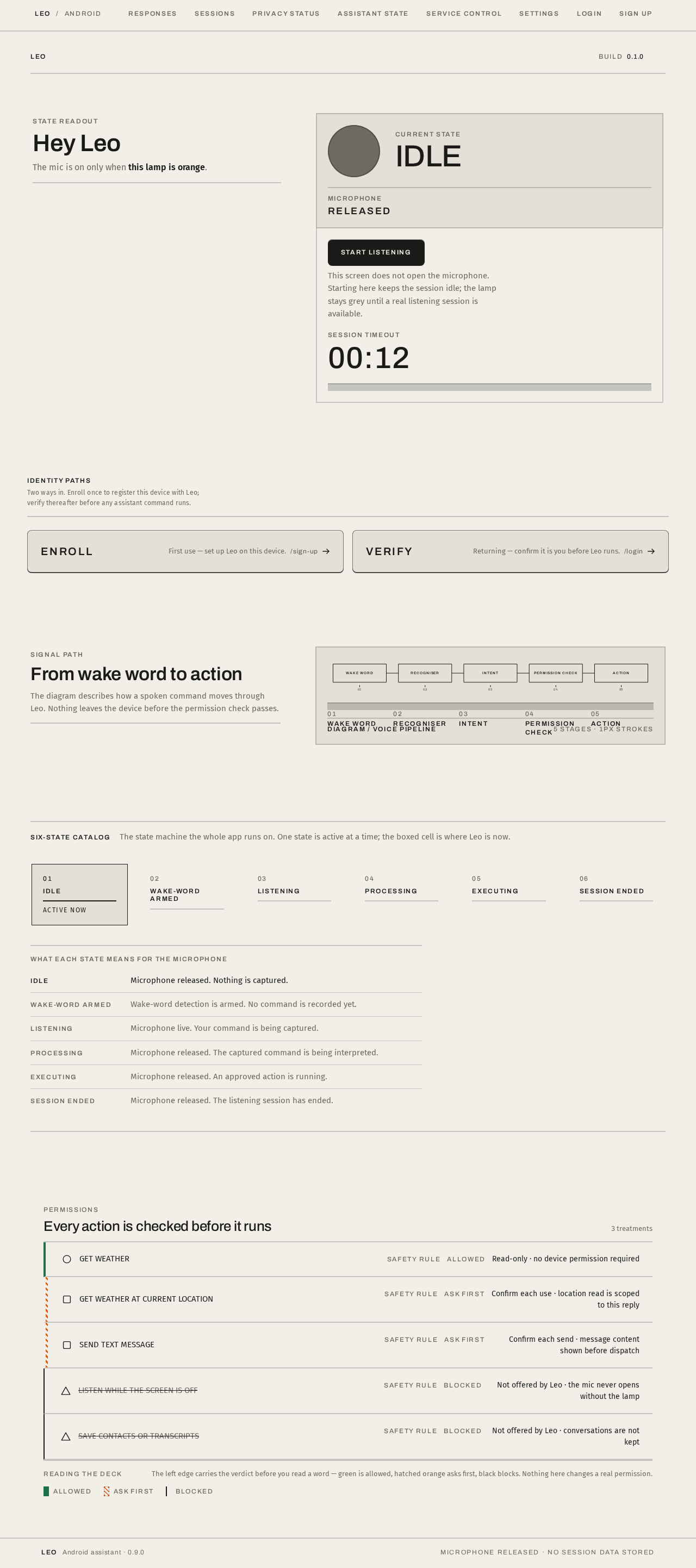
State readout
Hey Leo
The mic is on only when this lamp is orange.
This screen does not open the microphone. Starting here keeps the session idle; the lamp stays grey until a real listening session is available.
Signal path
From wake word to action
The diagram describes how a spoken command moves through Leo. Nothing leaves the device before the permission check passes.
- 01Wake word
- 02Recogniser
- 03Intent
- 04Permission check
- 05Action
Six-state catalog
The state machine the whole app runs on. One state is active at a time; the boxed cell is where Leo is now.
What each state means for the microphone
State readout
Hey Leo
The mic is on only when this lamp is orange.
This screen does not open the microphone. Starting here keeps the session idle; the lamp stays grey until a real listening session is available.
Signal path
From wake word to action
The diagram describes how a spoken command moves through Leo. Nothing leaves the device before the permission check passes.
- 01Wake word
- 02Recogniser
- 03Intent
- 04Permission check
- 05Action
Six-state catalog
The state machine the whole app runs on. One state is active at a time; the boxed cell is where Leo is now.
What each state means for the microphone
No comments yet. Be the first!