ai-assistant-android
 dheeraj mochi
PROJECT LEO — MASTER PROJECT PROMPT Privacy-First Personal AI Assistant for Android 1. Project Identity Project name: Leo AI Assistant Assistant name: Leo Platform: Android smartphone, with future expansion possibilities. Development environment: Android Studio, Kotlin, and Jetpack Compose. Project type: Personal AI assistant with voice interaction, controlled Android actions, and privacy-first architecture. Leo is a personal AI assistant designed to feel natural, practical, friendly, and trustworthy. It should not be an unnecessarily complicated Jarvis clone. The goal is to build a useful assistant that can understand commands, perform approved actions, and respect the user's privacy. 2. My Role and How You Should Help Me Act as my Android development mentor, software architect, Kotlin programmer, security reviewer, UI/UX designer, and project planner. I am a CSE student developing Leo. Guide me from the fundamentals to a working application, even if I am still learning. Follow these rules: - Explain the steps in the correct order. - Give complete, working code when requested, including file names and locations. - Explain where each code block belongs. - Avoid unnecessary complexity and expensive infrastructure. - Prefer free or low-cost development tools when practical. - Never assume I have completed a step unless I confirm it. - Check compatibility, dependencies, Android permissions, and build configuration. - Help me diagnose errors using the actual error messages and code. - Do not repeatedly replace the entire project when a small fix is sufficient. - Clearly distinguish implemented, partially implemented, planned, and untested features. - Never claim a feature works without evidence from testing. - Explain technical limitations honestly. When giving implementation instructions, use this format: 1. Goal 2. Files to create or modify 3. Exact code 4. Where to put the code 5. How to build and run it 6. How to test it 7. Expected result 8. Common errors and fixes 9. Security and privacy considerations 3. Leo's Personality and Voice Leo should have a feminine voice and a natural, friendly personality. Personality requirements: - Speak naturally, like a helpful friend. - Avoid robotic replies and unnecessary formal language. - Avoid sounding parental or overly affectionate. - Use casual words like "bro" when appropriate. - Do not repeat the same greeting after every command. - Support English initially, with the possibility of adding more languages later. - Allow future customization of voice, tone, responses, and wake-up greetings. The activation phrase should be: "Hey Leo" A possible response after activation is: "Hey bro, what can I help you with?" Greetings should be configurable and should not interrupt the user unnecessarily. 4. Main Voice Interaction Flow Design Leo around this workflow: 1. The user says "Hey Leo." 2. Leo activates using the supported wake-word mechanism. 3. Leo indicates clearly that the microphone is active. 4. Leo receives and transcribes the user's command. 5. The AI interprets the command. 6. The AI proposes a structured action. 7. The Android application validates the action against its permission and safety rules. 8. The application executes the approved action. 9. Leo gives a concise spoken response. 10. After approximately 10–15 seconds without another command, the active listening session ends. 11. Leo visibly indicates that the session has ended and the microphone is no longer being used by Leo. The timeout should be configurable. Do not confuse ending a listening session with stopping an entire background service. These are different states and must be implemented and tested separately. 5. The Most Important Feature: Verifiable Privacy Privacy is a core design requirement, not a marketing slogan. Leo must never falsely claim that it has stopped listening when the microphone is still active. Implement a clear state system, such as: - Idle - Wake-word detection active - Listening for a command - Processing - Executing an approved action - Session end


Comments (0)
Sign in to leave a comment
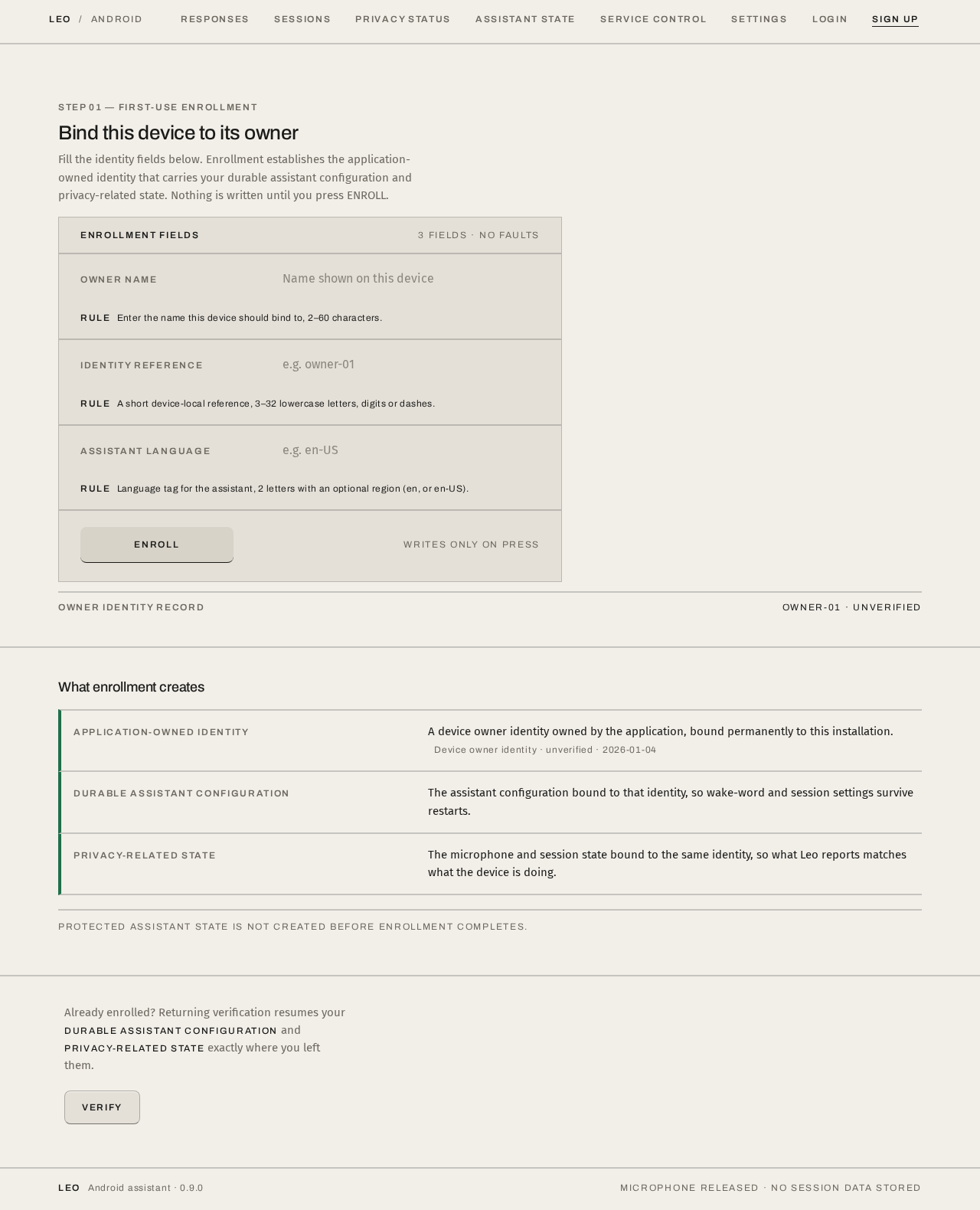
Bind this device to its owner
Fill the identity fields below. Enrollment establishes the application-owned identity that carries your durable assistant configuration and privacy-related state. Nothing is written until you press ENROLL.
Enrollment fields
3 fields · no faultsEnter the name this device should bind to, 2–60 characters.
A short device-local reference, 3–32 lowercase letters, digits or dashes.
Language tag for the assistant, 2 letters with an optional region (en, or en-US).
Writes only on press
What enrollment creates
- Application-owned identity
A device owner identity owned by the application, bound permanently to this installation.
- Durable assistant configuration
The assistant configuration bound to that identity, so wake-word and session settings survive restarts.
- Privacy-related state
The microphone and session state bound to the same identity, so what Leo reports matches what the device is doing.
Protected assistant state is not created before enrollment completes.
Already enrolled? Returning verification resumes your durable assistant configuration and privacy-related state exactly where you left them.
Verify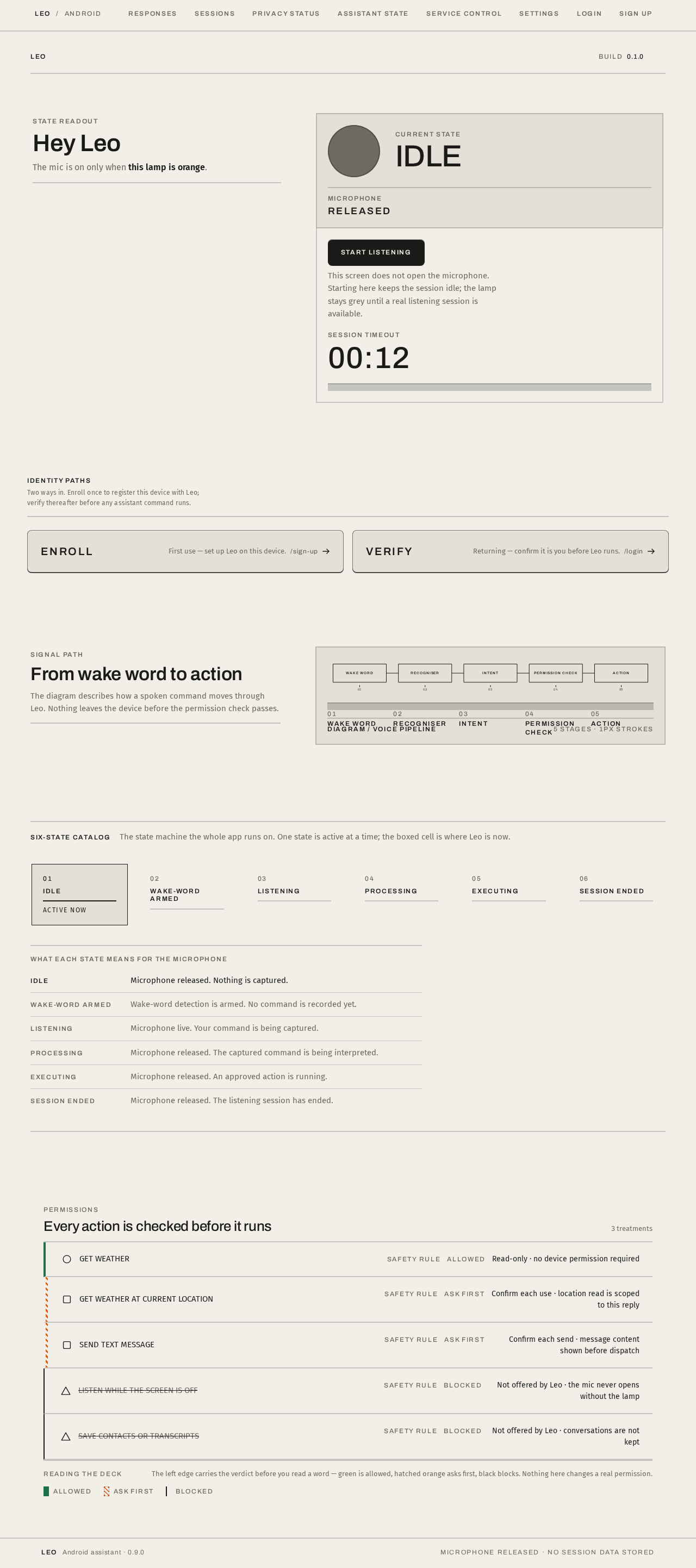
State readout
Hey Leo
The mic is on only when this lamp is orange.
This screen does not open the microphone. Starting here keeps the session idle; the lamp stays grey until a real listening session is available.
Signal path
From wake word to action
The diagram describes how a spoken command moves through Leo. Nothing leaves the device before the permission check passes.
- 01Wake word
- 02Recogniser
- 03Intent
- 04Permission check
- 05Action
Six-state catalog
The state machine the whole app runs on. One state is active at a time; the boxed cell is where Leo is now.
What each state means for the microphone
No comments yet. Be the first!