agile-work
 AHMED IBRAHIM
i want to work on a Student task and Assignment Tracker

Comments (0)
Sign in to leave a comment
System Requirements
System Requirements Document for agile-work
1. Introduction
The "Study Track" web application is designed to assist university students in managing their assignments and deadlines effectively. The application aims to provide a modern, responsive, and user-friendly interface that allows students to track their academic tasks, ensuring they meet deadlines and manage their workload efficiently.
2. System Overview
Study Track is a web-based application that provides university students with tools to manage their assignments and deadlines. The application includes features such as student registration, login, a dashboard for tracking assignments, and functionalities for adding, editing, deleting, searching, filtering, and marking assignments as completed. The design is clean, professional, and responsive, catering to both mobile and desktop users.
2a. Product Interpretation and Delivery Boundary
Study Track is a student-facing application focused on assignment and deadline management. It requires user-specific data persistence and supports responsive design for mobile and desktop devices. The application includes a public landing page, registration, login, and several authenticated pages for managing assignments and profiles. The application identity is app-owned, ensuring continuity across sessions.
2b. Source Content Inventory
Not applicable as no content source directive was provided.
2c. Page Content and Component Coverage
landing page
- Information/State: Introduction to Study Track, purpose of the app.
- Primary Actions: Navigate to registration or login.
- Components: Hero illustration, navigation links, CTA buttons.
student registration
- Information/State: Registration form for new students.
- Primary Actions: Submit registration details.
- Components: Form fields (name, email, password), submit button.
login
- Information/State: Login form for returning students.
- Primary Actions: Submit login credentials.
- Components: Form fields (email, password), login button.
dashboard
- Information/State: Overview of assignments (total, pending, completed, overdue), progress chart.
- Primary Actions: Navigate to My Assignments, Add Assignment, Upcoming Deadlines, Profile.
- Components: Assignment summary, progress chart, navigation links.
My Assignments
- Information/State: List of all assignments with details.
- Primary Actions: View, edit, delete, search, filter, mark as completed.
- Components: Assignment list, search bar, filter options, action buttons.
Add assignmen
- Information/State: Form for adding new assignments.
- Primary Actions: Submit new assignment details.
- Components: Form fields (title, course, description, due date, priority, status), submit button.
UPcoming Deadlines
- Information/State: List of upcoming and overdue deadlines.
- Primary Actions: Review deadlines.
- Components: Deadline list, navigation links.
profile page
- Information/State: Student profile details.
- Primary Actions: Edit profile information.
- Components: Profile details, edit button.
3. Functional Requirements
- As a Student, I should be able to register for an account to use the application. (explicit)
- As a Student, I should be able to log in to access my dashboard and assignments. (explicit)
- As a Student, I should be able to view a dashboard showing assignment totals, status summaries, and a progress chart. (explicit)
- As a Student, I should be able to add new assignments with title, course, description, due date, priority, and status. (explicit)
- As a Student, I should be able to view, edit, delete, search, filter, and mark assignments as completed in My Assignments. (explicit)
- As a Student, I should be able to view upcoming and overdue deadlines. (explicit)
- As a Student, I should be able to manage my profile information. (explicit)
- As a Student, I should be able to log out to terminate my session. (required_inference)
4. User Personas
- Student: University students who register, log in, manage their assignments, track deadlines and completion, and maintain their profile.
5. Core User Flows
-
Registration Flow:
- Student accesses the landing page.
- Student navigates to the registration page.
- Student fills out and submits the registration form.
- System creates a new account and redirects to the login page.
-
Login Flow:
- Student accesses the login page.
- Student enters credentials and submits the form.
- System verifies credentials and redirects to the dashboard.
-
Dashboard Access:
- Student logs in and is directed to the dashboard.
- Student views assignment summaries and progress chart.
- Student navigates to My Assignments, Add Assignment, or Upcoming Deadlines as needed.
-
Assignment Management:
- Student navigates to My Assignments.
- Student views, edits, deletes, searches, filters, or marks assignments as completed.
- Changes are saved and reflected in the dashboard.
-
Add Assignment:
- Student navigates to Add Assignment page.
- Student fills out assignment details and submits the form.
- New assignment is added and reflected in My Assignments and dashboard.
-
Profile Management:
- Student navigates to the profile page.
- Student edits profile information and saves changes.
-
Logout Flow:
- Student selects logout option.
- System terminates session and redirects to the landing page.
6. Visuals Colors and Theme
- Muse: Pablo Stanley
- Palette:
- Background: #FFFAF0
- Surface: #FFFFFF
- Text: #333333
- Primary: #FF6F61
- Accent: #FFD54F
- Muted: #B0BEC5
- Typography:
- Headings: Nunito — Bold
- Body: DM Sans
- Scale: 1.25 modular, 48/36/24/18/16
- Shape Language: Big radii, rounded pill buttons, soft offset shadows
- Layout: Generous padding, card-based sections, rounded corners
- Imagery: Modular vector illustrations of students and study environments
7. Signature Design Concept
The landing page features a large, friendly illustration of diverse students studying together, filling the screen. Oversized headings and a warm coral CTA button are placed over a cream background, creating an inviting and engaging entry point for users.
8. Interaction Model & Motion Direction
- Interaction Model: Animated
- Motion Tempo: Expressive
- Hero Dimensionality: Layered_2d
- Landing Hero Motion Brief:
- Focal Subject: Illustration of students studying
- Input → Transformation → Outcome: User hovers over elements → Elements animate with springy interactions → User feels engaged and encouraged to explore
- Motion Vocabulary: Springy micro-interactions, playful hover states
- Composed First Frame: Students in a study environment with interactive elements highlighted
- Reduced-Motion State: Static illustration with clear, accessible navigation
9. Non-Functional Requirements
- The application must be responsive and function seamlessly on both mobile and desktop devices. (explicit)
- All interactive elements must be fully functional and not just visual. (explicit)
- User data must persist across sessions and be specific to each authenticated user. (explicit)
10. Tech Stack
- Frontend: React
- Backend: Python/FastAPI
- Database: PostgreSQL
- Containerization: Docker/docker-compose
11. Assumptions and Constraints
- The application is intended solely for university students to manage their academic assignments and deadlines.
- User authentication is required for accessing all features beyond the landing page.
- The design must adhere to the creative direction inspired by Pablo Stanley, avoiding blue-based schemes and corporate aesthetics.
12. Glossary
- Assignment: A task or piece of work assigned to a student as part of their studies.
- Dashboard: A user interface that organizes and presents information in an easy-to-read format.
- Responsive Design: An approach to web design that makes web pages render well on a variety of devices and window or screen sizes.
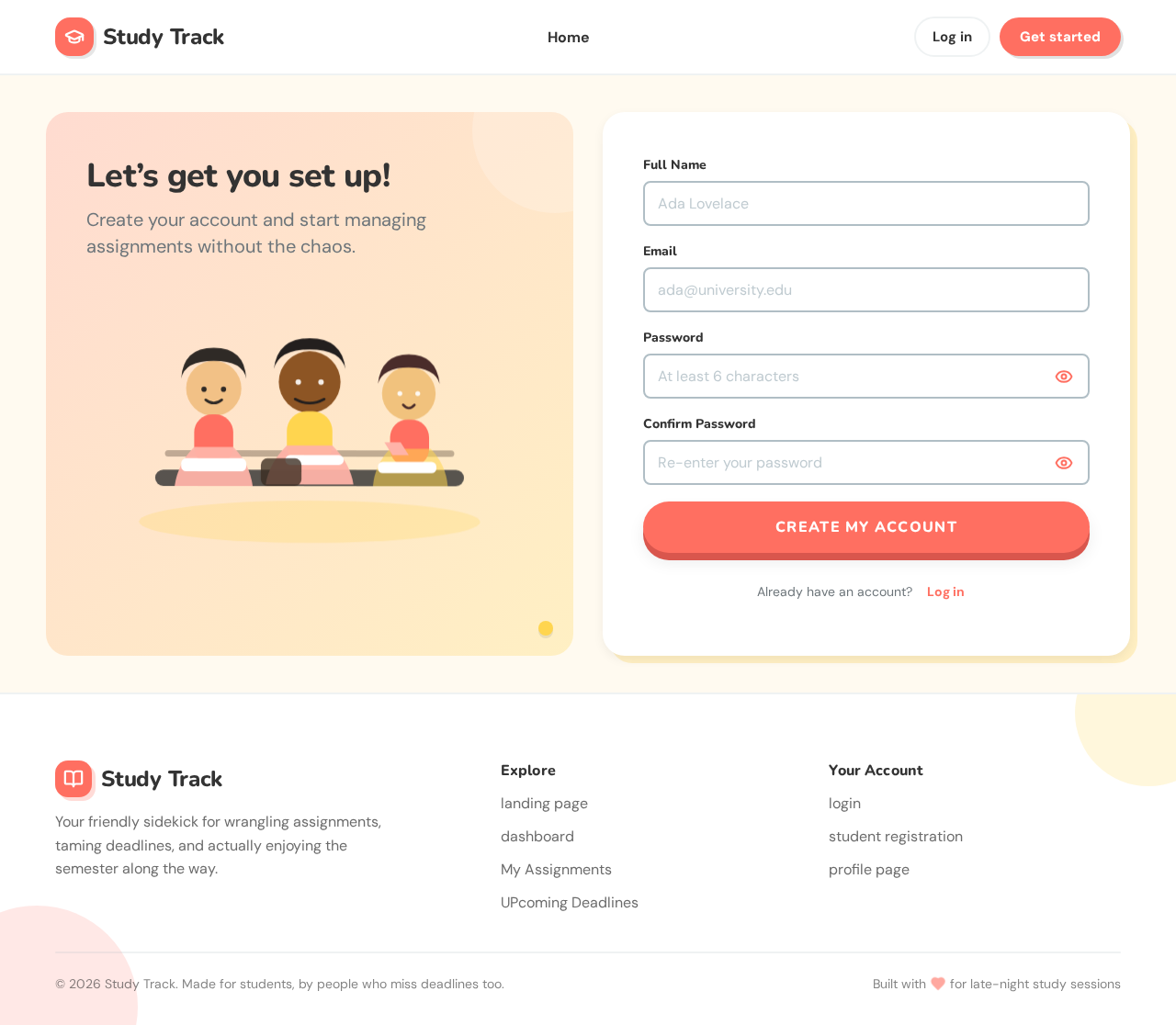
Let’s get you set up!
Create your account and start managing assignments without the chaos.
Let’s get you set up!
Create your account and start managing assignments without the chaos.
No comments yet. Be the first!