agile-website

byDev Patel

I need to generate website for the bhagodya medical College kadi https://share.google/tshwTmNcvibWA9S9G. https://share.google/unUB2hzD8hcOvnxit.

HomeDashboardLoginContactDoctors
Home

Comments (0)

No comments yet. Be the first!

System Requirements

System Requirement Document

System Requirements Document (SRD) for Agile-Website

1. Introduction

This System Requirements Document (SRD) outlines the specifications for the development of the Agile-Website project, which is dedicated to creating a comprehensive and user-friendly website for Bhagodya Medical College, Kadi. The website will serve as a centralized platform for academic resources, faculty profiles, blogs, and other essential information about the college.

The goal is to design a modern, intuitive, and visually appealing website that caters to the needs of students, faculty, and visitors while reflecting the institution's values and identity.

2. System Overview

The Agile-Website project aims to deliver a robust and scalable web platform for Bhagodya Medical College. The website will include features such as:

  • Academic resources for students and faculty.
  • Profiles of doctors and faculty members.
  • A dynamic blog system for updates and articles.
  • Detailed information about the college, including admissions, courses, events, and contact details.
  • A visually engaging design that aligns with the college's branding.

The website will be accessible across devices, ensuring a seamless user experience for both desktop and mobile users. The system will also include a content management system (CMS) for easy updates by administrators.


Page 1 of 6

3. Functional Requirements as Story Points

  • As a Student, I should be able to access academic resources, including curriculum details and event updates.
  • As a Visitor, I should be able to view detailed information about the college, including admissions and course offerings.
  • As a Faculty Member, I should be able to update my profile and share academic resources.
  • As an Admin, I should be able to manage blogs, doctor profiles, and website content.
  • As a User, I should be able to read and interact with blogs published by the college.
  • As a Prospective Student, I should be able to register for admissions or inquire about courses.

4. User Personas

4.1 Students

  • Description: Current students of Bhagodya Medical College.
  • Needs: Access to academic resources, event updates, and curriculum details.
  • Usage: Frequently visits the website for study materials and announcements.
Page 2 of 6

4.2 Faculty Members

  • Description: Professors, lecturers, and doctors associated with the college.
  • Needs: Ability to update profiles, share academic resources, and manage course-related content.
  • Usage: Uses the website to maintain their profiles and upload resources.

4.3 Visitors

  • Description: General public, including prospective students and parents.
  • Needs: Information about the college, admissions, and courses.
  • Usage: Visits the website to learn about the college and its offerings.

4.4 Administrators

  • Description: Website administrators responsible for managing content.
  • Needs: Tools to manage blogs, profiles, and other website content.
  • Usage: Regularly updates the website to ensure accuracy and relevance.

5. Visuals Colors and Theme

Page 3 of 6

Color Palette

  • Background: #F8F9FA (Soft White)
  • Surface: #FFFFFF (Pure White)
  • Text: #333333 (Dark Charcoal)
  • Accent: #007BFF (Vivid Blue)
  • Muted: #6C757D (Cool Gray)

This palette reflects a clean, professional, and academic aesthetic, aligning with the values of Bhagodya Medical College.

6. Signature Design Concept

Interactive Medical Campus Map

The homepage will feature an interactive 3D map of the Bhagodya Medical College campus. Users will see a beautifully rendered map with clickable buildings representing different sections of the website. For example:

  • Clicking on the Library building will lead to academic resources.
  • Clicking on the Administration Block will show admissions and contact details.
  • Clicking on the Faculty Block will display doctor and faculty profiles.

Animations and Interactions:

  • The map will have smooth zoom-in and zoom-out animations.
  • Hovering over a building will highlight it with a glowing outline.
  • A subtle parallax effect will give the map depth as users scroll.

This concept will make the website engaging and memorable, offering a unique way to navigate the college's offerings.

Page 4 of 6

7. Non-Functional Requirements

  • Performance: The website should load within 3 seconds on a standard broadband connection.
  • Scalability: The system should handle up to 10,000 concurrent users.
  • Accessibility: The website must comply with WCAG 2.1 Level AA standards.
  • Localization: The website should support English and Hindi languages.
  • Security: Implement SSL encryption and secure authentication mechanisms.

8. Tech Stack

Frontend

  • React for Web

Backend

  • Python
  • FastAPI

Database

  • MySQL (with Alembic for migrations)
Page 5 of 6

AI Tools

  • GPT 5.4 for user-friendly responses
  • Claude 4.6 Opas for academic or coding work

Orchestration

  • Docker
  • Kubernetes

9. Assumptions and Constraints

  • The website will primarily target users in India, with timezone settings defaulting to IST (Indian Standard Time).
  • The design and content will adhere to the branding guidelines of Bhagodya Medical College.
  • The system will be hosted on a cloud platform to ensure scalability and reliability.

10. Glossary

  • CMS: Content Management System, a tool for managing website content.
  • WCAG: Web Content Accessibility Guidelines, standards for making web content accessible.
  • IST: Indian Standard Time, the time zone for India.
  • SSL: Secure Sockets Layer, a protocol for encrypting internet communications.
Page 6 of 6
Home design preview
Home: View Homepage
Login: Sign In
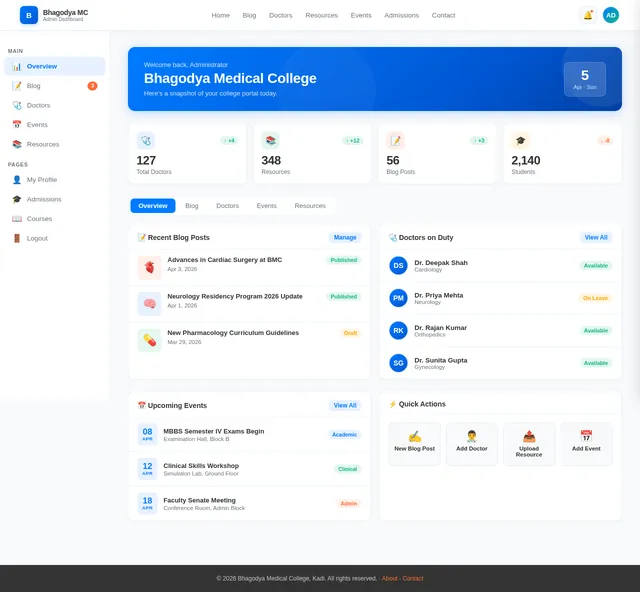
Dashboard: View Overview
Blog: Manage Posts
Blog: Publish Article
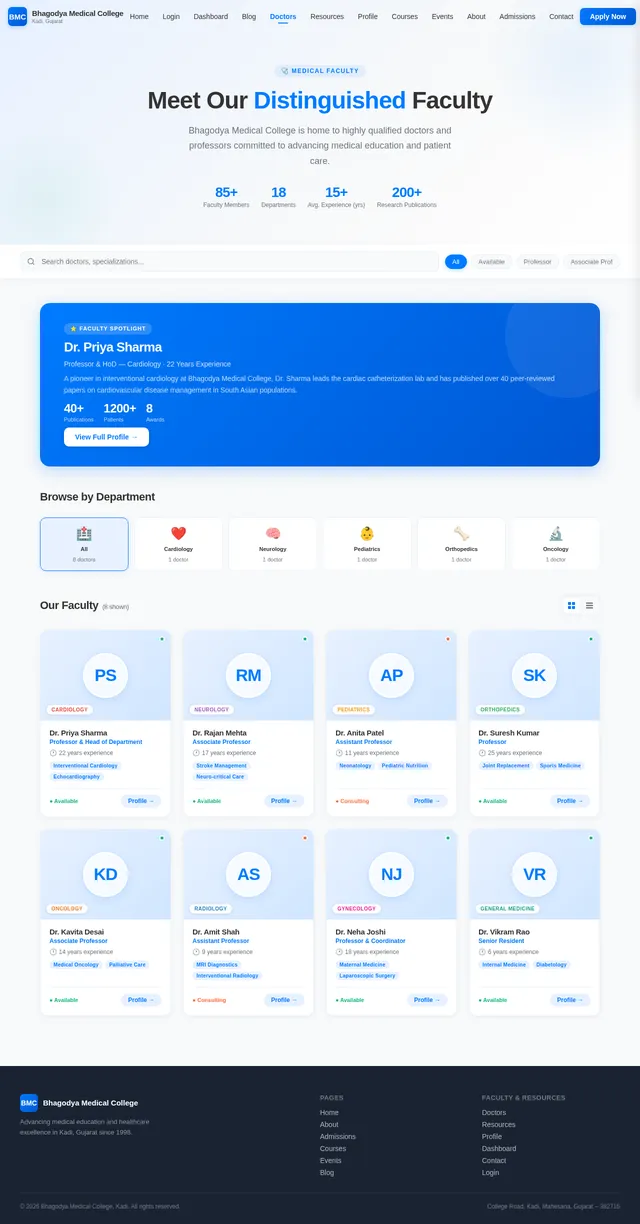
Doctors: Manage Profiles
Resources: Manage Content
Home design preview
Home: View Homepage
Login: Sign In
Dashboard: View Overview
Blog: Manage Posts
Blog: Publish Article
Doctors: Manage Profiles
Resources: Manage Content