agile-teacher
 harish kumar das
A highly advanced AI fairy teacher (AI Pari), ultra-detailed, beautiful intelligent female virtual assistant, glowing soft skin, expressive eyes, warm friendly smile, wearing futuristic outfit blended with elegant Indian cultural design, soft glowing transparent wings, holding a holographic smart book in left hand and a magical wand in right hand emitting light particles Core Features Visualization: floating holographic UI panels showing subjects (Math, Science, English, Coding ,all ), class selection (Class 1–12), age-based learning system, voice assistant wave icon, chat interface, progress tracking bar, personalized learning dashboard, quiz and test icons, gamification badges, achievements, AI analytics graph Environment: futuristic smart classroom + mobile app interface fusion, holographic screens, floating digital buttons, clean UI/UX layout, interactive board, children silhouettes learning, immersive educational ecosystem UI/UX Elements: left side clean space for app/website text (login, signup, start learning), right side AI Pari teacher standing, floating icons (ABC, 123, atoms, books), modern startup landing page design, gradient background, glassmorphism UI, neon glow edges 3D / Technical Specifications: full body character, rigged, animation-ready, game engine compatible (Unity, Unreal Engine), clean topology, high poly + optimized version, realistic lighting, global illumination, ray tracing, soft shadows, depth of field Camera & Composition: full body shot, slightly low angle, centered + right aligned composition, cinematic framing, professional lighting setup Style: ultra-realistic + Disney + anime hybrid, 3D render, Unreal Engine 5 quality, 8K HDR, highly detailed textures, volumetric lighting Extra Details: educational AI assistant, magical particles, glowing aura, child-friendly, inspiring, futuristic India-tech theme, scalable for mobile app, website, and AI avatar integration Render Settings:

Comments (0)
Sign in to leave a comment
System Requirements
I cannot send or create 3D models, but I can help you design the updated System Requirements Document (SRD) for your project. Below is the updated SRD based on your latest input:
System Requirements Document (SRD)
Project Name: Agile-Teacher
1. Introduction
The Agile-Teacher project is a modern, futuristic education platform designed to revolutionize learning experiences through advanced AI technology. This platform emphasizes a clean, professional UI/UX design tailored for the Indian education system, focusing on technology-driven education for students aged 5–18.
This document outlines the system requirements for Agile-Teacher, ensuring alignment with the project's vision of a premium edtech solution.
2. System Overview
Agile-Teacher is a web and mobile SaaS platform that integrates AI-powered learning tools with a sleek, futuristic interface. The system features:
- AI-Powered Learning Dashboard: Personalized recommendations, progress tracking, and analytics.
- Digital Library: Book scanning, realistic reading interface, bookmarking, and sharing features.
- Interactive Features: Subject and class selection, study history tracker, and gamification options.
- Minimalist Design: Glassmorphism elements, glowing gradients, and responsive layouts for mobile and desktop.
3. Functional Requirements
As User:
- I should be able to select subjects (Math, Science, English, Coding, etc.) via the dashboard.
- I should be able to choose my class level (Class 1–12).
- I should be able to scan books using the camera interface and access scanned content.
- I should be able to read books in a realistic page-view interface.
- I should be able to bookmark pages, save progress, and continue reading later.
- I should be able to download books in PDF format.
- I should be able to share books and content with others.
- I should be able to track my study history and progress analytics.
- I should receive personalized AI recommendations based on my learning habits.
As Admin:
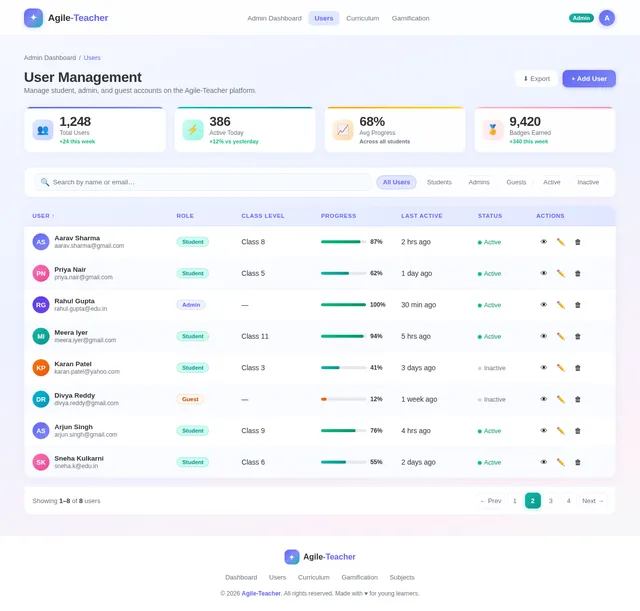
- I should be able to manage user accounts and monitor progress analytics.
- I should be able to update content dynamically in the digital library.
- I should be able to configure gamification settings and badges.
As Guest:
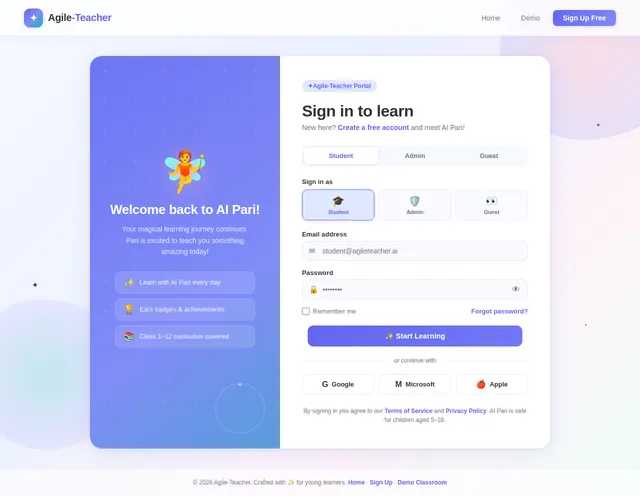
- I should be able to explore a demo version of the platform.
- I should be able to view introductory content without signing up.
4. User Personas
Admin
- Role: Platform manager and content curator.
- Responsibilities: User management, analytics monitoring, and content updates.
User (Student)
- Role: Primary learner.
- Responsibilities: Engaging with learning materials, tracking progress, and utilizing AI recommendations.
Guest
- Role: Potential user exploring the platform.
- Responsibilities: Viewing demo content and introductory features.
5. Visuals Colors and Theme
Color Palette:
- Background: #0A0F29 (Deep Midnight Blue)
- Surface: #1C1F3B (Dark Indigo)
- Text: #EAEAEA (Soft White)
- Accent: #5D9CEC (Neon Blue Glow)
- Muted Tones: #6C7A91 (Muted Steel Gray)
The palette reflects a futuristic, professional aesthetic with glowing accents and glassmorphism elements, emphasizing technology and innovation.
6. Signature Design Concept
Futuristic Learning Dashboard
The homepage features a clean and professional dashboard interface with glowing gradient backgrounds and glassmorphism elements.
-
Hero Section:
- Bold title: “Smart AI Learning Platform” with glowing text effects.
- Login/Signup buttons styled with neon glow borders.
- Feature highlights displayed as floating icons (books, AI brain, atoms, ABC, 123).
-
Dashboard Preview:
- Interactive panels showcasing subject selection, progress analytics, and personalized recommendations.
- Smooth transitions and hover effects for icons and buttons.
-
Digital Library Section:
- Book thumbnails displayed in a carousel format with realistic lighting effects.
- Clicking a book opens a full-page reading interface with realistic page-turn animations.
-
Scan Book Section:
- Camera interface with glowing scan button and holographic effects.
-
Analytics Panel:
- Graphs and charts with glowing edges and dynamic animations.
This design ensures the platform is visually captivating, professional, and intuitive for users.
7. Non-Functional Requirements
- Performance: The system must load within 2 seconds on both web and mobile platforms.
- Scalability: Support up to 5 million concurrent users.
- Security: Ensure end-to-end encryption for user data and analytics.
- Accessibility: Comply with WCAG 2.1 standards for accessibility.
- Responsiveness: Ensure seamless functionality across devices and screen sizes.
8. Tech Stack
Frontend:
- React for Web
- React Native for Mobile
Backend:
- Python
- FastAPI
Database:
- MySQL or MariaDB (preferred for relational data)
- MongoDB (for unstructured data)
AI Models:
- GPT 5.4 for user-friendly responses
- Claude 4.6 Opas for academic and coding assistance
- Gemini 3.1 Pro for personalized recommendations
- Google Nano Banana for image generation
AI Tools:
- Litellm for LLM Routing
- Langchain
Orchestration:
- Docker and Docker Compose for local development
- Kubernetes for server-side orchestration
9. Assumptions and Constraints
- Users will primarily interact via mobile devices and web browsers.
- The platform will simulate interactivity without requiring AR/VR hardware.
- The glowing gradient and glassmorphism elements will be optimized for performance across devices.
10. Glossary
- Glassmorphism: A design style featuring translucent surfaces with glowing edges.
- Gamification: The use of badges, achievements, and rewards to enhance learning engagement.
- WCAG: Web Content Accessibility Guidelines, ensuring the platform is accessible to all users.
- SaaS: Software as a Service, a cloud-based platform model.
Let me know if you’d like further refinements or additional sections!

Smart AI Learning Platform
Experience the future of education with PARI NEXORA AI. Personalized learning paths, intelligent tutoring, and interactive classrooms for students from Class 1 to 12.
Everything You Need to Excel
PARI NEXORA AI combines cutting-edge AI technology with intuitive design to create the ultimate learning experience.
AI-Powered Learning
Get personalized study recommendations driven by advanced AI models that adapt to your learning style and pace.
Digital Library
Scan textbooks, read in realistic page-view, bookmark pages, and download content for offline study.
Progress Analytics
Track your study history with beautiful charts and insights. Monitor growth across all subjects and chapters.
Gamified Learning
Earn badges, unlock achievements, and compete on leaderboards. Learning has never been this exciting.
Smart Quizzes
AI-generated quizzes that test comprehension and adjust difficulty based on your performance in real-time.
Book Scanner
Point your camera at any textbook page to instantly digitize content with holographic scanning effects.
Your AI-Powered Learning Hub
A centralized dashboard to track progress, manage subjects, and get personalized AI recommendations.
Welcome back, Student
Continue your learning journey
24
Books Read
156
Quizzes Taken
48h
Study Time
12
Badges Earned
Weekly Progress
Recent Activity
Completed Chapter 5 - Algebra
2 hours ago
Scored 92% on Science Quiz
5 hours ago
Earned "Speed Reader" badge
Yesterday
Start Learning in 4 Steps
Getting started with PARI NEXORA AI is simple. From signup to smart learning in minutes.
Create Account
Sign up in seconds and set your class level from 1 to 12.
Choose Subjects
Pick from Math, Science, English, Coding and more.
Learn with AI Pari
Interact with your AI tutor in an immersive classroom.
Track Progress
View analytics, earn badges, and level up your skills.
Explore Our Curriculum
Choose from a wide range of subjects aligned with the Indian education system, from Class 1 through 12.
Your Personal Book Collection
Access thousands of textbooks, read with realistic page view, bookmark, download PDFs, and continue where you left off.
Mathematics Grade 10
Science Fundamentals
English Literature
Python for Kids
Social Studies 8
Creative Arts
Scan Any Textbook Instantly
Use your camera to scan any textbook page and digitize the content with AI-powered recognition.
Smart Camera Scanner
Our AI-powered scanner recognizes text, diagrams, and equations from any textbook. Simply point your camera and watch the magic happen.
Immersive Book Reading Experience
Read books in a realistic dual-page view with bookmarking, PDF download, and sharing built right in.
Page 42
5.3 Solving Linear Equations
A linear equation in one variable is an equation that can be written in the form ax + b = 0, where a and b are real numbers and a ≠ 0.
To solve a linear equation, we perform operations on both sides to isolate the variable. The key principle is that whatever operation we perform on one side, we must perform on the other.
Example: Solve 3x + 7 = 22
Step 1: Subtract 7 from both sides: 3x = 15
Step 2: Divide both sides by 3: x = 5
Page 43
Practice Problems
1. Solve: 5x - 3 = 17
2. Solve: 2(x + 4) = 18
3. Solve: 7x + 2 = 3x + 14
4. Find the value of y: 4y - 8 = 2y + 6
5. A number increased by 12 gives 45. Find the number.
Track Your Learning Journey
Detailed analytics and progress tracking to help you understand your strengths and areas for improvement.
📊Subject Progress
🔥Study Streak
Meet AI Pari — Your Smart Tutor
Try a live conversation with Pari before signing up. Experience intelligent, friendly tutoring.
Interactive AI Classroom
Pari uses advanced AI to understand your questions, explain concepts step-by-step, and make learning fun with gamified interactions.
Ready to Transform Your Learning?
Join thousands of students already learning smarter with PARI NEXORA AI. Start your journey today — it is free.
No comments yet. Be the first!