Page 1 of 4
agile-start System Requirements Document
Introduction
The purpose of this document is to outline the system requirements for the "agile-start" project, which aims to develop a simple single-page calculator design. This document will serve as a guide for the development team to ensure all necessary features and functionalities are implemented.
System Overview
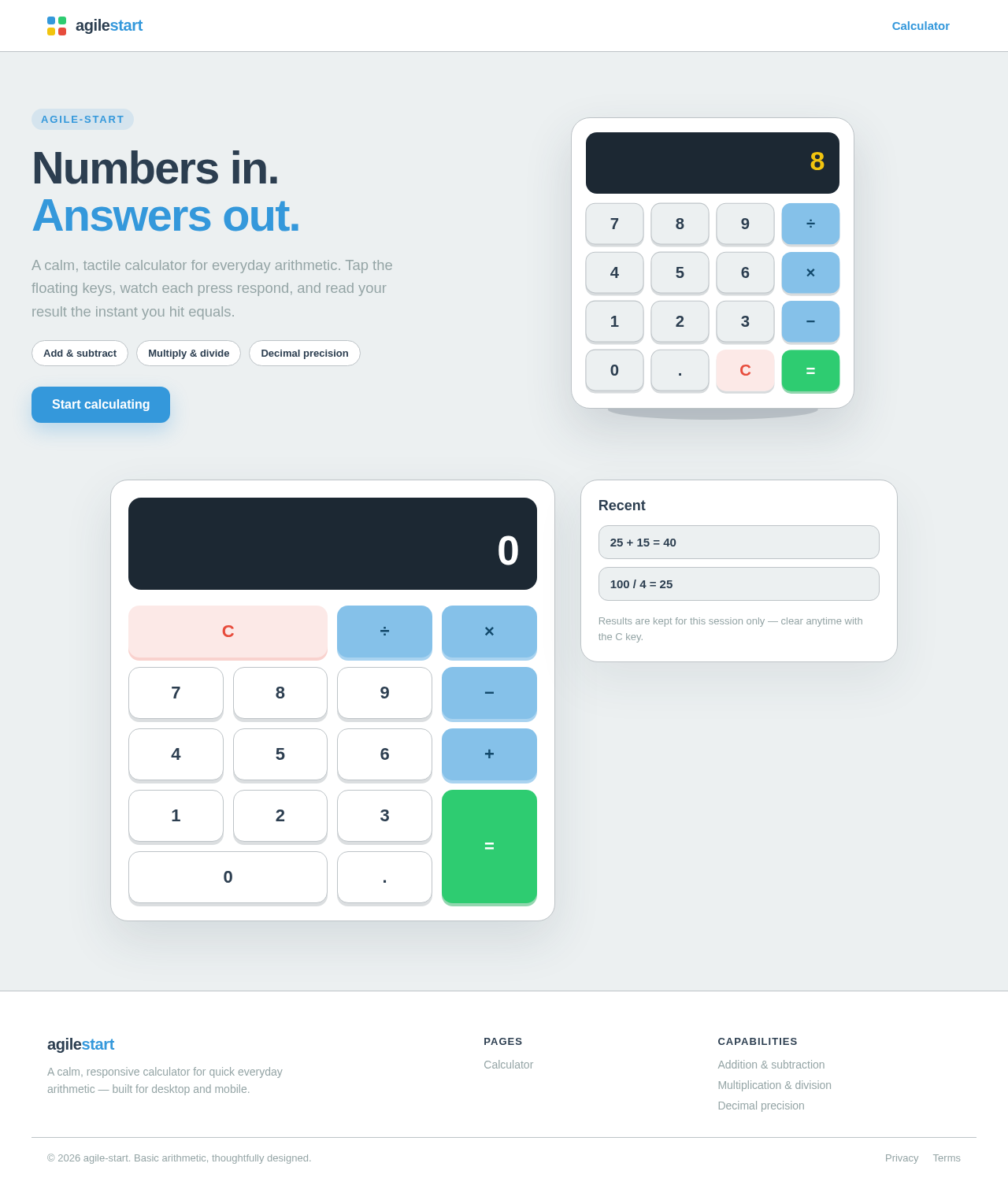
The "agile-start" project is focused on creating a user-friendly, single-page calculator application. The calculator will perform basic arithmetic operations and provide an intuitive interface for users.
Functional Requirements as Story Points
- As a User, I should be able to perform basic arithmetic operations such as addition, subtraction, multiplication, and division.
- As a User, I should be able to clear the current input to start a new calculation.
- As a User, I should be able to view the result of my calculations immediately after input.
- As a User, I should be able to use a decimal point for more precise calculations.
- As a User, I should be able to use the calculator on both desktop and mobile devices.
User Personas
- User: A general user who needs to perform basic arithmetic calculations quickly and efficiently.
Page 2 of 4
Core User Flows
- User opens the calculator application.
- User inputs numbers and selects an arithmetic operation.
- User views the result immediately after completing the input.
- User clears the input to perform a new calculation.
Visuals Colors and Theme
[Default — not specified by user]
- primary: #3498db (a calm blue for the main interface)
- primary_light: #85c1e9 (a lighter blue for hover states)
- secondary: #2ecc71 (a green for secondary actions)
- accent: #e74c3c (a red for error states or important actions)
- highlight: #f1c40f (a yellow for active indicators)
- bg: #ecf0f1 (a light gray for the background)
- surface: #ffffff (white for the calculator surface)
- text: #2c3e50 (a dark blue for primary text)
- text_muted: #95a5a6 (a gray for secondary text)
- border: #bdc3c7 (a subtle gray for borders)
Signature Design Concept
The calculator will feature an interactive, minimalist design with large, easy-to-press buttons. The signature concept will include a "floating" button effect where buttons slightly elevate when hovered over, providing a tactile feel. This will be achieved using motion/react for smooth animations.
Page 3 of 4
Landing Hero Motion Brief
The landing page will display the calculator with a subtle animation loop where the buttons gently pulse to indicate interactivity. When a user clicks a button, it will depress and then return to its original state, simulating a physical button press. The animation will be smooth and responsive, ensuring a seamless experience across devices.
Interaction Model & Motion Direction
- Interaction Model: Animated
- The calculator will feature hover transitions and smooth button animations to enhance user interaction.
- Internal Pages: Static
- As this is a single-page application, there are no additional internal pages.
Non-Functional Requirements
- The application must load quickly and perform calculations without noticeable delay.
- The design must be responsive and function correctly on various screen sizes and devices.
- The application should be accessible, adhering to WCAG 2.1 guidelines.
Page 4 of 4
Tech Stack
[Default — not specified by user]
- Frontend: React for Web
- Backend: None required for a single-page application
- Database: None required for a single-page application
- Local orchestration: Docker (for development environment setup)
Assumptions and Constraints
- The calculator will only perform basic arithmetic operations.
- The application will be a single-page design with no backend integration.
- The design will prioritize simplicity and ease of use.
Glossary
- Arithmetic Operations: Basic mathematical operations including addition, subtraction, multiplication, and division.
- Responsive Design: An approach to web design that makes web pages render well on a variety of devices and window or screen sizes.
This document outlines the requirements for the agile-start project, ensuring a clear understanding of the project's goals and deliverables.
 Diya Trivedi
No comments yet. Be the first!