agile-simple
 Diya Trivedi
create a project to build a simple single design for calculator


Comments (0)
Sign in to leave a comment
System Requirements
System Requirements Document for agile-simple
1. Introduction
agile-simple is a project to build a simple calculator delivered as a single design. The product intent is narrow and deliberate: one calculator, one layout, one visual design — no alternate themes, no layout switcher, no sidebar, no configuration surface. A person opens the product, enters numbers and an arithmetic operation, reads the computed result, and clears or starts a new calculation.
The audience is anyone who needs a fast, friendly, accurate arithmetic result without friction. The product is approachable utility: calm, trustworthy, slightly playful. It is not a corporate SaaS dashboard, not a data-heavy tool, and not a luxury or editorial experience. It should feel like a small piece of well-made software that is immediately understood.
The single design is the product's defining constraint and its signature. Everything in this document serves that constraint.
2. System Overview
agile-simple is a first-party web application with three current pages: Landing, Calculator, and New Calculation. All three are anonymously reachable; no account, sign-in, or identity establishment is required or provided, because the accepted behavior is stateless arithmetic with no durable actor-specific state, commitment, entitlement, or value transfer to bind to a participant.
The only supported human actor is the Calculator User. There are no differentiated permissions, roles, or visibility controls, because no authoritative source establishes differentiated control over shared product state.
Current accepted behavior:
- A public entry surface that states what the calculator is and what it does before calculator use.
- A single calculator design for entering numbers and an arithmetic operation and viewing the computed result.
- A focused continuation for clearing the current entry or calculation and starting another one.
Narrow exclusions carried from the authoritative source and the creative direction:
- No multiple themes, layout switchers, or alternate calculator designs.
- No sidebar, no alternate navigation model.
- No blue or indigo primary/accent on white; no generic SaaS template look.
- No photography, 3D renders, or illustration for its own sake.
- No skeuomorphic realism beyond the 2px ink border and 3px offset shadow.
- No account management, no user profiles, no saved history, no sharing, no export.
2a. Product Interpretation and Delivery Boundary
Delivery ownership. agile-simple is a first-party application-owned custom UI. All three pages are owned by the application and served by the application itself. There is no provider-owned surface, no external destination, and no headless-only delivery in the current scope.
Access ownership. All three pages are anonymously reachable. The accepted journeys — reading what the calculator is, performing arithmetic, and starting a new calculation — create no durable relationship, obligation, entitlement, or value transfer that must remain bound to a particular participant. Application-owned identity is therefore neither required nor provided. There is no sign-in, no sign-up, no invitation, no provisioning, and no deployment bootstrap. No protected destination exists, so no destination owns an access-establishment interaction.
Current boundary. The current product is the three pages above and the arithmetic behavior described in Section 3. Nothing else is current.
Future boundary. No future requirements have been accepted. Anything not described in this document is out of scope for the current generation.
2b. Source Content Inventory
Not applicable. No reference directive in the authoritative sources declares content_source authority, so no source content inventory is produced.
2c. Page Content and Component Coverage
Landing
- Information and state. The page presents the product identity and a plain statement of what the calculator is and does. A narrow top bar carries the wordmark and a single "New calculation" action. A single line of 15px Work Sans copy sits above the calculator slab: "A simple calculator. One design. No fuss." The calculator slab itself is the hero — there is no marketing headline, no subtext block, no blue button, and no gradient blob.
- Primary action. Begin using the calculator, which moves the Calculator User to the Calculator page.
- Supporting actions. Use the top-bar "New calculation" action to move directly to New Calculation.
- Domain entities. Calculator (the single design), Display readout, Key grid, Operator, Operand, Result.
- Component responsibilities.
- Top bar — wordmark plus the single "New calculation" action; no other navigation.
- Intro copy line — one line of Work Sans at 15px, sentence case, stating the product plainly.
- Calculator slab — the off-white body with a 2px ink border, 3px offset shadow, and 12px radius, presented as the hero.
- Display readout — 96px VT323 ink numerals, flush-left inside the slab, with a blinking block cursor.
- Key grid — a strict 4×5 grid of chunky pixel-friendly keys, each with an 8px radius, 2px ink border, and 3px offset shadow.
- States.
- Loading — the slab and grid render immediately from static markup; no data fetch, so no loading state is shown.
- Empty — the readout shows
0with the blinking block cursor. - Success — the Calculator User reaches the Calculator page and the readout is ready for input.
- Error — not applicable; the page has no data dependency and no failure mode.
- Recovery — not applicable.
Calculator
- Information and state. The single calculator design: one off-white slab in the optical center of a warm paper ground, with the display readout spanning the full width of the slab above a strict 4-column key grid. The readout shows the current entry, the active operator, and the computed result. The active operator is highlighted in pine green; the equals key is vermilion orange; the clear key is ink.
- Primary action. Enter digits and an arithmetic operation, then compute the result.
- Supporting actions. Clear the current entry; flip the sign; apply percent; backspace the last entered digit.
- Domain entities. Operand, Operator, Expression, Result, Display readout, Key.
- Component responsibilities.
- Display readout — 96px VT323 ink numerals, flush-left, with a blinking block cursor; shows the running entry and the computed result.
- Digit keys — off-white keys with ink labels, arranged in the 4×5 grid.
- Operator keys — muted keys; the active operator renders in pine green #2F6F4E.
- Equals key — vermilion orange #E4572E; commits the expression and produces the result.
- Clear key — ink; clears the current entry or calculation.
- Backspace, sign-flip, and percent keys — chunky-outline pixel icons drawn on the same 8px grid.
- Top bar — wordmark plus the single "New calculation" action.
- States.
- Loading — not applicable; the calculator is client-side and renders immediately.
- Empty — readout shows
0with the blinking block cursor; no operator is active. - Success — the computed result appears in the readout with a slide-in of the computed result.
- Error — an invalid or incomplete expression (for example, an operator with no second operand, or division by zero) does not produce a result; the readout retains the last valid entry and the expression is not committed.
- Recovery — the Calculator User backspaces, clears, or enters the missing operand and presses equals again.
New Calculation
- Information and state. The focused continuation surface for clearing the current entry or calculation and starting another one. It presents the same single calculator design — the same slab, the same 4×5 grid, the same readout — with the current entry cleared and the readout reset to
0with the blinking block cursor. - Primary action. Begin a fresh calculation from a cleared state.
- Supporting actions. Return to the Calculator page without clearing, if the Calculator User changes their mind.
- Domain entities. Calculator (the single design), Display readout, Key grid, Operand, Operator, Result.
- Component responsibilities.
- Cleared display readout — 96px VT323 ink numerals showing
0, with the blinking block cursor. - Key grid — the same strict 4×5 grid, ready for a new expression.
- Top bar — wordmark plus the single "New calculation" action.
- Cleared display readout — 96px VT323 ink numerals showing
- States.
- Loading — not applicable.
- Empty — readout shows
0; no operator is active; no prior entry is retained. - Success — the Calculator User enters a new expression and computes a result.
- Error — not applicable; the cleared state has no failure mode.
- Recovery — not applicable.
3. Functional Requirements
Each requirement below is a distinct story point with provenance, lifecycle facts, and observable acceptance.
FR-1 — Public entry states what the calculator is. As a Calculator User, I should see a public entry surface that plainly states what the calculator is and what it does, so that I understand the product before I use it.
- Provenance: required_inference (Landing, public_entry_surface).
- Trigger or input: the Calculator User opens the product.
- Observable result or state change: the Landing page renders the wordmark, the single line of copy "A simple calculator. One design. No fuss.", and the calculator slab as the hero.
- Access state: anonymous; no identity required.
- Material failure or recovery: not applicable; the page has no data dependency.
- Continuation: the Calculator User proceeds to the Calculator page.
FR-2 — Enter numbers and an arithmetic operation. As a Calculator User, I should enter numbers and an arithmetic operation on a single calculator design, so that I can build the expression I want to compute.
- Provenance: explicit (the calculator uses a single design; build a project that delivers a simple calculator).
- Trigger or input: the Calculator User presses digit keys and an operator key on the 4×5 grid.
- Observable result or state change: the display readout shows the running entry; the active operator renders in pine green #2F6F4E.
- Access state: anonymous; no identity required.
- Material failure or recovery: if the entry is malformed, the readout retains the last valid entry and the expression is not committed; the Calculator User backspaces or clears and re-enters.
- Continuation: the Calculator User presses the equals key.
FR-3 — View the computed result. As a Calculator User, I should view the computed result of my expression, so that I obtain the arithmetic answer I came for.
- Provenance: explicit (build a project that delivers a simple calculator).
- Trigger or input: the Calculator User presses the equals key (vermilion orange #E4572E).
- Observable result or state change: the computed result appears in the display readout with a slide-in of the computed result.
- Access state: anonymous; no identity required.
- Material failure or recovery: if the expression is incomplete or invalid (for example, an operator with no second operand, or division by zero), no result is produced; the readout retains the last valid entry and the Calculator User corrects the expression.
- Continuation: the Calculator User reads the result and either continues calculating or starts a new calculation.
FR-4 — Clear the current entry or calculation. As a Calculator User, I should clear the current entry or calculation, so that I can discard what I have entered without leaving the calculator.
- Provenance: required_inference (New Calculation; clear key in the single design).
- Trigger or input: the Calculator User presses the clear key (ink).
- Observable result or state change: the display readout resets to
0with the blinking block cursor; no operator is active. - Access state: anonymous; no identity required.
- Material failure or recovery: not applicable; clearing has no failure mode.
- Continuation: the Calculator User enters a new expression.
FR-5 — Start another calculation. As a Calculator User, I should start another calculation from a cleared state, so that I can perform a fresh computation without friction.
- Provenance: required_inference (New Calculation).
- Trigger or input: the Calculator User uses the top-bar "New calculation" action or the clear key.
- Observable result or state change: the New Calculation page presents the same single calculator design with the readout cleared to
0and the grid ready for a new expression. - Access state: anonymous; no identity required.
- Material failure or recovery: not applicable.
- Continuation: the Calculator User enters a new expression and computes a result.
FR-6 — Single design only. As a Calculator User, I should always see one calculator design, so that the product stays simple and I never have to choose a theme or layout.
- Provenance: explicit (the calculator uses a single design; simple calculator only: keep the design simple and single).
- Trigger or input: any interaction with the product.
- Observable result or state change: the same slab, the same 4×5 grid, and the same readout appear on every page; no theme switcher, layout switcher, sidebar, or alternate calculator design is present.
- Access state: anonymous; no identity required.
- Material failure or recovery: not applicable.
- Continuation: not applicable; this is a standing constraint on all other requirements.
FR-7 — Supporting key operations. As a Calculator User, I should use backspace, sign flip, and percent on the same key grid, so that I can correct and adjust my entry without leaving the single design.
- Provenance: required_inference (the creative direction's pixel icon set: backspace, clear, equals, percent, sign flip).
- Trigger or input: the Calculator User presses the backspace, sign-flip, or percent key.
- Observable result or state change: the display readout updates to reflect the removed digit, the flipped sign, or the percent-adjusted value.
- Access state: anonymous; no identity required.
- Material failure or recovery: if there is no digit to remove, the readout is unchanged.
- Continuation: the Calculator User continues entering the expression or presses equals.
4. User Personas
Calculator User
Product context. The Calculator User is the only supported human role. They arrive at agile-simple with a small, concrete arithmetic task and no interest in configuration, accounts, or exploration. They may arrive from a bookmark, a link, or a search, and they expect the calculator to be usable immediately.
Primary goal. Obtain a correct arithmetic result from a simple, single-design calculator with as little friction as possible.
Distinct accepted responsibilities. The Calculator User enters operands and an arithmetic operation, reads the computed result, and clears or starts a new calculation. Their recurring responsibility is the arithmetic loop itself: build an expression, commit it, read the answer, and reset for the next one. They are also the only actor who decides when a calculation is finished and when a new one begins.
Relevant inputs or decisions. They choose digits, an operator, and the equals key; they decide whether to correct an entry with backspace, flip a sign, apply percent, or clear the whole calculation. They decide when to start a new calculation rather than continue from the current result.
Interactions with other accepted participants. There are no other accepted human participants. The Calculator User interacts only with the calculator itself. No handoff, approval, or counterparty response exists in the accepted behavior.
Observable success. The computed result appears in the display readout and matches the arithmetic the Calculator User intended. The readout is the largest element on the page, so success is immediately legible.
What makes this role's work different. The Calculator User's work is a tight, self-contained loop with no durable state, no collaboration, and no identity. Unlike a role that manages records, approves requests, or coordinates with others, the Calculator User's entire responsibility begins and ends within a single sitting, and the product's success is measured by how quickly and clearly that loop completes.
5. Core User Flows
Flow 1 — Understand the product and begin calculating
- The Calculator User opens agile-simple and lands on the Landing page.
- The Landing page renders the warm paper ground, the narrow top bar with the wordmark and the single "New calculation" action, the one line of 15px Work Sans copy "A simple calculator. One design. No fuss.", and the calculator slab as the hero with its 96px VT323 readout showing
0and a blinking block cursor. - The Calculator User reads the copy line and understands that this is a simple calculator with one design.
- The Calculator User begins using the calculator, which moves them to the Calculator page.
- Failure and recovery: not applicable; the Landing page has no data dependency and no failure mode.
- Continuation: the Calculator User is on the Calculator page with the readout ready for input.
Flow 2 — Perform an arithmetic calculation
- The Calculator User is on the Calculator page. The readout shows
0with the blinking block cursor and no operator is active. - The Calculator User presses digit keys on the 4×5 grid. Each key press moves the key down 2px and collapses its offset shadow to 1px for 60ms, then returns. The readout shows the running entry in 96px VT323 ink numerals, flush-left.
- The Calculator User presses an operator key. The active operator renders in pine green #2F6F4E.
- The Calculator User presses digit keys for the second operand. The readout shows the second operand.
- The Calculator User presses the equals key (vermilion orange #E4572E). The computed result slides into the readout.
- The Calculator User reads the result.
- Failure and recovery: if the expression is incomplete or invalid — for example, an operator with no second operand, or division by zero — no result is produced. The readout retains the last valid entry and the expression is not committed. The Calculator User presses backspace to remove the last digit, or presses the clear key to reset the readout to
0, and re-enters the expression. - Continuation: the Calculator User either continues calculating from the result or starts a new calculation.
Flow 3 — Correct an entry with supporting keys
- The Calculator User is on the Calculator page with an entry in progress.
- The Calculator User presses the backspace key. The last entered digit is removed and the readout updates.
- The Calculator User presses the sign-flip key. The sign of the current entry flips and the readout updates.
- The Calculator User presses the percent key. The current entry is adjusted by percent and the readout updates.
- Failure and recovery: if there is no digit to remove, the readout is unchanged and the Calculator User continues.
- Continuation: the Calculator User continues entering the expression or presses equals.
Flow 4 — Clear the current entry or calculation
- The Calculator User is on the Calculator page with an entry or a computed result in the readout.
- The Calculator User presses the clear key (ink). The readout resets to
0with the blinking block cursor and no operator is active. - Failure and recovery: not applicable; clearing has no failure mode.
- Continuation: the Calculator User enters a new expression on the same grid.
Flow 5 — Start another calculation
- The Calculator User has finished a calculation and wants a fresh one.
- The Calculator User uses the top-bar "New calculation" action. This moves them to the New Calculation page.
- The New Calculation page presents the same single calculator design — the same slab, the same 4×5 grid, the same readout — with the readout cleared to
0and the blinking block cursor visible. No prior entry is retained. - The Calculator User enters a new expression and computes a result.
- Failure and recovery: not applicable; the cleared state has no failure mode.
- Continuation: the Calculator User reads the new result and either continues calculating or starts another new calculation.
6. Visuals Colors and Theme
The creative direction is authoritative for this section. The muse is Susan Kare; the headline is charming clarity — pixel-perfect calculator, one design, no template.
Color tokens (light mode)
| Role | Hex | Use |
|---|---|---|
| Background | #F3EFE6 | Warm paper ground filling the viewport |
| Surface | #FFFDF8 | Off-white calculator slab and key faces |
| Text | #1B1B1B | Ink black for maximum legible contrast |
| Primary | #E4572E | Vermilion orange; the equals key and the single hot accent |
| Accent | #2F6F4E | Deep pine green; the active operator and the clear key |
| Muted | #8A857C | Secondary labels and hairline rules |
Proportion: 70% paper/off-white, 20% ink, 8% orange, 2% green. No blue or indigo anywhere.
Typography
- Headings: VT323, all-caps, tight leading, slightly tracked-in. Used for the display readout and key labels.
- Body: Work Sans at medium weight, sentence case, generous line-height.
- Scale: 1.333 modular — 48 / 36 / 27 / 20 / 15 / 13.
- Display readout: 64–96px VT323 (96px on the hero slab).
- Section headings: 36px VT323 caps.
- Body: 15px Work Sans.
- Micro-labels: 11px Work Sans caps with 0.08em tracking.
Shape language
Chunky pixel-friendly geometry. Keys are 8px hard-edged with a 2px ink border and a 3px offset shadow that reads as a physical press, not a hover-lift. Icon tiles are square with 8px corners. No large soft radii, no glass, no blobs. The calculator body is a single rounded-rectangle slab with a 12px radius and a ruled 4×5 key grid you can feel.
Spacing rhythm
Generous outer margins. The grid is visible in the alignment of every key and label. The slab sits in the optical center with the readout spanning the full width of the slab above the strict 4-column key grid.
Imagery style
Pixel icons and simple pictograms only. The calculator keys are the imagery. A small set of chunky-outline pixel icons — backspace, clear, equals, percent, sign flip — drawn on the same 8px grid. No photography, no 3D renders, no gradient blobs.
7. Signature Design Concept
The calculator is the hero.
The first screen is not a marketing hero. It is the calculator itself. A warm paper ground (#F3EFE6) fills the viewport. A single off-white slab (#FFFDF8) sits dead center with a 2px ink border (#1B1B1B) and a 3px offset shadow. The display readout is set in 96px VT323 ink numerals, flush-left inside the slab, with a blinking block cursor. Below it, a strict 4×5 key grid: digits in off-white with ink labels, operators in muted (#8A857C), the active operator in pine green (#2F6F4E), the equals key in vermilion orange (#E4572E), and the clear key in ink. A single line of 15px Work Sans copy sits above the slab: "A simple calculator. One design. No fuss."
There is no centered SaaS headline, no subtext block, no blue button, and no gradient blob. The number is the largest element on the page. The constraint — one design, no theme switcher, no alternate layout — is the signature.
8. Interaction Model & Motion Direction
Interaction Model: Static Motion Tempo: restrained Hero Dimensionality: flat
Landing Hero Motion Brief
- Focal subject. The calculator slab itself, centered on the warm paper ground, with the 96px VT323 readout and the blinking block cursor as the focal point.
- Input → transformation → outcome thesis. The Calculator User presses a key; the key moves down 2px and its offset shadow collapses from 3px to 1px over 60ms; the readout updates with the entered digit or the computed result. The outcome is a legible, physically-clicked calculator that never hover-lifts.
- Motion vocabulary. Frame-by-frame micro animations only: a 60ms key press that moves the key down 2px and removes its offset shadow, a blink cursor in the readout, and a slide-in of the computed result. No easing theatrics, no parallax, no bounce beyond the physical press. State changes are instant and legible.
- Composed first frame. Warm paper ground filling the viewport; the off-white slab dead center with its 2px ink border and 3px offset shadow; the readout showing
0in 96px VT323 ink numerals, flush-left, with the blinking block cursor; the 4×5 key grid below with digits in off-white, operators in muted, the equals key in vermilion orange, and the clear key in ink; the single line of 15px Work Sans copy above the slab. - Reduced-motion state. When the user prefers reduced motion, the key press renders as an instant state change with no 60ms translation, the cursor blinks at a slower cadence or renders as a static block, and the computed result appears without the slide-in. All information and controls remain fully available.
9. Non-Functional Requirements
NFR-1 — Single design constraint. The product must present exactly one calculator design across all pages. No theme switcher, layout switcher, sidebar, or alternate calculator design may exist.
- Provenance: explicit (simple calculator only: keep the design simple and single).
- Rationale: the single design is the product's defining constraint and its signature.
NFR-2 — Legibility of the readout.
The display readout must render at 96px VT323 in ink #1B1B1B on the off-white slab #FFFDF8, flush-left, so that the number is the largest and most legible element on the page.
- Provenance: creative direction (oversized VT323 display readout).
- Rationale: the readout is the primary observable result of every calculation.
NFR-3 — Physical key feedback. Every key must render with a 2px ink border and a 3px offset shadow, and on press must move down 2px with the shadow collapsing to 1px over 60ms.
- Provenance: creative direction (pixel-press keys).
- Rationale: the physical press is the product's tactile signature and must not degrade into a hover-lift.
NFR-4 — Palette discipline.
The palette is limited to background #F3EFE6, surface #FFFDF8, text `#1B1B
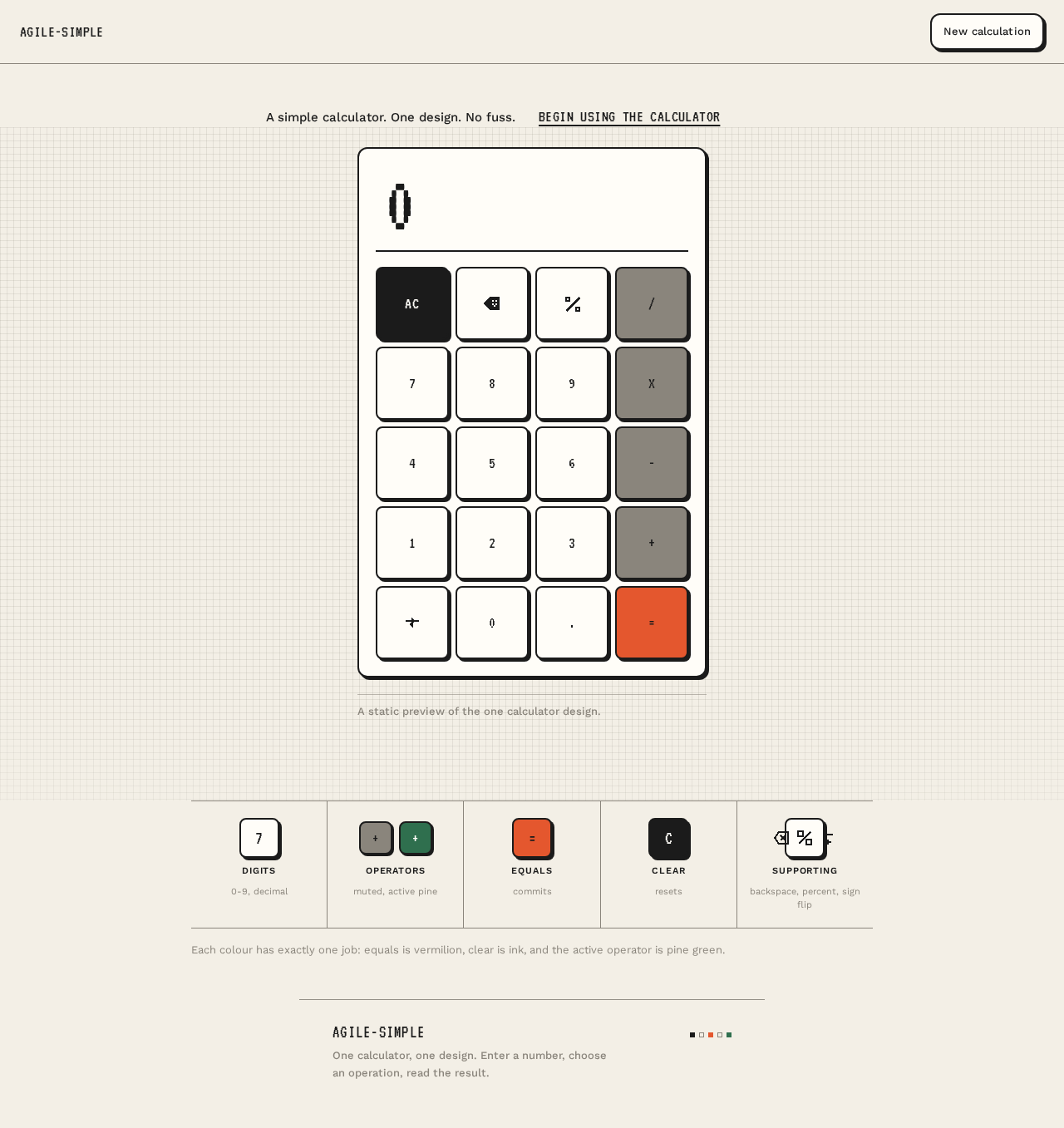
A simple calculator. One design. No fuss.
Begin using the calculatorA static preview of the one calculator design.
Key roles
- Digits0-9, decimal
- Operatorsmuted, active pine
- Equalscommits
- Clearresets
- Supportingbackspace, percent, sign flip
Each colour has exactly one job: equals is vermilion, clear is ink, and the active operator is pine green.
A simple calculator. One design. No fuss.
Begin using the calculatorA static preview of the one calculator design.
Key roles
- Digits0-9, decimal
- Operatorsmuted, active pine
- Equalscommits
- Clearresets
- Supportingbackspace, percent, sign flip
Each colour has exactly one job: equals is vermilion, clear is ink, and the active operator is pine green.
No comments yet. Be the first!