agile-json

byMerington BTor

створи програму для перегляду рецептів, планування, розрахунку, широкий функціонал, мінімум той шо представлений у файлі, враховуй всі нюанси, до найдрібніших, адаптивна програма, різні вийнятки і додаткові функції, фільтри і максимально можлива реалізація. дозволені зміни всього контенту, збереження всієї детальної інформації та відкриття файлу як json а також завантаження вже закладеної в коді бази. також сам проаналізуй і зроби повноцінний html із гарним інтерфейсом, вхідною сторінкою і т. д. ось файл: https://docs.google.com/spreadsheets/d/1liUaTtL7j6p2ryjT_NDJ8fQPaYaOn3BP/edit?usp=sharing&ouid=114984269946464786206&rtpof=true&sd=true

LandingMeal Planner
Landing

Comments (0)

No comments yet. Be the first!

System Requirements

System Requirement Document
Page 1 of 18

System Requirements Document for agile-json

1. Introduction

agile-json is a standalone, adaptive HTML recipe application for home cooking and meal organization. It enables users to browse complete recipe records, filter and sort a recipe collection, inspect recipe details, calculate ingredient quantities for changed serving sizes, plan meals by date and meal slot, edit all recipe and meal-plan content, and manage the complete recipe database through JSON import, export, and restoration of the embedded database.

The application is intended for people who cook at home, organize meals over time, and maintain a portable personal recipe collection. It must preserve every available recipe field and detailed record from the authoritative spreadsheet source, including recipe metadata, ingredients, instructions, notes, servings, tags, times, categories, images or attachments where supplied, and any additional spreadsheet-defined fields.

The current delivery is a polished, locally usable, offline-first HTML application. It does not require a server.

Page 2 of 18

2. System Overview

agile-json shall provide a comprehensive recipe-management experience through the following current capabilities:

  • Viewing complete recipe information.
  • Browsing recipes in grid and list views.
  • Searching, sorting, and filtering recipes by multiple criteria.
  • Filtering by ingredient, cuisine, complexity, preparation time, category, and other available recipe metadata.
  • Opening readable recipe-detail views with ingredients, preparation steps, metadata, notes, servings, tags, and images or attachments when supplied.
  • Recalculating ingredient quantities when the user changes the serving count.
  • Creating, editing, deleting, and reviewing meal plans.
  • Assigning selected recipes to specified dates and meal slots, including breakfast, lunch, and dinner.
  • Creating, editing, and deleting recipes while preserving the complete data structure.
  • Importing compatible recipe databases from JSON files.
  • Exporting the full current recipe collection as a JSON file.
  • Restoring the recipe collection from the preloaded database embedded in the application code.
  • Handling invalid navigation, malformed JSON, missing fields, unsupported data, invalid inputs, and incorrect operations with clear recovery guidance.
  • Operating responsively on desktop, tablet, and mobile devices.
  • Supporting local and offline use by default.
Page 3 of 18

2a. Product Interpretation and Delivery Boundary

agile-json is a browser-delivered, standalone HTML application with application-owned pages and no required authentication, user accounts, server, provider-owned workflow, or external destination.

The recipe database bundled in the application code shall include the recipes from the original spreadsheet for offline use. The user may modify all content after loading the embedded database, load a compatible JSON database, or export the complete currently active dataset.

All current features shall remain within the seven supplied application pages:

  1. Landing
  2. Recipes
  3. Recipe Details
  4. Meal Planner
  5. Calculator
  6. Recipe Editor
  7. Data Management

The application shall not introduce account management, online synchronization, role-based permissions, payment, social sharing, external recipe publishing, or server administration as current functionality.

The following source-listed extension points are future considerations only and are not required in current pages, acceptance criteria, or workflows:

  • Multiple-language localization support.
  • Favorites, ratings, or bookmarks.
  • User notes or comments per recipe beyond recipe data already present in the authoritative spreadsheet.
  • Shopping-list generation from meal plans.
  • Print-friendly recipe or meal-plan views.
Page 4 of 18

2b. Source Content Inventory

The authoritative spreadsheet reference establishes the following verified content and minimum functionality that agile-json shall preserve.

Application and Purpose

  • Project name: agile-json.
  • Application type: standalone adaptive, responsive HTML application; SPA delivery is preferred.
  • Server requirement: no server is required.
  • Purpose: comprehensive recipe management, meal planning, and ingredient calculation.
Page 5 of 18

Recipe Content and Data Fidelity

The application shall preserve and support all recipes and all fields from the spreadsheet with complete structure and fidelity.

The supported recipe record shall include, where present in the source data:

  • Title.
  • Category.
  • Ingredients.
  • Preparation steps.
  • Preparation and other time values.
  • Notes.
  • Servings.
  • Tags.
  • Cuisine.
  • Complexity.
  • Images.
  • Attachments.
  • Any other metadata values or detailed fields contained in the authoritative spreadsheet.

All such fields shall be available for display and file persistence. Fields that are editable in the data model shall remain editable through the Recipe Editor.

Page 6 of 18

Required Functional Coverage

  • Detailed recipe viewing with complete recipe information.
  • Meal planning using selected recipes for specified dates or slots.
  • Portion and serving calculation with dynamically recalculated ingredient quantities.
  • Multi-criteria filtering by ingredient, cuisine, complexity, preparation time, category, and other available metadata.
  • Full recipe-detail persistence.
  • JSON import and export of recipe databases.
  • Embedded, preloaded recipe database from the original spreadsheet.
  • Robust management of invalid or missing data and incorrect operations.
  • Creation, modification, and deletion of recipes and meal plans.
  • Landing-page navigation to major features.
  • Recipe browsing in grid and list displays.
  • Recipe sorting.
  • An interactive calendar or list-style meal-planning interface.
  • A calculator panel or modal accessible from recipe details.
  • Data-management tools for export, import, and reset to the embedded collection.
  • An attractive error page or dialog for invalid navigation, failed file handling, and failed operations.
  • Local and offline use by default.
  • Use of browser-native APIs for JSON import and export.

2c. Page Content and Component Coverage

Page 7 of 18

Landing

  • Information and state

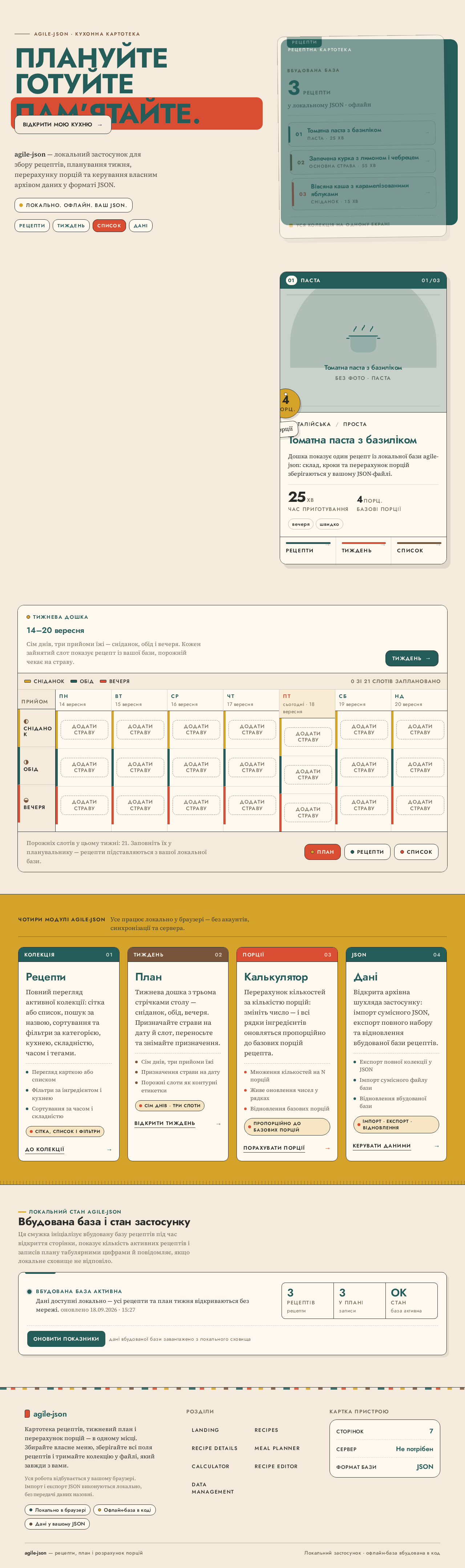
    • Introduces agile-json as a local recipe, planning, calculation, and data-management application.
    • Presents the primary value proposition: recipe collection, weekly meal planning, serving recalculation, and portable JSON data.
    • Shows the local/offline status message: “Локально. Офлайн. Ваш JSON.”
    • Provides a welcoming first-use state without requiring sign-in or account creation.
  • Primary actions

    • Navigate to Recipes.
    • Navigate to Meal Planner.
    • Navigate to Data Management.
    • Enter the application through the primary action “Відкрити мою кухню”.
  • Supporting actions

    • Expose clear navigation to all major application areas.
    • Present the currently available recipe and planning capabilities without implying unsupported online services.
  • Domain entities

    • Recipe collection.
    • Meal plan.
    • JSON database.
    • Embedded recipe database.
  • Component responsibilities

    • Hero composition and high-level application introduction.
    • Primary navigation.
    • Responsive entry layout.
    • Clear orientation for first-time and returning local users.
  • States and recovery

    • Loading state while embedded recipe data initializes.
    • Success state when the active local collection is ready.
    • Error dialog when embedded database initialization fails, with an action to retry loading the embedded database.
    • Invalid-route feedback that directs the user to an available page.
Page 8 of 18

Recipes

  • Information and state

    • Displays the active recipe collection.
    • Supports grid and list display modes.
    • Displays recipe title, category, image when available, preparation time, serving count, and available summary metadata.
    • Uses a geometric category composition with ingredient iconography and recipe title when no image is available.
    • Indicates active filters, active sorting, and result count.
  • Primary actions

    • Search recipes.
    • Filter recipes by ingredient, cuisine, complexity, preparation time, category, and other available metadata.
    • Sort recipes.
    • Switch between grid and list views.
    • Open a selected recipe in Recipe Details.
    • Start creation of a recipe in Recipe Editor.
  • Supporting actions

    • Clear individual filters or clear all filters.
    • Review selected filter values and applied sorting.
    • Navigate to Meal Planner, Calculator, Recipe Editor, and Data Management.
  • Domain entities

    • Recipe.
    • Ingredient.
    • Cuisine.
    • Category.
    • Complexity.
    • Preparation time.
    • Tags.
    • Serving count.
  • Component responsibilities

    • Search input.
    • Multi-field filter controls.
    • Sorting control.
    • Grid/list selector.
    • Featured-recipe card and modular recipe-card presentation.
    • Recipe result list.
    • Navigation rail or responsive mobile navigation.
  • States and recovery

    • Loading state while active recipe data is read.
    • Empty collection state with a route to Data Management for loading embedded or JSON data.
    • No-results state that shows active filters and offers filter clearing.
    • Success feedback when a recipe is created, updated, or deleted and the collection refreshes.
    • Error feedback when recipe data cannot be rendered because required display information is missing; preserve valid remaining records and direct the user to Recipe Editor or Data Management as applicable.
Page 9 of 18

Recipe Details

  • Information and state

    • Displays one selected recipe as a focused, readable full-page recipe record.
    • Shows all available recipe fields from the active data model.
    • Includes title, category, ingredients, steps, times, notes, servings, tags, cuisine, complexity, images, attachments, and any additional spreadsheet-defined fields when available.
    • Shows a recipe image when supplied; otherwise shows the defined category-based geometric fallback.
    • Maintains the source serving count separately from the currently selected calculation serving count.
  • Primary actions

    • Open the Calculator for the selected recipe.
    • Change the selected serving count through the ingredient calculation control.
    • Navigate to Recipe Editor for the selected recipe.
    • Add the selected recipe to a chosen date and meal slot in Meal Planner.
    • Return to Recipes.
  • Supporting actions

    • Review source ingredients and recalculated ingredient quantities.
    • Read ordered preparation steps.
    • Review full metadata, notes, images, and attachments.
    • Preserve all displayed detail during navigation and editing.
  • Domain entities

    • Recipe.
    • Ingredient line.
    • Source servings.
    • Selected servings.
    • Calculated ingredient quantity.
    • Meal-plan assignment.
    • Recipe metadata.
  • Component responsibilities

    • Recipe header and metadata block.
    • Image or geometric fallback artwork.
    • Ingredient column labeled “На N порцій”.
    • Portion stepper.
    • Preparation-step column.
    • Calculator access control.
    • Meal-planning assignment control.
    • Edit action.
    • Missing-data and invalid-recipe feedback.
  • States and recovery

    • Loading state while selected recipe data is retrieved.
    • Not-found state when the requested recipe identifier does not exist in the active collection, with return action to Recipes.
    • Missing optional-field state that omits unavailable metadata without deleting or inventing data.
    • Invalid serving-input state that explains acceptable input and restores the last valid serving count.
    • Calculation warning when an ingredient quantity cannot be numerically scaled; retain the original ingredient text and identify the unresolved item.
    • Success feedback after an assignment to Meal Planner or after a recipe is updated.
Page 10 of 18

Meal Planner

  • Information and state

    • Displays meal plans by date and meal slot.
    • Supports an interactive calendar or list-oriented planning view.
    • Uses a weekly planning board with seven date columns and meal rows for breakfast, lunch, and dinner.
    • Displays assigned recipe information within each planned slot.
    • Shows empty meal slots as clearly labeled “додати страву” controls.
  • Primary actions

    • Create a meal plan.
    • Assign a recipe to a specified date and meal slot.
    • Modify an existing meal-plan assignment.
    • Remove an assignment from a meal-plan slot.
    • Review the resulting plan.
    • Move a recipe between compatible meal slots through direct interaction where supported.
  • Supporting actions

    • Select the displayed week or planning period.
    • Open assigned recipe details.
    • Navigate to Recipes to choose recipes.
    • Navigate to Recipe Editor when recipe content requires correction.
  • Domain entities

    • Meal plan.
    • Plan date.
    • Meal slot.
    • Breakfast.
    • Lunch.
    • Dinner.
    • Recipe assignment.
    • Recipe.
  • Component responsibilities

    • Week selector or equivalent date-range control.
    • Seven-column weekly board.
    • Three color-coded meal rows.
    • Empty-slot assignment controls.
    • Assigned-recipe cards.
    • Add, edit, move, and remove assignment controls.
    • Responsive horizontal day-card scrolling on mobile.
  • States and recovery

    • Loading state while meal-plan data initializes.
    • Empty-plan state showing unassigned slots and recipe-selection entry points.
    • Success confirmation after a plan, assignment, modification, move, or removal is saved locally.
    • Conflict or invalid-slot feedback when an assignment cannot be saved to the selected date or slot.
    • Missing-recipe recovery when a meal-plan assignment references a deleted or unavailable recipe; identify the affected slot and allow removal or reselection.
    • Invalid-date feedback that preserves the existing plan and requests a valid date selection.
Page 11 of 18

Calculator

  • Information and state

    • Provides serving and ingredient calculations for a selected recipe.
    • Shows the recipe’s original serving count, selected serving count, source ingredient quantities, and recalculated quantities.
    • Supports calculator access from Recipe Details.
  • Primary actions

    • Select a recipe when no recipe context is already supplied.
    • Enter or adjust the desired number of servings.
    • Recalculate ingredient quantities.
    • Return to Recipe Details with the selected calculation context.
  • Supporting actions

    • Review unscaled ingredients that do not contain a safely calculable numeric quantity.
    • Restore the source serving count.
    • Navigate to Recipe Details or Recipes.
  • Domain entities

    • Recipe.
    • Source servings.
    • Requested servings.
    • Ingredient.
    • Numeric ingredient quantity.
    • Calculated quantity.
  • Component responsibilities

    • Recipe selector when launched without a selected recipe.
    • Serving input and stepper.
    • Ingredient calculation table or list.
    • Original-versus-calculated quantity presentation.
    • Validation messaging.
    • Animated numeric updates only.
  • States and recovery

    • Empty state when no recipe is selected, with recipe-selection control.
    • Error state when the source recipe has no usable serving value; retain recipe data and explain that calculation cannot proceed until a valid serving value is supplied in Recipe Editor.
    • Invalid requested-serving state for missing, non-numeric, zero, or negative values; retain the last valid result.
    • Partial-calculation state when some ingredients cannot be scaled automatically; show calculated values where possible and preserve original text for unresolved rows.
    • Success state when recalculated quantities are displayed.
Page 12 of 18

Recipe Editor

  • Information and state

    • Supports creation, modification, and deletion of recipes.
    • Presents all fields and business rules represented by the authoritative recipe data structure.
    • Displays existing values for an edited recipe without losing unsupported or unrecognized source fields.
    • Provides a create state for a new recipe and an edit state for an existing recipe.
  • Primary actions

    • Create a recipe.
    • Edit any recipe field.
    • Add, modify, reorder, or remove ingredients.
    • Add, modify, reorder, or remove preparation steps.
    • Edit servings, time values, category, cuisine, complexity, notes, tags, images, attachments, and all additional source-defined fields.
    • Save recipe changes.
    • Delete a recipe after confirmation.
  • Supporting actions

    • Cancel unsaved editing and return to the prior context.
    • Review field validation messages.
    • Navigate to Recipe Details after successful save.
    • Navigate to Data Management when a data-level correction or dataset replacement is required.
  • Domain entities

    • Recipe.
    • Ingredient.
    • Preparation step.
    • Metadata field.
    • Image.
    • Attachment.
    • Tags.
    • Servings.
    • Recipe identifier.
  • Component responsibilities

    • Full-featured recipe form.
    • Repeatable ingredient and step editors.
    • Metadata and detail-field editor.
    • Image and attachment field support where the active data model contains such fields.
    • Save, cancel, and delete actions.
    • Delete-confirmation dialog.
    • Validation summary and field-level error feedback.
  • States and recovery

    • Loading state while an existing recipe is prepared for editing.
    • Validation state for missing required values, invalid numeric values, invalid field formats, or incomplete repeatable entries.
    • Unsaved-change warning before leaving an edited record without saving.
    • Save-success feedback and return continuation to Recipe Details or Recipes.
    • Delete-confirmation state identifying the recipe affected.
    • Delete-success feedback with removal from Recipes and handling of any affected Meal Planner assignments.
    • Delete-failure feedback that preserves the recipe and directs the user to resolve dependent plan references.
Page 13 of 18

Data Management

  • Information and state

    • Displays the status of the active recipe database.
    • Shows the recipe count using tabular numerals.
    • Provides import, export, and embedded-database restoration tools.
    • Clearly distinguishes the currently active local dataset from the bundled embedded database.
  • Primary actions

    • Export the full current recipe dataset as JSON.
    • Load a compatible JSON recipe database from a local file.
    • Restore the embedded recipe database bundled in the application source.
    • Confirm dataset-replacing operations when existing data will be replaced.
  • Supporting actions

    • Review import validation outcomes.
    • Review imported record count and failed-record details where applicable.
    • Cancel an import or restoration operation before confirmation.
    • Navigate to Recipes to review the loaded collection.
    • Navigate to Recipe Editor to correct field-level recipe information.
  • Domain entities

    • Active recipe database.
    • Embedded recipe database.
    • JSON file.
    • Recipe record.
    • Import-validation result.
    • Exported dataset.
    • Meal-plan references affected by recipe replacement.
  • Component responsibilities

    • JSON import drop zone with dashed outline.
    • File picker using browser-native file APIs.
    • Export action.
    • Embedded-database restore action.
    • Import-validation feedback.
    • Confirmation dialogs for replacing the active collection.
    • Recipe-count display.
    • Error and recovery dialog system.
  • States and recovery

    • Loading state while embedded database information is read.
    • Import-ready state.
    • File-type error for non-JSON files.
    • Parse error for malformed JSON.
    • Compatibility error for unsupported JSON structure.
    • Missing-data error for records that cannot meet required data-model rules.
    • Partial-import result only when compatible valid records can be safely retained without corrupting the active dataset; invalid records must be reported.
    • Import-success state identifying the loaded record count.
    • Export-success state after the browser download is initiated.
    • Browser download failure guidance when export cannot begin.
    • Restore-confirmation state before replacing the active collection.
    • Restore-success state after the embedded database becomes active.
    • Restore failure state with retry guidance.
    • Meal-plan reference warning when an import or restoration removes recipes used in existing plans.
Page 14 of 18

3. Functional Requirements

FR-01 — Recipe Collection Viewing

As a Recipe Browser / Home Cook, I should browse the active recipe collection so that I can discover recipes available for cooking.

  • Provenance: explicit.
  • Actor: Recipe Browser / Home Cook.
  • Trigger/input: The user opens Recipes from Landing, navigation, or another application page.
  • Access state: No authentication is required.
  • Requirement: The system shall display recipes from the active local collection in grid and list views.
  • Observable result: The user sees recipe cards or list records containing available summary data, including title, category, preparation time, servings, image when available, and applicable metadata.
  • Failure/recovery: If the active collection is empty, the system shall show an empty state and direct the user to Data Management to load JSON data or restore the embedded database.
  • Continuation: The user can filter, sort, open Recipe Details, begin recipe creation, or navigate to another current page.

FR-02 — Search, Sorting, and Multi-Field Filtering

As a Recipe Browser / Home Cook, I should search, sort, and filter recipes by multiple criteria so that I can quickly locate suitable recipes.

  • Provenance: explicit.
  • Actor: Recipe Browser / Home Cook.
  • Trigger/input: The user enters a search phrase, selects filters, changes filter values, or chooses a sorting method on Recipes.
  • Access state: No authentication is required.
  • Requirement: The system shall support filtering by ingredient, cuisine, complexity, preparation time, category, and other available recipe metadata, as well as sorting and search.
  • Observable result: The recipe result set updates to reflect all active criteria, applied sorting, and search input.
  • Failure/recovery: When no recipes match, the system shall show a no-results state, display active criteria, and allow the user to clear individual filters or all filters.
  • Continuation: The user can refine filters, reset filters, change display mode, or open a matching recipe.
  • Acceptance: Filtering and sorting must not remove or alter recipe information in the active data collection.
Page 15 of 18

FR-03 — Complete Recipe Detail Viewing

As a Recipe Browser / Home Cook, I should open a recipe and read its complete information so that I can prepare it using the full preserved record.

  • Provenance: explicit.
  • Actor: Recipe Browser / Home Cook.
  • Trigger/input: The user selects a recipe from Recipes, Meal Planner, Calculator, or another recipe reference.
  • Access state: No authentication is required.
  • Requirement: The system shall display a complete, readable recipe detail record containing all available source-defined recipe fields, including ingredients, steps, metadata, times, notes, servings, tags, images, attachments, and additional spreadsheet-defined fields where present.
  • Observable result: The user sees the selected recipe’s full information without data loss.
  • Failure/recovery: If the recipe identifier is missing or unavailable, the system shall show a not-found state and provide a return path to Recipes. Missing optional fields shall be represented as unavailable rather than fabricated.
  • Continuation: The user can calculate portions, edit the recipe, assign it to a meal-plan slot, or return to Recipes.

FR-04 — Serving and Ingredient Quantity Calculation

As a Recipe Browser / Home Cook, I should change a recipe’s serving count and see recalculated ingredient quantities so that I can cook the needed amount.

  • Provenance: explicit.
  • Actor: Recipe Browser / Home Cook.
  • Trigger/input: The user selects a recipe and enters or adjusts a requested serving count using Calculator or the calculation control in Recipe Details.
  • Access state: No authentication is required.
  • Requirement: The system shall dynamically calculate ingredient quantities proportionally from the recipe’s source serving count to the requested serving count.
  • Observable result: Calculable ingredient quantities update for the selected number of servings while the original serving count remains available for reference.
  • Failure/recovery: The system shall reject missing, non-numeric, zero, and negative serving values and preserve the last valid calculation. If an ingredient quantity cannot be safely parsed as numeric, the system shall preserve its original text and identify it as not automatically scaled.
  • Continuation: The user can adjust the serving count again, restore source servings, return to Recipe Details, or use the recipe in Meal Planner.
Page 16 of 18

FR-05 — Meal Plan Creation and Review

As a Recipe Planner / Meal Scheduler, I should create and review meal plans by date and meal slot so that I can organize what to cook over time.

  • Provenance: explicit.
  • Actor: Recipe Planner / Meal Scheduler.
  • Trigger/input: The user opens Meal Planner and chooses a date range, week, calendar position, or planning list context.
  • Access state: No authentication is required.
  • Requirement: The system shall allow users to create and manage meal plans using selected recipes for specified dates or slots, including breakfast, lunch, and dinner.
  • Observable result: The user sees a meal-plan board or list showing dates, meal slots, assigned recipes, and unassigned slots.
  • Failure/recovery: Invalid date selection shall be identified without changing the existing plan. Empty plans shall show available slots and clear assignment actions.
  • Continuation: The user can assign recipes, edit plan assignments, remove assignments, review recipe details, or select another planning period.

FR-06 — Meal-Plan Assignment Modification and Deletion

As a Recipe Planner / Meal Scheduler, I should assign, modify, move, and remove recipes in meal-plan slots so that my plan remains accurate.

  • Provenance: explicit.
  • Actor: Recipe Planner / Meal Scheduler.
  • Trigger/input: The user selects an empty or occupied meal-plan slot and chooses a recipe or assignment action.
  • Access state: No authentication is required.
  • Requirement: The system shall support creation, modification, movement, and deletion of meal-plan assignments. It shall allow assignment of selected recipes to a specified date and meal slot.
  • Observable result: The selected meal-plan slot visibly reflects the current assigned recipe or returns to an empty state after removal.
  • Failure/recovery: If the selected recipe does not exist, has been deleted, or cannot be assigned to the selected slot, the system shall preserve the prior valid plan state and show a corrective message. A missing recipe reference shall be identified with actions to remove or replace the assignment.
  • Continuation: The user can continue scheduling recipes, open the assigned recipe, adjust the planning period, or return to Recipes.
Page 17 of 18

FR-07 — Recipe Creation and Full Content Editing

As a Recipe & Data Manager, I should create and edit recipes and all available recipe fields so that the collection remains complete and accurate.

  • Provenance: explicit.
  • Actor: Recipe & Data Manager.
  • Trigger/input: The user opens Recipe Editor to create a new recipe or edit an existing recipe.
  • Access state: No authentication is required.
  • Requirement: The system shall support creation and modification of recipes and shall allow changes to all content. The editor shall honor all data fields and business rules represented in the authoritative spreadsheet data.
  • Observable result: Saved recipes retain their edited title, category, ingredients, steps, times, notes, servings, tags, cuisine, complexity, images, attachments, and all additional supported fields.
  • Failure/recovery: The system shall identify missing required values, invalid numeric values, and invalid field formats without overwriting the last saved record. The user shall be warned before abandoning unsaved changes.
  • Continuation: The user can save and open Recipe Details, return to Recipes, continue editing, or manage the dataset in Data Management.

FR-08 — Recipe Deletion and Plan Integrity

As a Recipe & Data Manager, I should delete a recipe with clear consequences so that obsolete content can be removed without silently corrupting meal plans.

  • Provenance: explicit.
  • Actor: Recipe & Data Manager.
  • Trigger/input: The user chooses to delete a recipe in Recipe Editor.
  • Access state: No authentication is required.
  • Requirement: The system shall support recipe deletion after explicit confirmation.
  • Observable result: The deleted recipe is removed from the active collection and no longer appears in Recipes or Recipe Details.
  • Failure/recovery: Before completion, the system shall identify affected Meal Planner assignments when the recipe is in use. If deletion cannot complete, the recipe and plan references shall remain unchanged and the user shall receive corrective guidance.
  • Continuation: The user can return to Recipes, resolve affected meal-plan slots in Meal Planner, or cancel deletion.
Page 18 of 18

FR-09 — JSON Export

As a Recipe & Data Manager, I should export the full current recipe database as JSON so that I can retain a portable copy of all active content.

  • Provenance: explicit.
  • Actor: Recipe & Data Manager.
  • Trigger/input: The user selects Export in Data Management.
  • Access state: No authentication is required.
  • Requirement: The system shall export and download the complete active recipe dataset as a

Preview dataChanges stay in this preview.
Landing design preview
Diagram Error: Diagram could not be rendered.
Preview dataChanges stay in this preview.
Landing design preview
Diagram Error: Diagram could not be rendered.