Youtube Video To Pdf Ai
 Chandan Ajmera
# Build a Production-Ready AI App: YouTube to PDF AI Build a complete, production-quality application named **YouTube to PDF AI** using **Flutter (latest stable version)** from a **single codebase** for **Android (Google Play), iOS (App Store), and Web (PWA)**. Your goal is to build the **fastest, simplest, and most reliable MVP first**, verify it works, then add advanced features incrementally. Do not generate placeholder code. Produce clean, modular, scalable, production-ready code. ## Core Goal Convert educational videos into clean, searchable PDF notes by automatically detecting slide changes and capturing only useful frames instead of taking screenshots every second. ## No Login The app must work immediately after opening. Do NOT require: * Google Sign-In * Email * Phone Number * OTP * Account Creation Only ask users to sign in if they explicitly choose optional cloud features such as Google Drive backup. ## Platforms Create: * Android App * iPhone App * Responsive Website * Progressive Web App (PWA) All platforms should share the same features and codebase where possible. ## Video Input Support: * Paste YouTube URL (where permitted and compliant with YouTube's terms) * Paste any public video URL * Upload video * Gallery * Camera * Google Drive * Share from another app * Android Share Menu * Drag and Drop (website) ## AI Slide Detection Instead of screenshots every second, detect: * Slide changes * Scene changes * Text changes * Whiteboard changes * Presentation changes Capture only meaningful frames. Remove duplicate images automatically. ## AI Enhancement Automatically: * Crop borders * Straighten pages * Sharpen text * Improve brightness * Improve contrast * Reduce blur * Remove noise * Improve OCR accuracy ## Teacher Removal When possible: * Remove presenter using AI. * Otherwise intelligently crop the presenter while preserving slide content. * Fall back gracefully if neither is feasible. ## OCR Extract all visible text. Allow: * Searchable PDF * Copy text * Export TXT * Export DOCX ## PDF Generator Generate: * Standard PDF * Searchable PDF * Scanned Document PDF * Compressed PDF * High Quality PDF Options: * A4 * Letter * Portrait * Landscape * Compression * Image Quality ## Image Gallery Save extracted frames. Allow: * Rename * Delete * Share * Folder organization ## PDF Editor Support: * Merge * Split * Rotate * Crop * Delete pages * Reorder pages * Add pages * Watermark * Password protection * Digital signature ## Image Editor Support: * Crop * Rotate * Brightness * Contrast * Filters * Draw * Highlight * Shapes * Text * Blur * Undo * Redo ## Scanner Include a document scanner with: * Auto edge detection * Manual crop * OCR * Color * Black & White * Magic Color * Export to PDF ## Search Search: * PDFs * Images * Videos * Notes ## Export Allow export to: * PDF * Images * ZIP * DOCX * TXT ## Cloud (Optional) Support optional: * Google Drive backup * Import * Export * Restore Only request login if the user enables these features. ## Batch Processing Support multiple videos simultaneously. Show: * Progress * Pause * Resume * Cancel ## Themes Support: * Light Mode * Dark Mode * System Theme ## Performance Optimize for: * Fast startup * Low memory usage * Background processing * Large video support * High-resolution PDFs ## Security * Process locally whenever possible. * Request only required permissions. * Encrypt local preferences. * Do not collect unnecessary user data. ## AI Summary Shortcut Add a button labeled **"Summarize with Gemini"** that opens Gemini with the current video URL so users can request a summary themselves. Do not attempt unofficial Gemini automation. ## Website Create a responsive website with: * Upload video * Paste URL * Convert to PDF * Download PDF * Download images * Edit PDF * Scanner (where browser capabilities allow) No login required. ## Modern UI Use: * Material Design 3 * Smooth animations * Rounded corners * Responsive layouts * Accessibility support ## Architecture Use: * Flutter * Riverpod * Hive * SQLite * Google ML Kit OCR * OpenCV * FFmpeg * Repository Pattern * Dependency Injection * Feature-based folder structure Write reusable, documented, production-quality code. ## Google Play & App Store Ready Generate: * Adaptive App Icon * Splash Screen * Privacy Policy template * Play Store description * App Store description * Screenshots placeholder layout * Feature graphic * Versioning * Release configuration * Android App Bundle (AAB) configuration * iOS release configuration ## MVP (Build First) Before implementing advanced features, build a fully working MVP containing: * Gallery video import * Video upload * URL input * AI slide detection * OCR * PDF generation * Image extraction * Scanner * Image editor * PDF editor * Light Mode * Dark Mode * Local storage The MVP must be fully functional and testable. ## Final Requirements * Build the MVP first. * Test every feature before proceeding. * Fix bugs automatically before adding new features. * Keep the UI simple and fast. * Minimize dependencies. * Produce clean, maintainable code. * Ensure the app is suitable for Google Play and the App Store. * Deliver a working test build before adding advanced capabilities.


Comments (0)
Sign in to leave a comment
Project Tasks
No tasks generated yet.
Tasks will appear here as requirements are defined.
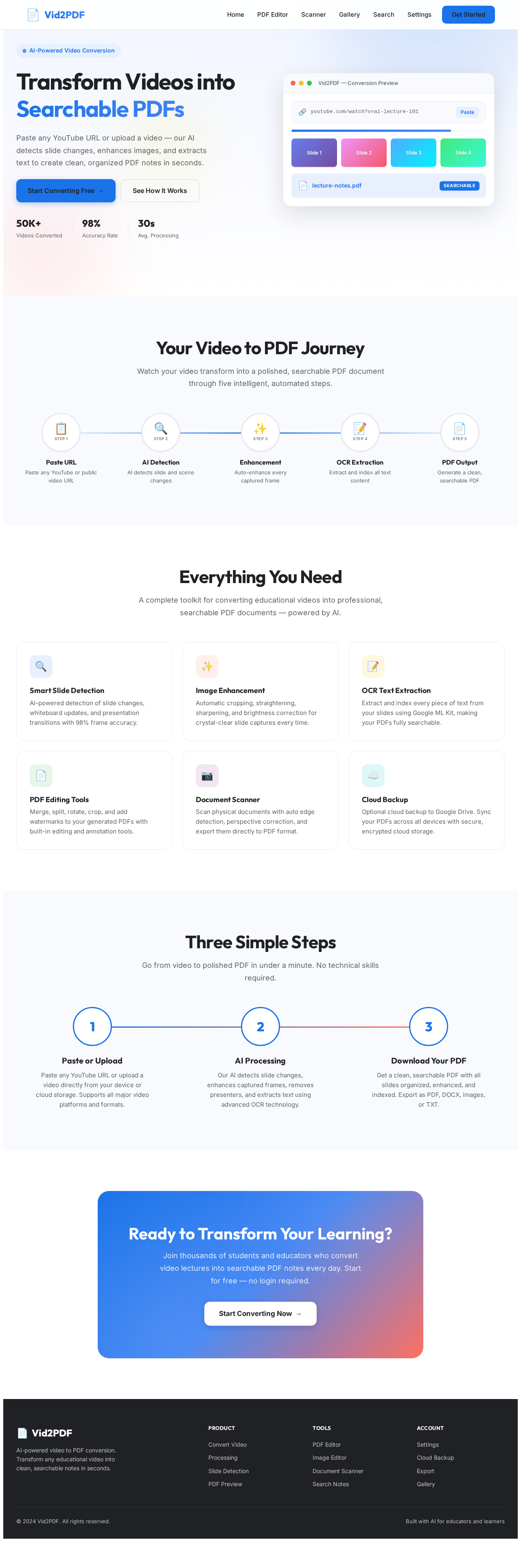
Transform Videos into Searchable PDFs
Paste any YouTube URL or upload a video — our AI detects slide changes, enhances images, and extracts text to create clean, organized PDF notes in seconds.
Your Video to PDF Journey
Watch your video transform into a polished, searchable PDF document through five intelligent, automated steps.
Paste URL
Paste any YouTube or public video URL
Supports YouTube, Vimeo, and any public video URL. You can also upload videos directly from your device or cloud storage for maximum flexibility.
AI Detection
AI detects slide and scene changes
Our AI analyzes each frame to detect slide transitions, whiteboard changes, and presentation movements with 98% accuracy using advanced computer vision.
Enhancement
Auto-enhance every captured frame
Frames are automatically cropped, straightened, sharpened, and adjusted for optimal brightness and contrast. Presenters can even be removed from slides.
OCR Extraction
Extract and index all text content
Advanced OCR powered by Google ML Kit extracts every piece of text from your slides, making your final PDF fully searchable across multiple languages.
PDF Output
Generate a clean, searchable PDF
Get a beautifully formatted PDF with table of contents, bookmarks, and full-text search. Export as PDF, DOCX, images, TXT, or ZIP archive.
Everything You Need
A complete toolkit for converting educational videos into professional, searchable PDF documents — powered by AI.
Smart Slide Detection
AI-powered detection of slide changes, whiteboard updates, and presentation transitions with 98% frame accuracy.
Image Enhancement
Automatic cropping, straightening, sharpening, and brightness correction for crystal-clear slide captures every time.
OCR Text Extraction
Extract and index every piece of text from your slides using Google ML Kit, making your PDFs fully searchable.
PDF Editing Tools
Merge, split, rotate, crop, and add watermarks to your generated PDFs with built-in editing and annotation tools.
Document Scanner
Scan physical documents with auto edge detection, perspective correction, and export them directly to PDF format.
Cloud Backup
Optional cloud backup to Google Drive. Sync your PDFs across all devices with secure, encrypted cloud storage.
Three Simple Steps
Go from video to polished PDF in under a minute. No technical skills required.
Paste or Upload
Paste any YouTube URL or upload a video directly from your device or cloud storage. Supports all major video platforms and formats.
AI Processing
Our AI detects slide changes, enhances captured frames, removes presenters, and extracts text using advanced OCR technology.
Download Your PDF
Get a clean, searchable PDF with all slides organized, enhanced, and indexed. Export as PDF, DOCX, images, or TXT.
Ready to Transform Your Learning?
Join thousands of students and educators who convert video lectures into searchable PDF notes every day. Start for free — no login required.
Start Converting Now→
No comments yet. Be the first!