
Weather disguise

byYash Raj Roy

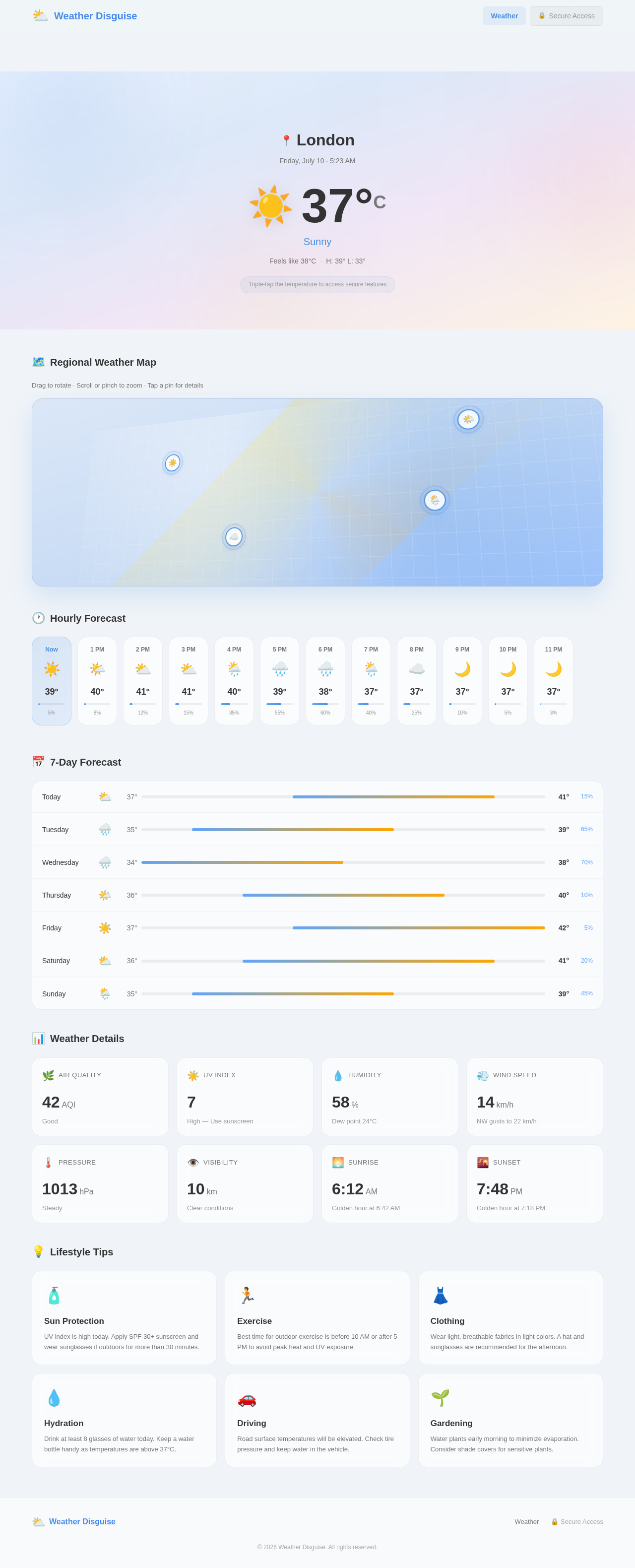
Develop a complete Android application in Android Studio using Kotlin with XML layouts and ViewBinding (not Jetpack Compose). The application name should be Weather and the package name should be com.realweather. Use Min SDK 24 and the latest stable Target and Compile SDK. The project must follow clean architecture, modular coding practices, proper lifecycle management, and compile without errors or warnings. The launcher activity should display a premium, realistic weather application with a gradient background, glassmorphism cards, smooth animations, and responsive layouts. Show the city name, weather condition, weather icon, and a random temperature between 37°C and 42°C every time the app starts. Include hourly and weekly forecasts, air quality, UV index, humidity, wind speed, pressure, visibility, feels-like temperature, sunrise, sunset, and lifestyle tips in a scrollable interface. Only the temperature text should respond to a triple tap, opening a secure LockActivity. After successful authentication, navigate to a WebView-based browser that loads Google by default and supports JavaScript, DOM Storage, cookies, third-party cookies, downloads, uploads, multiple windows, dark mode where supported, loading progress, proper back navigation, and session restoration. Include a modern toolbar with a back button, refresh button, address/search bar, and loading indicator. The app should always launch to the Weather screen. If the app is minimized, reopened, or the phone is locked and unlocked, reopening the app should start from the Weather screen instead of directly opening the browser. Handle Android lifecycle events correctly so protected screens are not unexpectedly restored. Optimize performance with fast startup, low memory usage, smooth scrolling, stable WebView performance, and efficient resource management. Deliver the complete Android Studio project including AndroidManifest.xml, Gradle files, Kotlin source files, XML layouts, adapters, models, themes, colors, strings, drawables, permissions, dependencies, and all required resources. The final application should be polished, responsive, stable, production-ready, and immediately buildable without any manual fixes.

WeatherBrowserLockActivity
Weather

Comments (0)

No comments yet. Be the first!

System Requirements

System Requirement Document

Weather Disguise

Introduction

The "Weather Disguise" project aims to develop a comprehensive Android application named "Weather" using Android Studio with Kotlin, XML layouts, and ViewBinding. The application will provide users with a premium, realistic weather experience, featuring a gradient background, glassmorphism cards, smooth animations, and responsive layouts. Additionally, the app will include a secure browser with advanced functionalities, ensuring smooth performance and correct lifecycle handling.

System Overview

The Weather Disguise application will be a feature-rich weather application that provides users with real-time weather information, forecasts, and lifestyle tips. It will also include a secure browser for enhanced user interaction. The app will be developed using clean architecture and modular coding practices, ensuring efficient resource management and optimal performance.

Page 1 of 6

Functional Requirements

  • As a User, I should see a premium, realistic weather application with a gradient background and glassmorphism cards.
  • As a User, I should view the city name, weather condition, weather icon, and a random temperature between 37°C and 42°C every time the app starts.
  • As a User, I should access hourly and weekly forecasts, air quality, UV index, humidity, wind speed, pressure, visibility, feels-like temperature, sunrise, sunset, and lifestyle tips in a scrollable interface.
  • As a User, I should be able to triple-tap the temperature text to open a secure LockActivity.
  • As a User, after successful authentication, I should navigate to a WebView-based browser that loads Google by default.
  • As a User, I should have a browser that supports JavaScript, DOM Storage, cookies, third-party cookies, downloads, uploads, multiple windows, dark mode, loading progress, proper back navigation, and session restoration.
  • As a User, I should see a modern toolbar with a back button, refresh button, address/search bar, and loading indicator in the browser.
  • As a User, I should always launch the app to the Weather screen.
  • As a User, if the app is minimized, reopened, or the phone is locked and unlocked, reopening the app should start from the Weather screen.
  • As a Developer, I should ensure the app handles Android lifecycle events correctly so protected screens are not unexpectedly restored.
  • As a Developer, I should optimize the app for fast startup, low memory usage, smooth scrolling, stable WebView performance, and efficient resource management.
Page 2 of 6

User Personas

  • Weather Enthusiast: Interested in detailed weather forecasts and lifestyle tips.
  • Casual User: Wants quick access to current weather conditions and forecasts.
  • Security-Conscious User: Values secure access to additional features like the browser.

Core User Flows

  • User opens the app -> Views weather details -> Triple-taps temperature -> Authenticates -> Accesses secure browser.
  • User opens the app -> Views hourly and weekly forecasts -> Scrolls through additional weather information.
  • User opens the app -> Minimizes or locks the phone -> Reopens the app -> Returns to the Weather screen.
Page 3 of 6

Visuals Colors and Theme

  • primary: #4A90E2 (a deep blue for the main brand color)
  • primary_light: #A6C8FF (a lighter tint of the primary for hover states)
  • secondary: #FF6F61 (a coral hue for headlines and emphasis)
  • accent: #FFD700 (a vibrant gold for CTAs and active states)
  • highlight: #FFA500 (a warm orange for hover states and notifications)
  • bg: #F0F4F8 (a light gray for the page background)
  • surface: rgba(255, 255, 255, 0.8) (a translucent white for cards/panels)
  • text: #333333 (a dark gray for primary text)
  • text_muted: #777777 (a softer gray for secondary text)
  • border: rgba(0, 0, 0, 0.1) (a subtle border color)

Signature Design Concept

The Weather Disguise app will feature an interactive, dynamic weather map on the home screen. Users can drag and zoom into different regions to see localized weather conditions. The map will animate with real-time weather effects such as rain, snow, or sunshine, corresponding to the selected area. This will be achieved using @react-three/fiber for 3D effects and gsap for smooth animations. The map will also include clickable weather icons that expand into detailed forecasts and lifestyle tips, creating an engaging and informative user experience.

Page 4 of 6

Interaction Model & Motion Direction

The landing page will utilize a "parallax" interaction model, providing a layered depth effect as users scroll through the weather information. Decorative elements like atmospheric blobs and weather icons will move at different speeds, creating a visually rich first impression. Internal pages, such as settings and profiles, will adopt a "static" model to prioritize layout clarity and reading speed.

Non-Functional Requirements

  • The application must compile without errors or warnings.
  • It should adhere to clean architecture and modular coding practices.
  • The app must be responsive and stable, with efficient resource management.
  • It should handle Android lifecycle events correctly.

Tech Stack

  • Frontend: Kotlin with XML layouts and ViewBinding
  • Backend: Not specified
  • Database: Not specified
  • AI Models: Not applicable
  • AI Tools: Not applicable
  • Local Orchestration: Not applicable
  • Server-side Orchestration: Not applicable
Page 5 of 6

Assumptions and Constraints

  • The app will be developed for Android devices with a minimum SDK of 24.
  • The latest stable Target and Compile SDK will be used.
  • The app will follow clean architecture and modular coding practices.

Glossary

  • Weather Disguise: The project name for the Android weather application.
  • LockActivity: A secure activity that requires authentication to access additional features.
  • WebView: A component that allows the app to display web content.
  • Glassmorphism: A design trend characterized by frosted-glass-like elements.
  • Parallax: An effect where background images move slower than foreground images, creating a sense of depth.
Page 6 of 6
Weather design preview
Weather: Launch App
Weather: View City Temperature
Weather: View Weather Icon
Weather: Scroll Hourly Forecast
Weather: Minimize App
Weather: Reopen App
Weather: View Current Conditions
Weather design preview
Weather: Launch App
Weather: View City Temperature
Weather: View Weather Icon
Weather: Scroll Hourly Forecast
Weather: Minimize App
Weather: Reopen App
Weather: View Current Conditions