WaoSim Test Demo
 Jasmin Isapara
https://staging.waosim.com/ can you please create the UI same like this website


Comments (0)
Sign in to leave a comment
System Requirements
WaoSim Test Demo
Introduction
The WaoSim Test Demo project aims to create a user interface that mirrors the clean and modern aesthetic of the provided reference website. The focus is on usability and clear information presentation, with enhancements to improve visual appearance and user experience.
System Overview
The system will provide a seamless user experience for selecting eSIM plans, checking network coverage, and ensuring device compatibility. The design will incorporate best practices to enhance the visual appeal while maintaining the functionality of the reference site.
Functional Requirements
- As a User, I should be able to view available eSIM plans.
- As a User, I should be able to select the duration of connectivity.
- As a User, I should be able to choose a plan type.
- As a User, I should be able to check network coverage.
- As a User, I should be able to check device compatibility.
User Personas
- User: Individuals looking to purchase and manage eSIM plans.
Visuals Colors and Theme
- primary: #FF6F00 (a vibrant orange for brand identity)
- primary_light: #FFA040 (a lighter tint for hover states)
- secondary: #0055FF (a distinct blue for emphasis)
- accent: #FF4081 (a bright pink for CTAs and active states)
- highlight: #FFC107 (a warm amber for notifications)
- bg: #F5F5F5 (a light grey for background)
- surface: rgba(255, 255, 255, 0.9) (a soft white for cards/panels)
- text: #212121 (a dark grey for primary text)
- text_muted: #757575 (a muted grey for secondary text)
- border: rgba(0, 0, 0, 0.1) (a subtle border color)
Signature Design Concept
Interactive World Map Experience
The homepage will feature an interactive world map as the background, where users can explore different regions by hovering over them. Each region will highlight with a subtle glow, and clicking on a region will zoom in to display available eSIM plans specific to that area. The map will use @react-three/fiber for 3D interaction, allowing users to rotate and explore the globe dynamically. This immersive experience will make the site engaging and intuitive.
Interaction Model & Motion Direction
- Interaction Model: Parallax
- The landing page will feature layered depth with a parallax effect, where the interactive map and UI elements move at different speeds to create a sense of depth.
- Internal pages will be static for clarity and ease of navigation.
Non-Functional Requirements
- The system should load within 3 seconds on a standard internet connection.
- The UI should be responsive and accessible on all devices.
- The design should adhere to accessibility standards (WCAG 2.1).
Tech Stack
- Frontend: React for Web
- Backend: Python, FastAPI
- Database: MySQL
- AI Models: GPT 5.4 for user-friendly responses
- AI Tools: Litellm for LLM Routing
- Local Orchestration: Docker
- Server-side Orchestration: Kubernetes
Assumptions and Constraints
- The design will follow the existing style of the reference site.
- The system will support multiple languages and currencies.
- The project will adhere to data privacy regulations.
Glossary
- eSIM: Embedded SIM, a digital SIM that allows users to activate a cellular plan without a physical SIM card.
- UI: User Interface, the space where interactions between humans and machines occur.
- WCAG: Web Content Accessibility Guidelines, a set of guidelines for making web content more accessible.
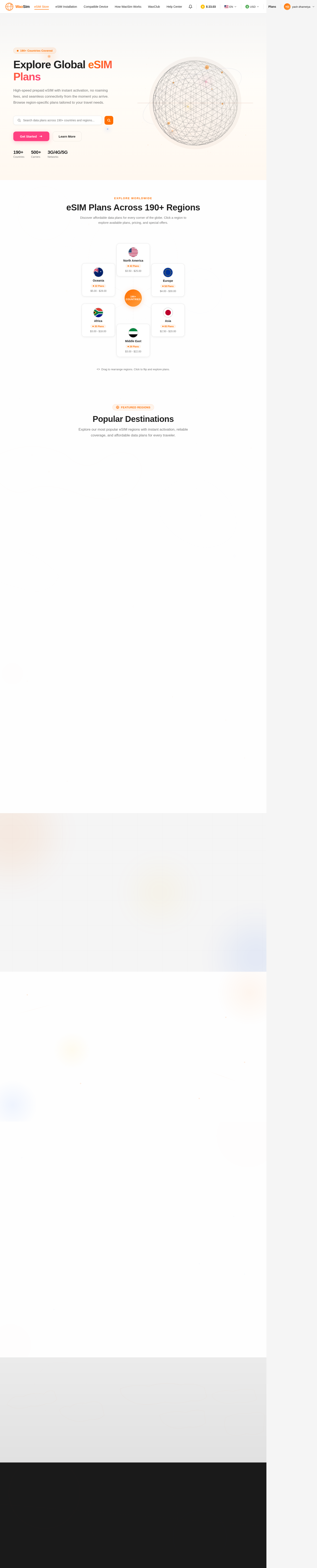
Explore Global eSIM Plans
High-speed prepaid eSIM with instant activation, no roaming fees, and seamless connectivity from the moment you arrive. Browse region-specific plans tailored to your travel needs.
eSIM Plans Across 190+ Regions
Discover affordable data plans for every corner of the globe. Click a region to explore available plans, pricing, and special offers.


Popular Destinations
Explore our most popular eSIM regions with instant activation, reliable coverage, and affordable data plans for every traveler.


United Arab Emirates
High-speed prepaid eSIM with instant activation, no roaming fees, and seamless connectivity across Dubai, Abu Dhabi, and all seven emirates.


Europe Multi-Country
One eSIM for 30+ European countries. Stay connected across the EU with reliable data roaming, perfect for multi-city trips and business travel.


United States
Coast-to-coast coverage on major US carriers. Ideal for tourists and business travelers needing reliable data from New York to San Francisco.


Southeast Asia
Explore Thailand, Vietnam, Singapore, and more with a single eSIM. Affordable daily plans with predictable usage for backpackers and digital nomads.
Everything You Need to Stay Connected
High-speed prepaid eSIM with instant activation, zero roaming fees, and seamless multi-device support across 190+ countries.
Instant Activation
Get connected in minutes. Download your eSIM profile and activate your data plan instantly — no waiting, no store visits, no shipping delays.
No Roaming Fees
Travel across 190+ countries without surprise charges. Enjoy local rates with prepaid data plans that keep you connected at a fraction of traditional roaming costs.
Multi-Device Support
Use your eSIM across smartphones, tablets, and smartwatches. One plan, multiple devices — manage everything seamlessly from your WaoSim dashboard.
Get Connected in 4 Easy Steps
From selecting your destination to enjoying seamless connectivity — setting up your eSIM takes just minutes, not hours.
Select Region
Browse our interactive map to choose your travel destination from 190+ countries and regions worldwide. Find the perfect coverage area.
Choose Plan
Pick the data plan that fits your needs — from daily passes to long-term packages. Compare unlimited and daily data options with transparent pricing.
Activate eSIM
Scan the QR code or install directly from your device settings. Your eSIM activates instantly — no physical SIM card or store visit needed.
Stay Connected
Enjoy seamless high-speed connectivity from the moment you arrive. No roaming fees, no surprises — just reliable internet wherever you go.
What Our Travelers Say
Join thousands of happy travelers who stay connected worldwide with WaoSim Test Demo eSIM plans.


Find Your Perfect eSIM Plan
High-speed prepaid eSIM plans across 190+ countries. Instant activation, no roaming fees, and seamless connectivity from the moment you arrive.


Ready to Explore the World?
Get instant connectivity in 190+ countries with WaoSim Test Demo. No roaming fees, no physical SIM cards — just seamless data wherever you travel.
No comments yet. Be the first!