
Vouqis-Verify

bySundar

Vouqis Verify AI Change Verification for Engineering Teams Vouqis Verify is an AI Change Verification platform that helps engineering teams verify AI-related changes before they are deployed to production. As software increasingly incorporates large language models (LLMs), retrieval systems, AI agents, prompts, and tool integrations, traditional software engineering practices are no longer sufficient. Existing CI/CD pipelines can confirm that code builds successfully and unit tests pass, but they cannot determine whether an AI-related change has altered application behavior in a way that is safe, reliable, or aligned with business expectations. Vouqis Verify addresses this gap by analyzing AI-related changes in GitHub pull requests, identifying modifications that could affect AI behavior, evaluating potential deployment risks, and generating structured deployment evidence to support engineering review. Rather than replacing human reviewers, Vouqis Verify equips them with the information needed to make better deployment decisions. The Problem Engineering teams frequently modify AI systems by: Updating prompts Changing LLM models Modifying Retrieval-Augmented Generation (RAG) pipelines Updating AI agents Adding or removing external tools Changing evaluation datasets Updating system instructions Modifying inference parameters Although these changes may appear small, they can significantly affect application behavior. Today, most teams review these changes manually. Typical code review answers questions such as: Does the code compile? Are tests passing? Is the implementation correct? However, these reviews rarely answer questions like: Will the AI behave differently? Has answer quality changed? Has retrieval quality degraded? Could this change introduce hallucinations? Should additional evaluations be run? Is this AI change safe to deploy? This creates an AI verification gap between development and deployment. Our Solution Vouqis Verify introduces an AI verification layer into the software development workflow. Instead of reviewing only source code, it analyzes AI-specific modifications and generates deployment evidence before changes reach production. For every AI-related pull request, Vouqis Verify helps answer: What AI components changed? How significant is the change? What evaluations should be executed? What risks are introduced? What evidence supports deployment? Should reviewers investigate further before merging? How Vouqis Verify Works Developer ↓ Creates Pull Request ↓ Vouqis Verify analyzes the changes ↓ Detects AI-related modifications ↓ Classifies affected AI components ↓ Assesses deployment risk ↓ Recommends required evaluations ↓ Generates a Review Package ↓ Engineering Review ↓ Merge Decision ↓ Production Core Features AI Change Detection Automatically detects AI-related modifications, including: Prompt changes Model upgrades Agent workflow modifications RAG pipeline updates Tool integrations Evaluation changes AI configuration updates AI Component Classification Classifies each detected modification into its corresponding AI component. Examples: Prompt Model Agent Retrieval Tool Evaluation Configuration This helps reviewers immediately understand what changed. Risk Assessment Evaluates how likely an AI change is to affect production behavior.

LandingRepositoriesPullRequestsLogin
Landing

Comments (0)

No comments yet. Be the first!

System Requirements

System Requirement Document
Page 1 of 7

Vouqis Verify System Requirements Document

1. Introduction

Vouqis Verify is an AI Change Verification platform designed to assist engineering teams in verifying AI-related changes before they are deployed to production. As software increasingly incorporates AI components such as large language models (LLMs), retrieval systems, AI agents, prompts, and tool integrations, traditional software engineering practices fall short in ensuring safe and reliable deployments. Vouqis Verify addresses this gap by analyzing AI-related changes in GitHub pull requests, identifying modifications that could affect AI behavior, evaluating potential deployment risks, and generating structured deployment evidence to support engineering review.

2. System Overview

Vouqis Verify integrates into existing GitHub pull request workflows to provide a verification layer for AI-related changes. It automatically detects AI modifications, classifies affected components, assesses deployment risks, and generates a Review Package to aid human reviewers in making informed merge decisions.

3. Functional Requirements

Page 2 of 7

AI Change Detection

  • As a reviewer, I want AI-related changes identified automatically so I know what changed before reviewing the pull request.
  • As a reviewer, I want prompt modifications identified so I understand prompt-related changes.
  • As a reviewer, I want model updates identified so I understand changes to model configuration.
  • As a reviewer, I want retrieval-related modifications identified so I understand knowledge source changes.
  • As a reviewer, I want agent workflow modifications identified so I understand workflow updates.
  • As a reviewer, I want tool integration changes identified so I understand external dependency changes.

Review Package Generation

  • As a reviewer, I want a structured summary of AI-related changes so I can review the pull request more efficiently.
  • As a reviewer, I need a concise summary of AI changes and evaluation results.

GitHub Pull Request Integration

  • As a reviewer, I want the Review Package available inside the pull request so I do not need another tool to review changes.

CLI Execution

  • As a developer, I want to run verification locally so I can generate a Review Package before opening a pull request.

Structured JSON Output

  • As an engineer, I want structured output so future integrations are possible.
Page 3 of 7

Additional Functional Requirements

  • As a reviewer, I want autonomous merge decisions to be suggested based on AI change verification results.
  • As a developer, I want CI/CD orchestration to be supported for seamless integration into existing workflows.
  • As a developer, I want a CLI that provides a simple developer experience with commands like vouqis init, vouqis verify, and vouqis doctor.
  • As an engineering team, I want cloud-hosted verification to be available for scalable and remote verification processes.

4. User Personas

  • AI Engineers: Responsible for developing and maintaining AI models and systems.
  • Applied AI Engineers: Focus on applying AI technologies to solve specific problems.
  • Software Engineers: Review AI-related pull requests and ensure code quality.
  • Engineering Managers: Oversee engineering teams and ensure consistent review quality.
  • Technical Founders: Ensure AI changes are evaluated before production deployment.

5. Core User Flows

  1. Developer Opens Pull Request

    • Vouqis Verify is triggered.
    • AI Change Detection occurs.
    • Verification Engine processes changes.
    • Review Package is generated and added to the pull request.
    • Reviewer examines deployment evidence.
    • Engineering discussion leads to a merge decision.
  2. Local Verification (CLI)

    • Developer runs local verification using CLI.
    • Review Package is generated locally.
    • Developer opens a pull request with pre-generated evidence.
Page 4 of 7

6. Visuals Colors and Theme

  • Professional Blues and Teals: Reflecting a professional and trustworthy interface suitable for engineering teams.

7. Signature Design Concept

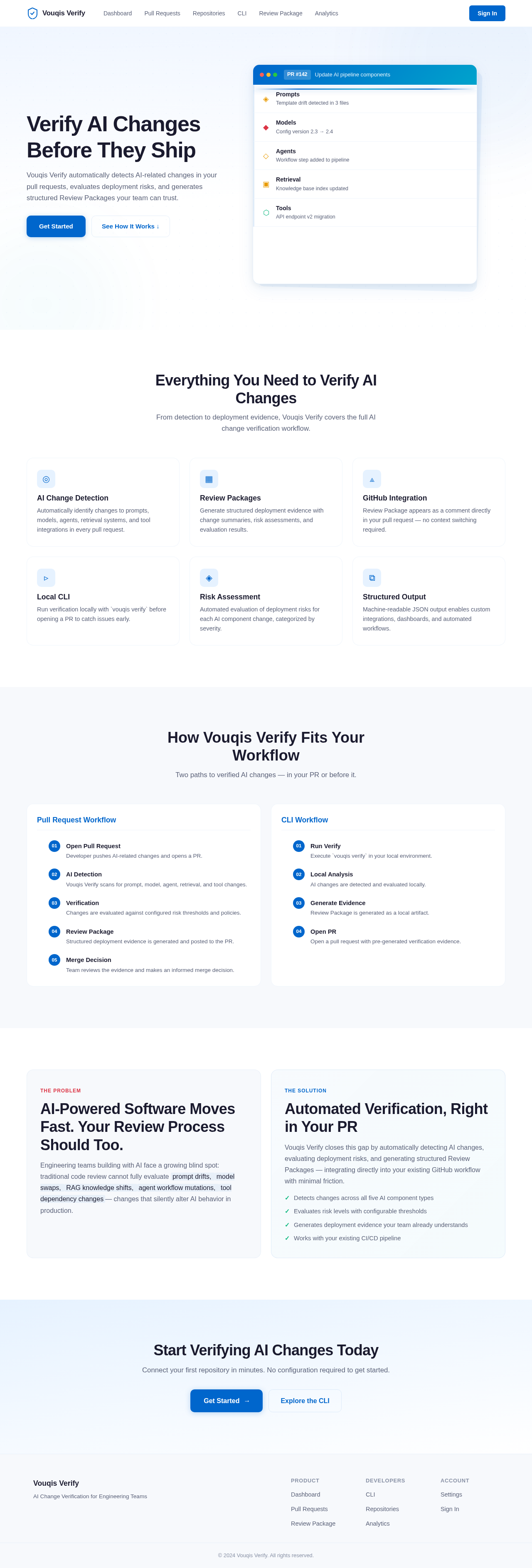
  • Interactive AI Workflow Visualization: The landing page will feature an interactive visualization of an AI workflow. Users can hover over different components (e.g., prompts, models, agents) to see detailed information about changes and risks. This dynamic interaction will be built using motion/react for smooth transitions and animations, providing an engaging and informative experience.

Landing Hero Motion Brief

  • Concept: "AI Change Detection in Action"
  • Story: As users scroll, they will see a visual representation of AI components (prompts, models, agents) being analyzed. Each component will animate to show changes detected by Vouqis Verify, culminating in a Review Package being generated.
  • Animation: Components will smoothly transition and highlight changes with subtle animations. The Review Package will appear as a dynamic, expanding card that summarizes the changes.
  • Interaction: Users can click on components to see detailed change logs and risk assessments.
  • Responsive Design: The animation will adapt to different screen sizes, ensuring a consistent experience across devices.

8. Interaction Model & Motion Direction

  • Animated: The landing page will feature moderate scroll-triggered reveals and hover transitions, providing an engaging experience while maintaining clarity and focus on the content.

9. Non-Functional Requirements

  • Performance: The Review Package should be generated quickly to support the existing pull request review workflow without introducing delays.
  • Security: Repository isolation, least privilege access, and minimal data retention are key principles.
Page 5 of 7

10. Tech Stack

  • Backend: Python
  • CLI: Typer
  • Configuration: YAML
  • Output: Rich, JSON, Markdown
  • Testing: Pytest
  • CI/CD: GitHub Actions

11. Assumptions and Constraints

  • Assumptions: Teams prefer integrating with existing workflows and reusing existing evaluation frameworks. Human reviewers remain responsible for merge decisions.
  • Constraints: Integration is limited to GitHub pull request workflows. No runtime monitoring or model hosting is included in the MVP.

12. Glossary

  • AI Change: Any modification affecting prompts, models, RAG, agents, or tools.
  • Review Package: Structured deployment evidence generated for a pull request.
  • Evaluation Pipeline: Existing evaluation command configured by the engineering team.
  • Deployment Evidence: Information supporting a merge decision.
  • AI Pull Request: A pull request containing AI-related changes.

13. Additional Sections

Problem Statement

  • Engineering teams building AI-powered software face challenges in identifying and understanding AI-related changes during code review.
Page 6 of 7

Solution Overview

  • Vouqis Verify provides a solution by automatically detecting AI changes, executing evaluations, and generating deployment evidence.

Success Metrics

  • Metrics include the number of repositories using Vouqis Verify, weekly active repositories, and the number of Review Packages generated.

Definition of Done

  • The MVP is complete when AI changes are detected, evaluation commands execute, Review Packages are generated, and GitHub Actions work.

Launch Criteria

  • Before public release, the CLI and GitHub Action must be published, documentation completed, and installation verified on multiple platforms.

Risk and Mitigation

  • Risk: Customer problem is not sufficiently validated.
  • Mitigation: Continue customer discovery interviews and prioritize observed workflow evidence over assumptions.

Wireframes / Mockups

  • Primary interfaces include CLI, GitHub Pull Request comments, and terminal output.

Feature List

  • Includes AI change detection, local CLI, GitHub Action, Review Package generation, and evaluation execution.
Page 7 of 7

Target User Personas

  • Includes AI Engineers, Applied AI Engineers, Software Engineers, Engineering Managers, and Technical Founders.

Technology Stack

  • Python, Typer for CLI, YAML for configuration, Rich for output, Pytest for testing, and GitHub Actions for CI/CD.

User Stories

  • Detailed user stories for each persona and feature requirement.

Organization Policies and Team Review Templates

  • Future iterations may include organization policies and team review templates for enhanced customization.
Landing design preview
Landing: View Info
Login: Sign In
Dashboard: View Stats
Repositories: Connect Repo
CLI: Run Init
CLI: Run Verify
ReviewPackage: View Summary
ReviewPackage: View Risk Assessment
ReviewPackage: View Evaluations
Settings: Configure Evaluations
CLI: Run Doctor
Landing design preview
Landing: View Info
Login: Sign In
Dashboard: View Stats
Repositories: Connect Repo
CLI: Run Init
CLI: Run Verify
ReviewPackage: View Summary
ReviewPackage: View Risk Assessment
ReviewPackage: View Evaluations
Settings: Configure Evaluations
CLI: Run Doctor