Todo app
 Jovakwin Litinov
Build a todo app


Comments (0)
Sign in to leave a comment
System Requirements
Todo App System Requirements Document
1. Introduction
The purpose of this document is to outline the system requirements for the "Todo App" project. This application is designed to help individual users manage their tasks efficiently by providing features such as categorization and detailed reminders.
2. System Overview
The Todo App is a task management application aimed at individual users. It allows users to create, categorize, and set reminders for their tasks. The app is designed to be intuitive and user-friendly, ensuring that users can easily manage their daily activities and improve productivity.
3. Functional Requirements
- As a user, I should be able to create a new task.
- As a user, I should be able to categorize tasks into different categories.
- As a user, I should be able to set detailed reminders for each task.
- As a user, I should be able to edit existing tasks.
- As a user, I should be able to delete tasks.
- As a user, I should be able to view all tasks in a list format.
- As a user, I should be able to mark tasks as completed.
- As a user, I should be able to filter tasks by category.
- As a user, I should be able to receive notifications for upcoming tasks based on set reminders.
4. User Personas
- Individual User: A person who uses the app to manage personal tasks and improve productivity. This user values simplicity and efficiency in task management.
5. Core User Flows
- User logs into the app -> creates a new task -> categorizes the task -> sets a reminder -> task is added to the list.
- User views the task list -> selects a task -> edits task details -> saves changes.
- User receives a notification -> opens the app -> marks the task as completed.
6. Visuals Colors and Theme
- primary: #1E90FF (Dodger Blue)
- primary_light: #63B8FF (Light Sky Blue)
- secondary: #FF6347 (Tomato)
- accent: #32CD32 (Lime Green)
- highlight: #FFD700 (Gold)
- bg: #F5F5F5 (White Smoke)
- surface: rgba(255, 255, 255, 0.9)
- text: #333333 (Dark Gray)
- text_muted: #777777 (Gray)
- border: rgba(200, 200, 200, 0.5)
7. Signature Design Concept
The Todo App will feature an interactive "Task Universe" on the home page. Users will see their tasks represented as floating planets in a 3D space. Each planet's size and color will correspond to the task's priority and category. Users can click on a planet to view task details or drag to rotate the universe and explore other tasks. This concept will be implemented using @react-three/fiber and @react-three/drei for the 3D environment, providing an engaging and memorable user experience.
8. Interaction Model & Motion Direction
The landing page will utilize a "parallax" interaction model, creating a sense of depth and immersion as users scroll through their tasks. This will be complemented by animated transitions and hover effects to enhance user engagement and provide a dynamic experience.
9. Non-Functional Requirements
- The application should be responsive and accessible on various devices, including desktops, tablets, and smartphones.
- The app should ensure data security and privacy for all user information.
- The system should be able to handle up to 10,000 concurrent users without performance degradation.
10. Tech Stack
- Frontend: React for Web
- Backend: Python with FastAPI
- Database: MySQL or MariaDB, using Alembic for migrations
- Local orchestration: Docker and docker-compose
- Server-side orchestration: Kubernetes
11. Assumptions and Constraints
- The app is intended for individual users and will not initially support collaborative features.
- The application will be developed with a focus on the UK market, considering local time zones and preferences.
- The app will not include AI capabilities in its initial version.
12. Glossary
- Task: An item that a user wants to manage, which can include details such as a title, description, category, and reminder.
- Category: A classification that helps organize tasks into groups.
- Reminder: A notification set by the user to alert them about a task at a specified time.
- User: An individual who interacts with the app to manage personal tasks.
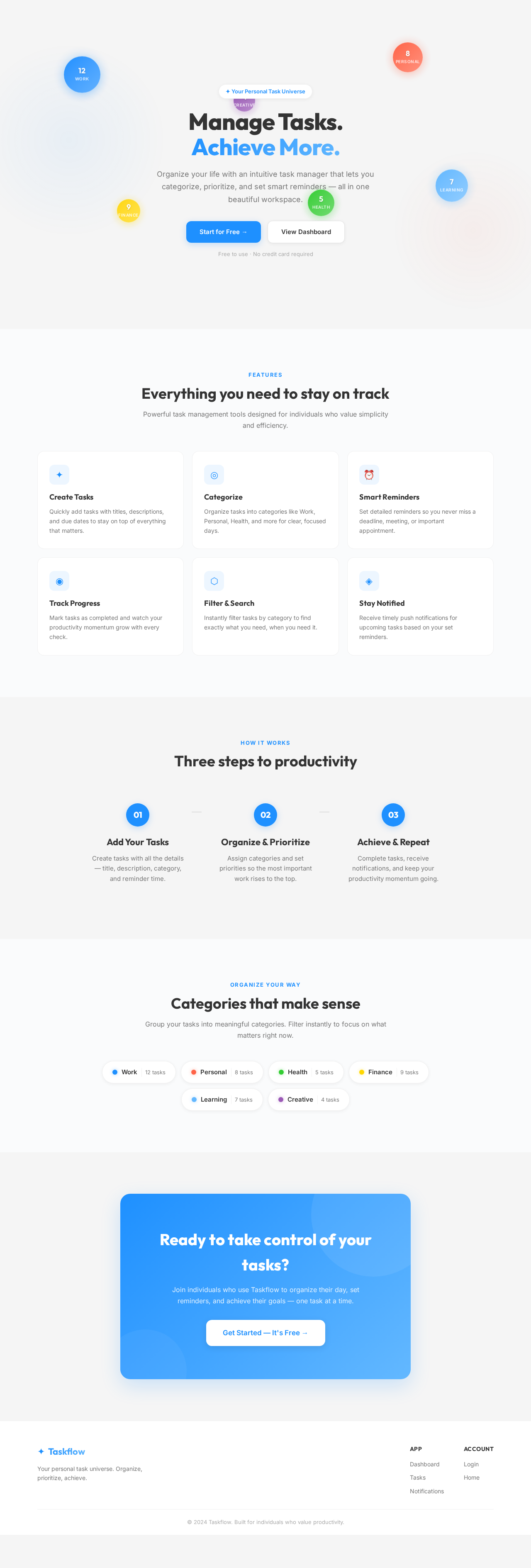
✦ Your Personal Task Universe
Manage Tasks.
Achieve More.
Organize your life with an intuitive task manager that lets you categorize, prioritize, and set smart reminders — all in one beautiful workspace.
Free to use · No credit card required
Features
Everything you need to stay on track
Powerful task management tools designed for individuals who value simplicity and efficiency.
Create Tasks
Quickly add tasks with titles, descriptions, and due dates to stay on top of everything that matters.
Categorize
Organize tasks into categories like Work, Personal, Health, and more for clear, focused days.
Smart Reminders
Set detailed reminders so you never miss a deadline, meeting, or important appointment.
Track Progress
Mark tasks as completed and watch your productivity momentum grow with every check.
Filter & Search
Instantly filter tasks by category to find exactly what you need, when you need it.
Stay Notified
Receive timely push notifications for upcoming tasks based on your set reminders.
How It Works
Three steps to productivity
Add Your Tasks
Create tasks with all the details — title, description, category, and reminder time.
Organize & Prioritize
Assign categories and set priorities so the most important work rises to the top.
Achieve & Repeat
Complete tasks, receive notifications, and keep your productivity momentum going.
Organize Your Way
Categories that make sense
Group your tasks into meaningful categories. Filter instantly to focus on what matters right now.
Ready to take control of your tasks?
Join individuals who use Taskflow to organize their day, set reminders, and achieve their goals — one task at a time.
Get Started — It's Free →
No comments yet. Be the first!