TR VISION
 Khushi Sharma
Create a complete Traffic Sign Recognition System using Deep Learning and Convolutional Neural Networks (CNN). Project Title: Traffic Sign Recognition using CNN and Deep Learning Objective: Develop a web application that can recognize and classify traffic signs from uploaded images using a trained CNN model. Frontend Requirements: - React.js frontend - Modern and responsive UI - Attractive dashboard design - Drag and Drop image upload - Browse image upload option - Image preview before prediction - Loading animation during prediction - Display predicted traffic sign name - Display confidence percentage - Error handling for invalid image uploads - Mobile and desktop responsive design Backend Requirements: - Python FastAPI backend - REST API architecture - Image upload endpoint - Prediction endpoint - Health check endpoint - Proper error handling - CORS support for React frontend Deep Learning Requirements: - TensorFlow/Keras framework - Convolutional Neural Network (CNN) built from scratch - Use: - Convolution Layers - ReLU Activation - MaxPooling Layers - Dropout Layers - Dense Layers - Softmax Output Layer - Multi-class traffic sign classification - Model saved as traffic_sign_model.h5 Dataset Requirements: - Use GTSRB (German Traffic Sign Recognition Benchmark) dataset - Image resizing to 32x32 - Image normalization - Data preprocessing pipeline - Data augmentation using ImageDataGenerator - Train/Test split Model Training Features: - CNN training script - Model checkpoint saving - Early stopping - Accuracy and loss tracking - Training history visualization Evaluation Features: - Accuracy graph - Loss graph - Confusion Matrix - Classification Report - Final test accuracy display Prediction Features: - Upload traffic sign image - Real-time prediction - Display sign class name - Display confidence score - Show uploaded image with result Project Structure: TrafficSignRecognition/ │ ├── frontend/ │ ├── src/ │ │ ├── components/ │ │ ├── pages/ │ │ ├── App.js │ │ ├── index.js │ │ └── api.js │ │ │ ├── public/ │ ├── package.json │ └── README.md │ ├── backend/ │ ├── server.py │ ├── classifier.py │ ├── requirements.txt │ ├── uploads/ │ └── models/ │ └── traffic_sign_model.h5 │ ├── training/ │ ├── train_model.py │ ├── evaluate_model.py │ ├── plots/ │ └── saved_models/ │ ├── dataset/ │ └── README.md API Endpoints: - GET /health - POST /predict Required Libraries: Backend: - TensorFlow - Keras - OpenCV - NumPy - Pandas - Matplotlib - FastAPI - Uvicorn - Pillow Frontend: - React.js - Axios - React Icons Additional Requirements: - Clean code with comments - Professional folder structure - Production-ready project - Fully functional frontend-backend integration - Step-by-step setup instructions - Complete source code for every file - No placeholder code - All files should be fully implemented and ready to run Generate the complete code for frontend, backend, CNN model training, dataset preprocessing, API integration, and project documentation. and also given the zip file to copy paste in the vs code plss help me broo


Comments (0)
Sign in to leave a comment
System Requirements
TR VISION
Introduction
The TR VISION project aims to develop a comprehensive Traffic Sign Recognition System using Deep Learning and Convolutional Neural Networks (CNN). This system will be implemented as a web application capable of recognizing and classifying traffic signs from uploaded images using a trained CNN model.
System Overview
TR VISION is designed to provide a seamless user experience for recognizing traffic signs. The system comprises a React.js frontend for user interaction and a Python FastAPI backend for processing and prediction. The CNN model, built using TensorFlow/Keras, will classify traffic signs based on the GTSRB dataset. The application is intended to be both mobile and desktop responsive, ensuring accessibility and usability across devices.
Functional Requirements
- As a User, I should be able to upload traffic sign images via drag and drop or browse option.
- As a User, I should see a preview of the uploaded image before prediction.
- As a User, I should see a loading animation during the prediction process.
- As a User, I should receive the predicted traffic sign name and confidence percentage.
- As a User, I should be informed of any errors during image upload.
- As a Developer, I should have a REST API architecture with endpoints for image upload, prediction, and health checks.
- As a Developer, I should implement proper error handling and CORS support for the React frontend.
- As a Data Scientist, I should use a CNN model with convolution layers, ReLU activation, max pooling, dropout, dense layers, and a softmax output layer.
- As a Data Scientist, I should perform multi-class traffic sign classification using the GTSRB dataset.
- As a Data Scientist, I should preprocess data with resizing, normalization, and augmentation.
- As a Data Scientist, I should implement model training features like checkpoint saving, early stopping, and accuracy/loss tracking.
- As a Data Scientist, I should evaluate the model using accuracy graphs, loss graphs, confusion matrix, and classification reports.
User Personas
- End User: Individuals who will upload images of traffic signs to receive predictions.
- Developer: Engineers responsible for maintaining the frontend and backend integration.
- Data Scientist: Professionals focused on training and optimizing the CNN model.
Core User Flows
- User uploads image -> Image preview displayed -> User initiates prediction -> Loading animation shown -> Prediction result displayed with confidence score.
- Developer sets up backend -> Connects frontend to backend -> Tests API endpoints -> Ensures error handling and CORS support.
- Data Scientist preprocesses dataset -> Trains CNN model -> Evaluates model performance -> Saves and deploys model.
Visuals Colors and Theme
- primary: #1E3A8A (Deep Blue)
- primary_light: #3B82F6 (Light Blue)
- secondary: #F97316 (Vibrant Orange)
- accent: #10B981 (Emerald Green)
- highlight: #F59E0B (Amber)
- bg: #F3F4F6 (Light Gray)
- surface: rgba(255, 255, 255, 0.8) (White)
- text: #111827 (Dark Gray)
- text_muted: #6B7280 (Muted Gray)
- border: rgba(209, 213, 219, 0.2) (Light Gray)
Signature Design Concept
The TR VISION homepage will feature an interactive "Traffic Sign Galaxy" where each traffic sign is represented as a star. Users can click on a star to view detailed information about the sign, including its classification and confidence score. The galaxy will be navigable, allowing users to drag and rotate the view, creating an immersive experience. This concept will be implemented using @react-three/fiber for 3D rendering and gsap for smooth animations and transitions.
Interaction Model & Motion Direction
The landing page will employ a "parallax" interaction model, creating a layered depth effect as users scroll through the page. Decorative elements like atmospheric blobs and particle fields will move at different speeds, enhancing the storytelling aspect of the site. Internal pages will adopt a "static" model for clarity and ease of use, focusing on data presentation and user interaction.
Non-Functional Requirements
- The system must be highly responsive and performant across devices.
- The application should handle a high volume of image uploads and predictions efficiently.
- The codebase must be clean, well-documented, and maintainable.
Tech Stack
- Frontend: React.js
- Backend: Python FastAPI
- Database: Not specified (assumed not required for this project)
- Deep Learning Framework: TensorFlow/Keras
- Libraries: OpenCV, NumPy, Pandas, Matplotlib, Uvicorn, Pillow
Assumptions and Constraints
- The application will primarily target educational and demonstration purposes.
- The system will use the GTSRB dataset for training and evaluation.
- The project will be developed and tested in an environment supporting Python and React.js.
Glossary
- CNN: Convolutional Neural Network, a class of deep neural networks commonly used for analyzing visual imagery.
- GTSRB: German Traffic Sign Recognition Benchmark, a dataset for traffic sign classification.
- REST API: Representational State Transfer, an architectural style for designing networked applications.
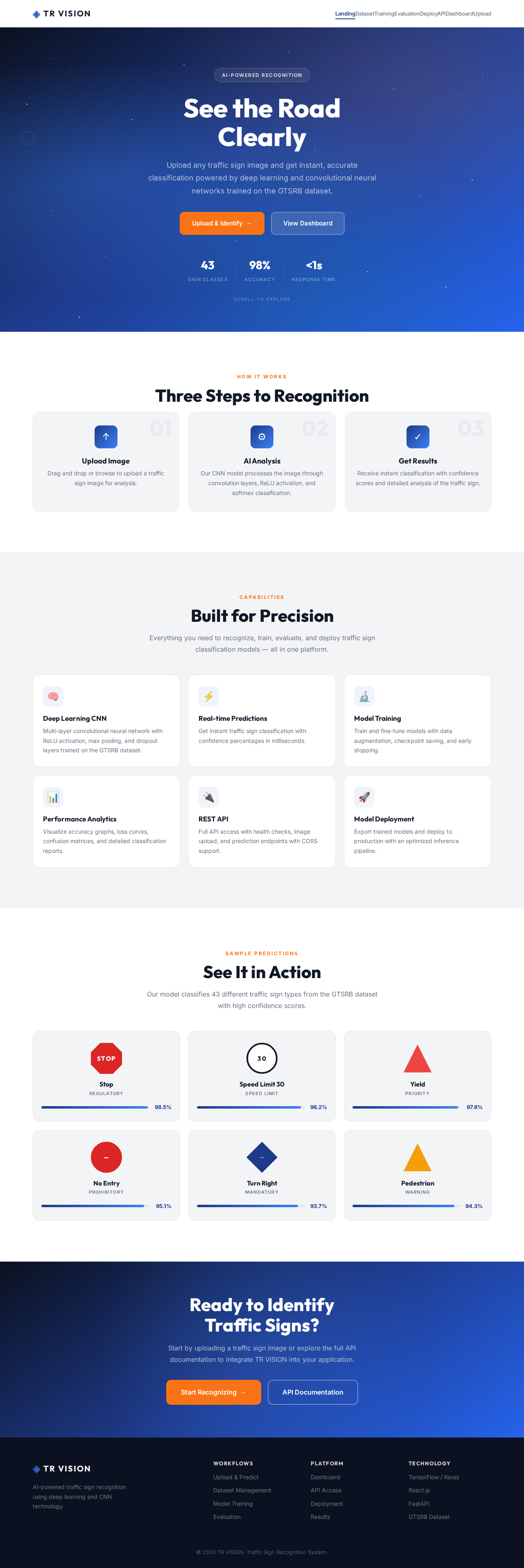
See the Road
Clearly
Upload any traffic sign image and get instant, accurate classification powered by deep learning and convolutional neural networks trained on the GTSRB dataset.
Three Steps to Recognition
Upload Image
Drag and drop or browse to upload a traffic sign image for analysis.
AI Analysis
Our CNN model processes the image through convolution layers, ReLU activation, and softmax classification.
Get Results
Receive instant classification with confidence scores and detailed analysis of the traffic sign.
Built for Precision
Everything you need to recognize, train, evaluate, and deploy traffic sign classification models — all in one platform.
Deep Learning CNN
Multi-layer convolutional neural network with ReLU activation, max pooling, and dropout layers trained on the GTSRB dataset.
Real-time Predictions
Get instant traffic sign classification with confidence percentages in milliseconds.
Model Training
Train and fine-tune models with data augmentation, checkpoint saving, and early stopping.
Performance Analytics
Visualize accuracy graphs, loss curves, confusion matrices, and detailed classification reports.
REST API
Full API access with health checks, image upload, and prediction endpoints with CORS support.
Model Deployment
Export trained models and deploy to production with an optimized inference pipeline.
See It in Action
Our model classifies 43 different traffic sign types from the GTSRB dataset with high confidence scores.
Stop
RegulatorySpeed Limit 30
Speed LimitYield
PriorityNo Entry
ProhibitoryTurn Right
MandatoryPedestrian
WarningReady to Identify
Traffic Signs?
Start by uploading a traffic sign image or explore the full API documentation to integrate TR VISION into your application.
No comments yet. Be the first!