
StaffTrack

byAndroid TV

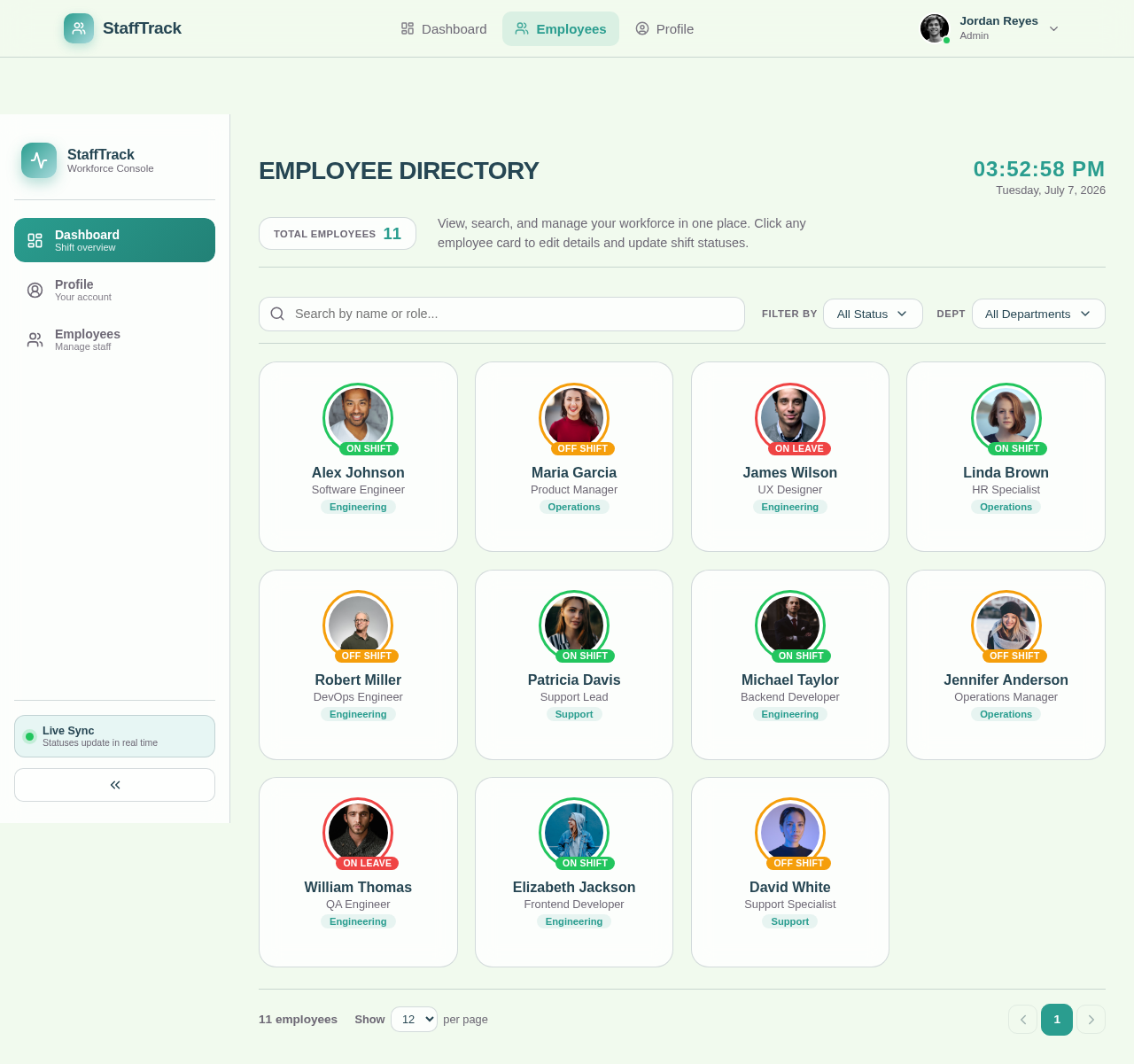
I would like to upload profile pictures for employees and have the ability to edit all options. On the home screen, I want to display the employees' profile pictures, similar to the reference image. We have 11 employees, and I want to create a shift management system. In the main dashboard, only the profile pictures of the employees will be shown. If an employee is on shift, a green circle will appear around their profile picture. If the employee is off shift, an orange circle will indicate this. If the employee is on leave, a red circle will surround their profile picture.

EmployeesProfile
Employees

Comments (0)

No comments yet. Be the first!

System Requirements

System Requirement Document
Page 1 of 4

StaffTrack System Requirements Document

1. Introduction

StaffTrack is a system designed to manage employee profiles and shift statuses efficiently. It allows for the uploading and editing of employee details and provides a visual representation of their shift statuses on the main dashboard.

2. System Overview

The main dashboard will feature large employee profile pictures with status indicators.

StaffTrack aims to streamline employee management by providing a centralized platform for handling employee profiles and shift information. The system will display employee profile pictures on the dashboard, indicating their current shift status through color-coded circles.

3. Functional Requirements

  • As an Admin, I should be able to upload profile pictures for employees.
  • As an Admin, I should be able to edit all employee details.
  • As an Employee, I should be able to update my shift status manually.
  • As a User, I should see a green circle around an employee's profile picture if they are on shift.
  • As a User, I should see an orange circle around an employee's profile picture if they are off shift.
  • As a User, I should see a red circle around an employee's profile picture if they are on leave.
Page 2 of 4

4. User Personas

  • Admin: Responsible for managing employee profiles and shift statuses.
  • Employee: Can update their own shift status and view their profile information.

5. Core User Flows

  • Admin uploads profile picture -> Admin edits employee details -> Employee updates shift status -> Dashboard displays updated status with color-coded circles.
  • Employee updates shift status -> Dashboard reflects status change with appropriate color indicator.

6. Visuals Colors and Theme

  • primary: #2A9D8F (Teal)
  • style: Glassmorphism
  • primary_light: #A8DADC (Light Teal)
  • secondary: #E76F51 (Coral)
  • accent: #F4A261 (Orange)
  • highlight: #E9C46A (Yellow)
  • bg: #F1FAEE (Light Gray)
  • surface: rgba(255, 255, 255, 0.8)
  • text: #264653 (Dark Blue)
  • text_muted: #6D6875 (Muted Gray)
  • border: rgba(38, 70, 83, 0.2)
Page 3 of 4

7. Signature Design Concept

The homepage will feature an interactive dashboard where employee profile pictures are displayed in a grid format. Each profile picture will have a dynamic, color-coded circle indicating the employee's shift status. Users can hover over a profile to see additional details, and clicking on a profile will open a detailed view with options to edit information. The design will use framer-motion for smooth transitions and hover effects.

8. Interaction Model & Motion Direction

  • Interaction Model: Animated
  • The landing page will feature moderate scroll-triggered reveals and hover transitions. Interactive elements will have spring physics for a polished user experience.

9. Non-Functional Requirements

  • The system should support up to 50 employees.
  • The dashboard should update in real-time as employees change their status.

10. Tech Stack

  • Frontend: React for Web
  • Backend: Python, FastAPI
  • Database: MySQL
  • AI Tools: Not applicable
Page 4 of 4

11. Assumptions and Constraints

  • The system will initially support a maximum of 11 employees but should be scalable.
  • Employee status updates should reflect immediately on the dashboard.

12. Glossary

  • Admin: User with permissions to manage employee profiles and shift statuses.
  • Employee: User who can update their own shift status.
  • Dashboard: The main interface displaying employee profiles and shift statuses.
Employees design preview
Dashboard: View Employee Grid
Dashboard: Hover Profile
Profile: View Details
Profile: Edit Details
Profile: Upload Picture
Profile: Save Changes
Dashboard: View Shift Status
Dashboard: View Notifications
Employees: Manage List
Employees: Edit Employee
Employees: Update Status