
SK-you

byShiva Kant Mishra

You are an expert SaaS product team consisting of: - Product Manager - UI/UX Designer - Frontend Engineer - Backend Engineer - Database Architect - DevOps Engineer - QA Engineer Build a production-ready Micro SaaS. Idea: (1).Public Changelog & Release Notes SaaS (Minimal features, ultra-fast to build, high visibility among makers) 2).Menu & Special QR Code Generator for Restaurants (Very basic CRUD app with high local sales potential) 3)Property Maintenance Ticketing Portal for Boutique Real Estate Managers ) Requirements: Create: - Beautiful landing page - Dashboard - User authentication - Google Login - Email Login - Stripe subscriptions - Pricing page - Admin dashboard - Database - REST APIs - Responsive design - Dark mode - User settings - Billing page - Analytics - SEO - Error handling - Loading states Generate: - Frontend - Backend - Database schema - APIs - Authentication - Deployment configuration - Environment variables - README - Sample data Use a modern design similar to Linear, Notion or Vercel. Everything should be production-ready.

Landing PageAdmin DashboardUser AuthenticationPricing PageBilling Page
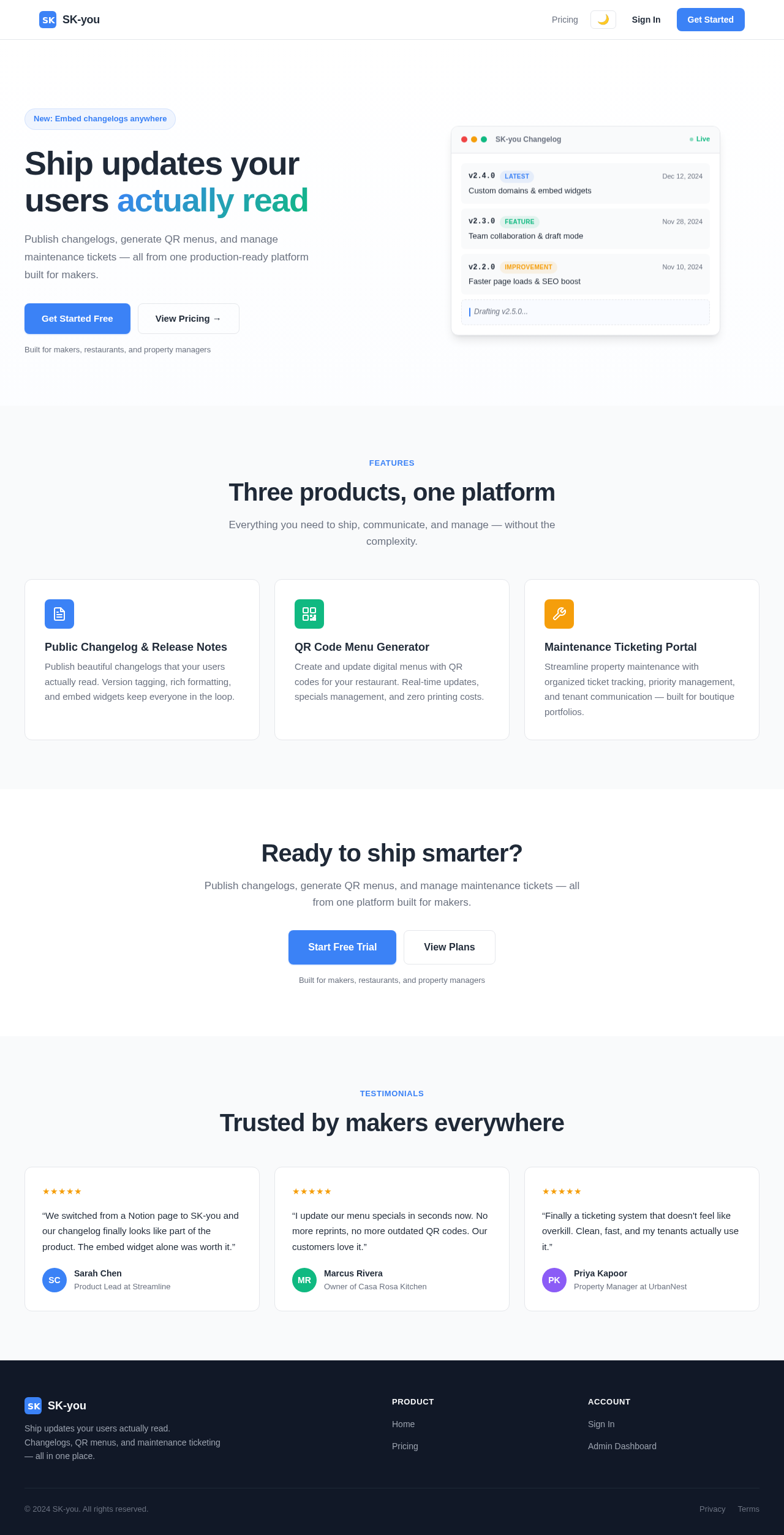
Landing Page

Comments (0)

No comments yet. Be the first!

System Requirements

System Requirement Document
Page 1 of 5

SK-you System Requirements Document

1. Introduction

This document outlines the system requirements for the SK-you project, a production-ready Micro SaaS application. The project aims to deliver a Public Changelog & Release Notes SaaS with minimal features and high visibility, a Menu & Special QR Code Generator for Restaurants, and a Property Maintenance Ticketing Portal for Boutique Real Estate Managers.

2. System Overview

Page 2 of 5

2a. Product Interpretation and Delivery Boundary

The SK-you project will develop a Micro SaaS application with the following key features:

  • Public Changelog & Release Notes SaaS: A platform for publishing changelogs and release notes.
  • Menu & Special QR Code Generator for Restaurants: A basic CRUD application with high local sales potential.
  • Property Maintenance Ticketing Portal: A portal for boutique real estate managers to manage maintenance tickets.

Exclusions:

  • Generic e-commerce features
  • Complex CRM integrations

Access: Application-owned identity with persistent user sessions.

Behavior Contracts:

  • User Authentication: Users can log in using email and password, gaining access to their dashboard.
  • Manage Subscriptions: Users can subscribe to plans using Stripe, with subscription status changes.
  • Admin Dashboard Access: Administrators can log in to access the admin dashboard.

2b. Source Content Inventory

No explicit content sources were provided. Default assumptions will be used for sample data and content areas not supplied by the user.

2c. Page Content and Component Coverage

Landing Page

  • Purpose: Visually appealing entry point.
  • Components: Hero section, feature highlights, call-to-action buttons, testimonials.
  • States: Loading, error, success.
Page 3 of 5

Pricing Page

  • Purpose: Display subscription plans and initiate subscriptions.
  • Components: Plan details, pricing tiers, subscription buttons.
  • States: Loading, error, success.

User Authentication

  • Purpose: User login and registration.
  • Components: Login form, registration form, Google login, email login.
  • States: Loading, error, success.

Admin Dashboard

  • Purpose: Administrative control and configuration.
  • Components: User management, system settings, analytics overview.
  • States: Loading, error, success.

Billing Page

  • Purpose: Manage user payments and billing information.
  • Components: Payment history, billing details, update payment method.
  • States: Loading, error, success.
Page 4 of 5

3. Functional Requirements as Story Points

  • As a User, I should be able to view a beautiful landing page to understand the product offerings. explicit
  • As a User, I should be able to log in using email and password to access my dashboard. explicit
  • As a User, I should be able to log in using Google for convenience. explicit
  • As a User, I should be able to view and select subscription plans on the pricing page. explicit
  • As a User, I should be able to manage my subscription using Stripe for payments. explicit
  • As an Administrator, I should be able to access the admin dashboard to manage users and settings. explicit
  • As a User, I should be able to view and update my billing information on the billing page. explicit
  • As a User, I should be able to access user settings to customize my experience. explicit
  • As a User, I should be able to view analytics to understand my usage patterns. explicit
  • As a User, I should be able to experience the application in dark mode for better visibility. explicit
  • As a User, I should be able to see loading states to know when data is being processed. explicit
  • As a User, I should be able to experience error handling for robust application behavior. explicit
  • As a User, I should be able to benefit from SEO for better search engine visibility. explicit

4. User Personas

  • User: Primary participant interacting with the SaaS.
  • Administrator: Manages and configures the SaaS.

5. Core User Flows

Page 5 of 5

User Flow

  1. Landing Page: User visits the landing page to learn about the product.
  2. User Authentication: User logs in using email/password or Google.
  3. Dashboard: User accesses their dashboard to manage their account.
  4. Pricing Page: User selects a subscription plan and subscribes.
  5. Billing Page: User manages billing information and payment methods.

Administrator Flow

  1. Admin Dashboard: Administrator logs in to access the admin dashboard.
  2. User Management: Administrator manages user accounts
Landing Page design preview
Admin Dashboard: 1. Administrator attempts to log in
Admin Dashboard: 2. Access result
Admin Dashboard: Administrator dashboard access granted
Admin Dashboard: 3. Access denied
Landing Page design preview
Admin Dashboard: 1. Administrator attempts to log in
Admin Dashboard: 2. Access result
Admin Dashboard: Administrator dashboard access granted
Admin Dashboard: 3. Access denied