SHA256-Magic
 Lance Marchetti
My project involves hashing a file and then locking the hash to the file by deleting the characters in the binary according to their column position sequence found in the hash string. Once the coordinate key is generated, we can then recall the characters from the hash string to populate their positions again in the binary file.


Comments (0)
Sign in to leave a comment
System Requirements
SHA256-Magic System Requirements Document
1. Introduction
SHA256-Magic is a project designed to hash a file and lock the hash to the file by manipulating the binary data according to the hash string. This document outlines the system requirements for SHA256-Magic, which is intended for individuals involved in Red Hat CTF training. The application is a single-user setup without the need for logins, passwords, or encryption, and it operates as a standalone HTML tool.
2. System Overview
SHA256-Magic provides a mechanism to hash a file, modify the binary data based on the hash, and later restore the file using the hash and a coordinate key. The application is designed to be minimalist and sleek, with a corporate-style interface. It includes a hidden 'Help' feature to guide users through the process.
3. Functional Requirements
- As a User, I should be able to upload a source file and have it hashed, with the hash available for download as 'source_filename_.hash'.
- As a User, I should be able to identify each character in the hash within the raw binary of the source file.
- As a User, I should be able to record the column positions of each character in the hash within the binary file.
- As a User, I should be able to delete the marked characters at their recorded positions in the binary file.
- As a User, I should be able to download the edited source file named as the actual SHA hash of the original source (e.g., 'a2bb78c...bin').
- As a User, I should be able to upload the SHA256 hash, edited source bin file, and coordinates key for recovery.
- As a User, I should be able to automatically fetch the necessary characters from the uploaded hash string and restore the missing bytes in the uploaded source.bin.
- As a User, I should be able to access a hidden 'Help' feature that provides step-by-step instructions for the mapping, removal, and replacement process.
4. User Personas
- User: An individual involved in Red Hat CTF training who requires a simple, efficient tool for hashing and binary manipulation.
5. Core User Flows
- User uploads source file -> File is hashed -> Hash is available for download as 'source_filename_.hash'.
- User identifies hash characters in binary -> Records column positions -> Deletes marked characters -> Downloads edited file as 'a2bb78c...bin'.
- User uploads SHA256 hash, edited source bin, and coordinates key -> System restores missing bytes in source.bin.
6. Visuals Colors and Theme
- primary: #1A237E (deep indigo)
- primary_light: #534BAE (light indigo)
- secondary: #FF5722 (deep orange)
- accent: #00E676 (vibrant green)
- highlight: #FFC107 (amber)
- bg: #F5F5F5 (light grey)
- surface: rgba(255, 255, 255, 0.9) (white)
- text: #212121 (dark grey)
- text_muted: #757575 (medium grey)
- border: rgba(33, 33, 33, 0.1) (light grey)
7. Signature Design Concept
The SHA256-Magic homepage will feature an interactive digital vault interface. Upon landing, users will see a sleek, animated vault door that opens to reveal the file upload and processing areas. Using framer-motion for smooth animations, the vault door will rotate and slide open as users hover over it, creating a sense of entering a secure area. Inside, the upload zones will be represented as digital lockboxes, which light up when files are dragged over them. The hidden 'Help' feature will be accessible via a small, glowing question mark icon in the corner, which, when clicked, will smoothly slide down a panel with step-by-step guidance.
8. Interaction Model & Motion Direction
The landing page will use an "animated" interaction model. The vault door animation will be triggered on hover, and the lockboxes will have hover transitions that highlight them. The hidden 'Help' panel will use spring physics for a smooth slide-down effect. Internal pages will remain static to ensure clarity and focus on functionality.
9. Non-Functional Requirements
- The application must be responsive and work seamlessly on various screen sizes.
- The system should handle files up to 100MB efficiently.
- The interface should load within 2 seconds on a standard broadband connection.
10. Tech Stack
- Frontend: React for Web
- Backend: Python with FastAPI
- Database: Not applicable as no persistent storage is required
- Local orchestration: Docker
11. Assumptions and Constraints
- The application is designed for a single-user setup without authentication.
- No persistent data storage is required; all operations are performed in-memory.
- The system assumes users have basic technical knowledge for file handling.
12. Glossary
- SHA256: A cryptographic hash function that produces a 256-bit hash value.
- Binary File: A file that contains data in a format that is not human-readable.
- Coordinate Key: A mapping of character positions used for restoring a binary file.
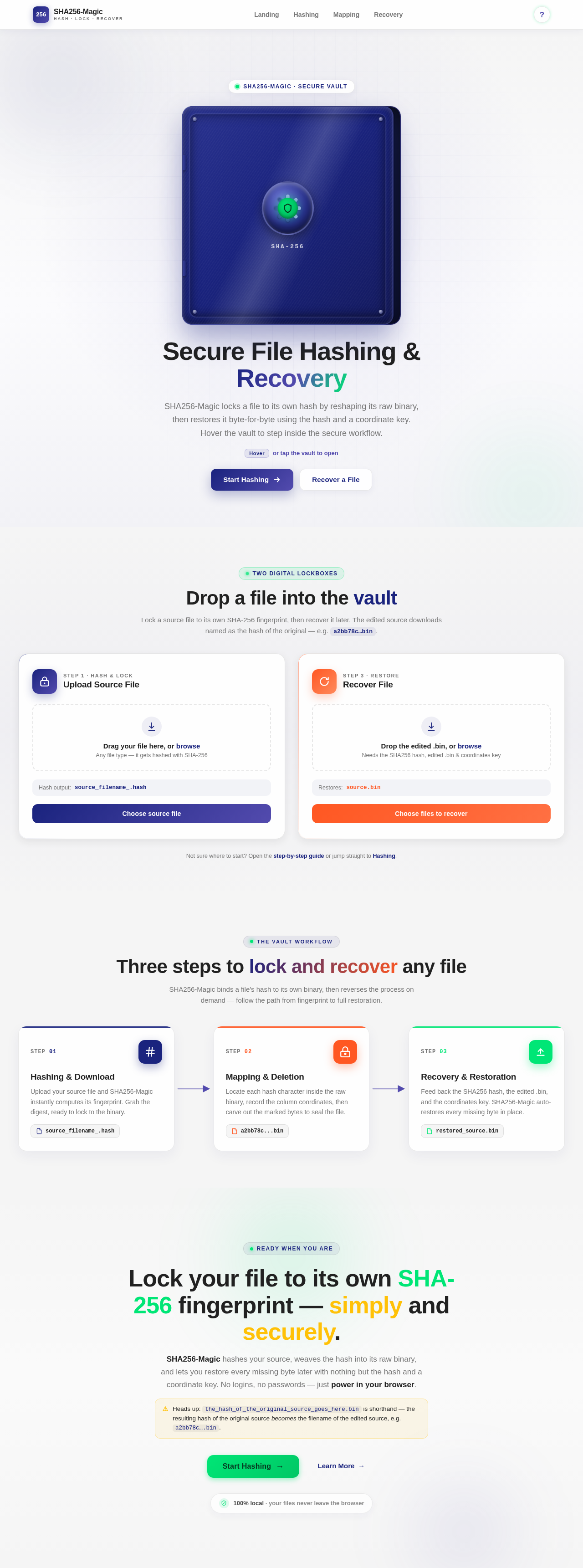
Secure File Hashing & Recovery
SHA256-Magic locks a file to its own hash by reshaping its raw binary, then restores it byte-for-byte using the hash and a coordinate key. Hover the vault to step inside the secure workflow.
Hoveror tap the vault to openDrop a file into the vault
Lock a source file to its own SHA-256 fingerprint, then recover it later. The edited source downloads named as the hash of the original — e.g. a2bb78c…bin.
source_filename_.hashsource.binNot sure where to start? Open the step-by-step guide or jump straight to Hashing.
Three steps to lock and recover any file
SHA256-Magic binds a file's hash to its own binary, then reverses the process on demand — follow the path from fingerprint to full restoration.
Hashing & Download
Upload your source file and SHA256-Magic instantly computes its fingerprint. Grab the digest, ready to lock to the binary.
source_filename_.hashMapping & Deletion
Locate each hash character inside the raw binary, record the column coordinates, then carve out the marked bytes to seal the file.
a2bb78c...binRecovery & Restoration
Feed back the SHA256 hash, the edited .bin, and the coordinates key. SHA256-Magic auto-restores every missing byte in place.
restored_source.binLock your file to its own SHA-256 fingerprint — simply and securely.
SHA256-Magic hashes your source, weaves the hash into its raw binary, and lets you restore every missing byte later with nothing but the hash and a coordinate key. No logins, no passwords — just power in your browser.
the_hash_of_the_original_source_goes_here.bin is shorthand — the resulting hash of the original source becomes the filename of the edited source, e.g. a2bb78c….bin.
No comments yet. Be the first!