Robinflow
make this only function website real life booking section video section demo videos action with the animation bar graph animation in animation look premium


Comments (0)
Sign in to leave a comment
System Requirements
Robinflow System Requirements Document
1. Introduction
Robinflow is a dynamic platform designed to provide users with an engaging and interactive experience. The project aims to incorporate real-life booking functionalities, video sections with demo videos, and premium animations, including bar graph animations, to enhance user interaction and engagement.
2. System Overview
Robinflow will be a web-based platform with a focus on providing seamless booking experiences and interactive video content. The platform will feature advanced animations to create a premium look and feel.
3. Functional Requirements
- As a User, I should be able to book appointments through a real-life booking section.
- As a User, I should be able to view demo videos in the video section.
- As a User, I should experience premium animations, including bar graph animations, throughout the website.
4. User Personas
- User: Individuals looking to book services and view demo content.
- Admin: Personnel managing bookings and video content.
5. Core User Flows
- User navigates to booking section -> selects service -> chooses date and time -> confirms booking.
- User visits video section -> selects demo video -> watches video with interactive controls.
6. Visuals Colors and Theme
- primary: #0F0F0F (Matte Black)
- primary_light: #2C2C2C (Charcoal)
- secondary: #00FF00 (Parrot Green)
- accent: #00FFFF (Framer)
- highlight: #32CD32 (Soft Neon Green Glow)
- bg: #000000 (Black)
- surface: rgba(15, 15, 15, 0.8)
- text: #FFFFFF (White Typography)
- text_muted: #B0B0B0 (Light Gray)
- border: rgba(255, 255, 255, 0.2)
7. Signature Design Concept
The homepage will feature an interactive galaxy map where each star represents a feature or section of the website. Users can click on stars to explore different functionalities. The map will have a 3D effect using @react-three/fiber and @react-three/drei, providing a sense of depth and exploration.
Landing Hero Motion Brief
The hero section will display a dynamic animation where inputs (represented by glowing orbs) gather around a central artifact (a futuristic device). The device transforms these inputs into a visual outcome (a vibrant bar graph animation), showcasing the platform's capabilities. This loop will run continuously, with interactive elements allowing users to explore different data transformations.
8. Interaction Model & Motion Direction
- Interaction Model: Parallax
- The landing page will feature layered depth via scroll, with decorative elements translating at different speeds to create a visually rich first impression.
9. Non-Functional Requirements
- The platform must be responsive and accessible across all devices.
- Load times should be optimized for quick access to content and features.
10. Tech Stack
- Frontend: React for Web
- Backend: Python, FastAPI
- Database: MySQL or MariaDB
- AI Models: Gemini 3.1 pro for friendly response, Google Nano banana for image generation
- AI Tools: Litellm for LLM Routing, Langchain
- Local Orchestration: Docker, docker-compose
- Server-side Orchestration: Kubernetes
11. Assumptions and Constraints
- The platform will primarily target users in India.
- Internet connectivity is assumed to be stable for video streaming and animations.
12. Glossary
- LLM: Large Language Model
- RDBMS: Relational Database Management System
This document outlines the requirements and design direction for Robinflow, ensuring a cohesive and engaging user experience.
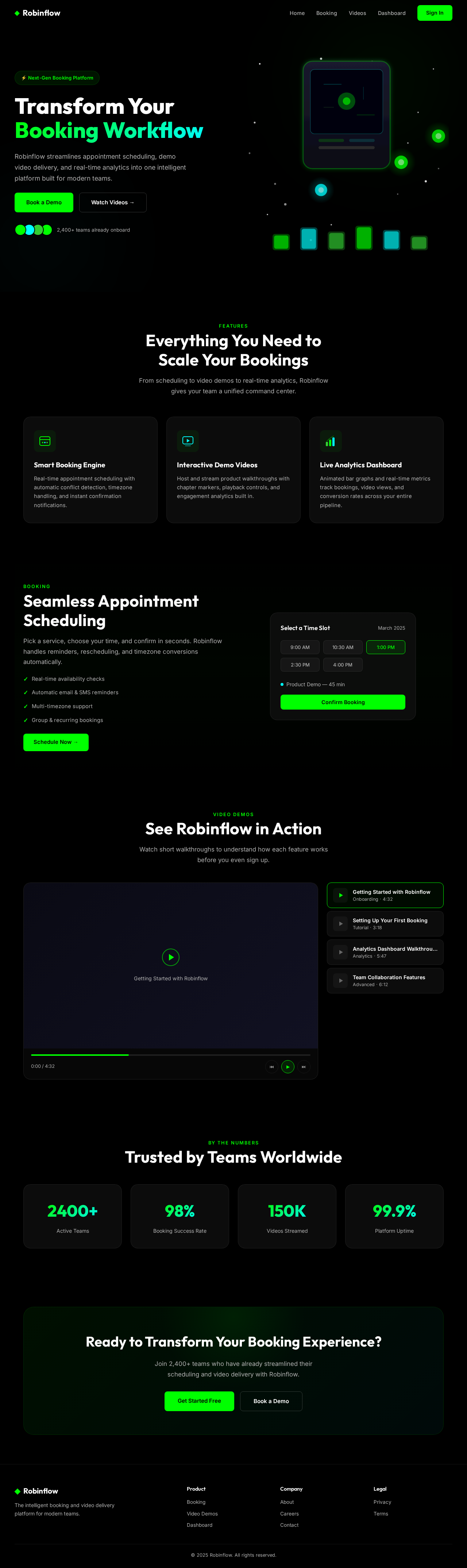
Transform Your
Booking Workflow
Robinflow streamlines appointment scheduling, demo video delivery, and real-time analytics into one intelligent platform built for modern teams.
Everything You Need to
Scale Your Bookings
From scheduling to video demos to real-time analytics, Robinflow gives your team a unified command center.
Smart Booking Engine
Real-time appointment scheduling with automatic conflict detection, timezone handling, and instant confirmation notifications.
Interactive Demo Videos
Host and stream product walkthroughs with chapter markers, playback controls, and engagement analytics built in.
Live Analytics Dashboard
Animated bar graphs and real-time metrics track bookings, video views, and conversion rates across your entire pipeline.
Seamless Appointment Scheduling
Pick a service, choose your time, and confirm in seconds. Robinflow handles reminders, rescheduling, and timezone conversions automatically.
- ✓Real-time availability checks
- ✓Automatic email & SMS reminders
- ✓Multi-timezone support
- ✓Group & recurring bookings
See Robinflow in Action
Watch short walkthroughs to understand how each feature works before you even sign up.
Trusted by Teams Worldwide
Ready to Transform Your Booking Experience?
Join 2,400+ teams who have already streamlined their scheduling and video delivery with Robinflow.
Transform Your
Booking Workflow
Robinflow streamlines appointment scheduling, demo video delivery, and real-time analytics into one intelligent platform built for modern teams.
Everything You Need to
Scale Your Bookings
From scheduling to video demos to real-time analytics, Robinflow gives your team a unified command center.
Smart Booking Engine
Real-time appointment scheduling with automatic conflict detection, timezone handling, and instant confirmation notifications.
Interactive Demo Videos
Host and stream product walkthroughs with chapter markers, playback controls, and engagement analytics built in.
Live Analytics Dashboard
Animated bar graphs and real-time metrics track bookings, video views, and conversion rates across your entire pipeline.
Seamless Appointment Scheduling
Pick a service, choose your time, and confirm in seconds. Robinflow handles reminders, rescheduling, and timezone conversions automatically.
- ✓Real-time availability checks
- ✓Automatic email & SMS reminders
- ✓Multi-timezone support
- ✓Group & recurring bookings
See Robinflow in Action
Watch short walkthroughs to understand how each feature works before you even sign up.
Trusted by Teams Worldwide
Ready to Transform Your Booking Experience?
Join 2,400+ teams who have already streamlined their scheduling and video delivery with Robinflow.
No comments yet. Be the first!