Resume-Builder

byPRIYANSH PATEL

Create a resume builder website with node js as backend & react js as front end

LandingResume BuilderAuthenticationTemplate Management
Landing

Comments (0)

No comments yet. Be the first!

System Requirements

System Requirement Document
Page 1 of 6

Resume-Builder System Requirements Document

1. Introduction

The Resume-Builder project is designed to assist industry professionals in creating, editing, and managing resumes with features such as PDF conversion, ATS score checking, and multiple template selection with CRUD operations.

2. System Overview

Page 2 of 6

2a. Product Interpretation and Delivery Boundary

  • Domain Descriptors:

    • Resume Building: The product is intended to help industry professionals create resumes. (Confidence: 0.9)
    • PDF Conversion: The product includes a feature to convert resumes to PDF format. (Confidence: 0.9)
  • What is being built:

    • A first-party application with a custom UI for resume building and PDF generation. The application will include features such as PDF conversion, ATS score checking, and template management with CRUD operations.
  • Excluded Assumptions:

    • Generic e-commerce features
    • Social media integration
  • Access:

    • Application-owned identity with authentication required for both professionals and administrators.
  • Behavior Contracts:

    • Create Resume: Industry professionals can create resume drafts using user data and template selection.
    • Convert Resume to PDF: Industry professionals can convert resume drafts to PDF format.
    • ATS Score Check: Industry professionals can check the ATS score of their resume drafts.
    • Manage Templates: Site administrators can manage resume templates through CRUD operations.
Page 3 of 6

2b. Source Content Inventory

No authoritative content sources were specified.

2c. Page Content and Component Coverage

  • Resume Builder Page:

    • Information: User data input, template selection, ATS score display.
    • Actions: Create, edit, and export resumes.
    • Components: Template selector, ATS score checker, PDF converter.
    • States: Empty, loading, success, error.
  • Template Management Page:

    • Information: Template data.
    • Actions: Create, read, update, delete templates.
    • Components: Template list, template editor.
    • States: Empty, loading, success, error.
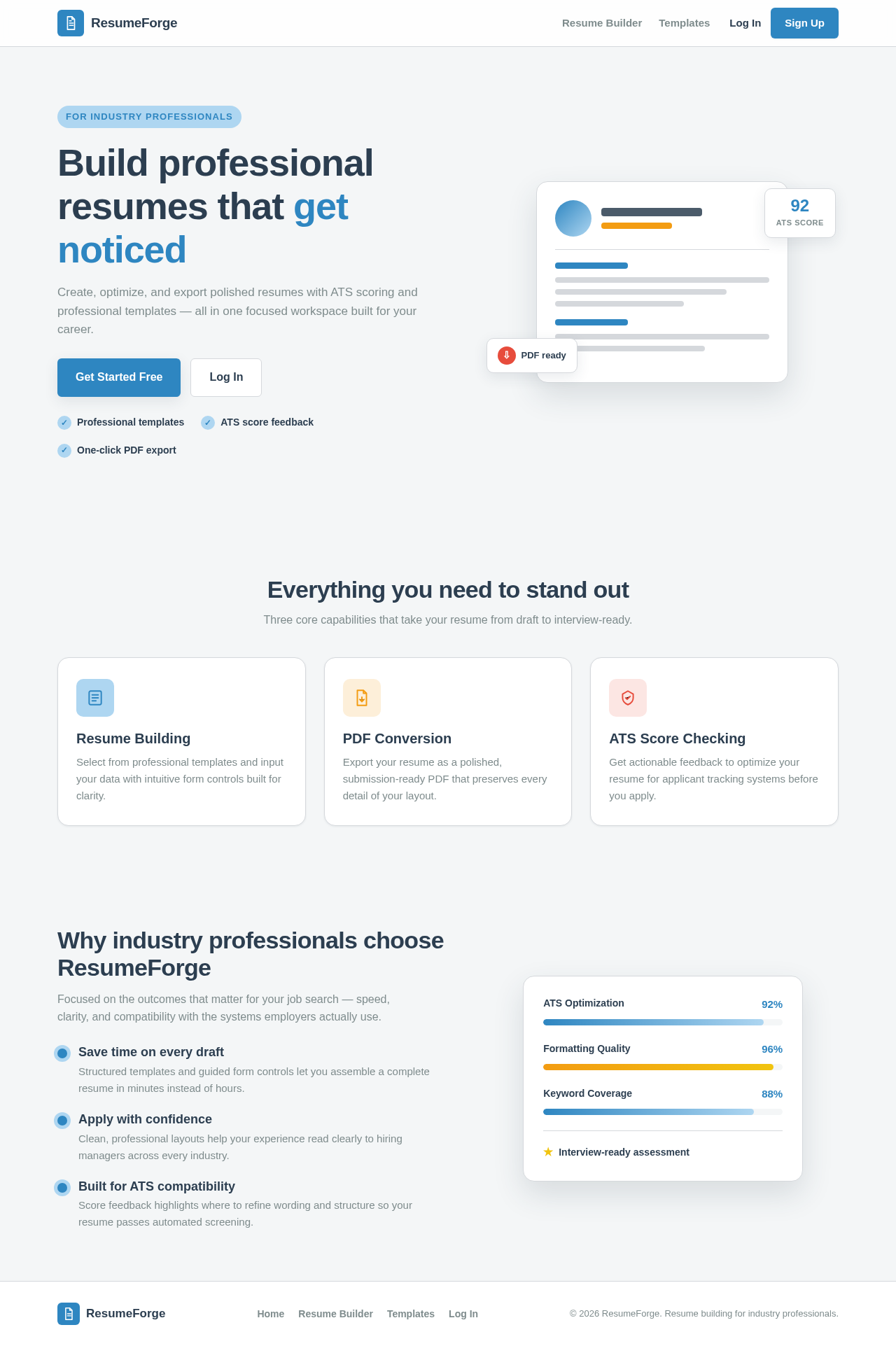
  • Landing Page:

    • Information: Overview of features and benefits.
    • Actions: Navigate to sign-up/login.
    • Components: Feature highlights, call-to-action buttons.
    • States: Static informational content.
  • Authentication Page:

    • Information: Sign-up/login forms.
    • Actions: Account creation, login, session management.
    • Components: Form fields, submit buttons.
    • States: Empty, loading, success, error.
Page 4 of 6

3. Functional Requirements as Story Points

  • As an Industry Professional, I should be able to create a resume draft using my data and template selection. explicit
  • As an Industry Professional, I should be able to convert my resume draft to a PDF document. basic_default
  • As an Industry Professional, I should be able to check the ATS score of my resume draft. required_inference
  • As a Site Administrator, I should be able to manage resume templates through CRUD operations. required_inference
  • As a User, I should be able to sign up, log in, and manage my session to access the resume builder and template management features. required_inference

4. User Personas

  • Industry Professionals: Primary users who create and manage resumes.
  • Site Administrator: Users responsible for managing resume templates and overseeing operations.

5. Core User Flows

Industry Professionals

  1. Access the Landing Page to learn about the features.
  2. Navigate to the Authentication Page to sign up or log in.
  3. Enter the Resume Builder Page to create or edit a resume.
  4. Select a template and input resume data.
  5. Check the ATS score and make necessary adjustments.
  6. Convert the resume to a PDF and download it.
Page 5 of 6

Site Administrator

  1. Access the Authentication Page to log in.
  2. Navigate to the Template Management Page.
  3. Perform CRUD operations on resume templates.

6. Visuals Colors and Theme

  • Primary: #2E86C1
  • Primary Light: #AED6F1
  • Secondary: #F39C12
  • Accent: #E74C3C
  • Highlight: #F1C40F
  • Background: #F4F6F7
  • Surface: #FFFFFF
  • Text: #2C3E50
  • Text Muted: #7F8C8D
  • Border: #D5D8DC

7. Signature Design Concept

The Resume Builder Page will feature a clean and professional layout with a focus on usability and clarity. The page will use a two-column layout with a sidebar for template selection and a main area for resume content editing. The design will incorporate the primary color for action buttons and highlights, with secondary and accent colors used sparingly for emphasis. Typography will be modern and legible, with clear headings and labels.

Page 6 of 6

8. Interaction Model & Motion Direction

  • Resume Builder Page: Animated with moderate scroll-triggered reveals and hover transitions to enhance user interaction without overwhelming the user.
  • Landing Page: Static with clear, concise information to guide users to sign-up or login.
  • Template Management Page: Static to prioritize clarity and ease of use for administrators.

9. Non-Functional Requirements

No additional non-functional requirements were inferred.
10. Tech Stack

  • Frontend: React for Web
  • Backend: Node.js
  • Database: MongoDB

11. Assumptions and Constraints

  • The system will not include generic e-commerce features or social media integration.
  • Authentication is required for accessing resume builder and template management features.

12. Glossary

  • ATS: Applicant Tracking System
  • CRUD: Create, Read, Update, Delete
  • PDF: Portable Document Format
Landing design preview
Landing: View features and benefits overview
Authentication: Sign up or log in
Resume Builder: Select template and enter resume data
Resume Builder: Resume creation failed
Resume Builder: Check ATS score of resume draft
Resume Builder: ATS score check failed
Resume Builder: Convert resume draft to PDF
Resume Builder: PDF conversion failed
Landing design preview
Landing: View features and benefits overview
Authentication: Sign up or log in
Resume Builder: Select template and enter resume data
Resume Builder: Resume creation failed
Resume Builder: Check ATS score of resume draft
Resume Builder: ATS score check failed
Resume Builder: Convert resume draft to PDF
Resume Builder: PDF conversion failed