Rapid-AI-Inspector
 Avinash Prajapati
I want to make a system that will take the Purchase order and invoice and will make a dashboard and report for matching data


Comments (0)
Sign in to leave a comment
System Requirements
Rapid-AI-Inspector
Introduction
The Rapid-AI-Inspector project aims to automate the process of matching purchase orders and invoices, specifically tailored for the oil and refinery industry. The system will leverage OCR technology to extract data from purchase orders, invoices, and material images, and subsequently use a Large Language Model (LLM) to generate Good Receive Notes (GRN).
System Overview
Rapid-AI-Inspector is designed to streamline the manual inspection process in the oil and refinery industry by automating data extraction and report generation. The system will handle purchase orders, invoices, and material images, ensuring that all materials are accounted for and accurately reported.
Source Content Inventory
No authoritative content sources provided.
Functional Requirements as Story Points
- As a User, I should be able to upload purchase orders, invoices, and material images for processing.
- As a System, I should run OCR on purchase orders, invoices, and material images to extract relevant data.
- As a System, I should provide extracted information to the LLM for GRN generation.
- As a User, I should be able to view a dashboard that displays matched data between purchase orders and invoices.
- As a User, I should receive reports detailing the inspection results, including any discrepancies found.
- As a User, I should be able to generate and view Good Receive Notes (GRN) based on the processed data.
User Personas
- Inspector: Responsible for overseeing the matching process and verifying the accuracy of the data.
- Vendor: Provides the materials and receives purchase orders from the refinery.
- Refinery Manager: Reviews the reports and ensures that all materials are accounted for.
Core User Flows
- Inspector uploads purchase order, invoice, and material images -> System runs OCR -> Extracted data is sent to LLM -> LLM generates GRN -> Inspector reviews GRN and report.
- Vendor sends materials -> Refinery receives materials -> Inspector verifies materials against purchase order and invoice -> System updates dashboard with matched data.
Visuals Colors and Theme
- primary: #2A9D8F (Teal)
- primary_light: #E9F5F4 (Light Teal)
- secondary: #E76F51 (Coral)
- accent: #F4A261 (Sandy Orange)
- highlight: #FFB703 (Amber)
- bg: #F1FAEE (Off White)
- surface: rgba(42, 157, 143, 0.8)
- text: #264653 (Dark Slate)
- text_muted: #8D99AE (Muted Gray)
- border: rgba(233, 69, 96, 0.2)
Signature Design Concept
The homepage of Rapid-AI-Inspector will feature an interactive 3D refinery landscape using @react-three/fiber. Users can navigate through different sections of the refinery by clicking on various elements, such as oil tanks and pipelines, which represent different functionalities of the system. As users hover over these elements, detailed information about each process will be displayed, creating an engaging and informative experience.
Interaction Model & Motion Direction
The landing page will utilize a "parallax" interaction model, providing a layered depth effect as users scroll through the page. Decorative elements, such as atmospheric clouds and moving machinery, will translate at different speeds to create a dynamic storytelling experience. Internal pages will adopt a "static" model for clarity and ease of use.
Non-Functional Requirements
- The system must process data and generate reports within 5 minutes of data submission.
- The system should support high-resolution images for accurate OCR processing.
- The dashboard should be responsive and accessible on various devices.
Tech Stack
- Frontend: React for Web
- Backend: Python, FastAPI
- Database: MySQL or MariaDB
- AI Models: GPT 5.4 for user-friendly responses
- AI Tools: Litellm for LLM Routing
- Local Orchestration: Docker, docker-compose
- Server-side Orchestration: Kubernetes
Assumptions and Constraints
- The system assumes that all uploaded documents are in a format compatible with OCR processing.
- The system is constrained to operate within the oil and refinery industry context.
- The LLM used for GRN generation must be pre-trained and integrated with the system.
Glossary
- OCR: Optical Character Recognition, a technology used to convert different types of documents into editable and searchable data.
- LLM: Large Language Model, an AI model used for generating human-like text.
- GRN: Good Receive Note, a document confirming the receipt of goods.
- Dashboard: A user interface that organizes and presents information in an easy-to-read format.
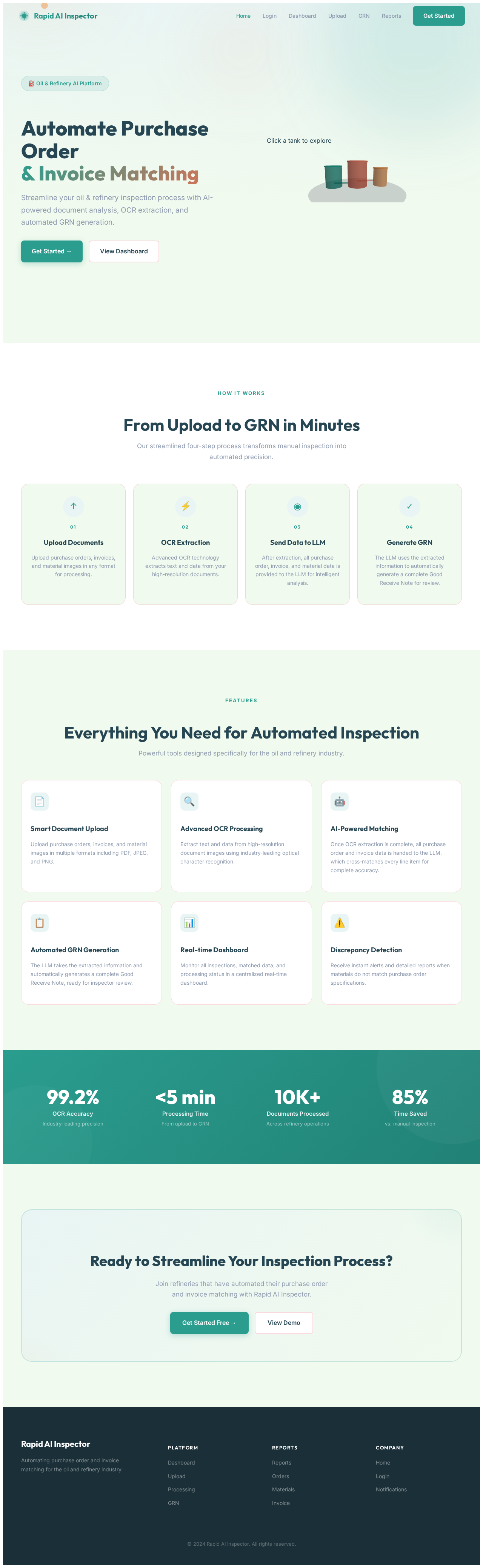
Automate Purchase Order& Invoice Matching
Streamline your oil & refinery inspection process with AI-powered document analysis, OCR extraction, and automated GRN generation.
From Upload to GRN in Minutes
Our streamlined four-step process transforms manual inspection into automated precision.
Upload Documents
Upload purchase orders, invoices, and material images in any format for processing.
OCR Extraction
Advanced OCR technology extracts text and data from your high-resolution documents.
Send Data to LLM
After extraction, all purchase order, invoice, and material data is provided to the LLM for intelligent analysis.
Generate GRN
The LLM uses the extracted information to automatically generate a complete Good Receive Note for review.
Everything You Need for Automated Inspection
Powerful tools designed specifically for the oil and refinery industry.
Smart Document Upload
Upload purchase orders, invoices, and material images in multiple formats including PDF, JPEG, and PNG.
Advanced OCR Processing
Extract text and data from high-resolution document images using industry-leading optical character recognition.
AI-Powered Matching
Once OCR extraction is complete, all purchase order and invoice data is handed to the LLM, which cross-matches every line item for complete accuracy.
Automated GRN Generation
The LLM takes the extracted information and automatically generates a complete Good Receive Note, ready for inspector review.
Real-time Dashboard
Monitor all inspections, matched data, and processing status in a centralized real-time dashboard.
Discrepancy Detection
Receive instant alerts and detailed reports when materials do not match purchase order specifications.
Ready to Streamline Your Inspection Process?
Join refineries that have automated their purchase order and invoice matching with Rapid AI Inspector.
Automate Purchase Order& Invoice Matching
Streamline your oil & refinery inspection process with AI-powered document analysis, OCR extraction, and automated GRN generation.
From Upload to GRN in Minutes
Our streamlined four-step process transforms manual inspection into automated precision.
Upload Documents
Upload purchase orders, invoices, and material images in any format for processing.
OCR Extraction
Advanced OCR technology extracts text and data from your high-resolution documents.
Send Data to LLM
After extraction, all purchase order, invoice, and material data is provided to the LLM for intelligent analysis.
Generate GRN
The LLM uses the extracted information to automatically generate a complete Good Receive Note for review.
Everything You Need for Automated Inspection
Powerful tools designed specifically for the oil and refinery industry.
Smart Document Upload
Upload purchase orders, invoices, and material images in multiple formats including PDF, JPEG, and PNG.
Advanced OCR Processing
Extract text and data from high-resolution document images using industry-leading optical character recognition.
AI-Powered Matching
Once OCR extraction is complete, all purchase order and invoice data is handed to the LLM, which cross-matches every line item for complete accuracy.
Automated GRN Generation
The LLM takes the extracted information and automatically generates a complete Good Receive Note, ready for inspector review.
Real-time Dashboard
Monitor all inspections, matched data, and processing status in a centralized real-time dashboard.
Discrepancy Detection
Receive instant alerts and detailed reports when materials do not match purchase order specifications.
Ready to Streamline Your Inspection Process?
Join refineries that have automated their purchase order and invoice matching with Rapid AI Inspector.
No comments yet. Be the first!