Rahi Activity World
 Ritika Jain
For **8080.ai**, you'll get much better results if you describe the app as a complete product vision, not just a feature list. Here's a detailed prompt you can paste directly into an AI app builder: --- # RAHI'S ACTIVITY WORLD – COMPLETE APP DESIGN & DEVELOPMENT PROMPT Build a complete Android-first educational mobile application called: ## Rahi's Activity World ### By Pictorial Palettes Create a premium-quality educational game app for children aged 4–5 years that combines learning, exploration, rewards, and play. The experience should feel like entering a magical learning world guided by a lovable mascot named **Rahi**. --- ## Core Vision The app should not feel like school. The app should feel like an adventure game where children learn naturally through play. Every screen should be joyful, colorful, rewarding, and interactive. The child should always feel: * Safe * Encouraged * Curious * Successful * Excited to explore --- # DESIGN LANGUAGE ## Visual Style Create a modern children's app inspired by: * Disney Junior * Khan Academy Kids * Duolingo Kids * PBS Kids But with a softer, more premium aesthetic. ### Design Keywords * Cute * Whimsical * Friendly * Cozy * Bright * Magical * Playful * Clean * Premium * Modern Avoid: * Corporate UI * Flat boring cards * Dark themes * Excessive text * Cluttered layouts --- # COLOR SYSTEM Primary Colors: Sky Blue * #87CEEB Soft Pink * #FFB6D9 Soft Purple * #B388FF Supporting Colors: Soft Yellow * #FFE27A Lavender * #E8D9FF Mint * #CFF7E7 White * #FFFFFF The interface should use: 40% Sky Blue 30% Purple 20% Pink 10% Accent Colors The app should immediately feel colorful and cheerful. --- # MASCOT Character Name: ## Rahi Rahi is the guide throughout the entire app. Rahi should appear: * On home screen * During lessons * During rewards * During celebrations Personality: * Friendly * Supportive * Curious * Playful * Encouraging Rahi should never criticize mistakes. Examples: "Let's try again!" "Great effort!" "You're doing amazing!" "Let's explore together!" --- # HOME SCREEN EXPERIENCE Do NOT create a standard dashboard. Create a magical interactive world map called: ## Rahi's Activity World The world should contain learning zones represented as colorful destinations. Children can tap on zones to enter them. World Map Sections: 🌳 English Forest ⛰ Maths Mountain 🌸 Hindi Garden ⭐ Shape Station 🌈 Color Kingdom 🐘 Animal Safari 🍎 Fruit Market 🧩 Puzzle Park 🏆 Reward Castle The map should feel like an adventure board game. --- # HOME SCREEN LAYOUT Top Section: * Welcome message * Child avatar * Star count Center: Large colorful learning zones Bottom Navigation: Home Rewards Profile Parents --- # ENGLISH FOREST Theme: Trees Letters hanging from branches Butterflies Birds Activities: * Alphabet Recognition * Letter Matching * Missing Letter * Beginning Sounds * Picture Association --- # MATHS MOUNTAIN Theme: Mountains Clouds Numbers carved into rocks Activities: * Number Recognition * Counting * Number Sequence * More vs Less * Basic Addition Concepts --- --- # SHAPE STATION Theme: Toy Factory Shapes floating around Activities: * Learn Shapes * Match Shapes * Find Shapes * Drag Shapes * Shape Sorting Shapes: Circle Square Triangle Rectangle Oval Star Heart --- # COLOR KINGDOM Theme: Rainbow Castle Color Rivers Activities: * Identify Colors * Match Colors * Sort Colors * Tap Correct Color --- # ANIMAL SAFARI Theme: Friendly jungle Cute cartoon animals Activities: * Animal Recognition * Animal Sounds * Matching Animals * Baby Animal Matching --- # FRUIT MARKET Theme: Cute market stalls Activities: * Fruit Identification * Match Fruits * Color Recognition * Sorting Fruits --- # PUZZLE PARK Theme: Fun carnival area Activities: * Matching Cards * Simple Puzzles * Drag & Drop Challenges * Memory Games --- # ACTIVITY DESIGN All activities must: * Use large touch targets * Require minimal reading * Be voice-assisted * Use animations Activity duration: 2–5 minutes maximum --- # REWARD SYSTEM Children earn: ⭐ Stars For every completed activity. Reward Structure: 10 Stars = Bronze Badge 25 Stars = Silver Badge 50 Stars = Gold Badge 100 Stars = Super Explorer Badge --- # REWARD CASTLE Create a dedicated reward zone. Children can: * View stars * View badges * Unlock treasures * Celebrate achievements Visuals: Confetti Sparkles Fireworks Happy mascot animations --- # CELEBRATION ANIMATIONS Correct Answer: * Confetti burst * Star explosion * Happy sound * Rahi cheering Wrong Answer: * Gentle bounce animation * Encouraging message * No negative sounds --- # PARENT SECTION Protected by: Simple math question Example: 5 + 3 = ? Parent Dashboard: * Learning progress * Time spent * Completed activities * Stars earned --- # ACCESSIBILITY Support: English Hindi # TECHNICAL REQUIREMENTS Generate: * Complete Flutter application * Firebase backend * Modular architecture * Responsive design * Offline content support * Progress saving * Scalable activity system --- # OUTPUT REQUIRED Generate: 1. Complete UI Design 2. Design System 3. Typography System 4. Component Library 5. App Architecture 6. Database Structure 7. Screen Flows 8. Wireframes 9. Flutter Code Structure 10. Firebase Schema 11. Asset Requirements 12. Mascot Placement Rules 13. Animation Specifications 14. Development Roadmap The final product should feel like a premium children's learning game that combines education, exploration, rewards, and fun while making Rahi the heart of the experience.


Comments (0)
Sign in to leave a comment
System Requirements
Rahi Activity World
1. Introduction
Rahi Activity World is an Android-first educational mobile application designed for children aged 4–5 years. Developed by Pictorial Palettes, this app aims to create a magical learning environment where children can explore, learn, and play guided by a lovable mascot named Rahi. The app combines elements of adventure and education to ensure a joyful, interactive, and rewarding experience for young learners.
2. System Overview
Rahi Activity World is designed to be an engaging educational game that feels more like an adventure than a traditional learning tool. The app features a variety of interactive learning zones, each with its own theme and set of activities. The mascot, Rahi, guides children through the app, providing encouragement and support. The app includes a reward system to motivate children and a parent section to track progress.
3. Functional Requirements
- As a child, I should be able to explore a magical world map with different learning zones.
- As a child, I should be able to interact with Rahi, the mascot, throughout the app.
- As a child, I should be able to participate in activities like Alphabet Recognition, Letter Matching, and more in the English Forest.
- As a child, I should be able to engage in Number Recognition, Counting, and Basic Addition in the Maths Mountain.
- As a child, I should be able to learn and match shapes in the Shape Station.
- As a child, I should be able to identify and sort colors in the Color Kingdom.
- As a child, I should be able to recognize animals and their sounds in the Animal Safari.
- As a child, I should be able to identify and sort fruits in the Fruit Market.
- As a child, I should be able to solve puzzles and memory games in the Puzzle Park.
- As a child, I should be able to earn stars and badges as rewards for completing activities.
- As a parent, I should be able to access a dashboard to view my child's learning progress and achievements.
- As a parent, I should be able to access the parent section by solving a simple math question for security.
4. User Personas
- Child User: Aged 4–5 years, curious, enjoys interactive and playful learning experiences.
- Parent User: Interested in tracking their child's educational progress and ensuring a safe learning environment.
5. Core User Flows
- Child opens the app -> interacts with Rahi -> explores the world map -> selects a learning zone -> completes activities -> earns stars -> receives badges.
- Parent accesses the app -> solves a math question to enter the parent section -> views child's progress and achievements.
6. Visuals Colors and Theme
- primary: #87CEEB (Sky Blue)
- primary_light: #B0E2FF (Lighter Sky Blue)
- secondary: #B388FF (Soft Purple)
- accent: #FFB6D9 (Soft Pink)
- highlight: #FFE27A (Soft Yellow)
- bg: #FFFFFF (White)
- surface: rgba(255, 255, 255, 0.8)
- text: #333333 (Dark Gray)
- text_muted: #666666 (Medium Gray)
- border: rgba(200, 200, 200, 0.5)
7. Signature Design Concept
The home page of Rahi Activity World will feature an interactive world map designed as a vibrant board game. Each learning zone is represented as a colorful destination on the map. Children can tap on these zones to enter them, creating a sense of adventure and exploration. The map will have animated elements such as moving clouds, fluttering butterflies, and sparkling stars to enhance the magical experience. Using framer-motion for animations, the map will respond to touch with playful bounces and transitions, making navigation intuitive and fun. The mascot, Rahi, will be present throughout the application, using realistic animation styles to engage children.
8. Interaction Model & Motion Direction
The landing page will employ a "parallax" interaction model, creating a layered depth effect as children scroll through the map. Decorative elements like clouds and stars will move at different speeds, while the main content remains in natural flow. This approach will provide a visually rich and engaging first impression, perfect for a children's educational app.
9. Non-Functional Requirements
- The app must be responsive and support various screen sizes.
- It should work offline and save progress locally.
- The app must be secure, especially the parent section.
- It should provide a seamless and intuitive user experience.
10. Tech Stack
- Frontend: Flutter for mobile app development
- Backend: Firebase for backend services
- Database: Firebase Realtime Database for storing user progress and achievements
11. Assumptions and Constraints
- The app will primarily target Android devices.
- The app should be accessible in English and Hindi.
- The app must be designed to engage children aged 4–5 years.
12. Glossary
- Rahi: The mascot and guide within the app.
- Learning Zones: Themed areas within the app where educational activities take place.
- Stars and Badges: Rewards earned by children for completing activities.
- Parent Section: A secure area of the app where parents can track their child's progress.
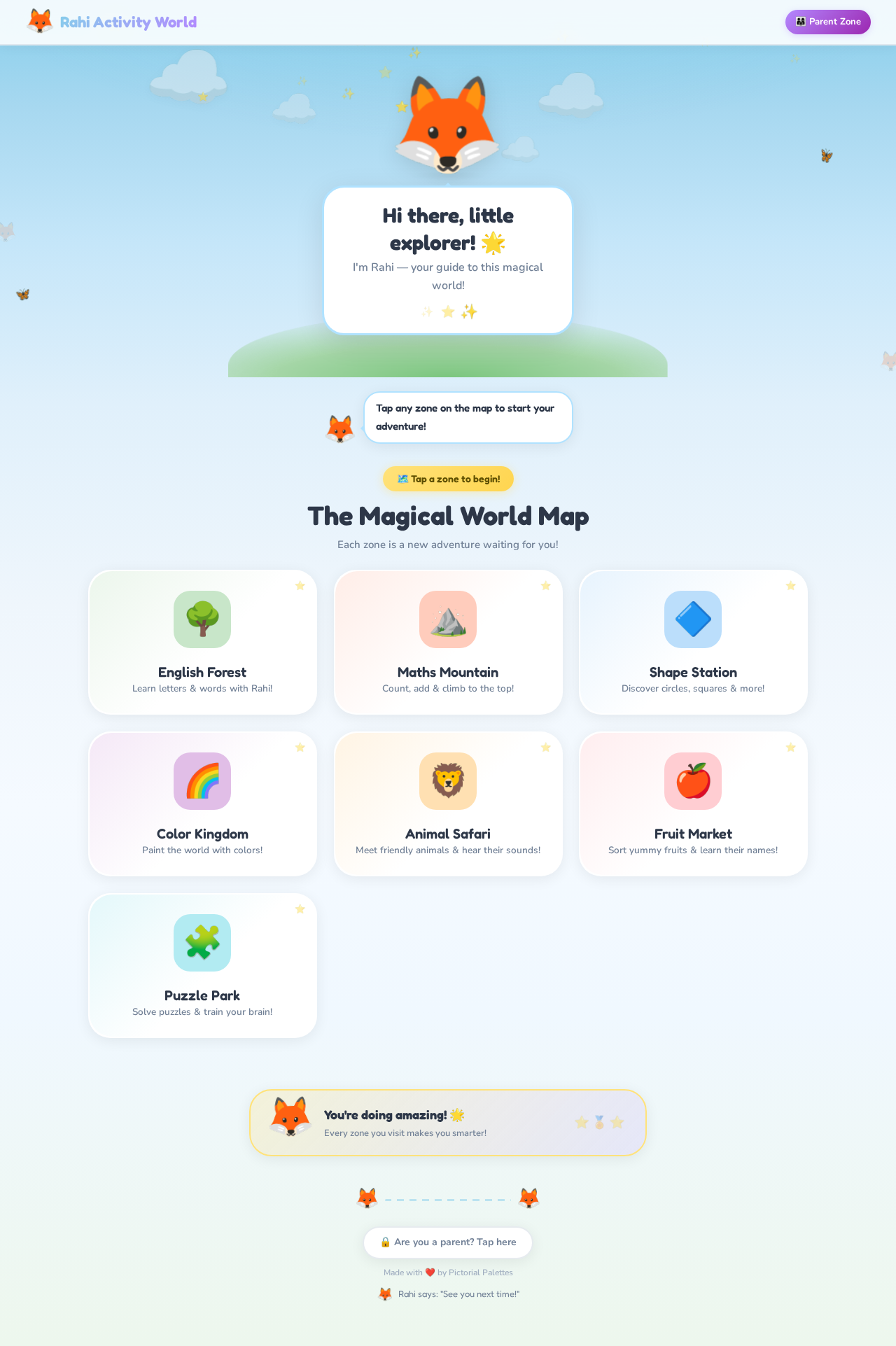
Rahi Activity World
Hi there, little explorer! 🌟
I'm Rahi — your guide to this magical world!
The Magical World Map
Each zone is a new adventure waiting for you!
English Forest
Learn letters & words with Rahi!
Maths Mountain
Count, add & climb to the top!
Shape Station
Discover circles, squares & more!
Color Kingdom
Paint the world with colors!
Animal Safari
Meet friendly animals & hear their sounds!
Fruit Market
Sort yummy fruits & learn their names!
Puzzle Park
Solve puzzles & train your brain!
You're doing amazing! 🌟
Every zone you visit makes you smarter!
No comments yet. Be the first!