ROVER OS
 Krish Suman
# RoverOS V2 — Futuristic ESP32 Delivery Rover Dashboard (Master Development Prompt) I want to build a futuristic robotics dashboard PWA for my ESP32 Delivery Rover V2. This is NOT just an RC car controller. The goal is to create a professional connected robotic platform interface that feels like a real industrial robotics operating system used for controlling autonomous robots. Build a clean, modern, production-quality Progressive Web App (PWA) with a premium futuristic UI inspired by: - JARVIS-style mission systems - Industrial robotics dashboards - Aerospace mission control interfaces - Modern robotic operating systems ================================================== CORE PRODUCT VISION ================================================== Application Name: RoverOS Version: Version 2.0 Purpose: A single-user local control dashboard for ESP32 Delivery Rover V2. The system should be modular, scalable, and future-ready while only displaying currently available Rover V2 capabilities. ================================================== TECHNICAL ARCHITECTURE ================================================== Follow clean architecture and SOLID principles. Separate: UI Layer ↓ Mission Logic Layer ↓ Communication Layer ↓ Hardware Communication Provider ↓ ESP32 Rover The UI must NEVER communicate directly with Bluetooth or hardware. All communication must go through a modular Communication Layer. Communication Layer Requirements: Current: - Mock Bluetooth provider enabled by default for development/demo. Future-ready providers: - Web Bluetooth API - Wi-Fi - MQTT - WebSocket - HTTP API - Jarvis Backend Integration The communication system should allow adding future providers without modifying: - UI - Mission logic - Dashboard components Architecture should be plug-and-play and production scalable. ================================================== DATA STORAGE ================================================== No backend database. Use client-side storage only. Store: - Settings - Mission history - Logs - User preferences Technology: - LocalStorage / IndexedDB ================================================== AUTHENTICATION ================================================== No authentication currently. The app should directly open into Rover Dashboard. However, keep authentication architecture modular and disabled by default. Future support: - Local PIN - Google Login - JWT Authentication - Multiple Users - Role Based Access: - Admin - Operator - Viewer - Multiple Rover Management ================================================== PWA REQUIREMENTS ================================================== Create a complete installable PWA. Include: - Web App Manifest - Service Worker - Offline support - App installation support - Mobile-first responsive design ================================================== UI DESIGN SYSTEM ================================================== Theme: Dark futuristic robotics interface. Color Palette: Primary: Electric Cyan (#00E5FF) Secondary: Deep Blue (#0A84FF) Background: Near Black (#0B0F14) Cards: Dark Gray (#151A22) Success: Green (#22C55E) Warning: Amber (#F59E0B) Danger: Red (#EF4444) Design Style: - Premium - Minimal - Professional - Industrial robotics feeling - Aerospace mission control inspired - Soft glassmorphism - Subtle blur - Rounded cards (14–18px) - Smooth animations (200–300ms) - Modern icons - High contrast readability Avoid: - Excessive neon glow - Gaming style UI - Overloaded animations The interface should feel like a real robotic operating system. ================================================== HOME SCREEN ================================================== Display: RoverOS Version 2.0 Show: - Rover Name: Rover V2 - Connection Status (Online/Offline) - Mission Status - Battery Percentage - Manual RC Mode - Bluetooth Status Main Action: Large premium button: START MISSION ================================================== MISSION START FLOW ================================================== When START MISSION is pressed: Show cinematic startup sequence: Checking Rover... Checking Battery... Checking Connection... Ready... Countdown: 3... 2... 1... Each countdown number should: - Play subtle futuristic beep sound - Have smooth animation After countdown: Play futuristic activation sound. Display: 🚀 Delivery Mission Activated Then automatically open Mission Dashboard. ================================================== MISSION DASHBOARD ================================================== Show live status cards: - Battery % - Mission Status - Current Mode - Bluetooth Status - Payload Status - Mission Timer Mission Log should update dynamically: Examples: Connected Mission Started Moving Turning Left Turning Right Stopped Package Delivered Mission Completed ================================================== CONTROL SCREEN ================================================== Provide large mobile-friendly controls: Forward Backward Left Right Stop Emergency Stop: - Red danger button - Immediate action ================================================== SETTINGS PAGE ================================================== Include: Rover Name Bluetooth Device Battery Calibration About Rover ================================================== CURRENT FEATURES ONLY ================================================== Only show features that actually exist in Rover V2. Available features: ✓ Manual RC Control ✓ Delivery Mission ✓ Live Dashboard ✓ Bluetooth Communication ✓ Mission Logs ✓ Battery Monitoring Do NOT display unavailable capabilities as existing. ================================================== FUTURE SECTION ================================================== Remove the old roadmap/future modules list. Do NOT display: - Line Following - Camera - Inspection - Patrol - AI Navigation - Voice Control - Jarvis Integration Replace with ONE single premium card only. Card: Title: Autonomous Operations Body: Next Evolution Status: Coming Soon Keep it mysterious and professional. Do not explain future features. ================================================== SOUND SYSTEM ================================================== Add subtle futuristic UI sound effects. Every interactive element should use the same premium robotic click sound. Apply to: - Navigation buttons - Mission buttons - Control buttons - Settings buttons - Dialog actions Sound style: - Soft robotic - Premium - Minimal - Professional Avoid: - Loud gaming sounds - Annoying effects ================================================== VERSION DISPLAY ================================================== Replace: RoverOS V2 with: RoverOS Version 2.0 Use a clean professional layout. ================================================== DEVELOPMENT REQUIREMENTS ================================================== Generate production-quality code. Requirements: - Modular folder structure - Reusable components - Clean naming conventions - Maintainable architecture - Separation of concerns - Scalable communication layer - Future hardware expansion support Do not redesign existing UI unnecessarily. Preserve: - Current layout - Navigation structure - Color palette - Premium industrial robotics design Only implement required functionality and improvements. The final product should feel like a professional robotic operating system dashboard for ESP32 Rover V2.


Comments (0)
Sign in to leave a comment
Architecture
No Services Diagrams Yet
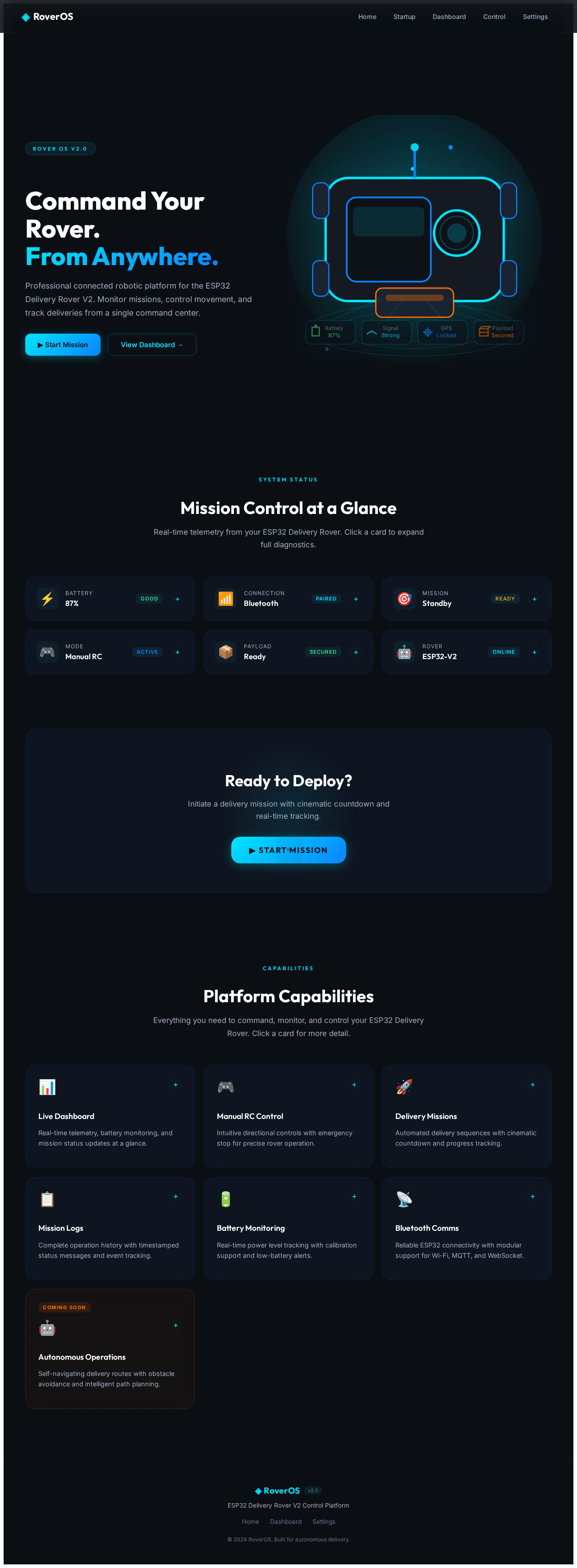
Command Your Rover.
From Anywhere.
Professional connected robotic platform for the ESP32 Delivery Rover V2. Monitor missions, control movement, and track deliveries from a single command center.
Mission Control at a Glance
Real-time telemetry from your ESP32 Delivery Rover. Click a card to expand full diagnostics.
Ready to Deploy?
Initiate a delivery mission with cinematic countdown and real-time tracking.
▶ START MISSIONPlatform Capabilities
Everything you need to command, monitor, and control your ESP32 Delivery Rover. Click a card for more detail.
Live Dashboard
Real-time telemetry, battery monitoring, and mission status updates at a glance.
Manual RC Control
Intuitive directional controls with emergency stop for precise rover operation.
Delivery Missions
Automated delivery sequences with cinematic countdown and progress tracking.
Mission Logs
Complete operation history with timestamped status messages and event tracking.
Battery Monitoring
Real-time power level tracking with calibration support and low-battery alerts.
Bluetooth Comms
Reliable ESP32 connectivity with modular support for Wi-Fi, MQTT, and WebSocket.
Autonomous Operations
Self-navigating delivery routes with obstacle avoidance and intelligent path planning.
Command Your Rover.
From Anywhere.
Professional connected robotic platform for the ESP32 Delivery Rover V2. Monitor missions, control movement, and track deliveries from a single command center.
Mission Control at a Glance
Real-time telemetry from your ESP32 Delivery Rover. Click a card to expand full diagnostics.
Ready to Deploy?
Initiate a delivery mission with cinematic countdown and real-time tracking.
▶ START MISSIONPlatform Capabilities
Everything you need to command, monitor, and control your ESP32 Delivery Rover. Click a card for more detail.
Live Dashboard
Real-time telemetry, battery monitoring, and mission status updates at a glance.
Manual RC Control
Intuitive directional controls with emergency stop for precise rover operation.
Delivery Missions
Automated delivery sequences with cinematic countdown and progress tracking.
Mission Logs
Complete operation history with timestamped status messages and event tracking.
Battery Monitoring
Real-time power level tracking with calibration support and low-battery alerts.
Bluetooth Comms
Reliable ESP32 connectivity with modular support for Wi-Fi, MQTT, and WebSocket.
Autonomous Operations
Self-navigating delivery routes with obstacle avoidance and intelligent path planning.
No comments yet. Be the first!