
Questive

byKanak Bajaj

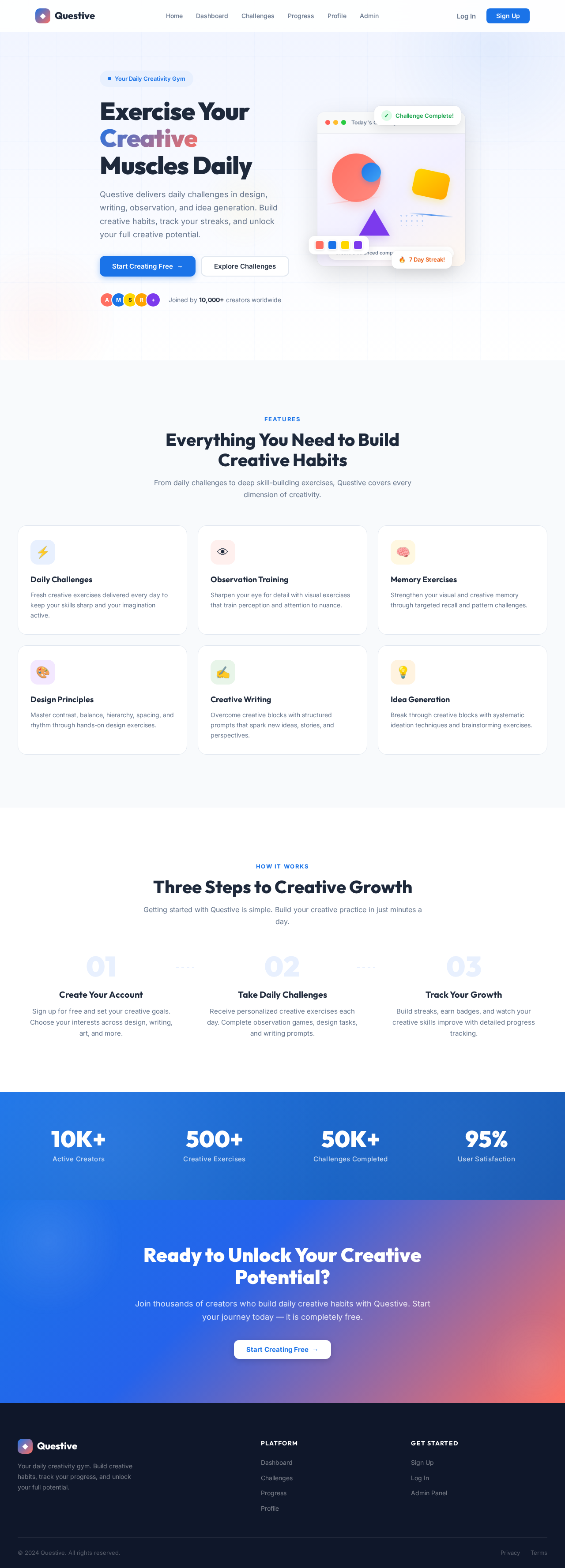
Build a modern web app called "Creativity Gym" for designers, artists, students, writers, and creators. Features: 1. Daily creativity challenges 2. Observation training games 3. Memory exercises 4. Design principle exercises (contrast, balance, hierarchy, spacing, rhythm) 5. Idea generation prompts 6. Creative writing prompts 7. Burnout recovery exercises 8. Streak and progress tracking 9. User accounts and saved progress 10. Responsive mobile-first design Include these exercises: - 3-circle drawing challenge: place three random circles and ask the user to turn them into a seamless drawing. - Half-object challenge: show half of an object and ask the user to reinterpret it into something completely different. - One-word challenge: give a random word and ask the user to create an ad, poem, product, or story idea. - Random object combination: combine 2-3 random objects into a new invention. - 10-second observation game: show an image briefly and ask questions about details. - Design hierarchy challenge: arrange elements to create visual priority. - Creative recovery mode: provide short exercises based on the user's current mental state. Design style: - Clean modern UI - Soft gradients - Playful but professional - Smooth animations - Dark and light mode - Inspired by Duolingo, Headspace, and Pinterest Pages: - Landing page - Dashboard - Challenge page - Progress page - Profile page - Admin page for adding new exercises Tech stack: - Next.js + React - Supabase or Firebase - Tailwind CSS - Framer Motion - Canvas API for drawing exercises

LandingChallengeSignupLoginAdmin
Landing

Comments (0)

No comments yet. Be the first!

System Requirements

System Requirement Document
Page 1 of 5

Questive System Requirements Document

1. Introduction

Questive is a modern web application designed to foster creativity among designers, artists, students, writers, and creators. The platform provides a variety of exercises and challenges aimed at enhancing creativity, observation, memory, and design skills. This document outlines the system requirements for Questive, ensuring a comprehensive and engaging user experience.

2. System Overview

Questive aims to be a creativity gym, offering daily challenges and exercises to stimulate creative thinking and skill development. The platform will support user accounts, progress tracking, and a responsive design suitable for mobile-first interactions. The admin panel will provide extensive management capabilities, allowing for the creation, scheduling, and categorization of exercises, as well as user and content management.

Page 2 of 5

3. Functional Requirements

  • As a User, I should be able to participate in daily creativity challenges.
  • As a User, I should be able to engage in observation training games.
  • As a User, I should be able to complete memory exercises.
  • As a User, I should be able to practice design principle exercises such as contrast, balance, hierarchy, spacing, and rhythm.
  • As a User, I should be able to receive idea generation prompts.
  • As a User, I should be able to engage in creative writing prompts.
  • As a User, I should be able to participate in burnout recovery exercises.
  • As a User, I should be able to track my streaks and progress.
  • As a User, I should be able to create an account and save my progress.
  • As a User, I should be able to access the platform on mobile devices with a responsive design.
  • As an Admin, I should be able to create, edit, schedule, and categorize exercises.
  • As an Admin, I should be able to upload images, videos, and reference assets for challenges.
  • As an Admin, I should be able to configure AI prompts and difficulty levels.
  • As an Admin, I should be able to review and feature user submissions with moderation tools.
  • As an Admin, I should be able to view analytics such as daily active users, completion rates, streaks, and the most engaging exercises.
  • As an Admin, I should be able to manage users, badges, achievements, and leaderboards.
  • As an Admin, I should be able to send announcements or weekly creativity challenges to users.
  • As an Admin, I should be able to manage design principles, frameworks, and learning content.
  • As an Admin, I should be able to add seasonal or themed challenge packs.
  • As an Admin, I should be able to enable or disable features and update content without modifying the code.
Page 3 of 5

4. User Personas

  • Designer: Engages with design principle exercises and creative challenges to enhance their design skills.
  • Artist: Participates in drawing and observation challenges to boost creativity and artistic expression.
  • Student: Uses the platform for idea generation and creative writing prompts to aid in academic projects.
  • Writer: Focuses on creative writing prompts and idea generation to overcome writer's block.
  • Admin: Manages the platform, exercises, and user engagement through the admin panel.

5. Core User Flows

  • User logs in -> selects a challenge -> completes the exercise -> tracks progress on the dashboard.
  • Admin logs in -> creates a new exercise -> uploads assets -> schedules the exercise -> monitors user engagement through analytics.

6. Visuals Colors and Theme

  • primary: #1A73E8 (deep blue)
  • primary_light: #E8F0FE (light blue)
  • secondary: #FF6F61 (coral)
  • accent: #FFD700 (gold)
  • highlight: #FFA500 (orange)
  • bg: #FFFFFF (white)
  • surface: rgba(250, 250, 250, 0.8)
  • text: #333333 (dark gray)
  • text_muted: #777777 (light gray)
  • border: rgba(200, 200, 200, 0.5)
Page 4 of 5

7. Signature Design Concept

The Questive homepage will feature an interactive "Creativity Canvas" where users can drag and drop elements to create their own unique designs. This canvas will utilize the Canvas API for drawing exercises, allowing users to manipulate shapes, colors, and textures in real-time. The background will transition between light and dark modes based on user preference, with smooth animations powered by Framer Motion. The playful yet professional design will be inspired by platforms like Duolingo and Pinterest, offering a dynamic and engaging first impression.

8. Interaction Model & Motion Direction

The landing page will employ a "parallax" interaction model, creating a layered depth effect as users scroll through the content. Decorative elements will move at different speeds, enhancing the storytelling aspect of the platform. Internal pages such as the dashboard and profile will utilize an "animated" model with moderate scroll-triggered reveals and hover transitions, providing a polished user experience.

9. Non-Functional Requirements

  • The platform must support high availability and scalability to accommodate a growing user base.
  • Data security and user privacy must be ensured through secure access control and data encryption.
  • The application should load within 3 seconds on standard broadband connections.
  • The system should support multiple languages to cater to a diverse user base.
Page 5 of 5

10. Tech Stack

  • Frontend: Next.js + React
  • Backend: Supabase or Firebase
  • Styling: Tailwind CSS
  • Animations: Framer Motion
  • Drawing Exercises: Canvas API

11. Assumptions and Constraints

  • The platform will primarily target users in India, with a focus on English language support initially.
  • The application will be optimized for mobile devices, ensuring a seamless experience across various screen sizes.
  • The admin panel will provide comprehensive management capabilities without requiring code modifications.

12. Glossary

  • Creativity Canvas: An interactive area on the homepage where users can create designs.
  • Parallax: A scrolling technique that creates a sense of depth by moving background and foreground elements at different speeds.
  • Framer Motion: A library for creating animations in React applications.
  • Canvas API: A web technology used for drawing graphics and animations directly in the browser.
Landing design preview
Login: Sign In
Admin: View Dashboard
Admin: View Analytics
Admin: Manage Exercises
Admin: Create Exercise
Admin: Upload Assets
Admin: Schedule Exercise
Admin: Manage Users
Admin: Manage Badges
Admin: Send Announcements
Admin: Manage Content
Admin: Toggle Features