Qatar-virtual-airline
Build a website for my Infinite flight Virtual Airline - Qatar Airways


Comments (0)
Sign in to leave a comment
System Requirements
Qatar-virtual-airline System Requirements Document
Introduction
This document outlines the system requirements for the Qatar-virtual-airline project, aimed at creating a dynamic and visually appealing website for the Infinite Flight Virtual Airline - Qatar Airways.
System Overview
The Qatar-virtual-airline website will serve as a central hub for the virtual airline community, providing real-time data integration with Discord or Crew Center. It will display information about the fleet, destinations, pilots, staff members, and more, while incorporating design elements from Qatar Airways' official website.
Functional Requirements
- As a User, I should be able to view information about Qatar Airways' fleet and total destinations.
- As a User, I should be able to see the number of pilots, staff members, total PIREPs filed, and hours flown.
- As a User, I should be able to view active pilots and routes.
- As a User, I should be able to apply as a pilot for Qatar Airways via a link.
- As a User, I should be able to read reviews from different Qatar Airways VA pilots.
- As a User, I should be able to view pilot ranks and their corresponding hours.
User Personas
- Guest: Can view all public information about the virtual airline.
- Pilot: Can access personalized data, including hours flown and rank.
- Admin: Can update and manage content on the website.
Visuals Colors and Theme
- primary: #800000 (deep maroon)
- primary_light: #A05252 (lighter maroon)
- secondary: #FFD700 (gold)
- accent: #00BFFF (deep sky blue)
- highlight: #FF4500 (orange red)
- bg: #F5F5F5 (white smoke)
- surface: rgba(255, 255, 255, 0.8)
- text: #333333 (dark gray)
- text_muted: #777777 (gray)
- border: rgba(0, 0, 0, 0.1)
Signature Design Concept
Interactive Flight Map Experience
The homepage will feature an interactive 3D flight map using @react-three/fiber and @react-three/drei. Users can explore a globe with animated flight paths representing Qatar Airways' routes. Hovering over a path will display flight details, and clicking will zoom into a specific route, showing detailed information about the destination, fleet, and pilot reviews. The map will dynamically update with real-time data from Discord or Crew Center.
Interaction Model & Motion Direction
-
Interaction Model: Parallax
- The landing page will feature layered depth via scroll, with atmospheric elements moving at different speeds to create a sense of depth.
- Real content will scroll naturally, with sections having distinctive mechanics like kinetic typography and morphing SVGs.
-
Internal Pages: Static
- Focus on layout clarity and minimal motion for data-heavy pages like dashboards and profiles.
Non-Functional Requirements
- The website must be responsive and accessible across all devices.
- It should load within 3 seconds on a standard broadband connection.
- The system must handle up to 10,000 concurrent users.
Tech Stack
- Frontend: React for Web
- Backend: Python, FastAPI
- Database: MySQL or MariaDB
- AI Models: GPT 5.4 for user-friendly responses
- AI Tools: Litellm for LLM Routing
- Local Orchestration: Docker, docker-compose
- Server-side Orchestration: Kubernetes
Assumptions and Constraints
- The website will integrate with existing Discord or Crew Center APIs for real-time data.
- The design will align with Qatar Airways' branding guidelines.
- The system will be built to scale with the growing user base.
Glossary
- PIREP: Pilot Report
- CMS: Content Management System
- VA: Virtual Airline
This document provides a comprehensive overview of the requirements for the Qatar-virtual-airline project, ensuring a cohesive and engaging experience for users.
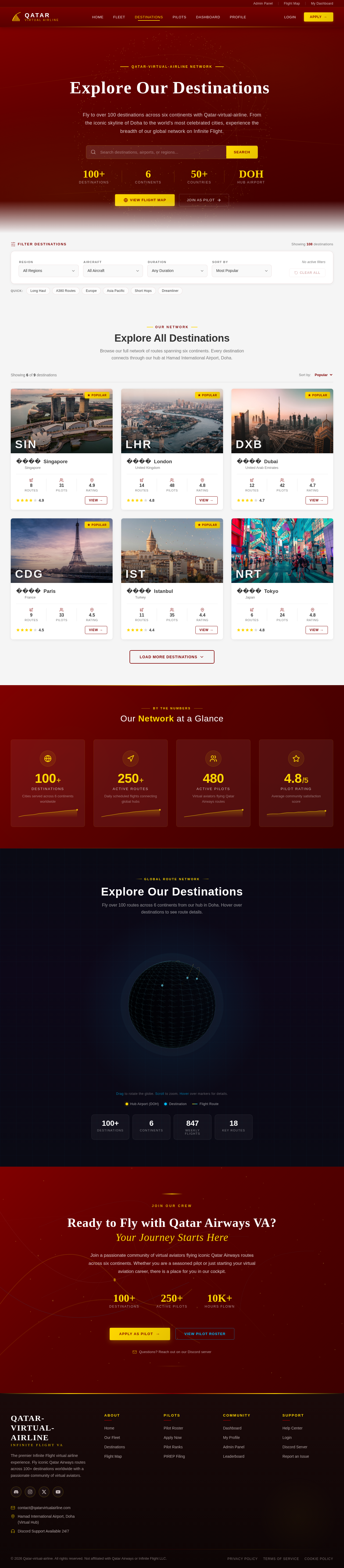
ExploreOurDestinations
Fly to over 100 destinations across six continents with Qatar-virtual-airline. From the iconic skyline of Doha to the world's most celebrated cities, experience the breadth of our global network on Infinite Flight.
Explore All Destinations
Browse our full network of routes spanning six continents. Every destination connects through our hub at Hamad International Airport, Doha.




Our Network at a Glance
Explore Our Destinations
Fly over 100 routes across 6 continents from our hub in Doha. Hover over destinations to see route details.
Drag to rotate the globe. Scroll to zoom. Hover over markers for details.
Ready to Fly with Qatar Airways VA?Your Journey Starts Here
Join a passionate community of virtual aviators flying iconic Qatar Airways routes across six continents. Whether you are a seasoned pilot or just starting your virtual aviation career, there is a place for you in our cockpit.
No comments yet. Be the first!