PromoPulse
 GUTTA BHAVANA
You are an expert SaaS product team consisting of: - Product Manager - UI/UX Designer - Frontend Engineer - Backend Engineer - Database Architect - DevOps Engineer - QA Engineer Build a production-ready Micro SaaS. Idea: Competitor promo monitor for SMB brands Requirements: Create: - Beautiful landing page - Dashboard - User authentication - Google Login - Email Login - Stripe subscriptions - Pricing page - Admin dashboard - Database - REST APIs - Responsive design - Dark mode - User settings - Billing page - Analytics - SEO - Error handling - Loading states Generate: - Frontend - Backend - Database schema - APIs - Authentication - Deployment configuration - Environment variables - README - Sample data Use a modern design similar to Linear, Notion or Vercel. Everything should be production-ready.


Comments (0)
Sign in to leave a comment
System Requirements
Riventiq System Requirements Document
1. Introduction
Riventiq is a Micro SaaS platform designed to monitor competitor promotions for small and medium-sized business (SMB) brands. The platform aims to provide users with insights into competitor activities, enabling them to make informed marketing decisions. This document outlines the system requirements for the development of Riventiq, ensuring a production-ready solution with a modern design aesthetic similar to Linear, Notion, or Vercel.
2. System Overview
Riventiq will be a comprehensive platform featuring a beautiful landing page, user authentication, subscription management, and a responsive design. The system will include dashboards for users and administrators, a pricing page, and analytics capabilities. The platform will support Google and Email login, Stripe subscriptions, and will be optimized for SEO. Error handling and loading states will ensure a smooth user experience.
3. Functional Requirements as Story Points
- As a User, I should be able to view a beautiful landing page.
- As a User, I should be able to log in using Google.
- As a User, I should be able to log in using Email.
- As a User, I should be able to manage my subscription through Stripe.
- As a User, I should be able to view and interact with a dashboard.
- As an Admin, I should be able to access an admin dashboard.
- As a User, I should be able to view a pricing page.
- As a User, I should be able to update my user settings.
- As a User, I should be able to view a billing page.
- As a User, I should be able to access analytics.
- As a User, I should experience responsive design across devices.
- As a User, I should be able to switch to dark mode.
- As a User, I should experience effective error handling.
- As a User, I should see loading states during data fetching.
- As a Developer, I should be able to generate frontend, backend, and database schema.
- As a Developer, I should be able to generate REST APIs.
- As a Developer, I should be able to configure authentication.
- As a Developer, I should be able to deploy the application with configuration.
- As a Developer, I should be able to manage environment variables.
- As a Developer, I should be able to access a README with project details.
- As a Developer, I should be able to use sample data for testing.
3.2 Competitor Website Management and Promotion Tracking
- As a User, I should be able to add competitor website URLs for monitoring.
- As a User, I should be able to manually scan competitor websites for promotions.
- As a User, I should be able to schedule automatic scans of competitor websites.
- As a User, I should be able to extract promotions such as discounts, coupon codes, and special offers.
- As a User, I should be able to view a history of promotions detected over time.
- As a User, I should be able to detect changes in promotions and receive alerts.
- As a User, I should receive AI-generated weekly summaries of competitor promotions.
- As a User, I should receive email alerts when there are changes in competitor promotions.
3.3 Implementation Tasks
- Implement competitor website management and scanning features.
- Develop services for promotion extraction, history tracking, and change detection.
3.1 Foundation Tasks
- google.oauth.integration: Implement Google OAuth for user authentication.
- fetch.system.events: Develop a service to fetch system events.
- fetch.promo.data: Create a service to fetch promotional data.
- fetch.event.data: Establish a service to fetch event data.
- stripe.integration: Integrate Stripe for payment processing.
4. User Personas
- User: An SMB brand representative looking to monitor competitor promotions.
- Admin: A platform administrator managing user accounts and overseeing system operations.
5. Core User Flows
- User visits landing page -> User logs in via Google/Email -> User accesses dashboard -> User views competitor promo insights -> User updates settings -> User manages subscription.
- Admin logs in -> Admin accesses admin dashboard -> Admin manages user accounts -> Admin reviews system analytics.
6. Visuals Colors and Theme
- primary: #0D6EFD (a vibrant blue for brand identity)
- primary_light: #66B2FF (a lighter blue for hover states)
- secondary: #6C757D (a neutral gray for supporting elements)
- accent: #FFC107 (a bold yellow for call-to-actions)
- highlight: #198754 (a green for active indicators)
- bg: #FFFFFF (a clean white for background)
- surface: #F8F9FA (a light gray for card backgrounds)
- text: #212529 (a dark gray for primary text)
- text_muted: #6C757D (a softer gray for secondary text)
- border: #DEE2E6 (a subtle gray for borders)
7. Signature Design Concept
Interactive Promo Galaxy
The homepage will feature an interactive galaxy map where each star represents a competitor promotion. Users can click on a star to open a detailed promo card, drag to rotate the galaxy, and hover to highlight connections between promotions. This dynamic visualization will be built using @react-three/fiber and gsap for smooth animations and interactions.
Landing Hero Motion Brief
A continuously moving 2D composition will depict a central dashboard surrounded by orbiting promo insights. As users interact, the dashboard transforms, showcasing real-time data updates and insights. The animation will loop every 10 seconds, with layers including the dashboard, orbiting insights, and interactive elements. The design will be responsive, ensuring clarity on all devices.
8. Interaction Model & Motion Direction
- Intended Interaction Model: Parallax
- The landing page will feature layered depth via scroll, with decorative elements translating at different speeds to create a visually rich first impression.
- Internal Pages: Static
- Internal pages will prioritize layout clarity with minimal motion, suitable for dashboards and settings.
9. Non-Functional Requirements
- The system must be highly available and scalable to accommodate growing user demand.
- The platform must ensure data security and user privacy.
- The application should be optimized for SEO to enhance discoverability.
- The design must be responsive and accessible across various devices and screen sizes.
10. Tech Stack
- Frontend: React for Web
- Backend: Python, FastAPI
- Database: PostgreSQL with Alembic for migrations
- DevOps: Docker, docker-compose
11. Assumptions and Constraints
- The platform will initially target SMB brands in India, considering local currency and timezone settings.
- The system will integrate with Stripe for subscription management.
- The application will be deployed on a cloud platform supporting Docker.
12. Glossary
- SMB: Small and Medium-sized Business
- Promo: Promotion
- REST API: Representational State Transfer Application Programming Interface
- SEO: Search Engine Optimization
- UI/UX: User Interface/User Experience
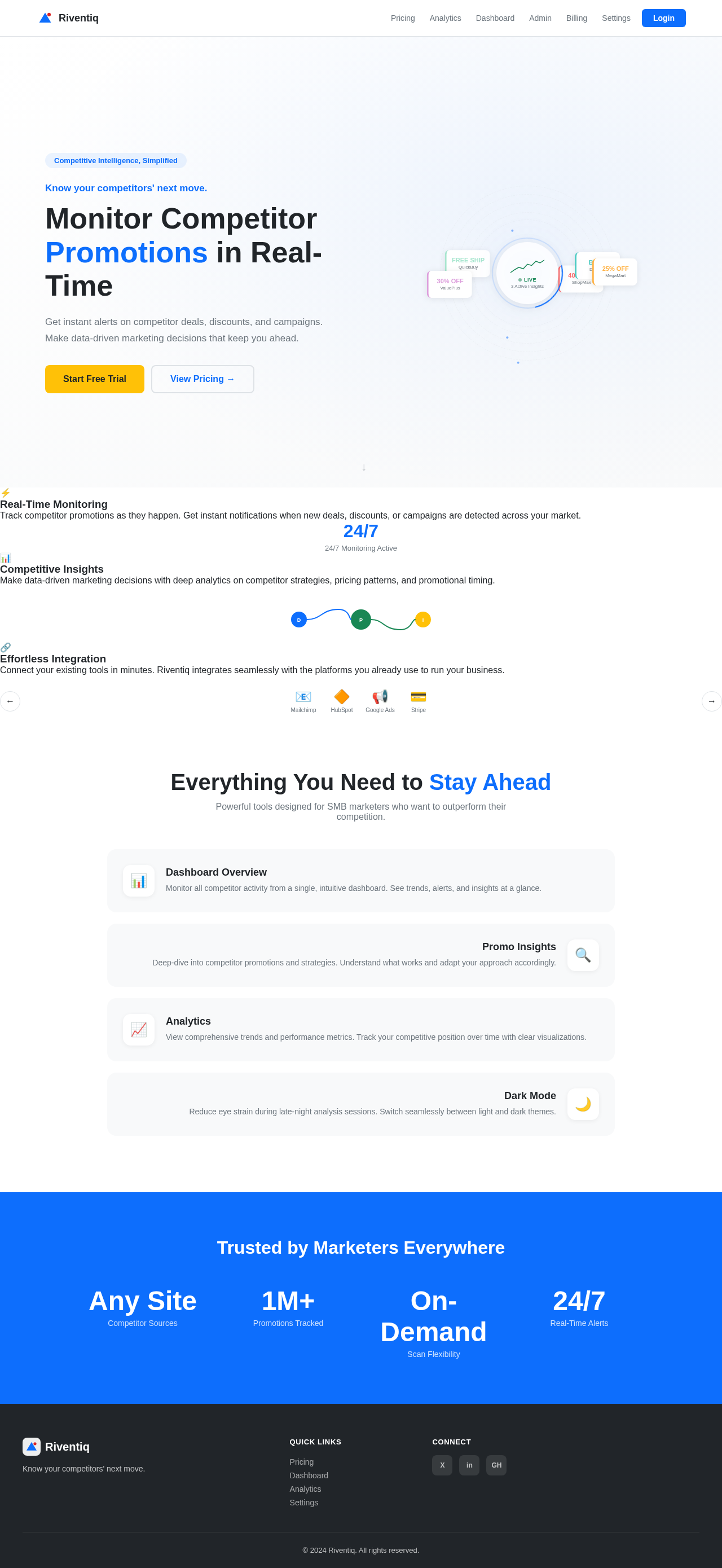
Know your competitors' next move.
Monitor Competitor Promotions in Real-Time
Get instant alerts on competitor deals, discounts, and campaigns. Make data-driven marketing decisions that keep you ahead.
Real-Time Monitoring
Track competitor promotions as they happen. Get instant notifications when new deals, discounts, or campaigns are detected across your market.
Competitive Insights
Make data-driven marketing decisions with deep analytics on competitor strategies, pricing patterns, and promotional timing.
Effortless Integration
Connect your existing tools in minutes. Riventiq integrates seamlessly with the platforms you already use to run your business.
Everything You Need to Stay Ahead
Powerful tools designed for SMB marketers who want to outperform their competition.
Dashboard Overview
Monitor all competitor activity from a single, intuitive dashboard. See trends, alerts, and insights at a glance.
Promo Insights
Deep-dive into competitor promotions and strategies. Understand what works and adapt your approach accordingly.
Analytics
View comprehensive trends and performance metrics. Track your competitive position over time with clear visualizations.
Dark Mode
Reduce eye strain during late-night analysis sessions. Switch seamlessly between light and dark themes.
Trusted by Marketers Everywhere
Know your competitors' next move.
Monitor Competitor Promotions in Real-Time
Get instant alerts on competitor deals, discounts, and campaigns. Make data-driven marketing decisions that keep you ahead.
Real-Time Monitoring
Track competitor promotions as they happen. Get instant notifications when new deals, discounts, or campaigns are detected across your market.
Competitive Insights
Make data-driven marketing decisions with deep analytics on competitor strategies, pricing patterns, and promotional timing.
Effortless Integration
Connect your existing tools in minutes. Riventiq integrates seamlessly with the platforms you already use to run your business.
Everything You Need to Stay Ahead
Powerful tools designed for SMB marketers who want to outperform their competition.
Dashboard Overview
Monitor all competitor activity from a single, intuitive dashboard. See trends, alerts, and insights at a glance.
Promo Insights
Deep-dive into competitor promotions and strategies. Understand what works and adapt your approach accordingly.
Analytics
View comprehensive trends and performance metrics. Track your competitive position over time with clear visualizations.
Dark Mode
Reduce eye strain during late-night analysis sessions. Switch seamlessly between light and dark themes.
No comments yet. Be the first!