Tropical Circuit
Southeast Asia
Temple trails, island hopping, and street-food crawls tuned to a relaxed solo pace with built-in safety check-ins.
Temple toursIsland hoppingNight markets
Explore itinerary Aarya jeni
Here is a comprehensive, high-detail product requirement and system architecture prompt designed to be handed over to a development team, software architect, or an AI code-generation tool. # Product Requirement Document (PRD): Next-Gen AI-Driven Trip Planner ## 1. Project Overview & Core Value Proposition The objective is to build an intelligent, context-aware, and highly adaptive mobile/web trip planning application. The platform will differentiate itself by offering real-time AI guidance, dynamic route recalculation based on live telemetry, localized crowd-sourced recommendations, and a heavy emphasis on solo traveler safety. The architecture must be modular to support future monetization (Pro/Premium tiers). ## 2. Functional Requirements & Feature Specifications ### Feature 1: Intelligent Onboarding & Trip Segmentation * **Specification:** The app must prompt the user to select a "Trip Persona" before generating an itinerary. * **Supported Types:** *Single, Friends, Family, Couple (Casual), Couple (Romantic), Devotional.* * **Behavior:** The recommendation engine must filter destinations, activities, and hotel vibes based on this selection (e.g., romantic trips prioritize secluded spots/fine dining; family trips prioritize kid-friendly spots; devotional trips prioritize temples/dress-code alerts). ### Feature 2: GPS Integration & Contextual Discovery * **Specification:** Continuous background/foreground GPS tracking (with user permission). * **Behavior:** Dynamically fetch and surface "Nearby Gems" within a configurable radius (X km) relative to the user's current coordinates. ### Feature 3: Interactive Itinerary Builder & Dynamic Mapping * **Specification:** Present a curated list of attractions featuring checkboxes for user selection. * **Behavior:** * Upon checking items, the app automatically plots an optimized sequential route. * Integrate a map interface (Google Maps/Mapbox API) displaying real-time GPS navigation paths connecting the selected points of interest (POIs). ### Feature 4: Google-Powered Gastronomy Engine * **Specification:** Integration with the Google Places API. * **Behavior:** Filter and display local culinary recommendations strictly based on top ratings (\ge 4.5 stars), sentiment analysis of reviews, and regional authenticity. ### Feature 5: Multi-Modal Transit Planning * **Specification:** Travel mode selector during setup. * **Options:** 1. *Personal/Rental Car* (focus on parking, driving routes). 2. *Public Transit* (integrated timetables for local buses, trains, or intercity coaches to reach the primary location). * **Behavior:** The itinerary pacing and routing logic must adjust based on the speed and constraints of the chosen transit mode. ### Feature 6: End-to-End Hospitality & Dining Research * **Specification:** Backend web-scraping/API aggregation engine (Booking.com, Expedia, TripAdvisor). * **Behavior:** Provide structured recommendations for accommodation (Stay) and daily meals separated into *Breakfast, Lunch, and Dinner*, optimized for proximity to the itinerary path. ### Feature 7: Real-Time Self-Healing Itineraries & Obstacle Detection * **Specification:** A dynamic "re-thinking" backend engine. * **Behavior:** If a user misses a turn, encounters a heavy traffic jam, runs into unannounced tolls, or faces bad road conditions: * The app must automatically recalculate the route. * It must dynamically swap or re-order upcoming POIs and hotels to minimize time wastage. ### Feature 8: Predictive Financial Estimator * **Specification:** Post-planning cost breakdown algorithm. * **Behavior:** Calculate and display a detailed, real-time updated approximate expenditure sheet categorized by: ### Feature 9: Omnipresent AI Travel Agent & Companion * **Specification:** An LLM-powered (e.g., GPT-4o / Claude 3.5 Sonnet) conversational assistant embedded via a persistent chat overlay. * **Behavior:** * Acts as a 24/7 real-time guide. * Capable of answering contextual questions (e.g., *"Is there a dress code for the temple I'm approaching?"* or *"Find me a pharmacy near my current GPS location"*). ### Feature 10: Post-Trip Memorabilia & Analytics * **Specification:** A "Trip Rewind" dashboard generated automatically upon trip completion. * **Behavior:** Compile an interactive summary consisting of key trip statistics, total distance covered, and an exportable high-resolution GPS map image overlayed with heatmaps/pins of the exact places visited. ## 3. Advanced Safety & Security Framework (Crucial) ### Feature 11: GuardAngel Solo-Traveler Safety Mode * **Specification:** Triggered automatically if the profile is registered as a solo female traveler (or manually toggled by any user). * **Behavior:** * **Live Location Streaming:** Secure, encrypted webhook link shareable via WhatsApp/SMS/Email, allowing designated family members to track live telemetry without needing the app installed. * **Geofencing Alerts:** Automatically notify emergency contacts if the user deviates drastically from the planned route during late hours. ### Feature 12: Kinetic & One-Tap SOS Emergency System * **Specification:** High-priority panic trigger mechanism. * **Behavior:** * A prominent one-tap SOS button on the map UI + a hardware trigger shortcut (e.g., shaking the phone or pressing the power button 3 times). * **Action:** Instantly dispatches a localized SMS/Data packet containing precise GPS coordinates, battery percentage, and a pre-configured distress message to registered emergency contacts and local authorities. ## 4. Administrative & Future-Proofing Requirements ### Feature 13: Modular Paywall & Administrative Feature Toggling * **Specification:** Role-Based Access Control (RBAC) and feature-flag infrastructure (e.g., LaunchDarkly or Firebase Remote Config). * **Behavior:** * Admin dashboard must allow non-technical administrators to lock advanced features (like real-time AI voice assistance or the SOS GuardAngel mode) behind a "Pro Version" paywall. * Seamless integration capability with payment gateways (Stripe, Apple Pay, Google Pay) for subscription/freemium model activation. ## 5. Suggested Tech Stack for Developers * **Frontend:** Flutter or React Native (For cross-platform iOS/Android deployment with native GPS tracking access). * **Backend:** Node.js (Fastify) or Python (FastAPI) to handle heavy asynchronous geospatial computations. * **Database:** PostgreSQL with PostGIS extension (essential for complex geographic and spatial queries). * **AI/LLM Layer:** LangChain/LlamaIndex orchestrating communication between the application, OpenAI/Anthropic APIs, and the Google Places database. * **Maps/Routing:** Mapbox Navigation SDK or Google Maps Platform (Directions, Distance Matrix, and Roads API). Would you like to expand on any specific feature here, such as designing the exact UI layout for the AI agent or defining how the budget estimator handles multi-currency trips?


Sign in to leave a comment
As a frontend developer, implement the Navbar section for the Landing page. This component uses useState for mobile drawer open/close (`open`) and scroll detection (`scrolled`), with two useEffect hooks: one attaching a passive scroll listener that sets `nv-scrolled` class when `scrollY > 8`, and another locking `document.body.style.overflow` when the drawer is open. The nav renders a logo with Compass icon (lucide-react, size 20), three nav links (Features→/Landing, Pricing→/Paywall, Docs→/Onboarding), Sign In/Sign Up CTA buttons, an animated three-span burger button with `aria-expanded`, a backdrop overlay (`nv-overlay`) that closes the drawer on click, and a slide-in `nv-drawer` aside with duplicated links and actions. Note: this component may already exist from a previous page — check for reuse before implementing.
As a Backend Developer, implement authentication API endpoints using FastAPI: POST /api/auth/signup (user registration with hashed password), POST /api/auth/login (JWT token generation), POST /api/auth/logout, POST /api/auth/refresh-token, GET /api/auth/me (current user profile). Include JWT middleware, password hashing (bcrypt), token validation, and RBAC role claim embedding. This supports LoginForm, SignupForm, and all protected page access.
As a Backend Developer, design and implement PostgreSQL database schema with PostGIS extension. Tables: users (id, email, password_hash, role, status, created_at), user_profiles (persona, preferences JSON, safety_settings), trips (id, user_id, destination, days, status), itinerary_items (trip_id, poi_id, day, time_slot, order), pois (id, name, category, geom GEOMETRY(Point,4326), rating), geofences (id, trip_id, zone GEOMETRY(Polygon,4326), alert_type), media (id, trip_id, user_id, url, geom, captured_at), sos_events (id, user_id, geom, status, contacts_notified), emergency_contacts (id, user_id, name, phone, relationship), subscriptions (user_id, tier, stripe_subscription_id, status). Write Alembic migrations. Seed Indian POI dataset.
As a Frontend Developer, configure global state management for the React Native/React app using Zustand or Redux Toolkit. Implement stores for: authStore (user, token, role, isAuthenticated), tripStore (active trip, itinerary, transit mode, persona), safetyStore (guardAngel active, live location sharing, geofences), uiStore (theme, notifications, loading states). Configure React Query / TanStack Query for server state and API caching. Set up Axios interceptors for JWT refresh and error handling. This cross-cutting concern underpins all data-driven page sections.
As a Frontend Developer, implement the global design system and theme configuration. Create a CSS variables file with all brand tokens: --primary #1E3A8A, --primary-light #3B82F6, --secondary #F97316, --accent #10B981, --highlight #F59E0B, --bg #F3F4F6, --surface rgba(255,255,255,0.8), --text #111827, --text-muted #6B7280, --border rgba(209,213,219,0.2). Set up global typography scale, spacing system, and shared component library (Button, Badge, Card, Modal, Toast). Configure Framer Motion global variants. Establish shared CSS utilities reused across all 16 pages.
Deploy the current develop branch to the stage environment for this product. Do not implement code changes.
As a frontend developer, implement the LandingHero section for the Landing page. This section is a complex 3D/animation-heavy hero using @react-three/fiber Canvas with a `GlobeMesh` component (sphereGeometry r=1.6, wireframe overlay, rotation delta 0.18 via useFrame) and a `ParticleField` (90 particles on sphere shell r=2.2–3.8, green `#A7F3D0` point material, slow counter-rotation). Framer Motion powers: staggered word-reveal headline (`container` + `wordVariants` with blur filter), `fadeUp` variants for subtext and CTAs, and a `useScroll`/`useTransform` parallax background (`bgY`). The headline array `HEADLINE` animates 8 words with accent coloring on 'Trip/at/a/Time'. Four animated `MARKERS` (Kyoto, Reykjavík, Lisbon, Cape Town) and three `STATS` (120+ Countries, 4.9★, AI) are rendered. Uses Compass, MapPin, ArrowRight, Sparkles from lucide-react. CTA links to /Signup and /Itinerary.
As a frontend developer, implement the LandingTripPersonas section for the Landing page. This section renders four interactive `PersonaCard` components (Adventure Seeker, Culture Explorer, Relaxation Enthusiast, Budget Traveler) using a `personas` array with icons from lucide-react (Mountain, Landmark, Palmtree, Wallet). Each card uses local `hovered` useState and a `selected` prop driven by parent `useState` for the active persona ID. Cards implement a CSS flip effect (`flipped = hovered || selected`) revealing a back face with `detail` text and three destination `MapPin` items. Framer Motion `AnimatePresence` + `tooltipVariants` (scale 0.95→1, y -8→0) animate a tooltip on hover. Cards are keyboard-accessible with `role=button`, `tabIndex=0`, `aria-pressed`, and Enter/Space `onKeyDown` handlers. The `RotateCw` icon and `Sparkles` icon appear in the flip/detail area. An `ArrowRight` CTA links to /Signup.
As a frontend developer, implement the LandingInteractiveMap section for the Landing page. This is the most complex section, featuring a @react-three/fiber Canvas globe with `OrbitControls` and `Stars` from @react-three/drei. A `Hotspot` component converts lat/lon to 3D vectors via `latLonToVec3` (spherical coordinates onto r=1.66 sphere) and animates scale pulse via `useFrame` clock. The `regions` array defines 4 regions (Southeast Asia, Western Europe, South America, East Africa) with colors PRIMARY/PRIMARY_LIGHT/ACCENT/HIGHLIGHT, lat/lon, cost ranges, durations, and activity lists. State management uses `useState` for `activeRegion`, `hoveredRegion`. Framer Motion `AnimatePresence` animates a detail panel slide-in showing region blurb, duration, cost, and activity chips. UI controls include zoom Plus/Minus buttons (useRef on canvas container), a `MousePointerClick` interaction hint, Globe2 header icon, and an ArrowRight CTA to /Itinerary. Uses `useCallback` and `useMemo` for hotspot position calculations.
As a frontend developer, implement the LandingFeatureShowcase section for the Landing page. This section renders a 6-card feature grid using a `features` array (AI Trip Planning→/Itinerary, Real-Time Navigation→/Map, Culinary Recommendations→/Dining, Cost Breakdown→/Budget, Dynamic Route Updates→/Transit, AI Travel Assistant→/AIAgent) with corresponding lucide-react icons (Sparkles, MapPin, Utensils, DollarSign, RefreshCw, MessageSquare). Framer Motion `useInView` (once, amount 0.3) on `gridRef` triggers `containerVariants` with `staggerChildren: 0.12` and `delayChildren: 0.05`, and `cardVariants` animating y:40→0 with cubic-bezier ease `[0.22, 1, 0.36, 1]`. A parallax decorative layer (`lfs-decor`) applies CSS variable `--scroll` at 0.6× speed with `lfs-grid-lines` and three blob divs (lfs-blob-a/b/c). Section header includes an eyebrow badge with dot, h2 with `<em>` accent, and subtitle. Each card includes tag, icon, title, description, and ArrowRight link.
As a frontend developer, implement the LandingSoloTravelerSafety section for the Landing page. This section renders three `SafetyBlock` components from a `blocks` array (GuardAngel Mode→/Safety with ShieldCheck, Live Location Sharing→/Map with MapPin, SOS Emergency System→/SOS with AlertTriangle), each with a variant class (sts-primary, sts-accent, sts-secondary). Each `SafetyBlock` uses `useRef` + `useInView` (once, amount 0.4) to trigger entrance animation (opacity 0→1, y 28→0, staggered by `index * 0.12`). A spring-animated `sts-bar` accent (scaleY spring: stiffness 200, damping 22) and a pulsing icon (scale [1,1.15,1], opacity [1,0.7,1], 2s infinite) with `whileHover` scale 1.12 are included. Five decorative floating icons (ShieldCheck, MapPin, AlertTriangle, Compass, Navigation) are positioned absolutely via `decorIcons` array with classes sts-d1 through sts-d5. Trust indicators row renders Lock/Users/BadgeCheck icons with labels (end-to-end encrypted, 2.4M solo travelers protected, Verified 24/7 response). `onAnimationComplete` fires `onLastReveal` callback for the last block.
As a frontend developer, implement the LandingCTA section for the Landing page. This section features a `MagneticPrimaryButton` component with `useMotionValue`/`useSpring` (stiffness 250, damping 18, mass 0.4) for magnetic hover tracking (max ±6px offset) via `useMotionTemplate` transform, linking to /Signup. State management includes `email` (controlled input), `submitted` (boolean toggling a success state), `focused` (input focus ring), and `ripples` array (each with id/rx/ry) spawned on button click via `spawnRipple` — animated scale 0→9, opacity 1→0 over 0.65s, auto-cleaned after 650ms. An email capture `<form>` with `handleSubmit` validates non-empty email, sets `submitted`, and clears input. `AnimatePresence` wraps the submitted confirmation state. Three `trustBadges` (ShieldCheck, Zap, Globe2) are rendered in a row. Four avatar initials chips (AK, MR, JS, TL) with gradient backgrounds display social proof. A `lcta-glow` decorative div is included. Mail and CalendarClock icons from lucide-react appear in the form area.
As a frontend developer, implement the Footer section for the Landing page. The Footer component uses `useState` for `email` (controlled newsletter input) and `subscribed` (boolean success toggle). It renders a 4-column link grid from `columns` array (Features, Company, Legal, Resources — each with 4 href links) plus a brand column with Compass logo icon and tagline. A newsletter form with `handleSubmit` validates non-empty email, sets `subscribed`, and clears input, with a `Send` icon submit button. Social icons row renders Twitter, Instagram, Facebook, LinkedIn from lucide-react in `socials` array as accessible buttons. A `ftr-glow` decorative div and `ftr-inner` layout container are included. Note: this component may already exist from a previous page — check for reuse before implementing.
As a frontend developer, implement the LoginHero section for the Login page. This section renders a full-width `<section className='lh-root'>` with an inner container. It uses `framer-motion` with three distinct animation variants: `headlineVariants` (opacity/y fade-in from top, 0.55s easeOut), `subheadVariants` (opacity/y fade-in from bottom, 0.5s with 0.18s delay), and `accentDotVariants` (scale+opacity pop-in, 0.35s with 0.32s delay). The `motion.h1` renders 'Welcome Back' with a `.lh-headline-underline` span on 'Back'. The `motion.p` subheadline includes two inline `motion.span` elements with class `lh-accent-dot` (aria-hidden) acting as animated decorative separators between 'itineraries', 'maps', and 'travel insights'. All animations use `initial='hidden'` and `animate='visible'`. Note: Navbar component may already exist from the Landing page task.
As a frontend developer, implement the SignupHero section for the Signup page. This section uses an IntersectionObserver (via useRef + useEffect) to trigger titleReady state, which drives Framer Motion animations. The decorative accent layer includes two animated blobs (sh-accent-blob-1/2) that animate from scale 0.8/opacity 0 to scale 1/opacity 0.08, plus static rings (sh-accent-ring-1/2) and lines (sh-accent-line-1/2). The headline 'Create Your Free Account' uses a staggered word reveal with AnimatePresence — each word animates with opacity 0→1 and y 16→0, delayed by 0.3 + i*0.12s. A value props row renders four items (Route, Shield, Compass, Sparkles icons) and an sh-badge with a pulse dot. Import SignupHero.css. Note: Navbar component may already exist from the Landing page task.
As a Backend Developer, implement user management REST API endpoints using FastAPI: GET /api/users (paginated list with search/filter/sort), GET /api/users/{id}, POST /api/users (admin create), PATCH /api/users/{id} (role/status update), DELETE /api/users/{id}, PATCH /api/users/{id}/suspend, PATCH /api/users/{id}/promote. Implement RBAC guards (admin-only routes). Supports AdminUsers, UsersTable, UsersToolbar, UsersHeader, and UsersPagination sections.
As a Backend Developer, implement onboarding API endpoints: POST /api/onboarding/persona (save selected Trip Persona), POST /api/onboarding/preferences (save travel mode, safety level, notification frequency, budget range), GET /api/onboarding/status (check completion). Store persona and preferences in PostgreSQL linked to user ID. Supports OnboardingPersonaSelection, OnboardingPreferences, OnboardingConfirmation.
As a Backend Developer, implement dining recommendation endpoints: GET /api/dining/recommendations?lat=&lng=&filters= (Google Places integration filtered by ≥4.5 stars, authenticity, ratings), GET /api/dining/{id} (restaurant detail with hours, menu highlights, reviews), GET /api/dining/reviews/{id} (paginated reviews with sort), GET /api/dining/similar/{id} (similar restaurants). Integrate Google Places API or scrape TripAdvisor. Supports DiningHero, DiningGrid, DiningFilters, DiningDetailModal, DiningReviews, DiningSimilar, ItineraryDiningSection.
As a Backend Developer, implement safety feature endpoints: POST /api/safety/guard-angel/activate (enable GuardAngel mode with encrypted live location webhook), GET /api/safety/live-location/{token} (public shareable location page), POST /api/safety/geofence (create/update geofence zones), GET /api/safety/geofence/alerts (check for zone violations), POST /api/safety/emergency-contacts (CRUD for emergency contacts), GET /api/safety/trusted-zones (manage trusted zones). Uses PostGIS for geofence polygon checks. Supports SafetyHero, SafetyGuardAngelMode, SafetyLocationSharing, SafetyGeofencing, SafetyTrustedZones, SafetyEmergencyContacts.
As a Backend Developer, implement media management endpoints: POST /api/media/upload (multipart upload of photo/video with GPS EXIF metadata extraction), GET /api/media/{trip_id}/by-location?lat=&lng=&radius= (retrieve media near a location for Trip Rewind map overlay), DELETE /api/media/{id}, GET /api/media/{id} (signed URL for secure access). Store media in S3-compatible object storage. Extract GPS coordinates from EXIF or accept explicit lat/lng payload. Supports HighlightGallery Trip Rewind map with location-based photo/video viewing.
As a DevOps Engineer, configure CI/CD pipeline using GitHub Actions: (1) Backend pipeline — lint (ruff/black), run pytest with coverage, build Docker image, push to registry, deploy to staging/production. (2) Frontend pipeline — lint (ESLint), type-check (tsc), build, deploy. Set up environment-specific secrets (DEV/STAGING/PROD) for DATABASE_URL, JWT_SECRET, OPENAI_API_KEY, MAPBOX_TOKEN, STRIPE_SECRET, TWILIO_AUTH_TOKEN, AWS_S3_BUCKET. Configure branch protection rules and PR checks.
As a frontend developer, implement the LoginForm section for the Login page. This section renders a card-style form (`lfm-card`) with the following state hooks: `email`, `password`, `rememberMe`, `showPassword` (boolean toggle for password visibility), `loading` (submission spinner state), `errors` (object for field-level validation messages), and `serverError` (string for API-level errors). The `validate()` function enforces: non-empty email with regex `^[^\s@]+@[^\s@]+\.[^\s@]+$`, and password minimum 8 characters. `handleSubmit` calls `validate()`, sets `loading=true`, and simulates an async call via `setTimeout` (1500ms). Field-level error clearing is handled in `handleEmailChange` and `handlePasswordChange` via partial `errors` state updates. UI includes: `Mail` and `Lock` icons from `lucide-react` as input prefix icons, an `Eye`/`EyeOff` toggle button for password visibility, an `AlertCircle`-decorated `.lfm-error-banner` for `serverError`, per-field error `<p>` elements with `aria-describedby` wiring, a Remember Me checkbox, a Forgot Password link, and a submit button with loading state. ARIA attributes `aria-invalid` are set on inputs when errors are present. Backend integration (real auth API call) must replace the `setTimeout` stub.
As a frontend developer, implement the LoginSignupPrompt section for the Login page. This is a stateless functional component rendering a `<div className='lsp-root'>` containing a single `<p className='lsp-prompt'>` with the text 'New to Plan my Trip?' followed by an `<a className='lsp-link' href='/Signup'>Sign Up</a>` anchor that navigates to the Signup page. No state or animations are involved. This component is a simple call-to-action redirect for unauthenticated users who need to register.
As a frontend developer, implement the SignupForm section for the Signup page. This is the most complex section — a fully controlled multi-field form with useState hooks for: name, email, password, confirmPassword, agreed, showPw, showCp, touched (per-field blur tracking), submitting, and submitted. Includes a getPasswordStrength() utility that scores password on length (8, 12), uppercase, digit, and special char presence, returning score/label/color/hint. The password strength meter renders segmented bars colored via CSS variables (--secondary, --highlight, --accent). Each field (User, Mail, Lock, ShieldCheck icons from lucide-react) uses fieldState() to conditionally apply sf-error/sf-success CSS classes. Password and confirm-password fields have Eye/EyeOff toggles. The submit button shows a Loader2 spinner during submitting state and a CheckCircle2 confirmation on submitted. Framer Motion staggerContainer/staggerItem variants animate each form field in sequence (staggerChildren: 0.08). Includes Terms checkbox with agreed state. Import SignupForm.css.
As a frontend developer, implement the SignupBenefits section for the Signup page. Renders three benefit cards (sb-card) in an sb-grid using a benefits array with title, desc, Icon (Sparkles, Route, Shield), and accentText fields. The sb-grid uses Framer Motion containerVariants (staggerChildren: 0.12, delayChildren: 0.05) with whileInView trigger and viewport margin '-40px'. Each sb-card uses cardVariants (opacity 0→1, y 28→0, cubic-bezier ease [0.25, 0.46, 0.45, 0.94], duration 0.5). The sb-card-icon renders the dynamic Icon component with strokeWidth 2. Each card has an sb-card-accent span with accentText + ArrowRight icon. The sb-header animates in with opacity 0→1, y 16→0. Also includes an sb-cta motion div (partially shown in JSX). Import SignupBenefits.css.
As a frontend developer, implement the OnboardingHero section for the Onboarding page. This section renders a full-screen hero with three decorative CSS blob elements (onhr-blob--primary, onhr-blob--secondary, onhr-blob--accent) for ambient background depth. It features a staggered word-reveal headline animation using Framer Motion's `stagger` and `wordAnim` variants — each word in 'Let's plan your perfect trip' animates with opacity, y-translate, and blur transitions. A `motion.div` step badge ('Step 1 of 3') animates in from above. A subheadline paragraph fades in with a 0.55s delay. An animated progress track displays three steps (Persona, Preferences, Confirm) driven by `useState(active)` initialized to 1 via a 300ms `setTimeout` in `useEffect`. Step nodes show completed state with a `Check` icon from lucide-react. Uses `AnimatePresence` for transition orchestration. Note: Navbar component may already exist from the Landing page.
As a frontend developer, implement the AdminSidebar section for the AdminDashboard page. Build the collapsible sidebar using `useState` for `drawerOpen` and `activeItem` state. Render grouped `navSections` (Main, Management, Insights) each with a section label, `as-section-label`, and an `<ul class='as-nav-items'>` list. Each nav item is an `<a class='as-nav-item'>` with a lucide icon (LayoutDashboard, Flag, Users, BarChart3, DollarSign), label, and optional badge (e.g. '1.2K' for Users, 'Pro' for Monetization). Active item gets `as-active` class and `aria-current='page'`. Implement `handleNavClick` to update active state and close the mobile drawer. Include a hamburger `Menu`/`X` toggle button for mobile drawer, an `as-divider`, and a bottom `as-profile` section with a `Shield` icon avatar and admin role label. Wire up `closeDrawer` and `toggleDrawer` handlers. Note: Navbar may already exist from Landing page. This section establishes the page-level dependency from Login page.
As a Backend Developer, implement itinerary management endpoints: POST /api/itinerary/generate (AI-driven generation from persona + location + days), GET /api/itinerary/{id}, PATCH /api/itinerary/{id}/attractions (add/remove attractions), GET /api/itinerary/{id}/route (optimized route ordering), POST /api/itinerary/{id}/recalculate (self-healing re-route on disruption), GET /api/itinerary/{id}/cost-breakdown (per-category cost). Uses PostGIS for geospatial queries. Supports ItineraryHeader, ItineraryAttractionsList, ItineraryCostBreakdown, ItineraryDiningSection.
As a Backend Developer, implement SOS emergency endpoints: POST /api/sos/trigger (dispatch GPS coordinates, battery %, distress message to emergency contacts + authorities via SMS/webhook), POST /api/sos/cancel (cancel in-flight SOS), GET /api/sos/history (past SOS events), POST /api/sos/contacts (emergency contact CRUD), GET /api/sos/status (current SOS state). Integrate SMS gateway (Twilio/AWS SNS). Handle offline queuing with retry logic. Supports SOSActivation, SOSHero, SOSFlow, EmergencyContacts, SafetySOSSystem.
As a Backend Developer, implement admin endpoints: GET /api/admin/analytics?period=7d|30d|90d|1y (KPIs, active users, top destinations, persona breakdown), GET /api/admin/monetization (subscription revenue, tier distribution), GET /api/admin/feature-flags (list all feature flags with rollout %), PATCH /api/admin/feature-flags/{id} (toggle enable/rollout/tier), GET /api/admin/overview (metric cards with sparkline data), GET /api/admin/paywall/tiers (subscription tier config), PATCH /api/admin/paywall/tiers/{id} (update pricing/features). All routes require admin RBAC. Supports AdminAnalytics, AdminMonetization, AdminFeatureFlags, AdminOverview, AdminUsers, PaywallTiers.
As a frontend developer, implement the OnboardingPersonaSelection section for the Onboarding page. This section renders three selectable persona cards (Solo Traveler, Adventure Seeker, Cultural Explorer) using a `personas` array with ids, lucide-react icons (User, Mountain, Building2), and feature lists. State is managed via `useState(selected)` with a `handleSelect` toggle function. Each card is a `motion.button` using `cardVariants` with staggered `custom` index delays (0.1s per card). When a card is selected, feature list items animate in using `featureVariants` with `AnimatePresence`. Selected cards display a `Check` icon and an `ArrowRight` CTA. An `ops-grid` layout hosts the three cards. Includes a header with step badge, title, and subtitle. Icon styling uses per-persona CSS classes (ops-icon-solo, ops-icon-adventure, ops-icon-culture).
As a frontend developer, implement the OnboardingPreferences section for the Onboarding page. This is a complex, multi-part preferences form with the following subsections: (1) Travel Mode selector with four chip options (Walking/Footprints, Cycling/Bike, Public Transit/Bus, Driving/Car) using lucide-react icons; (2) Safety Level radio cards (Standard Safety/Shield vs Enhanced with Live Location/ShieldCheck) with a 'Recommended for solo travelers' badge; (3) Notification Frequency chips (Real-time, Hourly Digest, Daily Summary, Important Only); (4) Budget Range dual-handle slider with min=50, max=5000 using `useState` and `useRef`. All preference groups use `groupVariants` Framer Motion animations with `activeHighlight` scale pulse on selection. Also includes a `CompassAccent` Three.js sub-component that mounts a `WebGLRenderer` with alpha, builds a `TorusGeometry` compass ring (MeshStandardMaterial, color #1e3a8a), an outer accent ring, and animates rotation via `requestAnimationFrame` — mounted via `useRef(mountRef)` with proper cleanup. Uses `useCallback` and `useEffect` for slider drag and resize logic. This section is independent of OnboardingPersonaSelection in terms of shared state.
As a frontend developer, implement the AdminHeader section for the AdminDashboard page. Build the header using `useState` for `saved` (boolean, resets after 2200ms via `setTimeout`). Render a breadcrumb `<nav class='ah-breadcrumb'>` iterating over `breadcrumb` array with `ChevronRight` separators — last crumb is a `<span class='ah-bc-current'>`, earlier ones are `<a class='ah-bc-link'>`. Render an `ah-title-row` with `ah-title-block` containing h1 'Admin Dashboard', description paragraph, and `ah-section-badge` span with the `Users` lucide icon. Implement three `motion.button`/`motion.a` action buttons (`ah-btn-primary` linking to /Users with `UserPlus` icon, `ah-btn-accent` Export Report with `Download` icon, `ah-btn-ghost` Save with `Save`/check icon) — all use `whileTap={{ scale: 0.97 }}` spring transition. The Save button uses `AnimatePresence mode='wait'` to animate between save and saved states, and applies `animate` with green `backgroundColor`/`borderColor` when `saved` is true.
As a frontend developer, implement the AdminOverview section for the AdminDashboard page. Use `useState`, `useEffect`, `useRef`, `useMemo`, and `useCallback`. Render a period toggle (`PERIODS`: Today, Week, Month) to switch `sparklineData` datasets. Display four metric cards driven by `metricConfig` array (Active Users with `Users` icon, Planned Trips with `Luggage`, Revenue with `DollarSign`, Engagement Rate with `TrendingUp`) — each card has a distinct `cardClass` (e.g. `ao-card-users`). Each card shows a formatted value, a comparison badge from `comparisonBadges` (using `TrendingUp`/`TrendingDown`/`Minus` icons and colored direction indicators), and a canvas sparkline. Implement the `drawSparkline` function: set canvas DPR, compute xs/ys from min/max range with `padY`, draw a filled gradient area and a stroked line path using `ctx.getContext('2d')`. Use `AnimatePresence` and `motion` for card entrance animations on period switch.
As a frontend developer, implement the AdminFeatureFlags section for the AdminDashboard page. Use `useState`, `useCallback`, and `useRef`. Initialize `INITIAL_FEATURES` array with 6 features (GPS Tracking, SOS System, AI Travel Agent, Safety Mode, Smart Transit, Dining Recommendations), each having `id`, `name`, `icon` (MapPin, AlertTriangle, Bot, Shield, Bus, Utensils), `iconClass`, `description`, `enabled`, `rollout` (0–100), `status` (Active/Draft/Rolled Back), `tier`, `activeUsers`, `lastDeployed`, and `dependsOn` arrays. Implement a `Search` input and `ChevronDown` dropdown for `STATUS_FILTERS` (All, Active, Draft, Rolled Back). Render each feature as a card with toggle switch (animate with `motion`), rollout percentage slider, status badge, tier badge, activeUsers count, lastDeployed timestamp, and dependency chips. Include a `RotateCcw` reset-to-defaults button and a `Save`/`Check` save button with `AnimatePresence` saved confirmation state. Use `motion` and `AnimatePresence` for card entrance and filter transitions.
As a frontend developer, implement the AdminUsers section for the AdminDashboard page. Use `useState` and `useMemo` to manage 18-user `initialUsers` dataset (fields: id, name, email, role, status, created). Implement a `Search` text input for filtering across all fields. Implement multi-column sorting via `ChevronUp`/`ChevronDown` icons on sortable `columns` (User ID, Name, Email, Role, Status, Created, Actions). Paginate results at `ROWS_PER_PAGE = 8` with prev/next controls. Render a status badge per user (Active/Inactive/Suspended) with distinct color classes. Implement a row-level `MoreHorizontal` actions dropdown with `Edit3` (inline edit mode using `Check`/`X` confirm), `Eye` (view modal), `Trash2` (delete with confirmation), `UserX` (suspend), and `Shield` (promote) options. Include a `Download` export button and bulk action support. Wrap interactive elements with appropriate ARIA labels and keyboard accessibility.
As a frontend developer, implement the AdminAnalytics section for the AdminDashboard page. Use `useState`, `useMemo`, `useRef`, and `useCallback`. Register Chart.js modules (CategoryScale, LinearScale, PointElement, LineElement, BarElement, ArcElement, Filler, Tooltip, Legend). Render a `PERIODS` toggle ('7D', '30D', '90D', '1Y') that switches between `dailyActiveData*` datasets for a `<Line>` chart (daily active users, `chartOptionsLine` with custom dark tooltip, no legend, hidden x-grid). Render a `<Bar>` chart for top-8 destinations (`destLabels`, `destData*`) and a `<Pie>` chart for traveler personas (`personaPeriodData`) using `pieColors` array. Animate KPI stat cards with `kpiVariants` (staggered `delay: i * 0.1`, y:20→0, opacity 0→1) and chart containers with `chartVariants` (staggered `delay: 0.2 + i * 0.12`). Include KPI cards with `TrendingUp`/`TrendingDown`/`Minus` trend icons, `Calendar` period label, and a `Download` export button. Wrap chart panels in `motion.div` with `AnimatePresence`.
As a frontend developer, implement the AdminMonetization section for the AdminDashboard page. Use `useState`, `useRef`, `useMemo`, `useEffect`, and `useCallback`. Implement a `CursorGlobe` component using `@react-three/fiber`'s `useFrame` and `@react-three/drei`'s `Sphere`/`MeshDistortMaterial` — a `sphereGeometry args={[1.4, 64, 48]}` with `MeshDistortMaterial` (color '#3B82F6', emissive '#1E3A8A', opacity 0.14, distort 0.18, speed 1.8) that lerps rotation toward cursor position via `window.addEventListener('mousemove')` and exponential smoothing (`1 - Math.exp(-3.5 * delta)`). Mount the globe inside `GlobeScene` within a `<Canvas camera={{ position: [0,0,4.2], fov: 38 }} gl={{ alpha: true }}>` in a `.am-globe-stage` div. Render subscription `tiers` (Free, Pro, Premium) as pricing cards with feature `Check`/`X` lists, price display, and a CTA button. Include `<Line>` and `<Bar>` Chart.js charts for revenue metrics. Use `motion` and `AnimatePresence` for tier card entrance animations. Register ChartJS modules (CategoryScale, LinearScale, PointElement, LineElement, BarElement, Filler, Tooltip, Legend).
As a frontend developer, implement the UsersHeader section for the Users page. This section renders a full admin page header using framer-motion's `titleReveal` staggered animation (custom delay multiplier per element, cubic-bezier easing) applied to: an animated badge with a `uh-badge-dot` pulse indicator and 'Admin' label, an animated `<h1>` 'User Management' title, and an animated subtitle paragraph. Below the title block, render a `uh-search-row` containing a controlled search input (useState `query`) with a lucide `Search` icon and a conditional clear button using lucide `X` (visible only when `query` is non-empty, triggers `handleClear`). Also render a `uh-filter-btn` toggle button using lucide `SlidersHorizontal` that manages `filterOpen` and `activeFilters` state — when opened, sets activeFilters to 2; when closed, resets to 0. Apply `uh-filter-active` class conditionally. All elements animate in via `motion.span`, `motion.h1`, `motion.p`, and `motion.div` with staggered custom index delays.
As a frontend developer, implement the ItineraryHeader section for the Itinerary page. Build the `ItineraryHeader` component using Framer Motion `containerVariants` and `itemVariants` with staggerChildren (0.08s) and delayChildren (0.05s) for orchestrated entrance animations. Render a breadcrumb nav using `ChevronRight` separator mapping over the `breadcrumb` array linking to `/AdminDashboard` and `/Itinerary`. Display the `tripData` object (title: 'Pacific Coast Explorer', destination: 'California Highway 1', dateRange: 'Jun 20 - Jun 27, 2026', persona: 'Solo Explorer') in an `ih-title-row` with an `ih-persona` badge containing an `ih-persona-dot`. Render meta items using `MapPin` and `Calendar` lucide icons. Include an `ih-actions` row with animated Save (`ih-btn-primary`) and Share (`ih-btn-outline`) buttons using `whileHover={{ scale: 1.03 }}` and `whileTap={{ scale: 0.97 }}`, plus Edit3 and Rewind action buttons. Note: this component may share layout patterns with AdminHeader from AdminDashboard.
As a frontend developer, implement the PaywallHero section for the Paywall page. This section renders a full-width hero using framer-motion with kinetic typography via staggered word reveal (headlineVariants, wordVariants with blur/opacity/y animations and staggerChildren: 0.12). The headline 'Unlock the Full Power of AI Travel Planning' animates word-by-word with accent and highlight variants. Below the headline, four value proposition pills (Sparkles, Shield, Zap, MapPin icons from lucide-react) animate in via pillVariants with custom delay offsets (0.7 + i * 0.08). A CTA button row fades up via ctaVariants at delay 1.1, and three trust items (Star, TrendingUp, Shield icons) fade in via trustVariants at delay 1.3. Three decorative accent blobs (ph-blob-primary, ph-blob-accent, ph-blob-secondary) are rendered as aria-hidden divs. An eyebrow badge with a pulsing dot and 'Premium Tiers Available' text animates in first at delay 0. All animations use framer-motion motion components with hidden/visible initial states.
As a Backend Developer, implement map and GPS endpoints: GET /api/map/pois?lat=&lng=&radius= (nearby POIs using PostGIS ST_DWithin), POST /api/map/route (optimized route from POI list via Mapbox/Google Directions), GET /api/map/geofences/{itinerary_id} (active geofence zones), POST /api/map/navigate/recalculate (real-time reroute on missed turn or disruption), GET /api/map/nearby-gems (contextual discovery). Supports MapCanvas, MapSidebar, MapBottomPanel, ItineraryMapView.
As a Backend Developer, implement transit planning endpoints: GET /api/transit/modes (available transit modes with cost/speed/safety data), POST /api/transit/compare (compare transit options for a route segment), GET /api/transit/cost?mode=&distance=&days= (cost calculation per mode), POST /api/transit/itinerary-pacing (adjust itinerary timing based on selected mode). Supports TransitHero, TransitModeSelector, TransitComparisonTable, TransitCostBreakdown, TransitItineraryPacing, TransitRecommendations, TransitCTA, ItineraryTransitOptions.
As a Backend Developer, implement budget endpoints: GET /api/budget/{itinerary_id} (full cost breakdown by category: accommodation, dining, transport, activities, misc), GET /api/budget/{itinerary_id}/daily (daily breakdown vs target), PATCH /api/budget/{itinerary_id} (update planned amounts), GET /api/budget/export/{itinerary_id}?format=pdf|csv (export report), POST /api/budget/payment-status (record payment/transaction). Supports BudgetHero, CostBreakdown, BudgetByCategory, PaymentStatus, ExportActions, BudgetRecap, ItineraryCostBreakdown.
As an AI Engineer, implement the AI travel agent endpoints using LangChain/LlamaIndex with Claude/GPT-4o: POST /api/ai/chat (streaming conversational response with trip context injection — itinerary, current location, persona), GET /api/ai/suggestions?context= (contextual prompt suggestions), POST /api/ai/itinerary-adjust (AI-driven itinerary modification based on user request), POST /api/ai/recommendation (AI destination/activity/dining recommendation). Include session/conversation history management per user. Supports ConversationArea, InputFooter, AIAgentHeader, ItineraryAIAgent.
As a Backend Developer, implement Trip Rewind endpoints: GET /api/trip-rewind/{trip_id} (full summary: stats, timeline, budget recap, sentiment), GET /api/trip-rewind/{trip_id}/media (geotagged photos/videos with lat/lng), POST /api/trip-rewind/{trip_id}/media (upload photo/video with GPS metadata), GET /api/trip-rewind/{trip_id}/timeline (day-by-day breakdown), GET /api/trip-rewind/{trip_id}/export (PDF/share link generation). Supports TripRewindHero, TripStats, TripTimeline, HighlightGallery, BudgetRecap, AttractionsVisited, ExperienceSummary, TripRewindCTA.
As a Backend Developer, implement paywall/subscription endpoints: GET /api/paywall/tiers (Free/Pro/Premium config with feature lists), POST /api/paywall/subscribe (initiate Stripe/payment checkout), POST /api/paywall/webhook (Stripe webhook for payment events), GET /api/paywall/subscription (current user subscription status), POST /api/paywall/cancel, GET /api/paywall/feature-access/{feature_id} (check if user's tier grants access). Integrates with Stripe API. Supports PaywallTiers, PaywallHero, PaywallCTA, PaywallFeatureComparison, PaywallFAQ.
As a Tech Lead, verify the end-to-end integration between the Login/Signup frontend forms (LoginForm, SignupForm) and the Auth API backend. Ensure JWT tokens are stored correctly, protected routes redirect unauthenticated users, form validation errors match API error responses, and the Remember Me / token refresh flow works end-to-end.
As a frontend developer, implement the OnboardingConfirmation section for the Onboarding page. This section serves as the final onboarding review screen. It displays a summary of the selected persona (`personaData` object: Solo Adventurer) and a `preferences` array (GPS Tracking/MapPin, Culinary Recommendations/UtensilsCrossed, Public Transit/Bus, Safety Mode Active/Shield) using lucide-react icons. A `benefits` array of 5 items lists AI-personalized itinerary highlights. Includes a Three.js WebGL background using an `OrthographicCamera` and a custom `ShaderMaterial` with a GLSL fragment shader that renders three soft radial light blobs (d1, d2, d3 distance fields) blended between colors #0f3a8a and #1099 (teal), with `uTime` and `uResolution` uniforms animated via `requestAnimationFrame`. The canvas is mounted via `canvasRef` and `containerRef` with a resize observer. Navigation buttons include `ArrowLeft` (back) and `ArrowRight` (confirm/proceed) using lucide-react, wrapped in Framer Motion. Uses `CheckCircle` and `Sparkles` icons for confirmation UI. Depends on both OnboardingPersonaSelection and OnboardingPreferences being complete.
As a frontend developer, implement the UsersToolbar section for the Users page. This section renders a toolbar with two main areas: a left `ut-meta` block displaying a static `userCount` (48) and a list of removable active filter chips (useState `activeFilters` initialized to `['Role: Admin', 'Status: Active']`) — each chip has an `X` remove button calling `removeFilter` to splice that label from state. The right `ut-actions` block contains a Filter toggle button (useState `filterOpen`, applies `ut-btn-active` class) with lucide `Filter` icon, a Sort button (useState `sortOpen`) with lucide `ArrowUpDown` icon, and a conditionally rendered `ut-sort-menu` dropdown that maps `sortOptions` array (5 options: name_asc, name_desc, created_desc, created_asc, last_active) with `handleSortSelect` setting `activeSort` state and closing the dropdown. Active sort option renders with `ut-sort-active` class and a lucide `Check` icon. Also includes a `UserPlus` (Add User) and `Download` (Export) action button. Uses lucide icons: `UserPlus`, `Download`, `Filter`, `ArrowUpDown`, `Check`, `X`.
As a frontend developer, implement the ItinerarySidebar section for the Itinerary page. Build the `ItinerarySidebar` component with `useState` for active filter key and selected transit mode, and `useMemo` for filtered/grouped attraction data. Render a FILTERS bar (All, Landmarks, Dining, Museums) using icon components from `lucide-react` (ListChecks, Landmark, UtensilsCrossed, Building2). Render a TRANSIT_MODES switcher (Walking/Footprints, Transit/Bus, Driving/Car). Display ATTRACTIONS grouped by day (dayDate headers like 'Mon, Jun 12') with time slots, star ratings, and category icons. Use `AnimatePresence` for filter transitions and a `SlidersHorizontal` filter toggle with an `X` clear button. Include 14 attraction entries across 5 days with ids a1–a14.
As a frontend developer, implement the ItineraryMapView section for the Itinerary page. Build a React Three Fiber `Canvas` scene with `OrbitControls` from `@react-three/drei`. Implement `RouteLine` component that creates a `CatmullRomCurve3` from `routePath` (7 waypoints), renders a `TubeGeometry` with `meshStandardMaterial` (color #1E3A8A), and overlays a custom `shaderMaterial` with animated `dashOffset` uniform driven by `useFrame` clock for a moving dashed-line effect. Render `AttractionMarkers` for 3 points (Colosseum, Trevi Fountain, Vatican Museums) and `GeofenceZones` as semi-transparent cylinders for 'Trastevere Safe Zone' and 'Centro Storico Zone'. Add layer toggle controls using MapPin, Route, Navigation, ZoomIn, ZoomOut, Layers, Radio, Shield, AlertTriangle lucide icons. Manage `showRoute`, `showAttractions`, `showGeofences` boolean state with `useState`. Use `useCallback` for toggle handlers and `useRef` for scene references.
As a frontend developer, implement the ItineraryCostBreakdown section for the Itinerary page. Register `ChartJS` with ArcElement, Tooltip, Legend, CategoryScale, LinearScale, BarElement. Render a `Pie` chart and a `Bar` chart from `react-chartjs-2` for cost distribution across 4 CATEGORIES (Accommodation $1280, Dining $640, Transit $380, Attractions $350). Implement currency conversion via `useMemo` over USD_RATES ({ USD:1, EUR:0.92, GBP:0.79, JPY:149.5, INR:83.1 }) with a `useState` currency selector dropdown. Render expandable per-category rows using `AnimatePresence` with `ChevronDown` toggling PER_ITEM_DETAILS sub-lists. Display a DAILY_BREAKDOWN bar chart for 5 days against `DAILY_BUDGET_TARGET` ($530) using Hotel, UtensilsCrossed, Bus, Ticket, TrendingUp lucide icons. Use `useCallback` for expand/collapse handlers.
As a frontend developer, implement the ItineraryAttractionsList section for the Itinerary page. Build the `ItineraryAttractionsList` component with `useState` for `activeCategory` (all/landmark/museum/nature/culture/adventure), `sortBy` (time/distance/rating), and `removedIds` array. Use `useMemo` to filter and sort `ATTRACTIONS_DATA` (6 entries: Eiffel Tower, Louvre Museum, Montmartre, Luxembourg Gardens, Notre-Dame, Seine River Cruise) excluding removed IDs. Generate CSS gradient thumbnails via `buildThumbnailGradient` using `THREE.Color` with `multiplyScalar` for lighter/darker variants stored in `thumbGradients` map. Render category filter pills and sort controls (SlidersHorizontal, ArrowUpDown icons). Each attraction card displays star rating, Clock duration, MapPin distance, Navigation and Eye action buttons, and a Trash2 remove button that appends to `removedIds`. Animate card removal with `AnimatePresence`.
As a frontend developer, implement the ItineraryDiningSection for the Itinerary page. Build `DiningCard` sub-component accepting a `restaurant` prop and `ind` (index for stagger delay). Render 6 `diningRecommendations` entries (La Pergola, Sakura Ramen, El Fogon, Le Petit Marais, Mama Goa, Taqueria El Califa) with cuisine, rating, reviews, distance, cost tier ($–$$$$), costEstimate, and proximityScore fields. Implement `starRating(rating)` helper producing filled/half/empty `Star` icons with `fill='currentColor'`. Render `resStatusClass`/`resStatusLabel` badge logic for 'available' (ids-res-available), 'limited' (ids-res-limited), and 'booked' states. Include CalendarPlus reservation CTA button, Lock/LogIn icons for auth-gated actions, and Sparkles AI recommendation badge. Animate cards with Framer Motion on scroll using `useRef`.
As a frontend developer, implement the ItineraryTransitOptions section for the Itinerary page. Build a React Three Fiber `Canvas` with a decorative `CompassRose` 3D component using `useFrame` for gentle oscillation (`Math.sin(t * 0.15) * 0.12` rotation on group, `-Math.sin(t * 0.2) * 0.08` on inner ring), `TorusGeometry` rings (radii 2.6 and 1.8), and N/S/E/W `BoxGeometry` cross-lines plus diagonal lines with low opacity. Render 4 TRANSIT_MODES (Walking/Footprints 42min $0, Public Transit/Bus 28min $8.50, Driving/Car 18min $14, Cycling/Bike 32min $5) as selectable cards with `useState` for `selectedMode`. Display a PACING_STOPS range slider (Slow/Normal/Fast at 0/50/100) using `useState`. Show per-mode time, cost, description, and CheckCircle2 selected indicator. Use `AnimatePresence` for mode detail panel transitions and `useCallback` for mode selection handler. Include Sparkles AI recommendation badge on optimal mode and Coffee break-time indicator.
As a frontend developer, implement the ItineraryAIAgent section for the Itinerary page. Build the `ItineraryAIAgent` component with `useState` for `expanded` (true default), `messages` array (seeded with INITIAL_MESSAGES), `input` string, `isTyping` boolean, and `headerOffset` ({x,y}) for parallax tilt effect. Implement `handleMouseMove` via `useCallback` computing offset from `headerRef` bounding rect for subtle header parallax. Auto-scroll to `messagesEndRef` via `useEffect` on messages/isTyping change. Render 5 SUGGESTIONS chips (Is this safe?/ShieldCheck, Best time to visit?/Clock, Nearby alternatives?/MapPin, Dining nearby/UtensilsCrossed, Travel tips/HelpCircle) that inject predefined AGENT_RESPONSES into the messages list with a typing indicator delay. Render a chat message thread differentiating 'agent' vs 'user' sender styles. Include a `Send` icon submit button, `ChevronDown` collapse toggle, and `Sparkles` icon branding in the agent header.
As a frontend developer, implement the PaywallTiers section for the Paywall page. This section renders three pricing tier cards (Free, Pro, Premium) with a monthly/yearly billing toggle managed via useState(false). Each card uses useRef via cardRefs (array of 3 React.createRef()) and useCallback for mouse-move-based 3D tilt effects applied dynamically on card hover. Pricing switches between monthlyPrice and yearlyPrice values (e.g. Pro: $12/$8, Premium: $24/$16) using AnimatePresence for animated price transitions. Each card displays a feature list with CheckIcon (SVG checkmark) and XIcon (SVG cross) SVG components for included/excluded features. The Pro card is flagged accent: true, highlight: true and receives visual emphasis (e.g. highlighted border, badge). Each card has a CTA button ('Get Started Free', 'Start Pro Trial', 'Go Premium'). framer-motion motion and AnimatePresence are used for card entrance animations and price value transitions.
As a frontend developer, implement the PaywallFAQ section for the Paywall page. This section renders an accordion-style FAQ list using React useState to track the currently open FAQ item index. Eight FAQ items are defined in the faqItems array covering topics like Free tier limits, Pro vs Free differences, Premium benefits, mid-cycle plan switching, free trial availability (14-day, no credit card), 30-day refund policy, safety feature tier gating, and AI Agent usage limits (10 queries/trip on Free, unlimited on Pro/Premium). Each item expands/collapses via AnimatePresence and framer-motion motion.div with height and opacity transitions. Only one item is open at a time (toggle behavior via useState). The section uses the PaywallFAQ.css stylesheet for layout and styling.
As a frontend developer, implement the PaywallCTA section for the Paywall page. This section renders a bottom conversion CTA using framer-motion useAnimation and useInView (with margin: '-60px 0px' and once: true) to trigger scroll-based entrance animations. The headline 'Ready to elevate your travels?' includes an accent-styled span. Two CTA buttons link to /Signup ('Start Free' with Zap + ArrowRight icons) and /Paywall ('Upgrade to Pro' with ArrowRight icon). Three trust badges (Shield: '256-bit SSL Encryption', Undo2: '30-Day Money Back', Headphones: '24/7 Expert Support') animate in via badgeVariants with staggered delays (0.15 + i * 0.1) using custom prop on framer-motion motion.span. A guarantee blurb animates via guaranteeVariants at delay 0.55. Three decorative accent circles (pcta-accent-circle--tl, --br, --mid) are aria-hidden. The controls.start('visible') call is triggered inside a useEffect watching inView state.
As a frontend developer, implement the MapSidebar section for the Map page. This collapsible sidebar uses `useState` for `open`, `pois`, `activePoiId`, `transitMode`, and `optimizing` state. Render a slide-in/out panel using `framer-motion` `motion` and `AnimatePresence` with `ChevronLeft`/`ChevronRight` toggle buttons. Display transit mode selector tabs (driving, transit, walking, cycling) using `transitModes` data with Lucide icons (Car, Train, Footprints, Bike). Render a scrollable POI list from `initialPOIs` with `togglePoi` (checkbox-style selection via `Plus`/`Check` icons) and `handlePoiClick` for map highlight activation. Each POI card shows `poiCategories` badge (landmark, restaurant, hotel, transit) with color-coded `className` variants, distance, and duration. Implement `handleOptimize` with `optimizing` loading state and `selectedCount` counter badge. Uses `useCallback` throughout for memoized handlers. Style with `MapSidebar.css`.
As a frontend developer, implement the MapCanvas section for the Map page. This is a complex SVG+3D canvas component using `@react-three/fiber` `Canvas` and `@react-three/drei` `OrbitControls` alongside a custom SVG map layer. Implement `geoToSvg` coordinate conversion (lat/lng to SVG x/y using `BASE_LAT=48.8566`, `BASE_LNG=2.3522`, `SCALE_X=70`, `SCALE_Y=-60`) for a Paris POI dataset (`poiData` with 12 POIs: landmarks, dining, hotels). Render an animated SVG route polyline through `routeWaypoints` (8 waypoints). Draw SVG `geofences` as semi-transparent circles with labels (Landmark Zone, Museum District, Dining Circle). Render interactive POI markers with type-based icons and rating tooltips. Include a custom `CompassRoseSVG` component with cardinal direction labels. Manage state with `useState`, `useRef`, and `useEffect` hooks; use `useCallback` for click/hover handlers. Use `framer-motion` `motion` for marker entrance animations. Map dimensions set to `MAP_W=1100`, `MAP_H=700` with `PADDING=60`. Style with `MapCanvas.css`.
As a frontend developer, implement the MapBottomPanel section for the Map page. This is a swipeable bottom navigation drawer using `useState` for `drawerOpen`, `safetyOn`, `glowPos`, and `sosTriggered` state, plus `useRef` for `sosRef` and `touchStartY`. Implement touch gesture detection via `handleTouchStart`/`handleTouchEnd` with 30px swipe threshold to toggle `drawerOpen`. Render static nav instruction bar using `navData` (turn instruction, street name, next direction) with `Navigation` and `MapPin` icons. Display `etaData` strip (time: '14 min', distance: '2.8 mi', arrival: '3:42 PM'). Add expandable drawer with `drawerDetails` array (Next Turn, Traffic, Arrival entries each with icon, value, and sub-label). Implement SOS button with `handleSOSMouseMove`/`handleSOSMouseLeave` for dynamic radial glow effect via `glowPos` CSS custom properties, `handleSOSClick` triggering 2200ms `sosTriggered` pulse animation. Safety toggle `safetyOn` with `Shield` icon. Animate `ChevronUp` handle bar rotation 0→180° on open via `framer-motion`. Use `AnimatePresence` for drawer slide. Accessibility: keyboard `Enter`/`Space` on handle. Style with `MapBottomPanel.css`.
As a frontend developer, implement the TransitHero section for the Transit page. This section features a full 3D hero built with @react-three/fiber and @react-three/drei, rendering four interactive TransitIcon components (walking, transit, car, bike) using Ring, Torus, Sphere, and MeshDistortMaterial geometries with Float wrappers. Each icon uses useFrame for sinusoidal floating animation, scale lerping on hover/active state, and rotation. Icons are clickable to switch the active transit mode. The outer React layer uses useState for activeMode tracking, AnimatePresence for mode label transitions, and motion components for the headline and subtitle fade-ins. Import TransitHero.css for layout and glassmorphism styling. Establish page-level dependency from the Itinerary page.
As a frontend developer, implement the BudgetHero section for the Budget page. This section renders a full-width hero using a Three.js Canvas with a floating IcosahedronGeometry gem via @react-three/fiber, Float, and MeshDistortMaterial (green emissive, distort=0.3). The AccentGem component uses useRef and useMemo for geometry. Framer Motion animates the header (opacity/y) and the stats card row (delayed). Displays a bh-total-card with $4,500 total budget, and four quickStats cards (Spent $2,845, Remaining $1,655, Categories 8, Trip Days 12) each with lucide-react icons (TrendingDown, Wallet, Layers, CalendarDays). Note: this is the first section of the Budget page and establishes the page entry point. May reuse global Navbar if present from previous pages.
As a frontend developer, implement the TripRewindHero section for the TripRewind page. This section renders a full-screen hero using a two-column trh-grid layout: a text column with framer-motion fade-in (opacity: 0→1, y: 24→0, duration 0.7s custom ease) containing a duration badge, trip name 'European Summer Explorer', date range with CalendarDays and MapPin lucide icons, and a welcome paragraph; alongside a 3D interactive globe rendered via @react-three/fiber Canvas with WireGlobe (sphereGeometry wireframe, color #1E3A8A, opacity 0.18), AccentDots (18 randomly placed green #10B981 spheres on the globe surface), and OrbitControls with autoRotate at speed 0.35 and zoom/pan disabled. Manages imageLoaded useState for hero image fallback handling with onLoad/onError handlers. The trh-globe-wrap div is aria-hidden. Import TripRewindHero.css for section-specific styles.
As a Backend Developer, implement a WebSocket server using FastAPI WebSocket endpoints for: live GPS location streaming (ws://api/ws/location/{token} — GuardAngel shareable stream), real-time SOS status updates (ws://api/ws/sos/{user_id}), AI agent streaming responses (ws://api/ws/ai/chat/{session_id}), route recalculation events (ws://api/ws/navigation/{trip_id}). Implement connection manager, heartbeat/ping-pong, and reconnection support. Required by SafetyLocationSharing, SOSActivation, ConversationArea (streaming AI), MapBottomPanel.
As a Tech Lead, verify the end-to-end integration between AdminDashboard frontend sections (AdminOverview, AdminAnalytics, AdminMonetization, AdminFeatureFlags, AdminUsers) and the Admin Dashboard & Feature Flags API. Ensure KPI metric cards load live data, chart datasets switch correctly on period toggle, feature flag toggles persist to backend, user list searches and paginates against API, and monetization revenue charts reflect real subscription data.
As a frontend developer, implement the UsersTable section for the Users page. This is the most complex section: it renders a sortable, selectable data table of 10 hardcoded `usersData` entries (fields: id, name, email, role, status, lastActive, avatarInit, registered, trips, plan). State includes: `selected` (Set for multi-row checkbox selection), `sortKey`/`sortDir` for column sorting with `ChevronUp`/`ChevronDown` lucide icons, `expandedId` for an animated row detail expansion using framer-motion `AnimatePresence`, and `deleteTarget` for a delete confirmation modal. The header row includes a 'select all' checkbox toggling the full Set. Each row renders: an avatar circle with `avatarInit` initials, name+email, a role badge with `roleClassMap` CSS classes (ut-role-admin, ut-role-moderator), a status badge mapped via `statusLabels` (active/pending/inactive), last active timestamp, and action buttons using lucide `Edit3` (edit), `Eye` (view/expand), and `Trash2` (triggers delete confirmation with `AlertTriangle` warning modal). The expanded row detail uses `AnimatePresence` + `motion.tr` for smooth height animation. An empty-state renders with lucide `Users` and `Search` icons when no users match. Role-based CSS class mapping and status color variants must be applied.
As a frontend developer, implement the PaywallFeatureComparison section for the Paywall page. This is the most complex section, featuring a feature comparison table built with React, framer-motion, and a THREE.js canvas background. The section uses useRef and useEffect to initialize a Three.js scene (imported via 'three') rendered into a canvas element as a decorative background. Feature rows are defined via featureRows array with inline SVG icons, tooltip strings, and boolean free/pro/premium access flags. useMemo is used for performance optimization of derived data. Check (lucide-react) and X (lucide-react) icons display tier access per row. Tooltip overlays appear on feature name hover, showing the tooltip string. The table has three columns (Free, Pro, Premium) with row-level motion animations using framer-motion for entrance via scroll-triggered reveal. The THREE.js integration renders an animated particle or mesh scene behind the comparison table for visual depth.
As a frontend developer, implement the TransitModeSelector section for the Transit page. This section renders a grid of five transit mode cards (Walking, Public Transit, Car Rental, Bike, Ride-Share) using Lucide icons (Footprints, Train, Car, Bike, Users). Each card uses motion.div with Framer Motion for hover and tap animations. useState manages `selected` and `confirmed` states; clicking a card selects it, and a secondary confirm action (with a Check icon) locks in the choice. Cards display speed level via speedDotClass (fast/medium/slow/variable dot indicators) and speedLabel helpers. The section uses role='radio' for accessibility. Import TransitModeSelector.css for card grid and selection highlight styles.
As a frontend developer, implement the TransitComparisonTable section for the Transit page. This section renders a sortable, filterable comparison table of seven transit modes (Walking, Bicycle, Public Bus, Metro/Subway, Ride Share, Rental Car, Domestic Flight) using Lucide icons (Bus, Train, Car, Bike, Plane). useState manages `sortKey`, `sortDir`, and `activeFilter` states. useMemo computes the filtered and sorted rows using sortOptions (mode, avgSpeed, costPerKm, safetyRating) and categoryFilters (all, public, private, human, air). ArrowUpDown and SlidersHorizontal icons provide sort and filter UI. Rows with `isRecommended: true` render a highlighted badge. AnimatePresence handles row exit/enter animations on filter change. Import TransitComparisonTable.css for table grid, category color badges, and safety rating bars.
As a frontend developer, implement the TransitCostBreakdown section for the Transit page. This section features a D3-powered radial/donut chart (RadialChart component) rendered into a containerRef using d3.arc, d3.select, and d3.pie with animated arc transitions. Five transit MODES (bus, train, car, bike, walk) each have COST_DATA with base fare, perKm rate, and speed. computeCost() calculates per-trip vs. per-day totals based on TRIP_DISTANCE_KM=12.5, TRIP_DAYS=5, and DAILY_TRIPS=2.4. useState manages `selectedMode` and `viewType` (per_day / total). useMemo derives chart data. Lucide icons (Bus, Train, Car, Bike, Footprints, TrendingDown, TrendingUp) annotate mode cards and trend indicators. AnimatePresence transitions between cost view panels. Import TransitCostBreakdown.css and uses CSS custom properties (--primary, --primary_light, --secondary, --accent, --text_muted).
As a frontend developer, implement the TransitItineraryPacing section for the Transit page. This section renders a mode-switcher (TRANSIT_MODES: walking, bike, transit, car) with dotClass color indicators and Lucide icons (Footprints, Bike, Bus, Car). useState manages `activeMode`. ITINERARY_DATA maps each mode to daily distance, total time, stops count, pacePercent (used for an animated progress bar), paceDesc, and a segments array with time, title, desc, and type (travel/attraction/break). Segments render as a vertical timeline using motion.div from Framer Motion with staggered entry animations. A Gauge icon visualizes the pace level. useEffect or useRef may scroll the timeline on mode change. Import TransitItineraryPacing.css for timeline layout, segment type color coding, and mode selector tab styles.
As a frontend developer, implement the TransitRecommendations section for the Transit page. This section features a decorative 3D particle field (ParticleField component) built with @react-three/fiber using a points mesh with a bufferGeometry containing 160 particles with Float32Array position, color (blue/green/orange buckets), and size attributes. useFrame animates slow Y-axis rotation and sinusoidal X tilt. The main UI uses useState for `expanded` to toggle an accordion of explanationItems (Cost Efficiency, Comfort & Convenience, Time, and others) each with an iconClass, Lucide Icon, title, and description. Lucide icons include Train, ChevronDown, Shield, Zap, Sparkles, Clock, DollarSign, ThumbsUp, Lightbulb, AlertTriangle, MapPin. AnimatePresence handles the expand/collapse animation. Import TransitRecommendations.css for card layout and particle canvas overlay.
As a frontend developer, implement the CostBreakdown section for the Budget page. This section uses react-chartjs-2 Bar (horizontal, indexAxis:'y') and Doughnut charts with ChartJS registered scales (CategoryScale, LinearScale, BarElement, ArcElement). It manages useState for selected category and useRef/useCallback for interactions. Renders 5 categories (Accommodation $1,850, Dining $940, Attractions $720, Transport $610, Miscellaneous $380) each with lucide icons (Home, Utensils, MapPin, Bus, MoreHorizontal), color-coded bars, and expandable detail rows via AnimatePresence. formatCurrency helper formats dollar values. Custom tooltip disabled in favor of inline hover UI.
As a frontend developer, implement the BudgetByCategory section for the Budget page. This section features a 3D CompassScene via @react-three/fiber with Float-wrapped Ring and two Sphere geometries using meshStandardMaterial with transparency and point lights. The main table uses useState for search query and sort state, useMemo for filtered/sorted rows, and useRef+useEffect for animation. Displays 8 category rows (Flights, Accommodation, Dining & Food, Local Transit, Activities & Tours, Travel Insurance, Visa & Documents, Miscellaneous) with estimated vs actual columns, variance computation (formatVar showing +/- signs), and an AlertTriangle icon for over-budget rows. Summary footer shows totalBudget, totalActual, and totalVariance. Search (Search icon) and sort (ArrowUpDown icon) controls filter/reorder rows via AnimatePresence transitions.
As a frontend developer, implement the PaymentStatus section for the Budget page. This section renders a 3D ambient ParticleField via @react-three/fiber useFrame that animates 80 particles stored as Float32Array bufferAttribute — particle color shifts based on status ('ontrack' green #10B981, 'approaching' amber, 'overbudget' orange) using THREE.Color and AdditiveBlending. The component uses useState for status and useMemo for positions/velocities. Displays paymentData: totalBudget $4,850, amountPaid $3,150, remainingBalance $1,700, spentPct (63%), maskedCard '•••• •••• •••• 4247', dueDate '2026-07-15', and a payment history list (3 entries) with lucide icons (CreditCard, Calendar, RefreshCw, CheckCircle2, AlertTriangle, TrendingDown, DollarSign, Wallet). AnimatePresence handles status badge transitions.
As a frontend developer, implement the BudgetTips section for the Budget page. This section renders a 3D decorative BudgetGlobe via @react-three/fiber using Sphere (args=[1.6,64,64]) with MeshDistortMaterial in wireframe mode (distort=0.35, speed=1.2, blue #3B82F6). Each TipCard uses useRef+useInView (framer-motion) for scroll-triggered entrance animations (opacity/y with staggered index*0.1 delay), useMotionValue+useSpring for 3D tilt on mouse move (rotateX/rotateY clamped to ±8°), and a parallax icon via nested useSpring. Tips array is generated with useMemo and includes 6 cards (CalendarDays, Plane, Hotel, UtensilsCrossed, Bus, ShieldCheck icons) each with title, description, and href link. Cards wrap in Suspense for 3D Canvas.
As a frontend developer, implement the ExportActions section for the Budget page. This section renders a 4-card action grid (PDF, CSV, Share Link, Email Receipt) using motion.button with hover/tap animations. Each card has an icon (FileText, FileSpreadsheet, Share2, Mail), a secondary ArrowIcon (ArrowRight, ArrowRight, Copy, Send), and a label+desc. handleCardClick uses useCallback to switch on actionId: PDF and CSV trigger toast notifications, Share invokes navigator.clipboard.writeText with a hardcoded URL ('https://planmytrip.app/budget/export/trip-8f3k2'), and Email queues a receipt. A memo textarea (StickyNote icon) binds to useState memo. Two CTA buttons (Download Report via handleDownloadReport, Email Receipt via handleEmailReceipt) use useCallback. AnimatePresence manages a toast overlay with auto-dismiss after 2600ms. Check icon used for confirmation states.
As a frontend developer, implement the TripStats section for the TripRewind page. This section renders a 6-card stats grid using framer-motion, each StatCard displaying an animated numeric counter via AnimatedValue (useMotionValue + useSpring with stiffness: 50, damping: 18, useInView with once: true and margin -60px). Stats include: distance (2847 km, Compass icon), attractions (47, MapPin), meals (82, UtensilsCrossed), budget (€3420 vs €3250 planned, Wallet, with budget-specific progress calculation), outdoors (126 hrs, Clock), and photos (1234, Camera). Each card has a colored progress bar, progress label, and lucide icon. Color variants (primary, secondary, accent, highlight, primary-light) applied via CSS class suffixes. Also imports THREE from three (decorative use). Import TripStats.css.
As a frontend developer, implement the TripTimeline section for the TripRewind page. This section renders an interactive vertical timeline for 5 trip days (Jun 7–11) using useState to track the selected/expanded day. Each timeline entry shows dayNum badge, date, title (e.g., 'Arrival in Barcelona', 'Gaudí & Gothic Quarter'), and morning/afternoon/evening activity breakdowns. Clicking a day expands an animated framer-motion detail panel listing highlights as a bulleted list. Day 3 ('Montjuïc & Harbor') is pre-set as active: true. Each entry displays mood and weather metadata badges. The timeline uses a vertical connector line between day nodes. Import TripTimeline.css (10559 chars of styles) for the extended layout.
As a frontend developer, implement the HighlightGallery section for the TripRewind page. This section renders an 8-photo gallery grid with a lightbox modal. Each photo card displays location (MapPin), date (Calendar), and a mood icon (moodIcons map: joyful→Smile, romantic→Heart, adventurous→Compass, serene→Star, cinematic→Camera). Clicking a card opens a full-screen AnimatePresence lightbox with ChevronLeft/ChevronRight navigation, X close button, and a notes panel. Lightbox supports keyboard navigation and useCallback-memoized handlers. Also imports THREE from three for decorative background effect. Gallery supports useRef for scroll/swipe behavior and useEffect for keyboard event listeners. Photos sourced from Unsplash URLs. Import HighlightGallery.css.
As a frontend developer, implement the BudgetRecap section for the TripRewind page. This section uses react-chartjs-2 Doughnut chart (ChartJS registered with ArcElement, Tooltip, Legend) with cutout: '68%' and custom tooltip callbacks formatting values as '$X,XXX (Y%)'. Displays 5 budget categories (Accommodations $1850, Dining $820, Activities $640, Transport $420, Other $195) as colored arcs. Below the chart renders three summary cards with Wallet, PiggyBank, and TrendingDown lucide icons showing total spent ($3,925), remaining, and savings rate (dynamically computed). Per-category row list shows planned vs spent with colored dot indicators. Derives overBudget boolean and diffAmount for conditional messaging. Import BudgetRecap.css.
As a frontend developer, implement the AttractionsVisited section for the TripRewind page. This section renders a 6-card grid of visited attractions (National Gallery, Tower Bridge, Hyde Park, Borough Market, West End Theatre, Camden Lock) using framer-motion cardVariants with staggered delay (i * 0.08s) and custom ease [0.25, 0.46, 0.45, 0.94]. Each card includes a StarRating component that renders filled/half/empty Star icons, attraction name, location with MapPin, categoryLabel badge, and a notes snippet. Cards include Bookmark (save) and Share2 (share) action buttons. Share triggers an AnimatePresence toast notification using toastVariants (scale + opacity). Uses useState for bookmark state per card and a shared toast queue. useCallback memoizes share/bookmark handlers. Import AttractionsVisited.css.
As a frontend developer, implement the ExperienceSummary section for the TripRewind page. This section has three sub-panels: (1) Sentiment tags row with 6 clickable filter chips (Adventurous, Cultural, Relaxing, Culinary, Scenic, Social) using useState for active selection; (2) Memorable Moments — 4 framer-motion cards with AnimatePresence transitions, each featuring an Icon component (Mountain, Utensils, Compass, Heart from lucide-react), moment name, and description; (3) AI Recommendations — 6 recommendation cards with heading, detail text, and a tag badge (Efficiency, Planning, Experience, Tech Tip, Pacing, Culture). Also renders an AI insight text panel with Sparkles icon and a computed 94% Cultural Explorer persona match score. Uses THREE from three for a decorative particle background via useRef/useEffect canvas layer. useCallback memoizes tab/filter interactions. Import ExperienceSummary.css.
As a frontend developer, implement the TripRewindCTA section for the TripRewind page. This section renders a centered CTA card (tcta-card) with a mouse-tracking radial highlight effect: onMouseMove computes cursor position as percentage within the card via getBoundingClientRect, updating highlightStyle state (opacity, left, top) to reposition the tcta-card-highlight pseudo-element; onMouseLeave fades it out. Contains a Compass icon badge, h2 title 'Ready for your next adventure?', subtitle paragraph, and two CTA buttons: 'Share' (Share2 icon, useState shared + 4s auto-reset, clipboard write of shareUrl) and 'Download Report' (Download icon, useState downloading + 2.5s simulated loading). Card uses framer-motion whileInView fade-in (y: 32→0, duration 0.55s). A tcta-glow decorative div sits behind the card. Links to /Onboarding route. Import TripRewindCTA.css.
As a frontend developer, implement the DiningHero section for the Dining page. This section features a full 3D canvas background built with @react-three/fiber and @react-three/drei, rendering six floating culinary shapes (DoughnutRing using torusGeometry, RoundedBox using boxGeometry, Tetra using tetrahedronGeometry) animated via the Float component with per-shape speed and rotation settings. The UI layer uses framer-motion with AnimatePresence for entrance animations. Implement a controlled search input with useState for 'query' and 'showSuggestions', displaying an animated dropdown of five suggestion items (Michelin-starred bistros, street food stalls, waterfront seafood, etc.) each with a label and meta tag. Include trust-signal badges using lucide-react icons (Shield, ThumbsUp, Clock) and a stat bar with UtensilsCrossed, Star, MapPin icons. The hero uses a layered CSS layout with the Canvas positioned absolutely behind the content. Ambient and point lights are configured in ThreeDScene. This section depends on the Map page task.
As a frontend developer, implement the AIAgentHeader section for the AIAgent page. This section renders a full-screen hero header using Framer Motion's containerVariants (staggerChildren: 0.12, delayChildren: 0.1) and itemVariants (opacity/y-axis fade-in, ease cubic-bezier). It includes: a Bot icon wrapped in an animated ring (ah-icon-ring), an h1 headline with an accent span ('AI Travel Companion'), a subheadline paragraph, a capabilities row mapping over 4 items (MessageSquare, MapPin, Shield, Lightbulb icons with labels: Real-Time Guidance, Smart Itineraries, Safety Alerts, Local Insights), an 'Active Trip: Tokyo Exploration' context badge with a Compass icon and animated dot indicator, and a quick stats row (2,400+ Trips Planned, 98% Satisfaction, 24/7 AI Active). All motion elements use whileInView with viewport once:true and margin -80px. Apply AIAgentHeader.css (5687 chars). Note: this is a new page-level entry point; depends on Map page tasks for page chaining.
As a frontend developer, implement the ConversationArea section for the AIAgent page. This is the most complex section: it renders a full AI chat UI using useState, useEffect, useRef, and useCallback hooks. It includes: an initialMessages array of 5 realistic messages (roles: 'assistant'/'user', rendered with Bot and User lucide icons), a suggestedPrompts row with 5 pill buttons (MapPin, Shield, UtensilsCrossed, Compass, Sparkles icons) that inject queries into the chat, animated message bubbles using Framer Motion's AnimatePresence for enter/exit transitions, per-message action toolbar (ThumbsUp, ThumbsDown, Copy, RefreshCw icons) for assistant messages, a typing indicator state, auto-scroll via useRef on message list updates, and markdown-like bold rendering for assistant messages. Apply ConversationArea.css (9819 chars). This section is independent of AIAgentHeader and can be built in parallel.
As a frontend developer, implement the InputFooter section for the AIAgent page. This section renders the chat input bar using useState (text, activePill, magnetPos, isHovering), useRef (textareaRef, btnRef), and useCallback hooks. It includes: a quick-action pills row with 5 toggle buttons (Safety Tips/Shield, Budget Help/DollarSign, Dining Ideas/UtensilsCrossed, Nearby Spots/MapPin, Trip Persona/Sparkles) with Framer Motion whileTap scale and active state animation; a textarea with auto-resize behavior, MAX_CHARS=500 character limit, Enter-to-send (Shift+Enter for newline) via handleKeyDown, and a character counter that switches CSS classes (if-char-warn at 80%, if-char-over at 100%); a Send button with a magnetic hover effect — handleMouseMove computes dx/dy from button center, calculates pull factor from maxDist=80, and applies magnetPos via Framer Motion animate to shift the button toward the cursor; AnimatePresence for pill active transitions. handleSend clears text and refocuses textarea. Apply InputFooter.css (4949 chars). Independent of ConversationArea and AIAgentHeader; can be built in parallel.
As a frontend developer, implement the SafetyHero section for the Safety page. Build a full 3D hero section using @react-three/fiber Canvas with a ShieldScene composed of ShieldGeometry (sphere + three torus rings using meshStandardMaterial with #10B981 green, animated via useFrame with sinusoidal rotation/float) and FloatingParticles (40-point bufferGeometry cloud with pointsMaterial, rotating slowly). Wrap hero content with framer-motion animations. Use lucide-react icons: Shield, ShieldCheck, Sparkles. Import SafetyHero.css for layout/styling. This is the entry hero for the Safety page — note Navbar component may already exist from a previous page.
As a frontend developer, implement the SOSHero section for the SOS page. Build the hero section using the `sh-root` section with layered backgrounds: `sh-bg-warm` radial gradient and `sh-bg-dot-grid` dot pattern. Render an animated shield icon inside `sh-shield-wrap` with a pulsing `sh-shield-ring` ring and `sh-shield-core` containing Lucide `Shield` icon. Include an emergency badge with a pulsing `sh-badge-dot` indicator. Render the h1 headline with `sh-headline-accent` styled span. Add action buttons: `sh-btn-sos` (with Lucide `Siren` icon) for SOS activation and `sh-btn-outline` anchor linking to `#sos-activation`. Render the `sh-info-strip` with three info items using Lucide `MapPin`, `Users`, and `Clock` icons for Live GPS Location, Contacts Notified, and Instant Dispatch. Ensure full accessibility with `aria-labelledby`, `aria-label`, and `aria-hidden` attributes. NOTE: depends on Map page tasks per page-level dependency chain.
As a Tech Lead, verify the end-to-end integration between Onboarding frontend sections (OnboardingPersonaSelection, OnboardingPreferences, OnboardingConfirmation) and the Onboarding & Persona API. Ensure persona and preferences are persisted correctly to the backend, confirmation screen reflects saved data, and the user is redirected to the Itinerary page post-onboarding.
As a Tech Lead, verify the end-to-end integration between Itinerary frontend sections (ItineraryHeader, ItineraryAttractionsList, ItinerarySidebar, ItineraryCostBreakdown, ItineraryDiningSection, ItineraryTransitOptions, ItineraryAIAgent) and the Itinerary Builder API. Ensure dynamic data loads, attraction add/remove persists, cost breakdown reflects real API data, and AI agent responses flow correctly into the chat UI.
As a Tech Lead, verify the end-to-end integration between Map frontend sections (MapCanvas, MapSidebar, MapBottomPanel) and the Map & GPS Routing API. Ensure POI data loads from the API, route polylines render from API-computed waypoints, geofence circles match backend zone data, real-time navigation instructions update correctly, and SOS button triggers the correct API flow.
As a frontend developer, implement the UsersPagination section for the Users page. This section renders a pagination control bar for 247 total users. State includes `currentPage` (starts at 1) and `perPage` (starts at 10, options from `PER_PAGE_OPTIONS`: [10, 25, 50, 100]). A `generatePageNumbers` utility computes the visible page number array with ellipsis ('...') entries for large page counts — showing first/last page always, current ±1, and '...' gaps. The left side renders a `upg-info` paragraph: 'Showing X-Y of 247 users' computed from `startEntry`/`endEntry`. The center `upg-nav` renders: a previous arrow button (lucide `ChevronLeft`, disabled + `upg-arrow--disabled` class when on page 1), a `upg-pages` list mapping `pageNumbers` — ellipsis items render as `<span>` with `upg-page--ellipsis`, numeric items render as `<button>` with `upg-page--active` on current page, and a next arrow (lucide `ChevronRight`, disabled on last page). The right side renders a `<select>` for per-page count that resets `currentPage` to 1 on change. Includes a clamp effect: if `currentPage` exceeds `totalPages` (e.g. after perPage change), it auto-corrects.
As a frontend developer, implement the TransitCTA section for the Transit page. This section uses a raw Three.js canvas (canvasRef) initialized via useEffect — not @react-three/fiber — with a WebGLRenderer (alpha: true, antialias: true), a spiral-ribbon Points geometry of 180 particles built from Float32Array positions/colors using canvasConfig (routeColor: 0x6533ff, speed: 0.0012), and a secondary RingGeometry pulse layer. useState manages `selectedMode` (from transitModes array: Walking, Cycling, Public Transit, Rideshare, Driving), `optimized`, and `saved` boolean flags. On mount, useEffect picks a random mode via setSelectedMode. useCallback and useMemo handle animation and resize. Lucide icons (CheckCircle, ArrowRight, Bookmark, Shuffle) power the CTA action buttons. AnimatePresence animates mode label transitions. Import TransitCTA.css for the dark hero layout and button styles.
As a frontend developer, implement the DiningFilters section for the Dining page. This section renders a horizontal filter bar with five controlled filter groups managed via useState: cuisine (multi-select array of 8 options with emoji icons), price (single-select with $/$$/$$$/$$$$), dietary (multi-select array of 3 options), rating (single-select from ratingOptions array with numeric thresholds), and distance (range slider 1–30 km). Implement toggleCuisine and toggleDietary via useCallback for toggling array membership. Compute activeCount from all active filters and sliderPct for the CSS custom property driving the range track fill. Render an AnimatePresence-driven active tags strip using activeTags derived array, each tag showing a type label and an X button to clear that individual filter. Include a 'Clear All' button via clearAll callback. All filter pill buttons use framer-motion whileHover/whileTap with pillSpring spring config. Import RotateCcw, Star, MapPin, X from lucide-react.
As a frontend developer, implement the DiningReviews section for the Dining page. This section imports THREE from 'three' for a background particle or visual effect alongside framer-motion and lucide-react icons (Star, ThumbsUp, ChevronDown, ChevronLeft, ChevronRight, CheckCircle, MessageSquare). Render a rating summary panel with ratingBars data (5 bars, stars 1–5, count and percentage) as animated progress bars. Display a paginated or scrollable list of 7+ reviews from reviewsData, each card showing: author initials avatar, author name, star rating, ISO date, review text, a 'helpful' count with ThumbsUp button, and a CheckCircle verified badge (conditional on verified flag). Implement useState for sort order and pagination/page state, and useMemo for filtered/sorted review list. Use useRef for any scroll-based reveal effects. AnimatePresence wraps review cards for stagger-in animations on filter/sort change. Include a ChevronDown 'Load More' or pagination control with ChevronLeft/ChevronRight navigation.
As a frontend developer, implement the DiningSimilar section for the Dining page. This section renders a horizontally scrollable carousel of 6 similar restaurant cards using a carouselRef (useRef) attached to the scroll container. Manage canScrollLeft and canScrollRight boolean states via useState, updated by the updateArrows function reading el.scrollLeft, el.clientWidth, and el.scrollWidth. The scrollBy function calculates card width as 290+24px and calls el.scrollBy with smooth behavior. Each card displays a restaurant image from Unsplash, name, cuisine label, a StarRating component (renders up to MAX_STARS=5 Star icons from lucide-react with filled/empty conditional classes), and review count. handleCardClick dispatches a custom DOM event 'dining:similar-select' with the restaurant as detail payload for cross-component communication. ChevronLeft and ChevronRight arrow buttons are conditionally disabled based on scroll state. The section header includes the title 'Similar Restaurants' and the arrow controls.
As a frontend developer, implement the SafetyGuardAngelMode section for the Safety page. Build an interactive card component using useState to manage an `active` boolean toggle state. Render a toggle button (sgam-switch) with aria-pressed and aria-label accessibility attributes, a knob span, and conditional CSS classes (sgam-active, sgam-on, sgam-inactive). Display a status badge (sgam-status-dot) that reflects active/inactive state. Render four sub-feature items from the `subFeatures` array using lucide-react icons: MapPin, Bell, Clock, Eye. Include a Shield icon in the header. Import SafetyGuardAngelMode.css.
As a frontend developer, implement the SafetyLocationSharing section for the Safety page. Build a card with useState `sharing` boolean toggle. Animate the toggle thumb using framer-motion motion.div with spring physics (stiffness 520, damping 28) shifting x by 24px. Use AnimatePresence to animate trusted contact chips in/out with chipVariants (hidden/visible/exit states, staggered delay via custom prop). Render three hardcoded trustedContacts (Sarah Chen, Marcus Webb, Elena Rossi) as avatar chips. Display a status dot (sls-active-dot / sls-inactive-dot) and dynamic text showing sharing count. Use lucide-react MapPin, ChevronRight, UserPlus icons. Import SafetyLocationSharing.css.
As a frontend developer, implement the SafetyGeofencing section for the Safety page. Build a complex section combining a @react-three/fiber Canvas 3D map scene (GeofenceMapScene) with OrbitControls from @react-three/drei, THREE.Color, ring geometry for geofence circles, a base plane, gridHelper, and road meshes. Manage state with useState for `enabled` toggle and selected geofence. Render a geofenceData list of 4 zones (Hotel Vicinity, Downtown Core, Airport Perimeter, Beach Zone) with edit/delete/add actions via Edit3, Trash2, Plus from lucide-react. Show alert type badges (Bell/Phone/MessageSquare icons) using alertTypeConfig map. Use AnimatePresence and motion for panel transitions. Import SafetyGeofencing.css.
As a frontend developer, implement the SafetySOSSystem section for the Safety page. Build a hold-to-activate SOS button with complex timer logic using useState (isPressing, holdProgress 0–100, triggered), useRef (holdTimerRef, holdStartRef), and useCallback. Implement a recursive setTimeout tick loop (50ms intervals) that calculates elapsed/holdDuration (3000ms) progress percentage and sets triggered when reaching 100. Handle touch/mouse start and cancel events. Use AnimatePresence for triggered state transitions and a resetAlert function. Render emergencyRecipients list (4 items: authority/contact types) and sosHistory table (3 entries with sent/cancelled status). Use Siren, ShieldAlert, Users, Clock, ChevronRight lucide icons and autoCall toggle. Cleanup timer on unmount via useEffect. Import SafetySOSSystem.css.
As a frontend developer, implement the SafetyEmergencyContacts section for the Safety page. Build a contacts list manager using useState for `contacts` array (initialContacts: 4 entries with verified flag) and `callStatus` string. Implement removeContact (filter by id) and handleQuickCall (sets callStatus with contact name, auto-clears after 2200ms) via useCallback. Animate contact rows with AnimatePresence using rowVariants (initial x:-12, exit x:40). Show a floating toast for callStatus using motion.div with opacity/y animation. Render per-contact: name, relationship, phone, verified badge (CheckCircle), edit (Pencil) and delete (Trash2) action buttons, and a quick call trigger. Header includes PhoneCall icon and UserPlus 'Add Emergency Contact' button. Import SafetyEmergencyContacts.css.
As a frontend developer, implement the SafetyTrustedZones section for the Safety page. Build a zone manager using useState for `enabled` boolean, `zones` array (initialZones: 4 entries with lat/lng percentages, color, radius), and `activePin` (nullable). Implement handleToggle, handleDelete (filter by id), and handleAddZone (appends a new zone with Date.now() id, random lat/lng within bounds, random color). Render zone pins on a pseudo-map div using absolute positioning based on lat/lng percentage values. Use AnimatePresence for zone card list transitions. Show a dynamic zoneStatusText computed from enabled+zones.length. Header includes Home icon and a tz-toggle switch (aria-checked, role=switch). Zone list rows include Pencil and Trash2 action icons. Import SafetyTrustedZones.css.
As a frontend developer, implement the SafetyFAQ section for the Safety page. Build an accordion FAQ component using useState to track the open item index. Render 5 faqItems (GuardAngel Mode, SOS trigger, location visibility, deactivating safety features, geofences vs trusted zones) as expandable rows. Use AnimatePresence and motion.div with height/opacity animation for answer panels. Rotate ChevronDown icon via framer-motion animate transform when open. Include an ArrowRight icon for a CTA link element at the bottom. Import SafetyFAQ.css.
As a frontend developer, implement the SOSActivation section for the SOS page. Build interactive SOS activation UI with complex state management using `useState` for `showModal`, `sent`, `countdown` (3-second), and `offline` states. Implement online/offline detection via `window.addEventListener('online'/'offline')` with `useEffect`. Use `useRef` for `timerRef` interval management and `useCallback` for `handleActivateSOS`, `handleCancel`, `handleConfirm`, and `resetState` handlers. Render a large pulsing SOS button wrapped in `soa-btn-wrapper` with outer ring `soa-btn-ring-outer` — disable animation and grey it out when `offline` is true. Use `framer-motion` `motion` and `AnimatePresence` for modal entrance/exit transitions. The modal contains: confirm/cancel buttons, a countdown display when `sent` is true, and a `CheckCircle` success state. Show `WifiOff` offline warning with `AlertTriangle` icon. Include `Shield` icon in the notice block. Auto-reset state after countdown completes via `clearInterval`.
As a frontend developer, implement the EmergencyContacts section for the SOS page. Render a grid of `ContactCard` components using `mockContacts` array containing 4 contacts: Emma Rodríguez (family/Heart icon), James Chen (phone/Phone icon), Barcelona Police (police/Shield icon), and Hospital Clínic (hospital/Building2 icon). Each `ContactCard` uses `framer-motion` `motion.div` with `useMotionValue` and `useSpring` (stiffness: 180, damping: 18) for a subtle 3D tilt effect on `onMouseMove` — compute offset from card center and apply `x.set(cx * 0.04)` and `y.set(cy * 0.04)`, reset on `onMouseLeave`. Cards animate in with `initial={{ opacity: 0, y: 20 }}` and `exit={{ opacity: 0, scale: 0.95 }}`. Each card displays: type badge with dynamic `ec-badge--{type}` class, contact name, phone, relationship, and edit (`Pencil`) / call (`Phone`) / delete (`Trash2`) action buttons with `whileHover={{ scale: 1.1 }}` and `whileTap={{ scale: 0.9 }}`. Include an `Add Contact` button with `Plus` icon and `AlertTriangle` warning strip. Manage removal via `useCallback` `onRemove` handler.
As a frontend developer, implement the SafetyFeatures section for the SOS page. Render a static features grid from the `safetyFeatures` array containing 4 items: Instant Location Share (MapPin icon), Real-Time Notifications (Bell icon), Geofence Alerts (Shield icon), and SOS History & Recovery (History icon) — all from Lucide React. Each feature card uses `sf-card` class with a decorative `sf-card-bar` accent element, an icon container `sf-card-icon`, title `sf-card-title`, description `sf-card-desc`, and a `Learn More` link with `sf-card-link-arrow` arrow pointing to `/Safety`. Include a section header with `sf-label` badge, `sf-title` h2, and `sf-subtitle` paragraph. Layout uses `sf-grid` CSS grid. No state or animation — pure static presentational component.
As a frontend developer, implement the SOSFlow section for the SOS page. Build a 5-step vertical timeline using the `steps` array with statuses: completed (steps 1–2), active (step 3), pending (step 4), and recovery (step 5). Use `IntersectionObserver` with `threshold: 0.35` to detect when each step enters the viewport, tracking visibility in a `Set` via `useState` (`visibleSteps`). Attach `data-step-index` to each step element and store refs in `stepRefs.current` array. Animate step nodes using `framer-motion` `motion` with `nodeVariants` — spring animation (stiffness: 220, damping: 18) with staggered `delay: i * 0.18`. Animate body text with `bodyVariants` — easeOut fade-in-up with `delay: i * 0.18 + 0.12`. Use `nodeClass()` helper to conditionally apply `sf-completed` or `sf-recovery` class. Render `Check` icon (size 30) for completed steps; render the step-specific Lucide icon (Bell, MapPin, Users, Navigation, Heart) for other statuses. Icons are size 28. Cleanup `IntersectionObserver` on unmount.
As a frontend developer, implement the SOSCTA section for the SOS page. Build a 3D CTA section featuring a `@react-three/fiber` `Canvas` rendering a custom `ShieldGeometry` component. The shield shape is constructed using `THREE.Shape` with `useMemo` — drawn with `moveTo`, `lineTo`, and `quadraticCurveTo` calls forming a shield outline (w=1.0, h=1.15). Apply `ExtrudeGeometry` with settings: depth 0.08, bevelThickness 0.04, bevelSize 0.04, bevelSegments 3. Material uses `meshStandardMaterial` with `#10B981` green, roughness 0.2, metalness 0.1. Mesh has `rotation={[0.15, 0, 0]}`. Canvas configured with `camera={{ position: [0,0,2.8], fov: 42 }}`, `dpr={[1, 2]}`, `alpha: true`. Add `ambientLight` (0.65) and two `directionalLight` sources. Wrap headline, support text, and button group in `framer-motion` `motion` components with `whileInView` fade-in-up animations (`viewport={{ once: true, margin: '-60px' }}`). Buttons include a primary CTA with Lucide `Shield` and `ArrowRight` icons and a secondary with `BookOpen` icon. Add a `socta-glow` radial background element.
As a Tech Lead, verify the end-to-end integration between Transit frontend sections (TransitModeSelector, TransitComparisonTable, TransitCostBreakdown, TransitItineraryPacing, TransitRecommendations) and the Transit & Routing API. Ensure mode selection persists to backend, comparison table loads live cost/speed data, cost breakdown chart uses API-computed values, and itinerary pacing adjusts based on selected mode.
As a Tech Lead, verify the end-to-end integration between Budget frontend sections (BudgetHero, CostBreakdown, BudgetByCategory, PaymentStatus, ExportActions, BudgetTips) and the Budget & Cost Estimation API. Ensure all cost categories load from API, export triggers download/email via backend, payment status reflects real subscription data, and currency conversion uses accurate rates from backend.
As a Tech Lead, verify the end-to-end integration between AI Agent frontend sections (ConversationArea, InputFooter, AIAgentHeader) and the AI Travel Agent API. Ensure WebSocket streaming responses render correctly in the chat UI, suggested prompts inject context (trip/location), per-message actions (copy, retry, thumbs) work, and the typing indicator synchronizes with server stream events.
As a Tech Lead, verify the end-to-end integration between Trip Rewind frontend sections (TripRewindHero, TripStats, TripTimeline, HighlightGallery, BudgetRecap, AttractionsVisited, ExperienceSummary, TripRewindCTA) and the Trip Rewind & Analytics API plus the Camera & Media Upload API. Ensure trip stats load from API, gallery displays geotagged photos on the map overlay, timeline matches backend data, budget recap reconciles against live trip budget, and export/share generates a real URL.
As a Tech Lead, verify the end-to-end integration between Paywall frontend sections (PaywallTiers, PaywallHero, PaywallCTA, PaywallFeatureComparison, PaywallFAQ) and the Paywall & Subscription API. Ensure pricing tiers load from API, billing toggle switches monthly/yearly prices correctly, Stripe checkout initiates on CTA click, webhook updates subscription status in real-time, and feature comparison table reflects actual tier access flags from backend.
As a frontend developer, implement the DiningGrid section for the Dining page. This section renders a responsive grid of 9 RestaurantCard components from a static restaurants array (La Maison Dorée, Sakura Blossom, Trattoria del Sole, etc.) each with name, cuisine, rating, reviews, distance, cost, and costLabel fields. Each RestaurantCard uses useRef for the card DOM element and useState for 'tilt' ({x, y}) and 'loaded' state, implementing a handleMouseMove callback using getBoundingClientRect to compute mouse-relative tilt values for a CSS 3D perspective effect. Include a reusable StarRating component that computes filled/half/empty star states from a float rating value and renders SVG Star icons from lucide-react with a linearGradient defs block for half-star fills. Cards display image placeholders (image: null), cuisine badge, rating, review count, distance with MapPin icon, cost label, and an ArrowRight CTA. Use framer-motion AnimatePresence for grid entrance stagger animations. Import UtensilsCrossed from lucide-react for empty state.
As a Tech Lead, verify the end-to-end integration between Safety frontend sections (SafetyGuardAngelMode, SafetyLocationSharing, SafetyGeofencing, SafetyEmergencyContacts, SafetyTrustedZones, SafetySOSSystem) and the Safety & GuardAngel API plus WebSocket live location stream. Ensure GuardAngel mode activates the live location webhook, geofence zones sync with backend, emergency contacts CRUD persists, and shareable location link is generated and accessible without auth.
As a Tech Lead, verify the end-to-end integration between SOS frontend sections (SOSHero, SOSActivation, SOSFlow, EmergencyContacts, SafetySOSSystem) and the SOS Emergency System API. Ensure the one-tap SOS button dispatches the correct API payload with GPS coordinates, countdown/cancel flow syncs with backend state, emergency contacts are fetched from API, offline queuing retries on reconnect, and SOS history renders from API data.
As a Tech Lead, verify the end-to-end integration between Users page frontend sections (UsersTable, UsersToolbar, UsersHeader, UsersPagination) and the User Management API. Ensure the table loads paginated data from the API, search/filter/sort params are sent as query strings, role/status updates persist to backend, delete confirmation triggers real API call, and pagination controls correctly calculate page ranges against total user count.
As a frontend developer, implement the DiningDetailModal section for the Dining page. This section renders a full-screen overlay modal with AnimatePresence entry/exit animations for the backdrop and modal panel. Manage state with useState for 'open' (boolean, default true), 'currentSlide' (integer index), and 'copied' (boolean for clipboard feedback). Implement an image carousel with 4 Unsplash images, prevSlide/nextSlide callbacks using modular arithmetic, and dot indicator navigation. Display restaurant details for 'La Maison d'Or' including address, phone, website, and a weekly hours table that highlights today's row using new Date().getDay() mapped to dayNames array. Render a menuHighlights section with 4 menu items (Lobster Bisque, Duck Confit, Tarte Tatin, Cheese Board) each with thumbnail image, description, and price. Include a share panel with Facebook, Twitter, Mail, and Link2 (copy-to-clipboard) actions from lucide-react, with the copied state toggling a checkmark. Add a CalendarDays reservation CTA button. handleOverlayClick closes modal on backdrop click.
As a Tech Lead, verify the end-to-end integration between Dining frontend sections (DiningHero, DiningGrid, DiningFilters, DiningDetailModal, DiningReviews, DiningSimilar) and the Dining & Restaurant API. Ensure restaurant data loads dynamically, filters apply via API query params, detail modal shows live data, reviews paginate correctly, and similar restaurant carousel uses API-driven recommendations.
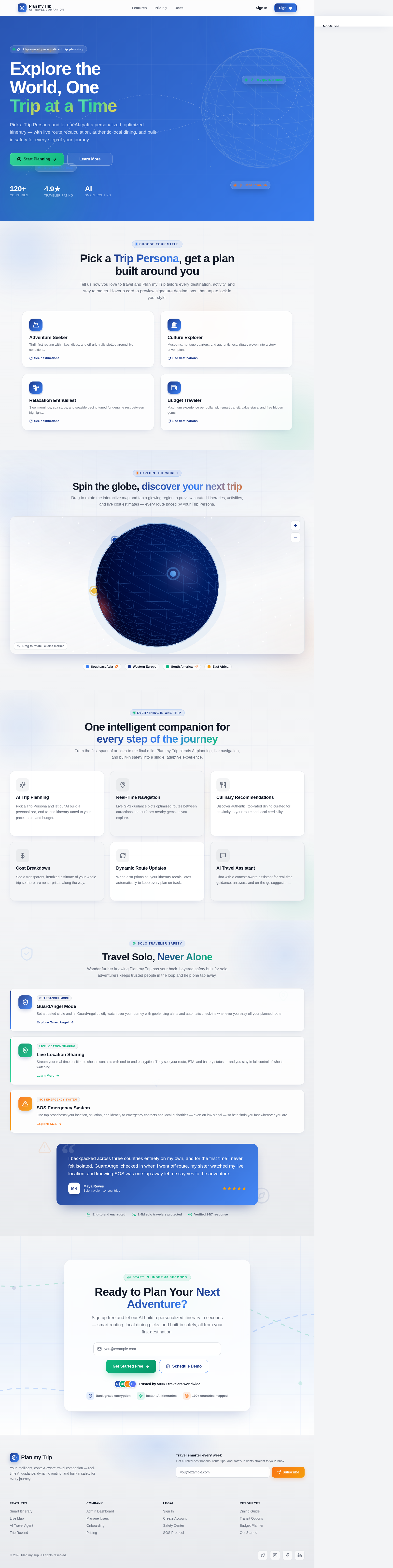
Pick a Trip Persona and let our AI craft a personalized, optimized itinerary — with live route recalculation, authentic local dining, and built-in safety for every step of your journey.
Tell us how you love to travel and Plan my Trip tailors every destination, activity, and stay to match. Hover a card to preview signature destinations, then tap to lock in your style.
Thrill-first routing with hikes, dives, and off-grid trails plotted around live conditions.
See destinationsExample destinations
Museums, heritage quarters, and authentic local rituals woven into a story-driven plan.
See destinationsExample destinations
Slow mornings, spa stops, and seaside pacing tuned for genuine rest between highlights.
See destinationsExample destinations
Maximum experience per dollar with smart transit, value stays, and free hidden gems.
See destinationsExample destinations
Drag to rotate the interactive map and tap a glowing region to preview curated itineraries, activities, and live cost estimates — every route paced by your Trip Persona.
Temple trails, island hopping, and street-food crawls tuned to a relaxed solo pace with built-in safety check-ins.
Rail-connected capitals with museum passes and cafe routes, auto-paced for transit changes and walkable old towns.
High-altitude treks and ruin discoveries with proximity-optimized stays and live geofencing for remote stretches.
Guided wildlife circuits and coastal escapes, with SOS one-tap streaming active across low-coverage reserves.
From the first spark of an idea to the final mile, Plan my Trip blends AI planning, live navigation, and built-in safety into a single, adaptive experience.
Pick a Trip Persona and let our AI build a personalized, end-to-end itinerary tuned to your pace, taste, and budget.
Personalized itinerariesLive GPS guidance plots optimized routes between attractions and surfaces nearby gems as you explore.
Live GPS routingDiscover authentic, top-rated dining curated for proximity to your route and local credibility.
Authentic local eatsSee a transparent, itemized estimate of your whole trip so there are no surprises along the way.
Transparent budgetingWhen disruptions hit, your itinerary recalculates automatically to keep every plan on track.
Auto re-routingChat with a context-aware assistant for real-time guidance, answers, and on-the-go suggestions.
Always-on guidanceWander further knowing Plan my Trip has your back. Layered safety built for solo adventurers keeps trusted people in the loop and help one tap away.
Set a trusted circle and let GuardAngel quietly watch over your journey with geofencing alerts and automatic check-ins whenever you stray off your planned route.
Explore GuardAngelStream your real-time position to chosen contacts with end-to-end encryption. They see your route, ETA, and battery status — and you stay in full control of who is watching.
Learn MoreOne tap broadcasts your location, situation, and identity to emergency contacts and local authorities — even on low signal — so help finds you fast wherever you are.
Explore SOSI backpacked across three countries entirely on my own, and for the first time I never felt isolated. GuardAngel checked in when I went off-route, my sister watched my live location, and knowing SOS was one tap away let me say yes to the adventure.
Sign up free and let our AI build a personalized itinerary in seconds — smart routing, local dining picks, and built-in safety, all from your first destination.
No comments yet. Be the first!