PRIME_S_LOOP
 Nedjmeddin Brahimi
هل اقدر اتكلم معك عربي


Comments (0)
Sign in to leave a comment
System Requirements
PRIME_S_LOOP System Requirements Document
1. Introduction
This document outlines the system requirements for the PRIME_S_LOOP project, a desktop application designed to manage the operations of Prime School, a language school. The application will facilitate student and teacher attendance tracking using NFC cards, manage monthly sessions, and calculate teacher salaries based on a percentage model. The application will also support continuous cloud synchronization to ensure data protection and accessibility across devices.
2. System Overview
PRIME_S_LOOP is a desktop application that provides a comprehensive solution for managing language school operations. It is designed to be lightweight and visually appealing, with the capability to operate on both desktop and mobile devices. The application will enable the registration of students and teachers, track attendance using NFC technology, and manage the financial aspects of teacher compensation. Continuous internet synchronization will ensure data is always up-to-date and secure.
3. Functional Requirements
- As an Administrator, I should be able to register students with a unique serial number and assign them NFC cards.
- As a Student, I should be able to check in to the school by swiping my NFC card, which deducts one session from my monthly allowance.
- As an Administrator, I should be able to register teachers and assign them NFC cards for attendance tracking.
- As a Teacher, I should be able to check in and out using my NFC card to log my teaching hours.
- As an Administrator, I should be able to calculate teacher salaries based on a percentage of their logged teaching hours.
- As an Administrator, I should be able to synchronize all data to the cloud to ensure data protection and accessibility.
- As a User, I should be able to access the application on both desktop and mobile devices.
4. User Personas
- Administrator: Responsible for managing student and teacher registrations, overseeing attendance, and handling financial calculations.
- Student: Attends classes and uses an NFC card to track attendance.
- Teacher: Conducts classes and uses an NFC card to log teaching hours.
5. Core User Flows
- Administrator registers a student -> assigns NFC card -> student attends class -> NFC card swipe logs attendance.
- Administrator registers a teacher -> assigns NFC card -> teacher conducts class -> NFC card swipe logs hours -> salary calculated based on hours.
- Data is continuously synchronized to the cloud -> accessible on desktop and mobile.
6. Visuals Colors and Theme
- primary: #1E3A8A (Deep Blue)
- primary_light: #3B82F6 (Light Blue)
- secondary: #F97316 (Vibrant Orange)
- accent: #10B981 (Emerald Green)
- highlight: #F59E0B (Amber)
- bg: #F3F4F6 (Light Gray)
- surface: rgba(255, 255, 255, 0.8) (White)
- text: #111827 (Dark Gray)
- text_muted: #6B7280 (Muted Gray)
- border: rgba(209, 213, 219, 0.2) (Light Gray)
7. Signature Design Concept
The homepage of the PRIME_S_LOOP application will feature an interactive 3D model of the school campus. Users can navigate through different sections of the school by clicking on various buildings, each representing a different feature of the application (e.g., student registration, attendance tracking, salary management). This immersive experience will be powered by @react-three/fiber and @react-three/drei, providing a unique and engaging way to interact with the system. As users hover over buildings, subtle animations will highlight the interactive elements, enhancing the user experience.
8. Interaction Model & Motion Direction
The landing page will utilize a "parallax" interaction model, creating a sense of depth as users scroll through the content. Decorative layers will move at different speeds, providing a visually rich first impression. Internal pages, such as dashboards and settings, will adopt a "static" model to prioritize clarity and ease of use.
9. Non-Functional Requirements
- The application must be lightweight and responsive, ensuring quick load times and smooth operation on both desktop and mobile devices.
- Data synchronization must occur seamlessly in the background without interrupting user activities.
- The system should be secure, protecting sensitive data such as student and teacher information.
10. Tech Stack
- Frontend: React for Web, React Native for mobile app
- Backend: Python, FastAPI
- Database: MySQL or MariaDB, using Alembic for migrations
- AI Models: Not applicable
- AI Tools: Not applicable
- Local Orchestration: Docker, docker-compose
- Server-side Orchestration: Kubernetes
11. Assumptions and Constraints
- The application will require continuous internet access for cloud synchronization.
- NFC card readers will be available at the school for student and teacher check-ins.
- The system will be designed to handle a moderate number of users typical for a language school.
12. Glossary
- NFC (Near Field Communication): A technology that enables communication between devices when they are close together.
- Cloud Synchronization: The process of updating data across devices via the internet to ensure consistency and availability.
- Parallax: A design technique that creates a 3D effect by moving background images slower than foreground images as the user scrolls.
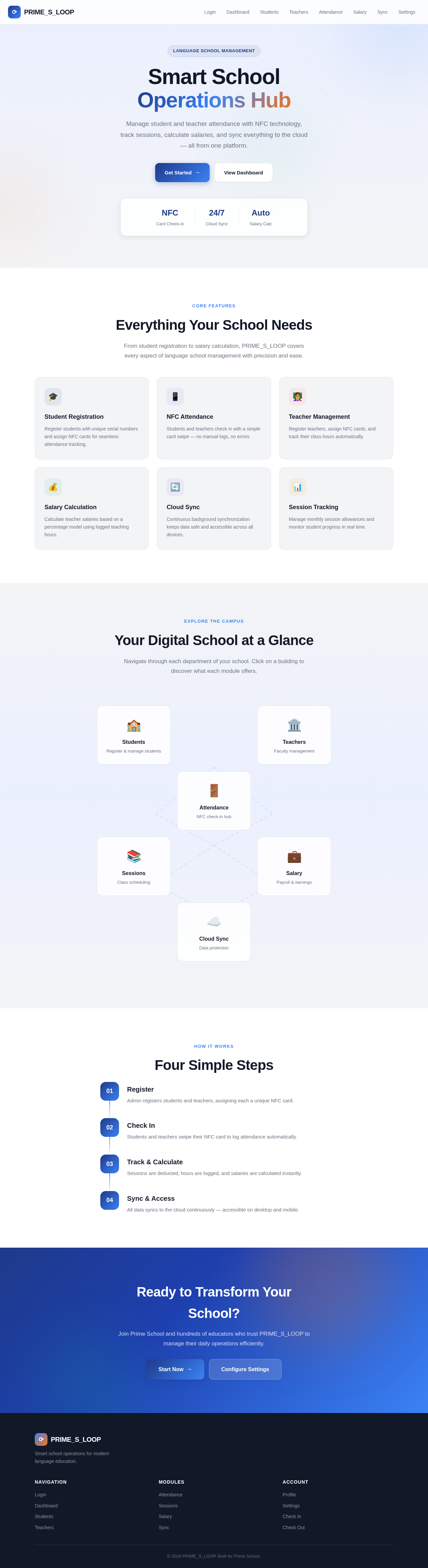
Smart School
Operations Hub
Manage student and teacher attendance with NFC technology, track sessions, calculate salaries, and sync everything to the cloud — all from one platform.
Everything Your School Needs
From student registration to salary calculation, PRIME_S_LOOP covers every aspect of language school management with precision and ease.
Student Registration
Register students with unique serial numbers and assign NFC cards for seamless attendance tracking.
NFC Attendance
Students and teachers check in with a simple card swipe — no manual logs, no errors.
Teacher Management
Register teachers, assign NFC cards, and track their class hours automatically.
Salary Calculation
Calculate teacher salaries based on a percentage model using logged teaching hours.
Cloud Sync
Continuous background synchronization keeps data safe and accessible across all devices.
Session Tracking
Manage monthly session allowances and monitor student progress in real time.
Your Digital School at a Glance
Navigate through each department of your school. Click on a building to discover what each module offers.
Students
Register & manage students
Teachers
Faculty management
Attendance
NFC check-in hub
Sessions
Class scheduling
Salary
Payroll & earnings
Cloud Sync
Data protection
Four Simple Steps
Register
Admin registers students and teachers, assigning each a unique NFC card.
Check In
Students and teachers swipe their NFC card to log attendance automatically.
Track & Calculate
Sessions are deducted, hours are logged, and salaries are calculated instantly.
Sync & Access
All data syncs to the cloud continuously — accessible on desktop and mobile.
Ready to Transform Your School?
Join Prime School and hundreds of educators who trust PRIME_S_LOOP to manage their daily operations efficiently.
No comments yet. Be the first!