Ortho-Vision
 Jatin Yadav
I want to build a COMPLETE project involves building an AI-powered dental operating system that supports dentists and orthodontists by automating clinical documentation, monitoring, diagnosis assistance, patient communication, scheduling, billing, and inventory management. The system is designed as an assistive AI platform, where all clinical decisions remain under doctor control. AI outputs are generated as drafts or recommendations and require doctor review and approval.

Comments (0)
Sign in to leave a comment
System Requirements
AI-Powered Dental Operating System: System Requirements Document
1. Introduction
The platform will be designed as a modern Single Page Application (SPA) with a centralized dashboard-driven architecture to ensure fast navigation, real-time workflows, and seamless AI-assisted operations without unnecessary page reloads. This document outlines the system requirements for the AI-powered dental operating system designed to support dentists and orthodontists by automating clinical documentation, monitoring, diagnosis assistance, patient communication, scheduling, billing, and inventory management. The system is designed as an assistive AI platform, ensuring all clinical decisions remain under doctor control. AI outputs are generated as drafts or recommendations and require doctor review and approval.
2. System Overview
The AI-powered dental operating system aims to enhance the efficiency and accuracy of dental practices by integrating advanced AI capabilities. The system will automate various aspects of dental operations, including clinical documentation, patient communication, and inventory management, while providing diagnostic assistance and treatment support. The development will follow an iterative delivery model with regular demos and feedback sessions to ensure alignment with user needs and expectations.
3. Functional Requirements
- As a Doctor, I should be able to securely log in and manage my appointments, consultations, and patient records.
- As a Patient, I should be able to view my appointments, upload scans/photos/videos, and communicate with the clinic.
- As a System, I should capture and transcribe doctor-patient conversations in real-time.
- As a System, I should analyze transcriptions to identify symptoms, concerns, and treatment discussions.
- As a System, I should generate draft SOAP notes and clinical summaries for doctor review.
- As a System, I should provide AI-assisted diagnostic insights and treatment plan suggestions.
- As a System, I should track patient orthodontic progress using uploaded images and scans.
- As a System, I should analyze dental X-rays and radiographs for cavities and bone levels.
- As a System, I should support video analysis for clinical observation.
- As a System, I should automate patient communication, including reminders and feedback requests.
- As a System, I should optimize appointment scheduling and provide operational analytics.
- As a System, I should manage inventory with real-time tracking and AI-based forecasting.
- As a System, I should ensure secure data storage and compliance with healthcare standards.
- As an Admin, I should be able to manage user accounts, roles, and permissions.
4. User Personas
- Doctor: Manages appointments, consultations, and reviews AI-generated outputs.
- Patient: Views appointments, uploads medical files, and communicates with the clinic.
- Receptionist: Manages scheduling and patient communication.
- Billing Staff: Handles billing, insurance claims, and financial workflows.
- Inventory Manager: Oversees inventory tracking and supply management.
- Admin: Manages user accounts, system configurations, and compliance monitoring.
5. Visuals Colors and Theme
- primary: #2A9D8F (Teal)
- primary_light: #A8DADC (Light Teal)
- secondary: #E63946 (Crimson)
- accent: #F4A261 (Orange)
- highlight: #E9C46A (Gold)
- bg: #F1FAEE (Off White)
- surface: rgba(233, 245, 248, 0.8)
- text: #264653 (Dark Blue)
- text_muted: #6D6875 (Muted Gray)
- border: rgba(38, 70, 83, 0.2)
6. Signature Design Concept
Interactive Dental Clinic Map: The homepage will feature an interactive 3D map of a dental clinic using @react-three/fiber and @react-three/drei. Users can navigate through different rooms (e.g., consultation room, X-ray room, billing office) by clicking on them. Each room will provide a unique interactive experience, such as viewing a 3D model of dental equipment or accessing patient records. Hovering over rooms will display tooltips with brief descriptions, and clicking will zoom into the room with smooth transitions using framer-motion. This concept will provide an engaging and informative first impression, allowing users to explore the system's capabilities visually.
7. Interaction Model & Motion Direction
- Interaction Model: Parallax
- Motion Direction: The landing page will feature layered depth via scroll, with decorative elements translating at different speeds to create a dynamic and engaging experience. Internal pages will maintain a static layout for clarity and efficiency, focusing on data-heavy tasks like patient management and billing.
8. Features
- User Authentication & Authorization: Secure login, registration, password management, session handling, and role-based access for doctors, staff, admins, and patients.
- Role-Based Access Control (RBAC): Different dashboards and permissions for dentists, orthodontists, receptionists, billing staff, inventory managers, and patients.
- Doctor Dashboard: Centralized dashboard for managing appointments, consultations, AI outputs, patient records, and clinic operations.
- Patient Portal: Portal where patients can view appointments, upload scans/photos/videos, receive instructions, and communicate with the clinic.
- Patient Registration & Profile Management: Create and manage patient profiles, demographics, medical history, treatment records, and uploaded files.
- Electronic Medical Records (EMR) System: Store and manage patient medical records, consultation history, treatments, prescriptions, imaging, and notes.
- Appointment Scheduling System: Create, update, cancel, and manage appointments with calendar-based scheduling.
- Calendar Management: Doctor and clinic calendar views for appointments, availability, and scheduling coordination.
- Consultation Management: Create and manage consultation sessions, including transcript recording and clinical documentation.
- Audio Recording Management: Record, upload, store, and retrieve consultation audio files securely.
- Real-Time Transcription UI: Live transcription display interface during consultations.
- Clinical Notes Editor: Editable interface for AI-generated SOAP notes and clinical summaries.
- Doctor Review & Approval Workflow: Approval system where doctors review, edit, and finalize AI-generated outputs before saving.
- Medical File Upload System: Upload and manage X-rays, scans, photos, PDFs, radiographs, and videos.
- Dental Imaging Viewer: View and manage dental X-rays, scans, and radiographs within the platform.
- AI Results Visualization: Display AI findings, recommendations, alerts, and highlighted imaging areas in an understandable format.
- Remote Monitoring Module: Patient upload system for periodic scans, images, and treatment progress tracking.
- Video Upload & Playback System: Upload, store, stream, and review clinical or patient-recorded videos.
- Chat & Messaging System: Real-time or asynchronous communication between clinic staff and patients.
- Notification System: Send reminders, confirmations, alerts, follow-ups, and operational notifications via email, or in-app messaging.
- Multilingual Support System: Chatbot communication support for multiple languages.
- AI Chatbot Interface: Conversational UI for patient communication and automated assistance.
- Billing Management System: Create invoices, manage payments, billing records, and financial workflows.
- Insurance Workflow Management: Manage insurance-related documents, claims, appeals, and communication workflows.
- CDT/ICD Code Management: Handle billing and insurance coding workflows integrated with patient records.
- Payment Tracking System: Track pending, completed, and overdue payments.
- Operational Analytics Dashboard: Display clinic KPIs, revenue insights, workflow analytics, and operational performance metrics.
- Scheduling Optimization Interface: UI for managing AI-assisted scheduling recommendations and chair-time allocation.
- Staff Management System: Manage clinic staff profiles, schedules, permissions, and assignments.
- Inventory Management System: Track dental inventory, supply usage, stock levels, and reorder workflows.
- Inventory Alerts & Threshold Management: Configure low-stock alerts, expiry notifications, and reorder thresholds.
- Voice Input Support: Voice-assisted workflows for inventory updates or operational interactions.
- Consent Management System: Manage patient consent forms and healthcare compliance acknowledgments.
- Secure File Storage System: Securely store patient files, imaging, audio, and video content.
- Audit Logs & Activity Tracking: Track user activities, record modifications, approvals, and system events for compliance and accountability.
- Access Control & Security Layer: Secure APIs, encrypted storage, authentication tokens, and protected healthcare data workflows.
- Search & Filter System: Advanced search functionality for patients, records, appointments, treatments, invoices, and inventory.
- Reporting & Export System: Export patient reports, treatment summaries, invoices, insurance documents, and operational analytics.
- Real-Time Updates & WebSocket Support: Real-time communication for transcription updates, chat, notifications, and operational changes.
- API Layer & Integrations: Backend APIs for frontend communication and possible third-party integrations (payment gateways, messaging systems, cloud storage, etc.).
- File & Media Management System: Organize uploaded media, scans, consultation recordings, and documentation assets.
- Treatment Progress Tracking: Timeline-based tracking of patient treatments, consultations, and orthodontic progression.
- Workflow Automation Engine: Automate repetitive clinic workflows such as reminders, follow-ups, approvals, and notifications.
- Dashboard Analytics & Charts: Visualize treatment metrics, clinic performance, appointment trends, and
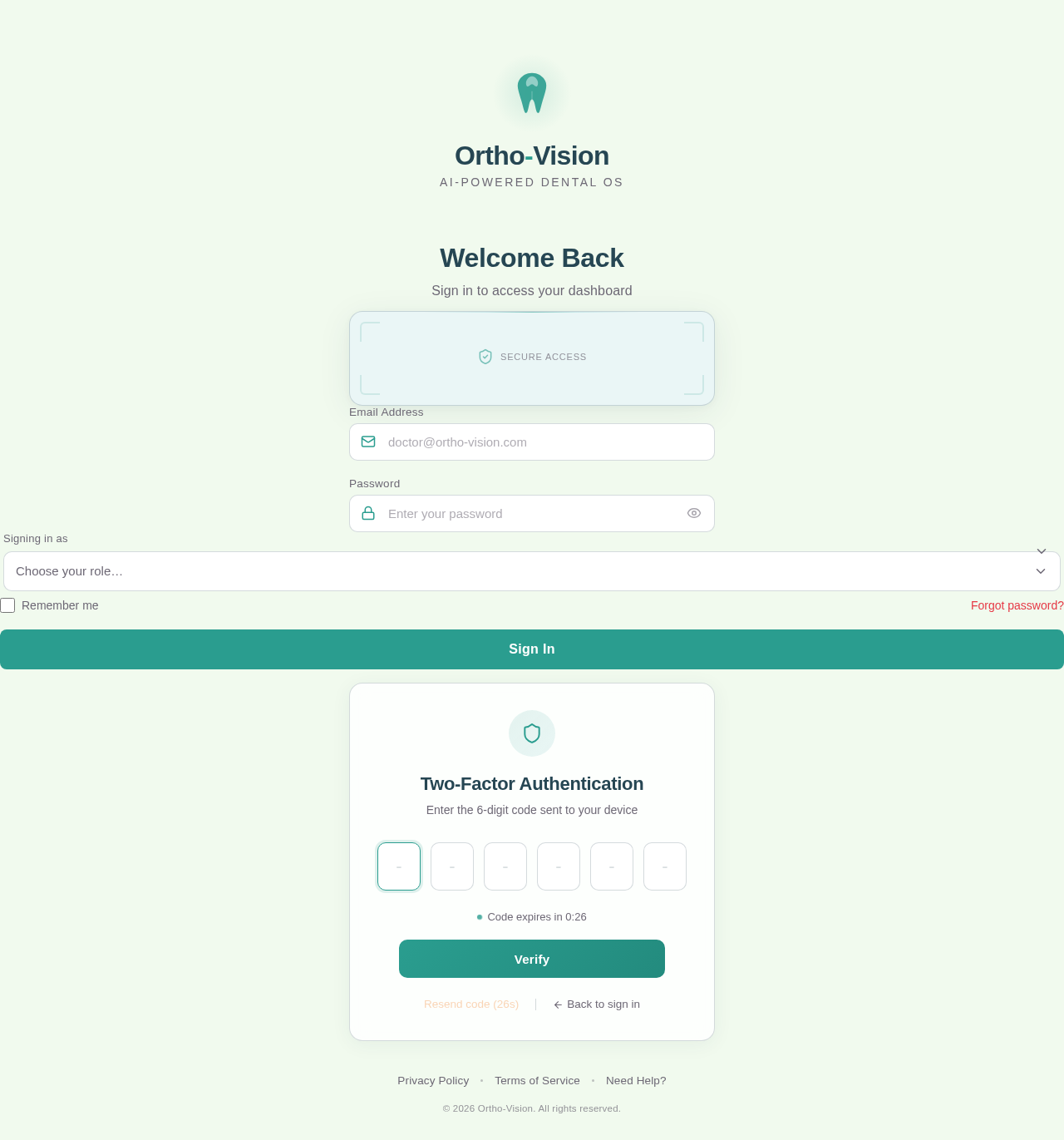
Ortho-Vision
AI-Powered Dental OS
Welcome Back
Sign in to access your dashboard
Two-Factor Authentication
Enter the 6-digit code sent to your device
No comments yet. Be the first!