Next.js Todo App
 Urvish Prajapati
Build a full-stack To-Do application using Next.js 16 (App Router), MongoDB, and without TypeScript. The project should follow industry best practices with clean architecture, reusable components, and scalable folder structure.


Comments (0)
Sign in to leave a comment
Project Tasks29
Create Task Model
Design and implement the Task model in MongoDB, including fields for title, description, category, is_completed, created_at, and updated_at.
Create User Model
Design and implement the User model in MongoDB, including fields for username, email, password, created_at, and updated_at.
Implement CTASection for Landing
As a frontend developer, implement the CTASection for the Landing page. This section includes a call-to-action with a title, subtitle, and a button linking to the Login page. Ensure the button has an arrow icon and the section includes a decorative stars background. This section is accessible to Individual Users. Page access: shared by all personas (Individual User).
Implement Navbar for Landing
As a frontend developer, implement the Navbar for the Landing page. This section includes a logo, toggleable menu for mobile view, and navigation links to Landing, Login, and TaskGalaxy pages. Ensure the menu toggle state is managed with React state. This section is accessible to Individual Users. Page access: shared by all personas (Individual User).
Implement GalaxyVisualization for TaskGalaxy
As a frontend developer, implement the GalaxyVisualization section using @react-three/fiber and @react-three/drei to render a 3D galaxy of tasks. Each task is represented as a star with pulsating animation and color-coded by category. Implement connection lines between related tasks using the Line component. This section is accessible to Individual Users. Page access: shared by all personas (Individual User).
Implement GalaxyInteractionHandler for TaskGalaxy
As a frontend developer, implement the GalaxyInteractionHandler section to manage user interactions with the 3D galaxy. This includes drag-to-rotate functionality, auto-rotation toggle, and task selection with status updates. Utilize useState and useRef hooks for managing interaction states. This section is accessible to Individual Users. Page access: shared by all personas (Individual User).
Implement TaskFilterBar for TaskGalaxy
As a frontend developer, implement the TaskFilterBar section to allow users to filter tasks by category. Use useState to manage selected categories and dynamically update the task count display. Ensure the filter bar is accessible and responsive. This section is accessible to Individual Users. Page access: shared by all personas (Individual User).
Implement TaskSearchAndSort for TaskGalaxy
As a frontend developer, implement the TaskSearchAndSort section to provide search and sorting functionalities for tasks. Use useState and useEffect for managing search queries and debounce input changes. Implement a dropdown for sorting options with dynamic label updates. This section is accessible to Individual Users. Page access: shared by all personas (Individual User).
Implement TaskListCards for TaskGalaxy
As a frontend developer, implement the TaskListCards section to display tasks in card format. Each card should show task details, category, priority, and completion status. Use useState for managing task states and ensure the design is responsive. This section is accessible to Individual Users. Page access: shared by all personas (Individual User).
Implement TaskListPagination for TaskGalaxy
As a frontend developer, implement the TaskListPagination section to manage pagination of tasks. Use useState to handle current page and results per page. Implement navigation controls with dynamic page range display. This section is accessible to Individual Users. Page access: shared by all personas (Individual User).
Implement Task API
Develop RESTful API endpoints for task creation, updating, deletion, completion, and filtering by category.
Implement User Authentication
Develop user authentication using JWT, including login and session management.
Implement FeaturesSection for Landing
As a frontend developer, implement the FeaturesSection for the Landing page. This section displays a grid of feature cards with icons, titles, and descriptions. It uses an IntersectionObserver to add a visible class for animations when the section enters the viewport. This section is accessible to Individual Users. Page access: shared by all personas (Individual User).
Implement Footer for Landing
As a frontend developer, implement the Footer for the Landing page. This section includes branding, navigation links to Landing, Login, and TaskGalaxy pages, and a copyright notice. Ensure links to restricted pages are conditionally shown based on user access. This section is accessible to Individual Users. Page access: shared by all personas (Individual User).
Implement HeroSection for Landing
As a frontend developer, implement the HeroSection for the Landing page. This section features parallax scrolling effects on star layers and includes a title, subtitle, and action buttons linking to Login and TaskGalaxy pages. Ensure the parallax effect is smooth and responsive. This section is accessible to Individual Users. Page access: shared by all personas (Individual User).
Implement HowItWorksSection for Landing
As a frontend developer, implement the HowItWorksSection for the Landing page. This section outlines the steps to get started with TaskVerse, using an IntersectionObserver to animate steps as they enter the viewport. This section is accessible to Individual Users. Page access: shared by all personas (Individual User).
Implement Navbar for Login
As a frontend developer, implement the Navbar section for the Login page. This component includes a toggleable menu using a useState hook to manage the open/close state. It features navigation links to the Landing, Login, and TaskGalaxy pages, with conditional rendering based on the menu state. Ensure that links to restricted pages are conditionally shown based on the user's persona. Page access: shared by all personas (Individual User).
Test Task Model
As a QA Engineer, develop unit tests for the Task model to ensure data integrity and correct CRUD operations.
Test User Model
As a QA Engineer, develop unit tests for the User model to ensure data integrity and correct CRUD operations.
Create API Client Service
Develop a client-side service to interact with the backend API for tasks and authentication.
Implement LoginHero for Login
As a frontend developer, implement the LoginHero section for the Login page. This component includes decorative elements like glowing effects and a welcoming message for users. It uses static content to guide users into the login process, emphasizing the continuity of their task management experience. Page access: shared by all personas (Individual User).
Implement LoginFormFields for Login
As a frontend developer, implement the LoginFormFields section for the Login page. This component includes controlled input fields for email and password, with state management for input values and error handling. It also features a toggle button to show/hide the password and a 'Remember me' checkbox. Page access: shared by all personas (Individual User).
Implement LoginFormActions for Login
As a frontend developer, implement the LoginFormActions section for the Login page. This component includes a submit button with loading state management and displays success or error messages based on the login attempt status. Page access: shared by all personas (Individual User).
Implement LoginSignupLink for Login
As a frontend developer, implement the LoginSignupLink section for the Login page. This component provides a link for users to navigate to the signup page if they do not have an account, enhancing user flow and accessibility. Page access: shared by all personas (Individual User).
Implement Footer for Login
As a frontend developer, implement the Footer section for the Login page. This component includes branding elements and navigation links similar to the Navbar, ensuring consistent navigation across the application. Note that this component may already exist from the Landing page. Page access: shared by all personas (Individual User).
Implement TaskGalaxyHeader for TaskGalaxy
As a frontend developer, implement the TaskGalaxyHeader section which includes animated task statistics using IntersectionObserver and requestAnimationFrame for count-up effects. The header displays total tasks, completed tasks, and a progress ring using SVG with dynamic stroke-dashoffset based on completion percentage. Ensure the header is responsive and visually aligns with the TaskGalaxy theme. This section is accessible to Individual Users. Page access: shared by all personas (Individual User).
Integrate Task API
As a Tech Lead, verify the end-to-end integration between the Task management frontend implementation and the Task API. Ensure data flows correctly, API responses are handled properly in the UI, and all interactions work as expected.
QA Task Management Flow
Test the task management flow including creation, editing, deletion, completion, and filtering.
Integrate Auth API
As a Tech Lead, verify the end-to-end integration between the authentication frontend implementation and the authentication API. Ensure login and session management work as expected.
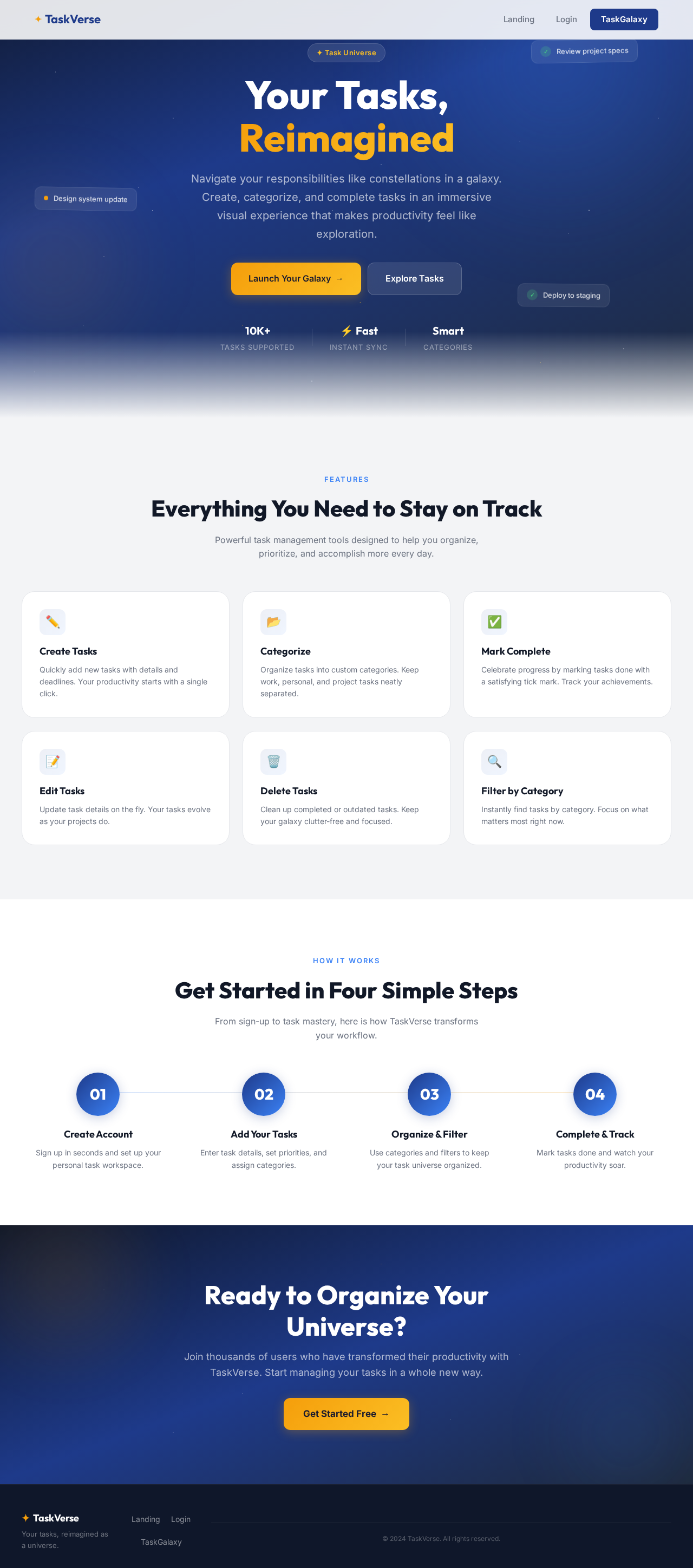
Your Tasks,
Reimagined
Navigate your responsibilities like constellations in a galaxy. Create, categorize, and complete tasks in an immersive visual experience that makes productivity feel like exploration.
Everything You Need to Stay on Track
Powerful task management tools designed to help you organize, prioritize, and accomplish more every day.
Create Tasks
Quickly add new tasks with details and deadlines. Your productivity starts with a single click.
Categorize
Organize tasks into custom categories. Keep work, personal, and project tasks neatly separated.
Mark Complete
Celebrate progress by marking tasks done with a satisfying tick mark. Track your achievements.
Edit Tasks
Update task details on the fly. Your tasks evolve as your projects do.
Delete Tasks
Clean up completed or outdated tasks. Keep your galaxy clutter-free and focused.
Filter by Category
Instantly find tasks by category. Focus on what matters most right now.
Get Started in Four Simple Steps
From sign-up to task mastery, here is how TaskVerse transforms your workflow.
Create Account
Sign up in seconds and set up your personal task workspace.
Add Your Tasks
Enter task details, set priorities, and assign categories.
Organize & Filter
Use categories and filters to keep your task universe organized.
Complete & Track
Mark tasks done and watch your productivity soar.
Ready to Organize Your Universe?
Join thousands of users who have transformed their productivity with TaskVerse. Start managing your tasks in a whole new way.
Get Started Free→
No comments yet. Be the first!