As a Database Architect, design the database schema for user management, subscriptions, invoices, and AR collections.
As a DevOps Engineer, set up the CI/CD pipeline for automated testing and deployment.
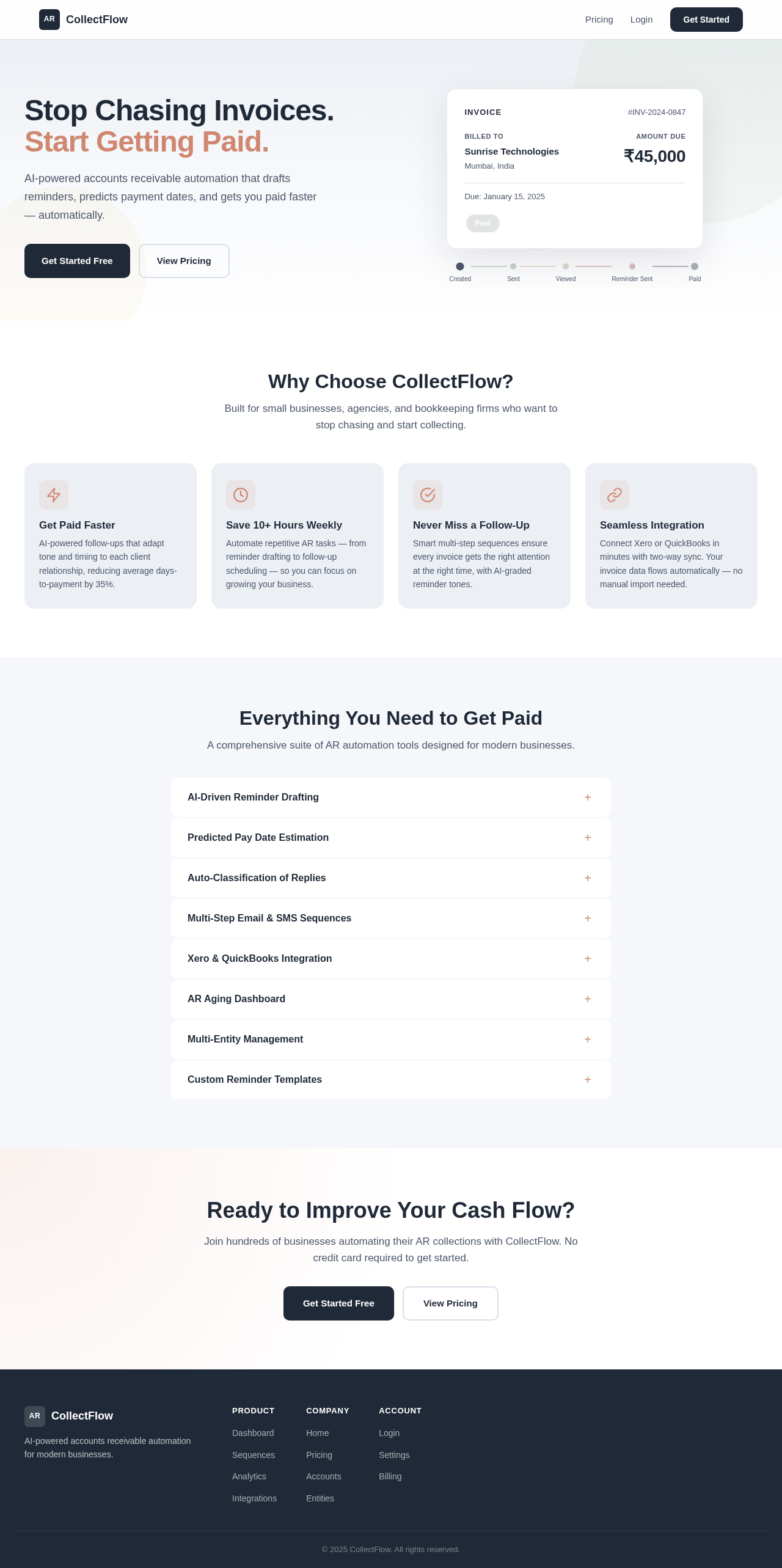
As a frontend developer, implement the Navbar section for the Landing page. This section provides a shared navigation shell with responsive design. Use motion/react for animations, including a magnetic hover effect on nav links and a smooth slide animation for the mobile menu toggle. Ensure the Navbar includes links to Landing, Pricing, and Login pages, with a 'Get Started' CTA. Acceptance criteria: The Navbar must render exactly once on the Landing page, provide responsive navigation with a toggle for mobile, and maintain the design structure with magnetic hover effects. The Navbar should be accessible to all personas and conditionally display links based on persona access context.
Page access: shared by all personas (Admin, Agency Owner, Bookkeeper, Small Business Owner). This is verification context and does not request role-specific implementation.
As a frontend developer, implement the LandingCTA section on the Landing page. This section should feature a compelling headline 'Ready to Improve Your Cash Flow?', a supporting subheading, and two prominent action buttons: 'Get Started Free' and 'View Pricing'. The primary button should have a gentle pulse animation using motion/react's `animate` prop, and both buttons should have hover effects with color transition and shadow lift. Implement a cursor-tracking glow effect using `useMotionTemplate` to enhance interactivity. Ensure the section is responsive, stacking buttons vertically on mobile. Acceptance criteria: The Landing page must render the LandingCTA section exactly once. The section must include the headline, subheading, and both buttons with specified animations. The 'Get Started Free' button must navigate to the Login page, and the 'View Pricing' button must navigate to the Pricing page. The design must maintain the specified color contrast and animation patterns. The section is accessible to all personas: Admin, Agency Owner, Bookkeeper, Small Business Owner.
Page access: shared by all personas (Admin, Agency Owner, Bookkeeper, Small Business Owner). This is verification context and does not request role-specific implementation.
As a frontend developer, implement the Footer section on the Landing page. This shared component should include brand information, project links, and legal content. Use motion/react to animate the footer's entry into the viewport with a staggered fade-in effect for columns and links. Links should underline smoothly on hover. The layout should be responsive, with 3-4 columns on desktop, 2 on tablet, and 1 on mobile. Acceptance criteria: The Landing page must render the Footer section exactly once. The footer must include brand, links, and legal content with specified animations. The design must maintain a simple and visually quiet layout. The section is accessible to all personas: Admin, Agency Owner, Bookkeeper, Small Business Owner.
Page access: shared by all personas (Admin, Agency Owner, Bookkeeper, Small Business Owner). This is verification context and does not request role-specific implementation.
As a frontend developer, implement the SettingsNavigation section to provide a vertical navigation menu for settings categories. Ensure the menu highlights the active section and supports responsive behavior, collapsing into a mobile drawer. Acceptance criteria: The Settings page must render the SettingsNavigation component exactly once. The navigation should list Profile, Notifications, Integrations, Security, and Preferences categories. The active category should be visually indicated, and the menu should be responsive. The section is accessible to Admin, Agency Owner, Bookkeeper, and Small Business Owner.
Page access: shared by all personas (Admin, Agency Owner, Bookkeeper, Small Business Owner). This is verification context and does not request role-specific implementation.
As a frontend developer, implement the SettingsTwoFactorSection to manage two-factor authentication (2FA) setup and management. This section includes a toggle to enable/disable 2FA, a step-by-step setup flow displaying a QR code, and options to download or print backup codes. It also shows the current 2FA status and provides security warnings. The section uses state hooks to manage 2FA status, setup flow visibility, backup codes, and secret key generation. Ensure the section is accessible to Admin, Agency Owner, Bookkeeper, and Small Business Owner personas. Acceptance criteria: The Settings page must render the SettingsTwoFactorSection exactly once. The section must include a toggle for 2FA, a QR code display, backup code management, and security warnings. The design must match the provided CSS styles. The section must handle enabling/disabling 2FA and downloading/printing backup codes without backend integration. Access is shared among all personas.
Page access: shared by all personas (Admin, Agency Owner, Bookkeeper, Small Business Owner). This is verification context and does not request role-specific implementation.
As a frontend developer, implement the SettingsSessionsSection to manage active sessions. This section displays a list of currently active sessions, including device, browser, location, and last activity time. It allows users to sign out from individual devices or terminate all other sessions, highlighting the current device/session. The section uses state hooks to manage session data and termination actions. Ensure the section is accessible to Admin, Agency Owner, Bookkeeper, and Small Business Owner personas. Acceptance criteria: The Settings page must render the SettingsSessionsSection exactly once. The section must display all active sessions with device and location info, and provide options to terminate individual or all sessions. The design must match the provided CSS styles. The section must handle session termination actions without backend integration. Access is shared among all personas.
Page access: shared by all personas (Admin, Agency Owner, Bookkeeper, Small Business Owner). This is verification context and does not request role-specific implementation.
As a frontend developer, implement the Footer component for the Settings page. This component should include animated sections with links to various parts of the application, such as Dashboard, Sequences, Analytics, Integrations, Home, Pricing, Accounts, Entities, Login, Settings, and Billing. Ensure the footer is styled according to the provided CSS and includes motion animations for a smooth user experience. The footer should be accessible to all personas: Admin, Agency Owner, Bookkeeper, and Small Business Owner. Acceptance criteria: The Settings page must render the Footer component exactly once. The footer must display all specified links with correct animations and styling. The design must match the provided CSS. Access is shared among all specified personas.
Page access: shared by all personas (Admin, Agency Owner, Bookkeeper, Small Business Owner). This is verification context and does not request role-specific implementation.
As a frontend developer, implement the BillingPaymentMethods section to manage the payment method list, including add, edit, delete, and set-default actions. This section displays card details and includes a form to add new cards. Manage payment method state and interactions using React state hooks. Acceptance criteria: The BillingPaymentMethods must render exactly once on the Billing page, displaying stored payment methods and allowing users to manage them through various actions. The design must match the provided CSS styles. This section is accessible by Admin, Agency Owner, Bookkeeper, and Small Business Owner.
Page access: shared by all personas (Admin, Agency Owner, Bookkeeper, Small Business Owner). This is verification context and does not request role-specific implementation.
As a frontend developer, implement the BillingBillingAddress section to display and allow editing of billing contact information. This section should show the full name, email, phone, company name, and billing address. It includes an 'Edit' button that triggers an edit mode, allowing users to update their billing details. The section should maintain the billing contact state using React state hooks. Acceptance criteria: The BillingBillingAddress component must render exactly once on the Billing page. It should display the billing details in a read-only format with an 'Edit' button. When the 'Edit' button is clicked, the section should switch to an editable form with 'Save Changes' and 'Cancel' buttons. The design structure and theme must match the provided CSS. No backend integration is required for this section. Access is shared among Admin, Agency Owner, Bookkeeper, and Small Business Owner.
Page access: shared by all personas (Admin, Agency Owner, Bookkeeper, Small Business Owner). This is verification context and does not request role-specific implementation.
As a frontend developer, implement the BillingInvoiceHeader section to introduce the invoice history area. This section should display a section title and a subtitle or description to provide context for the invoice list below. Acceptance criteria: The BillingInvoiceHeader component must render exactly once on the Billing page. It should display the title 'Invoice History' and a subtitle explaining the secure processing of payments through Stripe. The design structure and theme must match the provided CSS. No backend integration is required for this section. Access is shared among Admin, Agency Owner, Bookkeeper, and Small Business Owner.
Page access: shared by all personas (Admin, Agency Owner, Bookkeeper, Small Business Owner). This is verification context and does not request role-specific implementation.
As a frontend developer, implement the BillingInvoiceFilter section to manage search and filter controls for invoice history. This section should include a search input for invoice number, a date range picker, and a status filter dropdown. It should own the filter state and pass the filtered results to the BillingInvoiceList. Acceptance criteria: The BillingInvoiceFilter component must render exactly once on the Billing page. It should provide search and filter controls with a clear filters button. The design structure and theme must match the provided CSS. No backend integration is required for this section. Access is shared among Admin, Agency Owner, Bookkeeper, and Small Business Owner.
Page access: shared by all personas (Admin, Agency Owner, Bookkeeper, Small Business Owner). This is verification context and does not request role-specific implementation.
As a frontend developer, implement the BillingInvoiceList section to display filtered invoice records in reverse chronological order. Each invoice row should show the invoice number, amount, issue date, due date, status badge, and actions for downloading the PDF and emailing the receipt. Acceptance criteria: The BillingInvoiceList component must render exactly once on the Billing page. It should display invoices in reverse chronological order and provide download and email actions. The design structure and theme must match the provided CSS. No backend integration is required for this section. Access is shared among Admin, Agency Owner, Bookkeeper, and Small Business Owner.
Page access: shared by all personas (Admin, Agency Owner, Bookkeeper, Small Business Owner). This is verification context and does not request role-specific implementation.
As a frontend developer, implement the BillingCTA section to provide contextual calls-to-action at the bottom of the Billing page. This section should include a primary button to upgrade/change the plan, a secondary button to view pricing, and a link to support/contact for billing questions. Acceptance criteria: The BillingCTA component must render exactly once on the Billing page. It should provide navigation links to the upgrade flow and pricing page, and a contact link for billing support. The design structure and theme must match the provided CSS. No backend integration is required for this section. Access is shared among Admin, Agency Owner, Bookkeeper, and Small Business Owner.
Page access: shared by all personas (Admin, Agency Owner, Bookkeeper, Small Business Owner). This is verification context and does not request role-specific implementation.
Implement and verify the project capability `api.key.management` required by generated downstream tasks. Expose a stable implementation contract and satisfy every linked consumer without frontend mocks.
Implement and verify the project capability `backend.setup.end.to.end.testing.framework` required by generated downstream tasks. Expose a stable implementation contract and satisfy every linked consumer without frontend mocks.
Implement and verify the project capability `integration.connection.management` required by generated downstream tasks. Expose a stable implementation contract and satisfy every linked consumer without frontend mocks.
Implement and verify the project capability `integration.management` required by generated downstream tasks. Expose a stable implementation contract and satisfy every linked consumer without frontend mocks.
Implement and verify the project capability `security.management` required by generated downstream tasks. Expose a stable implementation contract and satisfy every linked consumer without frontend mocks.
Implement and verify the project capability `sequence.editor` required by generated downstream tasks. Expose a stable implementation contract and satisfy every linked consumer without frontend mocks.
Implement and verify the project capability `sync.log.display` required by generated downstream tasks. Expose a stable implementation contract and satisfy every linked consumer without frontend mocks.
As a Backend Developer, implement user authentication using JWT for Google and Email login.
Depends on:#1
Waiting for dependencies
As a Backend Developer, develop the API for managing user subscriptions using Stripe.
Depends on:#1
Waiting for dependencies
As a frontend developer, implement the LandingHero section for the Landing page. This section features an animated invoice journey using motion/react, showcasing the stages from Created to Paid. The animation should loop every 10 seconds and include stage-specific icons and transitions. Include a headline, subheadline, and CTA buttons for 'Sign In' and 'View Pricing'. Acceptance criteria: The LandingHero must render exactly once on the Landing page, display the looping animation with smooth transitions, and maintain the design structure. The section should be accessible to all personas.
Page access: shared by all personas (Admin, Agency Owner, Bookkeeper, Small Business Owner). This is verification context and does not request role-specific implementation.
Depends on:#7
Waiting for dependencies
As a frontend developer, implement the LandingValueProps section for the Landing page. This section highlights core value propositions using cards that stagger in on scroll. Each card should include an icon, title, and description, with hover effects for emphasis. Acceptance criteria: The LandingValueProps must render exactly once on the Landing page, display staggered animations on scroll, and maintain the design structure. The section should be accessible to all personas.
Page access: shared by all personas (Admin, Agency Owner, Bookkeeper, Small Business Owner). This is verification context and does not request role-specific implementation.
Depends on:#7
Waiting for dependencies
As a frontend developer, implement the LandingFeatures section for the Landing page. This section showcases detailed features using an interactive accordion layout. Each feature should expand to reveal detailed descriptions and integration badges. Acceptance criteria: The LandingFeatures must render exactly once on the Landing page, provide an interactive accordion with smooth transitions, and maintain the design structure. The section should be accessible to all personas.
Page access: shared by all personas (Admin, Agency Owner, Bookkeeper, Small Business Owner). This is verification context and does not request role-specific implementation.
Depends on:#7
Waiting for dependencies
As a frontend developer, implement the SettingsIntegrationsSection to manage third-party integrations with Xero and QuickBooks Online. This section should display the integration status (connected/disconnected), connection date, and last sync time. It must provide connect/disconnect buttons, a manual sync trigger, and an auth flow modal for new connections. The section should also display connection status indicators and error/success messages. Ensure that the integration status is accurately reflected and that the auth flow modal functions correctly for new connections. This section is accessible only by the Small Business Owner persona.
Acceptance Criteria:
- The SettingsIntegrationsSection must render exactly once on the Settings page.
- The section must display integration cards with status indicators, connection dates, and last sync times.
- Connect, disconnect, and sync buttons must function as expected, triggering the appropriate actions.
- The auth flow modal must open and close correctly, allowing users to authorize new connections.
- Success and error messages must display appropriately based on user actions.
- The section must adhere to the design structure and theme provided in the CSS.
- Backend integration is required to manage the connection status and sync actions.
- Access is restricted to the Small Business Owner persona.
Page access: shared by all personas (Admin, Agency Owner, Bookkeeper, Small Business Owner). This is verification context and does not request role-specific implementation.
Depends on:#73
Waiting for dependencies
As a frontend developer, implement the SettingsSecurityPasswordSection to enable secure password changes. This section should provide a form for entering the current password, a new password with confirmation, and include validation, a strength indicator, and save/cancel actions. It must show a confirmation message on successful password change. This section is accessible by all personas.
Acceptance Criteria:
- The SettingsSecurityPasswordSection must render exactly once on the Settings page.
- The form must collect and validate current and new password inputs, displaying validation messages as needed.
- The password strength indicator must accurately reflect the strength of the new password.
- Save and cancel actions must function correctly, with appropriate feedback on success or error.
- The section must adhere to the design structure and theme provided in the CSS.
- Backend integration is required to perform the password update securely.
- Access is shared among all personas.
Page access: shared by all personas (Admin, Agency Owner, Bookkeeper, Small Business Owner). This is verification context and does not request role-specific implementation.
Depends on:#74
Waiting for dependencies
As a frontend developer, implement the SettingsApiKeysSection to enable API key generation and lifecycle management. This section should display a list of generated API keys with their creation date, last used date, and status (active/revoked). Include a button to generate new keys, display the new key on creation (one-time), and allow revocation of existing keys. Implement copy-to-clipboard functionality for the keys. Ensure the section is accessible to Admin, Agency Owner, Bookkeeper, and Small Business Owner personas. Acceptance criteria: The Settings page must render the SettingsApiKeysSection exactly once. The section must display existing API keys with metadata and allow key generation, copying, and revocation. The design must match the provided CSS. The backend must support API key generation and revocation actions. Access is shared among all specified personas.
Page access: shared by all personas (Admin, Agency Owner, Bookkeeper, Small Business Owner). This is verification context and does not request role-specific implementation.
Depends on:#70
Waiting for dependencies
As a Backend Developer, create an API to generate AI-driven tone-graded reminder drafts. This API should accept parameters such as relationship value and days overdue to generate appropriate reminder messages. Ensure the API integrates with the existing AI tools and models. Acceptance criteria: The API must generate reminders with varying tones based on input parameters and return them in a structured format.
Depends on:#1
Waiting for dependencies
As a Backend Developer, develop an API to estimate predicted pay dates for customers based on their historical payment behavior. This API should analyze past payment data to provide accurate predictions. Acceptance criteria: The API must return a predicted pay date for each customer, considering their payment history and current invoice status.
Depends on:#1
Waiting for dependencies
As a Backend Developer, implement an API to auto-classify inbound replies into categories such as 'promise to pay', 'dispute', and 'wrong contact'. This API should use AI models to analyze the content of replies and classify them accordingly. Acceptance criteria: The API must accurately classify replies and return the classification result in a structured format.
Depends on:#1
Waiting for dependencies
As a Backend Developer, set up the backend infrastructure to support multi-entity management for firms. This includes database schema adjustments and API endpoints to handle multiple entities per user. Acceptance criteria: The system must allow users to manage multiple entities, with APIs to create, update, and delete entities, and associate them with user accounts.
Depends on:#1
Waiting for dependencies
As a Backend Developer, implement an API to provide data for the AR aging dashboard. This API should aggregate invoice data into aging buckets and return it in a format suitable for visualization. Acceptance criteria: The API must return data grouped by aging categories (e.g., Current, 30-60 days, 60-90 days, Over 90 days) with total amounts and counts for each category.
Depends on:#1
Waiting for dependencies
As a Backend Developer, develop an API to manage multi-step email/SMS sequences. This API should support creating, updating, and deleting sequences, as well as scheduling and executing them. Acceptance criteria: The API must handle sequence management and execution, including scheduling messages based on user-defined steps and conditions.
Depends on:#1
Waiting for dependencies
As a Backend Developer, set up integration with Xero and QuickBooks Online (QBO) for invoice management. This includes API connections, data synchronization, and error handling. Acceptance criteria: The system must successfully connect to Xero/QBO, synchronize invoice data, and handle errors gracefully.
Depends on:#1
Waiting for dependencies
As a Backend Developer, implement a notification delivery system for sending reminders and alerts via email and SMS. This system should support scheduling, retries, and delivery status tracking. Acceptance criteria: The system must reliably send notifications, track delivery status, and support retries for failed attempts.
Depends on:#1
Waiting for dependencies
As a QA Engineer, set up an end-to-end testing framework to verify critical user flows across the application. This includes login, dashboard interactions, sequence management, and billing processes. Acceptance criteria: The testing framework must cover all critical user flows, with automated tests that validate functionality and integration.
Depends on:#71
Waiting for dependencies
As a Backend Developer, create the API for accessing AR performance analytics.
Depends on:#1#2
Waiting for dependencies
As a Backend Developer, implement RBAC middleware to enforce role-based access control across the platform.
Depends on:#2
Waiting for dependencies
As a frontend developer, implement the PricingHero section to introduce the pricing page with a clear headline and subheading. This section should communicate the core benefit of New-saas and guide users toward plan selection. Ensure the headline 'Simple pricing for powerful AR automation' and subheading 'Start your free trial today — no credit card required. All plans include a 14‑day trial so you can see the impact on your cash flow before you commit.' are prominently displayed. The section should be static with no animations, maintaining a clean and scannable layout. Acceptance criteria: The PricingHero section must render exactly once on the Pricing page, displaying the headline and subheading as specified. The design must adhere to the provided CSS, ensuring responsive behavior. The section should be accessible to Agency Owners and Small Business Owners only, as per the page access context.
Page access: Agency Owner, Small Business Owner only. Verify the existing restricted-access contract; change authentication or RBAC only in a task that explicitly owns it.
Depends on:#2#7
Waiting for dependencies
As a frontend developer, implement the PricingControls section to allow users to toggle between monthly and annual billing cycles, displaying the corresponding plan prices. This section should include a toggle button for billing cycle selection, a discount badge for annual plans, and a grid of subscription plan cards (Starter, Professional, Enterprise) with dynamic pricing. The Professional plan should be highlighted as the most popular. Ensure the toggle updates the pricing display based on the selected cycle. Acceptance criteria: The PricingControls section must render exactly once on the Pricing page, allowing users to toggle billing cycles and view updated prices. The design must adhere to the provided CSS, ensuring responsive behavior. The section should be accessible to Agency Owners and Small Business Owners only, as per the page access context.
Page access: Agency Owner, Small Business Owner only. Verify the existing restricted-access contract; change authentication or RBAC only in a task that explicitly owns it.
Depends on:#2#3
Waiting for dependencies
As a frontend developer, implement the PricingFAQ section to address common pricing concerns through an accordion-style FAQ. This section should include questions and answers about billing cycles, refund policy, plan changes, integration support, contract terms, and trial duration. Ensure the accordion supports expand/collapse interactions. Acceptance criteria: The PricingFAQ section must render exactly once on the Pricing page, displaying the FAQ items in an accordion format. The design must adhere to the provided CSS, ensuring responsive behavior. The section should be accessible to Agency Owners and Small Business Owners only, as per the page access context.
Page access: Agency Owner, Small Business Owner only. Verify the existing restricted-access contract; change authentication or RBAC only in a task that explicitly owns it.
Depends on:#2
Waiting for dependencies
As a frontend developer, implement the PricingCTA section to provide a final call-to-action encouraging trial signup or contact sales. This section should include a headline, subheading, and two primary CTAs: 'Start Free Trial' and 'Contact Sales'. Reinforce the trial terms and money-back guarantee. Acceptance criteria: The PricingCTA section must render exactly once on the Pricing page, displaying the headline, subheading, and CTAs as specified. The design must adhere to the provided CSS, ensuring responsive behavior. The section should be accessible to Agency Owners and Small Business Owners only, as per the page access context.
Page access: Agency Owner, Small Business Owner only. Verify the existing restricted-access contract; change authentication or RBAC only in a task that explicitly owns it.
Depends on:#2
Waiting for dependencies
As a frontend developer, implement the AdminOverviewCards section for the Admin Dashboard. This section displays high-level dashboard metrics in a card grid format, including total active users, monthly recurring revenue (MRR), subscription breakdown, system health status, and recent activity summary. Utilize the provided JSX to calculate and display these metrics, ensuring the use of the TiltCard component for interactive card effects. Acceptance criteria: The AdminOverviewCards must render exactly once on the Admin Dashboard page, displaying metrics for active users, MRR, subscription distribution, system health, and recent signups. The design must match the provided CSS, including responsive behavior and tilt effects on hover. The section must be accessible only to the Admin persona. No backend integration is required for this static metrics display.
Page access: Admin only. Verify the existing restricted-access contract; change authentication or RBAC only in a task that explicitly owns it.
Depends on:#2
Waiting for dependencies
As a frontend developer, implement the AdminUserManagement section for the Admin Dashboard. This section provides a comprehensive user management interface with a searchable, filterable table of all users. It includes bulk status toggles, individual user edit/suspend/delete actions, and a detail modal for viewing/updating user records. Manage state for selected users, search queries, and filter status. Acceptance criteria: The AdminUserManagement must render exactly once on the Admin Dashboard page, providing a paginated user table with sortable columns, search and filter capabilities, and inline user actions. The user detail modal must function correctly for view, edit, and delete actions. The section must be accessible only to the Admin persona. Ensure the design matches the provided CSS, including responsive behavior. This section requires backend integration for user data management, utilizing the 'identity.authorization' capability from the FOUNDATION CAPABILITY CATALOG.
Page access: Admin only. Verify the existing restricted-access contract; change authentication or RBAC only in a task that explicitly owns it.
Depends on:#2
Waiting for dependencies
As a frontend developer, implement the AdminSubscriptionManagement section to provide an interface for admins to manage subscription plans. This section should display all subscription tiers (Starter, Pro, Team, Enterprise) in an editable table format. Each row should show the plan name, price (in INR), billing cycle, included features, active user count, and status. Implement inline edit mode for updating plan pricing, features, and status with Save/Cancel controls. Manage the plan selection state and edit mode state within this section. Ensure the section adheres to the design structure and theme specified in the provided CSS. The section should integrate with the backend to fetch and update subscription data using the 'subscription.management.api'.
Page access: Admin only. Verify the existing restricted-access contract; change authentication or RBAC only in a task that explicitly owns it.
Depends on:#3#2
Waiting for dependencies
As a frontend developer, implement the DashboardFiltersAndSort section to provide filtering and sorting controls for accounts. Include dropdowns for status and sort options, quick filter chips, and an entity filter. Ensure the clear filters button resets all selections. Acceptance criteria: The DashboardFiltersAndSort must render on the Dashboard page, providing functional dropdowns for status and sort, quick filter chips, and an entity filter. The clear filters button should reset all filters. The section must be accessible by Agency Owner, Bookkeeper, and Small Business Owner personas.
Page access: Agency Owner, Bookkeeper, Small Business Owner only. Verify the existing restricted-access contract; change authentication or RBAC only in a task that explicitly owns it.
Depends on:#2
Waiting for dependencies
As a frontend developer, implement the DashboardSequencesSummary section to display a summary of active email/SMS sequences. Each sequence card should include the sequence name, step count, active accounts count, success rate, and last execution time. Include a link to the Sequences page for full management. The section should be read-only and focus on providing an overview and navigation. Acceptance criteria: The DashboardSequencesSummary component must render on the Dashboard page, displaying sequence cards with accurate data. The design must match the provided CSS, and the 'Manage Sequences' link should navigate to the Sequences page. The section is accessible to Agency Owners, Bookkeepers, and Small Business Owners.
Page access: Agency Owner, Bookkeeper, Small Business Owner only. Verify the existing restricted-access contract; change authentication or RBAC only in a task that explicitly owns it.
Depends on:#2
Waiting for dependencies
As a frontend developer, implement the DashboardARAgingChart section to display a stacked bar chart showing AR aging buckets. The chart should include buckets for Current (<30 days), Aging 30-60 days, Aging 60-90 days, and Over 90 days, using colors to highlight older balances. Include a toggle to switch between viewing by count and amount, and enable filtering of the account grid by clicking on chart segments. Acceptance criteria: The DashboardARAgingChart component must render on the Dashboard page, displaying the aging distribution with interactive toggles and filtering capabilities. The design must match the provided CSS, and the section should integrate with the account grid for filtering. The section is accessible to Agency Owners, Bookkeepers, and Small Business Owners.
Page access: Agency Owner, Bookkeeper, Small Business Owner only. Verify the existing restricted-access contract; change authentication or RBAC only in a task that explicitly owns it.
Depends on:#2
Waiting for dependencies
As a frontend developer, implement the DashboardSidebar section to provide persistent app-level navigation and user context. This section should include navigation links for Dashboard, Sequences, Accounts, Analytics, Integrations, Settings, and Billing, with a current path indicator to highlight the active page. The sidebar must also display user profile and workspace information, and include a logout button. Ensure the sidebar is collapsible on mobile devices with a toggle button. The component should use the provided SVG icons for each navigation item and maintain the design structure as specified in the CSS. Acceptance criteria: The DashboardSidebar must render exactly once on the Dashboard page, displaying all specified navigation links with the current path highlighted. The sidebar should be collapsible on mobile, and the logout button must redirect to the Login page. Access to navigation links should be conditionally displayed based on persona access context: Admin, Agency Owner, Bookkeeper, and Small Business Owner. The design must adhere to the provided CSS styles, ensuring responsive behavior on different screen sizes.
Page access: Agency Owner, Bookkeeper, Small Business Owner only. Verify the existing restricted-access contract; change authentication or RBAC only in a task that explicitly owns it.
Depends on:#2
Waiting for dependencies
As a frontend developer, implement the EntitiesHeader section to display the page title, descriptive subtitle, and an 'Add Entity' button for the Entities page. This section should show the total number of entities using a badge and provide a button that logs 'Add entity clicked' when pressed. Ensure the header is styled according to the provided CSS, with responsive adjustments for smaller screens. Acceptance criteria: The Entities page must render the EntitiesHeader component exactly once. The header must include a title 'Entities', a subtitle describing entity management, and a badge showing the entity count. The 'Add Entity' button must be functional and log a message to the console. The design must match the provided CSS, including responsive behavior. Access is restricted to Bookkeeper persona only.
Page access: Bookkeeper only. Verify the existing restricted-access contract; change authentication or RBAC only in a task that explicitly owns it.
Depends on:#2
Waiting for dependencies
As a frontend developer, implement the EntitiesGrid section to display an interactive grid or list of entities on the Entities page. This section should support toggling between grid and list views, searching entities by name, filtering by status, and navigating to the dashboard with the selected entity's ID. Ensure the grid is styled according to the provided CSS, with responsive adjustments for different screen sizes. Acceptance criteria: The Entities page must render the EntitiesGrid component exactly once. The grid must allow toggling between views, searching, and filtering entities. Each entity card must display the entity's name, type, status, owner, invoice count, total AR amount, and days overdue. Clicking an entity must navigate to the dashboard with the entity ID. The design must match the provided CSS, including responsive behavior. Access is restricted to Bookkeeper persona only.
Page access: Bookkeeper only. Verify the existing restricted-access contract; change authentication or RBAC only in a task that explicitly owns it.
Depends on:#2
Waiting for dependencies
As a frontend developer, implement the SettingsProfileSection to allow users to manage their profile information, including name, avatar, email, role, timezone, and language preferences. Implement form validation, avatar upload, and save/cancel actions. Acceptance criteria: The Settings page must render the SettingsProfileSection component exactly once. Users should be able to edit their profile fields, upload an avatar, and save changes with validation feedback. The section should display a confirmation message on successful save. The section is accessible to Admin, Agency Owner, Bookkeeper, and Small Business Owner.
Page access: shared by all personas (Admin, Agency Owner, Bookkeeper, Small Business Owner). This is verification context and does not request role-specific implementation.
Depends on:#2
Waiting for dependencies
As a frontend developer, implement the SettingsNotificationsSection to manage notification preferences with toggles for multiple channels (Email, SMS, In-App). Ensure users can enable/disable notifications and save their preferences. Acceptance criteria: The Settings page must render the SettingsNotificationsSection component exactly once. Users should be able to toggle notification types and channels, with unsaved changes indicated. The section should include a save button to persist changes. The section is accessible to Admin, Agency Owner, Bookkeeper, and Small Business Owner.
Page access: shared by all personas (Admin, Agency Owner, Bookkeeper, Small Business Owner). This is verification context and does not request role-specific implementation.
Depends on:#2
Waiting for dependencies
As a frontend developer, implement the BillingCurrentPlan section to display the active subscription plan details, including plan name, price, billing cycle, renewal date, and features. This section includes 'Upgrade Plan' and 'Change Plan' actions that trigger a modal for plan selection. Manage the plan state and interactions using React state hooks. Acceptance criteria: The BillingCurrentPlan must render exactly once on the Billing page, displaying the current plan details and allowing users to upgrade or change plans through a modal. The design must match the provided CSS styles. This section is accessible by Admin, Agency Owner, Bookkeeper, and Small Business Owner.
Page access: shared by all personas (Admin, Agency Owner, Bookkeeper, Small Business Owner). This is verification context and does not request role-specific implementation.
Depends on:#3
Waiting for dependencies
As a frontend developer, implement the SequenceEditor section for the Sequences page. This section allows users to configure a selected sequence, including inputs for sequence name, trigger day, type (email/SMS), and a step builder for adding/editing steps. It features AI tone adjustment, a live preview panel, and save/cancel actions. The section must manage all mutable sequence state internally, without relying on sibling props. Acceptance criteria: The SequenceEditor must render on the Sequences page, allowing users to edit sequence metadata and steps. The editor should support adding/removing steps, adjusting tone, and previewing messages. The save and cancel buttons must function correctly, updating or discarding changes. The section must adhere to the design tokens for layout and styling. The page is accessible by Agency Owner, Bookkeeper, and Small Business Owner personas.
Page access: Agency Owner, Bookkeeper, Small Business Owner only. Verify the existing restricted-access contract; change authentication or RBAC only in a task that explicitly owns it.
Depends on:#75#2
Waiting for dependencies
As a Backend Developer, develop a comprehensive role-based access control (RBAC) system to manage user permissions across the platform. This includes defining roles, permissions, and access rules. Acceptance criteria: The RBAC system must enforce access control based on user roles and permissions, with APIs to manage roles and permissions.
Depends on:#2
Waiting for dependencies
As a frontend developer, implement the LoginPanel section on the Login page. This section includes a centered login form with email and password input fields, a Google OAuth button, a 'Remember me' checkbox, a submit button, and links for 'Forgot password' and 'Sign up'. The form should handle input validation, display error messages, and manage loading states. The email input must validate against a regex pattern, and the form should prevent submission if fields are empty or invalid. The Google OAuth button should simulate a login process and redirect to the Dashboard. Ensure the layout is responsive, with a card design featuring subtle shadows and a white surface. Acceptance criteria: The Login page must render the LoginPanel component exactly once. The form must validate inputs and display errors as specified. The Google OAuth button must redirect to '/Dashboard' after a simulated login. The section must be accessible to Admin, Agency Owner, Bookkeeper, and Small Business Owner personas.
Page access: shared by all personas (Admin, Agency Owner, Bookkeeper, Small Business Owner). This is verification context and does not request role-specific implementation.
Depends on:#7#13#2
Waiting for dependencies
As a frontend developer, implement the AdminSystemAnalytics section to provide a system-wide analytics dashboard for admins. This section should feature charts and metrics for platform health and business performance, including user growth over time (line chart), revenue trend (monthly recurring revenue over time), subscription tier distribution (pie chart), user status breakdown, payment success rates, and top-performing features. Include a date range selector and metric toggles to allow filtering of the analytics view. Ensure the section is read-only and adheres to the design structure and theme specified in the provided CSS. The section should integrate with the backend to fetch aggregated user and subscription data using the 'ar.analytics.api'.
Page access: Admin only. Verify the existing restricted-access contract; change authentication or RBAC only in a task that explicitly owns it.
Depends on:#4#2
Waiting for dependencies
As a frontend developer, implement the DashboardKPICards section to display four KPI cards: Total Outstanding, Overdue Amount, Collection Rate, and Predicted This Month. Each card should show the current value with a trend indicator and be clickable to navigate to the Analytics page. Use animations for number transitions and mouse-tilt effects for interactivity. Acceptance criteria: The DashboardKPICards must render on the Dashboard page, displaying all four KPI cards with accurate values and trend indicators. Each card should be interactive, with hover effects and clickable links to the Analytics page. The section must be accessible by Agency Owner, Bookkeeper, and Small Business Owner personas.
Page access: Agency Owner, Bookkeeper, Small Business Owner only. Verify the existing restricted-access contract; change authentication or RBAC only in a task that explicitly owns it.
Depends on:#4#2
Waiting for dependencies
As a frontend developer, implement the DashboardAccountsGrid section to display a responsive grid of account cards. Each card should show the company name, outstanding balance, due date, days overdue/upcoming, status badge, last reminder date, and quick action buttons (Send Reminder, View Details, Mark Paid). The grid should be filterable and sortable based on the DashboardFiltersAndSort state. Ensure that account selection and card expansion are functional, and handle actions like sending reminders and marking accounts as paid. Acceptance criteria: The DashboardAccountsGrid component must render on the Dashboard page, displaying account cards with accurate data and interactive elements. The design must match the provided CSS, and the component should integrate with the existing filter/sort state. The section is accessible to Agency Owners, Bookkeepers, and Small Business Owners.
Page access: Agency Owner, Bookkeeper, Small Business Owner only. Verify the existing restricted-access contract; change authentication or RBAC only in a task that explicitly owns it.
Depends on:#4#2
Waiting for dependencies
As a frontend developer, implement the AnalyticsAgingBreakdown section on the Analytics page. This section displays a detailed table of invoices grouped by aging status (Current, 31-60 days, 61-90 days, 90+ days). It includes columns for Invoice Number, Amount, Customer Name, Due Date, Status, and Days Outstanding. The table supports sorting by any column and pagination for large datasets. Clicking an invoice row should navigate to the /Accounts page with the selected invoice ID as a query parameter. The section owns the table sort and pagination state and reads immutable invoice data. It also includes a stacked bar chart showing invoice distribution across aging buckets, color-coded from green (current) to red (90+ days), displaying total count and amount for each bucket. The section must update when filter state changes. Ensure the design structure and theme are preserved as per the provided JSX and CSS.
Acceptance Criteria:
- The AnalyticsAgingBreakdown component must render exactly once on the Analytics page.
- The table must display all specified columns and support sorting and pagination.
- Clicking a row must navigate to /Accounts with the correct invoice ID.
- The stacked bar chart must accurately reflect the aging bucket data with the correct color coding.
- The section must update correctly on filter changes.
- Access is restricted to Agency Owner, Bookkeeper, and Small Business Owner personas.
Page access: Agency Owner, Bookkeeper, Small Business Owner only. Verify the existing restricted-access contract; change authentication or RBAC only in a task that explicitly owns it.
Depends on:#2#4
Waiting for dependencies
As a frontend developer, implement the AdminHeader section for the Admin Dashboard. This section introduces the Admin Dashboard with a breadcrumb, page title, and quick-action controls for navigation to Settings and Billing. It includes SVG icons for Admin, Settings, and Billing, and displays the current admin role. Ensure the header is styled according to the provided CSS, with responsive adjustments for smaller screens. Acceptance criteria: The AdminHeader must render exactly once on the Admin Dashboard page, displaying the breadcrumb 'Admin / Dashboard', the title 'Admin Dashboard', and quick-action links to '/Settings' and '/Billing'. The current role 'Administrator' must be shown with the AdminIcon. The section must be accessible only to the Admin persona. The design must match the provided CSS, including hover effects and responsive behavior. The section must depend on the Login page task ID 'fd7a0eb9-136c-4c65-a6cb-605fb7faec2d'.
Page access: Admin only. Verify the existing restricted-access contract; change authentication or RBAC only in a task that explicitly owns it.
Depends on:#2#17
Waiting for dependencies
As a frontend developer, implement the DashboardHeader section to display a personalized greeting, entity selector, integration status, and primary action buttons. This section should allow users to switch between entities, view integration readiness, and access quick actions. Ensure the greeting updates based on the time of day and the entity selector updates the URL parameters. Acceptance criteria: The DashboardHeader must render on the Dashboard page, displaying the greeting, entity selector, integration status, and action buttons. The entity selector should allow switching between entities, updating the URL accordingly. The integration status should reflect the current connection state. The section must be accessible by Agency Owner, Bookkeeper, and Small Business Owner personas. The implementation must depend on the Login page task ID 'fd7a0eb9-136c-4c65-a6cb-605fb7faec2d'.
Page access: Agency Owner, Bookkeeper, Small Business Owner only. Verify the existing restricted-access contract; change authentication or RBAC only in a task that explicitly owns it.
Depends on:#17#2
Waiting for dependencies
As a frontend developer, implement the AccountsListTable section on the Accounts page. This section is responsible for rendering a sortable and filterable table of overdue accounts. Each row should display client name, contact email, days overdue, amount due (₹), status badge, last reminder date, expected payment date, and row actions (View Detail, Send Reminder, Escalate, Add Note). The table must support sorting by overdue days or amount, and switch to a card layout on mobile. Implement the search functionality to filter accounts by client name, email, or invoice number. Ensure the table reflects the active filter and search state, and handle pagination or infinite scroll for large account lists. The section should trigger the AccountDetailModal when a row is clicked. Ensure the design tokens and responsive behavior are consistent with the provided CSS. This section is accessible by Agency Owner and Bookkeeper personas only. Acceptance criteria: 1) The AccountsListTable renders on the Accounts page exactly once. 2) The table displays all required fields and supports sorting and filtering as described. 3) The design structure and theme match the provided CSS. 4) The section integrates with the backend to fetch account data and update actions like reminders and notes. 5) The section respects the restricted access for Agency Owner and Bookkeeper personas.
Page access: Agency Owner, Bookkeeper only. Verify the existing restricted-access contract; change authentication or RBAC only in a task that explicitly owns it.
Depends on:#2#23#4
Waiting for dependencies
As a frontend developer, implement the IntegrationsHeader section for the Integrations page. This section introduces the Integrations setup with a title, description of purpose (connecting Xero/QBO for invoice sync), and a status overview. It includes breadcrumb navigation back to the Dashboard. The component should display the page title 'Integrations', a description explaining the benefits of connecting accounting software, and a summary of the integration status. The breadcrumb should allow navigation back to the Dashboard. The status summary should dynamically show the number of connected integrations out of the total available. This section is accessible only to the Small Business Owner persona. Acceptance criteria:
- The Integrations page must render the IntegrationsHeader component exactly once.
- The breadcrumb navigation must function correctly, linking back to the Dashboard.
- The design must match the provided CSS, including responsive behavior.
- The integration status summary must accurately reflect the connection status of integrations.
- The page must be restricted to the Small Business Owner persona.
Page access: Small Business Owner only. Verify the existing restricted-access contract; change authentication or RBAC only in a task that explicitly owns it.
Depends on:#23#2
Waiting for dependencies
As a frontend developer, implement the SettingsPageHeader section to display the page title 'Settings' and breadcrumb navigation (Dashboard > Settings). Ensure the breadcrumb links are functional and the help text is displayed. Acceptance criteria: The Settings page must render the SettingsPageHeader component exactly once. The breadcrumb navigation should allow navigation back to the Dashboard. The design must match the provided CSS, including responsive adjustments. The section is accessible to Admin, Agency Owner, Bookkeeper, and Small Business Owner. This section depends on AdminHeader and DashboardHeader tasks for breadcrumb integration.
Page access: shared by all personas (Admin, Agency Owner, Bookkeeper, Small Business Owner). This is verification context and does not request role-specific implementation.
Depends on:#18#23
Waiting for dependencies
As a frontend developer, implement the BillingHeader section to establish the billing page context and provide navigation breadcrumbs. This section includes a page title 'Billing', breadcrumb navigation with links to 'Dashboard' and the current 'Billing' page, and an optional back button to the dashboard. Ensure the header is styled with a background color, padding, and a border as specified in the CSS. Acceptance criteria: The BillingHeader must render exactly once on the Billing page, displaying the title and breadcrumb navigation. The breadcrumb links must be functional, allowing navigation back to the dashboard. The design must match the provided CSS styles. This section is accessible by Admin, Agency Owner, Bookkeeper, and Small Business Owner.
Page access: shared by all personas (Admin, Agency Owner, Bookkeeper, Small Business Owner). This is verification context and does not request role-specific implementation.
Depends on:#18#23
Waiting for dependencies
As a frontend developer, implement the SequencesHeader section for the Sequences page. This section introduces the sequences workspace with a page title and a brief description of the multi-step email/SMS sequence configuration. It includes a 'Create New Sequence' button that should trigger a function to open the sequence editor. Ensure the header is styled according to the provided CSS, maintaining responsiveness and design consistency. Acceptance criteria: The SequencesHeader must render exactly once on the Sequences page, displaying the title 'Sequences' and the description text. The 'Create New Sequence' button must be visible and clickable, though the actual navigation to the editor is a placeholder. The section must adhere to the design tokens for colors and typography. The page is accessible by Agency Owner, Bookkeeper, and Small Business Owner personas. This section depends on the Dashboard and Entities pages, specifically tasks 57cd989e-4dc9-4e94-935b-4c659a8dc039 and 9eef29f8-8861-4ce5-b833-d5d2b6bed12d.
Page access: Agency Owner, Bookkeeper, Small Business Owner only. Verify the existing restricted-access contract; change authentication or RBAC only in a task that explicitly owns it.
Depends on:#23#2#30
Waiting for dependencies
As a Tech Lead, verify the end-to-end integration between the Dashboard frontend implementation and the Dashboard backend API. Ensure data flows correctly, API responses are handled properly in the UI, and all interactions work as expected.
Depends on:#63#2#23
Waiting for dependencies
As a frontend developer, implement the IntegrationsGrid section for the Integrations page. This section displays a responsive grid of available integrations (Xero and QuickBooks Online) as cards. Each card should show the provider logo, name, connection status badge, connected account name, last sync timestamp, sync frequency dropdown, and primary action button (Connect/Disconnect/Retry). The section must handle OAuth flow initiation, manage integration connection state, and provide error recovery options. Acceptance criteria:
- The Integrations page must render the IntegrationsGrid component exactly once.
- Each integration card must display the correct provider details and connection status.
- The OAuth flow must be initiated correctly when connecting an integration.
- The design must match the provided CSS, including responsive behavior.
- The section must handle connection errors and allow retries.
- The page must be restricted to the Small Business Owner persona.
Page access: Small Business Owner only. Verify the existing restricted-access contract; change authentication or RBAC only in a task that explicitly owns it.
Depends on:#2#33#72
Waiting for dependencies
As a frontend developer, implement the IntegrationsSyncLogs section for the Integrations page. This section displays a scrollable table or timeline of recent sync events for all connected integrations. It should show the integration name, sync timestamp, sync status, records synced count, sync duration, and error message if applicable. The section provides a read-only historical record display of the last 10-20 sync attempts. Acceptance criteria:
- The Integrations page must render the IntegrationsSyncLogs component exactly once.
- The sync log must accurately display recent sync events with all required details.
- The design must match the provided CSS, including responsive behavior.
- The page must be restricted to the Small Business Owner persona.
Page access: Small Business Owner only. Verify the existing restricted-access contract; change authentication or RBAC only in a task that explicitly owns it.
Depends on:#76#2#33
Waiting for dependencies
As a frontend developer, implement the AnalyticsHeader section for the Analytics page. This section includes a page title, breadcrumb navigation, a date range picker with options for 'Last 30 days', 'Last 90 days', and a custom date picker, and a metric filter dropdown. It also includes action buttons for 'View Sequences' and 'Export Report'. The section manages its own state for date range and metric filters, which are passed to downstream components via props. Ensure the dropdown closes when clicking outside, and the 'Export Report' button triggers an alert for exporting. The section must be accessible to Agency Owners, Bookkeepers, and Small Business Owners. Acceptance criteria: The AnalyticsHeader must render exactly once on the Analytics page, with all controls functioning as described. The design must match the provided CSS, and the breadcrumb navigation should link to the Dashboard. The 'View Sequences' button must navigate to the Sequences page. The section must integrate with the AR Analytics API to fetch data based on the selected filters.
Page access: Agency Owner, Bookkeeper, Small Business Owner only. Verify the existing restricted-access contract; change authentication or RBAC only in a task that explicitly owns it.
Depends on:#2#54#23#4
Waiting for dependencies
As a frontend developer, implement the AnalyticsKPICards section for the Analytics page. This section displays a grid of four KPI metric cards: Days Sales Outstanding (DSO), Recovery Rate, Total Aging Balance, and Average Days to Payment. Each card shows the current value, trend direction (up/down arrow), and percent change from the previous period. The cards should update based on the date filter state from the AnalyticsHeader. Ensure the cards have a tilt effect on mouse movement. Acceptance criteria: The AnalyticsKPICards must render exactly once on the Analytics page, displaying the correct metric values and trends. The design must match the provided CSS, and the cards must update dynamically when the filter state changes. The section must read data from the canonical ar_metrics records.
Page access: Agency Owner, Bookkeeper, Small Business Owner only. Verify the existing restricted-access contract; change authentication or RBAC only in a task that explicitly owns it.
Depends on:#56#2#4
Waiting for dependencies



No comments yet. Be the first!