Miraj
 Syed Abdul Basit
You are a senior full-stack web developer and UI/UX designer. Build a complete, multi-page responsive website for a luxury perfume brand called "MIRAGE" targeting young women. The brand is premium, sensual, and fresh. ━━━━━━━━━━━━━━━━━━━━━━━━━━━━━━━━━ 🎨 COLOR THEME ━━━━━━━━━━━━━━━━━━━━━━━━━━━━━━━━━ Primary Palette (Fresh + Hot = Sky Water Freshness): - Background: #F0F8FF (Alice Blue — clean, airy) - Accent 1: #87CEEB (Sky Blue — fresh, feminine) - Accent 2: #B0E0E6 (Powder Blue — soft luxury) - Gold Highlight: #D4AF37 (Royal Gold — premium feel) - Deep Navy: #1B2A4A (text, contrast) - White: #FFFFFF (cards, sections) - Gradient Hero: linear-gradient(135deg, #87CEEB, #E0F7FA, #B0E0E6) ━━━━━━━━━━━━━━━━━━━━━━━━━━━━━━━━━ 📄 PAGES (Each in a Separate File) ━━━━━━━━━━━━━━━━━━━━━━━━━━━━━━━━━ Build these files separately: 1. index.html → Home Page 2. shop.html → Shop / Products Page 3. about.html → About Mirage Page 4. contact.html → Contact Page 5. product.html → Single Product Detail Page 6. admin.html → Admin Panel (Password Protected) 7. style.css → Global Stylesheet (shared across all pages) 8. animations.css → All Motion / 3D / Scroll Animations 9. admin.js → Admin Panel Logic (localStorage based) 10. main.js → Global JS (navbar, scroll effects, etc.) ━━━━━━━━━━━━━━━━━━━━━━━━━━━━━━━━━ 🏠 PAGE 1: index.html — HOME PAGE ━━━━━━━━━━━━━━━━━━━━━━━━━━━━━━━━━ Sections (in order): - Sticky Navbar with logo "MIRAGE" + nav links + cart icon - Hero Section: * Full-screen animated gradient background * 3D rotating perfume bottle (CSS 3D transform) * Big headline: "Wear the Sky" with shimmer text animation * Subtext: "Mirage — A Fragrance for the Fearless Feminine" * CTA Button: "Explore Collection" with hover glow effect * Floating particle animation in background (JS canvas or CSS) - Featured Products Section (3 cards with hover 3D tilt effect) - "Why Mirage?" Section with icons and scroll-triggered fade-in - Testimonials Carousel (auto-slide) - Newsletter Signup Section - Footer (links, social icons, copyright) ━━━━━━━━━━━━━━━━━━━━━━━━━━━━━━━━━ 🛍️ PAGE 2: shop.html — SHOP PAGE ━━━━━━━━━━━━━━━━━━━━━━━━━━━━━━━━━ - Filter Bar (All, Travel Size, Premium, Limited Edition) - Product Grid (cards with: image, name, price, Add to Cart button) - Each card has: hover flip animation showing product description on back - Pagination or Load More button - Cart sidebar (slides in from right) - Products loaded from admin panel data (localStorage JSON) ━━━━━━━━━━━━━━━━━━━━━━━━━━━━━━━━━ 💎 PAGE 3: about.html — ABOUT PAGE ━━━━━━━━━━━━━━━━━━━━━━━━━━━━━━━━━ - Brand Story Section with parallax background - Timeline of Mirage's journey (vertical scroll animation) - Team / Founder Section (card layout) - Values Section: "Purity. Passion. Power." with icons - Stats counter (animated numbers: 5000+ customers, 12 fragrances, etc.) ━━━━━━━━━━━━━━━━━━━━━━━━━━━━━━━━━ 📞 PAGE 4: contact.html — CONTACT ━━━━━━━━━━━━━━━━━━━━━━━━━━━━━━━━━ - Contact Form (Name, Email, Message) with animated focus states - Google Maps embed placeholder - Social media icons with hover effects - WhatsApp floating button (fixed bottom-right) - Office address, phone, email cards ━━━━━━━━━━━━━━━━━━━━━━━━━━━━━━━━━ 🧴 PAGE 5: product.html — PRODUCT DETAIL ━━━━━━━━━━━━━━━━━━━━━━━━━━━━━━━━━ - Large 3D product image with mouse-move tilt effect - Product name, price, size options (30ml / 50ml / 100ml) - Add to Cart with quantity selector - Description tabs (Description / Ingredients / How to Use) - Related Products section below ━━━━━━━━━━━━━━━━━━━━━━━━━━━━━━━━━ 🔐 PAGE 6: admin.html — ADMIN PANEL ━━━━━━━━━━━━━━━━━━━━━━━━━━━━━━━━━ - Password login screen (default password: mirage2025) - After login show full dashboard: DASHBOARD FEATURES: ✅ Add New Product (name, price, image URL, category, description) ✅ Edit Existing Product ✅ Delete Product ✅ Toggle Product Visibility (show/hide on shop page) ✅ Add / Remove Homepage Sections (toggle visibility) ✅ Edit Hero Text (headline & subtext) ✅ Manage Testimonials (add/edit/delete) ✅ View Contact Form Submissions ✅ All data saved in localStorage (no backend needed) ━━━━━━━━━━━━━━━━━━━━━━━━━━━━━━━━━ ✨ MOTION & 3D REQUIREMENTS ━━━━━━━━━━━━━━━━━━━━━━━━━━━━━━━━━ ALL of these must be implemented: 1. Hero 3D rotating bottle — CSS @keyframes rotateY 360deg, infinite 2. Scroll-triggered fade-up animations — IntersectionObserver API 3. Product card 3D hover tilt — JS mousemove + CSS transform perspective 4. Card flip animation on shop page — CSS transform rotateY 180deg on hover 5. Parallax scrolling on about page — CSS background-attachment: fixed 6. Shimmer/glitter text effect on brand name — CSS animation 7. Smooth page transitions — CSS opacity + translateY on load 8. Floating particles in hero — lightweight JS canvas animation 9. Navbar shrink on scroll — JS scrollY listener 10. Counter animation on stats — JS requestAnimationFrame ━━━━━━━━━━━━━━━━━━━━━━━━━━━━━━━━━ 📱 RESPONSIVE REQUIREMENTS ━━━━━━━━━━━━━━━━━━━━━━━━━━━━━━━━━ - Mobile first approach - Breakpoints: 320px, 480px, 768px, 1024px, 1280px - Hamburger menu on mobile (animated toggle) - Product grid: 1 col mobile, 2 col tablet, 3 col desktop - All animations reduced on prefers-reduced-motion - Touch-friendly buttons (min 44px tap target) - No horizontal scroll on any device ━━━━━━━━━━━━━━━━━━━━━━━━━━━━━━━━━ 🔤 FONTS & TYPOGRAPHY ━━━━━━━━━━━━━━━━━━━━━━━━━━━━━━━━━ - Display: "Playfair Display" (Google Fonts) — brand name & headings - Body: "Poppins" (Google Fonts) — all body text - Utility: "Montserrat" — buttons, labels, nav ━━━━━━━━━━━━━━━━━━━━━━━━━━━━━━━━━ 📁 CODE SEQUENCE / OUTPUT ORDER ━━━━━━━━━━━━━━━━━━━━━━━━━━━━━━━━━ Output files in this exact order so I can follow along: STEP 1: style.css (global variables, reset, typography, layout) STEP 2: animations.css (all keyframes and motion classes) STEP 3: main.js (navbar, scroll, particles, counter, tilt) STEP 4: index.html (home page — links all CSS/JS) STEP 5: shop.html (products page) STEP 6: about.html (about page) STEP 7: contact.html (contact page) STEP 8: product.html (single product page) STEP 9: admin.js (all admin logic) STEP 10: admin.html (admin panel UI) After each file, wait for my "next" command before proceeding. Use comments in each file to explain each section clearly. All files must link to style.css and animations.css correctly. Product data must use a shared window.MIRAGE_PRODUCTS array in main.js so admin panel changes reflect on shop page automatically via localStorage.


Comments (0)
Sign in to leave a comment
Architecture
No Services Diagrams Yet
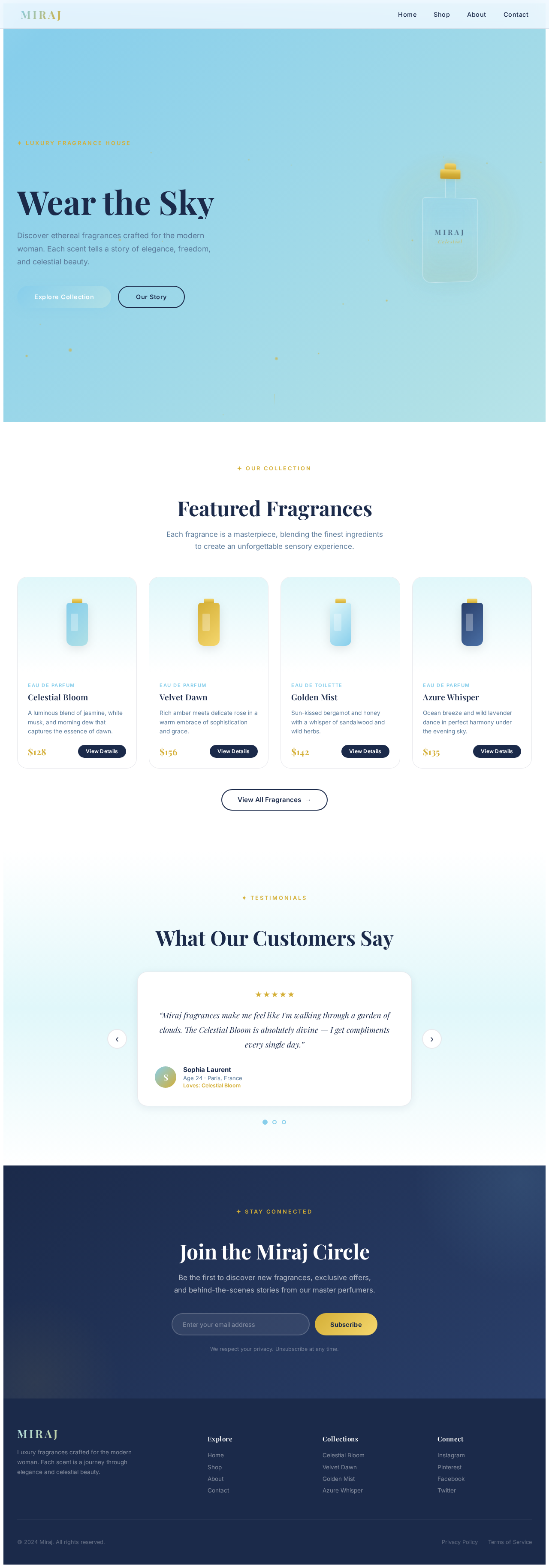
Wear the Sky
Discover ethereal fragrances crafted for the modern woman. Each scent tells a story of elegance, freedom, and celestial beauty.
Featured Fragrances
Each fragrance is a masterpiece, blending the finest ingredients to create an unforgettable sensory experience.
Celestial Bloom
A luminous blend of jasmine, white musk, and morning dew that captures the essence of dawn.
Velvet Dawn
Rich amber meets delicate rose in a warm embrace of sophistication and grace.
Golden Mist
Sun-kissed bergamot and honey with a whisper of sandalwood and wild herbs.
Azure Whisper
Ocean breeze and wild lavender dance in perfect harmony under the evening sky.
What Our Customers Say
“Miraj fragrances make me feel like I'm walking through a garden of clouds. The Celestial Bloom is absolutely divine — I get compliments every single day.”
Join the Miraj Circle
Be the first to discover new fragrances, exclusive offers, and behind-the-scenes stories from our master perfumers.
We respect your privacy. Unsubscribe at any time.
Wear the Sky
Discover ethereal fragrances crafted for the modern woman. Each scent tells a story of elegance, freedom, and celestial beauty.
Featured Fragrances
Each fragrance is a masterpiece, blending the finest ingredients to create an unforgettable sensory experience.
Celestial Bloom
A luminous blend of jasmine, white musk, and morning dew that captures the essence of dawn.
Velvet Dawn
Rich amber meets delicate rose in a warm embrace of sophistication and grace.
Golden Mist
Sun-kissed bergamot and honey with a whisper of sandalwood and wild herbs.
Azure Whisper
Ocean breeze and wild lavender dance in perfect harmony under the evening sky.
What Our Customers Say
“Miraj fragrances make me feel like I'm walking through a garden of clouds. The Celestial Bloom is absolutely divine — I get compliments every single day.”
Join the Miraj Circle
Be the first to discover new fragrances, exclusive offers, and behind-the-scenes stories from our master perfumers.
We respect your privacy. Unsubscribe at any time.
No comments yet. Be the first!