Meme

byArT CreaTion

Build a live viral merch store where fans can upload match memes, preview them on 3D hoodies, and check out instantly.

LandingControlsUploadConfirmation
Landing

Comments (0)

No comments yet. Be the first!

System Requirements

System Requirement Document
Page 1 of 4

Meme

Introduction

The "Meme" project is designed to create a live viral merchandise store where fans can upload memes, preview them on 3D hoodies, and complete purchases instantly. This document outlines the system requirements for the Meme project, ensuring a seamless and engaging user experience.

System Overview

The Meme project aims to provide a platform for fans to engage with viral content by allowing them to create personalized merchandise. The system will support meme uploads, 3D previews of merchandise, and an instant checkout process. Additionally, fan control functionality will be integrated as pre-resolved by the API supervisor.

Functional Requirements

  • As a fan, I should be able to upload memes to the platform.
  • As a fan, I should be able to preview memes on 3D hoodies.
  • As a fan, I should be able to complete purchases instantly.
  • As a fan, I should be able to control certain aspects of the merchandise creation process, as pre-resolved by the API supervisor.

User Personas

  • Fan: The primary user who uploads memes, previews them on merchandise, and makes purchases.
Page 2 of 4

Core User Flows

  • Fan uploads meme -> previews on 3D hoodie -> completes purchase instantly.
  • Fan accesses merchandise creation controls -> adjusts settings as per API supervisor's pre-resolved options -> previews and completes purchase.

Visuals Colors and Theme

  • primary: #1E90FF (Dodger Blue)
  • primary_light: #87CEFA (Light Sky Blue)
  • secondary: #FF4500 (Orange Red)
  • accent: #32CD32 (Lime Green)
  • highlight: #FFD700 (Gold)
  • bg: #F0F8FF (Alice Blue)
  • surface: rgba(255, 255, 255, 0.9)
  • text: #000000 (Black)
  • text_muted: #696969 (Dim Gray)
  • border: rgba(0, 0, 0, 0.1)

Signature Design Concept

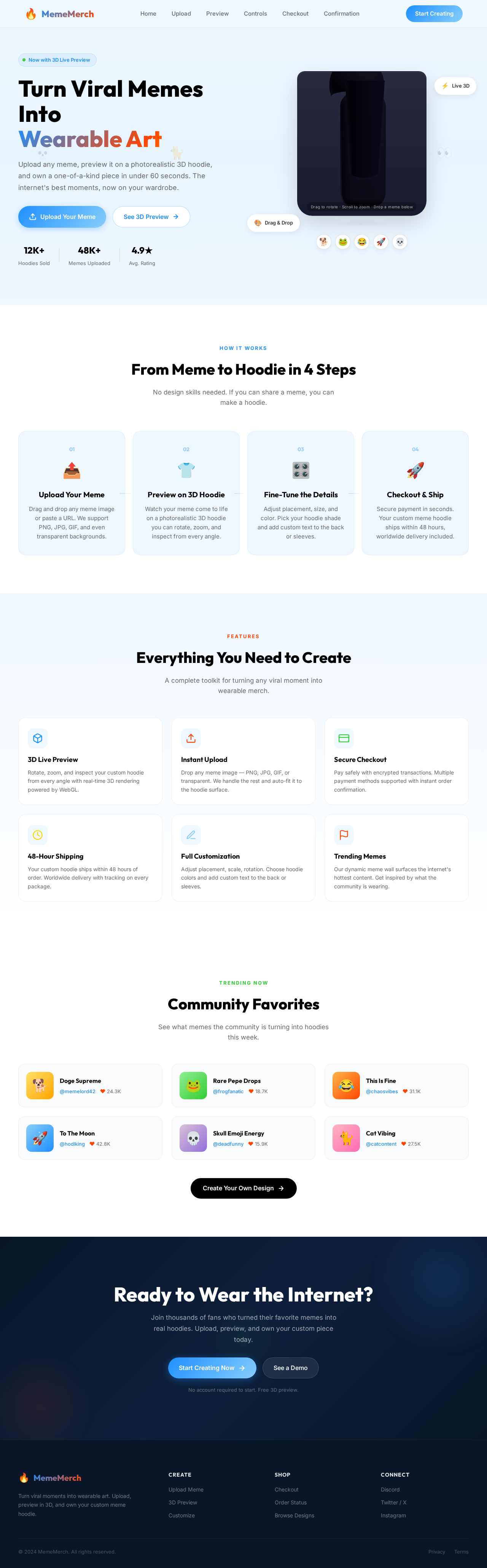
The homepage will feature an interactive 3D hoodie model that fans can rotate and zoom in on. Using @react-three/fiber and @react-three/drei, fans can drag and drop their memes onto the hoodie, instantly seeing how their design looks in real-time. The background will have a dynamic meme wall that changes based on trending memes, providing a lively and engaging atmosphere. Hovering over different sections will trigger subtle animations, enhancing the interactive experience.

Page 3 of 4

Interaction Model & Motion Direction

  • Intended Interaction Model: Parallax
    • The landing page will employ a parallax effect, with layered meme backgrounds moving at different speeds to create depth. Interactive elements like the 3D hoodie model will have smooth animations and transitions, providing a visually rich first impression.
  • Internal Pages: Static
    • For pages like checkout and settings, a static interaction model will be used to prioritize clarity and ease of use.

Non-Functional Requirements

  • The system should support high-resolution meme uploads.
  • The 3D preview should render smoothly across all modern browsers.
  • The checkout process must be secure and efficient.

Tech Stack

  • Frontend: React for Web
  • Backend: FastAPI
  • Database: MySQL or MariaDB, using Alembic for migrations
  • 3D Rendering: @react-three/fiber, @react-three/drei
Page 4 of 4

Assumptions and Constraints

  • The system assumes users have access to modern web browsers with WebGL support.
  • The API supervisor's pre-resolved controls will be integrated without further customization.

Glossary

  • Fan: A user who engages with the platform to create and purchase personalized merchandise.
  • 3D Hoodie Model: A digital representation of a hoodie used for previewing memes.
  • API Supervisor: A system component responsible for managing API interactions and pre-resolved controls.
Landing design preview
Landing: View Meme Wall
Landing: Explore Hoodie Model
Upload: Upload Meme
Preview: View 3D Hoodie
Preview: Drag Drop Meme
Controls: Adjust Settings
Preview: Confirm Design
Checkout: Enter Details
Checkout: Complete Purchase
Confirmation: View Order