Marketrix.app
 Yours Yuva
Build a modern CRM web application for my digital marketing agency named "Marketrix". Objective: Create an easy-to-use CRM that manages leads, tracks sales, imports Excel files, and updates lead status automatically. Features: 1. Dashboard - Total Leads - New Leads - Contacted - Follow-up - Interested - Proposal Sent - Won Clients - Lost Clients - Today's Follow-ups - Monthly Conversion Rate - Revenue Tracker 2. Lead Management - Add, Edit, Delete Leads - Search and Filter Leads - Assign Leads to Team Members - Notes Section - Timeline of every interaction Lead Fields: - Name - Company - Mobile Number - Email - City - Business Type - Source (Instagram, Facebook, Website, Referral, Cold Calling) - Status - Priority - Next Follow-up Date - Last Contact Date - Estimated Deal Value - Remarks 3. Excel Import & Export - Upload .xlsx and .csv files - Automatically map columns - Prevent duplicate leads using phone number or email - Export filtered data to Excel 4. Calling System - Click-to-call from mobile or desktop - After each call, automatically show: • Call Duration • Call Outcome • Add Notes • Schedule Next Follow-up - Keep complete call history 5. Lead Pipeline Move leads by drag-and-drop: New Lead → Contacted → Follow-up → Interested → Proposal Sent → Negotiation → Won → Lost 6. Follow-up Reminder - Daily reminders - Overdue follow-ups - Calendar view - Email and WhatsApp reminder support 7. Reports - Number of calls made - Conversion percentage - Leads by source - Monthly sales graph - Employee performance - Revenue reports 8. User Roles - Admin - Sales Executive - Manager 9. Notifications - Follow-up reminders - Missed follow-ups - New lead assigned - Won deal celebration notification 10. Security - Secure Login - Role-based permissions - Automatic backup - Audit logs 11. UI Design - Premium black and white theme - Responsive for mobile, tablet, and desktop - Fast loading - Clean modern CRM interface - Kanban board for lead stages - Charts and analytics 12. Future Integrations - WhatsApp Business API - Google Sheets Sync - Gmail Integration - Google Calendar - Meta Lead Ads - Razorpay Payment Tracking Technology: - React + Next.js - Node.js + Express - PostgreSQL - Tailwind CSS - Authentication with JWT - REST API architecture The application should be production-ready, scalable, and optimized for performance. It should feel like a professional CRM similar to HubSpot or Zoho CRM but customized for a digital marketing agency.


Comments (0)
Sign in to leave a comment
System Requirements
Marketrix.app System Requirements Document
Introduction
Marketrix.app is a modern CRM web application designed specifically for digital marketing agencies. The objective is to create an easy-to-use platform that manages leads, tracks sales, imports Excel files, and updates lead status automatically. This document outlines the system requirements for Marketrix.app to ensure it meets the needs of Yours Yuva's digital marketing agency.
System Overview
Marketrix.app will serve as a comprehensive CRM solution tailored for digital marketing agencies. It will provide functionalities such as lead management, sales tracking, and integration capabilities, all within a user-friendly interface. The application will be scalable, optimized for performance, and designed to offer a professional experience akin to leading CRMs like HubSpot and Zoho CRM.
Functional Requirements as Story Points
- As an Admin, I should be able to view a dashboard with total leads, new leads, contacted leads, follow-ups, interested leads, proposals sent, won clients, lost clients, today's follow-ups, monthly conversion rate, and revenue tracker.
- As a User, I should be able to add, edit, and delete leads.
- As a User, I should be able to search and filter leads.
- As a User, I should be able to assign leads to team members.
- As a User, I should be able to add notes and view a timeline of every interaction with leads.
- As a User, I should be able to upload and export Excel files, automatically map columns, and prevent duplicate leads.
- As a User, I should be able to click-to-call from mobile or desktop and manage call details.
- As a User, I should be able to move leads through the pipeline stages using drag-and-drop.
- As a User, I should receive daily follow-up reminders and view them in a calendar.
- As a User, I should be able to generate reports on calls, conversion rates, lead sources, sales, employee performance, and revenue.
- As an Admin, I should be able to manage user roles and permissions.
- As a User, I should receive notifications for follow-up reminders, missed follow-ups, new lead assignments, and won deals.
- As a User, I should have secure login access with role-based permissions and audit logs.
User Personas
- Admin: Responsible for managing the CRM, overseeing user roles, and ensuring data security.
- Sales Executive: Engages with leads, manages the sales pipeline, and updates lead statuses.
- Manager: Oversees the sales team, monitors performance, and generates reports.
Core User Flows
- Admin logs in -> Views dashboard -> Manages user roles and permissions
- Sales Executive logs in -> Adds new lead -> Updates lead status -> Moves lead through pipeline
- Manager logs in -> Reviews team performance -> Generates sales reports -> Adjusts strategies based on data
Visuals Colors and Theme
- primary: #1A1A1A (deep black)
- primary_light: #333333 (charcoal)
- secondary: #FFFFFF (white)
- accent: #FF5733 (vibrant orange)
- highlight: #FFC300 (warm yellow)
- bg: #F5F5F5 (light grey)
- surface: rgba(255, 255, 255, 0.9)
- text: #000000 (black)
- text_muted: #666666 (grey)
- border: rgba(0, 0, 0, 0.1)
Signature Design Concept
The homepage of Marketrix.app will feature an interactive Kanban board that visually represents the lead pipeline. Users can drag and drop leads between stages, with smooth animations powered by framer-motion. Each lead card will flip to reveal detailed information when clicked, creating an engaging and intuitive experience. The board will dynamically update in real-time, providing immediate feedback on lead status changes.
Interaction Model & Motion Direction
- Interaction Model: Animated
- The landing page will feature moderate scroll-triggered reveals and hover transitions. Interactive elements will utilize spring physics for a polished user experience. Internal pages will maintain a static layout for clarity and speed.
Non-Functional Requirements
- The application must be production-ready and scalable.
- It should be optimized for performance with fast loading times.
- The UI must be responsive across mobile, tablet, and desktop devices.
- Secure login and role-based permissions are mandatory.
- Automatic data backup and audit logs must be implemented.
Tech Stack
- Frontend: React + Next.js
- Backend: Node.js + Express
- Database: PostgreSQL
- Styling: Tailwind CSS
- Authentication: JWT
- Architecture: REST API
Assumptions and Constraints
- The application will be used primarily by digital marketing agencies in India.
- It will support integrations with popular tools like WhatsApp Business API, Google Sheets, Gmail, Google Calendar, Meta Lead Ads, and Razorpay.
- The CRM will handle sensitive client data, necessitating robust security measures.
Glossary
- CRM: Customer Relationship Management
- Lead: A potential client or customer
- Pipeline: The stages through which a lead progresses
- Kanban Board: A visual tool for managing tasks and workflows
- JWT: JSON Web Token, a standard for secure token-based authentication
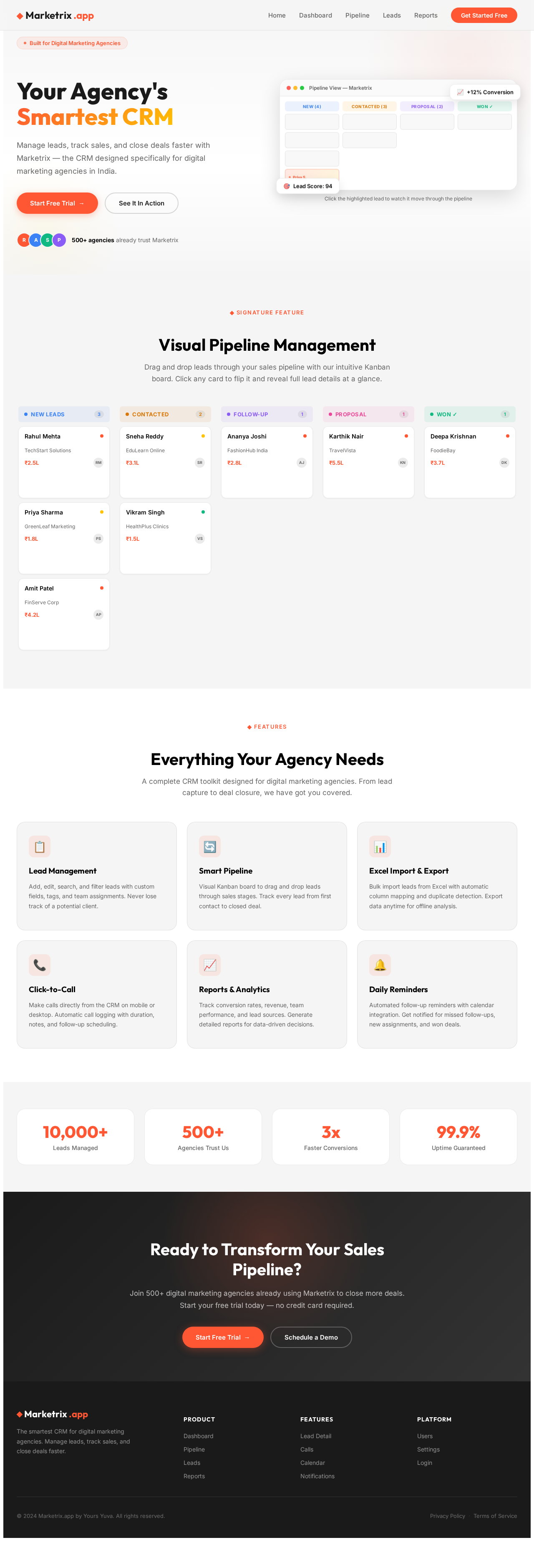
Your Agency's
Smartest CRM
Manage leads, track sales, and close deals faster with Marketrix — the CRM designed specifically for digital marketing agencies in India.
500+ agencies already trust Marketrix
Click the highlighted lead to watch it move through the pipeline
Visual Pipeline Management
Drag and drop leads through your sales pipeline with our intuitive Kanban board. Click any card to flip it and reveal full lead details at a glance.
TechStart Solutions
Requested a demo for a team of 12, keen on the enterprise plan.
GreenLeaf Marketing
Came in via Meta Lead Ads, awaiting first call.
FinServe Corp
Referral from Deepa Krishnan, high intent buyer.
EduLearn Online
First call done, evaluating against two competitors.
HealthPlus Clinics
Budget approval pending from clinic head office.
FashionHub India
Scheduled a follow-up call for pricing clarification.
TravelVista
Proposal sent, awaiting sign-off from finance team.
FoodieBay
Closed! Onboarding kicked off with the success team.
Everything Your Agency Needs
A complete CRM toolkit designed for digital marketing agencies. From lead capture to deal closure, we have got you covered.
Lead Management
Add, edit, search, and filter leads with custom fields, tags, and team assignments. Never lose track of a potential client.
Smart Pipeline
Visual Kanban board to drag and drop leads through sales stages. Track every lead from first contact to closed deal.
Excel Import & Export
Bulk import leads from Excel with automatic column mapping and duplicate detection. Export data anytime for offline analysis.
Click-to-Call
Make calls directly from the CRM on mobile or desktop. Automatic call logging with duration, notes, and follow-up scheduling.
Reports & Analytics
Track conversion rates, revenue, team performance, and lead sources. Generate detailed reports for data-driven decisions.
Daily Reminders
Automated follow-up reminders with calendar integration. Get notified for missed follow-ups, new assignments, and won deals.
Ready to Transform Your Sales Pipeline?
Join 500+ digital marketing agencies already using Marketrix to close more deals. Start your free trial today — no credit card required.
Your Agency's
Smartest CRM
Manage leads, track sales, and close deals faster with Marketrix — the CRM designed specifically for digital marketing agencies in India.
500+ agencies already trust Marketrix
Click the highlighted lead to watch it move through the pipeline
Visual Pipeline Management
Drag and drop leads through your sales pipeline with our intuitive Kanban board. Click any card to flip it and reveal full lead details at a glance.
TechStart Solutions
Requested a demo for a team of 12, keen on the enterprise plan.
GreenLeaf Marketing
Came in via Meta Lead Ads, awaiting first call.
FinServe Corp
Referral from Deepa Krishnan, high intent buyer.
EduLearn Online
First call done, evaluating against two competitors.
HealthPlus Clinics
Budget approval pending from clinic head office.
FashionHub India
Scheduled a follow-up call for pricing clarification.
TravelVista
Proposal sent, awaiting sign-off from finance team.
FoodieBay
Closed! Onboarding kicked off with the success team.
Everything Your Agency Needs
A complete CRM toolkit designed for digital marketing agencies. From lead capture to deal closure, we have got you covered.
Lead Management
Add, edit, search, and filter leads with custom fields, tags, and team assignments. Never lose track of a potential client.
Smart Pipeline
Visual Kanban board to drag and drop leads through sales stages. Track every lead from first contact to closed deal.
Excel Import & Export
Bulk import leads from Excel with automatic column mapping and duplicate detection. Export data anytime for offline analysis.
Click-to-Call
Make calls directly from the CRM on mobile or desktop. Automatic call logging with duration, notes, and follow-up scheduling.
Reports & Analytics
Track conversion rates, revenue, team performance, and lead sources. Generate detailed reports for data-driven decisions.
Daily Reminders
Automated follow-up reminders with calendar integration. Get notified for missed follow-ups, new assignments, and won deals.
Ready to Transform Your Sales Pipeline?
Join 500+ digital marketing agencies already using Marketrix to close more deals. Start your free trial today — no credit card required.
No comments yet. Be the first!