Page 1 of 6
System Requirements Document for MAC
1. Introduction
The MAC project is designed to provide OSHA/safety compliance tracking for construction and trades contractors. This tool aims to assist small to mid-sized contractors (5-50 employees) in managing safety training records, incident logs, and certification expirations efficiently. The system will help avoid fines ranging from $16K to $160K+ per violation by ensuring compliance with safety regulations.
2. System Overview
Page 2 of 6
2a. Product Interpretation and Delivery Boundary
-
Domain Descriptors:
- Certification and Expiration Management: The product is intended to manage certifications and track expiration dates for compliance. (Confidence: 0.9)
-
Product Intent: The MAC project is focused on OSHA/safety compliance tracking for construction and trades contractors.
-
Exclusions: Generic HR management features and payroll processing are not included.
-
Custom Pages:
- Certification Management Dashboard: A critical interface for Contractor Managers to track certifications, manage expirations, maintain safety training records, and log incidents.
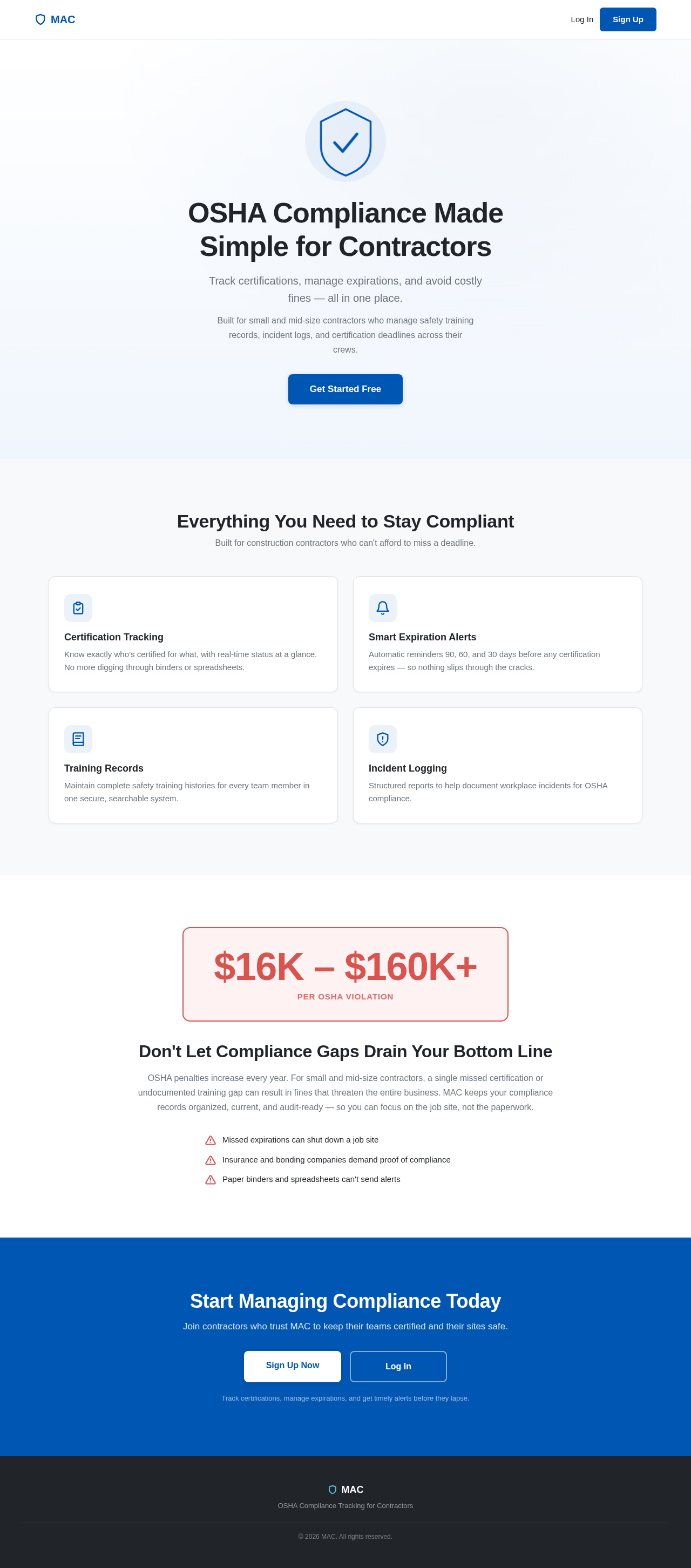
- Landing Page: Serves as a public entry point to orient and acquire contractor managers before they access the protected dashboard.
- Authentication Page: Facilitates sign-up, login, and session access to enable persistent identity for Contractor Managers.
-
Access Mode: Application-owned identity is required for persistent access and management of certification records.
-
Behavior Contracts:
- Certification Tracking:
- Actor: Contractor Manager
- Trigger: Certification update or expiration check
- Inputs: Certification details, expiration dates
- Outcomes: Updated certification status, expiration alerts
- State Changes: Certification records
- State Lifetime: Durable
- Identity Continuity: Persistent
- Audience Entry: Public
- Human Touchpoints: Dashboard, Email notifications
- Failure Outcome: Missed expiration alert
- Access Owner: Application
Page 3 of 6
2b. Source Content Inventory
No explicit content sources were provided.
2c. Page Content and Component Coverage
Page 4 of 6
3. Functional Requirements as Story Points
- As a Contractor Manager, I should be able to track certifications and their expiration dates to ensure compliance.
- As a Contractor Manager, I should receive alerts for upcoming certification expirations to prevent lapses.
- As a Contractor Manager, I should be able to log incidents and maintain safety training records for OSHA compliance.
- As a Contractor Manager, I should be able to sign up, log in, and maintain a session to manage certification records securely.
4. User Personas
- Contractor Manager: Responsible for managing certifications, training records, and incident logs.
5. Core User Flows
-
Landing Page Flow:
- Contractor Manager visits the Landing Page.
- Reads about the MAC project and its benefits.
- Proceeds to the Authentication Page for sign-up or login.
-
Authentication Flow:
- Contractor Manager signs up or logs in.
- Gains access to the Certification Management Dashboard.
-
Certification Management Flow:
- Contractor Manager views and updates certification records.
- Receives alerts for upcoming expirations.
- Logs incidents and updates training records.
Page 5 of 6
6. Visuals Colors and Theme
- Primary: #0056b3 (Blue)
- Primary Light: #337ab7 (Light Blue)
- Secondary: #f7f7f7 (Light Gray)
- Accent: #d9534f (Red)
- Highlight: #5bc0de (Cyan)
- Background: #ffffff (White)
- Surface: #f8f9fa (Light Gray)
- Text: #212529 (Dark Gray)
- Text Muted: #6c757d (Muted Gray)
- Border: #dee2e6 (Light Gray)
7. Signature Design Concept
The Certification Management Dashboard will feature a clean, professional layout with a focus on usability and clarity. The primary color scheme will be blue and gray, reflecting a professional and trustworthy aesthetic. The dashboard will include intuitive navigation, clear call-to-action buttons, and a responsive design to ensure accessibility across devices.
8. Interaction Model & Motion Direction
- Landing Page: Animated with moderate scroll-triggered reveals and hover transitions to engage users.
- Certification Management Dashboard: Static layout prioritizing clarity and data density.
- Authentication Page: Static with minimal motion for form interactions.
Page 6 of 6
9. Non-Functional Requirements
- The system must ensure data integrity and secure access control to protect sensitive certification records. (Provenance: Required inference)
10. Tech Stack
- Frontend: React for Web
- Backend: Python, FastAPI
- Database: MySQL or MariaDB, using Alembic for migrations
- Local Orchestration: Docker, docker-compose
- Server-side Orchestration: Kubernetes
11. Assumptions and Constraints
- The system will not include generic HR management features or payroll processing.
- Persistent identity is required for managing certification records.
12. Glossary
- OSHA: Occupational Safety and Health Administration
- Certification Management Dashboard: A tool for tracking certifications and managing compliance.
- Contractor Manager: A user responsible for managing certifications and compliance records.



No comments yet. Be the first!