LoveNest

byДіана Баутіна

Create a modern mobile app called "LoveNest" for Android and iOS with an Apple-style UI. Features: - Email, Google and Apple Sign In - Dating & Couple modes - User profiles (photo, full name, age, birthday, city, study/work, social links) - Dating with filters, matches and private chat - Couple dashboard with days together, anniversary countdown and shared memories - AI Love Assistant - Shared calendar, travel planner and mood tracker - English, Ukrainian and Polish - Dark & Light Mode Generate a complete production-ready mobile app with authentication, database, responsive UI and demo data.

Login
Login

Comments (0)

No comments yet. Be the first!

System Requirements

System Requirement Document
Page 1 of 5

LoveNest System Requirements Document

1. Introduction

LoveNest is a modern mobile application designed for Android and iOS platforms, featuring an Apple-style user interface. The app aims to enhance the dating and couple experience by providing a range of features including authentication, user profiles, dating and couple modes, AI Love Assistant, shared tools, multilingual support, and responsive design.

2. System Overview

LoveNest is designed to cater to individuals seeking meaningful connections and couples looking to enrich their relationship. The app provides a seamless experience with features tailored for both dating and couple interactions. It supports multiple languages and offers both dark and light modes to suit user preferences.

Page 2 of 5

3. Functional Requirements as Story Points

  • As a User, I should be able to sign in using Email, Google, or Apple accounts.
  • As a User, I should be able to complete my profile with a photo, first name, last name, middle name, nickname, birthday, age, city, country, study/work, school or company, bio, and social links.
  • As a User, I should be able to switch between Dating and Couple modes.
  • As a User, I should be able to complete a dating onboarding process after registration, choosing between Relationship or Single status.
  • As a User, I should be able to use filters to find matches and engage in private chats.
  • As a Couple, we should have access to a dashboard displaying days together, an anniversary countdown, and shared memories.
  • As a Couple, we should have a relationship score displayed on our dashboard.
  • As a User, I should be able to interact with an AI Love Assistant for relationship advice.
  • As a User, I should be able to use a shared calendar, travel planner, and mood tracker.
  • As a User, I should be able to use the app in English, Ukrainian, or Polish.
  • As a User, I should be able to switch between dark and light modes.

4. User Personas

  • Single User: Individuals looking for dating opportunities and meaningful connections.
  • Couple User: Partners who want to enhance their relationship with shared tools and experiences.

5. Core User Flows

  • Single User Flow: Sign in -> Complete Dating Onboarding -> Create Profile -> Set Dating Preferences -> Browse Matches -> Initiate Chat
  • Couple User Flow: Sign in -> Switch to Couple Mode -> Access Couple Dashboard -> Use Shared Tools (Calendar, Travel Planner, Mood Tracker)
Page 3 of 5

6. Visuals Colors and Theme

  • primary: #007AFF (Apple Blue)
  • primary_light: #5AC8FA (Light Apple Blue)
  • secondary: #34C759 (Green)
  • accent: #FF9500 (Orange)
  • highlight: #FF3B30 (Red)
  • bg: #FFFFFF (White for Light Mode), #000000 (Black for Dark Mode)
  • surface: #F2F2F7 (Light Gray)
  • text: #000000 (Black)
  • text_muted: #8E8E93 (Gray)
  • border: #C7C7CC (Light Gray)

7. Signature Design Concept

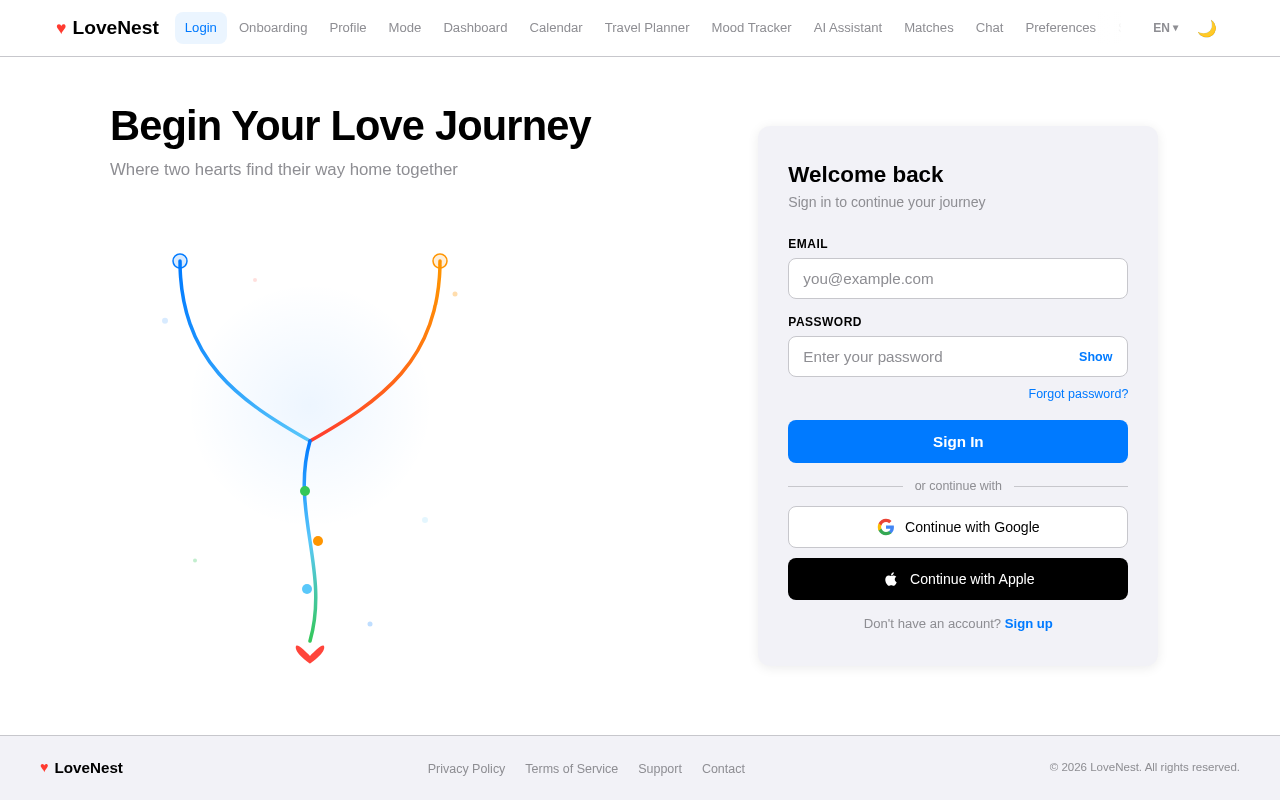
The LoveNest app will feature an interactive "Love Journey" animation on the home screen. Users will see a dynamic timeline that visually represents their relationship milestones. As users scroll, the timeline will animate with key events such as first meeting, anniversaries, and shared memories. This interactive timeline will use motion/react for smooth transitions and animations, providing a visually engaging experience that evolves with the user's relationship.

Page 4 of 5

LANDING HERO MOTION BRIEF

The landing hero will feature a continuously moving 2D composition that illustrates a couple's journey. The animation will start with two separate paths that converge into a single, vibrant timeline. As users scroll, the timeline will animate to reveal key relationship milestones, using motion/react for fluid transitions. The animation will loop every 10 seconds, providing a seamless and engaging experience that highlights the app's focus on relationship growth and shared experiences.
8. Interaction Model & Motion Direction

  • Interaction Model: Animated
  • The app will feature moderate scroll-triggered reveals and hover transitions, with spring physics on interactive elements to enhance user engagement.

9. Non-Functional Requirements

  • The app must support responsive design for various screen sizes on Android and iOS devices.
  • The app must ensure data privacy and secure authentication.
  • The app must provide a seamless multilingual experience in English, Ukrainian, and Polish.
  • The app must support both dark and light modes for user preference.
Page 5 of 5

10. Tech Stack

  • Frontend: React Native for mobile app development
  • Backend: Python with FastAPI
  • Database: MySQL or MariaDB, using Alembic for migrations
  • AI Models: GPT 5.4 for user-friendly responses
  • Local Orchestration: Docker, docker-compose
  • Server-side Orchestration: Kubernetes

11. Assumptions and Constraints

  • The app will be developed for both Android and iOS platforms.
  • The app will follow an Apple-style UI design.
  • The app will require internet connectivity for full functionality.
  • The app will use demo data for initial testing and development phases.

12. Glossary

  • AI Love Assistant: An AI-powered feature providing relationship advice and insights.
  • Couple Dashboard: A feature displaying relationship milestones and shared experiences.
  • Dating Mode: A mode focused on finding matches and initiating conversations.
  • Couple Mode: A mode focused on enhancing the relationship with shared tools.
  • Responsive Design: Design that adapts to different screen sizes and orientations.
Login design preview
Login: Sign In
Onboarding: Choose Relationship Status
Profile: Complete Profile
Mode: Switch to Couple
Dashboard: View Days Together
Dashboard: View Anniversary
Dashboard: View Relationship Score
Memories: Browse Shared Memories
Calendar: Manage Events
Travel Planner: Plan Trip
Mood Tracker: Log Mood
AI Assistant: Get Advice
Settings: Toggle Theme
Login design preview
Login: Sign In
Onboarding: Choose Relationship Status
Profile: Complete Profile
Mode: Switch to Couple
Dashboard: View Days Together
Dashboard: View Anniversary
Dashboard: View Relationship Score
Memories: Browse Shared Memories
Calendar: Manage Events
Travel Planner: Plan Trip
Mood Tracker: Log Mood
AI Assistant: Get Advice
Settings: Toggle Theme