Lets start Startups
 Marketing 8080AI
Build a producation-ready, multi-tenant Saas starter kit called "LaunchOS" a full stack web application that any startup founder can use as a base to launch their product.
Comments (0)
Sign in to leave a comment
System Requirements
System Requirements Document (SRD)
Project Name: amber-kit
1. Introduction
The amber-kit project is a production-ready, multi-tenant SaaS starter kit designed to empower startup founders with a robust, scalable, and customizable foundation for launching their products. By addressing critical SaaS essentials such as authentication, billing, multi-tenancy, and admin dashboards, amber-kit aims to save founders countless hours of development time while ensuring high-quality architecture and user experience.
This document outlines the system requirements for amber-kit, including functional and non-functional specifications, user personas, visual design concepts, technical stack, and constraints. The project is tailored for the US market, adhering to locale-specific defaults such as USD currency, EST timezone, and accessibility standards (WCAG 2.1 AA).
2. System Overview
amber-kit is a full-stack web application built to serve as a SaaS starter kit. It provides essential features for subscription management, tenant-based authentication, admin dashboards, and modularity for customization. The system is designed to be production-grade, scalable, and secure, with a focus on developer experience and accessibility.
Key Features:
- Authentication: Secure email/password login, social login, email verification, and role-based access.
- Billing & Subscriptions: Stripe integration, subscription management, and usage-based credit tracking.
- Dashboard: Interactive charts, SaaS metrics, and activity feeds.
- Multi-Tenancy: Organization/workspace model with team management.
- Admin Panel: User management, announcements, and org-level stats.
- Landing Page: Marketing-focused design with pricing tables and testimonials.
3. Functional Requirements
Authentication
- As User, I should be able to sign up and log in using email/password with JWT.
- As User, I should be able to log in using Google OAuth.
- As User, I should receive an email verification link upon signup.
- As User, I should be able to reset my password via an email link.
- As Admin, I should be able to assign roles (Admin, Member, Viewer) to users.
Billing & Subscriptions
- As User, I should be able to subscribe to one of three plans: Free, Pro ($29/mo), Enterprise ($99/mo).
- As User, I should be able to upgrade or downgrade my subscription plan.
- As User, I should be able to track usage-based credits per plan.
- As User, I should be able to access a billing portal to view invoice history.
- As System, I should handle Stripe webhook events for subscription updates.
Dashboard
- As User, I should be able to view SaaS metrics like MRR, active users, churn rate, and signups.
- As User, I should see interactive charts showing activity over the last 30 days.
- As User, I should see a recent activity feed.
- As User, I should have quick action buttons for common tasks.
Multi-Tenancy
- As User, I should be able to create and manage organizations/workspaces.
- As User, I should be able to invite team members via email.
- As Admin, I should be able to manage per-org settings and branding.
- As Admin, I should be able to assign roles to team members.
User Settings
- As User, I should be able to edit my profile (name, avatar upload).
- As User, I should be able to set notification preferences.
- As User, I should be able to generate and manage API keys.
- As User, I should be able to manage connected integrations.
Admin Panel
- As Admin, I should be able to search and filter the user list.
- As Admin, I should be able to suspend or delete user accounts.
- As Admin, I should be able to view org-level usage stats.
- As Admin, I should be able to broadcast announcements.
Landing Page
- As Visitor, I should see a hero section with a clear call-to-action (CTA).
- As Visitor, I should see feature highlights in a three-column layout.
- As Visitor, I should see a pricing table with three tiers.
- As Visitor, I should see a testimonials section.
- As Visitor, I should see a footer with links to key pages.
4. User Personas
Admin
- Responsible for managing user accounts, organizations, and system-wide settings.
- Needs access to advanced tools like announcements and usage stats.
Member
- Regular user within an organization, with permissions to perform tasks based on their role.
Viewer
- Limited access user, primarily for viewing data and reports.
Visitor
- Potential customer exploring the landing page to learn about the product and pricing.
5. Visuals Colors and Theme
Color Palette
- Background: #F5F7FA (soft gray-blue)
- Surface: #FFFFFF (pure white)
- Text: #2D3748 (dark slate)
- Accent: #4A90E2 (vibrant blue)
- Muted Tones: #A0AEC0 (cool gray)
Theme
The design will emphasize clarity, professionalism, and modernity, with a focus on clean layouts and intuitive navigation.
6. Signature Design Concept
Concept: Interactive Blueprint Landing Page
The homepage will resemble an architectural blueprint, complete with pencil-sketch animations that dynamically draw sections of the page as users scroll.
Key Features:
- Dynamic Animations: As users scroll, features like the hero section, pricing table, and testimonials will "draw themselves" in real-time, mimicking the look of a blueprint being created.
- Interactive Elements: Hovering over feature highlights will reveal additional details in a pop-up "blueprint note."
- Color Shifts: The blueprint background will subtly shift between shades of blue and gray based on the time of day.
- Micro-Interactions: Buttons and links will have fluid transitions, resembling the movement of a pencil sketch.
This concept will create a memorable first impression, blending creativity with functionality.
7. Non-Functional Requirements
- Performance: The system must handle up to 10,000 concurrent users.
- Security: Implement rate limiting, CORS, CSRF protection, and SQL injection prevention.
- Accessibility: Ensure WCAG 2.1 AA compliance.
- Scalability: Support multi-tenancy and modular feature expansion.
- Reliability: Maintain 99.9% uptime.
8. Tech Stack
Frontend
- Next.js 14 (App Router)
- TypeScript
- Tailwind CSS
Backend
- Node.js
- Express REST API
Database
- PostgreSQL (primary)
- Redis (sessions/cache)
Authentication
- JWT
- NextAuth.js
- Google OAuth
Payments
- Stripe
Storage
- AWS S3
- Resend API
Infrastructure
- Docker + docker-compose (local development)
- Kubernetes (Helm chart for production)
CI/CD
- GitHub Actions
Testing
- Jest (unit tests)
- Playwright (E2E tests)
9. Assumptions and Constraints
Assumptions
- The system will primarily serve US-based startups.
- All sensitive configurations will be managed via environment variables.
- The system will be mobile-responsive and accessible.
Constraints
- The project must be completed within 15 days.
- All features must be production-grade with no placeholders or stubs.
10. Glossary
- JWT: JSON Web Token, used for secure authentication.
- OAuth: Open standard for access delegation.
- MRR: Monthly Recurring Revenue.
- WCAG: Web Content Accessibility Guidelines.
- CI/CD: Continuous Integration/Continuous Deployment.
- E2E: End-to-End testing.
- SaaS: Software as a Service.
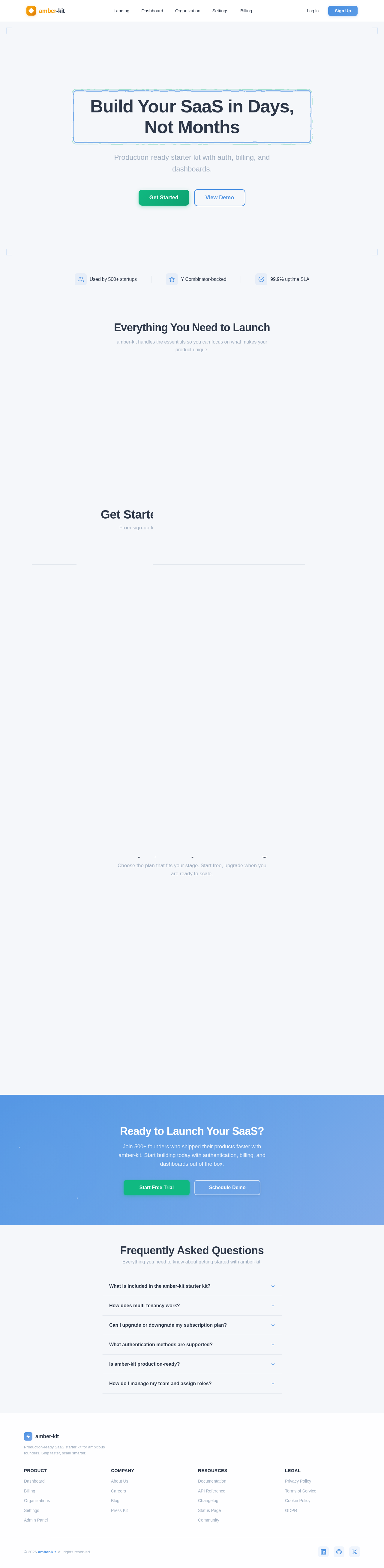
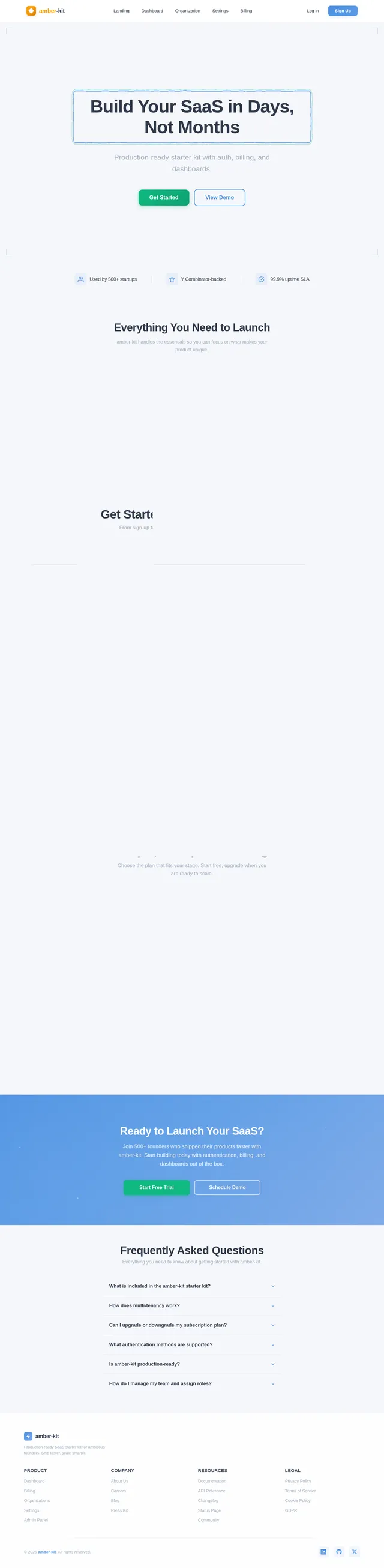
Build Your SaaS in Days, Not Months
Production-ready starter kit with auth, billing, and dashboards.
Everything You Need to Launch
amber-kit handles the essentials so you can focus on what makes your product unique.
Authentication
Secure email/password login, Google OAuth, email verification, and role-based access control out of the box.
Billing & Subscriptions
Stripe-powered subscription management with usage-based credits, invoices, and a self-serve billing portal.
Multi-Tenancy
Organization workspaces with team invites, per-org settings, custom branding, and scoped role management.
How It Works
Get Started in Four Simple Steps
From sign-up to launch, amber-kit gets your SaaS product live in days, not months.
Sign Up
Create your account in seconds with email or Google OAuth. No credit card required to get started.
Configure Org
Set up your organization, branding, and preferences. Customize your workspace to fit your workflow.
Invite Team
Add team members via email and assign roles. Collaborate seamlessly with Admin, Member, and Viewer access.
Launch
Go live with built-in auth, billing, and dashboards. Your SaaS is production-ready from day one.
What Founders Are Saying
Teams worldwide trust amber-kit to launch faster and scale with confidence.
amber-kit saved us at least two months of development time. Auth, billing, and multi-tenancy were ready on day one. We launched our MVP in under a week.
The Stripe integration just works. We went from zero to accepting payments in an afternoon. The subscription management and webhook handling are production-grade.
We evaluated five starter kits before choosing amber-kit. The multi-tenant architecture and role-based access control are exactly what enterprise clients demand.
The admin panel and dashboard metrics gave us instant visibility into our SaaS operations. MRR tracking, churn rate, user activity — all built in from the start.
Our team was onboarded in minutes with the invite system. Organization management and team roles made it seamless to set up our workspace exactly how we needed.
Simple, Transparent Pricing
Choose the plan that fits your stage. Start free, upgrade when you are ready to scale.
- 1 organization workspace
- Up to 3 team members
- Basic authentication
- Community support
- 100 API calls/month
- Unlimited organizations
- Up to 25 team members
- Advanced auth & SSO
- Priority email support
- 10,000 API calls/month
- Usage-based credit tracking
- Custom branding
- Unlimited everything
- Unlimited team members
- SAML SSO & RBAC
- Dedicated account manager
- Unlimited API calls
- Advanced admin panel
- SLA & uptime guarantee
- Custom integrations
Ready to Launch Your SaaS?
Join 500+ founders who shipped their products faster with amber-kit. Start building today with authentication, billing, and dashboards out of the box.
Frequently Asked Questions
Everything you need to know about getting started with amber-kit.
amber-kit includes production-ready authentication (email/password + Google OAuth), Stripe billing with three subscription tiers, a multi-tenant organization model, an admin panel, interactive dashboards with SaaS metrics, and a fully responsive landing page. Everything is built with Next.js 14, TypeScript, and Tailwind CSS.
Each user can create organizations (workspaces) and invite team members via email. Organizations have isolated settings, branding, and role-based access control with Admin, Member, and Viewer roles. Data is scoped per-organization with PostgreSQL row-level security.
Yes. You can switch between Free, Pro ($29/mo), and Enterprise ($99/mo) plans at any time through the billing portal. Plan changes are handled via Stripe with prorated billing, and usage-based credits adjust automatically to your new tier.
amber-kit supports email/password signup with JWT tokens, Google OAuth social login, email verification on signup, and password reset via secure email links. All auth flows use NextAuth.js with industry-standard security practices including rate limiting and CSRF protection.
Absolutely. The kit ships with Docker and Kubernetes Helm charts for deployment, GitHub Actions CI/CD pipelines, 80%+ test coverage with Jest and Playwright, input validation with Zod, and security measures including rate limiting, CORS, and SQL injection prevention. It is designed for 99.9% uptime.
From the Organization settings, admins can invite members by email, assign roles (Admin, Member, or Viewer), and manage per-organization branding and settings. The admin panel also provides user search, filtering, and the ability to suspend or remove accounts.
No comments yet. Be the first!