Interior
 Pushon Bhattacharyya
do as told in pdf


Comments (0)
Sign in to leave a comment
System Requirements
System Requirements Document
1. Introduction
This document outlines the system requirements for the Interior Designing Management System, intended for an interior design company. The project aims to deliver a production-ready application using only free services, ensuring a secure, fast, responsive, and professional user interface with modern design principles.
2. System Overview
The Interior Designing Management System will be developed using a modern technology stack, focusing on clean architecture and reusable components. The system will include both frontend and backend components, with a focus on security, performance, and user experience.
3. Functional Requirements
Phase 1: Project Planning
- As a developer, I want to create only the folder structure and project architecture without writing application code.
Phase 2: Initialize the Project
- As a developer, I want to generate the complete folder structure including Frontend, Backend, Shared, Assets, Public, Controllers, Models, Routes, Middleware, Utils, Config, Services, Hooks, Contexts, Layouts, Pages, and Components.
- As a developer, I want to generate
package.jsonfiles,.gitignore, and a README file.
Phase 3: Backend Setup
- As a developer, I want to set up the backend using Express, Helmet, CORS, Compression, Morgan, Cookie Parser, Rate Limiter, MongoDB, Error Handler, Async Error Wrapper, and Validation.
- As a developer, I want to create
server.js,app.js, MongoDB connection, environment variables, and production configuration.
Phase 4: Security System
- As a developer, I want to implement JWT Authentication, Refresh Tokens, bcrypt Password Hashing, HTTP Only Cookies, Role-Based Access, Authentication Middleware, Authorization Middleware, Rate Limiting, Helmet, CORS, Request Validation, MongoDB Injection Protection, XSS Protection, Input Sanitization, Centralized Error Handling, Logging, Security Headers, Password Complexity Validation, Email Verification, Forgot Password, and Reset Password functionalities.
Phase 5: Database Design
- As a developer, I want to create MongoDB models for Users, Projects, Services, Gallery, Appointments, Testimonials, Blogs, FAQs, Pricing, Messages, Settings, and Newsletter with validation, indexes, created date, updated date, soft delete, status, and timestamps.
Phase 6: API Design
- As a developer, I want to create REST APIs for Authentication, Users, Projects, Services, Gallery, Appointments, Blogs, Testimonials, Pricing, FAQs, Contact Messages, Newsletter, and Admin Dashboard using Controllers, Services, and Validation.
Phase 7: Frontend Setup
- As a developer, I want to configure React and install React Router, Axios, Tailwind CSS, React Icons, Framer Motion, React Hook Form, and React Hot Toast.
Phase 8: Design System
- As a designer, I want to create a professional design system with primary colors (White, Black, Gray, Gold Accent), 8px spacing system, rounded cards, glassmorphism, smooth shadows, professional typography, responsive layout, accessible colors, dark mode support, light mode support, and reusable components.
Phase 9: Customer Website
- As a user, I want to access pages like Home, About, Services, Projects, Gallery, Pricing, Blog, Testimonials, Contact, Book Consultation, FAQ, Privacy Policy, Terms, and 404, all fully responsive and SEO friendly.
Phase 10: Home Page
- As a user, I want to view sections like Hero, Featured Services, Latest Projects, About Company, Working Process, Statistics, Testimonials, FAQ, Call To Action, and Footer on the Home page.
Phase 11: Services
- As a user, I want to view each service with an image, description, benefits, pricing, book button, related services, search, and category filter on the Services page.
Phase 12: Portfolio
- As a user, I want to view projects with search, filters, pagination, project cards, project details, image gallery, lightbox, and a responsive masonry layout on the Projects page.
Phase 13: Contact System
- As a user, I want to access a Contact page with validation, Google Maps placeholder, business hours, address, phone, email, contact form, and toast messages.
Phase 14: Appointment System
- As a customer, I want to book services by choosing a service, selecting a date and time, writing a message, and receiving a success message. Admins can view bookings stored in MongoDB.
Phase 15: Admin Panel
- As an admin, I want to access a protected Admin Dashboard with a sidebar, dashboard, users, projects, services, bookings, blogs, messages, testimonials, gallery, pricing, settings, newsletter, charts, and statistics.
Phase 16: CRUD Operations
- As a developer, I want to create CRUD operations for Projects, Services, Blogs, Testimonials, Gallery, Pricing, FAQs, Team Members, Newsletter, and Settings using reusable forms and validation.
Phase 17: Dashboard Analytics
- As an admin, I want to view dashboard analytics showing total users, appointments, projects, messages, blogs, monthly growth, recent activity, latest bookings, latest messages, and charts.
Phase 18: Performance
- As a developer, I want to optimize the website with lazy loading, image optimization, reusable components, memoization, React best practices, code splitting, skeleton loading, fast API responses, and minimized re-renders.
Phase 19: Final Security
- As a developer, I want to perform a complete security audit checking JWT, authorization, authentication, input validation, password hashing, API protection, rate limiting, error handling, sensitive data, and OWASP Top 10 compliance.
Phase 20: Production Ready
- As a developer, I want to prepare the project for production by generating a README, deployment guide, environment variables,
.env.example, production build, Vercel setup, Render setup, MongoDB Atlas setup, and verifying every feature works.
Additional Hosting Requirements
- As a developer, I want to host the frontend on Vercel to ensure efficient deployment and scalability.
- As a developer, I want to host the backend on Render to leverage free-tier hosting services.
4. User Personas
- Interior Designer: Uses the system to manage projects, services, and client interactions.
- Admin: Manages the backend, oversees user activities, and ensures system security.
- Customer: Visits the website to explore services, book appointments, and contact the company.
5. Core User Flows
Interior Designer
- Log in to the Admin Panel.
- Manage projects and services.
- View and respond to customer messages and bookings.
Admin
- Access the Admin Dashboard.
- Monitor system analytics and user activities.
- Perform security audits and manage settings.
Customer
- Visit the website.
- Explore services and projects.
- Book an appointment or contact the company.
6. Visuals Colors and Theme
- Primary Colors: White, Black, Gray, Gold Accent
- Design Elements: 8px spacing system, rounded cards, glassmorphism, smooth shadows
- Typography: Professional and accessible
- Modes: Dark mode and light mode support
7. Signature Design Concept
- Modern UI with a focus on accessibility and responsiveness.
- Use of glassmorphism and smooth shadows for a professional look.
8. Interaction Model & Motion Direction
- Smooth transitions and animations using Framer Motion.
- Responsive interactions with React Hook Form and React Hot Toast for feedback.
9. Non-Functional Requirements
- The system must be secure, fast, and responsive.
- It should be easy to maintain with reusable components and clean architecture.
10. Tech Stack
- Frontend: React 19, Vite, Tailwind CSS, React Router, Axios
- Backend: Node.js, Express.js
- Database: MongoDB Atlas (Free Tier)
- Authentication: JWT, bcrypt
- Storage: Cloudinary Free Plan
- Deployment: Vercel (Frontend), Render (Backend)
11. Assumptions and Constraints
- The project will use only free services.
- The system must follow OWASP best practices for security.
- The application must be production-ready with a modern UI.
12. Glossary
- JWT: JSON Web Token, used for secure authentication.
- CRUD: Create, Read, Update, Delete operations.
- OWASP: Open Web Application Security Project, a standard for web security.
- Responsive Design: Design that adapts to different screen sizes and devices.
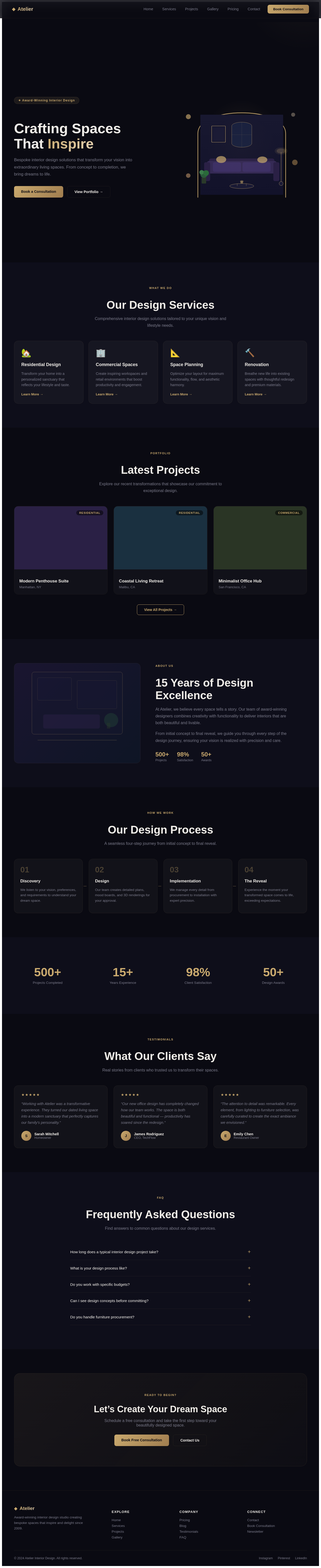
Crafting Spaces
That Inspire
Bespoke interior design solutions that transform your vision into extraordinary living spaces. From concept to completion, we bring dreams to life.
Our Design Services
Comprehensive interior design solutions tailored to your unique vision and lifestyle needs.
Residential Design
Transform your home into a personalized sanctuary that reflects your lifestyle and taste.
Learn More →Commercial Spaces
Create inspiring workspaces and retail environments that boost productivity and engagement.
Learn More →Space Planning
Optimize your layout for maximum functionality, flow, and aesthetic harmony.
Learn More →Renovation
Breathe new life into existing spaces with thoughtful redesign and premium materials.
Learn More →Latest Projects
Explore our recent transformations that showcase our commitment to exceptional design.
15 Years of Design Excellence
At Atelier, we believe every space tells a story. Our team of award-winning designers combines creativity with functionality to deliver interiors that are both beautiful and livable.
From initial concept to final reveal, we guide you through every step of the design journey, ensuring your vision is realized with precision and care.
Our Design Process
A seamless four-step journey from initial concept to final reveal.
Discovery
We listen to your vision, preferences, and requirements to understand your dream space.
Design
Our team creates detailed plans, mood boards, and 3D renderings for your approval.
Implementation
We manage every detail from procurement to installation with expert precision.
The Reveal
Experience the moment your transformed space comes to life, exceeding expectations.
What Our Clients Say
Real stories from clients who trusted us to transform their spaces.
“Working with Atelier was a transformative experience. They turned our dated living space into a modern sanctuary that perfectly captures our family's personality.”
“Our new office design has completely changed how our team works. The space is both beautiful and functional — productivity has soared since the redesign.”
“The attention to detail was remarkable. Every element, from lighting to furniture selection, was carefully curated to create the exact ambiance we envisioned.”
Frequently Asked Questions
Find answers to common questions about our design services.
Timelines vary based on scope. A single room refresh takes 4-6 weeks, while full home renovations typically span 3-6 months. We provide a detailed timeline during the discovery phase.
We follow a four-step process: Discovery, Design, Implementation, and Reveal. Each phase involves close collaboration with you to ensure the final result matches your vision perfectly.
Absolutely. We work with a wide range of budgets and are transparent about costs from the start. Our team excels at maximizing value while maintaining our high design standards.
Yes! After our initial consultation, we create mood boards and concept presentations for your review. You will have a clear picture of the proposed direction before any major commitments.
We manage the entire procurement process, from sourcing unique pieces to coordinating deliveries and installation. Our trade relationships often provide access to exclusive items and pricing.
Let’s Create Your Dream Space
Schedule a free consultation and take the first step toward your beautifully designed space.
Crafting Spaces
That Inspire
Bespoke interior design solutions that transform your vision into extraordinary living spaces. From concept to completion, we bring dreams to life.
Our Design Services
Comprehensive interior design solutions tailored to your unique vision and lifestyle needs.
Residential Design
Transform your home into a personalized sanctuary that reflects your lifestyle and taste.
Learn More →Commercial Spaces
Create inspiring workspaces and retail environments that boost productivity and engagement.
Learn More →Space Planning
Optimize your layout for maximum functionality, flow, and aesthetic harmony.
Learn More →Renovation
Breathe new life into existing spaces with thoughtful redesign and premium materials.
Learn More →Latest Projects
Explore our recent transformations that showcase our commitment to exceptional design.
15 Years of Design Excellence
At Atelier, we believe every space tells a story. Our team of award-winning designers combines creativity with functionality to deliver interiors that are both beautiful and livable.
From initial concept to final reveal, we guide you through every step of the design journey, ensuring your vision is realized with precision and care.
Our Design Process
A seamless four-step journey from initial concept to final reveal.
Discovery
We listen to your vision, preferences, and requirements to understand your dream space.
Design
Our team creates detailed plans, mood boards, and 3D renderings for your approval.
Implementation
We manage every detail from procurement to installation with expert precision.
The Reveal
Experience the moment your transformed space comes to life, exceeding expectations.
What Our Clients Say
Real stories from clients who trusted us to transform their spaces.
“Working with Atelier was a transformative experience. They turned our dated living space into a modern sanctuary that perfectly captures our family's personality.”
“Our new office design has completely changed how our team works. The space is both beautiful and functional — productivity has soared since the redesign.”
“The attention to detail was remarkable. Every element, from lighting to furniture selection, was carefully curated to create the exact ambiance we envisioned.”
Frequently Asked Questions
Find answers to common questions about our design services.
Timelines vary based on scope. A single room refresh takes 4-6 weeks, while full home renovations typically span 3-6 months. We provide a detailed timeline during the discovery phase.
We follow a four-step process: Discovery, Design, Implementation, and Reveal. Each phase involves close collaboration with you to ensure the final result matches your vision perfectly.
Absolutely. We work with a wide range of budgets and are transparent about costs from the start. Our team excels at maximizing value while maintaining our high design standards.
Yes! After our initial consultation, we create mood boards and concept presentations for your review. You will have a clear picture of the proposed direction before any major commitments.
We manage the entire procurement process, from sourcing unique pieces to coordinating deliveries and installation. Our trade relationships often provide access to exclusive items and pricing.
Let’s Create Your Dream Space
Schedule a free consultation and take the first step toward your beautifully designed space.
No comments yet. Be the first!