Infranite Builder
 Arnab Chakraborty
Infranite App - AI Operating System (MVP) Create a modern, premium, responsive SaaS web application called Infranite App. Design Style - Clean, minimal, professional. - White background. - Primary color: Blue (#2563EB). - Accent color: Red (#EF4444). - Text: Black (#111827). - Light gray borders and subtle shadows. - Rounded corners (12-16px). - Smooth animations. - Mobile-first and desktop responsive. - Fast loading and accessible UI. The design should feel more premium than Lovable, Base44, and 8080.ai. Landing Page Navigation: - Logo: Infranite - Features - Pricing - Documentation - Contact - Sign In - Get Started Hero Section: Headline: Build AI-Powered Apps Faster Than Ever Subheadline: Create websites, SaaS platforms, dashboards, APIs, and AI applications from natural language using Infranite App. Buttons: - Start Free - Watch Demo Include a modern dashboard illustration on the right. Authentication Support: - Google Sign-In - GitHub Sign-In - Email Magic Link - Passkeys (placeholder) - Infranite AI Login (Beta badge) Dashboard Left Sidebar: - Dashboard - AI Builder - Projects - Deployments - AI Studio - Media Studio - Database - Storage - API Keys - Billing - Settings Top Bar: - Search - Notifications - User Profile Main Dashboard Cards: - Total Projects - AI Credits - Deployments - Storage Used - Active APIs Recent Activity section. AI Builder Large prompt input. Placeholder: "Describe the application you want to build..." Buttons: - Generate Website - Generate SaaS - Generate Dashboard - Generate API - Generate Landing Page Output area with code preview placeholder. Projects Modern project cards showing: - Project Name - Status - Framework - Last Updated - Open Project button Pricing Plans: Free - $0/month Starter - $7/month Pro - $15/month Business - $50/month Enterprise - Contact Sales Display pricing in modern cards. Settings Profile Security API Keys Theme Notifications Billing Footer Links: Privacy Terms Support Documentation Copyright: © 2026 Infranite. All rights reserved. Technical Requirements - React + TypeScript - Tailwind CSS - Component-based architecture - Responsive layout - Clean folder structure - Dark mode ready (light mode default) - Placeholder API integration - Production-ready code - SEO friendly - Fast performance - Exportable project structure Build the UI with high-quality spacing, typography, and animations. The application should look like a premium enterprise SaaS product suitable for launch.


Comments (0)
Sign in to leave a comment
Architecture
No Services Diagrams Yet
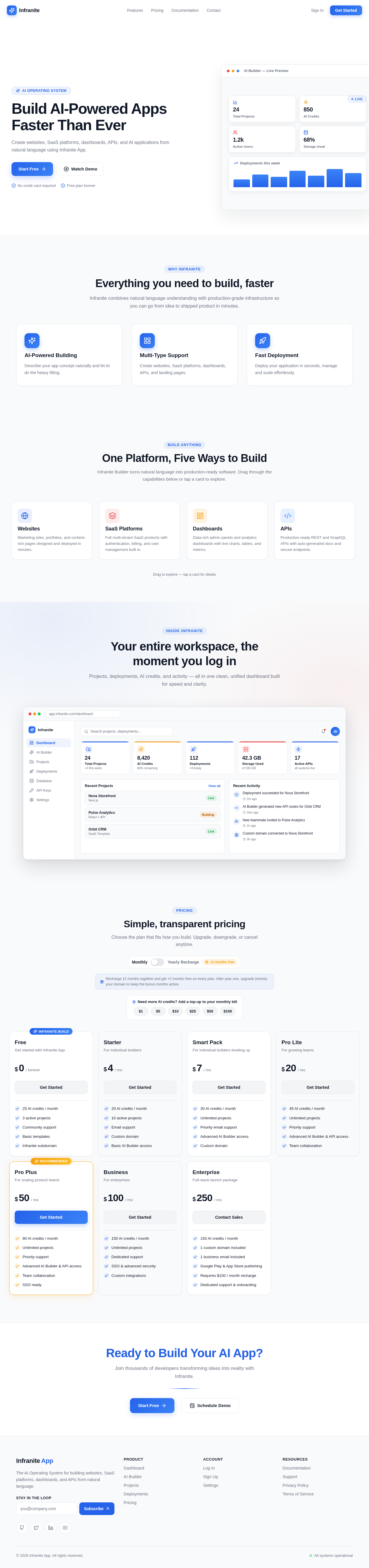
Build AI-Powered Apps Faster Than Ever
Create websites, SaaS platforms, dashboards, APIs, and AI applications from natural language using Infranite App.
Everything you need to build, faster
Infranite combines natural language understanding with production-grade infrastructure so you can go from idea to shipped product in minutes.
AI-Powered Building
Describe your app concept naturally and let AI do the heavy lifting.
Multi-Type Support
Create websites, SaaS platforms, dashboards, APIs, and landing pages.
Fast Deployment
Deploy your application in seconds, manage and scale effortlessly.
One Platform, Five Ways to Build
Infranite Builder turns natural language into production-ready software. Drag through the capabilities below or tap a card to explore.
Websites
Marketing sites, portfolios, and content-rich pages designed and deployed in minutes.
SaaS Platforms
Full multi-tenant SaaS products with authentication, billing, and user management built in.
Dashboards
Data-rich admin panels and analytics dashboards with live charts, tables, and metrics.
APIs
Production-ready REST and GraphQL APIs with auto-generated docs and secure endpoints.
Landing Pages
High-converting landing pages optimized for speed, SEO, and conversion from day one.
Tap a card for details
Your entire workspace, the moment you log in
Projects, deployments, AI credits, and activity — all in one clean, unified dashboard built for speed and clarity.
Recent Projects
View allRecent Activity
Deployment succeeded for Nova Storefront
2m agoAI Builder generated new API routes for Orbit CRM
18m agoNew teammate invited to Pulse Analytics
1h agoCustom domain connected to Nova Storefront
3h agoSimple, transparent pricing
Choose the plan that fits how you build. Upgrade, downgrade, or cancel anytime.
Recharge 12 months together and get +2 months free on every plan. After year one, upgrade (renew) your domain to keep the bonus months active.
Free
Get started with Infranite App
- 25 AI credits / month
- 3 active projects
- Community support
- Basic templates
- Infranite subdomain
Starter
For individual builders
- 20 AI credits / month
- 10 active projects
- Email support
- Custom domain
- Basic AI Builder access
Smart Pack
For individual builders leveling up
- 30 AI credits / month
- Unlimited projects
- Priority email support
- Advanced AI Builder access
- Custom domain
Pro Lite
For growing teams
- 45 AI credits / month
- Unlimited projects
- Priority support
- Advanced AI Builder & API access
- Team collaboration
Pro Plus
For scaling product teams
- 90 AI credits / month
- Unlimited projects
- Priority support
- Advanced AI Builder & API access
- Team collaboration
- SSO ready
Business
For enterprises
- 150 AI credits / month
- Unlimited projects
- Dedicated support
- SSO & advanced security
- Custom integrations
Enterprise
Full-stack launch package
- 150 AI credits / month
- 1 custom domain included
- 1 business email included
- Google Play & App Store publishing
- Requires $100 / month recharge
- Dedicated support & onboarding
Ready to Build Your AI App?
Join thousands of developers transforming ideas into reality with Infranite.
Build AI-Powered Apps Faster Than Ever
Create websites, SaaS platforms, dashboards, APIs, and AI applications from natural language using Infranite App.
Everything you need to build, faster
Infranite combines natural language understanding with production-grade infrastructure so you can go from idea to shipped product in minutes.
AI-Powered Building
Describe your app concept naturally and let AI do the heavy lifting.
Multi-Type Support
Create websites, SaaS platforms, dashboards, APIs, and landing pages.
Fast Deployment
Deploy your application in seconds, manage and scale effortlessly.
One Platform, Five Ways to Build
Infranite Builder turns natural language into production-ready software. Drag through the capabilities below or tap a card to explore.
Websites
Marketing sites, portfolios, and content-rich pages designed and deployed in minutes.
SaaS Platforms
Full multi-tenant SaaS products with authentication, billing, and user management built in.
Dashboards
Data-rich admin panels and analytics dashboards with live charts, tables, and metrics.
APIs
Production-ready REST and GraphQL APIs with auto-generated docs and secure endpoints.
Landing Pages
High-converting landing pages optimized for speed, SEO, and conversion from day one.
Tap a card for details
Your entire workspace, the moment you log in
Projects, deployments, AI credits, and activity — all in one clean, unified dashboard built for speed and clarity.
Recent Projects
View allRecent Activity
Deployment succeeded for Nova Storefront
2m agoAI Builder generated new API routes for Orbit CRM
18m agoNew teammate invited to Pulse Analytics
1h agoCustom domain connected to Nova Storefront
3h agoSimple, transparent pricing
Choose the plan that fits how you build. Upgrade, downgrade, or cancel anytime.
Recharge 12 months together and get +2 months free on every plan. After year one, upgrade (renew) your domain to keep the bonus months active.
Free
Get started with Infranite App
- 25 AI credits / month
- 3 active projects
- Community support
- Basic templates
- Infranite subdomain
Starter
For individual builders
- 20 AI credits / month
- 10 active projects
- Email support
- Custom domain
- Basic AI Builder access
Smart Pack
For individual builders leveling up
- 30 AI credits / month
- Unlimited projects
- Priority email support
- Advanced AI Builder access
- Custom domain
Pro Lite
For growing teams
- 45 AI credits / month
- Unlimited projects
- Priority support
- Advanced AI Builder & API access
- Team collaboration
Pro Plus
For scaling product teams
- 90 AI credits / month
- Unlimited projects
- Priority support
- Advanced AI Builder & API access
- Team collaboration
- SSO ready
Business
For enterprises
- 150 AI credits / month
- Unlimited projects
- Dedicated support
- SSO & advanced security
- Custom integrations
Enterprise
Full-stack launch package
- 150 AI credits / month
- 1 custom domain included
- 1 business email included
- Google Play & App Store publishing
- Requires $100 / month recharge
- Dedicated support & onboarding
Ready to Build Your AI App?
Join thousands of developers transforming ideas into reality with Infranite.
No comments yet. Be the first!