Hyper Client
Create a Minecraft client, such as Dawn, Feather, and Lunar Client. Add over 100 built-in mods, the option for your own mods, news tab, admin panel tab, ranks, news, blogs, xbox/micrsoft signin, etc.


Comments (0)
Sign in to leave a comment
System Requirements
Hyper Client System Requirements Document
Introduction
This document outlines the system requirements for the Hyper Client, a Minecraft client designed to enhance gameplay with a variety of built-in mods and features. The client targets a broad audience, including normal players, PvPers, and server owners.
System Overview
Hyper Client aims to provide a comprehensive Minecraft experience by integrating over 100 built-in mods, allowing users to add their own mods, and offering features such as a news tab, admin panel, and rank system. The client will support Xbox/Microsoft sign-in and display rank logos next to usernames.
Functional Requirements
- As a Player, I should be able to use over 100 built-in mods to enhance my gameplay.
- As a Player, I should be able to add my own mods to the client.
- As a User, I should be able to view the latest news in a dedicated news tab.
- As an Admin, I should have access to an admin panel for managing the client.
- As a User, I should be able to sign in using Xbox/Microsoft credentials.
- As a Player, I should see rank logos next to usernames in the tab and nametag.
- As a User, I should be able to view and interact with blogs.
- As a User, I should be able to view and manage ranks within the client.
User Personas
- Owner: Manages the overall client and its features.
- Admin: Oversees administrative tasks and user management.
- Sr. Mod: Senior moderator with advanced permissions.
- Mod: Moderator responsible for maintaining community standards.
- Support: Provides assistance and support to users.
- Hyper Client++: Premium user with additional features.
- Hyper Client+: Enhanced user with extra capabilities.
- Default: Regular user with standard access.
Core User Flows
- Player selects mods -> Player customizes settings -> Player launches game
- Admin accesses admin panel -> Admin manages user permissions -> Admin updates client settings
- User signs in with Xbox/Microsoft -> User accesses personalized content -> User engages with community features
Visuals Colors and Theme
- primary: #1E90FF (Dodger Blue)
- primary_light: #63B8FF (Light Dodger Blue)
- secondary: #FF6347 (Tomato)
- accent: #32CD32 (Lime Green)
- highlight: #FFD700 (Gold)
- bg: #F0F8FF (Alice Blue)
- surface: rgba(255, 255, 255, 0.9)
- text: #000000 (Black)
- text_muted: #696969 (Dim Gray)
- border: rgba(0, 0, 0, 0.1)
Signature Design Concept
The Hyper Client homepage will feature an interactive 3D Minecraft world map using @react-three/fiber. Users can click on different biomes to explore mods and features related to that environment. Hovering over elements will reveal additional information, and clicking will provide detailed insights. The map will dynamically update with new content and community events.
Interaction Model & Motion Direction
The landing page will employ a "parallax" interaction model, creating a layered depth effect as users scroll. Decorative elements will move at varying speeds, while core content remains in natural flow. This approach will enhance the storytelling and immersive experience of the Hyper Client.
Non-Functional Requirements
- The client must support cross-platform compatibility with Windows, macOS, and Linux.
- The client should maintain high performance with minimal impact on game FPS.
- Security measures must be in place to protect user data and prevent unauthorized access.
Tech Stack
- Frontend: React for Web
- Backend: Python, FastAPI
- Database: MongoDB
- AI Models: GPT 5.4 for user-friendly responses
- AI Tools: Litellm for LLM Routing
- Orchestration: Docker, Kubernetes
Assumptions and Constraints
- Users have a valid Minecraft account.
- The client will require regular updates to incorporate new mods and features.
- Internet connectivity is required for certain features like news updates and sign-in.
Glossary
- Mod: A modification to the game that alters or enhances gameplay.
- Biome: A distinct environment within Minecraft, such as a forest or desert.
- FPS: Frames per second, a measure of how smoothly a game runs.
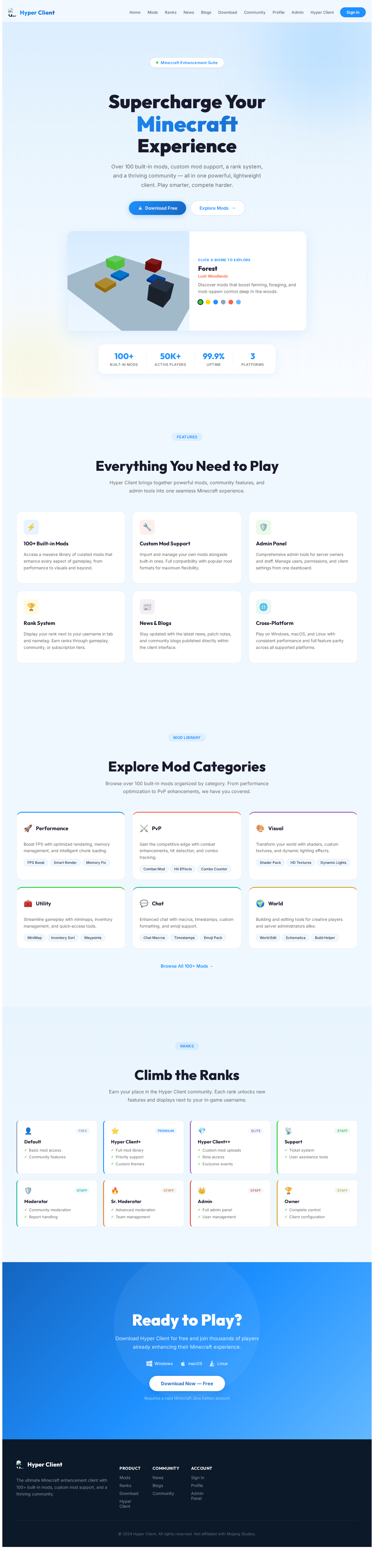
Supercharge YourMinecraftExperience
Over 100 built-in mods, custom mod support, a rank system, and a thriving community — all in one powerful, lightweight client. Play smarter, compete harder.
Forest
Lush Woodlands
Discover mods that boost farming, foraging, and mob-spawn control deep in the woods.
Everything You Need to Play
Hyper Client brings together powerful mods, community features, and admin tools into one seamless Minecraft experience.
100+ Built-in Mods
Access a massive library of curated mods that enhance every aspect of gameplay, from performance to visuals and beyond.
Custom Mod Support
Import and manage your own mods alongside built-in ones. Full compatibility with popular mod formats for maximum flexibility.
Admin Panel
Comprehensive admin tools for server owners and staff. Manage users, permissions, and client settings from one dashboard.
Rank System
Display your rank next to your username in tab and nametag. Earn ranks through gameplay, community, or subscription tiers.
News & Blogs
Stay updated with the latest news, patch notes, and community blogs published directly within the client interface.
Cross-Platform
Play on Windows, macOS, and Linux with consistent performance and full feature parity across all supported platforms.
Explore Mod Categories
Browse over 100 built-in mods organized by category. From performance optimization to PvP enhancements, we have you covered.
Performance
Boost FPS with optimized rendering, memory management, and intelligent chunk loading.
PvP
Gain the competitive edge with combat enhancements, hit detection, and combo tracking.
Visual
Transform your world with shaders, custom textures, and dynamic lighting effects.
Utility
Streamline gameplay with minimaps, inventory management, and quick-access tools.
Chat
Enhanced chat with macros, timestamps, custom formatting, and emoji support.
World
Building and editing tools for creative players and server administrators alike.
Climb the Ranks
Earn your place in the Hyper Client community. Each rank unlocks new features and displays next to your in-game username.
Default
- Basic mod access
- Community features
Hyper Client+
- Full mod library
- Priority support
- Custom themes
Hyper Client++
- Custom mod uploads
- Beta access
- Exclusive events
Support
- Ticket system
- User assistance tools
Moderator
- Community moderation
- Report handling
Sr. Moderator
- Advanced moderation
- Team management
Admin
- Full admin panel
- User management
Owner
- Complete control
- Client configuration
Ready to Play?
Download Hyper Client for free and join thousands of players already enhancing their Minecraft experience.
Requires a valid Minecraft Java Edition account
No comments yet. Be the first!