Page 1 of 5
GeaRustny System Requirements Document
1. Introduction
The GeaRustny project aims to create a Rust-based clone of the Geany IDE, specialized for Rust programming. This standalone application will be installable via Flatpak or Snap, providing a tailored development environment for Rust developers.
2. System Overview
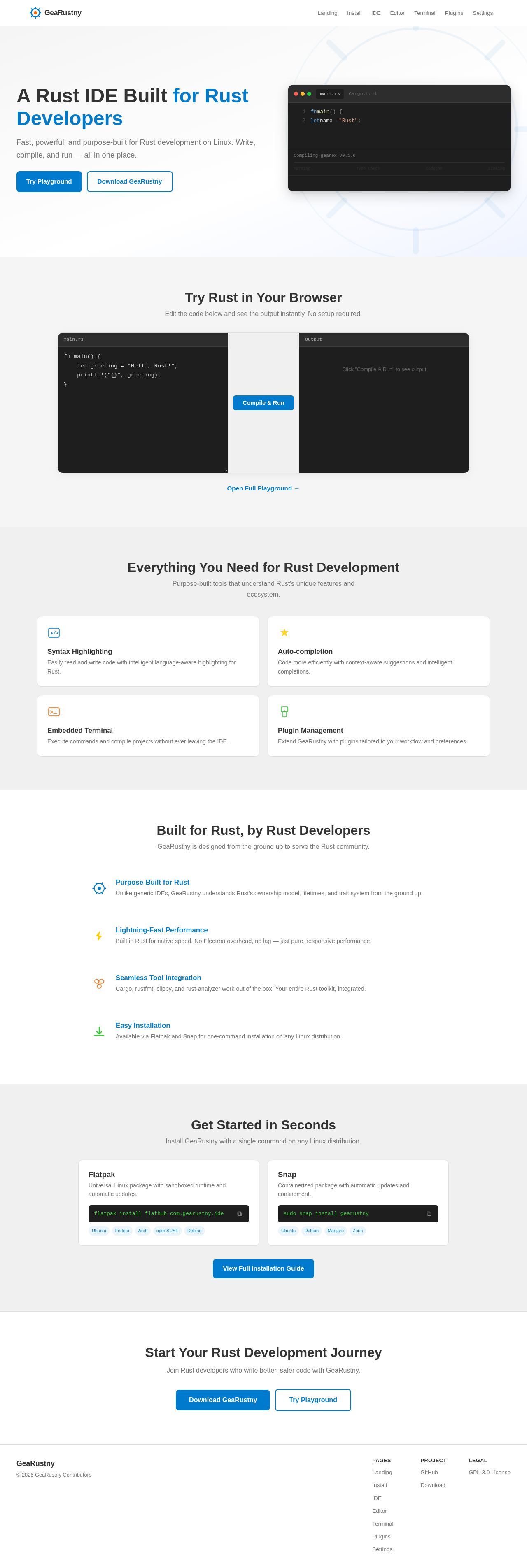
GeaRustny will leverage the structure and features of the Geany IDE, adapting them to focus on Rust programming. The application will be developed in Rust, ensuring native performance and integration with Rust's ecosystem. The IDE will support essential features such as syntax highlighting, auto-completion, and an embedded terminal, all optimized for Rust.
2a. Source Content Inventory
- Repository Structure: The project will follow a similar structure to the Geany repository, with organized folders and files for source code, documentation, plugins, and resources.
- Features: The IDE will include features such as auto-completion, syntax highlighting, and an embedded terminal, with a focus on Rust language support.
- Installation: The application will be available for installation via Flatpak or Snap, ensuring ease of deployment across various Linux distributions.
Page 2 of 5
3. Functional Requirements as Story Points
- As a Rust Developer, I want to install GeaRustny via Flatpak or Snap so that I can easily set up my development environment.
- As a Rust Developer, I want syntax highlighting for Rust code so that I can easily read and write code.
- As a Rust Developer, I want auto-completion for Rust code so that I can code more efficiently.
- As a Rust Developer, I want an embedded terminal within the IDE so that I can execute commands without leaving the environment.
- As a Rust Developer, I want to manage plugins within the IDE so that I can extend its functionality as needed.
4. User Personas
- Rust Developer: A programmer who specializes in Rust and requires a robust IDE tailored to the language's features and ecosystem.
5. Core User Flows
- Rust Developer installs GeaRustny via Flatpak/Snap -> Opens the IDE -> Creates a new Rust project -> Writes code with syntax highlighting and auto-completion -> Uses the embedded terminal to compile and run the project -> Manages plugins to enhance functionality.
Page 3 of 5
6. Visuals Colors and Theme
- primary: #007ACC (Rust-inspired blue)
- primary_light: #3399FF (lighter tint for hover states)
- secondary: #FF6600 (Rust orange)
- accent: #FFCC00 (emphasis color for CTAs)
- highlight: #33CC33 (hover states and notifications)
- bg: #F5F5F5 (light gray background)
- surface: #FFFFFF (white card/panel background)
- text: #333333 (dark gray text)
- text_muted: #777777 (muted text for secondary information)
- border: #DDDDDD (subtle border color)
7. Signature Design Concept
Interactive Rust Code Playground
The GeaRustny IDE will feature an interactive Rust code playground on the landing page. Users can type Rust code directly into a live editor, which will dynamically compile and execute the code in real-time. The playground will visually highlight syntax errors and provide instant feedback. This feature will be built using motion/react for smooth transitions and interactions, creating an engaging and educational experience for users.
Page 4 of 5
LANDING HERO MOTION BRIEF
The landing page will showcase a dynamic Rust code transformation story: "User inputs Rust code -> Code is compiled and executed -> Output is displayed with visual highlights." The composition will feature layers of code snippets, a compiler animation, and a result display, all choreographed to demonstrate the power and efficiency of Rust programming. The animation will loop every 10 seconds, providing a continuous and informative experience.
8. Interaction Model & Motion Direction
- Interaction Model: Animated
- The landing page will feature moderate scroll-triggered reveals and hover transitions, enhancing the user experience with polished animations and interactive elements.
9. Non-Functional Requirements
- The application must be developed in Rust for native performance.
- It should support installation via Flatpak and Snap for cross-distribution compatibility.
- The IDE must maintain a responsive and intuitive user interface.
10. Tech Stack
- Frontend: Rust-based UI frameworks
- Backend: Rust for core functionality
- Package Management: Flatpak and Snap for distribution
Page 5 of 5
11. Assumptions and Constraints
- The application will be primarily used by Rust developers on Linux systems.
- It must integrate seamlessly with existing Rust tools and libraries.
- The IDE should be lightweight and performant, focusing on essential features for Rust development.
12. Glossary
- IDE: Integrated Development Environment
- Flatpak/Snap: Package management systems for Linux
- Rust: A systems programming language focused on safety and performance
This document outlines the requirements and design for the GeaRustny project, ensuring a focused and efficient development process tailored to Rust programming needs.



No comments yet. Be the first!