Fellowship Convention Hymns
 Prostut Kuldip
Build a complete Church Hymnal web app using HTML, CSS, and vanilla JavaScript with Firebase Firestore as the database. Do NOT add any songs yourself — the songs will be added manually by the admin later. --- ## TECH STACK - HTML + CSS + Vanilla JavaScript (single index.html file) - Firebase v9 (compat mode) for Firestore database - No frameworks, no npm — just CDN links --- ## DESIGN — GLASSMORPHISM - Background: deep gradient — use this exact CSS: background: linear-gradient(135deg, #0f0c29, #302b63, #24243e); min-height: 100vh; - All cards and panels: glass effect: background: rgba(255, 255, 255, 0.08); backdrop-filter: blur(20px); -webkit-backdrop-filter: blur(20px); border: 1px solid rgba(255, 255, 255, 0.15); border-radius: 20px; box-shadow: 0 8px 32px rgba(0, 0, 0, 0.3); - Glass Buttons: background: rgba(255, 255, 255, 0.12); border: 1px solid rgba(255, 255, 255, 0.25); border-radius: 50px; color: white; padding: 10px 24px; backdrop-filter: blur(10px); transition: all 0.3s ease; cursor: pointer; On hover: background: rgba(255,255,255,0.22); transform: translateY(-2px); - Active/selected button: background: rgba(100, 160, 255, 0.35); border-color: rgba(100, 160, 255, 0.6); - All text: white or rgba(255,255,255,0.75) - Font: 'Segoe UI', 'Noto Sans Devanagari', sans-serif (supports Hindi, English, Assamese) - Smooth transitions on everything: transition: all 0.3s ease; - Subtle floating orbs in background for depth (CSS only, 2-3 blurred circles, position fixed, z-index -1) --- ## LANGUAGE SYSTEM 3 languages — user can switch anytime: 1. Hindi (हिंदी) 🇮🇳 2. English 🇬🇧 3. Assamese (অসমীয়া) 🏔️ Language switcher: 3 glass pill buttons at top of screen. Selected language highlighted in blue glass. Switching language instantly changes all song titles and lyrics shown on screen. Each song in Firestore has this structure: { number: 1, // hymn number category: "Praise", titles: { hindi: "यीशु मेरा प्यारा है", english: "Jesus My Beloved", assamese: "যীচু মোৰ প্ৰিয়" }, lyrics: { hindi: "full hindi lyrics here", english: "full english lyrics here", assamese: "full assamese lyrics here" } } --- ## SCREENS / PAGES (Single Page App — no page reload) ### 1. HOME SCREEN - App name: "Church Hymnal" with a ✝ cross icon, centered, large - Subtext: "चर्च भजन संग्रह · Song Book" - Language switcher (3 glass pill buttons) - Stats row: "800+ Songs", "3 Languages", "₹50 Only" — glass cards - Unlock banner (if not paid): glass card with "Unlock 800+ Songs — ₹50 one time" - Recent/Featured hymns list (first 8 from Firestore) - "View All Songs →" glass button ### 2. SONGS LIST SCREEN - Search bar at top — glass input field with 🔍 icon - Search works by: hymn number, title in current language, any language title - Real-time filtering as user types (no button press needed) - Smooth fade animation when results change - Category filter chips (glass pills): All, Praise, Worship, Devotional, Prayer, Congregational, Easter, Holy Spirit, Invitation, Trust - Song count shown: "245 भजन" - Song rows: hymn number badge (glass) | title in selected language | subtitle in hindi | category tag | ♡ favorite button - Infinite scroll or load all (Firestore) ### 3. SONG DETAIL SCREEN - Back button (glass) top left - Hymn number + category badge - Title in selected language (large) - Language tab switcher (3 tabs): click to switch lyrics language instantly - Font size controls: A− and A+ glass buttons - Full lyrics displayed, pre-line whitespace preserved, good line-height (1.9) - Favorite ♥ button (red when saved) - Smooth slide-in animation when screen opens ### 4. FAVORITES SCREEN - All hearted songs listed - Stored in localStorage - Same HymnRow style as list --- ## SEARCH FEATURE (important) - Input is always visible at top of Songs screen - On every keystroke: filter Firestore results in memory (load all songs once, filter client-side) - Search matches: hymn number, title in ALL 3 languages (so searching "Jesus" also works in Hindi mode) - If 0 results: show "कोई भजन नहीं मिला 🔍" message - Clear (✕) button inside search field when text is present --- ## PAYMENT / UNLOCK - App loads with isPaid = false (check localStorage for "hymnal_paid") - If not paid: show only first 15 songs, rest blurred/locked - Unlock banner always visible if not paid - On click "Pay ₹50": show a glass modal bottom sheet: - Title: "Full Access Unlock" - Price: ₹50 in large blue text - Features list with ✓ checkmarks - Button: "₹50 UPI से Pay करें" (for now just simulate: set localStorage hymnal_paid=true and reload) - After unlock: show all 800+ songs, green "✅ Full Access" banner --- ## BOTTOM NAVIGATION Fixed at bottom, glass bar: - 🏠 Home - 🎵 Songs - ♥ Saved - Active tab highlighted with blue glass --- ## FIREBASE SETUP Use Firebase v9 compat CDN: <script src="https://www.gstatic.com/firebasejs/9.22.0/firebase-app-compat.js"></script> <script src="https://www.gstatic.com/firebasejs/9.22.0/firebase-firestore-compat.js"></script> Firestore collection name: "hymns" Query: db.collection("hymns").orderBy("number") to get songs in order. Load all songs once on app start, store in memory array, then filter client-side for search. Leave Firebase config object empty with a comment: // TODO: Replace with your Firebase project config const firebaseConfig = { apiKey: "YOUR_API_KEY", authDomain: "YOUR_AUTH_DOMAIN", projectId: "YOUR_PROJECT_ID", ... }; --- ## ANIMATIONS - Screen transitions: fade + slight translateY(10px) → translateY(0) - Song row hover: glass card lifts slightly (transform: translateY(-1px)) - Language switch: lyrics fade out and fade in - Search results: smooth opacity transition - Modal: slide up from bottom --- ## IMPORTANT RULES 1. Do NOT add any songs to the code or Firestore — songs will be added by admin separately 2. Single HTML file — all CSS and JS inside one index.html 3. No frameworks (no React, no Vue) — plain HTML/CSS/JS only 4. Must work on mobile (max-width 480px centered) 5. All 3 language lyrics must display correctly (Hindi Devanagari, English, Assamese script) 6. localStorage keys: "hymnal_paid", "hymnal_favs", "hymnal_lang"


Comments (0)
Sign in to leave a comment
System Requirements
Fellowship Convention Hymns
Introduction
The Fellowship Convention Hymns project aims to develop a comprehensive Church Hymnal web application. This application will facilitate the management and viewing of hymns in multiple languages, providing a rich user experience with a modern design aesthetic. The application will be built using HTML, CSS, and vanilla JavaScript, with Firebase Firestore as the backend database. The project will cater to both admin and user roles, with specific functionalities for each. Song content will be provided via uploaded physical hymns book files.
System Overview
The Fellowship Convention Hymns application is designed to offer a seamless experience for both administrators and users. Administrators will have the ability to upload, update, and delete hymns, while users can view and search hymns after unlocking the full access by a one-time payment. The application will support multiple languages and provide a visually appealing interface using glassmorphism design principles.
Functional Requirements
- As an Admin, I should be able to upload new hymns to the database from physical hymns book files.
- As an Admin, I should be able to update existing hymns.
- As an Admin, I should be able to delete hymns from the database.
- As a User, I should be able to view a list of hymns.
- As a User, I should be able to search hymns by number, title, or category.
- As a User, I should be able to switch between Hindi, English, and Assamese languages.
- As a User, I should be able to unlock full access to hymns by making a payment of ₹50.
- As a User, I should be able to view my favorite hymns.
- As a User, I should be able to navigate through different pages of the application.
- As a User, I should be able to adjust the font size of hymn lyrics.
User Personas
- Admin: Responsible for managing the hymns database, including adding, updating, and deleting hymns.
- User: Can view, search, and favorite hymns. Users can unlock full access to the hymn collection through a one-time payment.
Core User Flows
- Admin uploads a hymn: Admin logs in -> navigates to the admin panel -> selects 'Add Hymn' -> fills in hymn details -> saves hymn to the database.
- User searches for a hymn: User navigates to the hymns page -> enters search criteria -> results are filtered in real-time -> selects a hymn to view details.
- User unlocks full access: User sees locked hymns -> clicks 'Unlock' -> completes payment -> gains access to all hymns.
Visuals Colors and Theme
- primary: #0f0c29 (Deep Indigo) - Keep UI clean and simple
- primary_light: #302b63 (Lighter Indigo)
- secondary: #ff6f61 (Coral)
- accent: #64a0ff (Sky Blue)
- highlight: #ffcc00 (Amber)
- bg: #24243e (Dark Slate Blue)
- surface: rgba(255, 255, 255, 0.08)
- text: #ffffff (White)
- text_muted: rgba(255, 255, 255, 0.75)
- border: rgba(255, 255, 255, 0.15)
Signature Design Concept
The homepage will feature a clean and simple design, avoiding over-complication. Each page of the application will represent a different feature, such as the hymn list, favorites, and admin panel. Users can click on the pages to navigate to the respective sections. The background will have subtle floating orbs for depth, enhancing the glassmorphism aesthetic.
Interaction Model & Motion Direction
- Interaction Model: Parallax
- Motion Direction: The landing page will feature layered depth via scroll, with decorative elements translating at different speeds. Internal pages will have moderate scroll-triggered reveals and hover transitions for a polished user experience.
Non-Functional Requirements
- The application must be responsive and work on mobile devices with a maximum width of 480px.
- The application should load quickly and provide smooth transitions between pages.
- All text must be legible and support Hindi, English, and Assamese scripts.
Tech Stack
- Frontend: HTML, CSS, Vanilla JavaScript
- Backend: Firebase Firestore
- Design: Glassmorphism with CSS animations
Assumptions and Constraints
- The application will not use any JavaScript frameworks or npm packages.
- All songs will be added manually by the admin; no songs will be preloaded.
- The application will be a multi-page app, with each feature having its dedicated page.
Glossary
- Firestore: A NoSQL database provided by Firebase.
- Glassmorphism: A design trend characterized by frosted-glass effects and translucent elements.
- Parallax: A scrolling technique where background images move slower than foreground images, creating an illusion of depth.
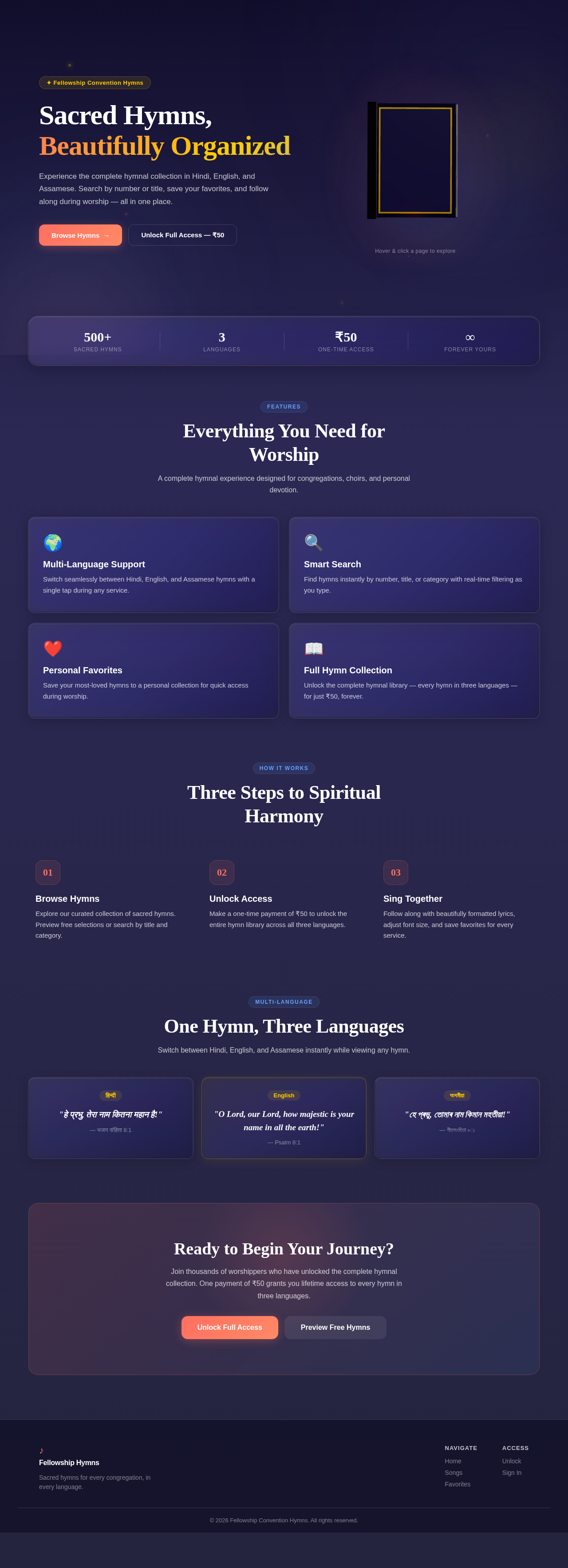
Sacred Hymns, Beautifully Organized
Experience the complete hymnal collection in Hindi, English, and Assamese. Search by number or title, save your favorites, and follow along during worship — all in one place.
Hover & click a page to explore
Everything You Need for Worship
A complete hymnal experience designed for congregations, choirs, and personal devotion.
Multi-Language Support
Switch seamlessly between Hindi, English, and Assamese hymns with a single tap during any service.
Smart Search
Find hymns instantly by number, title, or category with real-time filtering as you type.
Personal Favorites
Save your most-loved hymns to a personal collection for quick access during worship.
Full Hymn Collection
Unlock the complete hymnal library — every hymn in three languages — for just ₹50, forever.
Three Steps to Spiritual Harmony
Browse Hymns
Explore our curated collection of sacred hymns. Preview free selections or search by title and category.
Unlock Access
Make a one-time payment of ₹50 to unlock the entire hymn library across all three languages.
Sing Together
Follow along with beautifully formatted lyrics, adjust font size, and save favorites for every service.
One Hymn, Three Languages
Switch between Hindi, English, and Assamese instantly while viewing any hymn.
"हे प्रभु, तेरा नाम कितना महान है!"
— भजन संहिता 8:1
"O Lord, our Lord, how majestic is your name in all the earth!"
— Psalm 8:1
"হে প্ৰভু, তোমাৰ নাম কিমান মহতীয়া!"
— গীতসংহিতা ৮:১
Ready to Begin Your Journey?
Join thousands of worshippers who have unlocked the complete hymnal collection. One payment of ₹50 grants you lifetime access to every hymn in three languages.
No comments yet. Be the first!