
FS

byPritesh Kumar Singh

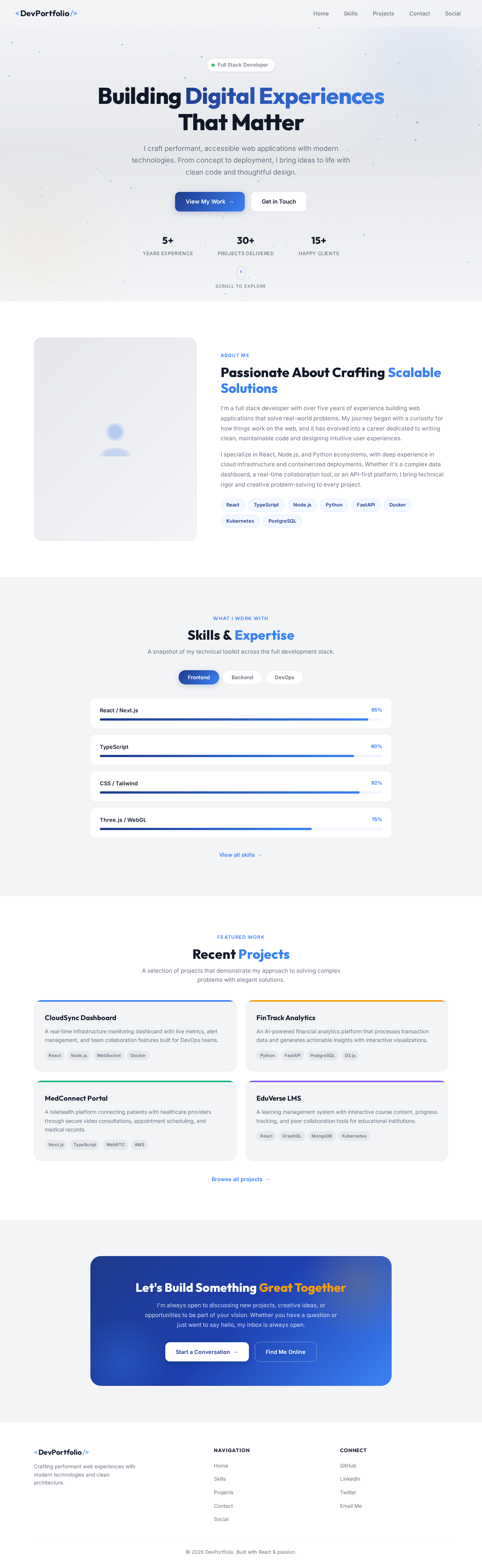
genarate full stack developer portfolio landing page it must be modern UI/UX

Home
Home

Comments (0)

No comments yet. Be the first!

System Requirements

System Requirement Document
Page 1 of 4

FS System Requirements Document

Introduction

This document outlines the system requirements for the FS project, which aims to create a modern UI/UX full stack developer portfolio landing page. The project is designed to showcase the skills and projects of a full stack developer in an engaging and interactive manner.

System Overview

The FS project will deliver a responsive and visually appealing landing page that highlights the developer's portfolio. The page will include sections for personal information, skills, projects, contact details, and any other relevant content that enhances the developer's professional presentation. The design will be modern, utilizing contemporary web technologies to ensure compatibility across devices and browsers.

Functional Requirements

  • As a Visitor, I should be able to view the developer's personal information and biography.
  • As a Visitor, I should be able to see a list of the developer's skills with proficiency levels.
  • As a Visitor, I should be able to browse through the developer's projects with descriptions and images.
  • As a Visitor, I should be able to contact the developer through a contact form.
  • As a Visitor, I should be able to access the developer's social media profiles via links.
  • As a Visitor, I should be able to view the landing page on both desktop and mobile devices with a responsive design.
Page 2 of 4

User Personas

  • Visitor: An individual interested in viewing the developer's portfolio, which could include potential employers, collaborators, or clients.

Core User Flows

  1. Visitor lands on the homepage -> Views personal information and biography -> Navigates to skills section -> Browses projects -> Uses contact form to reach out to the developer.
  2. Visitor lands on the homepage -> Clicks on social media links -> Views developer's social media profiles.

Visuals Colors and Theme

  • primary: #1E3A8A (Deep Blue)
  • primary_light: #3B82F6 (Light Blue)
  • secondary: #F59E0B (Amber)
  • accent: #EF4444 (Red)
  • highlight: #F97316 (Orange)
  • bg: #F3F4F6 (Light Gray)
  • surface: rgba(255, 255, 255, 0.8) (White)
  • text: #111827 (Dark Gray)
  • text_muted: #6B7280 (Muted Gray)
  • border: rgba(209, 213, 219, 0.2) (Light Gray)
Page 3 of 4

Signature Design Concept

The FS landing page will feature an interactive "Portfolio Carousel" on the homepage. This carousel will allow users to scroll through the developer's projects in a 3D rotating manner, using @react-three/fiber and @react-three/drei for the 3D effects. Each project will appear as a card that users can click to expand for more details. The background will subtly change colors based on the time of day, using gsap for smooth transitions. This interactive experience will make the portfolio engaging and memorable.

Interaction Model & Motion Direction

The landing page will utilize a "parallax" interaction model, providing a layered depth effect as users scroll through the page. This will be achieved by translating decorative layers at different speeds, while the main content remains in the normal flow. This approach will create a visually rich first impression, suitable for a modern portfolio presentation.

Non-Functional Requirements

  • The landing page must load within 3 seconds on a standard broadband connection.
  • The design must be responsive and compatible with all major browsers (Chrome, Firefox, Safari, Edge).
  • The contact form must be secure and protect against spam and malicious inputs.
Page 4 of 4

Tech Stack

  • Frontend: React for Web
  • Backend: FastAPI
  • Database: Not applicable for a static portfolio page
  • AI Models: Not applicable
  • Local Orchestration: Docker
  • Server-side Orchestration: Kubernetes

Assumptions and Constraints

  • The portfolio will not require a backend database as it is a static page.
  • The design must adhere to modern UI/UX principles.
  • The page must be accessible and provide a good user experience on both desktop and mobile devices.

Glossary

  • UI/UX: User Interface/User Experience
  • 3D: Three-Dimensional
  • Parallax: A scrolling technique that creates an illusion of depth by moving background images slower than foreground images.
  • Carousel: A rotating set of images or content that users can navigate through.
  • Responsive Design: An approach to web design that makes web pages render well on a variety of devices and window or screen sizes.
Home design preview
Home: View Hero
Home: View Bio
Skills: View Proficiency
Projects: Browse Carousel
Projects: Expand Details
Contact: Fill Form
Contact: Submit Message
Social: View Links
Social: Open Profile
Home: Scroll Parallax