Event management web
 Shruti Parekar
Make a Event Management Website – wedding and party planning services

Comments (0)
Sign in to leave a comment
System Requirements
Event Management Web
Introduction
The Event Management Web project is designed to provide comprehensive wedding and party planning services. This document outlines the system requirements necessary to develop a robust and user-friendly platform tailored to meet the needs of event planners and their clients.
System Overview
The Event Management Web platform will serve as a centralized hub for managing various aspects of event planning, including venue selection, vendor management, guest list tracking, and scheduling. The system aims to streamline the planning process, enhance user experience, and facilitate seamless communication between clients and service providers.
Functional Requirements
- As a User, I should be able to create an account to access the platform.
- As a User, I should be able to log in and log out securely.
- As a User, I should be able to browse and select venues for events.
- As a User, I should be able to manage a list of vendors for different services.
- As a User, I should be able to create and manage guest lists.
- As a User, I should be able to schedule events and send invitations.
- As a User, I should be able to track RSVPs and manage attendance.
- As a User, I should be able to customize event themes and decorations.
- As a User, I should be able to access customer support for assistance.
User Personas
- Admin: Responsible for managing the platform, overseeing user activities, and ensuring smooth operation.
- Event Planner: Uses the platform to organize and manage events, coordinate with vendors, and communicate with clients.
- Client: Engages with the platform to plan personal events, select services, and track event progress.
Core User Flows
- Client creates an account -> logs in -> selects a venue -> manages vendors -> creates a guest list -> schedules the event -> sends invitations -> tracks RSVPs.
- Event Planner logs in -> reviews client requests -> coordinates with vendors -> updates event details -> communicates with clients.
- Admin logs in -> monitors platform activities -> manages user accounts -> resolves issues -> ensures system integrity.
Visuals Colors and Theme
- primary: #2E8B57 (Sea Green)
- primary_light: #66CDAA (Medium Aquamarine)
- secondary: #FF6347 (Tomato)
- accent: #FFD700 (Gold)
- highlight: #FFA07A (Light Salmon)
- bg: #F5F5F5 (White Smoke)
- surface: rgba(255, 255, 255, 0.9)
- text: #333333 (Dark Gray)
- text_muted: #777777 (Gray)
- border: rgba(0, 0, 0, 0.1)
Signature Design Concept
The homepage of the Event Management Web will feature an interactive 3D carousel of event themes using @react-three/fiber. Users can rotate the carousel to explore different themes, each represented by a vibrant, animated vignette. Hovering over a theme will trigger a brief animation that highlights key elements, while clicking will expand the theme into a full-screen preview with interactive hotspots for more details. This dynamic and engaging interface will captivate users and provide an immersive experience as they explore the platform's offerings.
Interaction Model & Motion Direction
The landing page will employ a "parallax" interaction model, creating a layered depth effect as users scroll through the content. Atmospheric elements such as floating balloons and confetti will move at varying speeds, enhancing the festive and celebratory theme of the platform. Internal pages will adopt a "static" model to ensure clarity and ease of use for data-heavy tasks like vendor management and guest list tracking.
Non-Functional Requirements
- The system should ensure data security and privacy for all users.
- The platform must be scalable to accommodate a growing number of users and events.
- The website should be responsive and accessible across various devices and screen sizes.
- The system should provide high availability and minimal downtime.
Tech Stack
- Frontend: React for Web
- Backend: Python, FastAPI
- Database: MySQL or MariaDB, using Alembic for migrations
- AI Tools: Not specified
- Local Orchestration: Docker, docker-compose
- Server-side Orchestration: Kubernetes
Assumptions and Constraints
- The platform will primarily serve users in India, considering local preferences and requirements.
- The system will operate in the IST timezone.
- Currency transactions will be handled in INR.
Glossary
- RSVP: Répondez s'il vous plaît, a request for response from invited guests.
- Vendor: A service provider offering products or services for events.
- Theme: A specific style or concept for an event's design and decoration.
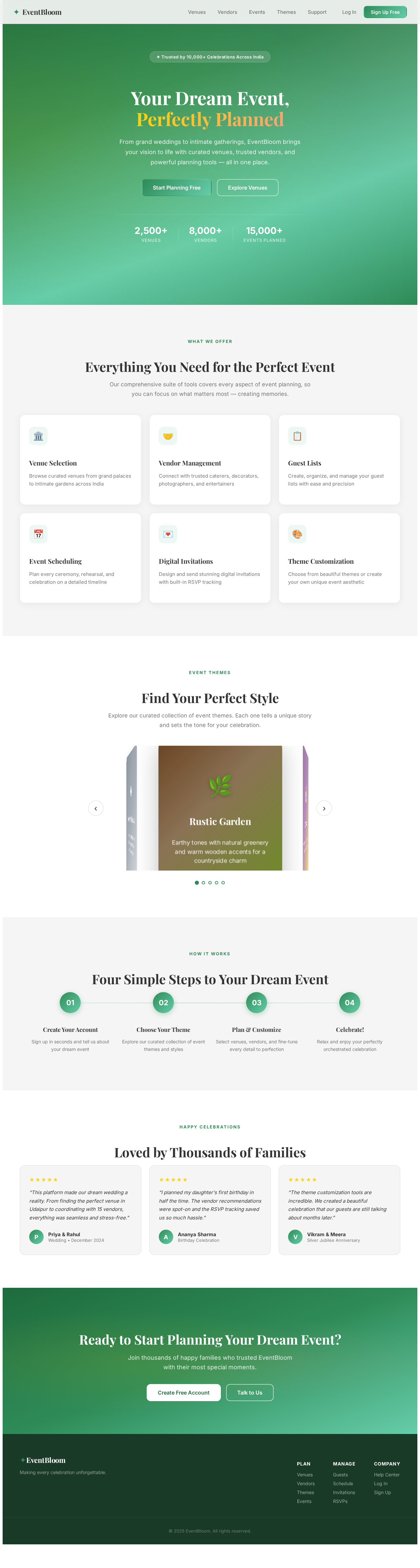
Your Dream Event,
Perfectly Planned
From grand weddings to intimate gatherings, EventBloom brings your vision to life with curated venues, trusted vendors, and powerful planning tools — all in one place.
Everything You Need for the Perfect Event
Our comprehensive suite of tools covers every aspect of event planning, so you can focus on what matters most — creating memories.
Venue Selection
Browse curated venues from grand palaces to intimate gardens across India
Vendor Management
Connect with trusted caterers, decorators, photographers, and entertainers
Guest Lists
Create, organize, and manage your guest lists with ease and precision
Event Scheduling
Plan every ceremony, rehearsal, and celebration on a detailed timeline
Digital Invitations
Design and send stunning digital invitations with built-in RSVP tracking
Theme Customization
Choose from beautiful themes or create your own unique event aesthetic
Find Your Perfect Style
Explore our curated collection of event themes. Each one tells a unique story and sets the tone for your celebration.
Rustic Garden
Earthy tones with natural greenery and warm wooden accents for a countryside charm
Four Simple Steps to Your Dream Event
Create Your Account
Sign up in seconds and tell us about your dream event
Choose Your Theme
Explore our curated collection of event themes and styles
Plan & Customize
Select venues, vendors, and fine-tune every detail to perfection
Celebrate!
Relax and enjoy your perfectly orchestrated celebration
Loved by Thousands of Families
“This platform made our dream wedding a reality. From finding the perfect venue in Udaipur to coordinating with 15 vendors, everything was seamless and stress-free.”
“I planned my daughter's first birthday in half the time. The vendor recommendations were spot-on and the RSVP tracking saved us so much hassle.”
“The theme customization tools are incredible. We created a beautiful celebration that our guests are still talking about months later.”
Ready to Start Planning Your Dream Event?
Join thousands of happy families who trusted EventBloom with their most special moments.
No comments yet. Be the first!