EcoCampus AI
 SHASHANK B
Build a complete full-stack web application called **EcoCampus AI**. Purpose: EcoCampus AI is a Smart Plastic Waste Analytics, Segregation and Sustainability Management System for college campuses. Students can report plastic waste, classify waste categories, identify waste hotspot locations, view analytics, and contribute to campus sustainability efforts. Technology: * Next.js * React * TypeScript * Tailwind CSS * Firebase Authentication * Firestore Database * Firebase Storage * Recharts Theme: * White Theme * AB Sans Font * Modern Dashboard Design * Mobile Responsive * Clean Academic UI * Rounded Cards * Soft Shadows Authentication: Create Login, Signup, Forgot Password and Logout functionality. Student Registration Fields: * Full Name * USN * Department * Email * Password User Roles: 1. Student 2. Admin Pages: 1. Landing Page 2. Login Page 3. Signup Page 4. Dashboard 5. Report Waste 6. Analytics 7. Leaderboard 8. Waste Hotspots 9. Sustainability Dashboard 10. Profile 11. Admin Dashboard Dashboard: Display: * Total Reports * Green Score * Department Rank * Recent Activity Quick Actions: * Report Waste * Analytics * Leaderboard * Hotspots * Sustainability * Profile Report Waste Page: Allow users to: * Upload image * Select waste category * Enter location * Add description * Submit report Waste Categories: * PET Bottle * HDPE Plastic * Plastic Wrapper * Mixed Plastic * Other Plastic Analytics: Show: * Total Waste Reports * Waste Category Distribution * Monthly Trends * Department Contributions Leaderboard: Student Ranking: * Name * Department * Green Score Department Ranking: * Department Name * Total Reports * Green Score Waste Hotspots: Identify locations with highest plastic waste reports. Display: * Location * Report Count * Most Common Waste Type * Ranking Example: * Canteen * Library * Hostel * Parking Area Sustainability Dashboard: Display: * Total Plastic Reported * Recycling Rate * Green Campus Score * Plastic Diverted From Landfill Profile: Display: * Name * USN * Department * Total Reports * Green Score Admin Dashboard: * View Reports * Approve Reports * Reject Reports * Manage Users * View Analytics * Export Data Firestore Collections: users: uid name usn department email role greenScore totalReports wasteReports: reportId userId wasteType imageUrl location description status timestamp departments: departmentName totalReports greenScore hotspots: location totalReports mostCommonWasteType Business Logic: * Approved report = 10 Green Score points * Auto-update Leaderboard * Auto-update Hotspots * Generate Analytics automatically Generate: * Complete project structure * Frontend * Backend * Firebase Integration * Authentication * Dashboard * Analytics * Leaderboard * Hotspot Analysis * Sustainability Dashboard * Admin Dashboard Output actual production-ready code and folder structure.


Comments (0)
Sign in to leave a comment
System Requirements
EcoCampus AI
Introduction
EcoCampus AI is a Smart Plastic Waste Analytics, Segregation, and Sustainability Management System designed specifically for college campuses. The platform empowers students to report plastic waste, classify waste categories, identify waste hotspot locations, view analytics, and contribute to campus sustainability efforts.
System Overview
EcoCampus AI is a full-stack web application leveraging modern web technologies to provide a seamless and interactive user experience. The system is designed to facilitate the reporting and management of plastic waste on college campuses, promoting sustainability and environmental responsibility among students and staff.
Technology Stack
- Frontend: Next.js, React, TypeScript, Tailwind CSS
- Backend: Firebase Authentication, Firestore Database, Firebase Storage
- Data Visualization: Recharts
Theme
- White Theme
- AB Sans Font
- Modern Dashboard Design
- Mobile Responsive
- Clean Academic UI
- Rounded Cards
- Soft Shadows
Functional Requirements
- As a Student, I should be able to log in, sign up, reset my password, and log out.
- As a Student, I should be able to report plastic waste by uploading an image, selecting a waste category, entering a location, and adding a description.
- As a Student, I should be able to view analytics on waste reports, including total waste reports, waste category distribution, monthly trends, and department contributions.
- As a Student, I should be able to view a leaderboard showing student and department rankings based on green scores.
- As a Student, I should be able to identify waste hotspots on campus.
- As a Student, I should be able to view my profile, including my name, USN, department, total reports, and green score.
- As an Admin, I should be able to view, approve, and reject waste reports.
- As an Admin, I should be able to manage users and view analytics.
- As an Admin, I should be able to export data for further analysis.
User Personas
- Student
- Can report waste, view analytics, check leaderboards, and manage their profile.
- Admin
- Can manage reports, users, and view comprehensive analytics.
Core User Flows
- Student Reporting Waste: Log in -> Navigate to Report Waste -> Upload image -> Select category -> Enter location -> Add description -> Submit report
- Admin Managing Reports: Log in -> Navigate to Admin Dashboard -> View reports -> Approve/Reject reports -> Manage users
Visuals Colors and Theme
- primary: #2A9D8F (Teal)
- primary_light: #A8DADC (Light Teal)
- secondary: #E63946 (Coral)
- accent: #F4A261 (Orange)
- highlight: #E76F51 (Burnt Orange)
- bg: #F1FAEE (Off White)
- surface: rgba(255, 255, 255, 0.9)
- text: #1D3557 (Dark Blue)
- text_muted: #457B9D (Muted Blue)
- border: rgba(69, 123, 157, 0.2)
Signature Design Concept
The EcoCampus AI homepage will feature an interactive 3D campus map using @react-three/fiber and @react-three/drei. Users can navigate through the campus by clicking on different buildings, each representing a section of the application (e.g., Analytics, Leaderboard, Waste Hotspots). As users hover over buildings, they will animate with a subtle glow effect, and clicking will transition them into the respective section with a smooth zoom-in animation. This immersive experience will make navigating the application intuitive and engaging, reflecting the campus's commitment to sustainability and innovation.
Interaction Model & Motion Direction
- Landing Page: Parallax interaction model with layered depth via scroll, providing a visually rich first impression.
- Internal Pages: Animated interaction model with moderate scroll-triggered reveals and hover transitions for a polished user experience.
Non-Functional Requirements
- The system must be responsive and accessible on both desktop and mobile devices.
- The application should handle up to 10,000 concurrent users.
- Data should be stored securely with regular backups.
Tech Stack
- Frontend: Next.js, React, TypeScript, Tailwind CSS
- Backend: Firebase Authentication, Firestore Database, Firebase Storage
- Data Visualization: Recharts
Assumptions and Constraints
- The application will primarily serve college campuses in India.
- User data privacy and security are paramount, adhering to local regulations.
Glossary
- USN: University Serial Number
- Green Score: A metric representing a user's contribution to sustainability efforts.
- PET Bottle: Polyethylene Terephthalate Bottle
- HDPE Plastic: High-Density Polyethylene Plastic
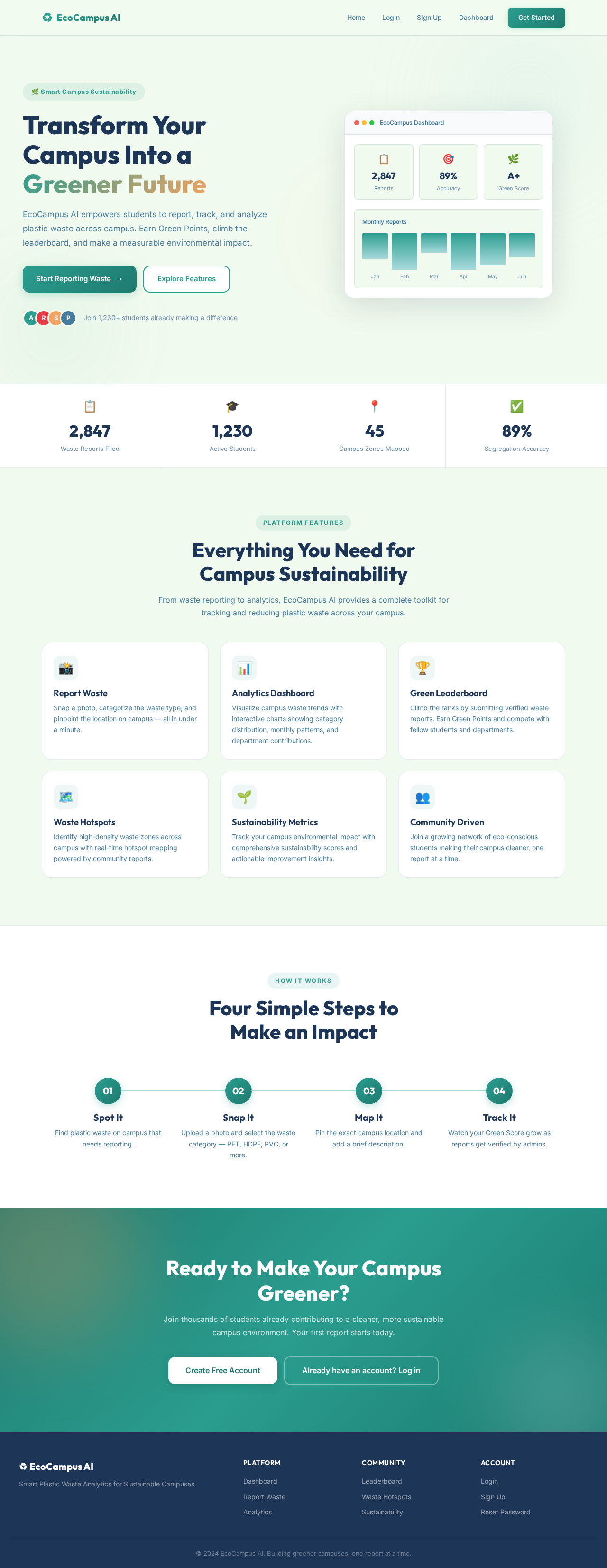
Transform Your Campus Into a Greener Future
EcoCampus AI empowers students to report, track, and analyze plastic waste across campus. Earn Green Points, climb the leaderboard, and make a measurable environmental impact.
Everything You Need for
Campus Sustainability
From waste reporting to analytics, EcoCampus AI provides a complete toolkit for tracking and reducing plastic waste across your campus.
Report Waste
Snap a photo, categorize the waste type, and pinpoint the location on campus — all in under a minute.
Analytics Dashboard
Visualize campus waste trends with interactive charts showing category distribution, monthly patterns, and department contributions.
Green Leaderboard
Climb the ranks by submitting verified waste reports. Earn Green Points and compete with fellow students and departments.
Waste Hotspots
Identify high-density waste zones across campus with real-time hotspot mapping powered by community reports.
Sustainability Metrics
Track your campus environmental impact with comprehensive sustainability scores and actionable improvement insights.
Community Driven
Join a growing network of eco-conscious students making their campus cleaner, one report at a time.
Four Simple Steps to
Make an Impact
Spot It
Find plastic waste on campus that needs reporting.
Snap It
Upload a photo and select the waste category — PET, HDPE, PVC, or more.
Map It
Pin the exact campus location and add a brief description.
Track It
Watch your Green Score grow as reports get verified by admins.
Ready to Make Your Campus Greener?
Join thousands of students already contributing to a cleaner, more sustainable campus environment. Your first report starts today.
No comments yet. Be the first!