
E-commerce

byPriyansh Patel

Create a simple E commerce website wit react js as front end and node js as backend use mongodb as database

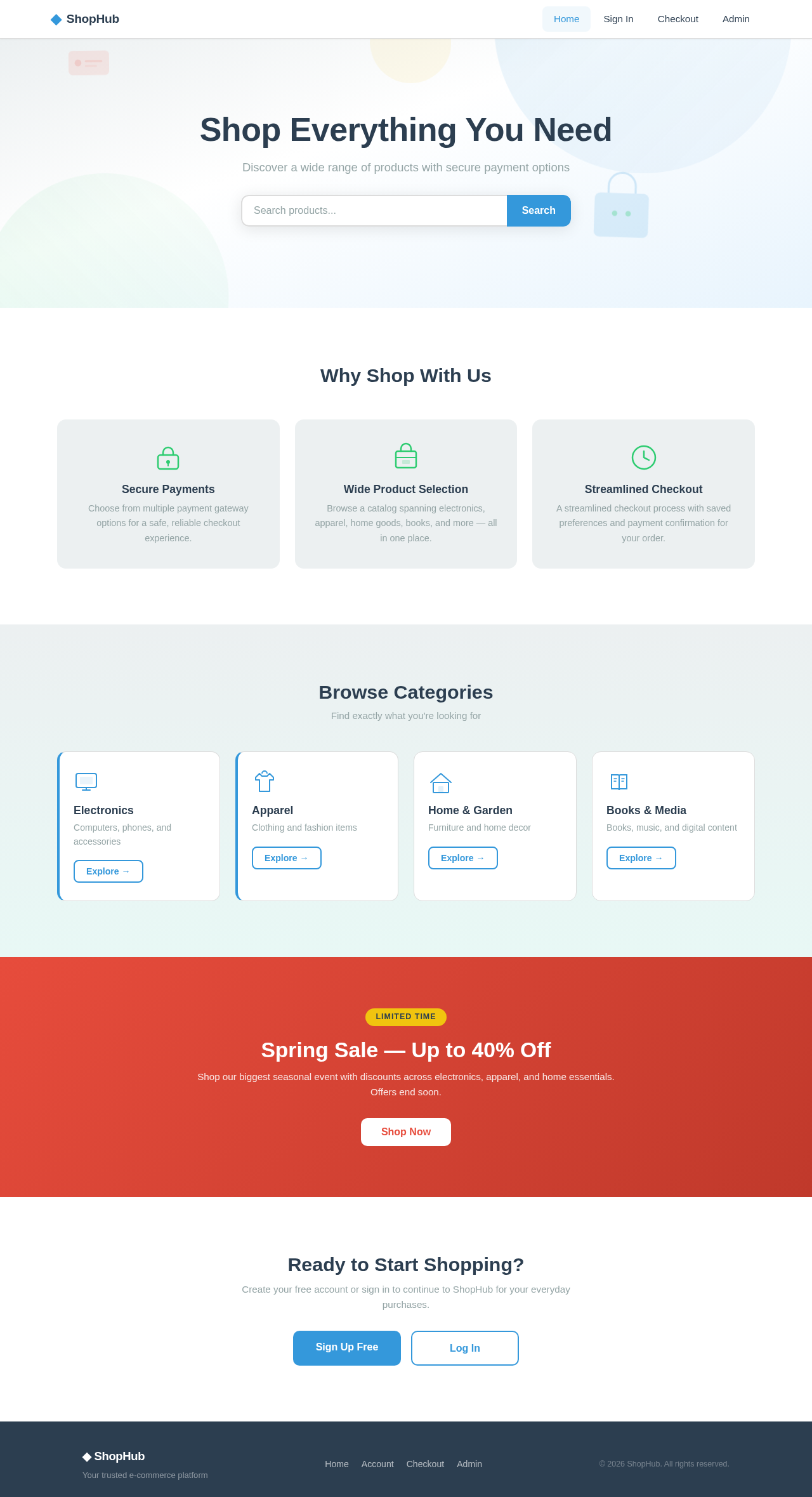
Landing
Landing

Comments (0)

No comments yet. Be the first!

System Requirements

System Requirement Document
Page 1 of 7

E-commerce System Requirements Document

1. Introduction

This document outlines the system requirements for the E-commerce project, focusing on enabling transactions through payment gateway integration, user authentication, and product management.

2. System Overview

The E-commerce project aims to provide a platform for online transactions, integrating multiple payment gateways to facilitate purchases. It includes features for customer account management, product catalog management, and secure transaction processing.

Page 2 of 7

2a. Product Interpretation and Delivery Boundary

  • Domain Descriptors:

    • E-commerce Transactions: Facilitates online purchases and sales.
  • Product Intent:

    • Build an E-commerce platform enabling transactions through payment gateway integration.
  • Excluded Assumptions:

    • Generic e-commerce features not explicitly required.
  • Custom Pages:

    • Checkout: Customer-facing page for initiating and completing payments.
    • Admin Dashboard: Administrator workspace for managing products and orders.
    • Landing: Public entry page for customer orientation.
    • Authentication: Combined surface for account sign-up and login.
  • Access:

    • Application-owned identity with persistent identity continuity.
  • Behavior Contracts:

    • Process Payment: Triggered by customer checkout, resulting in payment processing and order confirmation.
    • Manage Products: Triggered by administrator access to product management, resulting in product catalog updates.

2b. Source Content Inventory

No explicit content sources were provided.

Page 3 of 7

2c. Page Content and Component Coverage

  • Checkout Page:

    • Payment details form
    • Order summary
    • Payment confirmation
    • Error handling for failed payments
  • Admin Dashboard:

    • Product management interface
    • Order management section
    • User access controls
  • Landing Page:

    • Introduction to the platform
    • Navigation to product categories
    • Promotional content
  • Authentication Page:

    • User registration form
    • Login form
    • Password recovery option
Page 4 of 7

3. Functional Requirements as Story Points

  • As a Customer, I should be able to sign up for an account to make purchases.
  • As a Customer, I should be able to log in to access my account and order history.
  • As a Customer, I should be able to initiate a checkout process to purchase items.
  • As a Customer, I should be able to select a payment method and complete a transaction.
  • As a Customer, I should receive a notification if a payment fails.
  • As a Site Administrator, I should be able to log in to manage products and orders.
  • As a Site Administrator, I should be able to add or update products in the catalog.
  • As a Site Administrator, I should be able to view and manage customer orders.

4. User Personas

  • Customer: Primary user of the e-commerce site, responsible for browsing and purchasing products.
  • Site Administrator: Manages products, orders, and site content.

5. Core User Flows

Customer Flow

  1. Access the Landing Page.
  2. Navigate to the Authentication Page to sign up or log in.
  3. Browse products and add desired items to the cart.
  4. Proceed to the Checkout Page.
  5. Enter payment details and confirm the order.
  6. Receive order confirmation or payment failure notification.
Page 5 of 7

Administrator Flow

  1. Access the Authentication Page to log in.
  2. Navigate to the Admin Dashboard.
  3. Manage product catalog and update product details.
  4. View and manage customer orders.

6. Visuals Colors and Theme

  • Primary: #3498db
  • Primary Light: #5dade2
  • Secondary: #2ecc71
  • Accent: #e74c3c
  • Highlight: #f1c40f
  • Background: #ecf0f1
  • Surface: #ffffff
  • Text: #2c3e50
  • Text Muted: #95a5a6
  • Border: #dcdcdc

7. Signature Design Concept

The Landing Page will feature a clean and modern design with a focus on ease of navigation and product discovery. The page will use a grid layout to display product categories, with a prominent search bar and quick links to popular sections. The color scheme will be consistent with the brand identity, using the primary and secondary colors for emphasis.

Page 6 of 7

8. Interaction Model & Motion Direction

  • Landing Page: Animated with moderate scroll-triggered reveals and hover transitions to enhance user engagement.
  • Checkout Page: Static layout prioritizing clarity and ease of use.
  • Admin Dashboard: Static with minimal motion to focus on data density and task completion.

9. Non-Functional Requirements

  • Security: Secure access control for both customer and administrator workflows.
  • Performance: Efficient processing of transactions and product management operations.

10. Tech Stack

  • Frontend: React for Web
  • Backend: Node.js
  • Database: MongoDB

11. Assumptions and Constraints

  • The platform will support multiple payment gateways as specified by the user.
  • Authentication is required for both customers and administrators.
Page 7 of 7

12. Glossary

  • Checkout: The process of finalizing a purchase.
  • Admin Dashboard: Interface for administrators to manage site content.
  • Authentication: The process of verifying user identity.
Landing design preview
Landing: views product orientation and browses categories
Authentication: signs up or logs in
Checkout: enters payment details and order information
Checkout: Decision: payment processed successfully?
Checkout: order confirmed to customer
Checkout: payment failed notification shown
Landing design preview
Landing: views product orientation and browses categories
Authentication: signs up or logs in
Checkout: enters payment details and order information
Checkout: Decision: payment processed successfully?
Checkout: order confirmed to customer
Checkout: payment failed notification shown