RBI Compliant
Operations aligned with Reserve Bank of India guidelines and local financial regulations for fully lawful lending.
Regulated Tech City
Build an web application for local finance which will provide the loan.


Sign in to leave a comment
As a frontend developer, implement the Navbar section for the Landing page. Build the `Navbar` component using `useState` for `elevated` (scroll-shadow toggle) and `open` (mobile menu state). Attach a passive scroll listener via `useEffect` that sets `elevated` when `window.scrollY > 12`. Render an animated SVG logo using `motion.path` and `motion.circle` with `pathLength` draw-on variants (`hidden`→`visible`, durations 1.1s and 0.9s with 0.7s delay). Map `navLinks` array to desktop nav items. Render Login/Register `nv-btn` anchor tags. Implement a `motion.button` burger with animated `nv-burger-line` spans that rotate 45°/translate on open. Use `AnimatePresence` for the mobile drawer slide-in. Apply `nv-elevated` class conditionally for the drop-shadow on scroll. Import `Navbar.css`. Note: this component will be reused across multiple pages — check if it already exists from a prior page implementation.
As a Backend Developer, define all SQLAlchemy ORM models and Alembic migrations for the Digi-Loan system. Models required: User (id, full_name, email, phone, password_hash, role, status, kyc_status, credit_score, pan, aadhaar, annual_income, employment_type, language, created_at, updated_at), LoanProduct (id, name, description, min_amount, max_amount, tenure_options JSON, base_rate, min_rate, max_rate, status, created_at, updated_at), LoanApplication (id, user_id FK, product_id FK, amount, purpose, tenure, interest_rate, employment_type, status, reference_id, submitted_at, updated_at), LoanRecord (id, application_id FK, user_id FK, principal, disbursed_date, tenure, emi_amount, total_repayable, total_paid, outstanding, next_emi_date, interest_rate, processing_fee, penalties, status), Repayment (id, loan_record_id FK, due_date, amount, paid_date, method, txn_id, status), Notification (id, user_id FK, type, title, preview, read, created_at), SupportTicket (id, user_id FK, name, email, subject, message, status, created_at), SystemAlert (id, type, severity, message, created_at, dismissed_at). Create Alembic migration scripts for all models. Seed initial data for loan products and admin user.
As a Frontend Developer, set up the global design system and theme for the Digi-Loan application. Create a CSS custom properties file (variables.css) defining all brand tokens from the SRD: --primary: #0047AB, --primary_light: #5A9BD5, --secondary: #FF6F61, --accent: #FFD700, --highlight: #FFA500, --bg: #F5F5F5, --surface: rgba(255,255,255,0.9), --text: #333333, --text_muted: #777777, --border: rgba(0,71,171,0.2). Create global reset CSS (reset.css) with box-sizing, margin/padding resets, and Inter font-family import. Create shared utility classes (utilities.css): spacing, flex helpers, responsive breakpoints (mobile: 480px, tablet: 768px, desktop: 1200px). Set up the React app entry point (main.jsx / index.jsx) to import variables.css and reset.css globally. Configure framer-motion AnimatePresence at app root. Ensure all pages consume shared CSS variables for consistent theming. Note: this is a prerequisite for all frontend section tasks.
As a Backend Developer, set up the FastAPI application foundation. Create the project structure: app/main.py (FastAPI app instance, CORS middleware configured for frontend origin, mount routers), app/core/config.py (Settings class using pydantic-settings: DATABASE_URL, SECRET_KEY, ALGORITHM, ACCESS_TOKEN_EXPIRE_MINUTES, REFRESH_TOKEN_EXPIRE_DAYS, CORS_ORIGINS, environment), app/core/database.py (SQLAlchemy async engine and SessionLocal with get_db dependency), app/core/security.py (password hashing, JWT create/verify functions), app/middleware/timing.py (request timing middleware recording response time for system metrics), app/api/v1/router.py (aggregate all route prefixes: /auth, /users, /loan-products, /loan-applications, /loan-records, /repayments, /notifications, /reports, /support, /system). Configure CORS to allow the React dev server and production frontend URL. Add health check endpoint GET /health. Configure Alembic for migrations (alembic.ini, alembic/env.py). Add requirements.txt with: fastapi, uvicorn, sqlalchemy, alembic, pydantic-settings, python-jose[cryptography], passlib[bcrypt], python-multipart, httpx, psutil.
As a frontend developer, implement the `LandingHero` section. Use `useScroll` and `useTransform` to drive two parallax layers: `bgY = scrollY * -0.3` and `midY = scrollY * -0.6`. Implement mouse-parallax tilt with `useMotionValue` for `rotX`/`rotY`, smoothed via `useSpring` (stiffness 120, damping 18), composed into a CSS transform via `useMotionTemplate`. Detect desktop with a `window.matchMedia('(min-width: 768px)')` listener in `useEffect`. Build `handleMouseMove` that clamps tilt to ±15°. Render an animated SVG financial grid background using `vLines` (13 lines × 80px) and `hLines` (9 lines × 80px) arrays, with a looping `animate={{ x: [0,-40,0], y: [0,-24,0] }}` (22s infinite). Animate headline and stat items (`value`/`label` for 50K+, 4.9%, 24 hrs) using `containerVariants` (staggerChildren 0.12) and `itemVariants` (spring y:26→0). Import `LandingHero.css`.
As a frontend developer, implement the `LandingLoanProducts` section. Render four `ProductCard` components from the `products` array (Personal, Business, Education, Home), each with a tone class (`personal`, `business`, `education`, `home`), a Lucide icon (`User`, `Briefcase`, `GraduationCap`, `Home`), chip badges, and a `details` key-value list. Build `RateTicker` sub-component using `motion.span` with a looping `y: [0,-22,-22,0,0]` animation (6s, custom `times` array) to cycle through rate strings. In `ProductCard`, use `useState` for `hovered` and a `useRef` with `useMotionValue`/`useSpring`/`useTransform`/`useMotionTemplate` for 3D card-tilt on hover. Use `useInView` for scroll-triggered reveal. Apply `containerVariants` (staggerChildren 0.1) and `itemVariants` (spring y:28→0) via `AnimatePresence`. Import Lucide icons (`ArrowRight`). Import `LandingLoanProducts.css`.
As a frontend developer, implement the `LandingLoanCalculator` section. Manage `amount` (default 750000, range 50K–2.5M), `tenure` (default 36, from `tenureOptions` array of 5 pills), and `dragging` state via `useState`. Compute `emi`, `totalPayable`, `totalInterest`, and a yearly amortization `schedule` array via `useMemo` using the standard EMI formula (ANNUAL_RATE = 12.5%). Build a custom drag-based range slider tied to a `stageRef` that updates `amount` proportionally and tracks `dragging` state. Render an inline SVG bar chart (480×220 viewBox, `padLeft=8`, `padBottom=28`) with stacked bars for principal vs interest per year bucket, derived from the `schedule` array. Format all currency values with `formatINR` (Intl.NumberFormat en-IN). Use `useInView` (once, margin -80px) on `sectionRef` for entrance animation. Render a layered background with `lc-bg-grid` and `lc-mid-layer` orbs. Import Lucide icons (`Calculator`, `Move`, `IndianRupee`, `ArrowRight`). Import `LandingLoanCalculator.css`.
As a frontend developer, implement the `LandingHowItWorks` section. Map the `steps` array (Apply Online, We Review, Get Approval, Repay With Ease) to `Step` sub-components, each with its own `useRef` and `useInView` (once, margin -90px). Each `Step` renders a `.hiw-rail` containing a `motion.div` badge with the Lucide icon and a `motion.span` step number (padded to 2 digits), animated via `iconVariants` (rotate -180→0, scale 0.4→1, spring stiffness 200) and `numVariants` (scale 0→1, spring stiffness 320). Render a `.hiw-rail-line` with a `motion.div` fill using `railVariants` (scaleX/Y 0→1, 0.7s easeInOut). Animate the `.hiw-card` using `cardVariants` (x -48→0, spring stiffness 180). Use `staggerChildren: 0.12` and `delayChildren: index * 0.06` on each step's parent motion div. Import Lucide icons (`FileText`, `SearchCheck`, `BadgeCheck`, `Wallet`, `ArrowRight`). Import `LandingHowItWorks.css`.
As a frontend developer, implement the `LandingTrustBadges` section. Use `useRef` and `useInView` (once, margin -90px) on the section root. Render four badge cards from the `badges` array (RBI Compliant, ISO Certified, Secure Transactions, 24/7 Support) with Lucide icons (`ShieldCheck`, `BadgeCheck`, `Lock`, `Headset`) and tag chips. Animate the heading block with `headVariants` (opacity/y, 0.5s easeOut) and the grid with `gridVariants` (staggerChildren 0.1). Each badge card uses `badgeVariants` (opacity/scale 0.85/y:24 → 1/1/0, spring stiffness 240). Render a `stats` row (256-bit SSL, 99.9% uptime, 50K+ borrowers) below the grid. Render a layered background with `ltb-bg-grid`, `ltb-mid-orb-a`, and `ltb-mid-orb-b` parallax orb divs. Import `LandingTrustBadges.css`.
As a frontend developer, implement the `LandingTestimonials` section. Manage `active` index and `dir` (+1/-1) with `useState`; auto-advance every 5s via `useEffect` with cleanup. Implement `prev`/`next` callbacks wrapped in `useCallback`. Build a windowed display of `VISIBLE=3` cards, computing left/center/right indices with modular arithmetic over the 6-item `testimonials` array. Use `AnimatePresence` with a custom `variants` driven by `dir` for slide/fade transitions. Build `StarRating` sub-component that maps 1–5 positions to `motion.span` elements with staggered scale-bounce variants (staggerChildren 0.08). Each testimonial card renders an avatar with `initials` and CSS `color` gradient, `Quote` Lucide icon, name, loan type, `StarRating`, and quote text. Use `useScroll`/`useTransform` for a subtle parallax on the section heading. Render Lucide `ChevronLeft`/`ChevronRight` nav buttons. Import `LandingTestimonials.css`.
As a frontend developer, implement the `LandingCTA` section. Use `useRef` with `useInView` (once, margin -100px) for entrance animations. Manage `particles` state (array of burst objects) via `useState`. Implement magnetic button effect with `useMotionValue` (`rawX`/`rawY`) smoothed by `useSpring` (stiffness 220, damping 18, mass 0.4) — disabled on coarse-pointer devices. Build `makeBurst()` that generates 14 particle objects with random angle/radius/size/delay using a module-level `particleSeq` counter. Wire `fireBurst` (via `useCallback`) to the CTA button click to populate `particles` state. Use `AnimatePresence` to animate particle burst divs outward and fade. Render animated eyebrow span, `cta-headline` with animated `backgroundPosition` (shimmer, 5s infinite), and a `ShieldCheck` + `ArrowRight` Lucide icon trust line. Render layered `cta-bg-grid` and two `cta-orb` parallax divs. Import `LandingCTA.css`.
As a frontend developer, implement the `Footer` section. Manage `openCol` state (string | null) via `useState` for mobile accordion behavior. Render four `FooterColumn` sub-components from `linkColumns` (Products, Company, Support, Legal), each containing a `motion.button` header with a `ChevronDown` icon that rotates via `is-open` class, and an `AnimatePresence`-wrapped `motion.ul` that animates `height` 0→auto and `opacity` 0→1 (0.28s easeInOut) for mobile. On desktop (width ≥ 768) the list is always visible. Use `containerVariants` (staggerChildren 0.08) and `itemVariants` (spring y:20→0) for entrance animation triggered by `useInView`. Render the `Landmark` Lucide brand icon alongside the Digi-Loan wordmark. Render social icon links array (`Twitter`, `Linkedin`, `Facebook`, `Instagram`) as `motion.a` elements. Render bottom bar with copyright and regulatory disclaimer text. Import `Footer.css`. Note: this component may already exist from a prior page — check before recreating.
As a frontend developer, implement the Navbar section for the Login page. This component may already exist from the Landing page (task c313e6f4-ca72-4064-9aec-4d02a53ed0ab). It uses useState for `elevated` (scroll-triggered shadow via window.scrollY > 12) and `open` (mobile menu toggle), useEffect for passive scroll listener, and framer-motion for the animated SVG logo (pathLength draw animation on an SVG path and circle with staggered delays). Includes a navLinks array with Home/Products/About/Contact hrefs, nv-btn-login and nv-btn-register CTA buttons, and a motion.button burger menu with animated span lines (rotate 45deg + y-translate on open). AnimatePresence handles mobile drawer reveal. CSS covers nv-root, nv-bar, nv-elevated, nv-inner, nv-logo, nv-logo-mark, nv-logo-stroke, nv-logo-coin, nv-logo-text, nv-links, nv-link, nv-actions, nv-btn, nv-burger, nv-burger-line classes.
As a frontend developer, implement the Navbar section for the Register page. This component may already exist from Landing and Login pages (task c313e6f4-ca72-4064-9aec-4d02a53ed0ab). It uses useState for `elevated` (scroll-triggered shadow via window.scrollY > 12) and `open` (mobile burger menu toggle). Includes framer-motion animated SVG logo with `motion.path` (pathLength draw animation) and `motion.circle` (coin icon with delay), navLinks array mapping Home/Products/About/Contact hrefs, nv-actions with Login and Register anchor buttons, and a `motion.button` burger with animated span lines (rotate 45deg + y-translate when open). Uses AnimatePresence for mobile drawer. Depends on Landing page Navbar task for page-level chaining.
As a Backend Developer, implement authentication and authorization API endpoints using FastAPI. Endpoints: POST /api/auth/register (user registration with hashed password via bcrypt, returns user object), POST /api/auth/login (email+password login returning JWT access token + refresh token, supports role: user/admin), POST /api/auth/logout (invalidate refresh token), POST /api/auth/refresh (rotate refresh token), GET /api/auth/me (return current authenticated user profile). Implement JWT middleware using python-jose: validate Bearer token on protected routes, extract user_id and role claims. Implement role-based access control (RBAC) decorators: require_user, require_admin. Secure password hashing with passlib[bcrypt]. Store refresh tokens in DB or Redis. Return standardized error responses (401 Unauthorized, 403 Forbidden). Implement rate limiting on login endpoint (5 attempts per minute). Note: depends on temp_db_models.
As a Frontend Developer, set up internationalization (i18n) for English and Hindi language support as required by the SRD. Install and configure react-i18next with i18next. Create translation JSON files: public/locales/en/translation.json and public/locales/hi/translation.json covering key UI strings: navigation labels, form labels, button text, error messages, status labels, notification messages. Configure i18next with language detection (browser language preference, fallback to English). Add a language toggle in the Navbar (already has language selector in PersonalInfo profile section — wire it to i18n context). Ensure all hardcoded strings in frontend components use the t() translation hook. Note: The SRD explicitly requires both English and Hindi support (Section 11).
As a Frontend Developer, set up global state management for the Digi-Loan React application using React Context API with useReducer (or Zustand if complexity warrants). Create the following context providers: AuthContext — stores current user object, JWT token, role (user/admin), isAuthenticated boolean; exposes login(), logout(), refreshToken() actions; persists token to localStorage/sessionStorage. NotificationContext — stores unread count and notification list; exposes markRead(), dismiss(), fetchNotifications() actions; used by Navbar notification badge (DashboardTopBar) and Notifications page. LoanApplicationContext — stores multi-step form state across LoanApplicationForm steps (step, form fields, direction, errors); prevents data loss on step navigation. Create a root AppProviders wrapper component that nests all context providers. Set up Axios or fetch interceptor to automatically attach Authorization: Bearer header from AuthContext token and handle 401 responses by triggering logout. Note: depends on temp_theme_setup.
As a frontend developer, implement the LoginHero section for the Login page. The section renders a full-width hero using framer-motion with initial/animate lifecycle. It includes: a `lh-badge` with a dot indicator and Shield icon (lucide-react, size 12) that fades in from y:-8; a kinetic `h1` heading that splits 'Sign In' into individual characters via a `headingChars` array with accent flags, each rendered as a motion.span using custom `charVariants` (opacity/y/rotateX 3D flip, staggered delay 0.2 + i*0.06); a `lh-divider` that animates scaleX from 0 to 1 with opacity 0.5 at delay 0.65; a `lh-desc` paragraph fading in at delay 0.55; a `lh-accent-ring-wrap` decorative element; a `lh-accent-band` at the bottom; and a `lh-glow` wash overlay. CSS covers lh-root, lh-accent-band, lh-glow, lh-content, lh-badge, lh-badge-dot, lh-heading, lh-heading-wrapper, lh-heading-accent, lh-divider, lh-desc, lh-accent-ring-wrap classes.
As a frontend developer, implement the LoginForm section for the Login page. Uses useState for three pieces of state: `accountType` ('user'|'admin'), `showPassword` (boolean toggle), and `rememberMe` (boolean checkbox). Renders a motion.div `lf-card` with `formVariants` (y:24 → 0, opacity). Inside, each form element is a motion.div using `staggerItem` custom variants with delay 0.12*i. Components include: a card header with Lock icon (lucide-react, size 24), title and subtitle; an account type selector toggling between Borrower (User icon) and Admin (Building2 icon) buttons with `is-active` class and aria-pressed; an email/username field with Mail icon and `lf-input has-icon` styling; a password field with Lock icon and Eye/EyeOff toggle button controlled by `showPassword`; a remember-me checkbox row; a submit button with ArrowRight icon (lucide-react). Three decorative `lf-bg-ring` divs (lf-bg-ring-1/2/3) provide background motif. CSS covers lf-root, lf-bg-motif, lf-bg-ring, lf-card, lf-card-header, lf-card-icon, lf-card-title, lf-card-subtitle, lf-account-type, lf-type-btn, lf-type-icon, lf-field, lf-field-label, lf-input-wrapper, lf-input-icon, lf-input classes.
As a frontend developer, implement the LoginSupport section for the Login page. Renders three content blocks inside `lns-inner`: (1) a `lns-links` motion.div using `rowVariants` (staggerChildren 0.08, delayChildren 0.05) containing three support links ('Forgot your password?', 'Help Centre', 'Contact Support') all pointing to /Support, each a motion.a with `itemVariants` (spring stiffness 300, damping 22), separated by `lns-sep` span elements using React.Fragment; (2) a `lns-divider` with two `lns-divider-line` spans and a `lns-divider-text` 'or' label, fading in at delay 0.2; (3) a motion.a `lns-alt` OTP sign-in button with Smartphone icon (lucide-react, size 18), whileHover y:-2, whileTap scale:0.97, spring animation at delay 0.28, linking to /Login; (4) a `lns-register` paragraph with link to /Register ('Create one now'), fading in at delay 0.4. CSS covers lns-root, lns-inner, lns-links, lns-sep, lns-link, lns-divider, lns-divider-line, lns-divider-text, lns-alt, lns-alt-icon, lns-alt-label, lns-register classes.
As a frontend developer, implement the Footer section for the Login page. This component may already exist from the Landing page (task a9a3663e-997f-42f9-928d-7b85bb6ab408). Uses useState for `openCol` (accordion column state for mobile), useInView from framer-motion for scroll-triggered animation. Renders a `FooterColumn` sub-component per column that toggles accordion open/close with ChevronDown icon rotation (`is-open` class) and AnimatePresence height:0→auto exit animation. Four `linkColumns` arrays (Products, Company, Support, Legal) each with four href links. Social icons row with Twitter, Linkedin, Facebook, Instagram from lucide-react all pointing to /Support. `containerVariants` with staggerChildren 0.08 and `itemVariants` spring animation (stiffness 260, damping 24) on scroll into view. CSS covers ftr-root, ftr-col-head, ftr-col-chevron, ftr-links, ftr-link, ftr-logo (Landmark icon), social icon styles, and copyright row.
As a frontend developer, implement the RegisterHero section for the Register page. Uses `useRef` and `useInView` (once: true, margin: '-60px') to trigger entrance animations. Headline 'Create Your Account' is split character-by-character via `headlineChars.split('')`, each rendered as a `motion.span` with `charVariants` (y: 28→0, opacity, rotateX: -30→0, spring stiffness 280/damping 20). Characters from index 12 onward receive `rh-headline-accent` class. Includes `containerVariants` with staggerChildren 0.06, a `motion.div` rh-divider with scaleX spring animation (delay 0.7), a `motion.p` subheadline (y spring, delay 0.5), and three `accentHighlights` pills ('Secure & Encrypted', 'Fast Application', 'Transparent Rates') each animated via `pillVariants` with custom delay (0.8 + i*0.12). Background layer has rh-bg-glow-top and rh-bg-glow-bottom decorative divs.
As a frontend developer, implement the RegisterForm section for the Register page. Uses `useState` for form values, validation state, showPassword/showConfirmPassword toggles, and submission loading state. Defines `FORM_FIELDS` config object with five fields: fullName (User icon, min 2 chars), email (Mail icon, regex validation), phone (Phone icon, min 10 digits after stripping non-digits), password (Lock icon, requires uppercase/lowercase/digit/special char), confirmPassword (ShieldCheck icon, cross-field match against password value). Implements `computeStrength` function for password strength scoring. Uses `useCallback` for change/blur handlers. Renders lucide-react icons (Check, X, Eye, EyeOff, ArrowRight, Loader2) for field status and toggle visibility. Includes framer-motion animations for field entrance and validation feedback. Submit button shows Loader2 spinner during async submission state.
As a frontend developer, implement the RegisterBenefits section for the Register page. Uses `useRef` and `useInView` (once: true, margin: '-60px') for scroll-triggered animation. Renders three benefit cards from the `benefits` array: 'Fast Approval' (Zap icon), 'Transparent Rates' (Eye icon), 'Secure Process' (ShieldCheck icon) — all from lucide-react with size 26 and strokeWidth 1.8. Section heading row animates via inline `initial`/`animate` (y: 20→0, opacity, duration 0.5). Cards container uses `containerVariants` (staggerChildren 0.12, delayChildren 0.05) and individual `motion.div` cards with `cardVariants` (y: 32→0, opacity, spring stiffness 220/damping 22). Background has rb-bg-accent and rb-bg-accent-bottom decorative divs. Includes rb-section-label, rb-section-title, rb-section-subtitle, rb-card-icon-wrap, rb-card-title, rb-card-desc elements.
As a frontend developer, implement the Footer section for the Register page. This component may already exist from Landing and Login pages (task a9a3663e-997f-42f9-928d-7b85bb6ab408). Uses `useState` for `openCol` (accordion column state on mobile) and `useInView` for scroll-triggered entrance. Renders four `FooterColumn` sub-components from `linkColumns` array (Products, Company, Support, Legal), each with a `motion.button` toggle header with ChevronDown icon (rotates via `is-open` class) and `AnimatePresence`-wrapped `motion.ul` link list (height: 0→auto, opacity animation). Social icons row renders Twitter, Linkedin, Facebook, Instagram from lucide-react. Uses `containerVariants` (staggerChildren 0.08) and `itemVariants` (y: 20→0, spring stiffness 260/damping 24). Mobile accordion hides columns behind button; desktop shows all via window.innerWidth >= 768 check.
As a frontend developer, implement the Navbar section for the Dashboard page. This component (Navbar.css) uses useState for mobile menu open/close state and AnimatePresence/motion from framer-motion to animate the mobile drawer with height/opacity transitions (duration 0.32, ease [0.22,1,0.36,1]). Renders NAV_LINKS array (Dashboard, Loan Products, Apply, Repayments, Support) as desktop <ul> links and mobile equivalents. Includes Login (LogIn icon, href /Profile) and Register (UserPlus icon, href /UserAccounts) CTA buttons in nv-actions. A nv-burger button toggles the mobile menu with three <span> bars. Note: this Navbar component likely already exists from Landing/Login/Register pages — reuse or verify it renders correctly in the Dashboard layout context.
As a Backend Developer, implement user account management API endpoints. Endpoints: GET /api/users (admin only, paginated list with search/filter by status, sort), GET /api/users/{id} (get user detail), PUT /api/users/{id} (update user profile: name, phone, dob, state, city, postal_code, language, annual_income, employment_type), PUT /api/users/{id}/status (admin: activate/suspend/deactivate user), DELETE /api/users/{id} (admin: soft-delete user), GET /api/users/{id}/loans (user's loan summary), POST /api/users/{id}/kyc (upload KYC documents — store file reference), PUT /api/users/{id}/password (change password with current password verification), POST /api/users/{id}/2fa (toggle 2FA). Return paginated responses with metadata (total, page, page_size). Validate inputs with Pydantic schemas. Note: depends on temp_auth_api.
As a Backend Developer, implement loan product management API endpoints. Endpoints: GET /api/loan-products (public, list all active products with filters: status, type), GET /api/loan-products/{id} (product detail), POST /api/loan-products (admin: create new product — name, description, min_amount, max_amount, tenure_options, status), PUT /api/loan-products/{id} (admin: update product), DELETE /api/loan-products/{id} (admin: soft-delete), GET /api/loan-products/{id}/interest-rates (get rate history), PUT /api/loan-products/{id}/interest-rates (admin: update base_rate, min_rate, max_rate), GET /api/interest-rates (admin: list all products with current rates, search by name), POST /api/interest-rates (admin: add new interest rate entry). Validate business rules: min_amount < max_amount, min_rate <= base_rate <= max_rate. Note: depends on temp_auth_api.
As a Backend Developer, implement notifications API endpoints. Endpoints: GET /api/notifications (user: paginated list with filter: type — payment_due/application_updates/approvals/system_alerts/all; search; returns unread count), PUT /api/notifications/{id}/read (mark single notification as read), PUT /api/notifications/read-all (mark all as read), DELETE /api/notifications/{id} (dismiss/delete notification), DELETE /api/notifications (bulk clear all notifications for user), POST /api/notifications (internal: create notification — triggered by application status changes, payment due dates, EMI reminders). Notification types: payment_due, application_update, approval, system_alert, repayment_confirmation. Add background task (APScheduler or Celery) to generate payment_due notifications 3 days before EMI due date. Note: depends on temp_auth_api.
As a Backend Developer, implement customer support API endpoints. Endpoints: POST /api/support/contact (submit support ticket — name, email, subject, message; validates required fields; stores in DB; sends email acknowledgment), GET /api/support/tickets (admin: list all support tickets with filter by status), GET /api/support/tickets/{id} (ticket detail), PUT /api/support/tickets/{id}/status (admin: update ticket status — open/in_progress/resolved), GET /api/support/faq (public: return FAQ items list — question, answer, category), GET /api/support/categories (public: return support category list with article counts). Note: depends on temp_auth_api.
As a Backend Developer, implement system monitoring API endpoints (admin only). Endpoints: GET /api/system/metrics (KPI metrics: active_users, system_health_pct, total_transactions, avg_response_time_ms, db_usage_pct, api_error_rate_pct — each with sparkline data array of 24 points), GET /api/system/alerts (list active system alerts with severity: critical/warning/info; filter by dismissed state), PUT /api/system/alerts/{id}/dismiss (dismiss an alert), GET /api/system/activity-log (paginated activity log: timestamp, userId, userName, action, status, ip, device — with search and action-type filter), GET /api/system/performance (time-series performance data: load values and response times for 24h or 7d range). Collect real metrics using psutil for CPU/memory, SQLAlchemy pool stats for DB, and custom middleware timing for response time percentiles. Note: depends on temp_auth_api.
As a Frontend Developer, create a centralized API client layer for all backend communication. Set up Axios instance (src/api/client.js) with: base URL from REACT_APP_API_URL env var, request interceptor to inject JWT Authorization header from auth state, response interceptor to handle 401 (trigger logout/refresh), and standardized error handling. Create service modules for each API domain: authService.js (login, register, logout, refreshToken, getMe), userService.js (getUsers, getUser, updateUser, updateUserStatus, deleteUser, uploadKyc), loanProductsService.js (getProducts, getProduct, createProduct, updateProduct, deleteProduct, updateInterestRates), loanApplicationsService.js (submitApplication, getApplications, getApplication, updateStatus, uploadDocuments), loanRecordsService.js (getRecords, getRecord, getRepaymentSchedule, getStatement), repaymentsService.js (makeRepayment, getRepayments, getSchedule, getSummary), notificationsService.js (getNotifications, markRead, markAllRead, deleteNotification), reportsService.js (getSummary, getActivity, getTable, exportReport), supportService.js (submitTicket, getFaq, getCategories), systemService.js (getMetrics, getAlerts, dismissAlert, getActivityLog, getPerformance). Note: depends on temp_global_state.
As a frontend developer, implement the DashboardTopBar section for the Dashboard page. This component (DashboardTopBar.css) uses a custom useDateTime hook with useState/useEffect that sets an interval every 1000ms to update the current date/time, formatted for en-IN locale (weekday long date + 12h time). Renders a dtb-left greeting ('Welcome back, Admin') with live date/time via Calendar icon. The dtb-actions bar contains three motion.a elements (whileHover scale 1.08, whileTap 0.94) linking to /Notifications (Bell icon with dtb-badge showing notificationCount=3), /Settings (Settings icon), and /Profile (dtb-avatar 'A' span with hidden ChevronDown). Cleans up the interval on unmount.
As a frontend developer, implement the DashboardSidebar section for the Dashboard page. This component (DashboardSidebar.css) uses useState for activeItem (default 'dashboard') and expandedGroups (collapsible sub-navigation) state. Renders a ds-header with LayoutDashboard icon and 'Digi-Loan Admin Panel' branding. Iterates NAV_SECTIONS (Main, Loan Management, Administration, System) — each with a ds-section-label and nav items rendered as <a> tags with ds-item/ds-active/ds-expanded classes. Items include icon components (LayoutDashboard, FileText, FolderOpen, Users, BarChart3, Package, Activity), optional badge counts (Applications: badge=5), and ChevronRight for items with subItems. Uses AnimatePresence for sub-item expand/collapse animations. Links to /Dashboard, /LoanApplications, /LoanRecords, /UserAccounts, /Reports, /LoanProducts, /SystemMonitor.
As a frontend developer, implement the DashboardWelcomeBanner section for the Dashboard page. This component (DashboardWelcomeBanner.css) is a motion.div with entry animation (opacity 0→1, y 20→0, duration 0.45, ease [0.22,1,0.36,1]). Renders dwb-content with greeting 'Welcome back, Admin 👋' and a status paragraph highlighting '3 pending applications' (dwb-status-highlight span). The dwb-actions area contains two motion.a CTA buttons with whileHover scale 1.03 / whileTap 0.97: a primary 'Review Pending Applications' button (FileSearch icon, href /LoanApplications) and an accent 'Generate Report' button (FileText icon, href /Reports). A decorative dwb-icon-wrap displays BriefcaseBusiness icon (size 32).
As a frontend developer, implement the DashboardMetricsCards section for the Dashboard page. This component (DashboardMetricsCards.css) renders a dmc-grid of 4 motion.div cards from the METRICS array: Total Loan Applications (1,247, +12.5%, primary, FileText), Approved Loans (842, +8.2%, secondary, CheckCircle2), Pending Reviews (163, -3.1%, highlight, Clock3), and System Uptime (99.9%, +0.1%, accent, Activity). Each card uses cardVariants with staggered delay (i*0.08) for whileInView animations (once: true, margin -40px) and whileHover y:-4 lift effect. Each card displays a dmc-icon-wrap, a dmc-trend badge with TrendingUp/TrendingDown icon, a dmc-number value, and a dmc-label.
As a frontend developer, implement the DashboardActivityOverview section for the Dashboard page. This component (DashboardActivityOverview.css) renders a custom SVG line chart using useState/useEffect/useMemo. The useChartDimensions hook listens to window resize events and queries '.dao-chart-wrap' dimensions to set responsive width/height. ACTIVITY_DATA provides 7-day approved/pending/rejected counts. buildPath() generates SVG path strings by computing xStep = chartW/(points.length-1) and normalizing y values against maxVal. Renders three <path> elements (approved, pending, rejected) with SVG <g> transforms using CHART_PADDING offsets. Includes y-axis tick marks via yTicks (6 ticks, step = ceil(maxVal/5)), x-axis DAY_LABELS, hover interaction via hoveredDay state on data points, and a totals summary legend (approved/pending/rejected weekly totals via useMemo reduce).
As a frontend developer, implement the DashboardQuickActions section for the Dashboard page. This component (DashboardQuickActions.css) renders a dqa-grid of 4 motion.a cards from the ACTIONS array: Review Pending Applications (primary, FileSearch, /LoanApplications), Approve Application (secondary, CheckCircle, /LoanApplications), Configure Loan Products (accent, Settings, /LoanProducts), and View Reports (highlight, BarChart3, /Reports). Each card uses useCallback-memoized handleMouseMove to track mouse position as CSS custom properties --mx/--my for radial gradient spotlight effects. Cards animate with spring physics (stiffness 380, damping 22), whileHover scale 1.025, whileTap 0.975. Each card contains a dqa-btn-icon, dqa-btn-label (title + desc), and a dqa-btn-arrow (ArrowRight icon).
As a frontend developer, implement the DashboardRecentTransactions section for the Dashboard page. This component (DashboardRecentTransactions.css) renders a drt-table (desktop) and mobile card list from the TRANSACTIONS array of 8 records (APP-102847 through APP-102840) with customer names, INR loan amounts, status (approved/pending/rejected), and dates. The drt-header-row includes a 'View All' link with ArrowUpRight icon (href /LoanApplications). Desktop table rows are motion.tr elements with staggered entry animations (opacity 0→1, y 12→0, duration 0.35). Each row displays drt-app-id, customer name, amount, a status badge with STATUS_LABEL map, formatted date, and an action button with Eye icon (FileText for some) linking to the application detail. A drt-desktop-only class hides the table on mobile in favor of a card-based layout.
As a frontend developer, implement the Footer section for the Dashboard page. This component (Footer.css) renders a dgf-footer with a dgf-brand-col containing a Wallet icon logo, tagline text, and social media links (Twitter, LinkedIn, Facebook, Instagram — all href /Support) rendered via the socials array. A dgf-links nav renders 4 column groups from linkColumns: Products (LoanProducts, LoanApplication, RepaymentSchedule, Repayments), Company (Dashboard, Reports, UserAccounts, SystemMonitor), Support (Support, ApplicationStatus, Notifications, Profile), and Legal (LoanRecords, ToS, Privacy, Compliance). Footer bottom bar displays dynamic year via new Date().getFullYear() and a ShieldCheck icon for compliance branding. Note: this Footer component likely already exists from Landing/Login/Register pages — reuse or verify it renders correctly in the Dashboard layout.
As a frontend developer, implement the Navbar section for the LoanApplication page. This component is shared across pages and may already exist from Dashboard/Login/Register pages. The Navbar uses `useState` for mobile menu open/close toggling, renders NAV_LINKS array with 5 links (Dashboard, Loan Products, Apply, Repayments, Support), includes a logo with `Landmark` icon and 'Digi-Loan / Finance Made Simple' branding, Login/Register action buttons with `LogIn` and `UserPlus` lucide icons linking to /Profile and /UserAccounts, a burger button with animated spans, and a mobile drawer using `AnimatePresence` + `motion.div` with height/opacity animation (duration 0.32, cubic ease). Import from '../styles/Navbar.css'.
As a frontend developer, implement the ProfileHeader section for the Profile page. Build the `ProfileHeader` component using `framer-motion` with a staggered `fadeUp` animation variant (custom delay per index). Render a circular avatar with initials ('RS'), an `ph-avatar-ring` decorative ring, and an animated `ph-badge--active` status badge with a pulsing `ph-badge-dot`. Display a member-since row with an inline SVG calendar icon. Render a `ph-stats` row showing 3 stat tiles: Active Loans (12), Repayments (47), and a dynamic health score (87%) with label 'Excellent' derived from score thresholds. Compute SVG `dashOffset` from `circumference = 2 * Math.PI * 20` and `healthScore / 100` for a circular health ring using class `ph-health-ring-fill--excellent`. Include an Edit Profile button animated at custom index 3. Apply all styles from `ProfileHeader.css`. Chain page-level dependency from Dashboard via `depends_on`.
As a frontend developer, implement the `ProfileNav` section for the Profile page. Build a vertical tab navigation using `useState` for `activeTab` (defaulting to `'personal-info'`). Render a `NAV_TABS` array of 5 tabs — Personal Info, Financial Info, Security, Notifications, Account Settings — each with inline SVG icons. Use `framer-motion` `motion.li` with `AnimatePresence` for animated active indicator. Insert a `pn-divider` role separator before index 2 (Security tab). Apply `pn-item` active class based on `activeTab` state. Render as a semantic `<nav aria-label='Profile navigation'>` with `<ul role='tablist' aria-orientation='vertical'>`. Apply styles from `ProfileNav.css`. This section is independent of ProfileHeader and can be built in parallel.
As a frontend developer, implement the `PersonalInfo` section for the Profile page. Manage state with `useState` for `editing` (bool), `saved` (bool), `form` (object with fields: fullName, email, phone, dob, state, city, postalCode, language), and `errors` (object). Implement `handleChange`, `handleLanguage`, `validate`, `handleSave`, and `handleCancel` handlers. Validation covers: required fullName, email regex (`/^[^\s@]+@[^\s@]+\.[^\s@]+$/`), phone min 10 digits, required dob/state/city, 6-digit postalCode regex (`/^\d{6}$/`). On successful save, show a `saved` success state for 3000ms then auto-clear. Use `renderField` helper to toggle between `pi-input` (editing) and `pi-display-value` (read-only) per field. Render language selector with `languageOptions` (English, हिंदी). Use `Pencil`, `Save`, `X`, `CheckCircle` from `lucide-react`. Animate save confirmation with `framer-motion AnimatePresence`. Apply styles from `PersonalInfo.css`. Independent of ProfileNav and ProfileHeader.
As a frontend developer, implement the `FinancialInfo` section for the Profile page. Manage `useState` for `showModal` and `uploadedFile`. Compute `creditPct` from `(score - 300) / 600 * 100` using `CREDIT_SCORE = 742` and `SCORE_RANGE {min:300, max:900}`. Render 5 animated `motion.div` cards using `CARD_VARIANTS` with custom stagger delays: Annual Income (`IndianRupee` icon), Employment Type (`Briefcase` icon), masked PAN (`CreditCard`, showing last 4 digits), KYC Status (`ShieldCheck` with `badgeConfig` for verified/pending/rejected states including `CheckCircle`/`Clock`/`AlertCircle` icons), and a full-width Credit Score card with a progress bar at `creditPct`. Show a KYC document upload modal triggered by `handleUploadClick` with drag-and-drop via `handleFileDrop` using `dataTransfer.files` and `e.target.files`. Import `Wallet`, `IndianRupee`, `Briefcase`, `ShieldCheck`, `CreditCard`, `FileText`, `Upload`, `X`, `CheckCircle`, `Clock`, `AlertCircle` from `lucide-react`. Animate modal with `AnimatePresence`. Apply styles from `FinancialInfo.css`.
As a frontend developer, implement the `SecuritySettings` section for the Profile page. Manage state with `useState` for `currentPassword`, `newPassword`, `confirmPassword`, `showCurrent/showNew/showConfirm` (password visibility toggles), `feedback` (null or `{type, message}`), `sessions` (array), `is2FAEnabled`, and `isSubmitting`. Use `useMemo` to compute `assessPasswordStrength(newPassword)` — scoring against: length>=8, length>=12, uppercase, lowercase, digits, special chars — returning levels: 'none', 'weak', 'fair', 'good', 'strong'. Derive `passwordsMatch`, `hasNewPassword`, and `isFormValid` (currentPassword>=6, strength not weak/none, passwordsMatch). Simulate async password change with `setTimeout` setting feedback then clearing after 3s. Render active sessions list from `initialSessions` with device icons (`Monitor`, `Smartphone`, `Tablet`), `isCurrent` badge, and revoke button (disabled for current session) using `setSessions` filter. Implement 2FA toggle (`is2FAEnabled`). Use `dropIn` motion variants with `AnimatePresence` for feedback banners. Import `Shield`, `Lock`, `Key`, `Eye`, `EyeOff`, `CheckCircle`, `XCircle`, `AlertTriangle`, `Smartphone`, `Monitor`, `Tablet`, `LogOut` from `lucide-react`. Apply styles from `SecuritySettings.css`.
As a frontend developer, implement the `NotificationPrefs` section for the Profile page. Manage `prefs` state initialized from `initialPrefs` with three category keys: `email` (3 items: payment reminders, app updates, marketing), `sms` (2 items: loan status, payment due), `push` (1 item: general push). Each item has `id`, `label`, `desc`, `enabled` (bool), and `freq` (one of `FREQUENCIES = ['Immediate', 'Daily Digest', 'Weekly', 'Off']`). Implement `toggleEnabled(catKey, itemId)` and `changeFreq(catKey, itemId, val)` with `useCallback`. Implement `toggleOpen` for collapsible category accordion. Render category headers from `categoryMeta` (email/sms/push) with inline SVG path icons. Animate rows with `rowVariants` (staggered x:-12 slide-in) and categories with `catVariants` (staggered y:16 fade-up). Show a save toast notification using `toastVariants` (spring animation) with `AnimatePresence`. Apply styles from `NotificationPrefs.css`. Independent of other Profile sections.
As a frontend developer, implement the `DangerZone` section for the Profile page. Manage state with `useState` for `modal` ('deactivate' | 'delete' | null), `confirmed` (bool checkbox), and `countdown` (integer, default `COUNTDOWN_SECONDS = 5`). Implement a `useEffect` countdown timer using `setInterval` — clears when `modal` is null or `countdown <= 0`, decrement every 1000ms via `clearInterval`. Compute SVG ring progress with `circumference = 2 * Math.PI * 13` and `offset = circumference * (1 - countdown/COUNTDOWN_SECONDS)` for animated countdown ring. Gate `handleConfirm` (via `useCallback`) on `canConfirm = confirmed && countdown <= 0`. Render two danger action cards: Deactivate Account (`ShieldOff` icon) and Delete Account (`Trash2` icon). Modal content is conditional on `isDeactivate` flag — different title, description, checkbox label, and button text. Animate modal with spring `modalVariants` (`stiffness:380, damping:28`) and overlay with `overlayVariants` using `AnimatePresence`. Import `AlertTriangle`, `ShieldOff`, `Trash2`, `X`, `Lock` from `lucide-react`. Apply styles from `DangerZone.css`.
As a frontend developer, implement the Navbar section for the Notifications page. This component may already exist from previous pages (Repayments, Profile, etc.). It uses React useState for mobile menu toggle (`open` state), framer-motion AnimatePresence and motion.div for animated mobile drawer (height/opacity transition with cubic-bezier easing, duration 0.32s), lucide-react icons (Landmark, LogIn, UserPlus), NAV_LINKS array with 5 routes (Dashboard, Loan Products, Apply, Repayments, Support), desktop nv-links ul, nv-actions with Login/Register buttons linking to /Profile and /UserAccounts, and a nv-burger button with aria-expanded. Mobile menu renders nv-mobile-link anchors that call closeMenu() onClick. Styles from Navbar.css (5346 chars). Page-level dependency on Dashboard tasks must be chained via depends_on.
As a frontend developer, implement the Navbar section for the Support page. This component may already exist from previous pages (Notifications, Repayments, Profile). Uses useState for mobile menu open/close toggle, AnimatePresence and motion.div from framer-motion for animated mobile drawer (height/opacity: 0→auto, duration 0.32s, cubic ease). NAV_LINKS array includes Dashboard, Loan Products, Apply, Repayments, Support hrefs. Renders nv-logo with Landmark icon (lucide-react, size 20), desktop nv-links ul, nv-actions with Login (LogIn icon) and Register (UserPlus icon) buttons linking to /Profile and /UserAccounts. Hamburger button toggles nv-burger/nv-open class. Mobile nv-mobile drawer renders all nav links and action buttons with closeMenu callback. Import Navbar.css for full styling.
As a frontend developer, implement the Navbar section for the LoanApplications page. This component (Navbar.jsx) uses useState for `elevated` (scroll-triggered shadow) and `open` (mobile menu toggle) state, and useEffect to attach a passive scroll listener that sets `elevated` when window.scrollY > 12. Renders an animated SVG logo via framer-motion with `motion.path` (pathLength draw animation, duration 1.1s) and `motion.circle` (delayed 0.7s coin animation). Includes a navLinks array mapping to Home/Products/About/Contact hrefs, nv-btn Login/Register CTAs, and a `motion.button` burger with animated span lines (rotate 45deg + translateY on open). Uses AnimatePresence for mobile drawer. Note: this Navbar component likely already exists from Notifications/Support pages — reuse or reconcile with the existing Navbar.css and component.
As a frontend developer, implement the Navbar section for the UserAccounts page. This component uses useState for mobile menu open/close toggling, renders NAV_LINKS array (Dashboard, Loan Products, Apply, Repayments, Support) as anchor tags with nv-link class, and includes Login/Register CTAs using LogIn and UserPlus icons from lucide-react. The burger button toggles the nv-open class and aria-expanded attribute. AnimatePresence and motion.div from framer-motion animate the mobile drawer with height/opacity transitions (duration 0.32, ease [0.22,1,0.36,1]). The mobile menu renders nv-mobile-link anchors with closeMenu onClick handler. Note: this Navbar component likely already exists from previous pages (Support, LoanApplications, LoanRecords) — reuse or verify the existing Navbar.css and component. Register button links to /UserAccounts. Depends on Dashboard page task to establish page chain.
As a frontend developer, implement the Navbar section for the Reports page. This component may already exist from previous pages (LoanApplications, LoanRecords, UserAccounts). It uses useState for mobile menu open/close toggle, AnimatePresence and motion.div from framer-motion for animated mobile drawer (height/opacity transition with cubic-bezier easing), Landmark icon for logo, LogIn and UserPlus icons for auth buttons, and NAV_LINKS array with 5 routes: Dashboard, Loan Products, Apply, Repayments, Support. Includes a nv-burger hamburger button with aria-expanded. Mobile menu renders nv-mobile-link anchors and duplicated auth action buttons. Apply Navbar.css styles. Link logo to /Dashboard, Login to /Profile, Register to /UserAccounts.
As a frontend developer, implement the Navbar section for the LoanProducts page. This component may already exist from previous pages (LoanRecords, UserAccounts, Reports). It uses React useState for mobile menu open/close state, AnimatePresence and motion from framer-motion for animated mobile drawer (height: 0 to auto, opacity 0 to 1, duration 0.32s, custom ease). Includes NAV_LINKS array with 5 routes (Dashboard, Loan Products, Apply, Repayments, Support), a Landmark icon logo with 'Digi-Loan / Finance Made Simple' branding, desktop nv-links list, nv-actions with LogIn and UserPlus lucide icons linking to /Profile and /UserAccounts, and a burger button (nv-burger/nv-open toggle) that controls the mobile nv-mobile drawer with nv-mobile-link items and nv-mobile-actions. Import Navbar.css for styling.
As a frontend developer, implement the Navbar section for the SystemMonitor page. This component may already exist from previous pages (UserAccounts, Reports, LoanProducts). It uses useState for mobile menu open/close state, AnimatePresence and motion.div from framer-motion for animated mobile drawer (height/opacity transition, duration 0.32s, custom ease), and lucide-react icons (Landmark, LogIn, UserPlus). NAV_LINKS array defines 5 routes: Dashboard, Loan Products, Apply, Repayments, Support. Desktop layout renders nv-links ul and nv-actions div with Login/Register anchor buttons. Mobile burger button toggles nv-open class and renders nv-mobile animated panel with nv-mobile-link anchors and nv-mobile-actions. Imports Navbar.css. Establish page-level dependency chain from Dashboard page.
As a Backend Developer, implement loan application CRUD and workflow API endpoints. Endpoints: POST /api/loan-applications (user: submit new application — personal info, loan details, employment info; generate reference_id like DL-YYYY-XXXXXX; set status=pending), GET /api/loan-applications (admin: paginated list with filters: status, date_from, date_to, search by name/email/id; user: their own applications only), GET /api/loan-applications/{id} (detail view), PUT /api/loan-applications/{id}/status (admin: update status — approved/rejected/under_review/disbursed — with notes), POST /api/loan-applications/{id}/documents (user: upload KYC/income/bank documents, validate file type/size), GET /api/loan-applications/{id}/documents (list uploaded documents), GET /api/loan-applications/{id}/timeline (application stage history). Trigger notification on status change. Note: depends on temp_auth_api and temp_loan_products_api.
As a Tech Lead, verify the end-to-end integration between the Login/Register frontend implementation and the Auth backend API. Ensure: LoginForm submits credentials to POST /api/auth/login and receives JWT token; token is stored in AuthContext and persisted; authenticated user is redirected to /Dashboard; admin users see admin-only sidebar items; RegisterForm submits to POST /api/auth/register and auto-logs-in; logout clears token and redirects to /Login; protected routes redirect unauthenticated users to /Login; JWT expiry is handled gracefully via refresh token rotation. Verify role-based routing (admin vs user dashboard views). Check that the DashboardTopBar greeting reflects the authenticated user's name from GET /api/auth/me.
As a frontend developer, implement the LoanApplicationHeader section for the LoanApplication page. The component renders a page header with a `FileText` badge labelled 'New Application', an h1 title 'Apply for a Loan' with a highlighted span, a description paragraph, and a multi-step progress indicator. The animated progress bar uses `motion.div` with `initial={{ width: 0 }}` animating to `progressPercent` (calculated as CURRENT_STEP/STEPS.length * 100) with duration 0.7 and cubic ease. Three step items are rendered from STEPS array (Personal Information, Loan Details, Review & Submit), each as a `motion.div` with staggered `opacity: 0 → 1, y: 12 → 0` animation (delay: 0.25 + i * 0.12). Active/done steps apply `lah-step-active` and `lah-step-done` CSS classes; done steps show a `Check` icon instead of a step number. A step counter paragraph fades in with delay 0.5. Import from '../styles/LoanApplicationHeader.css'.
As a frontend developer, implement the LoanApplicationForm section for the LoanApplication page. This is the most complex section, featuring a 3-step multi-page form managed by `useState` for `step` (1-3), `direction`, `submitted`, `referenceId`, and `form` field state. The form object tracks 14 fields across three steps: Step 1 (Personal: firstName, lastName, email, phone, dob, idType), Step 2 (Employment: occupation, employer, annualIncome, employmentType), Step 3 (Loan: loanAmount, loanPurpose, tenure, existingLoans). `errors` and `touched` state drive inline validation using EMAIL_RE and PHONE_RE regex. A cursor-reactive glow effect uses `useRef` on the card container and `useCallback`-memoized `handleCardMouseMove`/`handleCardMouseLeave` to track mouse position as percentage (mx, my) via `setMousePos`. Step transitions use `AnimatePresence` with `stepVariants` (enter/center/exit) driven by `direction`, sliding ±60px on the x-axis. Select dropdowns are populated from ID_TYPES (5 options), EMPLOYMENT_TYPES (6 options), LOAN_PURPOSES (10 options), and TENURES (6 tenure options). Navigation uses ArrowLeft/ArrowRight icon buttons; final step shows a Send icon submit button. On submission, `submitted` state triggers a success confirmation with a generated `referenceId`. Import from '../styles/LoanApplicationForm.css'.
As a frontend developer, implement the LoanApplicationDocuments section for the LoanApplication page. The component manages file uploads across three document categories (KYC, Income Proof, Bank Statements) stored in a `useState` map keyed by category id. Each `DOC_CATEGORIES` entry has an id, title, hint, lucide icon (ShieldCheck, BadgeIndianRupee, Building2), iconClass, acceptedFormats, and description. File validation via `validateFile` enforces ACCEPTED_TYPES (PDF, JPG, PNG, DOC, DOCX) and MAX_FILE_SIZE_BYTES (10 MB). Drag-and-drop upload zones use `useRef` on hidden file inputs and `useCallback`-memoized drag event handlers (`onDragOver`, `onDragLeave`, `onDrop`) that toggle an `isDragging` state class. File items animate in/out with `AnimatePresence` using `fileItemVariants` (hidden: opacity 0, x -16, height 0 → visible: opacity 1, x 0, height auto). Each uploaded file shows extension badge via `getFileIconClass`, formatted size via `formatFileSize`, a `Trash2` delete button, and a `RefreshCw` replace button. Container and category cards stagger in using `containerVariants` and `categoryVariants` (y: 18 → 0, duration 0.4). An `ArrowRight` CTA button advances to the next step. Utility functions include `formatFileSize`, `getFileExtension`, and `getFileIconClass`. Import from '../styles/LoanApplicationDocuments.css'.
As a frontend developer, implement the LoanApplicationReview section for the LoanApplication page. The component renders a final review screen composed of three animated review cards built from `reviewSections` array: 'Personal Information' (6 fields including Full Name, DOB, PAN, Mobile, Email, Address), 'Loan Details' (6 fields including Loan Product, highlighted Loan Amount ₹5,00,000, Tenure, Interest Rate, Purpose, Employment Type), and 'Uploaded Documents' (6 document entries with 'ok'/'warn' status icons using CheckCircle/AlertTriangle). Each card uses `motion.div` with `cardVariants` (custom index-based delay: i * 0.12, y: 24 → 0). An EMI summary panel displays `emiData` (monthly ₹16,236, totalInterest, totalPayment, disbursementDate, firstEmiDate) using IndianRupee and Calculator icons. Each section card has an `Edit3` icon button for inline editing navigation. A `termsAccepted` boolean managed by `useState` gates the final submit button, toggled via a checkbox. The submit CTA uses a `CheckCircle` icon and is conditionally enabled. Lucide icons used: User, FileText, Upload, Calculator, Edit3, CheckCircle, AlertTriangle, IndianRupee, CreditCard, ShieldCheck. Import from '../styles/LoanApplicationReview.css'.
As a frontend developer, implement the Footer section for the LoanApplication page. This component is shared across pages and may already exist from Landing/Login/Register/Dashboard pages. The Footer renders a `dgf-footer` element with a brand column featuring a `Wallet` icon logo ('DigiLoan'), a tagline about smart lending, and four social links (Twitter, LinkedIn, Facebook, Instagram) using lucide icons linking to /Support. Four link columns are rendered from `linkColumns` array: Products (4 links), Company (4 links), Support (4 links), Legal (4 links) — all navigation hrefs point to relevant pages like /LoanProducts, /Repayments, /Dashboard, /Reports, /Support, /Profile etc. A bottom bar shows dynamic year via `new Date().getFullYear()`, a `ShieldCheck` icon for compliance trust signal, and copyright text. Import from '../styles/Footer.css'.
As a frontend developer, implement the Navbar section for the ApplicationStatus page. This component (Navbar.css) is likely shared from previous pages (Register, Dashboard, LoanApplication). It uses useState for mobile menu open/close toggle, AnimatePresence and motion from framer-motion for animated mobile drawer (height/opacity transition, duration 0.32s, custom ease). NAV_LINKS array includes Dashboard, Loan Products, Apply, Repayments, Support. Renders nv-burger hamburger button with aria-expanded, nv-mobile animated drawer with nv-mobile-link items, and nv-actions with Login (LogIn icon, href /Profile) and Register (UserPlus icon, href /UserAccounts) buttons. Landmark icon used in logo mark. Component may already exist from LoanApplication page — reuse if available.
As a frontend developer, implement the NotificationsHeader section for the Notifications page. The component manages three useState hooks: `unreadCount` (init 5), `totalCount` (init 12), and `confirmClear` (boolean for two-step clear confirmation). Renders an nth-root section with nth-title using accent span on 'cations', an AnimatePresence/motion.span badge that animates scale+opacity (spring, stiffness 400, damping 20) keyed to unreadCount — badge gets nth-badge-zero class when count is 0. Subtitle conditionally shows unread/total counts or 'No notifications yet'. Two action buttons: nth-btn-mark (disabled when !hasUnread, calls handleMarkAllRead to zero unreadCount) and nth-btn-clear which has a two-step confirmation flow — first click sets confirmClear=true showing cancel/confirm buttons, second click zeros both counts and resets confirmClear. Trash2 and CheckCheck lucide icons used. nth-divider shown for mobile. Styles from NotificationsHeader.css (4548 chars).
As a frontend developer, implement the NotificationsFilter section for the Notifications page. Uses useState for `activeTab` (init 'all') and `searchQuery` (init ''), plus useRef on tabsRowRef for the tabs row DOM reference, and useMemo to compute `filteredCount` from TAB_COUNTS map keyed by activeTab. FILTER_TABS array defines 5 tabs: all, payment_due, application_updates, approvals, system_alerts with static TAB_COUNTS (all:12, payment_due:3, application_updates:4, approvals:2, system_alerts:3). Search input with nf-search-icon (Search lucide), nf-search-input controlled input, and AnimatePresence/motion.button clear button (X icon, scale+opacity animation) that appears when searchQuery.length > 0. Tab buttons use nf-tab/nf-tab--active classes, aria-pressed, and motion.span for nf-tab-count with animated backgroundColor toggling between primary color and semi-transparent on active state. Styles from NotificationsFilter.css (3911 chars).
As a frontend developer, implement the Footer section for the Notifications page. This component may already exist from previous pages (RepaymentSchedule, Repayments). Renders a dgf-footer with dgf-inner containing dgf-top flex layout. dgf-brand-col has Wallet lucide logo icon (size 22, white), dgf-logo-name with 'Digi'+'Loan' span, tagline paragraph, and dgf-socials row with 4 social links (Twitter, Linkedin, Facebook, Instagram lucide icons, all href='/Support'). dgf-links nav renders 4 linkColumns (Products, Company, Support, Legal) each as dgf-col with dgf-col-title h4 and dgf-col-list ul — 16 total link entries covering /LoanProducts, /LoanApplication, /RepaymentSchedule, /Repayments, /Dashboard, /Reports, /UserAccounts, /SystemMonitor, /Support, /ApplicationStatus, /Notifications, /Profile, /LoanRecords. Footer bottom bar shows dynamic year via new Date().getFullYear(), ShieldCheck icon, and copyright/compliance text. Styles from Footer.css (4322 chars).
As a frontend developer, implement the SupportHero section for the Support page. Renders a full-width hero section (sh-root) with a decorative sh-accent-bar at top, and a sh-bg-motif containing two sh-bg-ring elements and five sh-bg-dot elements (all aria-hidden). Content inside sh-inner includes: a motion.h1 (sh-title 'Help Center') with initial opacity 0/y:16 animating to opacity 1/y:0 over 0.5s; a motion.div (sh-title-accent) animating width from 0→48px with 0.25s delay; and a motion.p (sh-tagline) describing Digi-Loan support with 0.35s delay. All animations use cubic ease [0.22, 1, 0.36, 1]. Import SupportHero.css for styling.
As a frontend developer, implement the SupportSearch section for the Support page. Uses useState for query, activeFilter ('all' default), and recentSearches (seeded from RECENT_SEARCHES constant with 5 items). useRef for inputRef on search input. useCallback handlers: handleClear (resets query, refocuses input), handleRecentClick (sets query from recent term), handleClearRecent (empties all recents), handleClearSingleRecent (removes single item via stopPropagation). Renders ss-search-wrapper with Search icon (lucide-react, size 20), controlled ss-input (type='search', aria-label), and AnimatePresence clear button with X icon animating scale 0.6→1. Below: ss-filters row rendering FILTER_OPTIONS (6 chips: All Results, FAQ, Loan Help, Account, Repayments, Documentation) with ss-active class on active chip. Result count computed as random number when query is non-empty (placeholder behavior). Import SupportSearch.css.
As a frontend developer, implement the SupportFAQ section for the Support page. Uses useState to track the currently open FAQ index (null by default). Renders 7 faqItems covering eligibility, required documents, approval timelines, interest rates, early repayment, missed EMI consequences, and application status tracking. Each item is an accordion: clicking the question header toggles the open state. Uses AnimatePresence and motion.div for smooth height/opacity expand-collapse animation on the answer panel. ChevronDown icon (lucide-react) rotates 180° when open. Includes a footer CTA row with MessageCircle icon and ArrowRight linking to live chat or contact. Import SupportFAQ.css for accordion and section styling.
As a frontend developer, implement the SupportCategories section for the Support page. Renders a sc-header with label 'Browse by Topic', h2 'Help Categories', and subtitle paragraph. Displays a sc-grid of 6 motion.a cards (framer-motion whileHover: rotateX -3deg, rotateY 3deg, scale 1.02; spring stiffness 280, damping 24). Each card from the categories array shows: sc-count badge (e.g. '12 articles'), sc-icon-wrap with dynamic lucide icon (BookOpen, FileText, CreditCard, UserCircle, AlertCircle, Settings — size 24, strokeWidth 1.8), sc-card-title, sc-card-desc, and sc-card-link with ArrowRight icon. Categories link to /Support, /LoanApplication, /Repayments, /Profile, /Support, /LoanProducts respectively. Import SupportCategories.css.
As a frontend developer, implement the SupportContact section for the Support page. Uses useState to track activeMethod ('email' | 'phone' | 'chat') and form submission success state. contactMethods array defines Email, Phone, Live Chat tabs with icons (Mail, Phone, MessageCircle), labels, and hint text. EmailForm sub-component uses useState for formData ({name, email, subject, message}), handleChange, and handleSubmit with basic required-field validation before calling onSuccess. AnimatePresence with panelVariants (initial: opacity 0/x:20, animate: opacity 1/x:0, exit: opacity 0/x:-20, duration 0.28s) handles tab panel transitions. On success, displays CheckCircle confirmation animation. additionalContacts array renders two info cards (Headphones: Loan Application Help, Clock: Repayment Assistance). Send button uses Send icon. Import SupportContact.css.
As a frontend developer, implement the Footer section for the Support page. This component may already exist from previous pages (Repayments, Notifications). Renders dgf-footer with dgf-inner containing dgf-top: a dgf-brand-col with Wallet icon logo (lucide-react, size 22, color #ffffff), 'DigiLoan' text, tagline paragraph, and dgf-socials row with four social links (Twitter, Linkedin, Facebook, Instagram icons, size 18). dgf-links nav renders 4 columns (Products, Company, Support, Legal) each with dgf-col-title h4 and dgf-col-list ul. Products: LoanProducts, LoanApplication, RepaymentSchedule, Repayments. Company: Dashboard, Reports, UserAccounts, SystemMonitor. Support: Help Center, ApplicationStatus, Notifications, Profile. Legal: LoanRecords plus Terms/Privacy/Compliance (all /Support). Bottom bar shows dynamic year via new Date().getFullYear() and ShieldCheck icon with compliance text. Import Footer.css.
As a frontend developer, implement the LoanApplicationsHeader section for the LoanApplications page. Renders a `<section className='lah-root'>` with two decorative CSS blur divs (`lah-bg-blur`, `lah-bg-blur-2`), a left `lah-accent-bar`, and a breadcrumb `<ul>` linking to /Dashboard with a ChevronRight separator and 'Loan Applications' current crumb (hidden on mobile via `lah-breadcrumb-hide-on-mobile`). Uses framer-motion `motion.div` with `staggerChildren: 0.12` for the title row, animating a `FileText` (lucide, size 20) icon, an `<h1>` title, and a `lah-badge` span showing a dot + '12 Pending Review' via spring variants (stiffness 320, damping 20, delay 0.3). Subtitle paragraph animates with `y: 8 → 0`, opacity fade, delay 0.2. Ends with a `lah-divider` div.
As a frontend developer, implement the LoanApplicationsFilters section for the LoanApplications page. Uses five useState hooks: `drawerOpen`, `search`, `status`, `dateFrom`, `dateTo`, and `sort` (default 'date_desc'). Defines STATUS_OPTIONS (All Statuses / Pending / Approved / Rejected / Under Review / Disbursed) and SORT_OPTIONS (6 sort modes). Computes `activeFilters` array from current state and `activeCount`. Renders a top row with a `laf-search-wrap` containing a Search icon (lucide, size 18) and a controlled text input (placeholder: 'Search by name, email, or application ID...'). A `laf-filter-toggle` button toggles `drawerOpen`. An AnimatePresence-driven filter drawer contains status `<select>`, date-from/date-to `<input type='date'>`, and sort `<select>`. Active filter chips render with X (lucide) remove buttons calling `removeFilter(key)`, plus a RotateCcw 'Clear All' button calling `clearAllFilters()`. The SlidersHorizontal icon shows active count badge on toggle button.
As a frontend developer, implement the LoanApplicationsList section for the LoanApplications page. Uses useState for `currentPage` (default 1), `expandedRow` (action menu toggle), and `isEmpty` (static false). Defines a hardcoded `applications` array of 10 entries (LN-2026-001 through LN-2026-010) with applicant, amount in INR, date, and status fields. Paginates with ITEMS_PER_PAGE=5, computing `totalPages`, `startIdx`, and `currentItems` slice. Renders a table/list with status badge classes via `getBadgeClass()` (lal-badge-pending / lal-badge-approved / lal-badge-rejected). Each row has a MoreHorizontal (lucide) action toggle that opens an AnimatePresence dropdown with Eye (View), CheckCircle (Approve), XCircle (Reject), FileText (Notes) actions via `toggleActions(id)`. Pagination renders page number buttons via `renderPageNumbers()` (ellipsis logic for >5 pages) with ChevronLeft/ChevronRight prev/next controls calling `handlePageChange()`. Empty state uses SearchX icon when `isEmpty` is true.
As a frontend developer, implement the Footer section for the LoanApplications page. Uses useState for `openCol` (accordion column title) and useInView for scroll-triggered entrance animation. Renders 4 `FooterColumn` sub-components (Products, Company, Support, Legal) each with a toggle button showing ChevronDown (rotates via `is-open` class) and an AnimatePresence `motion.ul` that animates height 0→auto and opacity 0→1 (duration 0.28s easeInOut) for mobile accordion behavior; on desktop (window.innerWidth >= 768) columns are always visible. `containerVariants` staggers children with 0.08s delay, `itemVariants` animate y: 20→0 with spring (stiffness 260, damping 24). Social links row renders Twitter, Linkedin, Facebook, Instagram icons from lucide. Logo uses Landmark icon with 'Digi-Loan' branding. Note: this Footer component likely already exists from Notifications/Support pages — reuse or reconcile with existing Footer.css.
As a frontend developer, implement the Navbar section for the LoanRecords page. This component may already exist from previous pages (Notifications, Support, LoanApplications). It uses useState for mobile menu open/close state, AnimatePresence and motion from framer-motion for animated mobile drawer (height: 0 → auto, opacity: 0 → 1, duration 0.32s cubic-ease). Renders NAV_LINKS array with Dashboard, Loan Products, Apply, Repayments, Support hrefs. Includes nv-logo with Landmark icon (lucide-react, size 20), Login button linking to /Profile with LogIn icon, Register button linking to /UserAccounts with UserPlus icon, and a burger button (nv-burger / nv-open classes) with aria-expanded. Mobile menu duplicates links and action buttons with closeMenu callback. Imports Navbar.css.
As a frontend developer, implement the UserAccountsHeader section for the UserAccounts page. The component renders a character-by-character animated title using titleChars ('User Accounts'.split('')) mapped to motion.span elements with custom stagger variants (delay: 0.08 + i * 0.04, duration 0.45, ease [0.22,1,0.36,1]). Includes a motion.div breadcrumb animating from opacity 0/y -6, a motion.p description with descVariants (delay 0.4), and a motion.div stats row with statsVariants (delay 0.65) showing Active/Pending/Suspended counts with colored uah-stat-dot indicators. A ctaVariants motion element (delay 0.55, scale 0.92→1) renders the Add User CTA with UserPlus icon from lucide-react. The uah-accent-bar decorative element is rendered at the top of uah-root. Includes uah-breadcrumb-sep span between Dashboard link and current page label.
As a frontend developer, implement the UserAccountsSearch section for the UserAccounts page. Component manages multiple useState hooks: searchQuery, showFilters (boolean), sortBy (default 'name_asc'), filterEmail, filterPhone, filterLoanStatus (default 'all'), filterDateFrom, filterDateTo. Renders a search bar with Search and X (clear) icons from lucide-react. A SlidersHorizontal filter toggle button shows active filter count badge. AnimatePresence wraps the expanded filter panel (motion.div) with LOAN_STATUSES dropdown (6 options: all/active/completed/defaulted/pending/none) and SORT_OPTIONS (5 options). Active filters are computed into activeFilters array and rendered as dismissible chips using FILTER_CHIP_CONFIG with valueMap functions. removeChip(key) dispatches to the correct setter. clearAllFilters() and clearSearch() reset all state. ChevronDown and RotateCcw icons from lucide-react used in filter panel. Filter chips use X icon for removal.
As a frontend developer, implement the UserAccountsTable section for the UserAccounts page. The component uses useState for pagination and selected rows. Renders MOCK_USERS array (12 entries with id, name, email, phone, status, loanCount, totalLoan, lastLogin fields) in a paginated table with PAGE_SIZE_OPTIONS [8,12,16,24]. Helper functions: getInitials(name) extracts 2-char initials for avatar badges, formatCurrency(amount) formats with ₹ and en-IN locale, formatLoginDate(dateStr) computes relative time (Just now / Xm ago / Xh ago / Xd ago). Status badges render Active/Suspended/Inactive with distinct CSS classes. Each row has Edit3, Ban, and Trash2 action icon buttons from lucide-react. Pagination uses ChevronLeft/ChevronRight icons with prev/next controls. AnimatePresence animates row entries with motion.tr or motion.div. Users icon from lucide-react used in empty state. Table columns: checkbox, avatar+name, email, phone, status, loan count, total loan, last login, actions.
As a frontend developer, implement the UserAccountsActions section for the UserAccounts page. Component manages useState for selectedCount (number) and totalUsers (number). Derives hasSelection (selectedCount > 0) and isEmpty (totalUsers === 0 && !hasSelection) booleans. AnimatePresence with mode='wait' conditionally renders two motion.div states: (1) uaa-toolbar shown when hasSelection=true — contains CheckSquare icon with selected count display, BULK_ACTIONS array mapped to uaa-action-btn buttons (Deactivate with UserX icon, Delete with Trash2 icon, Export CSV with Download icon; danger actions get uaa-danger class), and a 'Clear selection' button that calls setSelectedCount(0); (2) uaa-empty state shown when isEmpty=true — renders Users icon (size 40) in uaa-empty-icon-wrap, h2 title 'No user accounts yet', descriptive paragraph, and a UserPlus CTA button. Toolbar animates y:-12→0, empty state animates y:16→0 both with opacity transitions.
As a frontend developer, implement the Footer section for the UserAccounts page. The component renders a dgf-footer with dgf-inner containing dgf-top layout. The brand column (dgf-brand-col) includes a dgf-logo with Wallet icon (size 22, color #ffffff, strokeWidth 2.2), DigiLoan name with styled span, a tagline paragraph, and social links row mapping the socials array (Twitter, Linkedin, Facebook, Instagram icons from lucide-react) as dgf-social anchor tags linking to /Support. The nav section (dgf-links) renders 4 linkColumns (Products, Company, Support, Legal) each as dgf-col with dgf-col-title h4 and dgf-col-list ul. Company column links to /UserAccounts among others. The bottom bar includes ShieldCheck icon and dynamic year via new Date().getFullYear(). Note: this Footer component likely already exists from previous pages (Notifications, Support, LoanApplications, LoanRecords) — reuse or verify existing Footer.css and component.
As a frontend developer, implement the ReportsHeader section for the Reports page. Uses useState for fromDate (default last 30 days via getDateDaysAgo), toDate (today), activePreset, and appliedRange state. Renders a motion.div title row with BarChart3 icon badge, rh-overline 'Analytics & Reporting', h1 'Financial Reports', and a description paragraph. Below that, a motion.div rh-controls block with preset buttons (Today, Last 7 Days, Last 30 Days, This Quarter, This Year) and two date input wrappers with Calendar icons. Implements handlePreset(), applyFilter(), and clearFilter() handlers. Applied filter shows a dismissible rh-applied-badge with X icon. Uses formatDateLabel() for en-IN locale date display. Both motion.div blocks use opacity/y slide-in with staggered delay. Apply ReportsHeader.css.
As a frontend developer, implement the ReportsTabs section for the Reports page. Uses useState for activeTab (default 'daily'), useRef for scrollRef (scroll container) and tabRefs (per-tab element refs), and useState for indicatorStyle ({left, width}) and isOverflowing. Implements updateIndicator() with useCallback to compute sliding indicator position via getBoundingClientRect relative to scroll container. useEffect registers ResizeObserver on scroll container for overflow detection, scroll event listener, and window resize listener. handleTabClick() updates activeTab and programmatically scrolls the active tab into view with 24px margin using scrollTo behavior smooth. REPORT_TABS array has 8 tabs: daily, weekly, monthly, driver_performance, route_efficiency, annual_impact, grant_export, payroll — each with a lucide icon. Renders animated bottom indicator via absolute positioned div using indicatorStyle. Apply ReportsTabs.css.
As a frontend developer, implement the ReportsSummaryCards section for the Reports page. Renders 6 metric cards from SUMMARY_METRICS array: Total Loans Issued (₹48.6 Cr), Active Borrowers (8,432), Repayment Rate (94.7%), Avg Interest Earned (₹3.2 Cr), Total Disbursed (₹42.1 Cr), Pending Applications (1,247). Each card has an icon (Landmark, Users, TrendingUp, Percent, Coins, ArrowUpRight) with iconTone color variants (blue, coral, gold, orange, teal). Each card shows a delta badge with directional color and deltaLabel. Implements an inline SparklineChart SVG component using useMemo to compute polyline points from sparkData array (20 data points each) with padding=2, normalized min/max scaling. Sparkline renders as polyline with fill polygon. Cards use motion.div with staggered opacity/y animation. Apply ReportsSummaryCards.css.
As a frontend developer, implement the ReportsDataVisualization section for the Reports page. Registers Chart.js modules: CategoryScale, LinearScale, PointElement, LineElement, BarElement, ArcElement, Filler, Tooltip, Legend. Renders Line, Bar, Pie, Doughnut charts from react-chartjs-2. Uses useState for activeChart (default 'line') toggled via CHART_TYPES array (line/bar/pie/area) with TrendingUp, BarChart3, PieChart, AreaChart icons. Uses monthly data arrays (monthlyDisbursed, monthlyCollected, monthlyActive), quarterly arrays, and loanDistribution data with custom rgba colors. Implements makeOptions() that returns responsive Chart.js options with custom tooltip styling (Inter font, white background, border), conditionally omits scales for pie/doughnut. Chart switch uses AnimatePresence with motion.div opacity animation. Renders 4 summary METRICS chips below chart. Apply ReportsDataVisualization.css.
As a frontend developer, implement the ReportsTable section for the Reports page. Uses 20-row ALL_DATA array with fields: id, date, category, amount, percentage, status. Uses useState for search, statusFilter, categoryFilter, sortKey, sortDir, page (pagination), and expandedRow. useMemo computes filtered/sorted rows: filters by search (date/category text match), statusFilter from STATUS_OPTIONS, categoryFilter from CATEGORY_OPTIONS, then sorts by column key with asc/desc toggle. Pagination slices to 8 rows per page. Renders a search input with Search icon, two select dropdowns for status/category filters, and a sortable table with ChevronUp/ChevronDown icons per column header. Each row has Eye (expand detail) and Download/FileText action buttons. AnimatePresence renders expandable detail row with motion.div. formatINR() uses Intl.NumberFormat en-IN currency. formatPct() adds sign prefix. Apply ReportsTable.css.
As a frontend developer, implement the ReportsExportControls section for the Reports page. Renders an rec-card with title 'Export Report' and subtitle. Displays 4 export format buttons from exportFormats array: CSV (FileSpreadsheet), PDF Document (FileText, primary style), Excel (HardDrive), Print (Printer). Each button shows icon, label, and format string. Uses useState for successFormat and useRef for timeoutRef. handleExport() sets successFormat and clears it after 3500ms via setTimeout (cleanup on unmount with useEffect). When successFormat is set, renders rec-success banner with CheckCircle2 icon and message 'Your {label} report export is being prepared. The download will start shortly.' Primary PDF button receives rec-btn-primary class. Apply ReportsExportControls.css.
As a frontend developer, implement the Footer section for the Reports page. This component may already exist from previous pages (Support, LoanApplications, LoanRecords, UserAccounts). Renders dgf-footer with dgf-inner containing dgf-top flex row. Brand column has dgf-logo with Wallet icon (size 22, white), 'DigiLoan' name with span-wrapped 'Loan', tagline paragraph, and social links row with Twitter, Linkedin, Facebook, Instagram icons from lucide-react linking to /Support. Four link columns via linkColumns array: Products (LoanProducts, LoanApplication, RepaymentSchedule, Repayments), Company (Dashboard, Reports, UserAccounts, SystemMonitor), Support (Support, ApplicationStatus, Notifications, Profile), Legal (LoanRecords, Support x3). Footer bottom bar shows ShieldCheck icon, copyright with dynamic year from new Date().getFullYear(), and 'All rights reserved' text. Apply Footer.css.
As a frontend developer, implement the LoanProductsHero section for the LoanProducts page. Uses React useState for search string and activeFilter (default 'all'). Wraps content in a motion.div with containerVariants (staggerChildren: 0.08, delayChildren: 0.05) and itemVariants (opacity 0→1, y 18→0, duration 0.45, custom ease). Renders an animated breadcrumb nav with Home and ChevronRight lucide icons linking to /Dashboard. Includes an lph-header with title 'Configure Loan Products' (lph-title-accent span), subtitle text, and a search bar with Search icon, controlled input bound to search state, and AnimatePresence-toggled X clear button. Below the search, renders FILTER_CHIPS array (all, active, personal, business, home, education) as clickable chips with active state styling. Renders a STATS row with three stat items (12 Total Products / Coins icon, '9.2%' Avg Interest / Percent icon, '2.4K' Active Loans / Users icon), each wrapped in itemVariants motion. Import LoanProductsHero.css.
As a frontend developer, implement the ProductGrid section for the LoanProducts page. Uses React useState for activeFilter ('All'/'Active'/'Inactive'), hoveredId, and products array (initialized from productData with 6 entries: Personal, Business, Home, Education, Vehicle, Agriculture loans — each with icon component, iconClass, rate, amountRange, tenure, status). Filters products based on activeFilter tab. Renders filter tabs ['All', 'Active', 'Inactive'] with active count badges. Maps filtered products to cards using AnimatePresence with cardVariants (hidden: opacity 0, y 28, scale 0.96; visible with staggered delay i*0.08, duration 0.45; exit: opacity 0, scale 0.94). Each card shows the lucide icon (User, Building2, Home, GraduationCap, Car, Sprout), product name, rate, amountRange, tenure, and status badge. Card actions include Eye, Pencil, Trash2 icon buttons — handleDelete removes from products state. Shows pg-empty state with PackageOpen icon when no results. Displays activeCount/inactiveCount summary in pg-meta-row. Import ProductGrid.css.
As a frontend developer, implement the ProductManagement section for the LoanProducts page. Uses React useState for products array (5 initial entries: Personal, Home, Auto, Education, Business loans with minAmount, maxAmount, tenure array, status), editingId, formKey (incremented to reset form), and form object (name, description, minAmount, maxAmount, tenure[], status). Implements editProduct() which populates form from selected product and sets editingId, resetForm() which clears all form fields, updateField() for controlled inputs, and toggleTenure() which adds/removes tenure options from form.tenure array. handleSave() validates required fields (name, minAmount, maxAmount), constructs productData object, and either updates existing product in list or appends new one with id `prod-${Date.now()}`. Uses Reorder from framer-motion for drag-to-reorder product list with GripVertical drag handles. Each list row shows Package icon, product name, amount range, tenure tags, status badge (CheckCircle2 for active, Ban for inactive), and Pencil edit button. Form panel uses AnimatePresence for slide-in/out with Plus, Hash, IndianRupee icons for fields and Save/X buttons. TENURE_OPTIONS checkboxes rendered as toggle chips. Import ProductManagement.css.
As a frontend developer, implement the InterestRateConfig section for the LoanProducts page. Uses React useState for rates array (8 entries: Personal, Home, Auto, Education, Business, Gold, Agriculture, MSME loans — each with baseRate, minRate, maxRate, previousRate, lastUpdated ISO string), search string, editId, modalOpen boolean, modalMode ('edit'/'add'), form object (name, baseRate, minRate, maxRate), formErrors object, savingId, and useRef saveTimer for debounced save simulation. Implements getRateChange(current, previous) returning dir ('up'/'down'/'steady') and label string; renders TrendingUp, TrendingDown, or Minus lucide icons accordingly. formatDate(iso) converts ISO timestamps to 'DD Mon YYYY' display. PROD_ICONS maps product names to 2-letter abbreviations for avatar badges. Search filters rates by product name. AnimatePresence modal (motion.div overlay) opens for edit/add with form fields for name, baseRate, minRate, maxRate, validated via formErrors; Edit3 and Plus icons trigger respective modal modes. X button closes modal. Saving triggers setSavingId with a saveTimer ref for async save UX. Search bar uses Search and X (clear) lucide icons. Landmark icon used in section header. AlertCircle for validation error display. Import InterestRateConfig.css.
As a frontend developer, implement the Footer section for the LoanProducts page. This component may already exist from previous pages (LoanRecords, UserAccounts, Reports). Renders a dgf-footer with dgf-inner container split into dgf-top and a bottom bar. dgf-top includes a dgf-brand-col with Wallet lucide icon logo ('DigiLoan' with styled span), tagline paragraph, and dgf-socials row mapping socials array (Twitter, Linkedin, Facebook, Instagram lucide icons as anchor links to /Support). dgf-links nav renders 4 linkColumns (Products, Company, Support, Legal) each as a dgf-col with h4 title and ul of anchor links. Bottom bar shows ShieldCheck icon, dynamic year via `new Date().getFullYear()`, copyright text, and policy links. Import Footer.css.
As a frontend developer, implement the SystemMonitorHeader section for the SystemMonitor page. Uses useState for lastUpdated (Date) and spinning (boolean) state, and useCallback for handleRefresh which sets lastUpdated to new Date() and triggers a 700ms spinning animation on the RefreshCw icon via CSS class 'smh-spin'. Renders two motion.div elements from framer-motion: left title row (opacity 0→1, x -20→0, duration 0.45s) containing smh-icon-badge with Activity icon, h1 'System Monitor', subtitle, and smh-timestamp row with Clock icon and formatTimestamp() formatted date/time string plus smh-live-dot pulsing indicator; right actions row (opacity 0→1, x 20→0, delay 0.1s) with Refresh and Export buttons. formatTimestamp formats Date to '05 Jun 2026, 2:32 PM' style. Imports SystemMonitorHeader.css and lucide-react icons (Activity, RefreshCw, Download, Clock).
As a frontend developer, implement the SystemMonitorMetrics section for the SystemMonitor page. Renders 6 KPI metric cards from KPI_METRICS array (active-users, system-health, total-transactions, avg-response-time, database-usage, api-error-rate), each with variant styles ('default', 'good', 'caution', 'warning'). Uses useState, useEffect, useRef, and useCallback hooks for canvas-based sparkline rendering via the drawSparkline() function which: sets DPR-aware canvas dimensions from parent getBoundingClientRect(), draws a gradient-filled area path and stroke line using 24-point sparklineData arrays, with padX=2 and padY=6 padding. Each card displays a lucide-react icon (Users, Activity, ArrowUpDown, Timer, Database, AlertTriangle), label, value+unit, trend badge with trendLabel (up/down arrow), and sparkline canvas. Motion animations from framer-motion applied to card entrance. Imports SystemMonitorMetrics.css.
As a frontend developer, implement the SystemMonitorActivityLog section for the SystemMonitor page. Uses useState for search query, active filter, and current page state; useMemo for filtered/paginated log entries. ACTIVITY_LOG contains 10+ entries with fields: id, timestamp, userId, userName, action, status (Success/Failed), ip, device, deviceIcon (Monitor or Smartphone from lucide-react). Renders a header with Activity icon and title, a Search input (Search icon) with RotateCcw reset button, and action filter chips for all action types (Login, Loan Application, Payment, Profile Update, Admin Login, Repayment, Report Generated, Application Check). Table columns: Timestamp, User ID, User Name, Action (with icon mapping via LogIn, FileText, CreditCard, UserCog, Shield, Zap, FileSearch icons), Status (Success=green/Failed=red badge), IP Address, Device. AnimatePresence wraps table rows with motion.tr for enter/exit animations. Pagination controls use ChevronLeft/ChevronRight with page counter. Imports SystemMonitorActivityLog.css.
As a frontend developer, implement the SystemMonitorAlerts section for the SystemMonitor page. Uses useState initialized with INITIAL_ALERTS array (5 alerts) sorted by severityOrder object ({critical:0, warning:1, info:2}). Each alert has: id, type (System Error/Failed Payment/High Load/Security Alert), severity (critical/warning/info), message, time (relative string), and timestamp (Date). dismissAlert() filters out alert by id. Renders sal-header with Bell icon, h2 'Active Alerts', sal-count-badge showing totalCount, and 'View All Alerts' anchor with ChevronRight. Alert list uses AnimatePresence wrapping motion.li elements for dismiss exit animation; each item shows severity color-coded left border, AlertTriangle icon, type label, Clock icon with relative time, message text, and X dismiss button. Empty state shows CheckCircle2 icon with 'No active alerts' message. visibleAlerts sliced to first 5. Imports SystemMonitorAlerts.css and lucide-react icons.
As a frontend developer, implement the SystemMonitorPerformanceChart section for the SystemMonitor page. Uses useState for active range (RANGE_24H='24h' or RANGE_7D='7d'), useRef for canvas element, useEffect and useCallback for chart rendering. Data generators: generateHours(count) builds HH:00 label array from current time; generateDays(count) builds 'Jun 5' style labels; generateLoad(count, range) produces sinusoidal load values (0.25–3.5) with base 1.4/1.35; generateResp(count, range) produces cosine response time values (65–420ms) with base 185/195. drawChart() function draws on canvas with DPR scaling: reads CSS custom properties (--primary, --text_muted, --text, --secondary) for colors, draws axes, y-axis grid lines with load labels (0–4 scale, 5 steps), x-axis tick labels, dual-line chart (load as primary blue gradient area, response as secondary coral stroke), legend, and tooltip on mousemove. AnimatePresence handles range tab transitions. Imports SystemMonitorPerformanceChart.css.
As a frontend developer, implement the Footer section for the SystemMonitor page. This component may already exist from previous pages (UserAccounts, Reports, LoanProducts). Renders dgf-footer with dgf-inner containing dgf-top row: dgf-brand-col with Wallet icon logo (size 22, white, strokeWidth 2.2), 'DigiLoan' logo text, tagline paragraph, and dgf-socials row with 4 social anchor links (Twitter, Linkedin, Facebook, Instagram lucide icons, size 18). dgf-links nav renders 4 linkColumns (Products, Company, Support, Legal) each as dgf-col with h4 title and ul of anchor links — 16 total links covering routes like /LoanProducts, /Dashboard, /Support, /LoanRecords etc. Bottom bar shows ShieldCheck icon, copyright with dynamic year via new Date().getFullYear(), and legal text. Imports Footer.css.
As a Backend Developer, implement loan records management API endpoints. Endpoints: GET /api/loan-records (admin: paginated list with filters: status, date_from, date_to, amount_range, search; user: their own records), GET /api/loan-records/{id} (full detail: principal, disbursed_date, tenure, emi, interest breakdown, repayment timeline, payment history, notes), POST /api/loan-records (admin: create loan record from approved application), PUT /api/loan-records/{id} (admin: update loan record details), GET /api/loan-records/{id}/repayment-schedule (EMI schedule array with installment details and status), GET /api/loan-records/{id}/statement (generate loan statement data for PDF/CSV export), GET /api/loan-records/{id}/amortization (full amortization schedule for loan calculator). Compute EMI using standard formula: EMI = P*r*(1+r)^n / ((1+r)^n - 1). Note: depends on temp_loan_applications_api.
As a frontend developer, implement the StatusHero section (StatusHero.css) for the ApplicationStatus page. Uses useState for mousePos tracking cursor position (x/y), useCallback for handleMouseMove and handleMouseLeave. Renders three cursor-reactive ambient glow orbs (.ash-glow-orb) whose CSS transforms are driven by glowX/glowY computed from mousePos relative to section bounds. Displays a dot grid pattern div. Shows application metadata: ref DL-2026-0814, submissionDate, loanType (Personal Loan), loanAmount (₹50,000), loanTenure (12 months), progressPercent (62). statusConfig object maps under_review/approved/rejected to badge label, cssClass (ash-badge--review/approved/rejected), and description text. STAGES array (submitted, verification, under_review, decision, disbursement) drives a progress stepper. Uses framer-motion for section entrance animations. Icons: FileText, Calendar, CheckCircle2, Clock, ArrowRight, RefreshCw from lucide-react.
As a frontend developer, implement the ApplicationTimeline section (ApplicationTimeline.css) for the ApplicationStatus page. Uses useState (animated) and useEffect with a 120ms setTimeout to trigger entrance animation on mount. Renders timelineStages array of 6 stages (submitted, under_review, document_verification, credit_check, approval_decision, fund_disbursement) each with id, name, desc, date, status (completed/current/pending), and badge. stageIcons maps status to Check (completed), Loader2 (current, spinning), Clock (pending) from lucide-react. Computes completedCount and progressPct (3/6 = 50%). Renders atl-header with label 'Application Journey', h2, subtitle. atl-timeline iterates stages using framer-motion motion.div for staggered entrance animations. Current stage highlighted in gold per CSS. Circle icon used as fallback.
As a frontend developer, implement the StatusDetails section (StatusDetails.css) for the ApplicationStatus page. Uses useState for expandedDoc (toggling document row expand/collapse via AnimatePresence). applicationInfo object holds applicantName (Ramesh Kumar Sharma), loanAmount (₹5,00,000), loanType, purpose (Home Renovation), interestRate (11.75% p.a.), tenure (36 months), monthlyEMI (₹16,493), applicationDate, applicationId (DL-2026-004827), status (under_review). documents array of 6 items each with name, type (pdf/image/doc), size, uploaded date, status (verified/pending). STATUS_CONFIG maps loan status to label/cls. DOC_STATUS_CONFIG maps doc status to label/cls/icon (CheckCircle2, Clock4, AlertCircle). getDocIcon helper maps type to icon component and css class. containerVariants with staggerChildren 0.08s and itemVariants (opacity+y, duration 0.4s) drive whileInView animations. Icons: FileText, User, Banknote, Percent, CalendarDays, Clock, ShieldCheck, File, Image, FileType from lucide-react.
As a frontend developer, implement the NextSteps section (NextSteps.css) for the ApplicationStatus page. Uses useMemo. STEP_CARDS array of 4 cards: review (type info, FileText icon), decision (type info, Calendar icon), documents (type urgent, AlertTriangle icon, action Upload Documents linking to /LoanApplication with Upload icon), clarification (type warning, ShieldAlert icon, action Contact Support linking to /Support with MessageCircle icon). Each card has tags array with type/label/icon. TIMELINE_ENTRIES array of 5 entries (Application Submitted complete, Document Verification active, Credit Assessment pending, Final Decision pending, Disbursement pending). containerVariants drives staggered AnimatePresence entrance. Motion cards use whileHover scale. Icons: FileText, Clock, AlertTriangle, Upload, MessageCircle, CheckCircle, Calendar, ArrowRight, ShieldAlert, HeadphonesIcon from lucide-react.
As a frontend developer, implement the SupportCTA section (SupportCTA.css) for the ApplicationStatus page. Purely presentational with framer-motion animations. Renders scta-accent-line animating width from 0 to 48px on whileInView. fadeUp variants with custom delay index (i * 0.12s). Displays MessageCircle icon wrap, h2 heading 'Have questions? We're here to help', subheading about 2-hour response time. scta-actions row with two motion.a buttons: 'Chat with Support' (scta-btn-primary, href /Support, MessageCircle icon) and 'View FAQ' (scta-btn-secondary, href /Support, HelpCircle icon), both with whileHover scale 1.03 and whileTap scale 0.97. contactOptions array (Phone +91 1800-123-4567, Mail help@digi-loan.com, Clock Mon-Sat 9AM-7PM IST) rendered as scta-contact-options. Icons: MessageCircle, HelpCircle, Phone, Mail, Clock from lucide-react.
As a frontend developer, implement the Footer section (Footer.css) for the ApplicationStatus page. This component is likely shared from previous pages (Register, Dashboard, LoanApplication) — reuse if available. Static footer with Wallet icon logo, tagline 'Smart, secure and transparent lending for India.' Four linkColumns: Products (LoanProducts, LoanApplication, RepaymentSchedule, Repayments), Company (Dashboard, Reports, UserAccounts, SystemMonitor), Support (Support, ApplicationStatus, Notifications, Profile), Legal (LoanRecords, Terms, Privacy, Compliance). socials array (Twitter, Linkedin, Facebook, Instagram) rendered as dgf-social anchor links all pointing to /Support. Dynamic year via new Date().getFullYear(). dgf-inner > dgf-top layout with dgf-brand-col and dgf-links nav. Icons: Wallet, Twitter, Linkedin, Facebook, Instagram, ShieldCheck from lucide-react.
As a frontend developer, implement the Navbar section for the RepaymentSchedule page. This component may already exist from previous pages (LoanApplication, ApplicationStatus). It uses useState for mobile menu open/close state, AnimatePresence and motion from framer-motion for animated mobile drawer (height 0→auto, opacity 0→1, duration 0.32s cubic ease). Renders NAV_LINKS array with 5 items (Dashboard, Loan Products, Apply, Repayments, Support) as desktop <ul> and mobile drawer links. Includes nv-burger button with aria-expanded toggle, nv-btn-login linking to /Profile with LogIn icon, and nv-btn-register linking to /UserAccounts with UserPlus icon. Uses Landmark icon (size 20) in logo linking to /Dashboard. Imports Navbar.css for all nv-* class styles.
As a frontend developer, implement the NotificationsList section for the Notifications page. This is the most complex section: uses useState, useRef, useEffect, useCallback. Defines `relativeTime` helper (diffMs-based: 'Just now', 'X mins/hours/days ago', locale date for 7+ days). iconMap maps 5 types (document→FileText, time→Clock, check→CheckCircle2, info→Info, alert→AlertCircle) with corresponding iconWrapClassMap CSS classes. `initialNotifications` array of 7 notification objects each with id, type, title, preview (truncated text), timestamp (Date.now() offsets), and read boolean — covering loan application, payment due, loan approved, interest rate update, KYC alert, repayment schedule, and EMI confirmation. Each notification card renders: icon wrap with type-specific CSS class, title, preview text, relative timestamp, unread indicator dot, and a MoreVertical kebab menu (lucide) toggling a context menu with Eye/EyeOff (mark read/unread) and Trash2 (delete) actions. AnimatePresence wraps list items for exit animations. Styles from NotificationsList.css (6077 chars).
As a frontend developer, implement the LoanApplicationsDetail section for the LoanApplications page. Uses useState for `isOpen` (default true, controls slide-in panel visibility) and `notes` (pre-filled textarea with credit assessment notes). Renders an AnimatePresence wrapping an `ld-overlay` (motion.div, opacity fade variants, onClick closes panel) and a `motion.aside` slide-in panel (panelVariants: x: '100%' → 0 spring stiffness 300 damping 30). Panel displays: applicant info (name, email via Mail, phone via Phone, address via MapPin icons from lucide), loan details (amount formatted via Intl.NumberFormat 'en-IN', purpose, tenure in months via Clock, interest rate via Percent, target via Target, wallet via Wallet), KYC documents list using `KycIcon` sub-component (CheckCircle2/XCircle/Clock4 based on 'verified'/'rejected'/'pending' status), a 4-step timeline (completed/current/pending states with CalendarDays), and a notes textarea with MessageSquare icon. Action buttons: ThumbsUp (Approve), ThumbsDown (Reject), HelpCircle (Request Info), Printer (Print), Eye (View). X button calls `handleClose()` setting isOpen false.
As a frontend developer, implement the LoanRecordsHeader section for the LoanRecords page. Uses useState for filterActive (boolean toggle) and recordCount (hardcoded 248). Renders two staggered motion.div animations: breadcrumb nav (opacity/y, 0.35s easeOut) with ChevronRight separator linking Dashboard → Loan Records, and a title row (opacity/y, 0.4s easeOut, delay 0.08s) containing the h1 'Loan Records', subtitle paragraph, and an lrh-actions div. Actions include: lrh-count-badge with animated dot and '248 active records' label, Export CSV anchor (Download icon, links /Reports), View Reports anchor (BarChart3 icon, links /Reports), and a toggle button (SlidersHorizontal icon) that adds lrh-filter-active class and sets aria-pressed when filterActive is true. Imports LoanRecordsHeader.css.
As a frontend developer, implement the LoanRecordsFilters section for the LoanRecords page. Uses useState for: collapsed (boolean, default true), search (string), status (string), dateFrom (string), dateTo (string), amountRange ([0, 5000000]). Defines STATUS_OPTIONS array (All Statuses, Active, Pending, Closed, Default) and QUICK_CHIPS array with color codes. Implements formatINR using Intl.NumberFormat en-IN currency INR. Computes hasActiveFilters and activeFilterCount from filter state. Handlers: handleChipClick (toggles status chip), handleClearFilters (resets all state), handleRemoveFilter (type-switch clears individual filters). renderActiveBadges renders lrf-badge spans with × remove buttons for each active filter (search, status, dateFrom, dateTo, amount range). AnimatePresence collapses/expands the advanced filter panel with ChevronDown icon rotation. SlidersHorizontal icon shows active count badge. RotateCcw icon triggers clear. Imports LoanRecordsFilters.css.
As a frontend developer, implement the LoanRecordsTable section for the LoanRecords page. Uses useState for sort column/direction, current page, rowsPerPage (options: 10, 25, 50), and search. Uses useMemo for filtered and sorted LOAN_RECORDS (15 sample records with id, borrower, amount, rate, status, emi, dueDate fields). Implements sortable column headers with ChevronUp/ChevronDown icons. Renders status badges with BADGE_CLASS map (lrt-badge-active, lrt-badge-pending, lrt-badge-overdue, lrt-badge-closed, lrt-badge-defaulted). Each row has action buttons: Eye (view detail), Pencil (edit), FileText (statement), Download (export) with lucide-react icons. Displays AlertCircle for overdue/defaulted rows. AnimatePresence wraps table rows for animated entry. Pagination controls with ROWS_PER_PAGE_OPTIONS selector. Formats amounts as INR currency. Imports LoanRecordsTable.css.
As a frontend developer, implement the LoanRecordsDetail section for the LoanRecords page. Uses useState for activeTab (default 'overview') and a notes/message compose state. Renders a detailed loan modal/panel for a sampleBorrower (Rajesh Kumar, initials RK, loanId LON-2026-04821, creditScore 742, PAN, Aadhaar, email, phone, address). loanSummary object contains principal 500000, disbursedDate, tenure 36 months, emiAmount 16607, totalRepayable, totalPaid, outstanding, nextEmiDate, interestRate 10.75%, processingFee, penalties. repaymentTimeline array (8 entries: 5 paid, 3 upcoming) renders a visual timeline with CheckCircle2/XCircle/AlertTriangle icons. paymentHistory table (5 TXN entries) shows date, amount, mode (UPI/NEFT/Auto-Debit), status (success/late), and reference number. interestBreakdown renders key-value rows. notes array (2 entries: admin note + system note) with author, date, text. Tabbed navigation with framer-motion AnimatePresence tab transitions. Action buttons: Send, Download, Bell, RefreshCw. Uses lucide-react: FileText, User, Calendar, TrendingUp, AlertCircle, DollarSign, Clock, X, Landmark, Phone, Mail, MapPin, MessageSquare. Imports LoanRecordsDetail.css.
As a frontend developer, implement the Footer section for the LoanRecords page. This component may already exist from previous pages (Notifications, Support, LoanApplications). Renders dgf-footer with Wallet icon (lucide-react, size 22) logo and 'DigiLoan' brand name. Displays tagline about smart/secure lending. Social links row with Twitter, Linkedin, Facebook, Instagram icons (all href /Support). Four linkColumns (Products, Company, Support, Legal) each rendered as dgf-col with h4 title and ul of anchor links covering: LoanProducts, LoanApplication, RepaymentSchedule, Repayments, Dashboard, Reports, UserAccounts, SystemMonitor, Support, ApplicationStatus, Notifications, Profile, LoanRecords. Bottom bar shows ShieldCheck icon, dynamic year via new Date().getFullYear(), copyright text, and regulatory disclaimer. Imports Footer.css.
As a Backend Developer, implement repayment processing API endpoints. Endpoints: GET /api/repayments (user: list their repayment history with filters: method, date_range, sort; admin: all repayments), GET /api/repayments/{id} (repayment detail with receipt data), POST /api/repayments (user: make a repayment — loan_record_id, amount, method: UPI/NEFT/NetBanking/DebitCard; generate txn_id; update loan outstanding balance; mark EMI installment as paid; trigger payment confirmation notification), GET /api/repayments/schedule/{loan_record_id} (upcoming EMI schedule with status: paid/current/pending/overdue), PUT /api/repayments/{id}/status (admin: update repayment status for manual reconciliation), GET /api/repayments/summary/{loan_record_id} (summary: total loan, outstanding, next due, interest rate, paid so far). Validate payment amount >= EMI amount. Handle overdue detection. Note: depends on temp_loan_records_api.
As a Tech Lead, verify the end-to-end integration between the LoanProducts frontend and the Loan Products backend API. Ensure: ProductGrid fetches products from GET /api/loan-products and filters/paginates client-side or via API query params; ProductManagement save action calls POST /api/loan-products (create) or PUT /api/loan-products/{id} (update) and refreshes the list; ProductManagement delete calls DELETE /api/loan-products/{id}; InterestRateConfig fetches all rates from GET /api/interest-rates and saves via PUT /api/loan-products/{id}/interest-rates; LoanProductsHero stats (12 total, 9.2% avg interest, 2.4K active loans) are fetched dynamically; Landing page LandingLoanProducts displays public GET /api/loan-products data. Verify admin-only access control on create/update/delete operations.
As a Tech Lead, verify the end-to-end integration between the UserAccounts frontend and the User Accounts backend API. Ensure: UserAccountsTable fetches paginated users from GET /api/users with search/sort/filter params from UserAccountsSearch; Edit action calls PUT /api/users/{id} and refreshes row; Suspend/Ban action calls PUT /api/users/{id}/status; Delete action calls DELETE /api/users/{id} with optimistic UI removal; UserAccountsHeader stats (Active/Pending/Suspended counts) are derived from GET /api/users aggregate; UserAccountsActions bulk operations call appropriate batch endpoints; Profile page PersonalInfo, FinancialInfo, SecuritySettings all save to PUT /api/users/{id}; SecuritySettings session revoke calls PUT /api/users/{id}/sessions. Verify admin-only access for user management operations.
As a Tech Lead, verify the end-to-end integration between the Support frontend and the Support backend API. Ensure: SupportContact EmailForm submits to POST /api/support/contact and shows success confirmation on 200 response; SupportFAQ optionally fetches items from GET /api/support/faq (or falls back to static data); SupportCategories can optionally fetch categories with article counts from GET /api/support/categories; form validation errors are surfaced from API 422 responses; the success banner correctly displays after ticket submission. Verify email acknowledgment is sent upon ticket creation.
As a Tech Lead, verify the end-to-end integration between the SystemMonitor frontend and the System Monitor backend API. Ensure: SystemMonitorMetrics fetches KPI data from GET /api/system/metrics including sparkline arrays and renders them in canvas sparklines; SystemMonitorPerformanceChart fetches time-series load/response data from GET /api/system/performance for 24h/7d range tabs; SystemMonitorAlerts fetches active alerts from GET /api/system/alerts and dismiss calls PUT /api/system/alerts/{id}/dismiss; SystemMonitorActivityLog fetches paginated activity from GET /api/system/activity-log with search and action-type filters; SystemMonitorHeader refresh button re-fetches all data and updates lastUpdated timestamp. Verify admin-only access enforcement on all system endpoints.
As a frontend developer, implement the RepaymentScheduleHero section for the RepaymentSchedule page. Uses framer-motion containerVariants (staggerChildren: 0.1, delayChildren: 0.05) and itemVariants (opacity 0→1, y 16→0, duration 0.45s cubic ease) for staggered entrance animation. Renders a breadcrumb nav with ChevronRight separators linking to /Dashboard and /LoanRecords. Displays static loanData object with accountId 'DL-2026-03842', loanAmount '₹ 5,00,000', principalRemaining '₹ 3,72,500', interestAccrued '₹ 18,240', approvalStatus 'Approved'. Header row includes rsh-title-section with label, h1 title, subtitle, and rsh-status-badge with a pulsing rsh-status-dot when status is 'Approved'. Account pill uses Hash icon (size 16). Financial metrics row uses IndianRupee, TrendingDown, Percent icons from lucide-react. Imports RepaymentScheduleHero.css for all rsh-* class styles.
As a frontend developer, implement the ScheduleOverview section for the RepaymentSchedule page. Renders a grid of 4 StatCard components from a statCards array containing: Total Amount Due (₹ 54,250.00, DollarSign icon, so-card-value--secondary), Next Payment Date (Jun 22 2026, Calendar icon, so-card-icon-wrap--primary), Payment Frequency (Monthly, Repeat icon, so-card-value--accent), and Remaining Payments (14 of 36, Hash icon, so-card-value--highlight). Each StatCard uses useRef, useState for tilt state, and useMotionValue+useSpring (stiffness 180, damping 16) for 3D mouse-tracking tilt effect via perspective(600px) rotateX/Y transform on mousemove/mouseleave. Cards animate with whileInView (opacity 0→1, y 30→0) with staggered delay (index * 0.1s). Each card includes a so-card-glow div with variant-specific glow class. Imports ScheduleOverview.css for all so-* class styles.
As a frontend developer, implement the RepaymentTable section for the RepaymentSchedule page. Uses useState for filter ('all' default) and expandedIds (Set) state, and useMemo for filteredPayments and filterCounts derived from a PAYMENT_DATA array of 10 payment records with statuses: paid (4), overdue (1), pending (1), upcoming (4). FILTERS array has 5 keys: all, pending, overdue, paid, upcoming rendered as filter tab buttons with counts. StatusBadge component renders colored badges with rpt-badge-dot for paid/pending/overdue/upcoming states. Rows are expandable via ChevronDown/ChevronRight toggle tracked by expandedIds Set, revealing detail panel with CalendarCheck, CircleDollarSign, FileText, AlertTriangle, ReceiptText, Clock, IndianRupee icons. Uses AnimatePresence for expand/collapse animation. formatCurrency uses Intl.NumberFormat en-IN INR locale. formatDate uses toLocaleDateString en-IN. Imports StatusBadge.css and RepaymentTable.css for rpt-* class styles.
As a frontend developer, implement the PaymentActions section for the RepaymentSchedule page. Uses useState for activeMethod ('UPI' default), showConfirm (true default), and glowPos ({x: -999, y: -999}). useRef on root section element tracks mousemove events via addEventListener to update glowPos for a cursor-following glow div (pma-glow). Renders 3 actionCards as motion.a elements with whileHover scale 1.02, whileTap scale 0.98, spring transition (stiffness 400, damping 25): 'Make a Payment Now' (CreditCard icon, href /Repayments, pma-card--primary, pma-card-btn--filled), 'Download Schedule PDF' (Download icon, href #download-schedule, pma-card--secondary, pma-card-btn--outline), 'Set Auto-Pay' (RefreshCw icon, href #set-autopay, pma-card--tertiary, pma-card-btn--ghost). paymentMethods array ['UPI', 'Net Banking', 'Debit Card', 'NEFT'] rendered as selectable tabs with activeMethod state. showConfirm state controls a dismissible confirmation banner with CheckCircle and X icons. Imports PaymentActions.css for all pma-* class styles.
As a frontend developer, implement the RepaymentSummary section for the RepaymentSchedule page. Uses useState for barWidth (0 default) and useRef for barRef and hasAnimated flag. IntersectionObserver (threshold 0.3) on barRef triggers a setTimeout 200ms delay setting barWidth to PERCENTAGE_PAID (60) for an animated CSS progress bar — fires only once via hasAnimated ref guard. Renders summaryData array of 5 cards: Original Amount (Banknote icon), Total Interest Payable (Percent icon, rsm-accent-icon/text), Total Amount Payable (ReceiptText icon, rsm-highlight-icon), Amount Paid So Far (CircleCheckBig icon, rsm-success-icon), Remaining Balance (CircleDollarSign icon, rsm-warn-icon). Each card uses motion.div with whileInView (opacity 0→1, y 24→0, duration 0.45s cubic ease). Includes legendItems array with 3 items (Amount Paid, Remaining Balance, Total Interest) with rsm-dot-* color classes. ArrowRight and Download icons used in CTA/action area. Imports RepaymentSummary.css for all rsm-* class styles.
As a frontend developer, implement the Footer section for the RepaymentSchedule page. This component may already exist from previous pages (Dashboard, LoanApplication, ApplicationStatus). Renders a dgf-footer with dgf-inner containing dgf-top layout. Brand column includes Wallet icon (size 22, white) logo, 'DigiLoan' text with styled span, tagline paragraph, and dgf-socials row with 4 social links (Twitter, Linkedin, Facebook, Instagram icons from lucide-react, all href /Support). Footer nav has 4 link columns: Products (LoanProducts, LoanApplication, RepaymentSchedule, Repayments), Company (Dashboard, Reports, UserAccounts, SystemMonitor), Support (Support, ApplicationStatus, Notifications, Profile), Legal (LoanRecords, Terms, Privacy, Compliance — all legal links point to /Support). Dynamic year via new Date().getFullYear(). Includes ShieldCheck icon for compliance/trust badge area. Imports Footer.css for all dgf-* class styles.
As a frontend developer, implement the Navbar section for the Repayments page. This component (shared across pages — may already exist from LoanApplication, ApplicationStatus, or RepaymentSchedule pages) uses useState for mobile menu open/close state, AnimatePresence and motion.div from framer-motion for animated mobile drawer (height: 0 → auto, opacity: 0 → 1, duration 0.32s cubic ease), Landmark icon for logo, LogIn and UserPlus icons for auth buttons. NAV_LINKS array includes Dashboard, Loan Products, Apply, Repayments, and Support routes. Desktop renders nv-links ul and nv-actions div with login/register anchor buttons. Mobile renders nv-burger button with aria-expanded toggle and nv-mobile animated panel containing nv-mobile-link anchors and nv-mobile-actions. Verify Repayments link is active/highlighted in nav context.
As a frontend developer, implement the NotificationsEmpty section for the Notifications page. This is a conditional empty-state component rendered when no notifications exist. Uses framer-motion with two variant sets: `containerVariants` (hidden: opacity 0 y:18 → visible: opacity 1 y:0, duration 0.45, cubic-bezier [0.22,1,0.36,1]) and `iconVariants` (hidden: opacity 0 scale:0.6 → visible: opacity 1 scale:1, spring-like cubic-bezier [0.34,1.56,0.64,1], delay 0.1). Renders motion.section with ne-root class, ne-inner div, motion.div ne-icon-ring containing three ne-dot spans and BellOff lucide icon (ne-icon-svg, strokeWidth 1.8). Heading 'No notifications', subtext conditionally shows filterSubtext or 'You're all caught up!' based on hasActiveFilter boolean (currently hardcoded false). When hasActiveFilter is true, renders ne-clear-link anchor to /Notifications with X icon. Styles from NotificationsEmpty.css (3643 chars).
As a Backend Developer, implement financial reports API endpoints (admin only). Endpoints: GET /api/reports/summary (aggregate metrics: total_loans_issued, active_borrowers, repayment_rate, avg_interest_earned, total_disbursed, pending_applications), GET /api/reports/activity (time-series data for charts: daily/weekly/monthly disbursed, collected, active loans by date_from/date_to), GET /api/reports/table (paginated transactions table with filters: search, status, category, sort; returns id, date, category, amount, percentage, status), GET /api/reports/distribution (loan type distribution for pie/doughnut chart), POST /api/reports/export (generate export: format=csv/pdf/excel; returns download URL or triggers file generation), GET /api/reports/system-performance (for SystemMonitor: load data, response times, active users, error rates, DB usage). All endpoints require admin role. Note: depends on temp_loan_records_api and temp_repayments_api.
As a Tech Lead, verify the end-to-end integration between the LoanApplication frontend and the Loan Applications backend API. Ensure: LoanApplicationForm multi-step submission posts to POST /api/loan-applications and returns a reference_id; LoanApplicationDocuments uploads files to POST /api/loan-applications/{id}/documents; LoanApplicationReview displays data pulled from GET /api/loan-applications/{id}; ApplicationStatus page fetches real application status and timeline from GET /api/loan-applications/{id} and GET /api/loan-applications/{id}/timeline; status updates from admin in LoanApplications page correctly call PUT /api/loan-applications/{id}/status and trigger notifications; the LoanApplicationsList and LoanApplicationsFilters correctly page and filter results from GET /api/loan-applications. Verify reference ID display and status badge rendering match API response.
As a Tech Lead, verify the end-to-end integration between the LoanRecords frontend and the Loan Records backend API. Ensure: LoanRecordsTable fetches paginated records from GET /api/loan-records with filters from LoanRecordsFilters (status, date range, amount range, search); LoanRecordsDetail panel fetches full record detail from GET /api/loan-records/{id} including repayment timeline and payment history; Export CSV action calls GET /api/loan-records/{id}/statement; LoanRecordsHeader active count reflects real total from API; Download statement and View Reports action buttons link correctly. Verify that loan records are only created when an application is approved (data integrity between loan applications and loan records).
As a frontend developer, implement the RepaymentsHero section for the Repayments page. The section renders a breadcrumb nav (Dashboard → Repayments) using ChevronRight icon and rh-breadcrumb-sep span. Below the breadcrumb is a rh-title-row with a two-column layout: left column contains rh-heading 'Make Loan Repayments' and rh-subtitle paragraph about managing active loans and repayment schedule; right column contains a motion.a CTA button with whileTap scale: 0.96 spring animation linking to /RepaymentSchedule, featuring CalendarClock icon and 'View Repayment Schedule' label. Styled via RepaymentsHero.css.
As a frontend developer, implement the RepaymentsSummary section for the Repayments page. Renders four staggered animated summary cards using a summaryCards array with entries for Total Loan Amount (₹4,50,000, Banknote icon, #0047AB), Outstanding Balance (₹2,87,400, Scale icon, #5A9BD5), Next Due Date (15 Jul 2026 EMI ₹12,450, CalendarDays icon, #FF6F61), and Interest Rate (11.25%, Percent icon, #FFD700). Parent motion.div uses containerVariants with staggerChildren: 0.10 and delayChildren: 0.08, triggered whileInView with once: true, amount: 0.25. Each motion.div card uses cardVariants (hidden: opacity 0, y 28 → visible: opacity 1, y 0, spring stiffness 180 damping 22). Cards include rs-card-icon with CSS custom property --card-tint, rs-card-body with label/value/sub paragraphs, and rs-pulse-ring span. Eyebrow with accent bar and 'Overview' label above heading 'Repayment Summary'.
As a frontend developer, implement the RepaymentsTable section for the Repayments page. Uses useState and useMemo for search query, active status filter, current page, and page size state. MOCK_PAYMENTS array contains 26+ entries across 2024–2026 with statuses Paid, Pending, and Overdue. Features: Search input with Search icon filtering by payment ID or date; status filter tabs (All, Paid, Pending, Overdue) with counts; paginated table with columns for Payment #, Due Date (Calendar icon), Amount (DollarSign icon), Status badge (CheckCircle/Clock/AlertCircle icons per status), and Actions (Eye/Download/FileText buttons). Pagination controls use ChevronsLeft, ChevronLeft, ChevronRight, ChevronsRight icons with page number display. AnimatePresence wraps table rows for enter/exit animations. Empty state renders Inbox icon with message. useMemo derives filteredPayments and paginatedPayments from search+filter state.
As a frontend developer, implement the RepaymentsSchedule section for the Repayments page. Integrates Chart.js via react-chartjs-2 — registers CategoryScale, LinearScale, BarElement, Title, Tooltip, ChartLegend, and Filler. Renders a Bar chart with custom chartOptions: responsive, maintainAspectRatio false, index interaction mode, white-background custom tooltip with Inter font, cornerRadius 10, and currency callbacks. scheduleData array has 12 installments with fields: installment label, date, amountPaid (₹2,450 each), remaining balance, status (paid/current/pending), progress percentage, and isMilestone flag for Payment 6. Each schedule row renders a statusIcon mapping (CheckCircle2 for paid, Clock for current, AlertCircle for pending/overdue). Uses useRef and useEffect for chart lifecycle. Motion animations on schedule rows. Download button with Download icon and TrendingUp, Target, CheckCircle2 summary stat icons in header area.
As a frontend developer, implement the RepaymentsHistory section for the Repayments page. Uses useState for search query, filter visibility, active method filter (online/manual), sort config (key + direction), and current page. useMemo derives filteredHistory and sortedHistory from HISTORY_DATA (14 transactions from 2025-11-01 to 2026-06-01 with txnId, amount, method fields). COLUMNS array defines sortable columns (date, amount, method) and non-sortable (txnId, receipt). Renders: Search input with Search/X clear button; Filter toggle button with Filter icon revealing method filter chips; sortable column headers with ArrowUpDown/ArrowUp/ArrowDown icons toggling sort state via useMemo; table rows with formatted currency via Intl.NumberFormat en-IN, method badge icons (CreditCard for online, BanknoteIcon for manual), ReceiptText download link per row. AnimatePresence wraps rows for stagger animation. Download all button and pagination controls. Empty state with Clock icon.
As a frontend developer, implement the RepaymentsActions section for the Repayments page. Uses useState for notifyEnabled toggle (default true) and shinePos {x, y} for radial gradient spotlight effect. useRef on primaryBtnRef tracks button bounding rect. useCallback handlers: handleMouseMove computes x/y percentage from clientX/clientY relative to button rect and updates shinePos; handleMouseLeave resets shinePos to {50%, 50%}. Primary CTA is a motion.button with whileHover scale 1.03, whileTap scale 0.97, spring stiffness 400 damping 25, renders ra-btn-shine span positioned via shinePos CSS vars, CreditCard icon, 'Make a Payment' label, navigates to /Repayments on click. Secondary link to /RepaymentSchedule with CalendarDays icon. Tertiary row has Download Statement link (/Repayments) and Contact Support link (/Support) with HeadphonesIcon. Below actions, motion.div notification toggle with initial opacity 0 y 12 animate to visible (delay 0.15s), BellRing icon, toggle switch bound to notifyEnabled state.
As a frontend developer, implement the Footer section for the Repayments page. This component (shared across pages — may already exist from LoanApplication, ApplicationStatus, or RepaymentSchedule pages) renders dgf-footer with dgf-inner containing dgf-top div. Left column (dgf-brand-col) has Wallet icon logo (22px, white, strokeWidth 2.2), dgf-logo-name 'DigiLoan' with span-wrapped 'Loan', tagline paragraph, and dgf-socials row mapping socials array (Twitter, Linkedin, Facebook, Instagram icons, all linking to /Support). Right nav (dgf-links) renders four linkColumns: Products (LoanProducts, LoanApplication, RepaymentSchedule, Repayments), Company (Dashboard, Reports, UserAccounts, SystemMonitor), Support (Support, ApplicationStatus, Notifications, Profile), Legal (LoanRecords, Support x3). Each column is dgf-col with h4 title and dgf-col-list ul. Bottom bar shows dynamic year via new Date().getFullYear() and ShieldCheck icon compliance badge.
As a Tech Lead, verify the end-to-end integration between the Reports frontend and the Reports backend API. Ensure: ReportsSummaryCards fetches aggregate data from GET /api/reports/summary and maps to the 6 metric cards with real values; ReportsDataVisualization fetches time-series data from GET /api/reports/activity for line/bar/pie charts with date range filter applied from ReportsHeader; ReportsTable fetches paginated transaction data from GET /api/reports/table with search, status, category filters; ReportsExportControls calls POST /api/reports/export with the selected format and handles the download response; ReportsHeader date presets and custom date range correctly pass date_from/date_to to all data endpoints; ReportsTabs tab selection filters the data appropriately.
As a Tech Lead, verify the end-to-end integration between the Notifications frontend and the Notifications backend API. Ensure: NotificationsList fetches real notifications from GET /api/notifications with filter by type from NotificationsFilter; mark-as-read calls PUT /api/notifications/{id}/read or PUT /api/notifications/read-all; delete calls DELETE /api/notifications/{id}; NotificationsHeader unread count and total count reflect real API data; NotificationsEmpty correctly shows when API returns empty results; DashboardTopBar Bell badge shows live unread count from NotificationContext (polled from GET /api/notifications?unread_count=true every 30s or via WebSocket); payment_due notifications are auto-generated 3 days before EMI due dates by the backend scheduler.
As a Tech Lead, verify the end-to-end integration between the Dashboard frontend and the backend APIs. Ensure: DashboardMetricsCards fetches aggregate KPIs (total applications, approved, pending, system uptime) from GET /api/reports/summary or a dedicated dashboard endpoint; DashboardRecentTransactions fetches latest loan applications from GET /api/loan-applications?limit=8&sort=date_desc; DashboardActivityOverview fetches 7-day activity chart data from GET /api/reports/activity?range=7d; DashboardWelcomeBanner and DashboardTopBar display the authenticated admin user's name from AuthContext; DashboardTopBar notification badge shows live unread count; DashboardQuickActions navigation links work correctly. Verify the admin sidebar (DashboardSidebar) shows correct badge count for pending applications.
As a Tech Lead, verify the end-to-end integration between the Repayments/RepaymentSchedule frontend and the Repayments backend API. Ensure: RepaymentsSummary fetches real loan summary from GET /api/repayments/summary/{loan_record_id}; RepaymentsSchedule and RepaymentTable fetch EMI schedule from GET /api/repayments/schedule/{loan_record_id}; RepaymentsHistory fetches paginated transaction history from GET /api/repayments; RepaymentsActions 'Make a Payment' triggers POST /api/repayments and updates outstanding balance; PaymentActions on RepaymentSchedule page correctly links to payment flow; RepaymentSummary progress bar reflects real paid/remaining values from API; ScheduleOverview stat cards show real next payment date, remaining count. Verify payment confirmation notification is triggered after successful repayment.
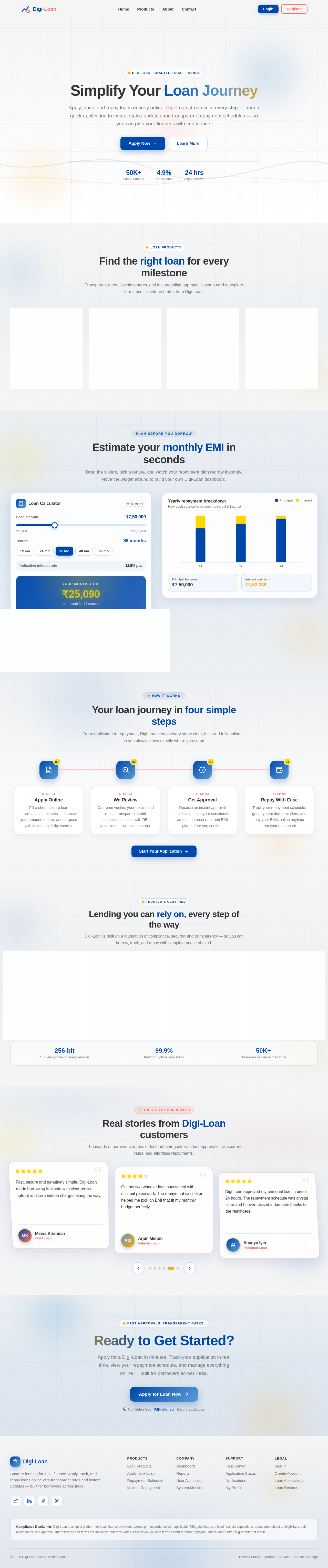
Apply, track, and repay loans entirely online. Digi-Loan streamlines every step — from a quick application to instant status updates and transparent repayment schedules — so you can plan your finances with confidence.
Transparent rates, flexible tenures, and instant online approval. Hover a card to explore terms and live interest rates from Digi-Loan.
Flexible funds for life events, weddings, travel, or emergencies with quick online approval.
Grow your enterprise with working capital, equipment finance, and expansion-ready credit lines.
Fund domestic or overseas studies with moratorium options and student-first repayment plans.
Own your dream home with long-tenure financing, balance transfer, and low EMIs you can plan around.
Drag the sliders, pick a tenure, and watch your repayment plan redraw instantly. Move the widget around to build your own Digi-Loan dashboard.
How each year splits between principal & interest
From application to repayment, Digi-Loan keeps every stage clear, fast, and fully online — so you always know exactly where you stand.
Fill a short, secure loan application in minutes — choose your amount, tenure, and purpose with instant eligibility checks.
Our team verifies your details and runs a transparent credit assessment in line with RBI guidelines — no hidden steps.
Receive an instant approval notification, see your sanctioned amount, interest rate, and EMI plan before you confirm.
Track your repayment schedule, get payment due reminders, and pay your EMIs online anytime from your dashboard.
Digi-Loan is built on a foundation of compliance, security, and transparency — so you can borrow, track, and repay with complete peace of mind.
Operations aligned with Reserve Bank of India guidelines and local financial regulations for fully lawful lending.
RegulatedInformation security and quality processes audited to recognised ISO standards across the Digi-Loan platform.
AuditedBank-grade encryption protects every repayment and application, keeping your financial data private end to end.
EncryptedRound-the-clock customer support for loan queries, application status, and payment assistance whenever you need it.
Always OnThousands of borrowers across India fund their goals with fast approvals, transparent rates, and effortless repayments.
Digi-Loan approved my personal loan in under 24 hours. The repayment schedule was crystal clear and I never missed a due date thanks to the reminders.
As a small shop owner, the working capital loan kept my business running. The interest rates were transparent and the online application took ten minutes.
Tracking my application status in real time was a relief. I could see every step from review to disbursal without calling support even once.
Apply for a Digi-Loan in minutes. Track your application in real time, view your repayment schedule, and manage everything online — built for borrowers across India.
No hidden fees · RBI-aligned · Secure application
No comments yet. Be the first!